What Is Single Sign-On (SSO)?

Single Sign-On (SSO) lets users authenticate once and access multiple apps without repeated logins. It simplifies user experience, strengthens security, and reduces IT overhead. This guide explains SSO meaning, how it works, protocols, benefits, risks, and best practices.
profile
Kundan SinghFirst published: 2025-12-10Last updated: 2025-12-10
what-is-sso
Table of Contents

Introduction Summary

Introduction Summary

The modern digital experience is overloaded with passwords, logins, and fragmented identity workflows. Users switch between dozens of applications daily—each demanding separate authentication. IT teams spend hours on password resets. Businesses lose conversions due to login friction. Attackers exploit weak credentials with increasing speed.

Single Sign-On (SSO) solves these problems by letting users authenticate once and access multiple apps without logging in again. It simplifies user journeys, centralizes identity governance, reduces password burden, and strengthens security.

In this comprehensive guide, you’ll learn:

  • What single sign on means (sso meaning + sso login foundations)

  • How SSO works technically using SAML, OAuth, and OIDC

  • Types of SSO across enterprise, consumer, and federated environments

  • Security benefits and real-world applications of SSO

  • Challenges, risks, and best practices

  • How LoginRadius enables secure, scalable SSO

  • Why SSO is essential for Zero Trust and modern IAM

By the end, you’ll have a complete, expert-level understanding of SSO—both conceptually and practically.

Single Sign-On (SSO) is an authentication method that lets users log in once and access multiple applications without re-entering credentials. A centralized Identity Provider (IdP) verifies identity and issues secure tokens that connected apps trust.

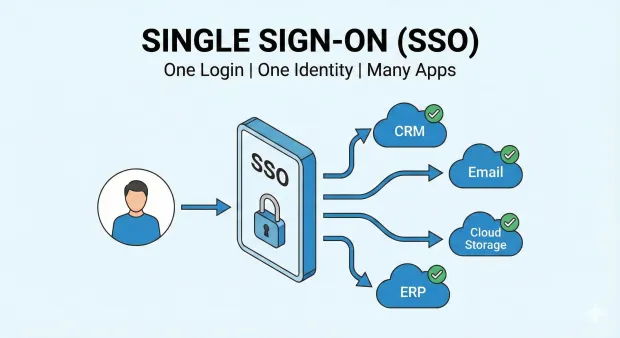
Illustration of Single Sign-On (SSO) showing one user logging in once to access multiple applications through a central SSO system. Connected apps include CRM, Email, Cloud Storage, and ERP, all enabled with a single identity

Single Sign-On (SSO) is a centralized authentication approach that allows users to sign in once and use that one authenticated session to access multiple independent apps, services, or systems. Instead of entering credentials repeatedly, users authenticate through a single identity provider (IdP). Each application then trusts the authentication performed by this IdP.

This means:

  • One login

  • One identity provider

  • Many applications

  • No repeated authentication

SSO meaning can be simplified as: a unified login experience across all systems you need to access.

SSO solves major modern challenges:

  • Password fatigue : People can’t manage dozens of unique passwords.

  • Security vulnerabilities : More passwords mean more opportunities for credential theft.

  • Fragmented UX : Logging into each app disrupts flow.

  • Operational overhead : IT spends time on password resets rather than strategy.

With SSO, security and convenience coexist. Users log in faster. Admins manage access easily. Developers integrate authentication without rebuilding it for every app. Businesses deliver seamless cross-application experiences.

How Does SSO Work?

SSO works by centralizing authentication in an identity provider. Once the IdP verifies the user, it issues a signed token or assertion that connected applications trust. This lets users access multiple apps without logging in again.

SSO operates through a trust relationship between applications (service providers) and a centralized identity provider (IdP). The IdP handles all authentication and generates secure tokens that applications accept.
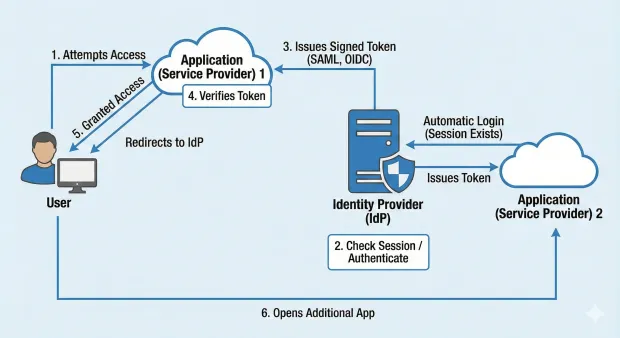
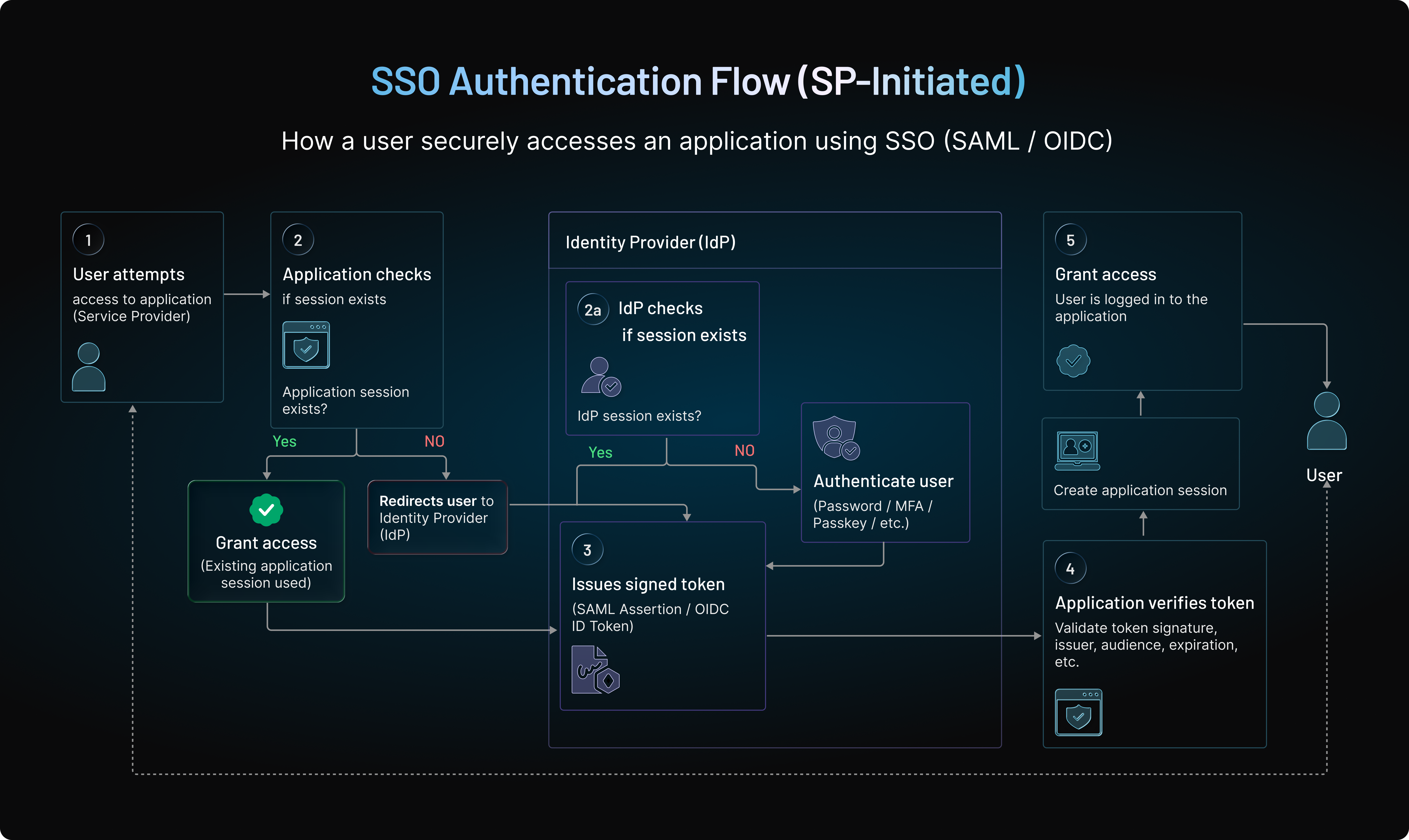
A diagram showing how Single Sign-On (SSO) works, illustrating the flow between the user, service providers, and the identity provider. It highlights steps such as access attempts, redirection, authentication, token issuance, verification, and automatic login across multiple applications

Here’s the expanded SSO flow:

1. User attempts to access an application

The app detects no active session and redirects the user to the identity provider. This redirection includes metadata identifying the app and the requested action.

2. Identity provider checks for an existing session

If the user is not logged in, they authenticate using a password, MFA, passkey, biometrics, or passwordless methods. If they’re already authenticated, the IdP skips new login prompts, maintaining a smooth UX.

3. Identity provider issues a signed token

The IdP generates a cryptographically signed assertion/token (SAML, OIDC ID token, or OAuth access token) containing identity information. Its signature prevents tampering.

4. Application verifies the token

The app checks the digital signature, audience, issuer, timestamps, nonce, and other claims to ensure validity.

5. The user is granted access

After validation, the user gains access. A secure session is established.

6. User opens additional applications

Each app checks with the IdP. Because a session already exists, the login is automatic.

This makes SSO login incredibly fast, consistent, and secure across multiple systems.

SSO Protocols: SAML, OAuth 2.0, OpenID Connect

SSO isn't one technology—it’s a framework powered by modern identity protocols. Let’s learn about them in detail.

SAML 2.0 (Security Assertion Markup Language)

SAML 2.0 is used heavily for enterprise workforce SSO.

  • XML-based assertions

  • Strong digital signatures

  • Ideal for older and enterprise SaaS apps

  • Robust cross-domain identity federation

OAuth 2.0

Focused on authorization, not authentication.

  • Delegates controlled resource access

  • Common for API authorization

  • Often paired with OIDC for login

OpenID Connect (OIDC)

OpenID Connect is a modern SSO standard, built on top of OAuth.

  • JSON-based

  • Developer-friendly

  • Mobile-friendly

  • Supports passwordless + modern MFA

  • Ideal for customer IAM

OIDC has become the default protocol for new applications.

Types of Single Sign-On

Enterprise Workforce SSO

Enables employees to access corporate apps with a single login.

Consumer SSO (Social Login)

“Login with Google/Apple/LinkedIn” flows.

Federated SSO

Trust established across multiple organizations.

Cross-Domain SSO

Single login across multiple internal apps or product suites.

Cloud SSO

Distributed access across SaaS and cloud-native applications.

Benefits of Single Sign-On

SSO provides meaningful advantages across usability, security, and operational efficiency. These expanded bullets highlight the real impact:

A Unified, Seamless User Experience That Reduces Drop-Off

With SSO, users authenticate once and navigate across applications without interruption. The elimination of repetitive logins significantly reduces friction during onboarding, product exploration, and daily workflows.

This improves user satisfaction, increases time-on-task for workforce apps, and boosts conversion and retention in consumer products. SSO is a direct antidote to “login fatigue,” which causes users to abandon sessions prematurely.

Stronger Security Through Centralized Credential Management

Centralizing authentication eliminates fragmented credential stores across dozens of systems. By consolidating login into one authoritative IdP, organizations drastically reduce password reuse, weak passwords, and inconsistent policy enforcement.

Security teams can enforce MFA, monitor authentication risk, and apply adaptive controls at a single point—strengthening the entire security boundary.

Operational Efficiency for IT and Support Teams

Password resets are among the top drivers of IT support load. With SSO, fewer credentials mean fewer reset tickets and less administrative overhead.

Onboarding becomes faster (one identity, many apps), and offboarding is more secure (terminating one profile revokes access everywhere). As systems scale, this results in massive time and cost savings for IT teams.

Better Governance and Compliance Visibility

SSO gives organizations a centralized audit trail of all authentication activity. This unified view simplifies compliance with frameworks like SOC 2, HIPAA, GDPR, PCI DSS, and ISO 27001.

Consistent access policies, quick revocation, and fine-grained reporting all contribute to a cleaner governance posture.

SSO Security Model

The SSO security model ensures that identity verification is consistent, trusted, and tamper-proof across all applications. Here’s how it looks like:
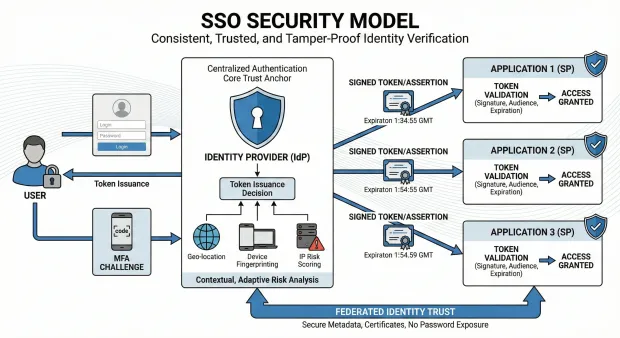
Diagram illustrating an SSO security model where a user authenticates through an Identity Provider, which performs adaptive risk analysis and issues signed tokens to multiple applications. Each application validates the token to grant secure, password-free access

Centralized Authentication as the Core Trust Anchor

By having the IdP authenticate users, organizations eliminate the need for each app to maintain its own passwords or MFA setup. The IdP becomes the system of record for identity verification, ensuring consistent security controls and centralized policy enforcement.

Token-Based Trust Using Secure, Signed Artifacts

SSO relies on signed assertions and tokens that applications validate cryptographically. These artifacts ensure the identity information has not been altered and originates only from the trusted IdP. Expiration, audience matching, and signature validation protect against replay and impersonation.

Contextual, Adaptive Risk Analysis Before Token Issuance

Modern SSO uses adaptive intelligence—geo-location, device fingerprinting, IP risk scoring—to evaluate whether a login is normal or suspicious. High-risk activity can trigger MFA, block the session, or require re-authentication. This layered defense ensures identity verification is dynamic rather than static.

Federated Identity Trust Across Applications and Domains

Trust relationships between the IdP and service providers are established through secure metadata and certificates. Federation ensures that identity can travel securely between apps and organizations without exposing passwords or relying on insecure user-managed credentials.

SSO Challenges and Risks

SSO delivers immense value, but organizations must be aware of the potential risks and misconfigurations that can weaken it.

Dependence on the Identity Provider as a Single Point of Failure

Because all authentication flows through the IdP, downtime or latency at the identity layer can cascade into system-wide outages. High availability, redundancy, and distributed IdP architecture are essential for minimizing access disruptions.

Incorrect Token Validation or Misconfigured Trust Relationships

Service providers must validate the issuer, signatures, timestamps, audience, and token structure. Misconfigurations can undermine SSO security, especially in multi-app, multi-domain deployments. Regular trust audits and certificate rotation are essential.

Security Risks from Long-Lived Sessions

If SSO sessions persist for too long, compromised or unattended devices can provide ongoing unauthorized access. Organizations must balance user convenience with secure session expiration, idle timeout policies, and real-time device checks.

Over-Reliance on Password-Based Primary Authentication

When SSO still uses a password as the first authentication step, the entire ecosystem inherits password vulnerabilities. Upgrading the IdP to MFA or passwordless methods is crucial for preventing credential-based attacks.
How SSO Fits Into Zero Trust

Zero Trust requires continuous identity verification—SSO supports this by centralizing authentication and enabling consistent policy enforcement. It allows:

  • MFA verification at the identity layer

  • Secure token-based access across applications

  • Continuous session evaluation

  • Identity and device posture checks

  • Least-privilege access enforcement

SSO is often the first step toward a full Zero Trust architecture.

SSO Best Practices

To implement SSO securely and effectively, organizations should follow these expanded best practices:

Use Modern Protocols (OIDC) and Short-Lived Tokens

OIDC provides modern, lightweight authentication that’s compatible with mobile, web, and API-based ecosystems. Short-lived tokens minimize exposure if compromised. Using refresh tokens with revocation lists further strengthens the session boundary.

Enforce MFA or Passwordless Authentication at the IdP Level

All downstream applications inherit security from the IdP. Enforcing MFA or passwordless login—via biometrics, passkeys, or app-based verification—ensures that a compromised password doesn’t compromise the entire system.

Apply Adaptive Access Policies Based on Behavior and Context

Adaptive policies evaluate login context such as browser fingerprint, location, device reputation, and behavioral anomalies. When something looks unusual, the system can demand step-up verification, ensuring that SSO remains secure without adding unnecessary friction.

Maintain Strong Governance Through Logging and Audits

Detailed logging allows organizations to investigate incidents, analyze access patterns, and prove compliance. Regular audits—checking certificates, token policies, and trust relationships—ensure SSO stays secure, updated, and aligned with organizational needs.

How LoginRadius Supports Secure, Scalable SSO

LoginRadius simplifies enterprise and consumer SSO by merging security, adaptability, and developer-friendly design.

Full Protocol Support Tailored for Any Application Stack

LoginRadius supports SAML, OAuth 2.0, OIDC, JWT, and custom federation. This allows legacy enterprise systems and modern cloud apps to share the same identity framework without re-architecting integrations.

Built-In Adaptive Authentication for Real-Time Risk Mitigation

LoginRadius evaluates IP risk, device fingerprint, behavioral anomalies, geo-velocity, and network integrity before granting SSO access. High-risk sessions can trigger MFA or block access, ensuring token issuance never becomes a blind trust exercise.

Passwordless Capabilities Integrated Directly Into SSO

With support for biometrics, passkeys, magic links, and OTPs, LoginRadius turns the identity provider into a passwordless gateway. Downstream apps benefit automatically—no need for custom MFA in each system.

Enterprise-Grade Identity Governance and Compliance

LoginRadius centralizes permissions, logs, consent, and audit trails. Security teams maintain full visibility over user access patterns and can enforce compliance for SOC 2, GDPR, ISO 27001, HIPAA, and more.

Conclusion

Single Sign-On has evolved from convenience to a critical foundation for identity. It enables organizations to simplify authentication, eliminate password overload, strengthen security, and provide seamless multi-app experiences. But SSO must be implemented thoughtfully—paired with MFA, adaptive risk analysis, strong governance, and short-lived tokens.

LoginRadius enables organizations to deploy secure, scalable SSO using modern protocols, adaptive authentication, passwordless capabilities, and enterprise governance. It transforms SSO from a simple login convenience into a powerful identity strategy aligned with Zero Trust and modern CIAM.

SSO isn’t just a login solution—it’s the gateway to a seamless digital experience.

FAQs

1. What is single sign on?

Single sign on (SSO) is an authentication method that lets users sign in once and access multiple apps without re-entering passwords.

2. How does SSO work?

SSO works through a centralized identity provider that authenticates the user and issues secure tokens trusted by connected applications.

3. What does single sign on mean?

It means one authenticated session can be reused across many systems, eliminating repeated logins.

4. What is SSO login?

SSO login refers to the seamless process where users sign in through the IdP and gain instant access to all linked applications.

book-a-free-demo-loginradius

Kundan Singh
By Kundan SinghDirector of Product Development @ LoginRadius.
Featured Posts

What Is OTP?

The Rise of Agentic Iam: Securing Agents Before They Go Rogue

What Is Single Sign-On (SSO)?

Your Identity Security Playbook: Stop Fraud, Catch Threats, and Make Customers Love Your Security

Passwordless & MFA in 2026: Passkeys, Push MFA, Device Trust, and Continuous Authentication

What Is Biometric Security?

What Is Device ID?

What Is Dynamic Access Control?

What Is 2FA and How It Works: Guide to Modern Authentication

What Is SMART on FHIR?

2FA in 2025: How Leading Providers Keep Digital Identities Safe

What Is a YubiKey?

Biometric Authentication Methods: How They Work & When to Use Them

Compliance Management: Processes, Systems & Best Practices

RBAC and Access Management: The Foundation of Secure IAM

How Does SAML Authentication Work?

ID Token vs. Access Token: Understand the Difference

AI-Driven Fraud Detection: The Future of Digital Trust

OIDC Authentication: How Modern Apps Verify Identity

A Complete Guide to 2FA Authentication in 2025: Methods, Risks, and Modern Best Practices

Cybersecurity Awareness Month 2025: Why Businesses Can’t Afford to Look Away

Secure Customer Experiences with Phone Authentication: Why Mobile Matters

Best Descope CIAM Alternatives in 2025

Passwordless Login: Technical Workflows, Business ROI, and Regional Adoption

Top 10 Frontegg Alternatives to Consider in 2025

Identity and Access Management in Banking: Why It’s Crucial for Security and Customer Experience

Top 10 FusionAuth Alternatives in 2025

Unlocking Secure Digital Experiences with Authorization as a Service

CIAM Platform Integrations: The Key to a Strong Customer Identity Strategy

Email is Hacked! 7 Immediate Steps to Follow

Data Governance in Healthcare: Best Practices & Future Trends

Why Social Login is a Game-Changer for eCommerce Login

Top WordPress Social Plugin Picks for Seamless Logins

Why Privacy-First Companies Choose Canada for Data Storage

Top Auth0 Alternatives for 2025: Simpler, Faster, and More Flexible CIAM Options

What Are Digital Certificates and How Do They Secure the Web

Why Hosting Your CIAM Solution in a Canadian Data Center Gives You the Edge

B2B IAM vs Workforce IAM: What Enterprises Must Know

Access Control in Security: What It Is and Why It Matters

The Making of The Power of Digital Identity: A Candid Interview with Rakesh Soni

What is Certificate-Based Authentication and Why It’s Used

6 Key Ecommerce Challenges in 2025 (And How CIAM Solves Them)

B2B vs B2C Authentication- A Quick Guide

Password Best Practices for Stronger Security

Building Community Beyond Borders: Our Thailand Story

1FA vs 2FA vs MFA: Which Method Secures You Best?

B2B IAM Best Practices and Architecture Guide

Adding Partner IAM With LoginRadius: A Complete Guide to B2B Identity Management

What is User Authentication, and Why is it Important?

What is Partner IAM / B2B IAM - A Complete Guide

Still Bending Workforce IAM for Your B2B Networks? Introducing LoginRadius Partner IAM—Built from the Ground Up

What is Biometric Authentication and How It's Changing Login

Location-Based Data Residency Boosts Trust and Conversions

The Impact of AI on Cybersecurity

PINs vs Passwords: Which is More Secure?

Why Global Businesses Trust Canada for Data Hosting Services

Passkeys vs Passwords: The Upgrade Your Security Needs

What is the Best Way to Authenticate Users?

Canada as a Global Hub for Privacy-First CIAM Platforms

How to Choose a Strong Password- A Quick Guide

A Complete Guide to Device Authentication Methods

What is a One-Time Password (OTP) ? – A Complete Guide

A Quick Guide to Username and Password Authentication

Types of Authentication and Identity Verification

What is Strong Authentication in Cybersecurity?

Top 9 User Authentication Methods to Stay Secure in 2025

Authentication vs Authorization: Key Differences, Real Examples & Best Practices

Guide to Authentication Methods & Choosing the Right One

Identification and Authentication: A Quick Comparison

Understanding Authentication, Authorization, and Encryption

Introducing the LoginRadius Trust Center: Always Up-to-Date and at Your Fingertips

What is Token Authentication and How Does It Work?

What is OTP Authentication and How Does it Work?

What is Role-Based Access Control (RBAC)?

LoginRadius Launches Next-Generation CIAM Console: Self-Serve, No-Code, and Built for Speed

Quick Guide to Single-factor, Two-factor, and Multi-factor Authentication

Democratizing Authentication: Introducing LoginRadius' Free Forever Developer Plan

Mobile Authentication: Everything You Need to Know

What is Push Notification Authentication and How It Works?

Code Less, Build More: Unveiling LoginRadius' AI-Powered Developer Documentation

Types of Multi Factor Authentication & How to Pick the Best

Risk-Based Authentication vs. MFA: Key Differences Explained

Revamped & Ready: Introducing the New Developer-First LoginRadius Website

What is SCIM? A Developer's Guide to Understanding and Using SCIM

RBAC vs ABAC: A Developer’s Guide to Choosing the Right Fit

CISOs’ Top Cybersecurity Threats 2025: Scattered Spider, Deepfakes, and More

LoginRadius 2024: A Year of CIAM Innovations

What is Passkey Authentication - A Complete Guide

How AI-Enabled Cybersecurity Solutions Are Strengthening Our Online Security

What is Identity Orchestration

LoginRadius Releases 2024 Consumer Identity Report, Highlights the Shifting Trends in Consumer Preferences

Celebrating 8th Year Milestone: How Our Collaboration with a Leading Healthcare Company Transformed Millions of Lives

Unlock Your Digital Freedom: How Automating Passwordless Authentication Can Transform Your Security

How To Secure GenAI by Implementing RBAC In The Enterprise

The Hidden Pitfalls: Why Most CIAM Systems Fail Under Pressure

No More Login Hassles: Effortless Migration to LoginRadius Awaits

How Cookie Management Supports GDPR and CCPA Compliance

LoginRadius Launches Identity Orchestration for Seamless Identity Workflows

Passkeys: Unlocking Benefits for a Better Online Shopping Experience

AI and the Changing Face of Enterprise Security Threats

Leading the Charge in Customer IAM: LoginRadius Recognized as an Overall Leader by KuppingerCole

Gearing Up for Better Customer Experiences? Choose No-Code Identity Orchestration

Announcement - LoginRadius Launches PassKeys to Redefine Authentication Security and User Experience

Decoding the Rise of Zero-Trust Adoption in Government Sector

Say Goodbye to Passwords: How Passkeys Are Reinventing Online Security

Announcement - LoginRadius Unveils the Future of Authentication with Push Notification MFA

Is Your CIAM Adapting to Global Needs? 6 Key Areas to Win Privacy-Concerned Customers

The Growing Threat of Identity-Based Attacks and the Need for an Advanced Identity Security Approach

How AI Is Changing the Game in User Authentication

eIDAS 2.0: The Digital Revolution Is Here – Is Your Business Ready to Comply?

A Quick Guide To Choosing The Right Zero Trust Vendor

Cloud Security Governance: Protecting Assets in the Digital Frontier

What is Silver SAML Vulnerability and How Can We Protect Our Digital Identities?

Identity Security for Device Trust: Navigating 2024 & Beyond

Exciting Leadership Updates Amid Strategic Growth at LoginRadius

From Past to Present: User Authentication's Evolution and Challenges

How Does Multi-Tenancy in Customer IAM Solutions Boost Security?

How No/Low Code CIAM Balances Security and User Engagement?

Beyond Passwords: Navigating Tomorrow's Authentication Landscape

How does identity management address the top 5 security challenges in B2B SaaS?

Reinforcing Security with Advanced Risk-Based Authentication in 2024 & Beyond

2FA vs MFA: Understanding the Differences

Okta Token Theft Implicated in Cloudflare's Security Breach

Voice OTP by LoginRadius: Revolutionizing Secure and Seamless User Authentication

Which is Safer: Biometric or Password?

7 Reasons to Use Biometric Authentication for Multi-Factor Authentication

Exploring Digital Identity Verification with Effective Crucial Data Checks

5 Reasons Why LoginRadius Leads the Way in the CIAM Landscape in 2024 & Beyond

Above the Horizon: Exploring the Power of a Strong Cloud Identity Platform

Streamlining Authentication: Elevate User Experience with LoginRadius AutoLookup

A Journey Through Our Top 10 Blogs from 2023

Now and Beyond- Staying Ahead with the 10 Key Cybersecurity Trends of 2024

B2B SaaS SSO Login: Exploring Enterprise Considerations in 2024

Securing Corporate Applications: A Comprehensive Guide to Enterprise Application Security

Strengthening Security Measures: The Role of Two-Factor Authentication (2FA)

Securing the Throne: Privileged Access Management (PAM) Best Practices Unveiled

7 Common Authentication Vulnerabilities to Steer Clear of

What is Identity Lifecycle Management?

Strengthening Security and Compliance: The Role of Identity Governance

Understanding the Okta Hack: Breach in Customer Support and Lessons for Organizations

Managing Generative AI Security Risks in the Enterprise- A Quick Guide

Empowering Your Security: Exploring the Advantages of Time-Based One-Time Passwords (TOTP)

The Future of Personalization: Embracing Zero-Party Data

Comprehensive Guide to Flexible CIAM Deployment Options with LoginRadius

Small Steps, Big Shields: Navigating Cybersecurity Awareness Month 2023 Safely

Streamlining Access with Converged Identity Platforms

How Retailers Can Balance Privacy While Foiling Thieves

The Power of No-code Customer IAM in Reducing Churn

CIAM: Enhancing Security & Building Consumer Trust-All At Once

Maintaining Trust: Customer Identity Verification Challenges & Best Practices

Unlocking Smartphone Security: How to Hackproof Your Smartphone

Phishing-Resistant MFA Login for Mobile Applications: Strategies and Challenges

True Passwordless Authentication: Stronger Defense Against Cyberattacks

Identity Governance vs. Identity Management: Navigating the Differences

Navigating Identity Verification Challenges in Regulated Industries: 7 Effective Solutions

Enhancing Security: Leveraging 5 Real-Time Techniques to Detect Phishing Attacks

A Comprehensive Guide to the Five A's of Cloud Identity Management

Understanding the Difference Between Identity Access Management On-Premise and Cloud

Learn the Impact of Identity Theft on Businesses in 2023

LDAP Authentication: Meaning and How it Works?

7 Things Your Security Team Need To Know Before Creating A CIAM Strategy

Choosing Between Self-Managed and Service-Based SSO Solutions: A Comprehensive Comparison

What is Cloud Identity and its Benefits?

The Legal Implications of SSO: Privacy, Security, and Compliance

Data Privacy Laws for 2023: A Closer Look at 9 Key Regulations

4 Reasons Why SSO Integrations Are a Must-Have For Online Businesses

Consumer vs. Enterprise: Navigating the Dual Nature of Digital Identity

LoginRadius Releases Consumer Identity Trend Report 2023, Highlights The Future of Customer Identity

What is a Password Vault and How Does it Work?

How a Culture of Identity Governance Empowers Digital Transformation?

Securing the Digital Frontier: The Power of AI in Next-Gen CIAM

Replatforming 101: Everything You Need to Know

Best Practices for Username and Password Authentication

The Ultimate Guide to Choosing the Right CIAM Solution

How to Use Identity Management at Every Stage of the Customer Journey?

Protecting Your Cloud Data: The Power of SaaS Security and IAM Governance

The Rise of Account Creation Fraud: What You Need to Know

Why Direct-to-Consumer (D2C) Businesses Must Take A Strategic Approach To CIAM?

What are Self-Sovereign Identities?

7 Uncommon Cyber Attacks in 2023: Why Your Organization Needs To Be Ready For The Worst-Case Scenarios

Identity Modernization: What Is It & Why Should You Care?

A Lot Can Happen In The Cloud: Multi-Cloud Environment and its Optimization Challenges

Can Security and User Experience Co-Exist in the Authenticating and Authorizing Space?

Business On The Move: How Just-in-Time Migrations Are Making Smooth CIAM Transitions

3 Digital Onboarding Trends To Watch In 2023 (And What You Can Do About It Now)

6 Tips to Prevent Accidental Data Exposure Within Your Company

Top Priorities for Customer IAM Leaders in 2023 and How to Prepare

Electronic Theatre Controls: A LoginRadius Customer Success Story

Distributed Multi-Cloud Identity Management and Its Endless Business Benefits

How The Age Of Smart Credentials Is Rewriting The Rules For Physical Verification?

Incident Response Vs. Disaster Recovery: What’s The Difference and Which Do You Need?

The Customer Experience is About to Get Even Better With Passive Authentication

What is Dynamic Authorization & Why Does it Matter?

What’s the Difference Between Attack Surface and Attack Vector?

How Identity-Based Access Ensures Robust Infrastructure Security Amidst the Growing Identity Crisis?

2FA Bypass Attacks- Everything You Should Know

IAM vs. Customer IAM: Understanding the Role of CIAM in Accelerating Business Growth

Why MFA Fatigue Attacks May Soon Be Your Worst Nightmare?

InfoSec Director, Alok Patidar Answers Your Most Difficult Questions on Cybersecurity

Understanding MITRE ATT&CK Framework?

Identity Fabric vs. Zero Trust: Is One a Better Alternative Than The Other?

The Role of Customer Identity Management in IoT Security: How It's a Must!

Securing Centralized Access Without Compromising User Experience

User Authentication in the Metaverse: What’s Changing?

LoginRadius Pledges To Raise Awareness This Cybersecurity Month

Public Cloud Risks - Is Your Organization Prepared for Cloud Threats?

What Brands Need to Know for Building the Future of Data Compliance?

Okta Identity Credentials on the Radar of Oktapus Phishing Campaign

BC Municipality Digitizes its Citizen Services. LoginRadius Brings Identity to the Table.

The Role of Customer Authentication in Paving the Way for Digital Agility

What Brands Need to Know for Building the Future of Data Compliance?

6 Alternative Authentication Methods For Your Online Customers

Implementing Zero Trust? Make Sure You're Doing It Correctly

What is Federated SSO (Single Sign-On)?

MFA Prompt Bombing: Is it a New Threat Vector to Worry About?

Privacy-Centric Enhancements: CEO Rakesh Soni Shares His Thoughts on Shifting Data Strategies

The Role of Identity Management in Securing Your Citizen’s Data

Why is Data Privacy an Immediate Enterprise Priority?

What is Out-of-Band Authentication?

How Can Enterprises Use SSO to Boost Data Collection?

Why Your Business Needs A Simple Passwordless Experience (Minus the User Friction)

Will Apple’s ‘Lockdown Mode’ Reduce State-Sponsored Attacks?

Authentication, Identity Verification, and Identification: What's the Difference

IoT Botnet Attacks: Are They the Next Big Threat to Enterprises?

Skiperformance - a LoginRadius Customer Success Story

Cross-Device Authentication and Tracking: The Opportunities and Underlying Privacy Risks

How Identity Modernization Will Thrive Business Success in 2022 and Beyond

The Pros & Cons of Reusable Digital Identity: What You Need To Know

What is Cloud Security and How it Works?

Age of No-Code Technologies: Identification and Authentication

SSO vs. Social Login: What’s the Difference? [Infographic]

Planning a Digital Makeover For Your Business? LoginRadius CIAM Can Help!

What is Cloud Computing?

Authentication vs Login - What’s the Difference?

How a Simple Password Reset Can Ruin Your Customer's Experience

GovTech is On The Rise: How Can This Technology Improve Government Services?

5 Access Management Best Practices and Benefits For Businesses

LoginRadius Releases Consumer Identity Trend Report 2022, Key Login Methods Highlighted

BITB Attacks: The New Destructive Phishing Technique

5 Reasons Why You Need to Strengthen Your Identity Authentication

What is the Difference Between MFA vs. SSO?

What is Login Authentication?

5 Ways to Improve Your Customer Verification Process

5 Myths About Phishing You Should Know

4 Common Security Issues Found In Password-Based Login

Personal Information and PII - What’s the Difference?

OTT Platforms and CIAM: How Identity Management Ensures Millions of Viewers to Scale with Ease

Is the Rise of Machine Identity Posing a Threat to Enterprise Security?

LoginRadius Integrates Search in Navigation for Better Customer Experience

5 Privacy Threats in Social Media You Should Know in 2022

Importance of Multi-factor Authentication for SSO

How LoginRadius Creates a Perfect Harmony of UX and Security

Smart Cities and Cyber Security Trends to Watch Out in 2022

Harry Rosen, a LoginRadius Customer Success Story

Top 7 Security Tips from LoginRadius’ Cybersecurity Expert to Follow in 2023

Top 7 Security Tips from LoginRadius’ Cybersecurity Expert to Follow in 2023

This Is How Scammers Get Your Email Address & How to Stop Them

Will Decentralized Auth Change the Perception of Consumer Identities in 2022?

Emerging Threat of Deepfakes: How To Identify And Prepare Against It

Everything You Need to Know Before Buying Cyber Insurance in 2022

5 Challenges for Government Adoption of Citizens’ Access Control

Are You Thinking of Token Management for Your API Product? Think about JWT!

LoginRadius Launches M2M Authorization for Seamless Business Operations

LoginRadius Offers PerfectMind Integration for a Seamless UX

Take Control of Your CIAM Environment with LoginRadius' Private Cloud

10 Tips From CIAM Experts to Reduce the Attack Surface of User Authentication

How LoginRadius Webhook Allows You to Sync Your Data in Real-Time

Federated Identity Management vs. SSO: What's The Difference?

How to Evaluate the Quality of Your User Authentication System

How LoginRadius Offers Customer-Centric Capabilities that Drive ROI

3 Best Stages of IT Security for Implementing Gartner's CARTA

How to Choose the Right User Authentication Option for your Product

An Introduction to Financial-Grade API (FAPI) for Open Banking

Why is PKI The Future of Secure Communications

How to Find the Right SSO Strategy that Fits Your Business

Cybersecurity Best Practices for Businesses in 2023 & Beyond [Infographic]

SSO Integration: How to Secure the Customer Experience on Loyalty Platforms

The Top 5 Trends in CIAM We’ve Watched in 2021

The Major Challenges of Customer Identification in the Retail Industry

Cybersecurity Awareness Month: Predicting the Deadliest Cyber Attacks in 2022

LoginRadius Delivers a Seamless User Experience that Increases Conversions through Enhanced Progressive Profiling

Avoid these Common Mistakes When Dealing with Data Breaches

Tiroler Tageszeitung (TT), a LoginRadius Customer Success Story

What are Security Keys? What are its Advantages?

Everything You Need to Know About OAuth and How it Works

Decentralized Authentication: What Is It And How It Is Changing the Industry

Getting Started with OpenID Connect

Discover the Benefits of Re-Authentication for Enhanced Security

Stand Out from the Crowd: Improve Your Customer Support with CIAM

Why Should You be Customizing Your Identity System to Your Needs

SMS Authentication — Can it Really Protect Your Business?

How Poor Login Concurrency can Impact OTT Platforms' Business

A Comprehensive Guide to Privileged Access Management (PAM)

How Cities Can Improve Civilians’ Digital Experience with Unified Identity

Refresh Tokens: When to Use Them and How They Interact with JWTs

How Progressive Disclosure Makes Your User's Onboarding Easy

What is Digital Identity Verification and Why is it Necessary?

How OTT Services can Simplify Authentication on Various Devices

A Beginner's Guide to Zero Trust Security Model

What is Identity Security?

What is a Token? What are its Pros and Cons?

How to Scale Your Business Quickly with Identity Management

How to Manage Situation After a Data Breach

How to Strike the Right Balance Between Security and Consumer Experience

How NIST is Changing Password Creation in 2021

COVID-19 and Beyond: 5 Risk Management Essentials for Your Enterprise

How WebAuth Secures Your Users’ Login

Adaptive Authentication- Is it the Next Breakthrough in Customer Authentication?

The Rise of BYOI (Bring your own Identity)

Understanding PII Compliance: A Key to Enterprise Data Security

Cyber Security Round-Up: What Happened in June 2021

How Businesses are Experiencing Digital Transformation with Consumer IAM

What is SAML SSO?

LoginRadius Offers Additional Security Layer through Newly-Enhanced Step-up Authentication Feature

Why Big Merchants Need to Deliver a Unified Consumer Experience?

All About Google One Tap Login—Explained!

What to Do if Someone Steals Your JSON Web Token?

What is Web SSO

Working With Industry Authorization: A Beginner's Guide to OAuth 2.0

Password History, Expiration, and Complexity: Explained!

SAML vs OIDC: How to Choose the Right SSO Protocol for Your Business

10 Reasons For Businesses to Implement SASE with a Zero Trust Strategy

Move beyond Traditional Risk Management with Holistic APIs

Identity Providers Explained: How IdPs Power SSO, SAML, and OIDC

What is User Session Management?

How Entertainment Companies Use the LoginRadius CIAM platform

Consumer Data Protection: How to Handle Data Breaches in Your Business

Top 5 User Provisioning Mistakes Enterprises Should Avoid in 2021

How Secure is Two-Factor Authentication (2FA)?

The Changing Role of Identity Management in Enterprise Decision-Making

5 Reasons Why Cloud Governance Matters For Your Business

Implementing Effective Social Authentication Solution with LoginRadius

The Future of Authentication is Passwordless With Magic links

Handling Scalability and Enhancing Security with LoginRadius

Maintaining Quality Data Security Practices

Introduction to Mobile Biometric Authentication

Data Security in Hospitality: Best Practices for Operating In a Post-COVID Era

The Role of Identity management in the media industry

A Detailed Guide on How UX/UI Affects Registration

What Is a Salt and How Does It Boost Security?

Login Using Microsoft Account

A Detail Guide to Consent Management and Processing Data

Workflow Automation- What is it and Why Do You Need It?

How Companies can Enable Account security for their Consumers

What is Progressive Profiling and How it Works?

Password Spraying: What Is It And How To Prevent It?

5 Tips to Prevent OAuth Authentication Vulnerabilities

Calculating ROI, Build vs Buy (Part 1)

Identity Theft Frauds- Staying Ahead in 2021

What is privacy compliance and why is it so important?

Authentication Explained: What it is, How it Works, and Why it Matters in Cybersecurity

What are Federated Identity Providers?

Login with Google Apps

What is Passwordless Login?

What is Standard Login

IoT authentication in the airline industry

Announcement - Authentication API Analytics to Evaluate the Performance of LoginRadius APIs for Your Applications

Multi-Factor Authentication - A Beginner’s Guide

Single Sign-On- A Beginner’s Guide

Top 10 Cybersecurity Predictions for 2021 That SMBs Must Know

How to Put Yourself In Control of Your Data by Leveraging LoginRadius' SSO

What Is User Management?

How CIAM Will Address The 5 Most Popular Issues In The Utility Industry

CIAM Continues to Draw Attention as Okta acquires Auth0

Protecting a Unified Cloud Platform through Cloud Security Management

What is Continuous Authentication

What is Brute Force Attack

What is Identity Authentication: How It Works and What’s Ahead

What is the Power of PIN Authentication Security?

What is Risk-Based Authentication (RBA)?

SaaS IAM for B2B: The Key to Secure, Scalable Partner Access

Understanding the Difference Between Single-Tenant and Multi-Tenant Cloud [Infographic]

What is Phone Login

Why Organizations Must Use API-Driven CIAM for Digital Agility

Why Do Consumers Prefer Social Login [Infographic]

5 Best Practices of Implementing Business Resilience during a Data Breach

What is Broken Authentication Vulnerability and How to Prevent It?

Announcement - LoginRadius Introduces Convenient and Secure Biometric Authentication for Mobile Apps

6 Strategies to Secure Your Cloud Operations Against Today's Cyber Threats

Announcement - LoginRadius Introduces Password Policy to Ensure Best Practices for Businesses and Consumers

How Is New Age Ciam Revolutionizing Consumer Experience?

What is Federated Identity Management

7 Common Web Application Security Threats

Identity Management in Cloud Computing

What is Identity and Access Management (IAM)?

Announcement - LoginRadius Announces Identity Brokering To Establish Trust Between Identity and Service Providers

5 Ways User Onboarding Software Can Revamp Your Application

How to secure an email address on your website

What is Formjacking

DNS Cache Poisoning: Why Is It Dangerous for Your Business

How to Set Up Two-factor Authentication on All Your Online Accounts?

What is Digital Transformation

The Do's and Don'ts of Choosing a Secure Password

How To Secure Your Contact Form From Bot Attacks

What is Identity Proofing and Why is it Important?

Identity Governance in CIAM: Taking Control of Your Data

Announcement: LoginRadius Embraces Privacy Policy Management Amid Heightened Regulatory Updates

Login Security: 7 Best Practice to Keep Your Online Accounts Secure

9 Data Security Best Practices For your Business

How To Make Sure Your Phone Isn’t Hacked

Safe Data Act: A New Privacy Law in the Town

Email is Hacked!: 7 Immediate Steps To Follow

Announcement - LoginRadius Smart and IoT Authentication to Offer Hassle-Free Login for Input-Constrained Devices

Announcement - LoginRadius Announces Authentication and SSO for Native Mobile Apps

9 Identity and Access Management Best Practices for 2021

E-commerce Security: 5 Ways to Enhance Data Protection During the Shopping Season

Identity Management in Healthcare: Analyzing the Industry Needs

Identity Management for Developers: Why it's required more than ever

Announcement - LoginRadius Launches Passwordless Login with Magic Link or OTP, Keeps Barriers Low During Registration and Login

Announcement - LoginRadius Simplifies the Implementation of Federated SSO With Federated Identity Management

Best IDaaS Provider - Why Loginradius is Considered as the Best IDaaS Solution

Social Engineering Attacks: Prevention and Best Practices [Infographic]

Announcement – LoginRadius Announces the Availability of User Management

Consumer Identity Management for the CMO, CISO, and CIO

Announcement - LoginRadius Delivers Exceptional Authentication With The Launch Of Identity Experience Framework

Best SSO Provider: Why LoginRadius Is Considered As The Best SSO Solution

Single-Page Applications: Building A Secure Login Pathway with LoginRadius

LoginRadius Releases Consumer Digital Identity Trend Report 2020

Securing Enterprise Mobile Apps with LoginRadius

Data Governance Best Practices for Enterprises

Top 10 Benefits of Multi-Factor Authentication (MFA)

Build vs Buy: Securing Customer Identity with Loginradius

LoginRadius Identity Import Manager, An Automated Feature for Seamless Data Migration

Why Identity Management for Education Sector has Become Crucial

LoginRadius Approves Consumer Audit Trail for In-Depth Data Analysis and Risk Assessment

Online Casino and Gambling Industry Is Gaining Momentum, So Is the Cyber Threat

How LoginRadius Future-Proofs Consumer Data Privacy and Security

Authentication and Authorization Defined: What's the Difference? [Infographic]

LoginRadius Launches Consent Management to Support the EU's GDPR Compliance

Streaming Applications: How to Secure Your Customer Data

Protecting Organization From Cyber-Threats: Business at Risk During COVID-19

Announcement - LoginRadius China CIAM for Businesses to Benefit From Its Lucrative Market

Why Financial Industry Needs an Identity Management System Now More Than Ever

Announcement - LoginRadius Now Supports PIN Login with Enhanced Features

Corporate Account Takeover Attacks: Detecting and Preventing it

Marriott Data Breach 2020: 5.2 Million Guest Records Were Stolen

How LoginRadius Help Retail and E-commerce Industry to Manage Customer Identities

Announcing New Look of LoginRadius

LoginRadius Announces Its Business Continuity Plan to Fight COVID-19 Outbreak

Unlock the Future of Smart Cities

How LoginRadius Helps Enterprises Stay CCPA Compliant in 2020

Social Login Explained: How “Login with Social Media” Boosts Conversions

Identity as a Service (IDAAS): Managing Digital Identities (Updated)

The Worst Passwords of 2019

Digital Privacy: Securing Consumer Privacy with LoginRadius

One World Identity Report Names LoginRadius a Customer Identity and Access Management (CIAM) Industry Leader

Benefits of Single Sign-On: Advantages, Security, and ROI Explained

Cloud Security Challenges Today: Expert Advice on Keeping your Business Safe

The Role of Passwordless Authentication in Securing Digital Identity

LoginRadius presents at KuppingerCole Consumer Identity World

Digital Identity Management: 5 Ways to Win Customer Trust

CCPA vs GDPR: Global Compliance Guide [Infographic]

Credential Stuffing: How To Detect And Prevent It

A History of Human Identity in Pictures Part 3

A History of Human Identity in Pictures Part 2

A History of Human Identity in Pictures - Part 1

What is Multi Factor Authentication (MFA) and How does it Work?

Why LoginRadius is the Best Akamai Identity Cloud (Janrain) Alternative

5 Reasons To Know Why B2C Enterprises Should Use Single Sign-On

8 Key Components of a Perfect CIAM Platform

What is CIAM? A Complete Guide to Customer Identity and Access Management

What is Single Sign-On (SSO) and How it Works?

California's CCPA 2.0 Passed: Everything You Need to Know About the New CPRA

IAM vs. CIAM: Which Solution is Right For You?

Looking for a Gigya Alternative? Try LoginRadius, a Superior and Modern Identity Platform

Presenting: Progressive Profiling from LoginRadius

Best Practices for Choosing Good Security Questions

How Do I Know If My Email Has Been Leaked in a Data Breach?

The Death of Passwords [Infographic]

How to Use Multi-Factor Authentication When You Don’t Have Cell Phone Access

The Customer Identity Infrastructure that Cruise Line Passengers Don’t See

Why Your Enterprise Needs a Digital Business Transformation Strategy

Reconsidering Social Login from a Security and Privacy Angle

Improving Customer Experience in the Public Sector

Customer Spotlight - Hydro Ottawa

Digital Transformation: Safeguarding the Customer Experience

Rede Gazeta, a LoginRadius Customer Success Story

4 Barriers to Building a Digital Business and How to Overcome Them

LoginRadius Announces $17M Series A Funding from ForgePoint and Microsoft

BroadcastMed, a LoginRadius Customer Success Story

Why Municipalities Are Investing in Citizen Engagement

Customer Experience is Driving Digital Transformation

Identity Fraud Hits All-Time High in 2017

Phishing Attacks: How to Identify & Avoid Phishing Scams

IFMA, a LoginRadius Customer Success Story

Canada To Fine Companies For Not Reporting Data Breaches

Mapegy, a LoginRadius Customer Success Story

Aurora WDC, a LoginRadius Customer Success Story

IOM X, a LoginRadius Customer Success Story

Customer Identity Preference Trends Q2 2016

Customer Identity Preference Trends Q1 2016

Share On:
Share on TwitterShare on LinkedIn