Introduction
WordPress makes it easy to launch a website, but the default account experience still leaves customers with another username and password to create and remember. For sites where registration or sign-in is part of the customer journey, that extra step can add unnecessary friction.
WordPress social login gives customers another option. Instead of creating a separate password, they can authenticate using an account from a supported identity provider such as Google, Facebook, or Apple. A social login plugin handles the connection between the WordPress site and the identity flow, while the provider authenticates the customer.
The login button is only the visible part of the implementation. Behind it, teams still need to configure identity providers correctly, handle new and returning customers, prevent duplicate accounts, secure account linking, manage redirects, and test what happens when authentication succeeds, fails, or is cancelled.
LoginRadius approaches WordPress social login as part of a broader CIAM implementation rather than an isolated login button. The LoginRadius WordPress CIAM Plugin connects WordPress authentication with customer identity management while supporting social authentication and other identity capabilities.
This guide explains how WordPress social login works, how to configure it using the LoginRadius WordPress CIAM Plugin, what to consider when working with different social providers, and how to test and secure the complete authentication journey.
What Is WordPress Social Login, and How Does It Authenticate Customers?
WordPress social login allows customers to register or sign in to a WordPress site using an existing account from a supported identity provider instead of creating another site-specific password. Depending on the implementation, that provider might be Google, Facebook, Apple, LinkedIn, or another configured identity service.
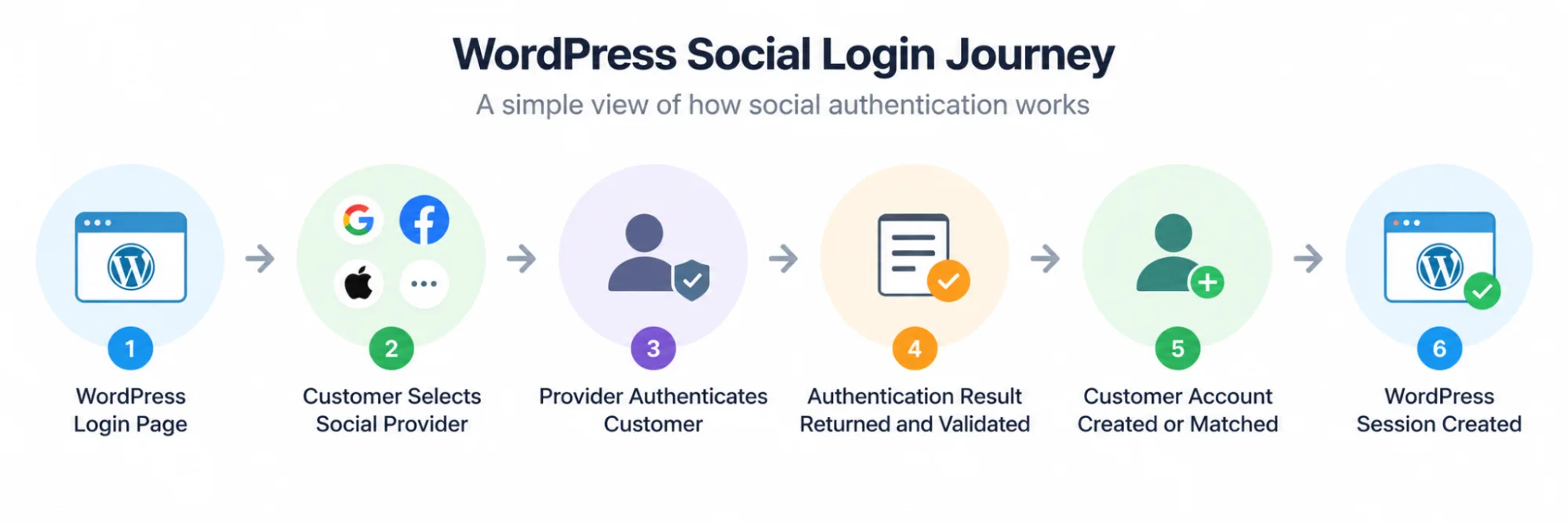
The important detail is that WordPress does not receive the customer's social account password. Authentication happens with the identity provider. The application receives the result of that identity flow, validates the relevant response, identifies the customer, and then creates or connects the appropriate local account before establishing the WordPress session.
A simplified flow looks like this: Customer → WordPress → Social Identity Provider → Authentication Result → LoginRadius → Customer Account Created or Matched → WordPress Session
Where OAuth 2.0 and OpenID Connect Fit
Social login is often described simply as “OAuth login,” but that wording can blur two different jobs. OAuth 2.0 is an authorization framework used to grant scoped access to protected resources. OpenID Connect (OIDC) adds an identity layer on top of OAuth 2.0 and is commonly used when an application needs to authenticate a customer and receive identity claims.
The exact protocol and response vary by provider. So a WordPress integration should follow the supported flow for each configured identity provider rather than assuming every social login works identically.
What Happens After the Social Provider Authenticates the Customer?
Successful authentication with the provider is not the end of the WordPress login process. The returned identity still needs to be associated with the correct customer account.
For a first-time customer, that may result in a new account being created. For someone who has signed in before, the application should locate the previously associated identity and return the customer to the correct account. If an existing customer later chooses another login method, secure account-linking rules become important.
That distinction matters. Authentication proves control of the configured provider identity; account matching determines which application account that identity should access. Treating those as the same operation can introduce duplicate-account problems or, with unsafe linking logic, security risks.
Once the correct account has been resolved and the authentication flow is complete, WordPress can establish the application session and give the customer the appropriate access.
What You Need Before Setting Up Social Login on WordPress
A WordPress social login implementation touches more than the WordPress dashboard. Before installing and configuring the plugin, make sure you have access to the systems and credentials required for the complete authentication flow.
WordPress Administrator Access
You need sufficient WordPress permissions to install and activate the LoginRadius CIAM Plugin, access its configuration settings, and add the authentication experience to the appropriate pages.
For an existing production site, test the integration in a staging environment first. Authentication changes can affect registration, login, account matching, redirects, and existing customer access.
A LoginRadius Application
The WordPress plugin needs to be connected to a LoginRadius application. The LoginRadius Admin Console provides the application configuration and credentials required for that connection.
Keep administrative credentials and secrets protected. They should not be exposed in public repositories, browser-side code, screenshots, or documentation available to site visitors.
LoginRadius API Key and API Secret
The LoginRadius WordPress CIAM Plugin uses the API Key and API Secret associated with your LoginRadius application during plugin activation and configuration.
You will need these values when connecting the WordPress installation to LoginRadius. Treat the API Secret as sensitive configuration data and restrict access accordingly.
Social Identity Providers You Plan to Support
Decide which providers make sense for your customers before adding every available option to the login page. Google, Facebook, and Apple are common examples, but the right selection depends on your audience and supported LoginRadius configuration.
Each provider can have its own application setup, credentials, approved domains, redirect requirements, and policies. Provider-specific configuration should therefore follow the current LoginRadius and provider documentation.
Your WordPress Domain and Redirect Configuration
Social authentication depends on the customer leaving WordPress for the provider authentication flow and returning to the expected destination.
Make sure the production domain, HTTPS configuration, and required callback or redirect settings are correct for the provider being configured. A mismatch here can cause an otherwise correct integration to fail after authentication.
A Plan for Existing and New Customer Accounts
This is easy to overlook.
Before enabling social login for existing customers, decide how the application should handle first-time social users, returning social users, and customers who already have an account but choose a new authentication method.
New Social Identity → Create Appropriate Account
Known Linked Identity → Return to Existing Account
Existing Account + New Login Method → Apply Secure Account-Linking Process
Do not assume that matching email addresses alone always proves that two accounts belong to the same person. Account linking needs its own verification and security logic.
Once these pieces are ready, the WordPress installation can be connected to LoginRadius and the actual social login experience can be configured.
How to Add Social Login to WordPress With the LoginRadius CIAM Plugin
Once the prerequisites are ready, the implementation has two main parts: connecting WordPress to LoginRadius and configuring the social providers customers will use to authenticate.
The exact administrative screens can change as the WordPress plugin and LoginRadius Admin Console evolve, so use the current LoginRadius documentation for individual field names and configuration options.
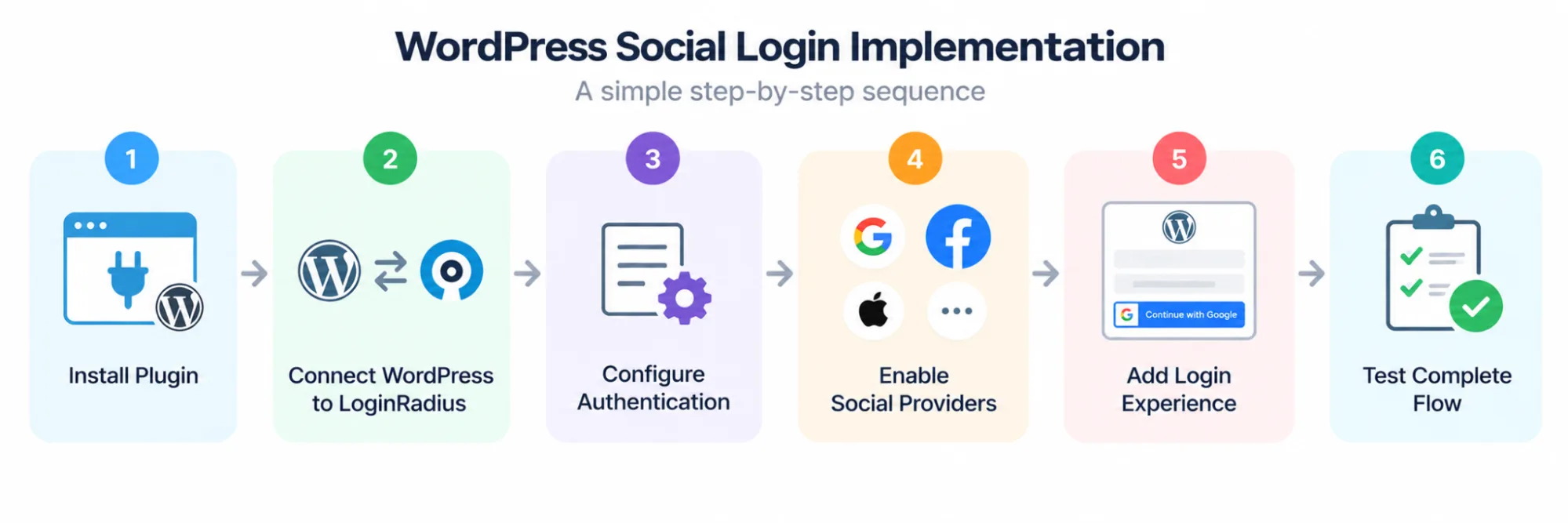
Step 1: Install and Activate the LoginRadius WordPress Plugin
Start from the WordPress administration area and install the LoginRadius plugin supported for your deployment. Activate it before attempting to configure the authentication experience.
For an existing WordPress site, do this in staging first. Activating an identity integration can affect login, registration, redirects, account creation, and how existing customers regain access.
LoginRadius classifies WordPress as one of its turnkey CMS integrations. The purpose is to connect WordPress with LoginRadius authentication and identity capabilities without requiring teams to build the entire integration directly against the APIs.
Step 2: Connect WordPress to Your LoginRadius Application
Next, connect the plugin to the appropriate LoginRadius application using the configuration and credentials associated with that application.
Be careful here. The application used for testing should match the environment being configured, and sensitive credentials should remain protected. Do not expose secrets in browser-side code, public repositories, screenshots, or other client-accessible locations.
Once the connection is established, WordPress can use LoginRadius as part of the customer authentication and identity flow.
Step 3: Configure the Authentication Experience
Decide how customers should be able to access the WordPress site.
Social login can sit alongside other configured authentication methods rather than replacing them automatically. Depending on the customer journey and LoginRadius configuration, a site may support combinations of email-based authentication, passwordless methods, passkeys, or social authentication.
Keep the login page focused. Adding every available method simply because it can be enabled may make the experience harder to understand.
Step 4: Enable the Required Social Identity Providers
In the current LoginRadius Admin Console, social providers are configured under the authentication settings. Enable the providers you intend to offer and complete the required configuration for each one.
The common pattern is: Select Social Provider → Configure Provider Application → Add Required Credentials and Settings → Enable Provider → Save Configuration
Google, Facebook, Apple, and other providers can have different credential, domain, redirect, permission, and application-review requirements. Do not copy one provider's configuration into another and assume the flow will behave the same way.
Use the current provider-specific LoginRadius documentation when configuring each integration.
Step 5: Add Social Login to the WordPress Authentication Experience
Once the providers are configured, make the social authentication options available where customers actually need them.
The login and registration experience should make the choice clear. A customer selecting Google, for example, should understand that they are continuing through Google rather than entering a Google password directly into WordPress.
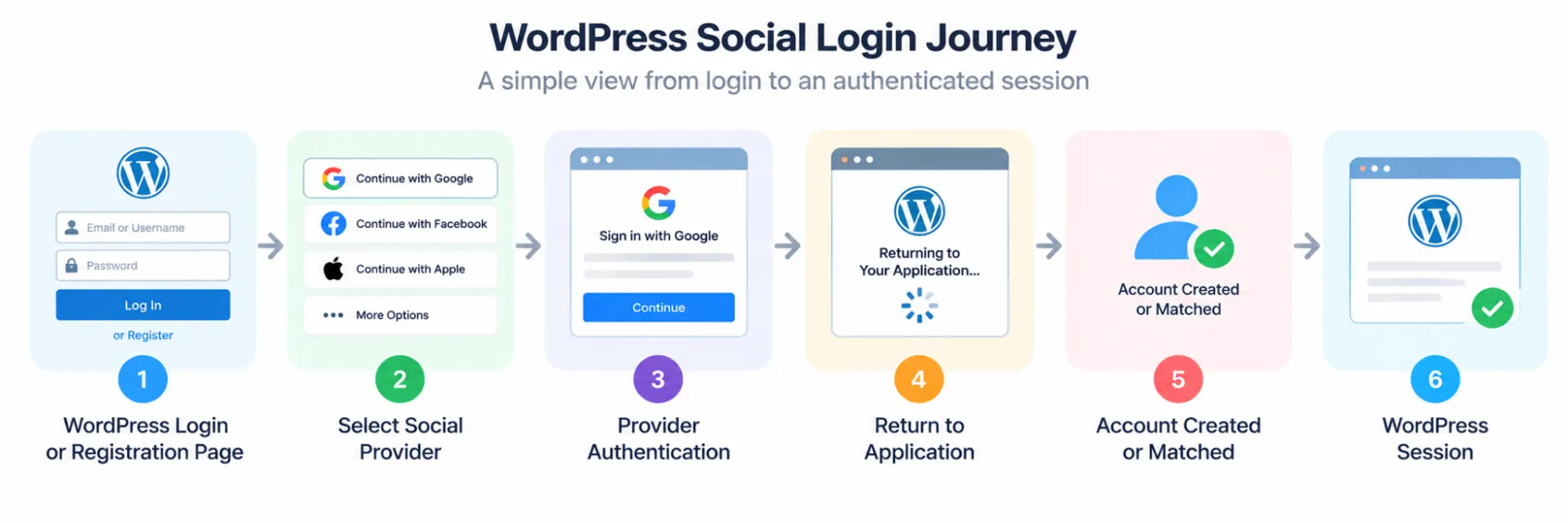
Behind that journey, however, identity matching still matters. A successful provider login should not result in a new WordPress account every time a returning customer authenticates.
Step 6: Configure Redirects and Post-Login Behavior
After authentication, customers need to return to the correct application location.
Check the allowed callback or redirect configuration required by the selected provider and LoginRadius implementation. Then verify the post-login experience on WordPress. Depending on the site, that destination might be an account area, customer portal, checkout flow, or another protected page.
Here’s where a small configuration error becomes very visible. The provider may authenticate the customer successfully, yet an incorrect redirect URL or domain configuration can prevent the journey from completing.
Step 7: Run the Complete Social Login Journey
Do not treat a visible provider button as proof that the integration works.
Run the journey from the WordPress page through provider authentication and all the way back to an authenticated application session: WordPress Page → Social Login Selected → Provider Authenticates Customer → Authentication Result Returned → Identity Processed → Correct Account Created or Matched → WordPress Session Created → Access
Test this once as a new customer and again as a returning customer. The second test matters just as much. It confirms that the implementation recognizes the existing identity instead of creating another account.
Also test failed, denied, and cancelled authentication attempts. Customers will not always complete the provider flow successfully, and WordPress should return them to a usable state rather than leaving them on a broken callback or unclear error page.
For current configuration options and WordPress plugin guidance, refer to the latest LoginRadius documentation rather than relying on older Admin Console instructions. This is particularly important for existing implementations because LoginRadius has retired legacy documentation associated with its previous Admin Console.
How WordPress Social Login Handles New, Returning, and Existing Customer Accounts
A successful Google, Facebook, Apple, or other social authentication does not automatically answer one important question: which WordPress account should this identity access?
That decision depends on whether the customer is new, has used the same social identity before, or already has an account created through another authentication method. Getting this logic right helps avoid duplicate accounts and, more importantly, unsafe account linking.
First-Time Social Login Can Create a New Customer Account
When a customer uses a social provider for the first time, the application receives the supported identity information returned through that provider flow. If no existing linked identity is found and the registration requirements are satisfied, a new customer account can be created.
The simplified journey is: Social Provider → Identity Validated → No Existing Linked Identity Found → Customer Account Created → WordPress Session
Only collect and store identity attributes that are required for the intended customer experience and permitted by the provider configuration and applicable data-handling requirements. Social authentication should not become an excuse to collect every available profile attribute.
Returning Customers Should Reach the Same Account
The flow changes when the customer has already authenticated through that provider.
Instead of creating another account, the application should recognize the previously associated provider identity and resolve it to the existing customer account.
Social Provider → Identity Validated → Existing Linked Identity Found → Existing Customer Account → WordPress Session
Stable provider-issued identifiers are important here. Email addresses can change, may be unavailable, or may differ depending on the provider and customer settings. Apple, for example, can allow customers to use a private relay address through Hide My Email.
The goal is identity continuity—not repeatedly recreating the customer based on whichever profile attribute happens to be returned during login.
Existing Customers May Need to Link a New Login Method
Here’s where it gets interesting. A customer may already have a WordPress account created with email and password, then later choose Google or another social provider.
Creating a second account immediately can fragment the customer's identity. Automatically merging the accounts because both contain the same email address can introduce a different problem: unsafe account linking.
A safer model is: Existing Authenticated Customer → Requests New Login Method → Ownership Reverified → Social Identity Authenticated → Accounts Securely Linked
The exact linking process depends on the implementation, but the security principle stays the same. The application should establish sufficient proof that the customer controls the existing account and the identity being linked.
Do Not Treat Matching Email Addresses as Automatic Proof of Identity
Email can be useful for account discovery, but it should not automatically be treated as a durable identity key.
Provider behavior differs. An email may change, be hidden, use an alias, or have different verification characteristics. Two records sharing an email-like attribute are therefore not, by themselves, enough evidence to blindly merge identities.
For OpenID Connect integrations, the combination of the provider's issuer (iss) and subject (sub) is designed to identify the end user within that issuer's context. Applications should follow the provider and identity-platform guidance for durable identifiers rather than building account matching around mutable profile fields alone.
Keep Authentication and Account Matching as Separate Decisions
This distinction is easy to miss. Authentication establishes that the customer successfully authenticated with the configured identity provider. Account matching or linking determines which application account that authenticated identity is allowed to access.
Keeping those decisions separate makes the overall flow easier to reason about: Provider Authentication → Identity Validation → Account Resolution → Secure Linking if Required → Session Creation
That becomes increasingly important as a WordPress site supports more authentication methods. Customers should be able to return through supported login options without accumulating disconnected accounts—or gaining access to an existing account through an unsafe matching rule.
Configure Google, Facebook, Apple, and Other Social Login Providers for WordPress
Enabling a social provider in WordPress is only one part of the setup. The provider itself usually needs an application or project configured with the correct credentials, domains, redirect URLs, and permissions before customers can authenticate successfully.
Although the exact settings differ, the general pattern is similar:
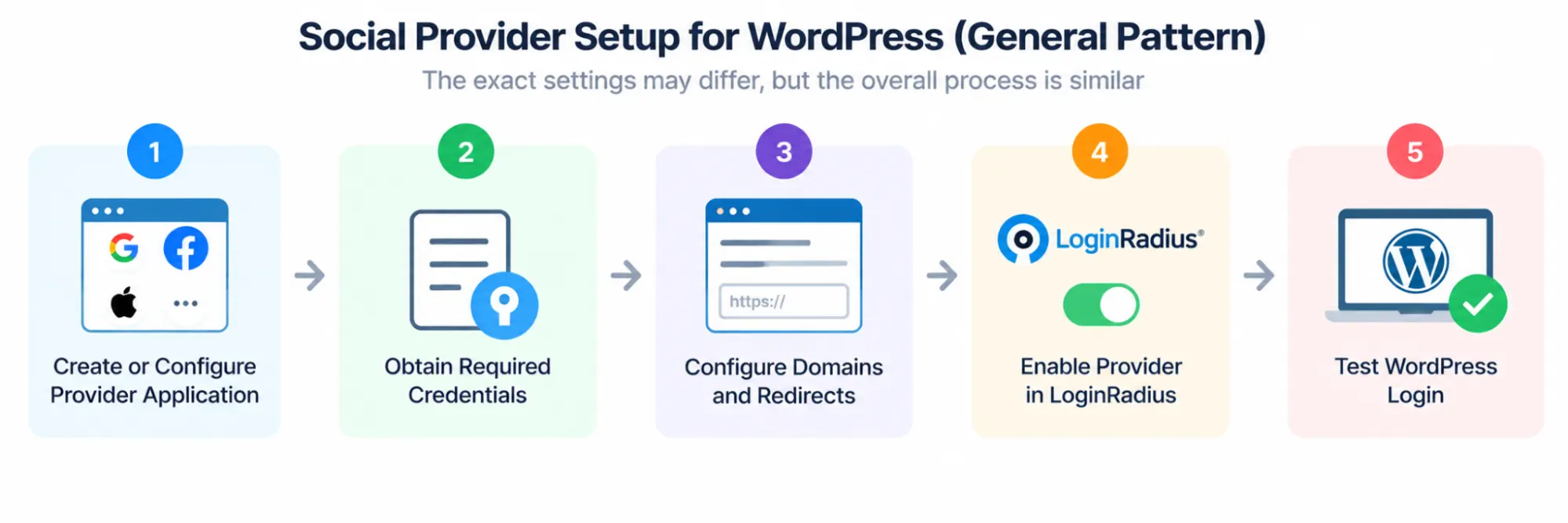
Provider dashboards and requirements change over time, so use the current LoginRadius and provider documentation for exact console paths rather than relying on screenshots or instructions written for an older interface.
Configure Google Login for WordPress
Google authentication typically requires configuring an application in Google Cloud as a new Project, setting the appropriate OAuth consent and client configuration, and registering the authorized redirect URL required by the integration.
Once the required Google credentials are available, configure Google Login in the LoginRadius WordPress Plugin and enable it for the customer authentication experience. Enter the generated Client ID and Client Secret into the LoginRadius Google social provider configuration.
Then test more than the Google account-selection screen. Complete the journey back to WordPress and confirm that the correct customer account and session are created.
WordPress → Continue With Google → Google Authentication → Return to LoginRadius/Application → Customer Account Resolved → WordPress Session
Note: Ensure the redirect URL configured in Google Cloud exactly matches the URL in LoginRadius. Even a small mismatch can prevent customers from completing authentication successfully.
Configure Facebook Login for WordPress
Facebook Login requires an application configured through Meta's developer platform. The application configuration, supported use case, redirect settings, requested permissions, and production requirements should match the way Facebook authentication is being used on the WordPress site. Once the required Facebook application credentials are available, configure Facebook Login in the LoginRadius WordPress Plugin and enable it for the customer authentication experience. Enter the Facebook App ID and App Secret into the LoginRadius Facebook social provider configuration.
Pay particular attention to the identity information actually returned. Do not build account-linking logic around an assumption that every Facebook authentication will provide every profile attribute you expect.
Configure Sign in With Apple for WordPress
Apple deserves extra attention because its identity behavior can affect account matching.
Customers can choose Hide My Email, which allows Apple to provide a private relay email address rather than the customer's personal address. That makes email-only matching particularly fragile.
The application should rely on the appropriate provider identity relationship and secure account-linking process rather than assuming an Apple email address will match an existing WordPress account.
Test both scenarios where available: Sign in With Apple → Share Email → Account Resolution
and Sign in With Apple → Hide My Email → Private Relay Address → Account Resolution
The second path is a useful test of whether the identity architecture depends too heavily on email.
Configure Other Supported Social Identity Providers Based on Customer Needs
The same broad model applies to other supported providers, but credentials, scopes, redirect requirements, available profile data, and review processes can differ.
Avoid enabling a long row of social buttons simply because the providers are available. A WordPress site serving consumers in one market may need a different provider mix from a community, media platform, e-commerce site, or customer portal serving another audience.
Start with the providers your customers are likely to use, then expand based on actual requirements.
Test Each Provider as Its Own Authentication Integration
Here’s where teams usually go wrong: they configure one provider successfully and assume the others will behave the same way.
They may not.
Test each provider independently for:
New Customer → Authentication → Account Creation → Session
Returning Customer → Authentication → Existing Account → Session
Authentication Cancelled → Safe Return to WordPress
Authentication Failed → Clear Recovery Path
Existing Customer + New Provider → Secure Account-Linking Process
This catches provider-specific problems before they turn into customer-facing login failures. It also confirms that adding another social provider does not quietly create duplicate identities or change how existing customers reach their WordPress accounts.
Benefits of WordPress Social Login Instead of Relying Only on Passwords?
Adding social login does not mean every WordPress site should remove its existing authentication methods. It gives customers another way to access an account using an identity provider they may already use regularly.
For customer-facing WordPress sites, that can simplify several points in the registration and login journey.
Reduce Registration and Login Friction
A traditional signup may require customers to create a username, choose a password, satisfy password requirements, and then remember those credentials when they return.
Social login can shorten that process by moving authentication to a configured identity provider.
Visit WordPress Site → Select Social Login → Authenticate With Provider → Account Created or Matched → Access
Fewer steps do not guarantee a completed registration or conversion. They can, however, remove some of the avoidable authentication friction surrounding those actions.
Reduce Dependence on Another Site-Specific Password
Customers already manage credentials across many applications. Giving them a supported social authentication option means they do not necessarily need another WordPress-specific password.
This does not make the account automatically secure. Security still depends on the provider, implementation, account-linking rules, recovery process, session handling, and any additional controls applied by the application.
Make Sign-In Easier on Mobile Devices
Typing and recovering passwords can be particularly inconvenient on smaller screens. A familiar provider-based authentication flow can give returning customers a more convenient option, especially when they are already authenticated with that provider on their device.
The experience still needs testing across browsers, devices, redirects, and provider flows. A social login button that works perfectly on desktop but fails after a mobile redirect has not reduced friction.
Give Customers More Choice in How They Authenticate
Some customers prefer passwords. Others may choose Google, Facebook, Apple, or another supported provider. Offering appropriate authentication options lets a WordPress site accommodate different customer preferences instead of forcing everyone through one login method.
More buttons are not necessarily better, though. The providers offered should make sense for the site's audience and authentication requirements.
Support a More Consistent Customer Identity Experience
Social login becomes more valuable when it is connected to customer identity management rather than treated as a standalone button.
A returning customer may sign in from another device or later choose a different authentication method. The system still needs to determine whether that person should access an existing account or create a new one.
Here’s where teams usually go wrong: adding another authentication method without considering what happens to the underlying customer identity.
A well-designed implementation considers registration, authentication, account matching, secure linking, recovery, and session creation together. That helps WordPress social login fit into the broader customer journey instead of creating another disconnected identity path.
Customize the WordPress Social Login Experience Without Creating Authentication Friction
A technically correct social login flow can still create a poor customer experience if the buttons are difficult to find, the login choices are unclear, or customers do not know what will happen after selecting a provider.
Customization should make authentication easier to understand. It should not change the underlying security behavior simply to make the login page look cleaner.
Place Social Login Where Customers Already Expect to Authenticate
The most obvious locations are the WordPress login and registration experiences. Depending on the site, authentication may also be required before customers enter an account area, access protected content, or continue through another authenticated journey.
Keep the placement consistent. If Google login is offered during registration but disappears when the customer returns to sign in, the customer may assume they created a separate WordPress password that never existed.
Make Social Login Buttons Easy to Recognize
Use clear provider names and recognizable branding that follows the provider's current branding requirements. Labels such as Continue with Google or Continue with Apple tell customers exactly where the next step will take them.
Avoid vague labels or heavily redesigned buttons that make the identity provider difficult to identify.
The goal is simple: customers should know which authentication method they are choosing before they leave WordPress.
Keep Registration and Returning Login Behavior Consistent
Social authentication can serve both new and returning customers, but the application behavior behind it differs.
A new customer may need an account created after successful authentication. A returning customer should reach the account already associated with that social identity.
From the customer's perspective, however, the journey should remain predictable: Select Provider → Authenticate → Return to WordPress → Reach the Correct Account
Do not force returning customers through unnecessary registration questions every time they authenticate. If additional profile information is required later, collect it at an appropriate point in the customer journey rather than repeatedly treating the customer as new.
Avoid Overloading the Login Page With Providers
More social login options do not automatically create a better experience.
A page containing numerous provider buttons alongside passwords, passwordless options, passkeys, registration links, and recovery actions can become harder to scan. Prioritize authentication methods based on the audience and actual requirements of the WordPress site.
Start with the options customers are likely to use. Add another provider because there is a reason for it—not because there is room for another logo.
Provide an Alternative When Social Authentication Is Unavailable
A customer's access to a social provider can change. The provider may also experience an outage, the customer may revoke access, or the authentication flow may fail.
Where the account model permits it, provide an appropriate alternative authentication or recovery path. The recovery process should verify the customer securely rather than weakening the account simply because the preferred social provider is unavailable.
Make Authentication Errors Useful
“Login failed” rarely tells a customer what to do next. Different failures may need different responses. A customer who cancels authentication should be able to return to the login page. A configuration error should not expose sensitive technical details. An account-linking conflict may need a secure verification path instead of silently creating another account.
Good error handling keeps the customer journey usable without revealing credentials, tokens, internal identifiers, or unnecessary implementation information.
Test the Experience on More Than One Screen Size
Social authentication includes redirects and provider-controlled screens, so the experience does not stay entirely inside the WordPress interface.
Test the complete journey on desktop and mobile: WordPress Login → Provider Selection → Provider Authentication → Redirect Back → Correct Account → Authenticated WordPress Experience
Pay attention to button placement, browser transitions, return URLs, error messages, and the page customers see after authentication.
The best customization is usually the least surprising one. Customers should be able to choose an authentication method, understand where they are going, and return to the correct WordPress account without having to figure out how the identity integration works behind the scenes.
Secure WordPress Social Login Against Account Linking, Redirect, and Authentication Risks
Social login can remove the need for another site-specific password, but it does not remove authentication risk. The security boundary changes: WordPress now depends on the social provider flow, the CIAM configuration, identity matching, account linking, redirects, and session creation all working correctly.
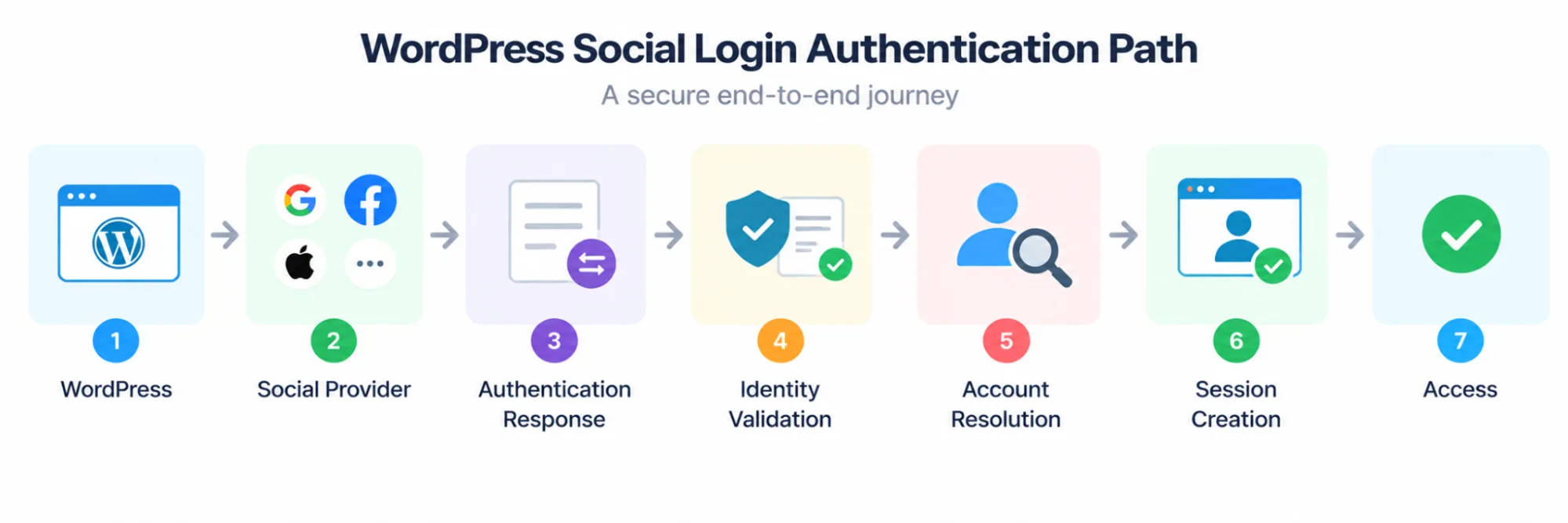
A weakness at any of those points can affect the account that ultimately receives access.
Validate Authentication Responses Before Creating a Session
Do not treat a successful redirect back to WordPress as proof that authentication succeeded.
The application or identity layer should validate the response according to the protocol and provider requirements before trusting the identity information it contains. For OpenID Connect flows, that includes appropriate validation of the ID token and relevant claims such as issuer, audience, signature, and validity period.
Only after the authentication result has been validated should the application proceed to account resolution and session creation.
Protect Redirect and Callback Handling
Social authentication relies on redirects between WordPress, the identity layer, and the provider. Redirect URLs should therefore be explicitly configured and restricted to expected destinations.
Loose redirect handling can introduce security problems or send customers somewhere they did not intend to go after authentication.
Use HTTPS throughout production authentication flows and keep provider-side redirect configuration aligned with the URLs required by the LoginRadius implementation.
Protect Against Login CSRF and Account-Binding Attacks
Login CSRF can occur when an attacker causes a victim's browser to complete an authentication flow associated with an identity the attacker controls. The victim may then unknowingly interact with the application under the wrong account.
OAuth and OIDC implementations use mechanisms such as state, and OIDC flows may also use nonce, as part of protecting and validating authentication transactions. These controls need to be generated, bound to the correct transaction, and validated rather than treated as optional parameters.
Use the supported LoginRadius and provider authentication flow instead of building custom shortcuts around these protections.
Do Not Automatically Link Accounts Using Email Alone
Account linking deserves particular attention because a linking mistake can grant one identity access to another customer's account.
Two records containing the same email address should not automatically be treated as proof that both identities belong to the same person. Email addresses can change, aliases exist, providers expose identity information differently, and Apple can provide private relay addresses.
A safer pattern is: Authenticated Existing Account → Request to Add Provider → Reverify as Required → Authenticate New Provider Identity → Link Identity → Confirm Result
The application should establish sufficient proof of control before creating the relationship.
Protect LoginRadius and Social Provider Credentials
API secrets, provider client secrets, private keys, and other sensitive credentials should be treated as server-side secrets.
Do not place them in public repositories, JavaScript delivered to browsers, publicly accessible configuration files, screenshots, or support material. Restrict administrative access and rotate credentials when exposure is suspected.
Client identifiers that are designed to be public are different from secrets. Do not assume every credential shown in a provider dashboard has the same sensitivity.
Keep WordPress, Plugins, and Dependencies Updated
Authentication security also depends on the environment hosting the integration.
Keep WordPress and the LoginRadius plugin on supported versions, review updates before production deployment, and remove obsolete authentication plugins that are no longer required. Running multiple plugins that attempt to control the same login or registration flow can also produce unexpected behavior.
Test updates in staging when authentication is business-critical.
Apply Stronger Authentication When the Risk Requires It
Social login is an authentication option, not automatically MFA.
If a WordPress application protects sensitive customer data or high-risk actions, additional authentication controls may be appropriate. Depending on the implementation, that can include MFA, step-up authentication, or other risk-based controls.
The required assurance should match the action being protected rather than assuming that the presence of a social provider makes every session equally trustworthy.
Secure the WordPress Session After Social Authentication
The provider authentication flow may be secure, but access ultimately continues through an application session.
Use secure session handling, appropriate cookie protections, sensible expiration policies, logout behavior, and reauthentication for sensitive actions where required. A valid social login should not create an application session that remains trusted indefinitely.
Here’s where teams sometimes focus too narrowly: they secure the provider redirect and forget that the customer spends the rest of the experience inside the WordPress session.
Social login security therefore does not end when Google, Facebook, Apple, or another provider says authentication succeeded. It ends with the correct customer receiving the correct application session—and that session remaining appropriately protected throughout its lifetime.
Test the Complete WordPress Social Login Journey Before Going Live
Seeing a Google, Facebook, or Apple button on the WordPress login page confirms very little. The real test is whether a customer can leave WordPress, authenticate with the provider, return through the expected callback, reach the correct account, and receive a valid application session.
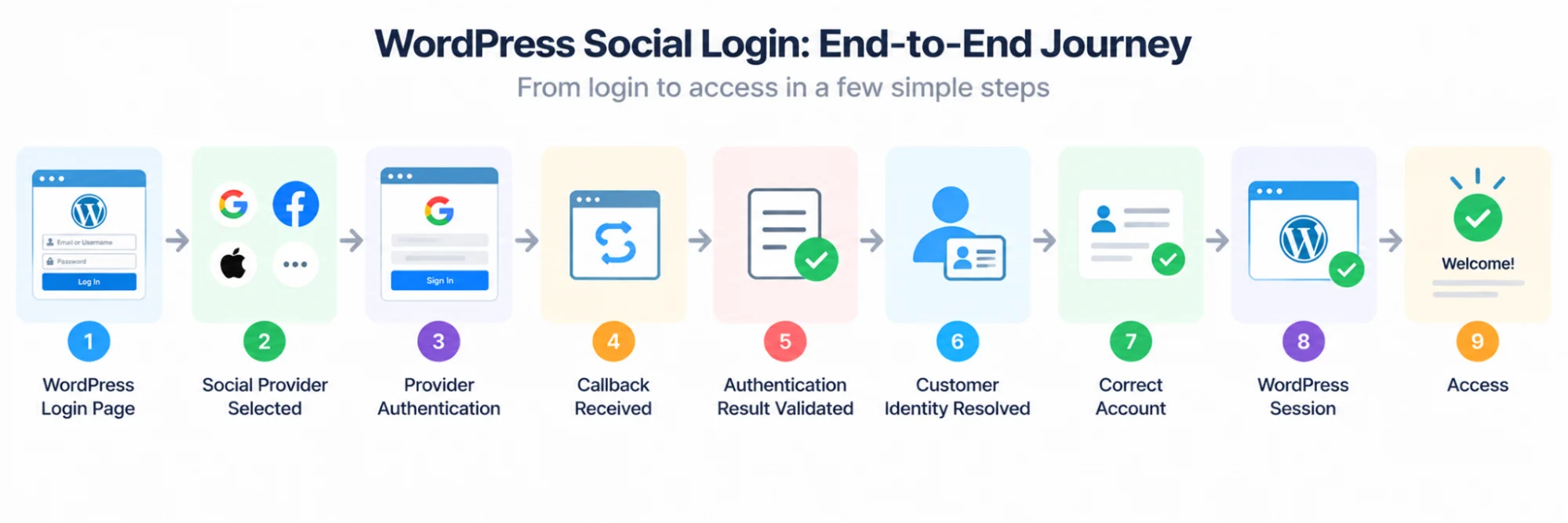
Then repeat it under different account conditions. Social login problems often appear only after the first successful test.
First-Time Registration
Start with a customer who has never used the WordPress site.
Complete social authentication and confirm that the expected account is created, required profile information is handled correctly, and the customer reaches the intended post-registration destination.
Then log out. The next test is where identity continuity becomes visible.
Returning Social Login
Authenticate again using the same provider identity.
The application should recognize the existing relationship and return the customer to the same account rather than creating another one.
The expected flow is: Known Social Identity → Authentication → Existing Linked Account Found → WordPress Session → Access
Check the underlying customer record as well. A login that appears successful to the customer can still hide duplicate-account creation behind the interface.
Existing Customers Who Add Another Login Method
Use an account that already exists through another supported authentication method and follow the intended account-linking process.
Confirm that the new social identity becomes associated with the correct existing account only after the required verification. Then sign out and authenticate through the newly linked provider.
Both methods should resolve to the intended customer account without silently creating separate identities.
Cancelled and Failed Authentication
Customers will sometimes close the provider window, deny authorization, select the wrong account, encounter an expired transaction, or simply decide not to continue.
Test those paths deliberately.
Social Login Selected → Authentication Cancelled → Safe Return to WordPress
Social Login Selected → Authentication Fails → Clear Error or Recovery Path
Neither scenario should leave the customer on a broken callback page, create a partial account unexpectedly, or expose sensitive implementation details.
Redirects and Protected Destinations
If authentication begins while a customer is trying to reach a protected page, verify what happens after successful login.
The customer should return only to an approved destination defined by the application flow. Test both successful redirects and invalid or unexpected redirect values so the implementation does not blindly send authenticated customers to arbitrary locations.
Each Enabled Social Provider Separately
Do not assume that a successful Google integration proves Facebook or Apple is configured correctly.
Run the complete authentication journey for every enabled provider. Check the identity attributes actually returned, account creation and matching behavior, redirects, logout, reauthentication, and error handling.
Provider-specific differences can expose assumptions that were invisible during the first integration.
Test Across Mobile and Desktop Environments
Authentication redirects can behave differently across desktop browsers, mobile browsers, embedded contexts, and devices where the customer is already signed in to the provider.
Run representative production journeys across the environments your customers actually use. Pay particular attention to redirect completion and whether customers return to the correct WordPress state after provider authentication.
Logout and Reauthentication
Finally, confirm that logout ends the intended WordPress application session.
Remember that logging out of WordPress does not necessarily sign the customer out of Google, Facebook, Apple, or another external identity provider. A subsequent authentication attempt may therefore behave differently because an active provider session still exists.
The production test should answer one simple question: Can every supported authentication path consistently return the right customer to the right WordPress account without creating an unsafe or confusing shortcut?
If the answer is unclear for any provider, account state, or failure condition, that path needs another test before launch.
Best Social Login Plugins for WordPress
Now that we know why social login is a game-changer, let’s get into the real reason you're here: finding the best social login plugin for WordPress.
The WordPress plugin ecosystem is massive, and while that's great for variety, it can also be overwhelming. Some plugins are lightweight and free, ideal for bloggers or small businesses.
Others are full-fledged identity solutions meant for growing ecommerce brands or high-traffic membership sites. And then there are tools that try to do everything sometimes at the cost of simplicity or performance.
To save you hours of research, we’ve curated this list of the top WordPress social plugin options based on key criteria:
-
Ease of setup (especially for non-tech users)
-
Number of supported social platforms
-
GDPR/compliance features
-
Compatibility with other plugins (WooCommerce, BuddyPress, Elementor)
-
Design flexibility and branding options
-
Scalability and support
Whether you're looking for a lightweight wp social media plugin or a robust social media plugin WordPress solution that can scale with your user base, you’ll find your match below.
| Plugin | Free Version | ## of Social Providers | GDPR Compliant | Best For |
|---|---|---|---|---|
| LoginRadius | Yes | 40+ | Yes | Enterprise sites, SaaS platforms |
| Nextend Social Login | Yes | 3 (Free) / 5+ (Pro) | Partial | Bloggers, small business sites |
| Super Socializer | Yes | 10+ | Yes | Publishers, content-heavy blogs |
| MiniOrange | Yes | 30+ | Yes | Complex user flows, community platforms |
| OneAll | Yes (limit) | 20+ | Yes | Privacy-first organizations |
| WP Social | Yes | 4 | Partial | Ecommerce brands, WooCommerce sites |
| Youzify | No (Paid) | 5+ | Yes | Social communities, member platforms |
| PeepSo Social Login | No (Paid) | 2 | Yes | PeepSo community-based sites |
Why Use LoginRadius for WordPress Social Login and Customer Identity Management?
A basic WordPress social login plugin can solve a narrow problem: add provider-based authentication to a website. That may be enough for a simple use case.
The requirement changes when social login is only one part of a broader customer identity journey. A business may also need registration, multiple authentication methods, customer profiles, account linking, consent and preference management, MFA, passwordless authentication, or identity experiences shared across more than one digital property.
LoginRadius approaches the WordPress integration from that CIAM perspective.
Connect WordPress to a Broader Customer Identity Layer
With LoginRadius, social authentication can sit within the same customer identity architecture used for registration, authentication, profile management, and other supported identity capabilities.
That creates a cleaner relationship: WordPress → LoginRadius CIAM → Customer Identity and Authentication → Supported Identity Providers
WordPress remains the application experience. LoginRadius handles the customer identity layer behind the authentication journey.
This becomes particularly useful when WordPress is not the only customer-facing application a business operates.
Support Multiple Authentication Options Alongside Social Login
Customers do not always want to authenticate the same way.
LoginRadius supports social authentication alongside other customer authentication capabilities, including traditional credentials, passwordless options, passkeys, and MFA where configured for the use case.
That means teams can design the WordPress authentication experience around their customer and security requirements instead of treating social login as the only possible route into an account.
Manage Customer Profiles Beyond the Initial Social Login
Social providers return identity information according to their own configuration, permissions, and policies. That information alone does not necessarily represent the complete customer profile a business needs.
LoginRadius provides customer profile management capabilities that can support profile information beyond the initial provider authentication. Additional appropriate information can then be collected or updated during the customer lifecycle rather than forcing the social provider to become the source for every customer attribute.
Maintain Identity When Customers Use Different Login Methods
This is one of the bigger differences between adding a button and managing customer identity.
A customer might register using email, later authenticate with Google, and eventually use another supported method. Without an identity strategy, those interactions can turn into separate customer records.
LoginRadius supports account-linking capabilities that can help connect supported identities under the appropriate customer account when implemented with suitable verification.
The desired outcome is: Customer → Multiple Supported Authentication Methods → Correct Customer Identity → Consistent Account
Not: Customer → Multiple Login Methods → Multiple Unrelated Accounts
Extend Authentication Beyond a Single WordPress Site
For organizations running multiple customer-facing applications, identity becomes harder to manage independently inside each application.
A CIAM layer can provide a more consistent identity foundation across supported digital properties rather than requiring each site to invent its own registration, authentication, profile, and account-management logic.
WordPress can therefore become one part of the customer identity ecosystem rather than an isolated authentication silo.
Use APIs and Integration Capabilities as Requirements Grow
A turnkey WordPress plugin can accelerate the initial implementation, but identity requirements may become more complex over time.
LoginRadius also provides APIs, SDKs, webhooks, and integration capabilities for teams that need to connect customer identity with other applications and systems. That gives developers a path beyond the initial plugin-based implementation without requiring the WordPress site to become the system responsible for every identity function.
Start With the WordPress Plugin Documentation
If the immediate goal is to add LoginRadius authentication to WordPress, use the current LoginRadius WordPress plugin documentation as the implementation reference. It should be the source for supported configuration options, plugin requirements, and current setup instructions rather than older screenshots or legacy Admin Console paths.
The distinction is straightforward: the WordPress plugin provides the integration point, while LoginRadius provides the broader customer identity platform behind it.
For teams that only need a simple social button, that broader architecture may not be necessary. For organizations managing customer authentication across growing digital experiences, it can prevent WordPress social login from becoming another isolated identity implementation.
Conclusion: Add WordPress Social Login Without Turning Authentication Into Another Custom Integration
Adding social login to WordPress looks simple from the customer side: choose Google, Facebook, Apple, or another supported provider and sign in. The implementation behind that button needs more care.
Provider configuration, response validation, account creation, secure account linking, redirects, session handling, and recovery all influence whether the right customer reaches the right account. That is why WordPress social login should be treated as part of the customer identity architecture rather than just another button on the login page.
The LoginRadius WordPress CIAM Plugin gives teams a way to connect WordPress with a broader customer identity platform instead of building every authentication flow from scratch. Start with the LoginRadius WordPress plugin documentation to configure the integration and verify the supported settings for your environment.
Need social login to work across a larger customer identity strategy? Book a LoginRadius demo to explore how LoginRadius can support social authentication, passwordless experiences, passkeys, MFA, customer profiles, account linking, and other CIAM requirements across your digital properties.
FAQs
Q: What Is WordPress Social Login?
A: WordPress social login allows customers to register or sign in using an existing account from a supported identity provider, such as Google, Facebook, or Apple, instead of creating another site-specific password.
Q: How Do I Add Social Login to WordPress?
A: You can add social login using a WordPress social login plugin or CIAM integration. With LoginRadius, connect the WordPress plugin to your LoginRadius application, configure the required providers, and test the complete authentication flow.
Q: What Is a WordPress Social Login Plugin?
A: A WordPress social login plugin connects a WordPress site with supported identity providers so customers can authenticate through those providers. Depending on the plugin, it may also support registration, account linking, and profile management.
Q: Can I Add Google and Facebook Login to WordPress?
A: Yes. Google and Facebook can be configured as social identity providers for WordPress through a compatible plugin or CIAM platform. Each provider requires its own application credentials, redirect configuration, and setup.
Q: Does WordPress Social Login Use OAuth or OpenID Connect?
A: It depends on the identity provider and implementation. OAuth 2.0 is an authorization framework, while OpenID Connect adds an identity layer commonly used for authentication and identity claims.
Q: How Are New Users Created Through WordPress Social Login?
A: After successful provider authentication and identity validation, the application checks for an existing linked identity. If none exists and registration requirements are met, an appropriate customer account can be created.
Q: Can Social Login Be Linked to an Existing WordPress Account?
A: Yes, when the implementation supports secure account linking. The customer should sufficiently prove control of the existing account and new provider identity rather than having accounts automatically linked based only on matching email addresses.
Q: Is WordPress Social Login Secure?
A: WordPress social login can be implemented securely when provider responses, redirects, account linking, credentials, and application sessions are properly protected. Social login itself does not eliminate authentication or account-takeover risks.