
Introduction
Most mobile apps stumble at the very first step — authentication. And, in this blog, we’ll uncover why login flows often fail, the best practices you can’t afford to ignore, and how to finally get Mobile App Authentication right.
Why Mobile App Authentication Fails So Often
Mobile app authentication should be simple. After all, it’s just logging in, right? Wrong. It’s the silent deal-maker or deal-breaker of your app. Mess it up, and users won’t just leave — they’ll uninstall, leave you a one-star review, and probably tweet something unkind.
So, why do so many apps fail here?
-
Too many hoops. Sign in, re-sign in, verify email, confirm OTP, solve a CAPTCHA, sacrifice a goat… okay, maybe not the last one, but you get it.
-
Security takes a backseat. Developers prioritize flashy features, while authentication gets duct-taped together at 2 a.m. before launch.
-
Passwords everywhere. Consumers already have 150+ passwords in their brains. Yours won’t be remembered, and “Secure123!” doesn’t count as secure.
-
Custom code gone wrong. Rolling your own auth logic is the equivalent of DIY electrical wiring. Sure, it might work… until the fire.
The irony? Authentication is often the first touchpoint users have with your app. If it’s clunky, it doesn’t matter how beautiful your UI or how fast your backend is — you’ve already lost trust. In today’s crowded app market, that’s a luxury you can’t afford.
Mobile App Authentication Best Practices
Let’s not just rant. Here’s how to avoid being the next cautionary tale:
-
Offer flexible login methods. Email login, phone login, social login, biometrics, and passwordless options. Because no two users want the same thing.
-
Adopt OAuth2.0 and OpenID Connect. OAUth2.0 and OpenID Connect are the latest industry standards for mobile apps. If you’re still using SAML, please put down the flip phone.
-
Keep it seamless. One login, multiple apps = Single Sign-On. If Netflix can get it right across devices, so can you.
-
Don’t annoy your users. Yes, security matters. But stop logging them out every five minutes “for safety.” Balance is key.
-
Use SDKs, not spaghetti code. Pre-built SDKs (like LoginRadius for iOS/Android) come with best practices baked in — saving your devs from reinventing the wheel… as a triangle.
Best practices sound basic, but most companies overlook them because they’re too busy building “features.” Ironically, the best feature you can give your users is the ability to access your app without frustration. Strong authentication isn’t just about security — it’s a conversion booster.
Common Pitfalls of Mobile Authentication
Here’s where things usually crash and burn:
-
App Store rejections. Apple and Google have no patience for sloppy auth that violates guidelines.
-
Bot signups. No CAPTCHA on mobile? Bots will flood your database like it’s Black Friday.
-
Session hijacking. Without proper token handling, attackers waltz in through side doors.
-
Poor scalability. That homegrown login might work for 100 users — but at 1 million, your servers are crying in the corner.
-
Rogue apps are stealing credentials. Attackers love cloning your app to harvest logins. Weak SDKs won’t stop them.
Every one of these pitfalls directly impacts user trust. And here’s the kicker — users don’t care about the “why.” They don’t want to hear your excuse about token handling. They’ll just delete your app and move on to one that doesn’t make them feel unsafe.
OAuth2 vs SAML for Mobile Authentication
Quick myth-busting:
-
SAML = dinosaur. It’s great for old-school enterprise web apps, not mobile. Heavy, XML-based, clunky.
-
OAuth2 / OpenID Connect = modern. Lightweight, token-driven, designed for mobile-first apps.
If you’re still debating between OAuth2, SAML, and OpenID for a mobile app, it’s like choosing between a Tesla and a horse-drawn carriage. Sure, the carriage is “classic,” but good luck getting it approved in the App Store.
What’s more, OAuth2 isn’t just trendy — it’s future-proof. The entire ecosystem of modern identity management is built around it. Going with SAML in mobile is basically deciding to start a marathon in flip-flops.
How to Implement SSO in Mobile Apps
Imagine you have three apps under one brand: a shopping app, a loyalty app, and a payments app. Now imagine forcing users to log in separately for each. That’s not SSO — that’s SOS.
Here’s how Single Sign-On (SSO) works in mobile apps when done right:
-
User logs into one app.
-
That session extends across all your apps.
-
The SDK ensures tokens are shared securely, not copied by rogue apps.
Done correctly, it feels invisible. Done incorrectly, it feels like standing in three different DMV lines on the same day.
And let’s be real — users don’t notice good SSO. They only notice when it’s missing. That’s the bittersweet part of authentication: if you do it well, nobody thanks you. If you do it badly, everybody complains.
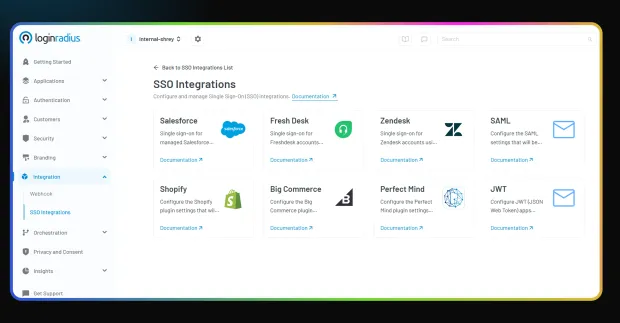
That’s why we’ve made SSO implementation through quick integrations a breeze in LoginRadius:
Understanding Token Exchange in Native Mobile Apps
Token exchange is the secret sauce of smooth SSO. Here’s the non-boring version:
-
User authenticates once → receives an access token.
-
That token is exchanged securely for session tokens across other apps.
-
SDKs handle the messy part (validating, refreshing, revoking).
Without token exchange, every app is an island. With it, your apps behave like a connected ecosystem — which is exactly what users expect.
Think of it like this: without token exchange, you’re making users queue at three different airport check-ins. With token exchange, they’re walking through with a global boarding pass. Smooth, secure, and infinitely less annoying.
Balancing UX and Security in Mobile Authentication
Welcome to the eternal war:
-
Users want convenience. Tap, swipe, done.
-
Security teams want Fort Knox. Two passwords, three MFA steps, retina scans, maybe even a blood sample.
The fix? A balance.
-
Use biometrics for fast yet secure login.
-
Add PINs for high-value actions like purchases.
-
Set session limits that make sense. (24 hours, not 24 seconds.)
-
Protect against bots with Secure One Time Tokens (SOTT).
The secret is to hide the complexity under the hood. Think of it like airbags in a car: users don’t see them every day, but they’re always there. When security measures are invisible yet effective, you win both retention and compliance battles.
Real-World Challenges (and How to Fix Them)
Challenge 1: App Store Rejections
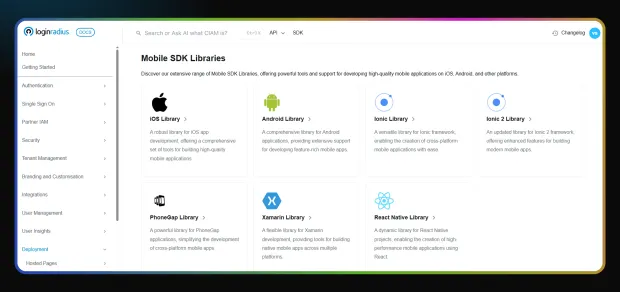
Fix: Use SDKs that comply with Apple/Google rules (just like the LoginRadius SDKs).
Challenge 2: Bot Flooding
Fix: Implement SOTT tokens to prevent fake signups.
Challenge 3: Scaling Woes
Fix: Rely on SDKs built to handle millions of users with robust scalability, not thousands.
Challenge 4: Credential Theft by Rogue Apps
Fix: Use universal links + decompilation protection.
Each of these challenges comes with real business impact: lost users, lost revenue, or worse, lost reputation. The irony? Every fix already exists. Teams fail because they insist on reinventing the wheel instead of using proven SDKs that have already been stress-tested by thousands of developers.
How LoginRadius Fixes Mobile Authentication
Here’s why our SDKs are a “cheat code” for mobile app developers:
-
Plug-and-play login methods → email, phone, social, passwordless, passkeys, biometrics.
-
Seamless SSO across apps → one identity, multiple apps.
-
Pre-built security measures → HTTPS, API signing, exception handling.
-
Spam protection → SOTT tokens instead of CAPTCHAs.
-
Compliance-ready → built to Apple and Google guidelines.
-
Open source & customizable → tweak as much as you need.
In short, you get everything you need to stop worrying about authentication and start focusing on building features your users actually see. The SDK isn’t just code — it’s peace of mind for both developers and product managers.
👉 Cut the headaches. Download the full Authentication & SSO Datasheet:
Final Thoughts
Why do most mobile apps fail at authentication? Because they treat it as an afterthought. UX teams polish buttons, marketing teams polish copy, and devs are left duct-taping login flows at the last minute.
But authentication isn’t optional. It’s the first thing users see. It decides whether they stay or uninstall.
So, the fix is simple:
-
Stop rolling your own auth logic.
-
Adopt OAuth2/OIDC, not SAML.
-
Implement SSO with token exchange.
-
Balance UX and security with SDKs built for mobile.
Or, you know, just keep failing and make room for apps that actually get it right. Your choice.
FAQs
1. Why is Mobile App Authentication important?
Mobile App Authentication ensures only authorized users can access your app. It protects sensitive data, builds user trust, and provides a secure entry point without adding unnecessary friction to the experience.
2. What are the common challenges in Mobile App Authentication?
Common issues include password fatigue, insecure session management, fake signups from bots, and vulnerabilities in custom-built code. These challenges can be addressed with modern standards like OAuth2, OpenID Connect, and reliable SDKs.
3. Which protocol is best for Mobile App Authentication: OAuth2 or SAML?
For mobile apps, OAuth2 and OpenID Connect are the best choices. They are lightweight, token-based, and designed for mobile-first environments. SAML is more suited to older, web-based enterprise applications and is less efficient on mobile.
4. How does Single Sign-On (SSO) improve Mobile App Authentication?
SSO allows users to log in once and access multiple apps within your ecosystem. It improves convenience, reduces the number of passwords users need to manage, and centralizes security for easier monitoring and control.
5. How can I make Mobile App Authentication secure and user-friendly?
The key is balancing security with usability. Offer multiple login methods (such as biometrics, passwordless, and social login), implement strong encryption, and use SDKs that handle security best practices while keeping the login process smooth for users.


