
Introduction
Imagine this: you're working on a tight deadline, trying to access a critical app, and bam, you're locked out because you forgot your password. Again. Now multiply that experience across five apps you use daily. This is the exact friction Single Sign-On (SSO) aims to eliminate.
In today’s digital-first world, users, whether employees, partners, or customers, juggle dozens of tools, platforms, and services. Managing separate credentials for each one is not just exhausting, it's a security risk. Enter SSO authentication, a mechanism that allows users to access multiple applications using a single set of credentials.
But what is single sign-on, and how does it work under the hood? This blog will break it all down from the types of SSO to how single sign-on works with industry-standard protocols like OpenID Connect, SAML, and OAuth.
We’ll also explore the single sign-on architecture powering secure and seamless access across environments, and how SSO links directly to IAM (Identity and Access Management), MFA (Multi-Factor Authentication), and broader sso security practices.
By the end of this blog, you’ll not only understand what single sign-on is but also how to choose the right SSO protocol for your stack and how LoginRadius makes implementation smoother for developers and IT teams alike.
Let’s decode SSO authentication once and for all.
What is Single Sign-On?
At its core, Single Sign-On (SSO) is exactly what it sounds like: a way for users to log in once and gain access to multiple applications or services without having to authenticate again each time.
Let’s say you log in to your company’s email system in the morning. Thanks to SSO, you can seamlessly access your file storage, project management tool, HR portal, and video conferencing platform, all without being prompted for another password. No repetitive logins. No password fatigue. No helpdesk calls for resets. Just a smooth, secure access experience.
That’s the beauty of SSO authentication.
Why SSO Matters More Than Ever
The average user today accesses 20 to 40 applications daily, especially in distributed workplaces or digital-first organizations. For IT teams, managing separate credentials for each tool creates chaos. For users, it's frustrating. For attackers, it's a playground.
Single Sign-On solves all three problems:
-
Users win with faster, frictionless logins.
-
IT teams win with centralized access control.
-
Security wins with fewer entry points to exploit.
In essence, SSO integration creates a centralized identity gateway: a trusted Identity Provider (IdP) handles the user authentication and shares that trust with multiple Service Providers (SPs) like Salesforce, Dropbox, Zoom, or your own custom apps.
Why SSO is a Must-Have Today
If you’re still wondering what SSO is or how single sign-on works, think of it as the key to: Simplifying logins for users, centralizing access for admins, and strengthening security across every app. And the best part? You don’t have to build it from scratch. Tools like LoginRadius offer out-of-the-box SSO authentication methods that work across social, enterprise, and B2B environments.
Overview of OpenID (OpenID Connect)
When people talk about logging in with Google, Apple, or Facebook, they’re almost always referring to OpenID Connect (OIDC). It’s one of the most developer-friendly ways to implement single sign-on authentication, especially in modern consumer-facing applications.
But before we go further, let’s clear up a common mix-up.
OpenID vs OpenID Connect: What’s the Difference?
-
OpenID (original) was an older protocol used for federated identity. It’s largely deprecated now.
-
OpenID Connect (OIDC) is the modern version built on top of OAuth 2.0, and widely adopted across web and mobile apps.
If you’re building anything new today, it’s OpenID Connect you’ll be working with.
How OpenID Connect Works in SSO
Think of OIDC as the identity layer that sits on top of OAuth. It authenticates the user and returns an ID token, often in the form of a JWT (JSON Web Token), containing user info like name, email, and unique ID.
Here’s what the flow typically looks like:
-
The user initiates login with a provider (like Google).
-
The app redirects the user to the Authorization Server (Google’s auth server).
-
After login, the Authorization Server sends back:
- An ID token (proving who the user is)
- An access token (if you requested access to APIs)
-
The app validates the tokens and starts the session.
And that’s how you get seamless login with no password created or stored on your app.
Security Considerations with OpenID
While OpenID Connect is secure when implemented correctly, it does rely heavily on proper token validation and HTTPS. Here are a few best practices:
-
Always validate the ID token signature and audience claim
-
Use short-lived tokens and refresh them securely
-
Avoid exposing tokens in URLs or insecure storage
SSO flows using OpenID Connect can be further hardened with MFA, device checks, and risk scoring, especially when implemented with a CIAM platform like LoginRadius.
How It Fits into Single Sign-On Architecture
In the grand scheme of single sign-on architecture, OpenID Connect serves as the bridge between user identity and your application ecosystem. You trust the identity proofing done by another provider (Google, Microsoft, Apple) and let users in without additional credentials.
It’s perfect for apps that want to offload login complexity while still maintaining control over access and personalization.
Overview of SAML (Security Assertion Markup Language)
If OpenID Connect is the new-age protocol powering modern apps and social logins, SAML is the enterprise veteran, robust, battle-tested, and still powering single sign-on authentication in thousands of organizations around the world.
Let’s break it down.
What is SAML?
SAML (Security Assertion Markup Language) is an XML-based standard used for exchanging authentication and authorization data between parties—primarily between an Identity Provider (IdP) and a Service Provider (SP).
It’s the backbone of enterprise SSO, particularly in environments where legacy systems, Active Directory, or enterprise SaaS apps like Salesforce, Zoom, or Workday are involved.
Where OpenID is JSON + mobile-friendly, SAML is XML + enterprise-focused.
How SAML Works in SSO
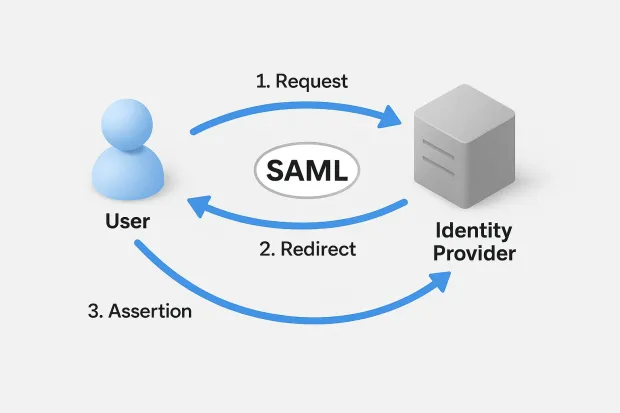
Here’s a simplified flow of how single sign-on works with SAML:
-
Request: The user tries to access an application (Service Provider).
-
Redirect: The app sends the user to the Identity Provider for authentication.
-
Assertion: Upon successful login, the Identity Provider sends back a SAML Assertion, an XML payload containing the user's identity and authorization details.
-
Session: The Service Provider validates the assertion and logs the user in.
When Should You Use SAML?
SAML is ideal when you need:
-
SSO across multiple enterprise apps
-
Seamless login experiences for internal employees
-
Integration with LDAP or Active Directory
-
A protocol trusted by IT compliance teams and regulators
It’s heavily used in industries like finance, government, healthcare, and education, where security and interoperability matter just as much as usability.
SAML and Security
One of the strongest points of SAML is that it keeps authentication logic centralized and off the application itself. That means:
-
No password database in each app
-
No separate user management
-
Strong encryption and signature validation via X.509 certificates
It also supports Just-in-Time (JIT) provisioning, meaning a new user can be automatically created in your system the moment their first SAML login happens.
All of this makes sso security with SAML extremely powerful and enterprise-grade.
Developer Note: Integration May Take Time
SAML is incredibly powerful, but it's also notoriously verbose and complex compared to OpenID or OAuth. Implementing SAML from scratch isn’t recommended unless you love parsing XML and decoding digital certificates.
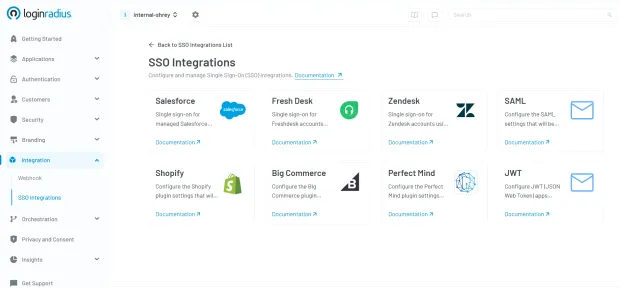
Instead, most teams rely on platforms like LoginRadius or libraries like passport-saml, SAMLtool, or OneLogin’s SAML SDKs for integration. Here’s how easy it is to to configure SSO integrations in the LoginRadius admin console:
SAML in Single Sign-On Architecture
In a typical single sign-on architecture, SAML acts as the assertion pipeline that confirms who the user is and what they can access before that user ever touches your application.
It gives IT teams the ability to centrally manage identity, reduce login fatigue, and meet strict compliance requirements, all while offering users a seamless experience.
Overview of OAuth
So far, we’ve covered OpenID Connect for modern authentication and SAML for enterprise SSO, but what about OAuth? Chances are, if your app is interacting with APIs or integrating with third-party services, OAuth is already part of the picture.
But here’s the twist: OAuth isn’t actually an authentication protocol. It’s an authorization framework. And yet, it plays a major role in many SSO authentication flows.
What is OAuth?
OAuth 2.0 is a widely adopted standard that lets applications securely access resources on behalf of a user without sharing passwords.
Think of it like this:
You want to give a food delivery app access to your Google Calendar to check your availability, but you don’t want to hand over your Google password. OAuth makes that possible.
Instead of the user handing over their credentials, the app redirects the user to Google (the authorization server), and after successful consent, it gets a token that grants limited access (e.g., read-only calendar events).
How OAuth Works in SSO Scenarios
Although OAuth alone doesn’t authenticate users, it’s often combined with OpenID Connect (OIDC) to create an SSO experience, especially in web and mobile apps.
Here’s the general OAuth flow (simplified):
-
Authorization Request: The user tries to access an app, which redirects them to the Authorization Server.
-
Consent + Login: The user logs in (if needed) and consents to data access.
-
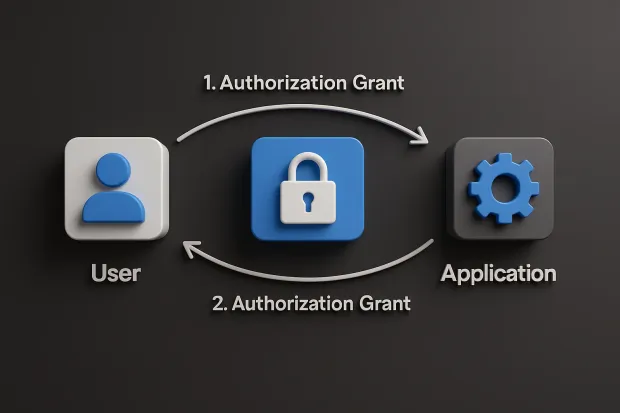
Authorization Grant: The Authorization Server sends back a code.
-
Access Token Exchange: The app exchanges the code for an Access Token (and optionally a Refresh Token).
-
Resource Access: The app uses the token to access APIs or user data.
If OpenID Connect is layered on top, you also get an ID Token, which actually proves user identity.
When Should You Use OAuth?
OAuth shines in:
-
API access delegation
-
Machine-to-machine (M2M) authentication
-
Mobile and SPAs (Single Page Applications)
-
Third-party integrations
-
Customer-facing platforms where SSO also requires granular data scopes
If you’re building any kind of product where users link external accounts or services, OAuth is essential.
Security Considerations
OAuth is powerful but not foolproof. Here’s what to watch out for:
-
Always use short-lived tokens with refresh rotation
-
Validate redirect URIs to prevent open redirects
-
Implement PKCE for public clients (e.g., mobile apps)
-
Don’t confuse authentication (who the user is) with authorization (what they can do)
Also, make sure your implementation uses HTTPS everywhere and avoid storing tokens in local storage.
How OAuth Fits into SSO Authentication
While OAuth doesn’t natively provide single sign-on, it is often used in tandem with OIDC to enable SSO flows, particularly for consumer apps, SaaS tools, and mobile-first platforms.
What is the Difference Between OpenID, SAML, and OAuth?
By now, you’ve seen that OpenID Connect, SAML, and OAuth are all foundational protocols that can support single sign-on authentication, but they serve different purposes and are built for different eras and ecosystems.
Here’s a simple way to think about them:
-
OpenID Connect = authentication for modern web and mobile apps
-
SAML = authentication for enterprise and legacy systems
-
OAuth = secure authorization (not authentication), often layered with OpenID for SSO
Let’s break that down further.
OpenID Connect vs SAML vs OAuth 2.0
| Feature / Criteria | OpenID Connect (OIDC) | SAML 2.0 | OAuth 2.0 |
|---|---|---|---|
| Primary Function | Authentication (who the user is) | Authentication (who the user is) | Authorization (what the user can access) |
| Underlying Protocol | Built on OAuth 2.0, uses JSON + REST | Uses XML + SOAP, older architecture | Token-based authorization, JSON + REST |
| Token Format | ID Token in JWT format | SAML Assertion (verbose XML) | Access Token (Bearer token, optional refresh) |
| Login Flow | Token-based redirect + callback | Browser POST redirect + assertion | Authorization code exchange + optional consent |
| Common Use Cases | B2C login, mobile apps, SPAs, CIAM, social login | Enterprise SSO, internal tools, compliance systems | Third-party API access, M2M auth, delegated scopes |
| SSO Support | Full support | Full support | Requires an OpenID layer for true SSO |
| Multi-Factor Auth (MFA) Support | Easy integration with adaptive MFA | Common in enterprise flows | Handled externally, via Identity Layer |
| Session Management | Modern token/session handling via ID tokens | Centralized session control via IdP | Token-based session; no native login session |
| Mobile-Friendliness | Designed for mobile + SPAs | Not ideal for mobile/web hybrids | Excellent for mobile + API-first apps |
| Ease of Integration | Developer-friendly SDKs, easy to scale | Complex XML integration, more IT-heavy | Moderate complexity; requires careful token handling |
| Security Posture | Strong: JWT validation, PKCE, scopes, consent | Strong: Signed assertions, certificate validation | Depends on scopes, implementation, and token hygiene |
| User Consent / Granular Permissions | Fine-grained scopes + consent screen | Typically all-or-nothing | Scopes define specific resource access |
| Who Typically Uses It? | App developers, CIAM teams, startups | IT admins, security/compliance teams | API developers, integrators, platform engineers |
| Ideal For | Fast-moving teams building apps with modern SSO | Enterprises needing secure, centralized identity | Platforms that need secure API/data sharing |
How They Differ
-
Use OpenID Connect if you’re building a customer-facing app and want to offer secure login via social providers or external IdPs. It’s great for modern CIAM.
-
Use SAML if you're supporting enterprise SSO across internal tools, especially with AD or other legacy infrastructure.
-
Use OAuth 2.0 when you need delegated access to APIs, machine-to-machine integration, or app-to-service authorization.
In most real-world sso integration use cases, you’ll see these combined:
-
OAuth + OIDC for user login + data access
-
SAML + MFA for enterprise-grade security
-
Federated IdPs where OpenID and SAML coexist
Choosing the Right Protocol for Your SSO Implementation
By now, you know that OpenID Connect, SAML, and OAuth 2.0 each serve a unique role in the SSO ecosystem. But the big question is: Which one should you use?
The answer isn’t one-size-fits-all. Your ideal protocol depends on your audience, tech stack, security needs, and the type of application you're building.
Let’s walk through a practical breakdown.
If You’re Building a Customer-Facing (B2C) Application:
-
Go with OpenID Connect (OIDC).
-
Why? It’s lightweight, mobile-friendly, and ideal for social login, single-page apps, and smooth onboarding experiences.
-
LoginRadius, Google, Microsoft, and others offer ready-made OIDC flows you can plug into your CIAM strategy.
Use cases: → SaaS platforms, fintech apps, eCommerce portals, streaming services
If You’re Supporting Enterprise Users or Internal Tools:
-
Use SAML 2.0.
-
Why? It’s trusted, secure, and integrates deeply with Active Directory, LDAP, and other enterprise IdPs.
-
SAML is the standard in regulated industries where IT departments demand fine-grained control.
Use cases: → HR systems, intranets, healthcare software, finance apps, B2B portals
If You’re Connecting APIs or Third-Party Services:
-
Choose OAuth 2.0 and add OpenID Connect if authentication is needed.
-
Why? OAuth is the gold standard for delegated access, API authorization, and machine-to-machine authentication.
Use cases: → IoT platforms, developer integrations, partner APIs, workflow automation
What If You Need All Three?
That’s more common than you think, especially in hybrid platforms that serve multiple user types.
A modern SSO integration strategy might include:
-
OpenID Connect for customers
-
SAML for enterprise partners or employee access
-
OAuth for connecting to third-party tools and APIs
With a platform like LoginRadius, you don’t have to choose just one. You can build a flexible SSO authentication setup that adapts to your users, not the other way around.
Choosing the right protocol isn’t just a technical decision; it’s a product and user experience decision. The right setup can reduce login fatigue, prevent security vulnerabilities, and accelerate user onboarding across platforms.
IAM Isn’t Just About Control, It’s About Experience
Modern identity is not just a security tool. It’s a business enabler.
-
SSO improves product experience for your users
-
SSO reduces administrative overhead for your IT team
-
SSO lays the foundation for zero-trust, compliance, and intelligent orchestration
In other words, the best IAM systems start with SSO and scale from there.
Conclusion
If you’ve made it this far, you’ve likely realized that Single Sign-On (SSO) is more than just a login shortcut; it’s the access gateway to a safer, smarter, and more scalable digital experience.
Whether you're building a B2C product that prioritizes onboarding speed, a B2B platform that needs secure partner access, or an internal IT ecosystem looking to reduce friction and strengthen governance, SSO should be your first move.
Where LoginRadius Fits In
Implementing secure and flexible SSO can be hard unless you have the right platform.
LoginRadius gives you:
-
Developer-friendly APIs and SDKs for OpenID, OAuth, and SAML
-
Built-in support for social login, B2B federation, and adaptive MFA
-
Hosted login pages and custom branding tools
-
Centralized IAM, provisioning, access policies, and session management
-
Regional data residencyand compliance-ready infrastructure
Whether you're starting fresh or replacing a legacy identity system, LoginRadius helps you build an SSO solution that scales with your business and doesn’t lock you into rigid workflows.
But only if it’s done right with the right protocols, the right architecture, and the right platform to support your identity evolution.
Get started with LoginRadius today- Talk to an identity expert.
FAQs
1. Which protocol is best for enterprise SSO?
A: SAML 2.0 is widely considered the best fit for enterprise SSO. It integrates smoothly with systems like Active Directory, supports Just-in-Time provisioning, and meets strict compliance and governance requirements often found in large organizations.
2. What are the advantages of using OpenID Connect over SAML?
A: OpenID Connect (OIDC) is more lightweight, developer-friendly, and designed for modern web and mobile apps. It uses JSON and REST APIs (instead of XML), making it faster to implement, easier to debug, and more compatible with today’s CIAM use cases.
3. Is OAuth the same as OpenID?
A: Not exactly. OAuth 2.0 is a framework for authorization, while OpenID Connect is a protocol for authentication that runs on top of OAuth. OAuth lets apps access data on behalf of a user; OpenID proves who the user is.