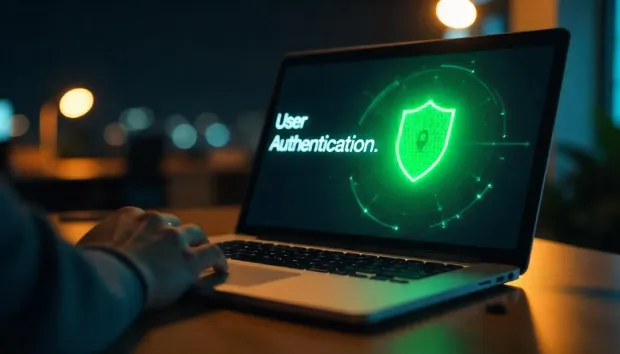
User authentication is the foundation of secure digital access. It is the process of verifying that a user is genuinely who they claim to be before allowing access to applications, data, or services.
In today’s web-first and API-driven environment, every interaction begins with authentication, whether it’s logging into an app, approving a transaction, or accessing enterprise systems. As cyber threats increasingly target identities rather than infrastructure, authentication has become the first and most critical control point in cybersecurity.
Modern authentication goes far beyond simple username and password checks. It includes multiple layers of verification, such as device recognition, behavioral signals, multi-factor authentication (MFA), and risk-based decisioning. These mechanisms work together to ensure that access is granted only when identity confidence is high.
At the same time, user expectations have evolved. Authentication must not only be secure but also seamless. Friction-heavy login experiences can lead to user drop-offs, while weak authentication increases the risk of breaches. This has led to the rise of advanced methods such as biometrics, passkeys, push notifications, and adaptive authentication designed to balance security with usability.
Why this matters today:
-
Identity is now the primary attack surface in most cyber incidents
-
Strong authentication prevents unauthorized access and reduces breach risk
-
Seamless authentication improves user experience and retention
-
It enables compliance with modern security standards and frameworks
In essence, user authentication is no longer just a technical step, it is a critical layer that establishes trust, protects digital ecosystems, and shapes the overall user experience.
This guide focuses specifically on the human experience of logging into applications, the different methods available, real-world use cases, and best practices to build a secure and scalable authentication strategy. For a technical deep dive into backend protocols (OIDC, SAML), machine-to-machine security, and API tokens, see our Comprehensive Guide to Authentication.
How User Authentication Works
While general authentication deals with any entity, User Authentication focuses on the human journey. It is the process of translating a person's identity into a secure digital session through a series of trust-building steps. Consider an example in everyday life: entering a secure building. You might scan your ID badge (something you have). A software system monitored by a security guard compares it to a list of allowed individuals (something they know you are allowed to be). Similarly, in digital environments, login prompts, biometric scans, or SMS-based codes are used to verify authenticity.
A deeper understanding involves recognizing that auth user flows are not one-dimensional. They rely on user authentication techniques such as token-based systems (e.g., OAuth), SAML assertions, biometrics, and risk-sensitive adaptive checks. Each technique addresses specific threats, such as password-leak risks, device theft, or phishing.
By understanding what user authentication is, organizations can design systems that are both secure and welcoming. It’s not just about mechanics—it’s about trust, consistency, and adapting to evolving threats while maintaining user confidence.
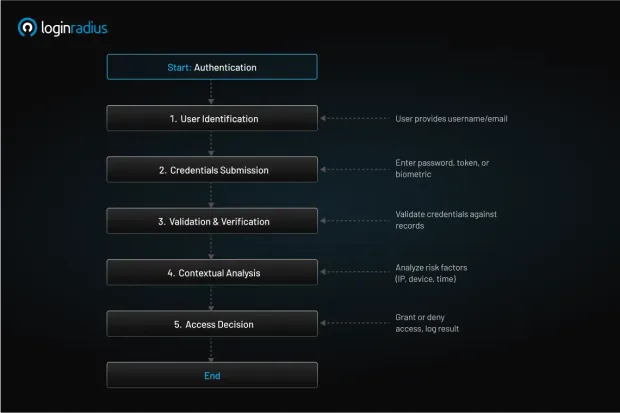
How does user authentication actually work under the hood? At a high level, the process flows through several stages: identify, verify, and grant access.
-
User identification : The user provides a username or email. This step answers the question, “Who is trying to access the system?”
-
Credentials submission : The user submits credentials—this may involve user authentication methods like passwords, biometrics, or tokens.
-
Validation and verification : The system compares submitted data against stored values. If biometrics are used, systems match live scans to enrolled profiles; for passwords, hashes are compared.
-
Contextual analysis : Risk signals—like unusual IP, new device, or login time—are evaluated. Adaptive authentication may trigger additional steps, including MFA.
-
Access decision : If checks succeed, permissions are granted. Logs are recorded for audit. If not, the user is denied access or prompted to retry.
Technologies like push notification authentication simplify modern flows—after entering credentials, a push alert appears on a trusted device for quick approval. For many, this replaces older OTPs or SMS codes, offering both convenience and control. See LoginRadius’s blog on what is multi‑factor authentication for more insight.
Underpinning this is a user authentication system with secure storage of credentials (e.g., hashed passwords), cryptographic libraries, and APIs that protect data in motion. Token-based systems—e.g., JSON Web Tokens (JWTs)—allow session persistence, so users aren’t repeatedly asked to re-authenticate.
In essence, user authentication techniques coordinate multiple layers: identifying devices, verifying factors, assessing risk, and granting access—all while maintaining a seamless user experience.
Types of User Authentication
There are several types of user authentication, each playing a unique role:
-
Something you know : Classic passwords or PINs. Still widespread, but weak if reused or simple.
-
Something you have : Security tokens, smart cards, or hardware keys (e.g., YubiKey).
-
Something you are: Biometrics such as fingerprint, facial, or voice recognition.
-
Something you do : Behavioral biometrics, like typing patterns or navigation habits.
Advanced setups combine these for strong MFA. Consider device fingerprinting, a passive yet powerful method. It collects device attributes (OS, browser, timezone, GPU fingerprints) to build a unique identifier—helping detect risky activity.
Another approach is risk-based authentication, analyzing patterns like failed logins, impossible travel, or transaction anomalies. Adaptive measures might trigger step-up challenges—like OTP or biometric scans. To learn more about risk-based authentication, download this insightful resource:
To stay current, many rely on authentication management platforms—providing centralized dashboards, easy enrollment of new methods, and consistent logging. They support flexible auth types, letting businesses shift seamlessly between SMS-only flows, app-based MFA with push, and full passwordless models.
When evaluating user authentication methods, each type offers a tradeoff between friction and assurance. Multiple methods strengthen security, but maintaining a user-friendly experience is key to adoption.
Key User Authentication Methods
What are the leading user authentication methods that modern organizations rely on? Here are key options:
-
Password-based authentication : Still the baseline. Best practices -salted and hashed storage, strong complexity requirements, breach detection.
-
One-time passwords (OTP) : Delivery via SMS, email, or authenticator apps - read more about what is one-time password here.
-
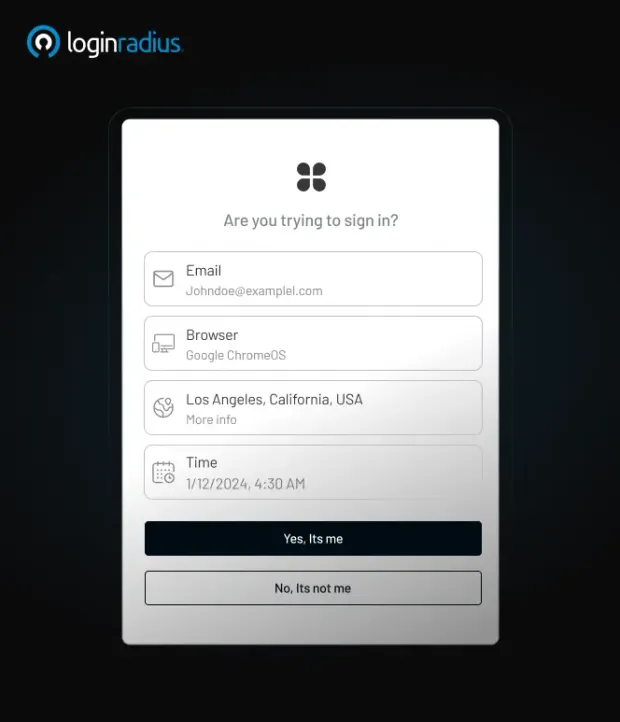
Push notification authentication : A prompt on your device eliminates code entry - fast, secure, branded. Learn more about push notification authentication here.
-
Biometric user authentication : Facial, fingerprint, voice-ties identity to an individual’s physical traits. Works offline, friction‑free.
-
Hardware tokens : YubiKeys or smart cards-immune to phishing. Insert, tap, and authenticate.
-
Passwordless login : Passwordless login offers email or magic-link sign-in approaches eliminating the need for passwords entirely.
-
Certificate-based auth : Used heavily in enterprise scenarios with digital certificates stored in TPMs.
For API and service‑to‑service flows, many rely on token-based authentication (e.g., JWT, OAuth 2.0). These tokens carry authentication info in a portable, signed format, enabling sessionless, stateless operations.
Platforms like LoginRadius provide built-in support for these user authentication techniques, allowing configuration of multiple methods, token lifespans, certificate rotation, and risk signals. Read the developer docs to learn more about LoginRadius authentication configuration.
User Authentication Methods Compared
| Method | Security Level | Phishing Resistance | User Friction | Best For | Limitation |
|---|---|---|---|---|---|
| Password (SFA) | Low | Low | Low | Legacy systems | Easily compromised |
| OTP (SMS/Email) | Medium | Low | Medium | Consumer apps | Vulnerable to interception |
| TOTP Apps | High | Medium | Medium | SaaS platforms | Requires manual input |
| Push Notifications | High | Medium | Low | Mobile-first apps | MFA fatigue attacks |
| Biometric Authentication | Very High | High | Low | Consumer & enterprise apps | Device dependency |
| Hardware Keys | Very High | Very High | Medium | Enterprises | Cost, hardware required |
| Passwordless (Passkeys) | Very High | Very High | Very Low | Modern apps | Adoption still growing |
Why is User Authentication Important?
User authentication is mission-critical for several reasons:
1. Security and Fraud Prevention
Without verifying identity, attackers can steal credentials, impersonate users, or gain unauthorized access. This leads to data breaches, fraudulent transactions, and brand damage.
2. Regulatory Compliance
Laws like GDPR, HIPAA, and PCI DSS demand authentication standards—MFA is often mandatory. A robust authentication system simplifies compliance audits.
3. User Trust and Experience
Secure authentication builds emotional trust. When a user feels confident their data is protected, they’re more likely to stay, engage, and recommend your brand.
4. Operational Resilience
Proper authentication management reduces password reset tickets, lowers IT helpdesk burden, and prevents downtime due to credential misuse.
5. Business Growth Enablement
Strong authentication opens doors-APIs, third-party integrations, and digital services rely on proven identity systems. You can onboard partners more securely and scale faster.
For example, banks use layered user authentication techniques—such as password, device token, OTP, and biometric-to ensure that high-value transactions are genuinely authorized. Meanwhile, SaaS platforms might employ authenticating users via OAuth tokens for secure integration with external tools.
Across industries, when organizations treat user identities with seriousness, they protect data, meet obligations, and enable innovation. The alternative-weak or no authentication-exposes you to fraud, fines, and regulatory action.
Key Statistics
• Over 80% of breaches involve stolen or weak credentials (Verizon DBIR)
• MFA blocks 99.9% of automated attacks (Microsoft)
• The average cost of a data breach is $4.88 million (IBM 2024)
• PCI DSS 4.0 mandates MFA for accessing cardholder data
These numbers highlight why strong user authentication is essential for modern security.
Modernize your Authentication Strategy
Upgrading your user authentication system doesn’t always mean a full overhaul. It starts with smart, incremental steps tied to strategy:
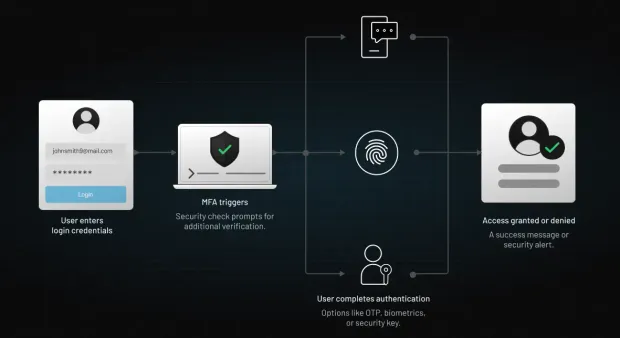
- Adopt Multi Factor Authentication (MFA): Push-based MFA, OTP, or biometrics drastically increase security. Learn how MFA adds context in this guide on what is multi‑factor authentication.
-
Implement Risk‑Based Adaptive Policies: Evaluate login context—device, location, timing and trigger step-up when needed.
-
Add Biometric User Authentication: Facial or fingerprint adds passive assurance and ease. Ideal for mobile apps.
-
Move Toward Passwordless Flows: Use magic links or push prompts for low-friction, high-security access.
-
Secure Token Generation: Use secure JWTs, refresh flows, certificate rotation, and store tokens in secure enclaves like HSMs or TPMs.
-
Enhance User Experience: Offer clear error messages, branded push notifications, and seamless fallback options.
-
Educate Users: Teach strong password habits, phishing awareness, and device hygiene.
-
Monitor and Audit: Log authentications, failed attempts, and reset actions. Tune detections over time.
Tools such as adaptive authentication/risk-based authentication, threat intelligence feeds, and analytics dashboards support stronger auth flows, reducing false alarms and increasing genuine trust. By layering your approach with password, token, push, and device check, you create a comprehensive system that’s also easy to use.
User Authentication / Security Hardening Checklist
To maintain resilient authentication over time, follow these user authentication best practices:
-
Enforce strong password policies: Ensure all user passwords meet a minimum length (typically 12+ characters) and are updated regularly. Avoid personal information, dictionary words or predictable patterns. Implement password checkers to guide users during creation. You can take help of this insightful guide for setting up a strong password.
-
Use salted hashing: Store passwords using secure hashing algorithms like bcrypt, Argon2, or PBKDF2, paired with unique salts. This prevents attackers from easily reversing stolen password hashes during breaches.
-
Enable MFA across the board: Add a second layer of authentication using push notifications or biometrics for higher assurance. SMS can serve as a fallback, but should not be the primary method due to security concerns.
-
Provide secure self‑service: Allow users to manage authentication methods through a secure portal—register devices, switch authenticators, or reset factors without compromising system integrity.
-
Continuously monitor risk: Deploy anomaly detection to track login behavior, such as sudden IP changes or logins from unfamiliar devices, triggering adaptive responses like step-up authentication.
-
Implement secure session handling: Bind authentication tokens to specific devices, limit their lifespan, and ensure automatic revocation upon logout or inactivity to reduce hijacking risks.
-
Educate employees and users: Offer ongoing security training, including phishing simulations and updates on common threats. Keep users informed with clear, digestible best-practice guidelines.
-
Stay patched: Regularly update authentication frameworks, TLS protocols, and certificate authorities to protect against known vulnerabilities and emerging exploits.
-
Adopt zero‑trust principles: Assume no implicit trust—validate every identity, network segment, and data request continuously to prevent lateral movement and insider threats.
-
Plan for recovery: Design fallback mechanisms like secure secondary contact methods or manual verification with support agents to restore access without compromising security.
By applying these, you reinforce both the mechanics and the user journey, ensuring authenticating users are friction‑aware while maintaining rigorous defense. Beyond tactics, governance remains essential: clear roles, audit trails, and incident response plans prepare organizations for breaches or policy changes.
Challenges of User Authentication
Security Threats
1. Phishing Sophistication
Phishing attacks have evolved into highly sophisticated campaigns that mimic legitimate login pages and capture credentials in real time. Attackers increasingly use adversary-in-the-middle (AiTM) techniques to intercept authentication flows and bypass traditional protections.
To mitigate this risk, organizations should adopt phishing-resistant methods such as passkeys, hardware security keys, and adaptive MFA with contextual verification.
2. MFA Fatigue and Push Approval Attacks
Repeated authentication prompts, especially in push-based MFA systems, can lead users to approve requests without verifying them. Attackers exploit this behavior through MFA fatigue attacks.
Mitigation strategies include number-matching authentication, limiting push requests, and displaying contextual login details.
3. Session Hijacking and Token Security
Even after successful authentication, sessions can be compromised through token theft or session hijacking attacks.
Implementing secure token storage, short-lived tokens, refresh token rotation, and session monitoring reduces these risks.
4. Scalability Under Attack
Authentication systems must handle large spikes in traffic, especially during credential stuffing or brute-force attacks. Poorly designed systems can become bottlenecks or fail under load.
Implementing rate limiting, bot detection, and distributed authentication infrastructure ensures resilience under high traffic conditions.
Friction and User Experience
1. Credential Fatigue and Password Reuse
Users often struggle to manage multiple credentials across applications, leading to password reuse and weak password practices. This significantly increases the risk of credential-based attacks.
Organizations can address this by enforcing password policies, enabling MFA, and transitioning toward passwordless authentication methods.
2. User Experience vs Security Trade-Off
Strong authentication mechanisms often introduce friction, such as additional verification steps, which can negatively impact user experience and conversion rates.
Balancing security with usability requires adaptive authentication, where additional checks are triggered only in high-risk scenarios.
3. Device Proliferation and Management
Users access systems from multiple devices, including mobile phones, laptops, and tablets. Managing authentication across these devices while maintaining security can be challenging.
Device recognition, trusted device policies, and session management strategies help ensure secure access without excessive friction.
4. Offline and Connectivity Limitations
Some authentication methods, such as push notifications, require internet connectivity. In offline scenarios, users may be unable to authenticate.
Providing fallback options like TOTP apps or backup codes ensures uninterrupted access.
Operational & Compliance Hurdles
1. Legacy System Compatibility
Many organizations rely on legacy systems that were not designed for modern authentication standards. Integrating MFA, SSO, or passwordless authentication into these environments can be complex and resource-intensive.
A phased modernization approach using identity platforms that support legacy integrations can help bridge this gap without disrupting existing workflows.
2. Biometric Privacy and Data Concerns
Biometric authentication introduces concerns around data storage, privacy, and misuse. Unlike passwords, biometric data cannot be changed if compromised.
To mitigate this, organizations should use secure enclaves, on-device processing, and avoid storing raw biometric data on centralized servers.
3. Regulatory and Compliance Complexity
Different industries and regions have varying authentication and data protection requirements, such as PCI DSS, HIPAA, and NIST guidelines. Ensuring compliance across multiple frameworks can be complex.
Organizations should implement flexible authentication systems that support policy-based controls and audit logging to meet regulatory requirements.
4. API and Microservices Authentication Complexity
Modern applications rely heavily on APIs and microservices, requiring secure authentication between services, not just users. Managing tokens, scopes, and service identities adds complexity.
Using token-based authentication (JWT, OAuth 2.0) and proper token lifecycle management helps secure machine-to-machine communication.
5. Identity Lifecycle and Account Recovery
Managing account recovery, password resets, and identity lifecycle events (like device changes) introduces security risks if not handled properly.
Secure recovery mechanisms, identity verification checks, and audit trails are essential to prevent unauthorized access during recovery flows.
User authentication is essential for security, but it comes with real-world challenges that organizations must address proactively. By combining modern authentication methods, adaptive security, and strong implementation practices, businesses can overcome these challenges while maintaining both security and user experience.
User Authentication Use Cases
Let’s explore real-world user authentication scenarios:
1. Banking Apps
Users authenticate with a username/password, then additional biometric user authentication (face ID or fingerprint) for sensitive transactions. Risk analysis flags unusual transfers.
2. SSO in Private and Public Sector
Employees access mail, CRM, and HR systems through a corporate identity provider (IdP), streamlining login while maintaining security. Auth user flows typically leverage SAML protocols, combined with MFA methods like push notifications or OTPs, and device certificates for added assurance. See how the City of Rochester implemented secure SSO and improved workforce access with LoginRadius.
3. E-Commerce Sites
Shoppers sign in with email and OTP or magic link, avoiding password overhead. High-value orders trigger push confirmation.
4. API/Developer Platforms
Services authenticate via OAuth2 tokens. Token lifecycle management, scopes, and key rotation enable secure integration.
5. Healthcare Portals
Patients use strong digital verification methods and OTPs to securely access their medical records. Ensuring HIPAA compliance involves maintaining audit logs and managing access based on explicit consent. Discover how Health Vision leveraged LoginRadius to deliver compliant, user-friendly authentication for sensitive healthcare data.
6. Educational Platforms
Students access courses using a password + OTP. Remote proctoring leverages biometric device checks and behavioral analysis.
7. IoT and Connected Devices
Devices authenticate via certificates and secure tokens; end‑users register mobile apps with push notifications or biometrics.
Each scenario uses a tailored combination of user authentication methods, balancing security, privacy, and experience demands.
Conclusion
User authentication is the process that verifies identity before access is granted, and it remains the most important control point in modern cybersecurity.
As threats continue to shift toward identity-based attacks, relying on a single method like passwords is no longer sufficient. Organizations must adopt layered authentication strategies that combine multiple factors, contextual signals, and continuous validation to protect users, systems, and data.
Modern user authentication systems go beyond login screens. They incorporate multi-factor authentication (MFA), biometrics, token-based flows, and adaptive risk-based policies to ensure that access decisions are accurate, secure, and seamless.
Key takeaways:
-
User authentication verifies identity before granting access
-
Strong authentication reduces unauthorized access and credential-based attacks
-
Modern methods like MFA, passkeys, and adaptive authentication improve both security and user experience
-
Authentication is essential for compliance with standards like PCI DSS, HIPAA, and NIST
-
A layered, adaptive approach is the most effective way to secure digital environments
In simple terms, user authentication is the foundation of trust in any digital interaction. Without it, secure access, data protection, and user confidence cannot be achieved.
Build Secure User Authentication with LoginRadius
If you're looking to implement secure, scalable, and modern user authentication, LoginRadius provides a complete identity platform designed for today’s security needs:
-
Support for password, MFA, biometrics, push notifications, and passkeys
-
Adaptive authentication with real-time risk evaluation
-
OAuth 2.0, OpenID Connect, and token-based authentication support
-
Developer-friendly APIs and pre-built authentication workflows
Book a demo and strengthen your authentication strategy today, and stay ahead of evolving identity threats.
Frequently Asked Questions
Q: What is user authentication?
A: User authentication is the process of verifying the identity of a user before granting access to a system or application.
Q: How does user authentication work?
A: It works by collecting credentials, validating them against identity records, and granting access through a session or token.
Q: What is the difference between authentication and authorization?
A: Authentication verifies identity, while authorization determines what a user is allowed to access.
Q: What are the most secure authentication methods?
A: Passkeys, hardware security keys, and biometric authentication are among the most secure methods.
Q: Why is user authentication important?
A: It prevents unauthorized access, protects sensitive data, and ensures compliance with security standards.
Q: What is passwordless authentication?
A: Passwordless authentication eliminates passwords and uses biometrics, tokens, or device-based verification instead.