Push notification authentication is a modern authentication method that verifies user identity through a real-time approval request sent to a trusted mobile device. Instead of entering passwords or one-time codes, users simply approve or deny login attempts with a single, real-time tap making authentication both secure and frictionless. This method combines device possession (something the user has) with user interaction (something the user does) to significantly enhance security.
As cyber threats increasingly target user identities, traditional methods like passwords and OTPs are no longer sufficient. Stolen credentials, phishing attacks, and SIM-swapping have exposed the limitations of these approaches. Push authentication addresses these challenges by eliminating manual code entry and introducing device-based, context-aware verification.
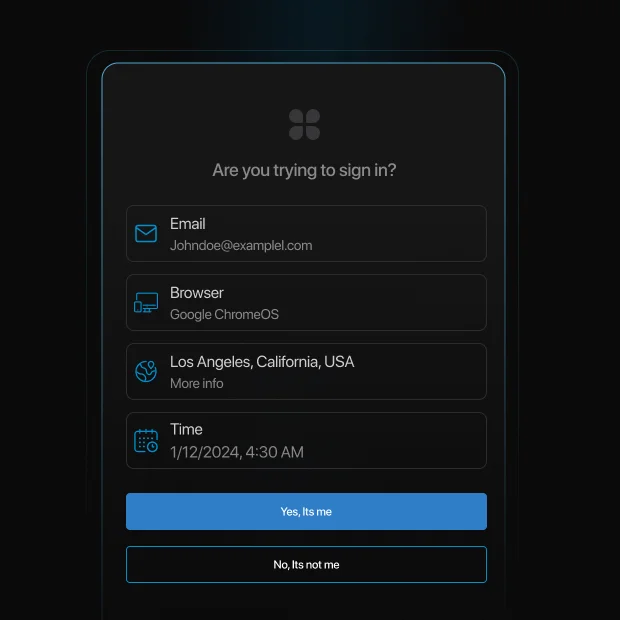
In a typical flow, when a user attempts to log in, a push notification is sent to their registered device with details such as location, device type, and time of access. The user can then approve or deny the request instantly. This not only improves security but also enhances user experience by reducing login friction.
Why push authentication is gaining adoption:
-
Eliminates password and OTP entry, reducing user friction
-
Reduces risk of phishing and credential-based attacks
-
Enables real-time, device-based identity verification
-
Improves login success rates and user experience
-
Supports modern MFA and passwordless authentication strategies
Modern implementations also include advanced security controls such as number-matching authentication, contextual prompts, and adaptive risk-based checks. These enhancements help prevent attacks like MFA fatigue and unauthorized approvals.
In this guide, we’ll explain what push notification authentication is, how it works step by step, its advantages and limitations, real-world use cases, and best practices for secure implementation.
Push authentication is widely used in multi-factor authentication (MFA) solutions, adding an extra layer of protection against unauthorized access. It is commonly implemented by banking services, corporate security systems, and cloud-based applications to prevent fraudulent logins. It is also implemented by other industries as part of their adaptive MFA strategy.
This is a specialized guide on Push notification authentication methods. For a look at the human login journey, see our User Authentication Guide. For backend protocols and machine-level security, see our Comprehensive Guide to Authentication.
How Push Authentication Works?
Push authentication follows a straightforward and user-friendly process:
-
User Initiates Login: The user attempts to log into an application or access a protected resource.
-
Server Sends a Push Message: The authentication server generates a push request and sends notifications to the user’s registered device.
-
User Reviews the Request: The push alert notification contains details such as login location, device information, and time.
-
User Approves or Denies: The user can approve the authentication request if it is legitimate or deny it if it appears suspicious.
-
Access is Granted or Denied: If approved, access is granted; if denied, the login attempt is blocked.
What Are the Advantages and Challenges of Push Authentication?
Advantages of Push Notification Authentication
-
Enhanced Security: Since push authentication requires both device possession and user approval, it is more secure than passwords or OTPs.
-
Seamless User Experience: Users do not need to memorize passwords or enter codes manually, reducing friction during authentication.
-
Real-Time Alerts: Users receive immediate notifications of any login attempts, enabling them to take quick action against unauthorized access.
-
Phishing Resistance: Unlike traditional authentication methods, push authentication minimizes the risk of phishing attacks by eliminating the need to enter credentials.
-
Cost-Effective: Reduces reliance on SMS-based OTPs, lowering operational costs and improving authentication efficiency.
Why Push Authentication Is Growing
-
MFA blocks 99.9% of automated attacks (Microsoft)
-
Over 80% of breaches involve stolen credentials (Verizon DBIR)
-
Push-based MFA adoption is rapidly increasing across enterprises (Gartner)
These trends show why organizations are moving beyond passwords and OTP-based authentication.
Challenges of Push Notification Authentication
Device Dependency
Push authentication requires users to have access to a registered device. If a device is lost or changed, users may face login disruptions unless backup authentication methods are configured.
Internet Connectivity
Push notifications rely on internet connectivity. In offline scenarios, users may not receive authentication requests, making fallback methods like TOTP essential.
Device Compatibility
Not all devices or operating systems support push notifications equally. Older devices or restricted environments may limit functionality.
MFA Push Fatigue
Repeated authentication requests can lead to accidental approvals, especially if users are not trained to recognize suspicious activity.
Approval Phishing (AiTM Attacks)
Attackers can intercept authentication flows and trick users into approving malicious requests in real time.
User Adoption Challenges
Some users may not understand push-based authentication flows, requiring onboarding and education for smooth adoption.
MFA Push Fatigue: The Biggest Risk of Push Authentication
MFA push fatigue (also known as MFA bombing) is one of the most common attacks against push notification authentication.
In this attack, an attacker repeatedly sends login approval requests to a user’s device until the user accidentally or unknowingly approves one. This tactic relies on human behavior rather than technical vulnerabilities.
A well-known example is the 2022 Uber breach, where an attacker sent repeated push notifications until a contractor approved one, granting access to internal systems.
How to prevent push fatigue attacks
-
Use number-matching authentication instead of simple approve/deny
-
Limit the number of push requests within a time window
-
Show contextual details (location, device, time) in the notification
-
Enable risk-based authentication to detect suspicious patterns
Modern push authentication systems combine these controls to significantly reduce attack success rates.
Number Matching Authentication
This is a modern technique that requires the user to type a 2-digit number or select the right one from a few options, from the login screen.
Where Is Push Authentication Used?
Push authentication is widely used across various industries, including:
Financial Services
Push authentication is widely used in banking and fintech applications to approve transactions and secure account access. When a user initiates a login or high-value transfer, a push notification is sent with contextual details such as location, device, and transaction amount. This allows users to instantly approve or deny requests, significantly reducing fraud and unauthorized access.
E-Commerce
Push notifications help verify high-value purchases, account logins, and payment changes in real time. Instead of relying on OTPs, users can approve actions with a single tap, reducing checkout friction while preventing unauthorized transactions. This balance between security and user experience is critical for minimizing cart abandonment.
Enterprise Security (Workforce Identity)
Organizations use push authentication to secure employee access to internal systems, VPNs, and cloud applications. It enables strong multi-factor authentication without disrupting productivity. Employees receive login approval requests on trusted devices, ensuring secure access to corporate resources while maintaining a seamless workflow.
Healthcare
Healthcare platforms use push authentication to protect access to electronic medical records (EMRs) and sensitive patient data. Medical professionals can securely authenticate access requests while maintaining compliance with regulations like HIPAA. Push notifications also provide audit trails for security and compliance monitoring.
Government and Public Sector
Government portals use push authentication to secure citizen services, tax systems, and administrative platforms. It helps verify identity for sensitive actions such as document access or benefit claims, ensuring secure and trustworthy digital interactions between citizens and government systems.
Education Platforms
Educational institutions use push authentication to protect student portals, online exams, and administrative systems. It ensures that only authorized users can access academic records, submit assignments, or log into learning platforms, reducing the risk of account misuse.
SaaS and Developer Platforms
SaaS applications and developer tools use push authentication to secure user accounts, admin dashboards, and API access. It provides a frictionless authentication experience for developers and users while ensuring strong protection against credential-based attacks.
How to Add Push Notification Authentication to Your Apps with LoginRadius?
Integrating push message notification authentication into your applications is seamless with LoginRadius. Our platform provides a robust and scalable solution to implement push authentication efficiently.
Steps to Enable Push Authentication with LoginRadius:
-
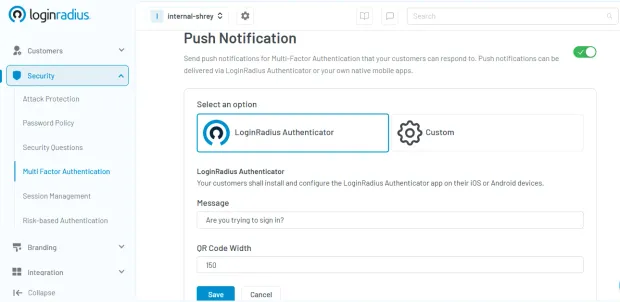
Sign Up for LoginRadius: Create an account on the LoginRadius platform and access the Admin Console.
-
Enable Multi-Factor Authentication (MFA): Navigate to **“Security” **settings and choose and enable multi-factor authentication.
-
Choose Push Notification as an MFA Factor: Select “Push Notifications” as an MFA factor to integrate push authentication into your application.
-
Test and Deploy: Verify the setup by testing push notifications and deploy them into your production environment.
For a detailed implementation guide, refer to our developer documentation.
Push Notifications vs. Other MFA Factors
| Method | Security Level | Phishing Resistance | User Friction | Best Use Case | Limitation |
|---|---|---|---|---|---|
| Push Notifications | High | Medium–High | Low | Mobile apps, SaaS, enterprises | Requires device + internet |
| SMS / Email OTP | Medium | Low | Medium | Consumer apps | Vulnerable to SIM swap |
| TOTP Apps | High | Medium | Medium | Developer platforms, SaaS | Manual entry required |
| Biometric Authentication | Very High | High | Low | Mobile-first authentication | Device dependency |
| Hardware Security Keys | Very High | Very High | Medium | Enterprises, high-security use | Cost, hardware required |
| Passkeys (FIDO2) | Very High | Very High | Very Low | Passwordless systems | Adoption still growing |
For most applications, push authentication offers the best balance between security and user experience, while passkeys and hardware keys provide the highest phishing resistance.
The Growing Need For Push Authentication in Cybersecurity
With the rise in credential-based attacks and data breaches, organizations are increasingly adopting push authentication as a key security measure. Since push notifications require an active user response, they offer a higher level of assurance compared to traditional authentication methods.
Additionally, organizations can integrate adaptive authentication mechanisms, such as analyzing device fingerprinting and login patterns, to further enhance security while keeping the user experience seamless.
Future Trends in Push Notification Authentication
As technology evolves, push notification authentication is expected to become even more sophisticated. Artificial Intelligence (AI) and machine learning (ML) will play a crucial role in detecting anomalies and preventing fraud.
Future advancements may also integrate biometrics with push authentication, creating a multi-layered security approach that is nearly impossible to bypass. Furthermore, enterprises are looking to implement decentralized identity solutions, ensuring greater user privacy and security across digital ecosystems.
Push Authentication and Compliance Requirements
Push notification authentication helps organizations meet modern security and compliance standards.
• PCI DSS 4.0 requires MFA for accessing cardholder data
• NIST 800-63B defines authentication assurance levels (AAL2)
• CISA recommends number-matching push authentication to prevent fatigue attacks
• HIPAA requires secure access controls and audit logging for healthcare systems
Implementing push authentication ensures both security and regulatory compliance.
Conclusion
Push notification authentication has emerged as one of the most effective ways to balance security and user experience in modern authentication systems. Replacing manual code entry with real-time, device-based approvals reduces friction while strengthening identity verification.
As identity-based attacks continue to rise, relying solely on passwords or OTPs is no longer enough. Push authentication adds a critical layer of protection by leveraging trusted devices, contextual signals, and real-time user interaction. When combined with advanced controls like number-matching and adaptive authentication, it significantly reduces the risk of phishing, credential theft, and unauthorized access.
Key takeaways:
-
Push authentication enables fast, secure, and user-friendly login experiences
-
It reduces dependency on passwords and OTP-based methods
-
Advanced implementations help prevent MFA fatigue and approval-based attacks
-
It supports compliance with modern security standards and frameworks
-
It is a key component of MFA and passwordless authentication strategies
For most organizations, push authentication offers the optimal balance between strong security and seamless usability making it a preferred choice for mobile-first, SaaS, and enterprise applications.
Implement Push Authentication with LoginRadius
If you're looking to implement secure and scalable push notification authentication, LoginRadius provides a developer-friendly identity platform with built-in support for modern authentication methods:
-
Push-based MFA with contextual verification and secure approvals
-
Support for passwordless authentication, biometrics, and passkeys
-
Adaptive authentication with real-time risk analysis
-
Easy integration with APIs, SDKs, and pre-built workflows
Book a demo today and start building secure, seamless authentication experiences and stay ahead of evolving identity threats.
FAQs
Q: What is an example of push notification authentication?
A: A push notification authentication example includes receiving a login request on your mobile device with details like location, device, and time. You can approve or deny access directly from the notification.
Q: Are push notifications secure?
A: Yes, push notifications are secure when implemented correctly. They use encrypted communication, signed requests, and contextual verification to ensure safe authentication.
Q: Is push authentication better than OTP?
A: Push authentication is generally more secure and user-friendly than OTP, as it reduces phishing risks and eliminates manual code entry. However, TOTP may be preferred in offline scenarios.
Q: How do I enable push authentication?
A: Push authentication can be enabled through platforms like LoginRadius by configuring MFA settings, selecting push notifications, and testing the setup in minutes.
Q: What is MFA push fatigue?
A: MFA push fatigue is an attack where repeated login requests are sent to trick users into approving one. It can be prevented using number matching and rate limiting.
Q: Can push authentication work offline?
A: No, push authentication requires internet connectivity. Backup methods like TOTP should be configured for offline access.
Q: Is push authentication the same as 2FA?
A: Push authentication is a type of multi-factor authentication (MFA) that verifies identity using a device-based approval mechanism.