Introduction
There was a time when adding an OTP field made a product team feel security-conscious. Job done, box checked, everyone moved on. That version of MFA buying does not hold up anymore. Threats have changed. User expectations have changed. Buyer expectations definitely have changed.
Today, teams evaluating multi factor authentication solutions are not just asking whether a platform supports SMS codes or authenticator apps. They are asking tougher questions. Can it reduce phishing risk? Can it apply step-up authentication only when risk is actually high? Can admins manage policies without opening five tabs and creating three accidental outages? That is the real conversation now.
Here’s where teams usually go wrong. They compare MFA vendors like they are comparing a feature sheet from 2019. One supports OTP. Another supports push. A third adds biometrics. Fine. But modern multi-factor authentication is not about collecting factors like loyalty points. It is about choosing the right factor for the right moment, then enforcing it without making users miserable.
A surprising pattern we’ve seen: many organizations still buy MFA for compliance first and security second. That usually leads to weak defaults, clunky login flows, and policies that annoy legitimate users more than they stop attackers. Password plus SMS may still count as MFA on paper. In practice, attackers are not exactly shaking in fear.
That is why this guide focuses on what buyers actually need to evaluate now: factor strength, adaptive policies, and admin UX. Because good MFA does more than add another step. It makes smarter trust decisions, reduces avoidable friction, and helps security teams stay in control without turning every login into a small act of revenge.
What Is Multi-Factor Authentication?
Multi-factor authentication is exactly what it sounds like: verifying identity using more than one independent factor. Instead of trusting a single password, the system requires two or more categories of proof before granting access. The idea is simple. If one factor is compromised, the attacker still cannot get in.
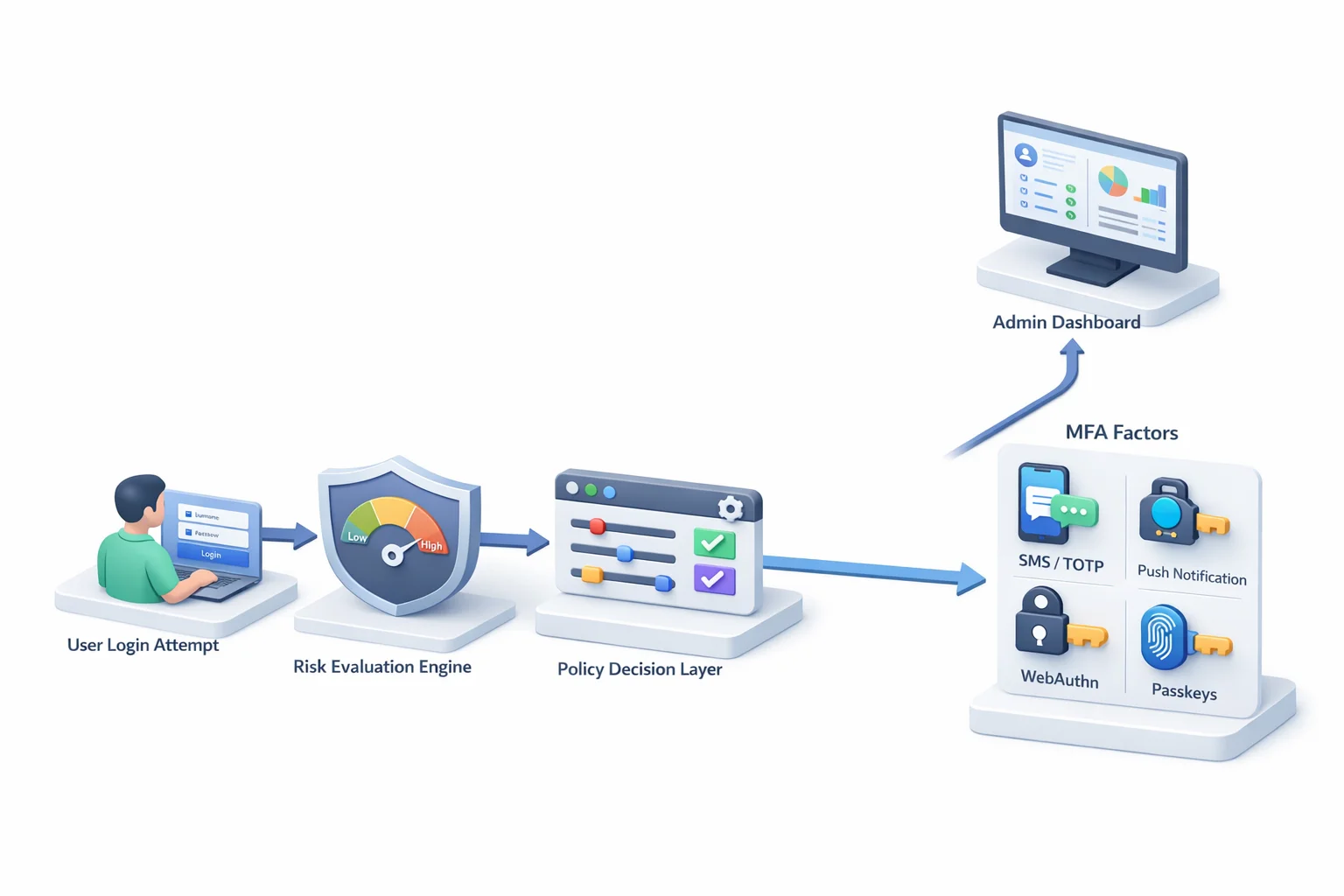
At its core, multi-factor authentication methods fall into three categories. Something you know, such as a password or PIN. Something you have, such as a mobile device, OTP app, or hardware key. Something you are, such as a fingerprint or facial recognition.
Combining factors across categories dramatically increases the security of multi-factor authentication because an attacker must compromise multiple systems at once.
Common multi-factor authentication examples include entering a password and then confirming a one-time code sent to your phone. More advanced examples of multi-factor authentication include logging in with a password and approving a push notification tied to a registered device, or using a passkey backed by biometric verification and cryptographic challenge-response.
But here is the nuance buyers often miss. Not all multi-factor authentication solutions provide the same level of protection. SMS-based OTP is technically MFA, but it is vulnerable to SIM swap attacks. Push notifications can be socially engineered.
Email OTP depends on the security of the email account itself. Meanwhile, WebAuthn and hardware-backed authenticators provide phishing-resistant protection because credentials are bound to the legitimate domain.
Understanding the types of multi-factor authentication available is the first step. Understanding their real-world strength is what separates a secure implementation from a compliance checkbox.
The Real Benefits of Multi-Factor Authentication
The most obvious benefits of multi-factor authentication are easy to list. Reduced account takeovers. Stronger login security. Better compliance alignment. But if those are the only reasons you’re buying it, you’re thinking too small.
The real advantages of multi-factor authentication show up when credentials fail and they will fail. Password databases leak. Users reuse passwords. Phishing kits capture login forms in real time. MFA serves as the second barrier, preventing a compromised password from becoming a compromised account. That single additional factor blocks a massive percentage of automated attacks.
Another major benefit of multi-factor authentication is risk containment. Even if attackers obtain valid credentials, they cannot authenticate without possession of the second factor. This dramatically reduces the success rate of credential stuffing and limits lateral movement within enterprise systems. In other words, MFA shrinks the blast radius.
There is also a business advantage that is often overlooked. Strong multi-factor authentication security builds user trust. Customers are far more likely to engage with digital platforms that demonstrate visible security controls. In regulated industries such as finance and healthcare, MFA is not just good practice; it is expected infrastructure.
Then there is adaptive friction control. Modern multi-factor authentication solutions allow you to apply stronger verification only when risk is elevated. That means fewer unnecessary prompts for legitimate users and stronger defenses against suspicious behavior. Security without constant friction is no longer optional. It is a competitive requirement.
Treating MFA as a compliance requirement misses the point. The true value lies in resilience. It ensures that when one layer breaks, your entire identity system does not collapse with it.
Adaptive MFA: Where Security Stops Being Static
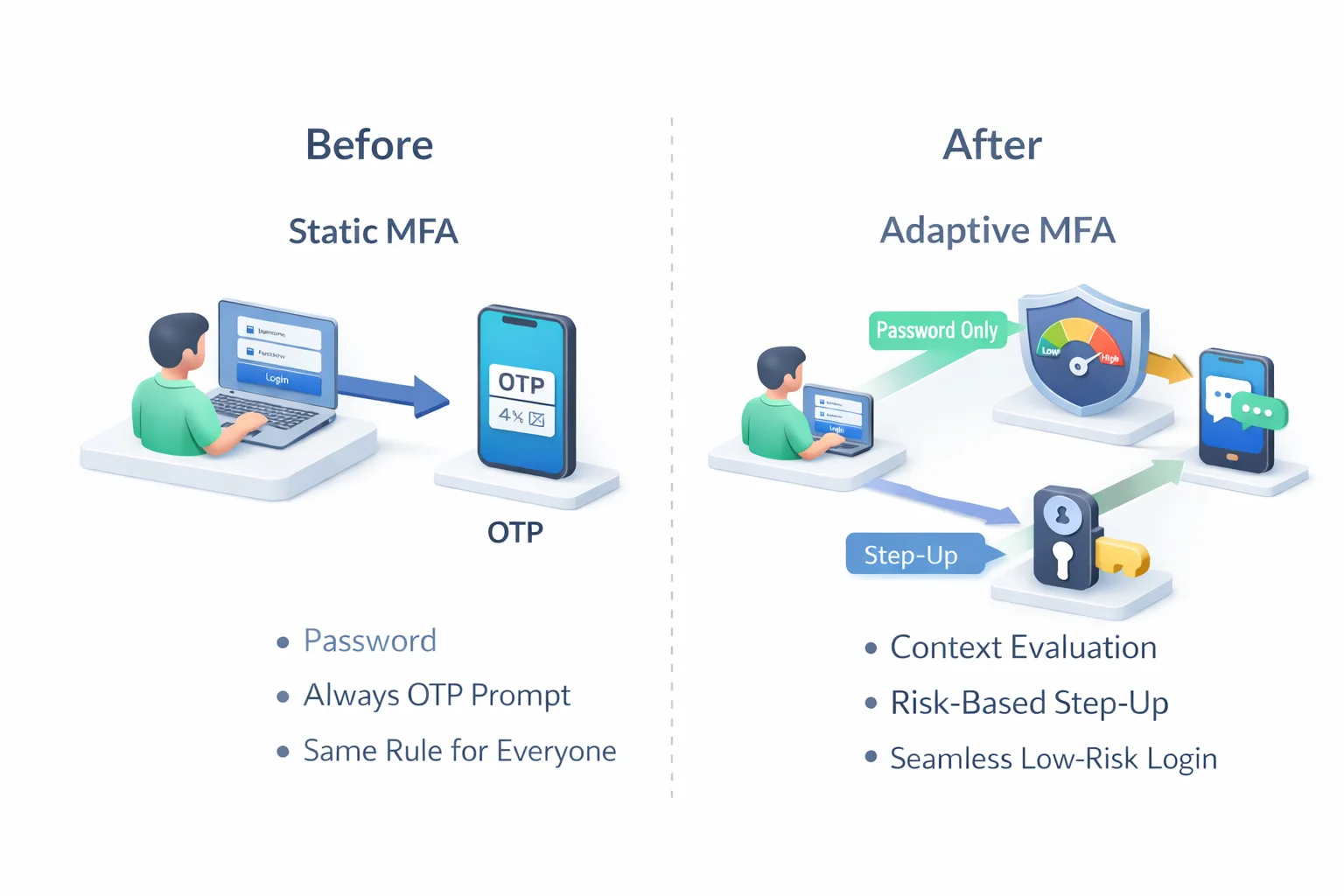
Static MFA policies assume every login attempt carries the same risk. That assumption no longer holds. A login from a recognized device in a usual location at 10 AM is not the same as a login from a new country at 3 AM through an anonymous proxy. Treating both equally either creates unnecessary friction or unnecessary risk.
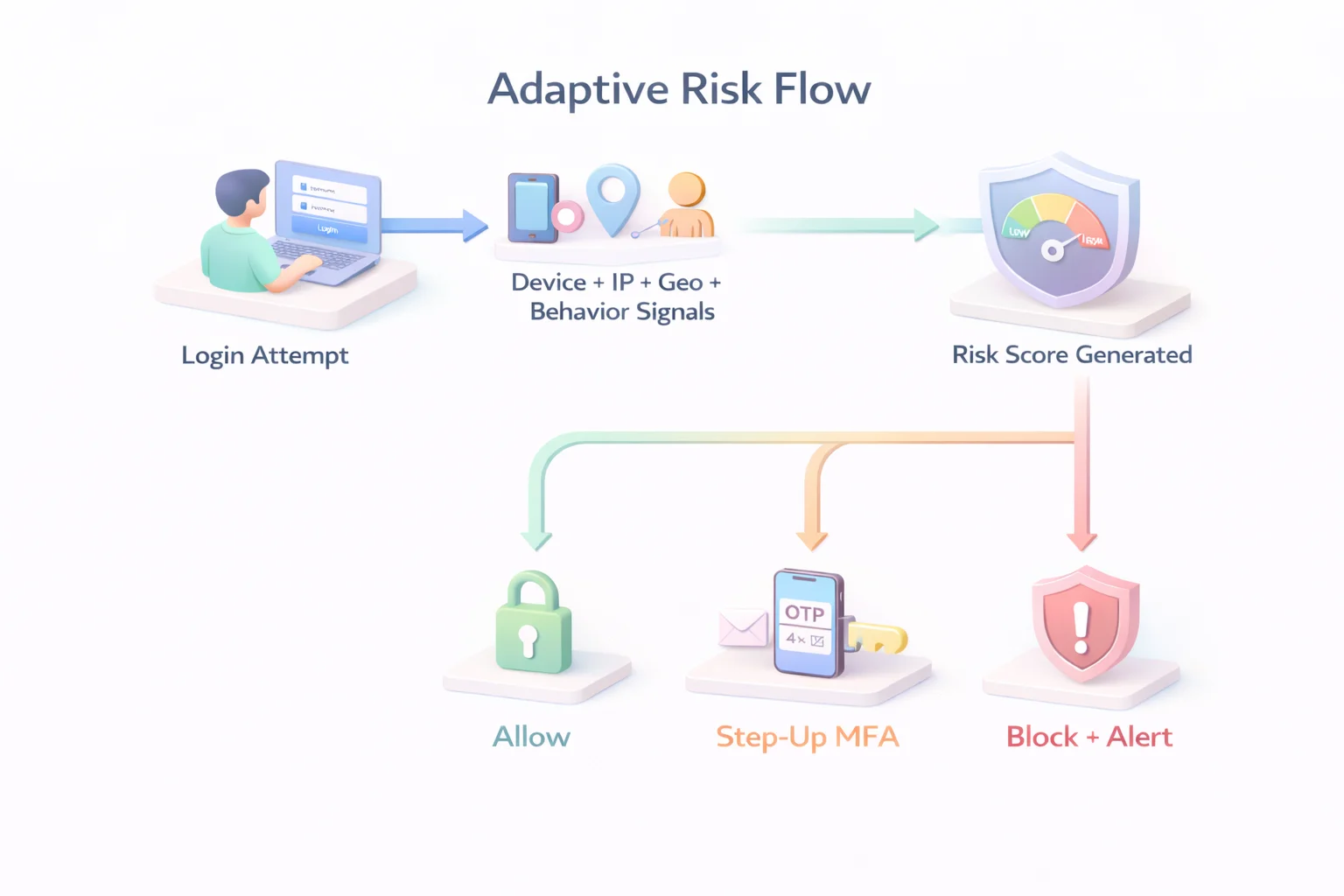
Adaptive multi factor authentication changes that equation. Instead of prompting for the same factors every time, the system evaluates contextual signals in real time before deciding whether to allow access, require step-up verification, or block the attempt entirely.
Modern multi factor authentication solutions evaluate signals such as IP reputation, device fingerprinting, geo-velocity anomalies, impossible travel patterns, behavioral deviations, session history, and prior authentication strength. These signals feed into a risk engine that determines the appropriate response.
A typical adaptive flow looks like this:
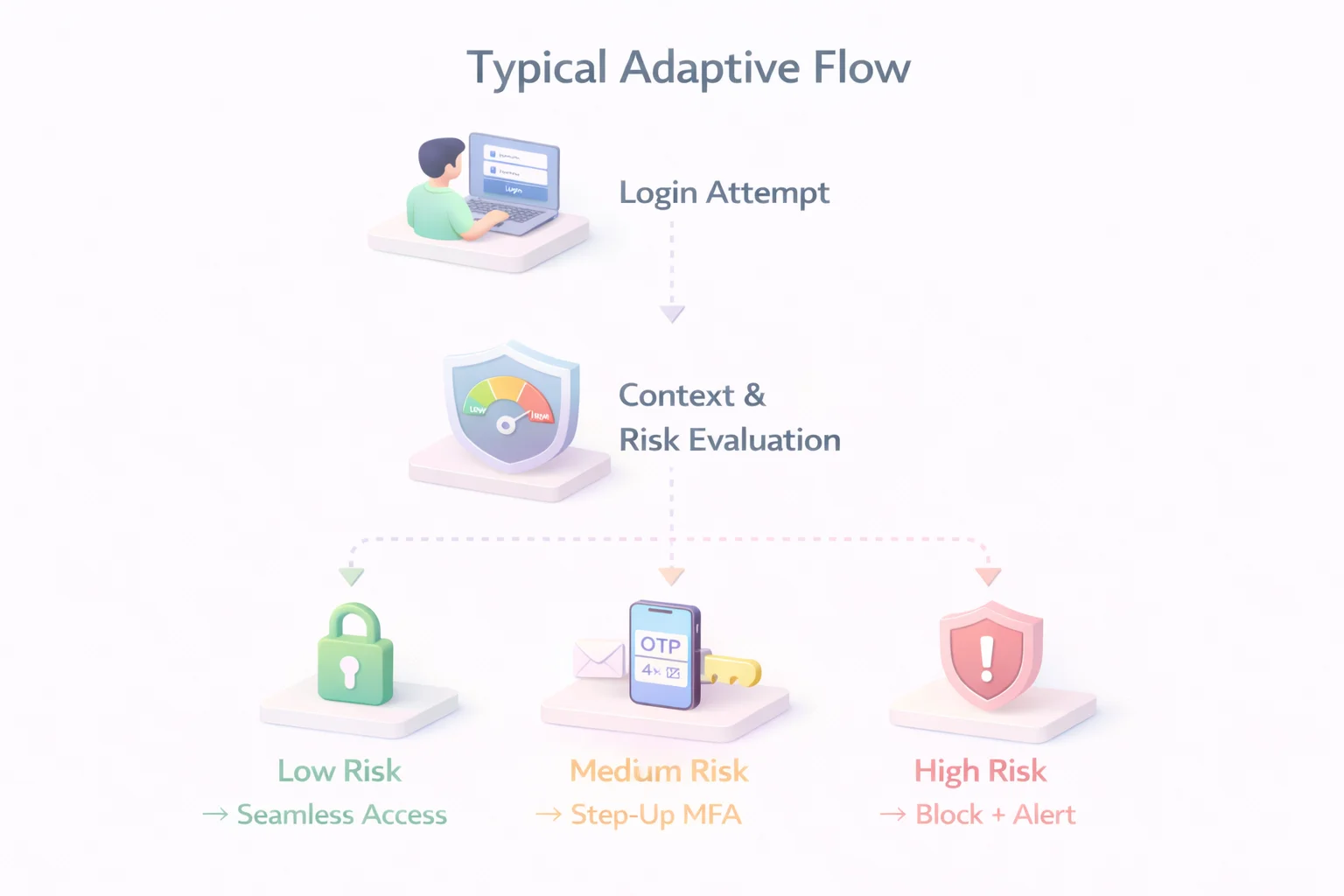
This model strengthens multi-factor authentication security without punishing legitimate users. Low-risk logins remain frictionless. Suspicious activity triggers stronger verification. High-risk attempts are stopped before damage occurs.
Adaptive policies also align closely with zero-trust principles. Trust is not permanent. It is continuously evaluated. A user who authenticated successfully earlier in the session may still be prompted again if behavior changes or risk signals increase.
Buyers evaluating multi-factor authentication solutions should examine how configurable the adaptive engine is. Can policies be customized by application, user role, tenant, or geography? Can risk thresholds be tuned? Can APIs expose risk signals to other security systems? Without flexibility, “adaptive” becomes just another marketing term.
In modern environments, static MFA is predictable. Adaptive MFA is responsive. And attackers tend to prefer predictable defenses.
Admin UX: The Most Overlooked MFA Buying Decision
Security teams rarely complain about having strong authentication. They complain about managing it. Poor admin experience turns even well-designed multi-factor authentication solutions into operational bottlenecks.
Policy configuration is the first pressure point. If creating or modifying MFA rules requires navigating multiple dashboards, writing brittle conditions, or waiting on vendor support, agility disappears. Security becomes slow. And when security is slow, teams look for shortcuts.
Modern multi-factor authentication security depends on clear policy builders that allow granular control without complexity. Administrators should be able to define rules based on user roles, applications, device posture, tenant context, or risk score. They should not need three separate tools to do it.
Auditability is the second requirement. Every authentication attempt, step-up trigger, and policy decision should be logged and easily searchable. When incidents occur, security teams need clear visibility into why a specific multi-factor authentication method was triggered and what signals influenced the decision. Without detailed logs, investigations turn into guesswork.
Delegated administration also matters, especially in B2B SaaS environments. Multi-tenant platforms require tenant-level policy controls without exposing global configuration. A single global MFA rule applied blindly across all tenants creates friction and support overhead.
User self-service is another overlooked dimension. Can users manage their own multi factor authentication methods? Can they enroll new authenticators securely? Can they recover access without bypassing security controls? Poor recovery flows are often the weakest link in otherwise strong MFA deployments.
When evaluating multi-factor authentication solutions, admin UX is not a cosmetic feature. It directly affects security posture. If administrators avoid adjusting policies because the interface is confusing or risky, your defenses stagnate while attacker techniques evolve.
Strong MFA architecture without manageable administration is theoretical security. Practical security requires control that is usable, observable, and adaptable.
How to Evaluate Multi-Factor Authentication Solutions
Most buyers start with a feature checklist. Does it support SMS? Push? Authenticator apps? Maybe passkeys? That’s a start, but evaluating multi factor authentication solutions requires a deeper architectural lens.
First, assess the breadth and strength of the factors. Supporting multiple multi factor authentication methods is important, but what matters more is the quality of those methods. Does the platform support phishing-resistant options like WebAuthn and passkeys? Are device-bound credentials available? Can stronger factors be enforced for high-privilege accounts? A long list of weak options does not equal strong multi factor authentication security.
Second, examine the adaptive engine. Are risk signals evaluated in real time? Can you configure step-up authentication based on IP reputation, device recognition, geo anomalies, or behavioral deviations? Is the risk scoring transparent enough for your security team to understand the rationale behind decisions? Adaptive MFA without policy flexibility quickly becomes rigid.
Third, review policy granularity. Can policies be defined per application, role, tenant, or geography? Enterprise environments rarely operate under a single risk model. A customer login portal does not carry the same risk as an internal admin dashboard. Your multi factor authentication solutions should reflect that difference.
Fourth, analyze integration capabilities. Does the system support modern standards like OIDC and SAML? Are SDKs and APIs available for custom flows? Can authentication signals integrate with SIEM, fraud detection, or identity threat protection tools? MFA does not operate in isolation; it must integrate with the broader identity stack.
Fifth, test scalability and performance. MFA introduces additional network calls, cryptographic operations, and user interactions. Can the solution handle peak traffic without adding noticeable latency? Authentication delays erode user trust faster than most teams realize.
Finally, validate recovery and lifecycle management. Enrollment, factor reset, device replacement, and account recovery are part of the real-world flow. Poorly designed recovery paths can undermine even the strongest multi factor authentication security model.
Choosing multi factor authentication solutions is not about selecting the most features. It is about selecting the right architecture. Buyers who evaluate only surface functionality often discover limitations after deployment, when policy changes are expensive, and user friction is already high.
Common Mistakes Teams Make When Buying MFA
Buying multi factor authentication solutions should reduce risk. In practice, poor decisions often introduce new weaknesses. Most of these mistakes are predictable.
The first mistake is treating MFA as a compliance checkbox. If the goal is simply to say “we have MFA,” teams tend to deploy the fastest method available, usually SMS OTP. While technically valid, SMS offers limited protection against SIM swap attacks and real-time phishing. Compliance may be met, but multi-factor authentication security remains fragile.
The second mistake is overusing friction. Some organizations enforce step-up authentication on every login, regardless of context. While this appears secure, it conditions users to approve prompts reflexively. Push fatigue attacks exploit exactly this behavior. Strong security does not mean constant interruption. It means intelligent interruption.
Another common mistake is ignoring recovery flows. Many breaches do not occur during initial login but during account recovery. If password reset or factor reset processes are weak, attackers can bypass strong multi-factor authentication methods entirely. Recovery design is as important as primary authentication.
Teams also underestimate administrative complexity. Policies that cannot evolve with business needs become stale. As new applications launch or threat models change, rigid MFA configurations either remain unchanged or get bypassed. Both outcomes degrade security over time.
Finally, buyers sometimes ignore phishing resistance. Modern phishing kits can proxy login sessions and capture OTP codes in real time. Deploying MFA without considering origin-bound authentication methods leaves organizations vulnerable to sophisticated attacks. Not all types of multi factor authentication can withstand modern phishing.
The pattern is clear. Weak factor selection, static policies, and poor lifecycle management undermine the very advantages of multi factor authentication. Buying MFA is not difficult. Buying it thoughtfully is.
Multi-Factor Authentication Examples in Real-World Scenarios
Understanding multi factor authentication solutions becomes easier when you see how they operate across different environments. MFA does not look the same in a retail app, a B2B SaaS admin console, or a healthcare portal. The context defines the control.
In a digital banking application, a returning customer logging in from a recognized device may only need to confirm access using an authenticator app. However, if the same account attempts a funds transfer from a new device in a different region, the system can enforce a stronger multi-factor authentication method, such as WebAuthn or a hardware-backed key. The authentication requirement scales with the transaction risk, not just the login event.
For B2B SaaS platforms, privilege level matters. A standard user accessing dashboards might authenticate using TOTP or push verification. But when an administrator attempts to modify access roles or export sensitive data, step-up authentication can be triggered automatically. This layered approach strengthens multi-factor authentication security without introducing unnecessary friction for routine activities.
Healthcare portals operate under similar principles. A clinician logging in from a hospital network during working hours may face minimal prompts. An after-hours login from an unfamiliar network can trigger additional verification before granting access to patient records. The authentication model adjusts to behavior and context rather than applying a single rule universally.
In eCommerce, authentication requirements can be tied to account actions. Browsing products may require no additional verification after login. Changing a shipping address, updating stored payment details, or redeeming loyalty points can trigger an additional factor. This protects high-value actions without interrupting normal browsing behavior.
Platforms like LoginRadius enable these use cases by supporting a range of multi factor authentication methods, including SMS, email OTP, authenticator apps, push notifications, and phishing-resistant WebAuthn.
Policies can be configured by application, user role, or risk context, allowing businesses to apply stronger verification only where it adds meaningful protection. The focus remains on balancing security with usability rather than enforcing blanket controls.
These examples of multi factor authentication highlight a key principle: effective MFA adapts to risk and business logic. It protects sensitive operations while keeping legitimate user journeys smooth. The strength of your authentication model lies not just in the factors you support, but in how intelligently you apply them.
The Future of Multi-Factor Authentication Security
If you think MFA today is mature, look at where authentication is heading. The next evolution is not about adding more factors. It is about removing weak ones and making strong ones invisible.
Passwords are slowly losing relevance. Passkeys and device-bound credentials are redefining what multi factor authentication methods look like. Instead of typing secrets that can be phished or reused, users authenticate using cryptographic keys stored securely on trusted devices.
The authentication challenge is tied to the exact domain, making credential replay useless. This is not an incremental improvement. It is a structural change in multi factor authentication security.
Continuous authentication is another emerging shift. Rather than treating authentication as a single event at login, systems increasingly evaluate behavior throughout the session. Mouse movement patterns, device posture, network changes, and session anomalies feed into dynamic risk scoring.
If trust degrades mid-session, step-up authentication can be triggered automatically. Trust becomes fluid, not permanent.
Artificial intelligence is also influencing the development of adaptive policies. Risk engines are becoming better at identifying subtle anomalies across large datasets. Instead of relying solely on predefined rules, modern multi-factor authentication solutions can incorporate behavioral baselines and anomaly-detection models. This enables more accurate risk-based decisions without increasing friction for legitimate users.
Regulatory pressure is accelerating these changes. Strong customer authentication requirements in financial sectors and zero-trust mandates in enterprise environments are pushing organizations toward phishing-resistant and context-aware authentication. Static OTP-based systems will increasingly struggle to meet these expectations.
The direction is clear. The future of multi-factor authentication security is passwordless, adaptive, and deeply integrated into broader identity threat-protection strategies. MFA will not disappear. It will evolve into a smarter, less intrusive, and more cryptographically grounded layer of identity defense.
Organizations that invest in modern multi-factor authentication solutions today position themselves ahead of the curve. Those who rely on legacy approaches may find that their “second factor” becomes the next weakest link.
Conclusion
Multi-factor authentication is no longer a security add-on. It is foundational identity infrastructure. But simply deploying multiple factors does not guarantee protection. The strength of your defense depends on the quality of your factors, the intelligence of your policies, and the usability of your administration layer.
The most effective multi factor authentication solutions combine strong, phishing-resistant authentication methods with adaptive risk evaluation and manageable policy controls. They reduce friction for legitimate users while increasing resistance against automated attacks, social engineering, and credential abuse. That balance is where modern multi-factor authentication succeeds.
Buyers must move beyond the surface question of “Does it support MFA?” The real question is whether the solution can enforce risk-aligned authentication, scale across applications and tenants, integrate with broader identity ecosystems, and evolve as attacker tactics change.
The advantages of multi factor authentication are undeniable, but only when implemented thoughtfully. Static OTP prompts and rigid policies may satisfy compliance today, yet they rarely withstand tomorrow’s threats. Intelligent, adaptive, and phishing-resistant architectures do.
In the end, MFA is not about adding more prompts. It is about making smarter decisions. Organizations that approach MFA as a strategic identity control rather than a feature checklist will build systems that are not only compliant but resilient.
Book a demo with LoginRadius and see how adaptive, developer-friendly multi factor authentication solutions can secure your users without slowing them down.
FAQs
Q: What are the most secure multi factor authentication methods?
A: Phishing-resistant methods like WebAuthn, FIDO2 security keys, and passkeys offer the highest level of multi-factor authentication security because credentials are cryptographically bound to the legitimate domain.
Q: What are common examples of multi factor authentication?
A: Common multi factor authentication examples include password + SMS OTP, password + authenticator app (TOTP), push-based verification, and biometric-backed passkeys.
Q: What are the benefits of multi factor authentication?
A: The primary benefits of multi-factor authentication include reduced account takeover risk, stronger defense against credential stuffing, regulatory compliance support, and improved user trust.
Q: Is SMS-based MFA secure enough?
A: SMS is better than a password-only login, but it is vulnerable to SIM swap and phishing attacks. Modern multi factor authentication solutions increasingly recommend app-based or phishing-resistant methods instead.