Introduction
MFA vs SSO is one of those comparisons that looks simple at first, but gets confusing fast.
Both are used during login. Both improve authentication. Both are common in enterprise identity systems. So it is easy to assume they do the same job. They do not.
Single Sign-On helps users access multiple applications with one login. Multi-Factor Authentication adds extra proof that the person logging in is actually who they claim to be. One improves access convenience. The other strengthens login security. Although both are part of modern authentication, they solve different problems.
Teams end up treating SSO as a security replacement for MFA. It is not. SSO can reduce password fatigue and simplify access across apps, but if the main login is compromised, that same convenience can become a risk. One stolen credential can open the door to multiple connected systems.
MFA closes that gap by adding another layer of verification. It may ask for a passkey, biometric check, authenticator app approval, security key, or risk-based challenge before access is granted. In contrast, SSO focuses on reducing repeated logins and centralizing identity through an identity provider. The strongest setup is not MFA or SSO. It is MFA with SSO.
And with adaptive MFA, passkeys, and phishing-resistant authentication becoming more important, the relationship between MFA and SSO matters even more. Looking to choose the right approach? Let’s help you understand what MFA and SSO do, how they are different, why they work better together, and how modern businesses can use both to build safer, simpler authentication.
Authentication Fundamentals: Understanding Authentication, SSO, and MFA
What Is Authentication?
Authentication is the process of verifying that a user is who they claim to be before granting access to an application or system. Traditionally, this relied on usernames and passwords, but modern identity platforms also use biometrics, security keys, passkeys, and contextual risk signals to improve security.
Authentication answers one question: "Who are you?"
Only after identity is verified can the system determine what resources the user is allowed to access.
What Is Single Sign-On (SSO)?
Single Sign-On (SSO) allows users to authenticate once and access multiple trusted applications without signing in repeatedly.
Instead of every application managing its own login, authentication is handled through a centralized Identity Provider. Once the user is verified, connected applications trust the authenticated session, reducing password fatigue while simplifying access across the organization.
SSO improves convenience and centralized identity management, but it doesn't replace strong authentication.
What Is Multi-Factor Authentication (MFA)?
Multi-Factor Authentication (MFA) strengthens authentication by requiring users to provide two or more independent forms of identity verification before access is granted.
These factors may include:
-
Something you know (password or PIN)
-
Something you have (authenticator app or security key)
-
Something you are (fingerprint or Face ID)
Modern MFA solutions also support Adaptive MFA, Risk-Based Authentication, and phishing-resistant methods such as passkeys, allowing organizations to strengthen security while reducing unnecessary authentication prompts.
MFA vs SSO: Difference Between Multi-Factor Authentication and Single Sign-On?
If you had to explain the difference in one sentence, it would be this: SSO makes logging in easier. MFA makes logging in safer. That simple distinction clears up most of the confusion.
Although both are authentication technologies, they serve completely different purposes. Single Sign-On is designed to improve the user experience by reducing the number of times people need to log in. Multi-Factor Authentication focuses on verifying identity more rigorously before access is granted.
Neither replaces the other. In fact, they solve two separate challenges that almost every organization faces.
One challenge is usability. Employees may use dozens of business applications every day. Remembering a different password for each one is frustrating, leads to password reuse, and increases help desk requests for password resets.
The other challenge is security. A password alone is no longer enough to protect sensitive accounts. If an attacker steals valid credentials through phishing, credential stuffing, or a data breach, they can often log in as if they were the legitimate user.
SSO addresses the first problem. MFA addresses the second. That is why modern identity platforms almost always recommend deploying them together rather than choosing one over the other.
The table below highlights the key differences.
| Feature | Multi-Factor Authentication (MFA) | Single Sign-On (SSO) |
|---|---|---|
| Primary Purpose | Strengthen identity verification | Simplify user authentication across applications |
| Main Goal | Prevent unauthorized access | Reduce repeated logins |
| How It Works | Requires two or more authentication factors | Authenticates once and reuses that trusted session across multiple applications |
| Improves Security | ✅ Yes | ⚠️ Indirectly |
| Improves User Experience | Slightly, when implemented well | ✅ Significantly |
| Password Reduction | No | Yes |
| Protection Against Stolen Passwords | ✅ Yes | No |
| Protection Against Phishing | Partial with traditional MFA; strong with phishing-resistant MFA and passkeys | No |
| Typical Deployment | Login verification | Centralized authentication and identity federation |
| Works Best For | Securing identities | Managing access across multiple applications |
Organizations sometimes treat SSO as if it automatically improves security simply because users have fewer passwords to manage. Fewer passwords can reduce unsafe habits like password reuse, but SSO doesn't make a stolen password any less valuable.
If an attacker successfully authenticates to the Identity Provider, every connected application may become accessible through that same trusted session. The opposite misconception exists too.
Some teams assume MFA alone is enough. It certainly strengthens authentication, but users may still have to remember separate credentials and complete multiple login flows throughout the day. That creates friction, encourages poor password habits, and often leads employees to look for shortcuts.
SSO and MFA aren't competing technologies; they're complementary. SSO answers the question: "How can users access multiple applications without logging in repeatedly?"
MFA answers a different question: "How can we be confident the person logging in is really the legitimate user?"
Once you separate those two objectives, the comparison becomes much clearer. One focuses on convenience. The other focuses on trust. Together, they create an authentication experience that is both secure and frictionless.
Looking to choose the right approach? For most organizations, the answer isn't MFA or SSO. It's SSO backed by modern authentication controls such as adaptive MFA, phishing-resistant authentication, passkeys, and risk-based access policies.
Technical Foundation: Protocols Powering SSO and MFA
Understanding how SSO and MFA interact requires looking at the underlying standards:
-
SSO Protocols: SAML 2.0 (Security Assertion Markup Language) and OIDC (OpenID Connect) facilitate federated trust between your Identity Provider (IdP) and Service Providers (SPs).
-
MFA Standards: FIDO2 and WebAuthn enable passwordless and phishing-resistant authentication, while TOTP (Time-based One-Time Password) handles legacy multi-factor flows.
Why SSO Alone Isn't Enough and Why You Need MFA
Can SSO replace MFA? No. Single Sign-On and Multi-Factor Authentication solve different problems. SSO simplifies access by letting users sign in once and move across multiple trusted applications. MFA strengthens the login itself by asking for additional proof that the person signing in is legitimate.
| Feature | SSO | SSO + MFA |
|---|---|---|
| Centralized / Smooth Access | Yes | Yes |
| Secure Authentication | No | Yes |
| Protection Against Stolen Passwords | ❌ Vulnerable | ✅ Protected |
| Protection Against Phishing & Brute Force | Weak | Strong (especially with Passkeys) |
| Multi-Factor Identity Verification | ❌ Basic / Single-Factor | ✅ Multi-Factor Verified |
| Phishing / Credential Theft | ❌ Full account takeover across all apps | ✅ Attacker blocked at IdP challenge |
| Credential Stuffing | ❌ High risk if password is reused | ✅ Neutralized by second-factor requirement |
| Session Hijacking | ❌ Vulnerable if the session token is stolen | ✅ Mitigated via risk-based/adaptive re-authentication |
This is why modern SSO deployments should not rely on passwords alone. SSO gives users smoother access. MFA ensures that access starts with stronger identity verification. Together, they reduce login friction without leaving the front door open to credential-based attacks.
Why Combining MFA and SSO Creates Stronger Security and Better User Experience
SSO and MFA are often discussed as separate technologies, but their real value comes from using them together.
SSO reduces the number of times users need to log in, creating a faster and more consistent experience across applications. MFA strengthens that experience by verifying a user's identity before the SSO session is established. One focuses on convenience. The other focuses on trust.
Here's how it works in practice. An employee signs in through the organization's Identity Provider and completes MFA using a passkey, biometric verification, authenticator app, or another approved authentication factor. Once their identity is verified, the Identity Provider creates a trusted SSO session that allows secure access to connected applications without repeated logins.
This approach benefits everyone involved. Users spend less time authenticating, IT teams manage access from a centralized platform, and security teams gain stronger protection against credential theft, phishing, and unauthorized access.
Modern identity platforms make this process even smarter by combining SSO with Adaptive MFA and Risk-Based Authentication. Instead of challenging every login, additional verification is requested only when the level of risk increases, reducing unnecessary prompts while maintaining strong security.
The result is an authentication experience that balances usability and security rather than forcing organizations to choose between them. That's why combining MFA and SSO has become the standard approach for modern identity and access management.
How MFA and SSO Work Together to Secure Modern Authentication
On paper, combining SSO and MFA sounds complex. In practice, the user doesn't complete Multi-Factor Authentication for every application they open. Instead, MFA protects the point that matters most the initial authentication with the Identity Provider.
Here's how it actually works. An employee opens a business application such as Salesforce, Microsoft Teams, or an internal HR portal. Because the application trusts the organization's Identity Provider, it redirects the user to a centralized login page rather than asking for its own username and password. The user enters their credentials.
Before creating an authenticated session, the Identity Provider evaluates the login request. Depending on the organization's security policy, it may ask the user to approve a push notification, verify with a fingerprint, authenticate using a passkey, insert a FIDO2 security key, or complete another approved authentication factor.
Modern identity platforms often go a step further. Rather than requesting MFA for every login, they evaluate contextual signals such as device trust, IP reputation, geographic location, network, login history, and user behavior. If the login appears low risk, access may be granted immediately. If something looks unusual, additional verification is required before authentication succeeds.
Only after the user's identity has been verified does the Identity Provider create a trusted SSO session.
From that point forward, every connected application recognizes the authenticated session. Users can move between approved applications without repeatedly entering passwords or responding to additional MFA prompts, provided the session remains valid and no new risk signals are detected.
The workflow looks something like this:
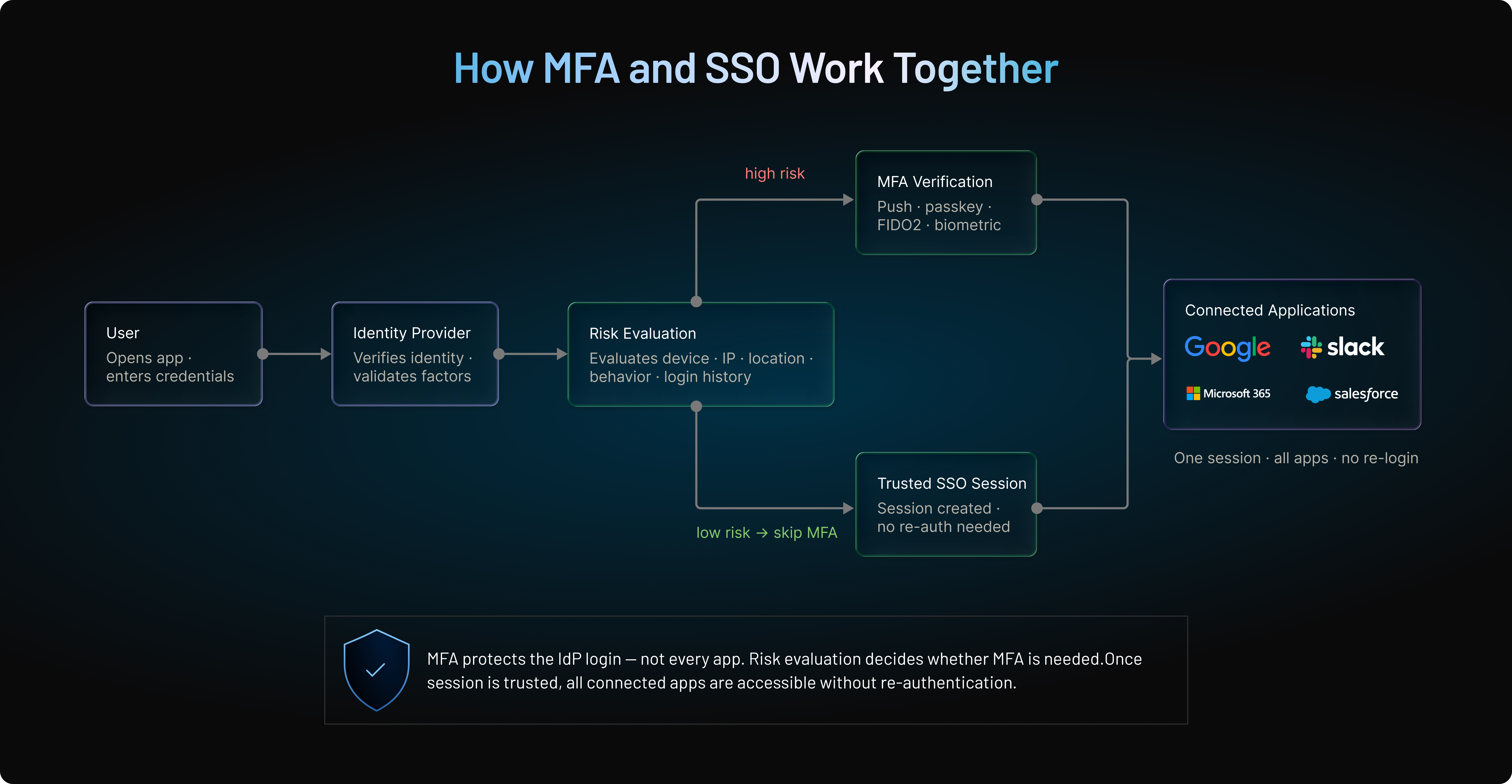
This sequence is important because authentication happens only once, while authorization decisions continue across each application based on the permissions assigned to that user.
We've seen organizations enabling MFA separately inside every business application. While this may appear more secure, it often creates an inconsistent user experience, increases administrative overhead, and leads to unnecessary authentication prompts.
Centralizing authentication through an Identity Provider solves that problem. Security policies are enforced in one place. Users have a consistent login experience across applications. Administrators manage authentication methods from a single console instead of configuring MFA individually for every service.
That consistency becomes even more valuable as organizations grow. Whether users access five applications or five hundred, the authentication process remains familiar, while security policies can evolve without requiring changes across every connected system.
This architecture also supports modern security strategies. Organizations can require stronger authentication for administrators, trigger step-up authentication before sensitive actions, enforce device trust for managed endpoints, or require phishing-resistant authentication for high-risk users all without redesigning the SSO experience.
In other words, SSO provides the seamless access users expect, while MFA ensures that a trusted session is created only after the user's identity has been verified with the appropriate level of assurance.
Top Benefits of Combining MFA and SSO for Businesses
Organizations don't adopt MFA and SSO simply because they're considered security best practices. They deploy them because the combination solves operational challenges that neither technology can address on its own.
SSO removes unnecessary friction by reducing repeated logins, while MFA ensures that every trusted session starts with strong identity verification. Together, they improve security without making access more difficult for legitimate users.
| Benefit | How Combining MFA and SSO Helps |
|---|---|
| Stronger Identity Security | MFA verifies user identity before an SSO session is established, making stolen passwords alone insufficient for access. |
| Simplified User Experience | Users authenticate once and securely access multiple connected applications without repeated logins. |
| Reduced Password Fatigue | Employees manage fewer passwords, lowering the likelihood of password reuse and forgotten credentials. |
| Lower Help Desk Costs | Fewer password reset requests and centralized authentication reduce administrative overhead for IT teams. |
| Centralized Access Management | Authentication policies, user provisioning, and access controls are managed through a single Identity Provider. |
| Improved Phishing Resistance | Adaptive MFA, passkeys, and phishing-resistant authentication strengthen the initial login against credential-based attacks. |
| Better Support for Zero Trust | Every authentication request can be evaluated using contextual risk signals before granting access. |
| Easier Regulatory Compliance | Strong authentication and centralized access controls help organizations meet requirements for standards such as GDPR, HIPAA, PCI DSS, and SOC 2. |
| Scalable Enterprise Security | Consistent authentication policies can be applied across cloud, on-premises, and hybrid applications as the organization grows. |
| Future-Ready Authentication | Organizations can adopt passkeys, FIDO2 security keys, passwordless authentication, and risk-based access without redesigning their authentication architecture. |
The biggest advantage isn't simply stronger security or a better user experience. It's achieving both at the same time.
Employees spend less time dealing with authentication, IT teams gain centralized control over identity management, and security teams can enforce stronger verification without introducing unnecessary friction. That balance is one of the main reasons why combining MFA with SSO has become the standard approach for modern enterprise identity.
Common Enterprise Use Cases for MFA and SSO Across Different Industries
The combination of MFA and SSO is used across almost every industry, but the reasons vary depending on the applications, users, and security requirements. Here are some of the most common enterprise use cases.
Enterprise Workforce Access
Employees often rely on dozens of business applications throughout the day, from email and collaboration tools to CRM and HR platforms. SSO eliminates repeated logins by allowing employees to authenticate once, while MFA ensures that only verified users can establish that trusted session. The result is stronger security, centralized access management, and a better user experience.
B2B SaaS Platforms
Enterprise customers increasingly expect SSO integration with their existing Identity Providers. By combining enterprise SSO with MFA, B2B SaaS providers can deliver seamless authentication for end users while protecting administrator accounts, customer tenants, and privileged operations with stronger identity verification.
Healthcare Organizations
Healthcare professionals require fast, reliable access to electronic health records, patient portals, and clinical applications. SSO reduces login friction during busy workflows, while MFA helps safeguard sensitive patient information and supports compliance requirements such as HIPAA.
Financial Services
Banks, insurers, and investment firms manage highly sensitive financial data and remain frequent targets for phishing and account takeover attacks. Combining SSO with MFA, passkeys, or phishing-resistant authentication helps strengthen account security while maintaining a streamlined experience for employees and customers.
Customer Identity (CIAM)
Retailers, healthcare providers, travel companies, financial institutions, and other digital businesses authenticate millions of customer logins every day. SSO creates a seamless experience across websites and mobile applications, while MFA protects customer accounts during login, password recovery, and high-risk transactions without adding unnecessary friction.
The same approach is widely used across government agencies, educational institutions, and hybrid work environments where centralized access and strong identity verification are equally important. Regardless of the industry, the objective remains the same: simplify access for legitimate users while reducing the risk of unauthorized account access.
Compliance Snapshot: NIST SP 800-63B mandates Authenticator Assurance Levels (AAL). While SSO manages Identity Assurance (IAL), combining SSO with FIDO2-based Passkeys satisfies AAL3, the highest level of authentication security required for sensitive enterprise data.
How MFA and SSO Support a Modern Zero Trust Security Strategy
Traditional security assumed that users inside the corporate network could generally be trusted. That model no longer works. Cloud applications, remote work, third-party access, and hybrid environments have made identity not network location the new security perimeter. That's the foundation of Zero Trust.
Instead of trusting users by default, Zero Trust follows a simple principle: Never Trust. Always Verify.
Every access request is evaluated using signals such as user identity, device trust, location, risk level, and behavior before access is granted. MFA and SSO play complementary roles in this model.
SSO provides centralized authentication, allowing users to securely access multiple trusted applications through a single identity. MFA strengthens that initial authentication by requiring additional proof of identity before a trusted session is established.
Zero Trust goes one step further with step-up authentication. If risk increases during a session, for example, a user signs in from an unfamiliar device, attempts to access sensitive data, or performs an administrative action, the system can request additional verification before allowing the action to continue.
This approach improves security without interrupting every user or every login.
Modern identity platforms extend this further with Adaptive MFA and Risk-Based Authentication, continuously evaluating contextual signals to determine whether additional verification is necessary.
Rather than replacing SSO or MFA, Zero Trust builds on them. SSO simplifies access, MFA verifies identity, and continuous risk evaluation ensures trust is reassessed whenever circumstances change. Together, they create a security model that is better suited to today's distributed workforce and evolving threat landscape.
How Adaptive MFA and Risk-Based Authentication Improve Security Without Adding Friction
Traditional MFA applies the same authentication process to every login. Whether a user signs in from their usual office laptop or an unfamiliar device halfway across the world, they're often asked to complete the same verification steps. Modern identity systems take a smarter approach.
Instead of treating every login as equally risky, Adaptive MFA evaluates contextual signals before deciding whether additional verification is required. A routine login from a trusted device may proceed without interruption, while a suspicious login from an unfamiliar location can trigger stronger authentication.
Ex: Unfamiliar IP → Potential Hijack → Trigger a push notification on their trusted mobile device
Some of the most common risk signals include:
| Risk Signal | What It Helps Identify |
|---|---|
| Device Trust | Is the login coming from a known or managed device? |
| Location | Is the user signing in from an expected location? |
| IP Reputation | Is the IP address associated with suspicious activity? |
| Login Time | Does the request match the user's normal login patterns? |
| User Behavior | Does the login differ significantly from previous sessions? |
| Network Context | Is the request coming from a trusted or unknown network? |
This risk-based approach improves both security and usability. Legitimate users encounter fewer unnecessary MFA prompts, while attackers face stronger authentication challenges when something doesn't look right.
It also helps reduce MFA fatigue. Repeated authentication requests can condition users to approve prompts automatically, creating opportunities for prompt bombing attacks. By generating MFA challenges only when risk justifies them, Risk-Based Authentication (RBA) reduces unnecessary prompts while strengthening protection against credential-based attacks.
How Passkeys and Phishing-Resistant Authentication Are Shaping the Future of SSO
Passwords remain one of the weakest links in modern authentication. They can be stolen through phishing, reused across multiple accounts, exposed in data breaches, or captured by adversary-in-the-middle (AiTM) attacks. Even traditional MFA methods that rely on one-time passcodes or push notifications can be vulnerable to increasingly sophisticated phishing techniques. That's why many organizations are adopting phishing-resistant authentication.
Unlike passwords or one-time codes, phishing-resistant authentication uses cryptographic credentials that are bound to the legitimate website or application. If a user is redirected to a fake login page, the authentication simply won't complete because the credential cannot be used on an unauthorized domain.
One of the most common examples is the passkey.
Passkeys replace passwords with public-key cryptography and allow users to authenticate using a fingerprint, Face ID, a device PIN, or another secure method supported by their trusted device. Because no reusable secret is transmitted during authentication, passkeys significantly reduce the risk of phishing, credential theft, password reuse, and credential stuffing attacks.
Passkeys don't replace SSO; they strengthen it. Users still authenticate once through the organization's Identity Provider and access multiple connected applications through a trusted SSO session. The difference is that the initial authentication is protected by a phishing-resistant method instead of relying solely on a password.
Modern identity platforms increasingly combine passkeys with Adaptive MFA and Risk-Based Authentication. Routine logins from trusted devices can remain seamless, while higher-risk requests can trigger additional verification before access is granted.
Together, SSO, Adaptive MFA, and passkeys create an authentication experience that is both easier for legitimate users and significantly more resistant to modern identity attacks.
How to Choose the Right Authentication Strategy for Your Organization
By this point, one thing should be clear. Choosing between MFA and SSO isn't really the right question.
The better question is: what combination of authentication technologies best fits your organization, users, and security requirements?
The answer depends on several factors, including the type of applications you manage, the sensitivity of your data, regulatory obligations, and the experience you want to provide for employees or customers.
The table below can serve as a practical starting point.
| Scenario | Recommended Approach | Why It Works |
|---|---|---|
| Small business with a few cloud applications | SSO + MFA | Simplifies access while protecting business accounts from credential theft. |
| Growing organization using multiple SaaS applications | SSO + Adaptive MFA | Reduces password fatigue while applying stronger authentication only when risk increases. |
| Large enterprise workforce | Enterprise SSO + Adaptive MFA + Conditional Access | Provides centralized identity management, scalable security policies, and contextual access decisions. |
| B2B SaaS platform | Enterprise SSO + Adaptive MFA + Passkeys for administrators | Supports customer Identity Providers while protecting privileged accounts and administrative access. |
| Healthcare organizations | SSO + Adaptive MFA + Device Trust | Enables fast access for clinicians while protecting sensitive patient information. |
| Financial services | SSO + Phishing-Resistant MFA + Passkeys or FIDO2 Security Keys | Strengthens protection against phishing, account takeover, and high-risk financial transactions. |
| Government and public sector | SSO + MFA + Risk-Based Authentication | Balances strong identity verification with secure access across departments and citizen services. |
| Customer-facing applications (CIAM) | SSO + Adaptive Authentication + Passkeys | Delivers a frictionless login experience while reducing password-related security risks. |
Organizations often search for a single technology that solves every authentication challenge. But it doesn't exist. SSO improves usability, but it doesn't verify identity beyond the authentication method protecting the initial login.
Traditional MFA strengthens authentication, but asking every user to complete the same challenge on every login can create unnecessary friction. Passkeys reduce dependence on passwords, but organizations still need centralized identity management and access policies.
The strongest authentication strategies combine these capabilities rather than treating them as alternatives. If your primary challenge is employees managing dozens of applications, SSO should be part of your identity strategy.
If protecting accounts from phishing, credential theft, and unauthorized access is your biggest concern, MFA should be non-negotiable.
If your organization wants stronger security without interrupting legitimate users, Adaptive MFA and Risk-Based Authentication provide a more intelligent approach.
And if you're planning for the future, passkeys and phishing-resistant authentication offer a practical path toward reducing password-related risks while improving the login experience.
Looking to choose the right approach?
For most modern organizations, the answer isn't to replace one technology with another. It's to build an identity strategy where SSO simplifies access, MFA strengthens authentication, Adaptive MFA responds to risk, and passkeys gradually reduce reliance on passwords. Together, these technologies create a secure, scalable authentication experience that can evolve alongside your business.
Common MFA and SSO Implementation Mistakes Organizations Should Avoid
Deploying MFA or SSO isn't the hard part. Deploying them effectively is.
Many organizations invest in modern authentication technologies but still leave gaps in their identity strategy. In most cases, the issue isn't the technology itself—it's how it's implemented.
Here are some of the most common mistakes security and IT teams encounter.
| Common Mistake | Why It Creates Risk | Better Approach |
|---|---|---|
| Assuming SSO is a security solution on its own | SSO simplifies access but doesn't prevent unauthorized logins if the initial authentication is weak. | Protect the Identity Provider with MFA, Adaptive MFA, or phishing-resistant authentication. |
| Relying only on passwords | Passwords can be stolen through phishing, credential stuffing, malware, or data breaches. | Add multiple authentication factors or adopt passkeys where appropriate. |
| Requiring MFA for every login without considering risk | Constant authentication prompts frustrate users and can contribute to MFA fatigue. | Use Adaptive MFA to challenge users only when risk justifies additional verification. |
| Using SMS OTP as the only MFA method | SMS-based authentication can be vulnerable to SIM swapping, interception, and social engineering attacks. | Prefer authenticator apps, passkeys, FIDO2 security keys, or biometric authentication whenever possible. |
| Ignoring privileged accounts | Administrative accounts are among the most valuable targets for attackers. | Enforce stronger authentication policies and phishing-resistant methods for privileged users. |
| Applying the same policy to every user | Different users and applications carry different levels of risk. | Build policies around user roles, device trust, application sensitivity, and contextual risk. |
| Treating authentication as a one-time project | New applications, users, threats, and compliance requirements continue to evolve. | Regularly review authentication policies, access controls, and risk signals as part of an ongoing identity strategy. |
One mistake appears more often than almost any other. Organizations frame the conversation as MFA versus SSO. That usually leads to unnecessary compromises.
Choosing only SSO may improve productivity while leaving the initial authentication vulnerable. Choosing only MFA strengthens identity verification but doesn't address password fatigue, repeated logins, or centralized access management.
The strongest identity strategies don't force a choice. They combine technologies that complement one another.
A centralized Identity Provider delivers seamless Single Sign-On. MFA verifies identity before trusted sessions are created. Adaptive authentication evaluates changing risk throughout the login journey. Passkeys reduce dependence on passwords altogether.
Identity threats continue to evolve, and authentication strategies need to evolve with them. Avoiding these common mistakes helps organizations strengthen security, improve user experience, and build an authentication framework that's easier to manage over time.
Best Practices for Implementing MFA and SSO Successfully
There isn't a universal authentication strategy that works for every organization.
A startup managing a handful of SaaS applications has different requirements than a global enterprise supporting thousands of employees, partners, and customers. The goal isn't to adopt every available security feature. It's to build an authentication experience that matches your organization's risk profile while remaining simple for legitimate users.
The following practices can help achieve that balance.
| Best Practice | Why It Matters |
|---|---|
| Protect your Identity Provider with strong authentication | Since the Identity Provider controls access to connected applications, strengthening the initial login protects your entire SSO environment. |
| Use Adaptive MFA instead of challenging every login | Evaluate contextual risk signals and require additional verification only when the login presents elevated risk. |
| Move beyond passwords where possible | Passkeys and phishing-resistant authentication reduce the risks associated with stolen, reused, or weak passwords. |
| Apply stronger authentication to privileged accounts | Administrators, developers, and users with access to sensitive systems should have stricter authentication requirements than standard users. |
| Adopt risk-based access policies | Consider device trust, location, IP reputation, login behavior, and application sensitivity when making authentication decisions. |
| Review authentication policies regularly | As applications, users, and threats change, authentication policies should evolve alongside them. |
| Educate users about modern identity threats | Awareness of phishing, MFA fatigue, prompt bombing, and credential theft helps users recognize suspicious authentication requests before they become security incidents. |
| Plan for passwordless authentication | Organizations don't need to eliminate passwords overnight, but adopting passkeys and modern authentication standards provides a practical path toward stronger identity security over time. |
Technology alone isn't enough.
Even the strongest authentication platform depends on thoughtful policies, consistent implementation, and informed users. A well-designed identity strategy combines technical controls with practical operational decisions, ensuring that security supports productivity instead of slowing it down.
Many organizations begin by implementing SSO to simplify access or MFA to satisfy compliance requirements. Over time, those individual projects often evolve into something much broader: a modern identity platform capable of supporting adaptive authentication, passwordless sign-ins, Zero Trust initiatives, and secure access across cloud, on-premises, and hybrid environments.
That gradual evolution is perfectly normal.
Authentication isn't standing still, and neither should the systems that protect it. Organizations that regularly review their identity architecture, modernize authentication methods, and adapt to emerging threats are far better positioned to deliver both strong security and a seamless user experience.
Ultimately, the most effective authentication strategy isn't the one with the most security controls. It's the one that applies the right controls at the right time, giving legitimate users fast, secure access while making unauthorized access significantly more difficult.
Conclusion
If there's one takeaway from this comparison, it's this: MFA and SSO aren't competing technologies. They're complementary building blocks of modern identity security.
SSO simplifies how users access applications. MFA strengthens how their identities are verified. Add Adaptive MFA, Risk-Based Authentication, and phishing-resistant methods such as passkeys, and organizations can deliver a login experience that's both secure and remarkably easy to use.
That's becoming increasingly important.
Employees expect seamless access from anywhere. Customers expect fast, frictionless sign-ins. Security teams need stronger protection against phishing, credential theft, account takeover, and evolving identity attacks. Meeting all three expectations with passwords alone is no longer realistic.
The good news is that organizations don't have to choose between usability and security.
A well-designed identity strategy brings these technologies together. Users authenticate with confidence, administrators manage access from a centralized platform, and security policies adapt as risks change. The result is an authentication experience that scales with your business instead of creating obstacles for it.
Whether you're modernizing workforce identity, securing a B2B SaaS platform, protecting customer accounts, or building a Zero Trust architecture, the objective remains the same: verify identities with greater confidence while making access simpler for legitimate users.
Looking to build an authentication strategy that's ready for today's threats and tomorrow's growth?
LoginRadius helps organizations implement enterprise Single Sign-On, Adaptive MFA, passwordless authentication, passkeys, social login, and customer identity solutions from a unified identity platform. Whether you're securing employees, partners, or millions of customer accounts, you can deliver seamless authentication without compromising security.
Ready to modernize your authentication strategy? Explore LoginRadius or schedule a personalized demo to see how enterprise-grade identity can improve both security and user experience.
FAQs
Q: What is the difference between MFA and SSO?
A: MFA (Multi-Factor Authentication) strengthens login security by requiring multiple forms of identity verification, while SSO (Single Sign-On) lets users access multiple applications after logging in once. MFA improves security, whereas SSO improves convenience.
Q: Which is better: MFA or SSO?
A: Neither is better because they serve different purposes. SSO simplifies access across applications, while MFA protects accounts from unauthorized access. Most organizations achieve the best results by using both together.
Q: Can MFA work without SSO?
A: Yes. MFA can secure individual applications even if SSO isn't deployed. However, users may need to complete separate logins for each application, which can reduce productivity and increase password fatigue.
Q: Is SSO considered authentication?
A: Yes. SSO is an authentication mechanism that allows users to sign in once and access multiple trusted applications. However, it doesn't specify how users authenticate, which is why it's commonly paired with MFA.
Q: Does SSO improve security?
A: SSO improves security indirectly by reducing password reuse and centralizing authentication. For stronger protection against phishing and credential theft, organizations should combine SSO with MFA or phishing-resistant authentication.
Q: Can SSO prevent phishing attacks?
A: No. SSO alone cannot stop phishing attacks. If attackers steal a user's credentials, they may access connected applications unless additional protections such as MFA, passkeys, or phishing-resistant authentication are in place.
Q: What is Risk-Based Authentication (RBA)?
A: Risk-Based Authentication (RBA) analyzes each login request and adjusts authentication requirements based on the level of risk. Low-risk logins may proceed normally, while suspicious attempts trigger additional identity verification.
Q: Can passkeys replace MFA?
A: Passkeys can replace passwords and, in many scenarios, provide phishing-resistant authentication that is stronger than traditional MFA. Some organizations still combine passkeys with adaptive authentication for highly sensitive accounts or privileged access.
Q: Does Zero Trust require MFA?
A: While Zero Trust doesn't mandate a specific authentication method, MFA is considered a foundational component of most Zero Trust architectures. It helps verify user identity before granting access to applications and resources.
Q: What is step-up authentication?
A: Step-up authentication requires users to complete additional verification only when they attempt higher-risk actions, such as accessing sensitive data or changing security settings. It improves security without interrupting every login.
Q: Is SAML required for SSO?
A: No. SAML is one of several protocols used to implement SSO. Modern applications also use OpenID Connect (OIDC), while OAuth 2.0 is commonly used for authorization alongside OIDC.
Q: Can SSO work without an Identity Provider?
A: No. SSO depends on a trusted Identity Provider (IdP) to authenticate users and establish a session that connected applications recognize. Without an IdP, centralized Single Sign-On isn't possible.
Q: What authentication method is best for B2B SaaS applications?
A: Most B2B SaaS platforms use enterprise SSO with Adaptive MFA to support customer Identity Providers while protecting administrator and privileged accounts. Many also support passkeys and phishing-resistant authentication for enhanced security.
Q: Can customers use SSO and MFA together?
A: Yes. Customer Identity and Access Management (CIAM) platforms commonly combine SSO with MFA to deliver seamless login experiences while protecting customer accounts from phishing, credential theft, and account takeover attacks.