Introduction
If you’ve ever logged into a work app and instantly accessed five other business tools without entering your password again, you’ve already used SAML 2.0. You probably didn’t notice it. Most users don’t and that really is the intention behind it.
SAML, short for Security Assertion Markup Language, is an open standard used to exchange authentication and identity information between systems. In other words, it allows one trusted system to say, “I have verified this user,” and another application to trust that statement without asking the user to log in again.
SAML 2.0 is not new, and in tech years it most certainly is old now. But it remains deeply embedded in enterprise identity architecture because enterprises care about reliability, interoperability, security, and scale. SAML 2.0 is the backbone of SAML-based single sign-on (SSO). It allows organizations to centralize authentication through a trusted Identity Provider while enabling seamless access across multiple applications. This is especially important in B2B SaaS and enterprise environments, where users need secure access to many systems without managing separate credentials for each one.
So while newer protocols like OpenID Connect and OAuth are widely used for modern apps, APIs, and customer-facing experiences, SAML 2.0 is still widely used where enterprise trust and federation matter most.
What Is SAML 2.0?
SAML 2.0 is an open standard that enables secure authentication and single sign-on between an Identity Provider (IdP) and a Service Provider (SP). It allows users to authenticate once and access multiple applications without re-entering credentials, while helping organizations centralize identity management and security policies.
| Term | Purpose |
|---|---|
| SAML 2.0 | Authentication protocol used for secure SSO and identity federation |
| SSO | Login experience that lets users access multiple apps with one authentication |
| Identity Provider (IdP) | System that authenticates the user |
| Service Provider (SP) | Application that grants access after trusting the IdP |
| SAML Assertion | Digitally signed XML message containing user identity information |
The Core Components of SAML 2.0
To understand how SAML 2.0 works, you need to understand four main components: the Identity Provider, the Service Provider, the SAML assertion, and metadata.
| SAML Component | Core Role | Example |
|---|---|---|
| Identity Provider (IdP) | Authenticates the user and issues the SAML assertion | LoginRadius, Okta, Microsoft Entra ID, Ping Identity |
| Service Provider (SP) | Application the user wants to access | Salesforce, Jira, Zoom, Workday |
| SAML Assertion | Signed XML message carrying identity data | NameID, email, roles, groups, authentication timestamp |
| Metadata | XML configuration used to establish trust between IdP and SP | Entity IDs, certificates, ACS URLs, SSO endpoints |
| Entity ID | Uniquely identifies an IdP or SP in a SAML federation | https://company.com/saml |
| ACS (Assertion Consumer Service) URL | Endpoint where the Service Provider receives the SAML Response | https://app.example.com/saml/acs |
| X.509 Certificate | Digitally signs and validates SAML messages to establish trust | Public certificate exchanged between the IdP and SP |
This is why SAML 2.0 is so common in enterprise environments. It separates authentication from the application itself. The application does not need to store or verify the user’s password. It trusts the Identity Provider.
Once these pieces are configured correctly, SAML authentication becomes a secure trust exchange instead of a repeated login process.
SAML Authentication vs Traditional Login
Traditional login usually means every application manages its own credentials. That works for small systems. It becomes painful fast in enterprise environments.
SAML authentication changes that model. The application does not need to store passwords or run its own authentication process. It relies on a trusted Identity Provider.
| Feature | Traditional Login | SAML Authentication |
|---|---|---|
| Password Stored in Application | Yes | No |
| Centralized Authentication | No | Yes |
| Enterprise SSO Support | Limited | Yes |
| Identity Federation | No | Yes |
| MFA Enforcement | Per Application | Centralized |
| User Experience | Multiple Logins | Single Login |
| Enterprise Scalability | Limited | High |
This is why SAML is still widely used in enterprise identity. It reduces credential exposure, simplifies access control, and gives security teams one place to enforce login policies.
How SAML Authentication Works: A Detailed Step-by-Step Flow
SAML authentication allows a Service Provider (SP) and an Identity Provider (IdP) to work together to authenticate users without requiring the application to manage passwords directly.
While the process appears seamless to users, multiple authentication and validation steps occur behind the scenes before access is granted.
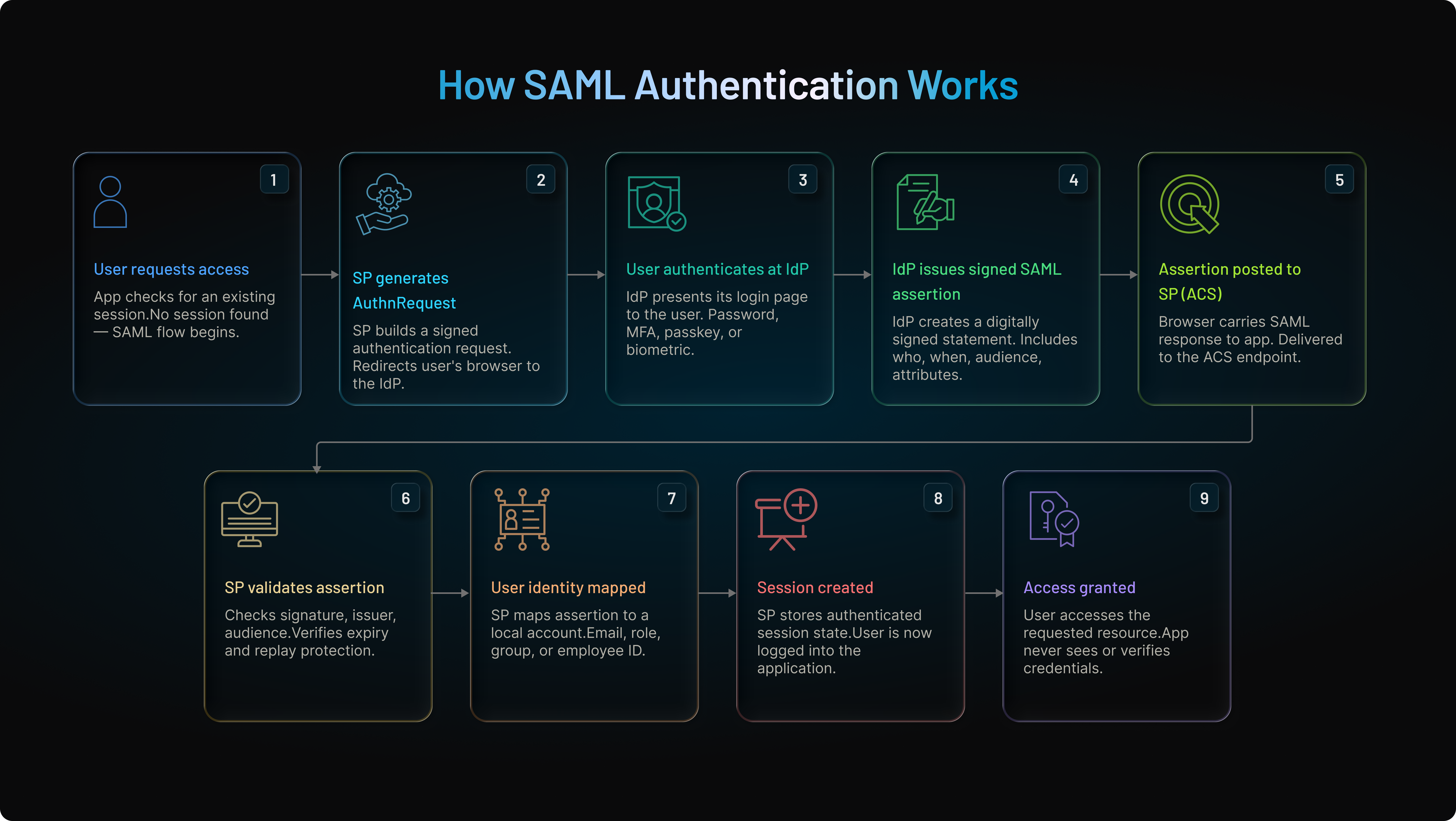
Step 1: User Attempts to Access an Application
The process begins when a user attempts to access an application protected by SAML authentication. The application checks whether the user already has an active authenticated session.
-
If a valid session exists, access is granted immediately.
-
If not, the application starts the SAML authentication process.
At this point, the Service Provider recognizes that authentication is required but does not authenticate the user itself. Instead, it relies on a trusted Identity Provider.
Step 2: Service Provider Creates a SAML Authentication Request
The Service Provider generates a SAML Authentication Request, commonly called an AuthnRequest.
This request contains information that helps the Identity Provider understand:
-
Which application is requesting authentication
-
Where the response should be returned
-
Which Identity Provider should process the request
-
Any authentication requirements
The request is then sent to the Identity Provider through the user's browser.
In most implementations, this happens using an HTTP Redirect.
At this stage, the user leaves the application and arrives at the Identity Provider's login page.
Step 3: User Authenticates with the Identity Provider
The Identity Provider now takes responsibility for verifying the user's identity.
Depending on the organization's security policies, authentication may involve:
-
Username and password
-
Multi-factor authentication (MFA)
-
Passwordless authentication
-
Smart cards
-
Security keys
-
Biometric authentication
The Identity Provider evaluates the credentials and determines whether the user should be authenticated.
-
If authentication fails, the process stops.
-
If authentication succeeds, the Identity Provider proceeds to create a trusted authentication response.
This is where SAML authentication differs from traditional login systems.
The application never sees or verifies the user's credentials.
Only the Identity Provider performs authentication.
Step 4: Identity Provider Generates a Signed SAML Assertion
After successful authentication, the Identity Provider creates a SAML assertion.
The assertion acts as a digitally signed identity statement that confirms:
-
Who the user is
-
When authentication occurred
-
Which application should receive the assertion
-
Which attributes belong to the user
A typical assertion may contain:
| Assertion Element | Purpose |
|---|---|
| Issuer | Identifies the Identity Provider |
| Subject | Identifies the user |
| Conditions | Defines validity rules |
| Authentication Statement | Records authentication details |
| Attribute Statement | Provides user attributes |
The assertion is digitally signed using the Identity Provider's private key.
This signature helps ensure that the assertion cannot be modified without detection.
Step 5: SAML Response Is Returned to the Application
The Identity Provider packages the assertion inside a SAML Response and sends it back to the Service Provider. The user's browser acts as the carrier for this message. The response is typically sent to the application's Assertion Consumer Service (ACS) endpoint. The ACS endpoint is specifically designed to receive and process SAML responses.
From the user's perspective, this usually appears as a brief redirect before the application loads.
Behind the scenes, however, the Service Provider has not yet granted access. Validation must occur first.
Step 6: Service Provider Validates the SAML Response
This is one of the most important steps in the entire authentication flow.
Before trusting the assertion, the Service Provider performs several security checks.
It verifies:
-
The digital signature
-
The Identity Provider that issued the assertion
-
The intended audience
-
The destination URL
-
Assertion expiration times
-
Replay protection requirements
A secure implementation should always ask:
-
Who issued this assertion?
-
Was it modified?
-
Was it intended for this application?
-
Is it still valid?
-
Should access be granted?
If any validation check fails, authentication is rejected.
If all checks pass, the assertion is considered trustworthy.
Step 7: User Identity Is Mapped to an Application Account
Once the assertion has been validated, the Service Provider identifies the user.
This often involves mapping assertion attributes such as:
-
Email address
-
Username
-
Employee ID
-
Department
-
Role
-
Group membership
In enterprise deployments, sometimes authentication succeeds but the account mapping fails. The assertion is valid means the user exists. But the expected identifier or attribute is missing.
This is why attribute mapping remains one of the most common operational challenges in SAML deployments.
Step 8: Application Creates a Session
After successful validation and user mapping, the Service Provider creates an authenticated session.
The user is now logged in.
The application stores session information and allows access according to the user's permissions.
From the user's perspective, the login process feels instant.
Behind the scenes, the Service Provider has validated a trusted authentication decision rather than verifying credentials itself.
Step 9: Access Is Granted
The user gains access to the requested application.
No additional credentials are required.
No separate account management process is necessary.
The Service Provider trusts the Identity Provider's authentication decision and grants access accordingly.
This is the foundation of enterprise single sign-on.
One authentication event can provide access to multiple applications while allowing organizations to maintain centralized control over authentication policies, MFA requirements, user lifecycle management, and security governance.
Why This Flow Matters
The biggest advantage of SAML authentication is that it separates authentication from applications.
Instead of every application managing passwords independently, authentication is centralized through a trusted Identity Provider. This improves security, simplifies access management, reduces password fatigue, and enables enterprise single sign-on across multiple systems.
For organizations managing employees, contractors, partners, suppliers, and enterprise customers, this centralized authentication model remains one of the primary reasons SAML authentication is still widely used today.
SP-Initiated vs IdP-Initiated SAML Authentication
Not every SAML login begins the same way.
In an SP-initiated flow, the user starts at the application. The Service Provider creates the AuthnRequest and redirects the user to the Identity Provider. After authentication, the IdP sends the assertion back to the application.
This is the preferred approach for most SaaS, CIAM, and B2B authentication flows because the application controls the login request and return path.
In an IdP-initiated flow, the user starts inside the Identity Provider. They may log into an enterprise dashboard, click an application tile, and get redirected to the Service Provider with a SAML response.
That can be convenient. It also needs careful validation because the Service Provider may not have created a fresh authentication request.
| Flow Type | Starts From | Best Used For | Security Consideration |
|---|---|---|---|
| SP-Initiated SAML | Service Provider | SaaS apps, CIAM, partner portals | Better request tracking |
| IdP-Initiated SAML | Identity Provider | Enterprise app launchers | Requires strict assertion validation |
Looking to choose the right approach? For most customer, partner, and B2B SaaS flows, SP-initiated SAML is usually the safer default.
What Happens Inside a SAML AuthnRequest?
The AuthnRequest is the message the Service Provider sends to the Identity Provider when authentication is needed.
It tells the IdP which application is requesting authentication, where the response should be returned, and what identifier format or authentication context may be expected.
A simplified AuthnRequest looks like this:
1<samlp:AuthnRequest
2  ID="_request123"
3  Destination="https://idp.example.com/sso"
4  AssertionConsumerServiceURL="https://sp.example.com/saml/acs">
5  <saml:Issuer>https://sp.example.com/metadata</saml:Issuer>
6</samlp:AuthnRequest>
In real deployments, this request may also include NameID policies, requested authentication context, protocol binding preferences, and RelayState.
Here’s where teams usually go wrong. They treat the AuthnRequest like a normal redirect. It is not. It is a security-sensitive message. If the ACS URL, issuer, RelayState, or binding configuration is wrong, users may fail authentication, land in the wrong place, or create a security gap.
What Happens Inside a SAML Response?
The SAML response is returned by the Identity Provider after the user has been authenticated.
It contains the assertion, which is the main identity message in SAML authentication. The response is usually sent to the Service Provider’s ACS endpoint through an HTTP POST from the browser.
A simplified SAML response looks like this:
1<samlp:Response Destination="https://sp.example.com/saml/acs">
2  <saml:Issuer>https://idp.example.com/metadata</saml:Issuer>
3  <saml:Assertion>
4    <saml:Subject>User Identity</saml:Subject>
5    <saml:Conditions>...</saml:Conditions>
6    <saml:AttributeStatement>...</saml:AttributeStatement>
7  </saml:Assertion>
8</samlp:Response>
The Service Provider should never trust this response blindly. It must confirm where it came from, whether it was signed correctly, whether it is still valid, and whether it was intended for that exact application.
Working login is not enough. Secure validation is the real test.
What Is a SAML Assertion?
A SAML assertion is the signed XML statement that proves a user has been authenticated by the Identity Provider.
It typically contains the user identity, authentication event, validity conditions, and user attributes. The Service Provider uses this information to decide whether access should be granted and how the user should be represented inside the application.
| Assertion Component | Why It Matters |
|---|---|
| Issuer | Confirms which IdP issued the assertion |
| Subject | Identifies the authenticated user |
| Conditions | Limits where and when the assertion can be used |
| Attribute Statement | Sends user profile or authorization attributes |
| Authentication Statement | Describes when and how the user authenticated |
We have seen that many SAML failures are not caused by authentication failure. The user is authenticated successfully, but the assertion contains missing, inconsistent, or unexpected attributes.
The protocol worked. The identity mapping did not.
SAML Metadata and Trust Configuration
SAML metadata is the configuration document that allows the Identity Provider and Service Provider to trust each other.
It usually includes entity IDs, SSO URLs, ACS URLs, certificates, supported bindings, and sometimes logout endpoints.
Metadata is not exciting. But if it is wrong, the integration breaks.
If the ACS URL is incorrect, the response goes to the wrong endpoint. If the certificate is outdated, signature validation fails. If the entity ID does not match, the Service Provider rejects the assertion.
Many SAML outages are not caused by bad code. They are caused by stale metadata, expired certificates, or configuration drift.
SAML Certificates and Signatures
SAML depends heavily on digital signatures.
The Identity Provider signs the assertion or response using its private key. The Service Provider validates that signature using the IdP’s public certificate. If the signature is valid, the SP knows the assertion came from the trusted IdP and was not modified in transit.
Without signature validation, SAML becomes dangerous.
An attacker could attempt to modify attributes, forge assertions, or replay old authentication messages. That is why signature validation, certificate monitoring, and certificate rotation should never be treated as optional.
Small thing. Big outage.
Expired certificates are one of the most common reasons enterprise SSO breaks.
Where LoginRadius Fits in the SAML Authentication Flow
In many CIAM and B2B SaaS deployments, LoginRadius can act as the Service Provider.
That means LoginRadius receives the SAML response from the customer’s Identity Provider, validates the assertion, extracts user attributes, maps them into a profile, and creates a consistent identity session for downstream applications.
This matters because every enterprise customer may use a different IdP. One customer may use Microsoft Entra ID. Another may use Okta. Another may use PingFederate, ADFS, or a custom SAML provider.
Without a centralized identity layer, every application must handle SAML parsing, certificate validation, attribute mapping, and session creation separately.
That gets messy fast.
With LoginRadius, applications can rely on a standardized identity profile and authentication session while LoginRadius handles the SAML-specific complexity.
A Real Enterprise SAML Authentication Example
Imagine a B2B SaaS company selling to enterprise customers.
One customer wants employees to access the SaaS platform using Microsoft Entra ID. Another uses Okta. Another uses PingFederate. Each customer expects SSO using its own corporate identity system.
A common flow looks like this:
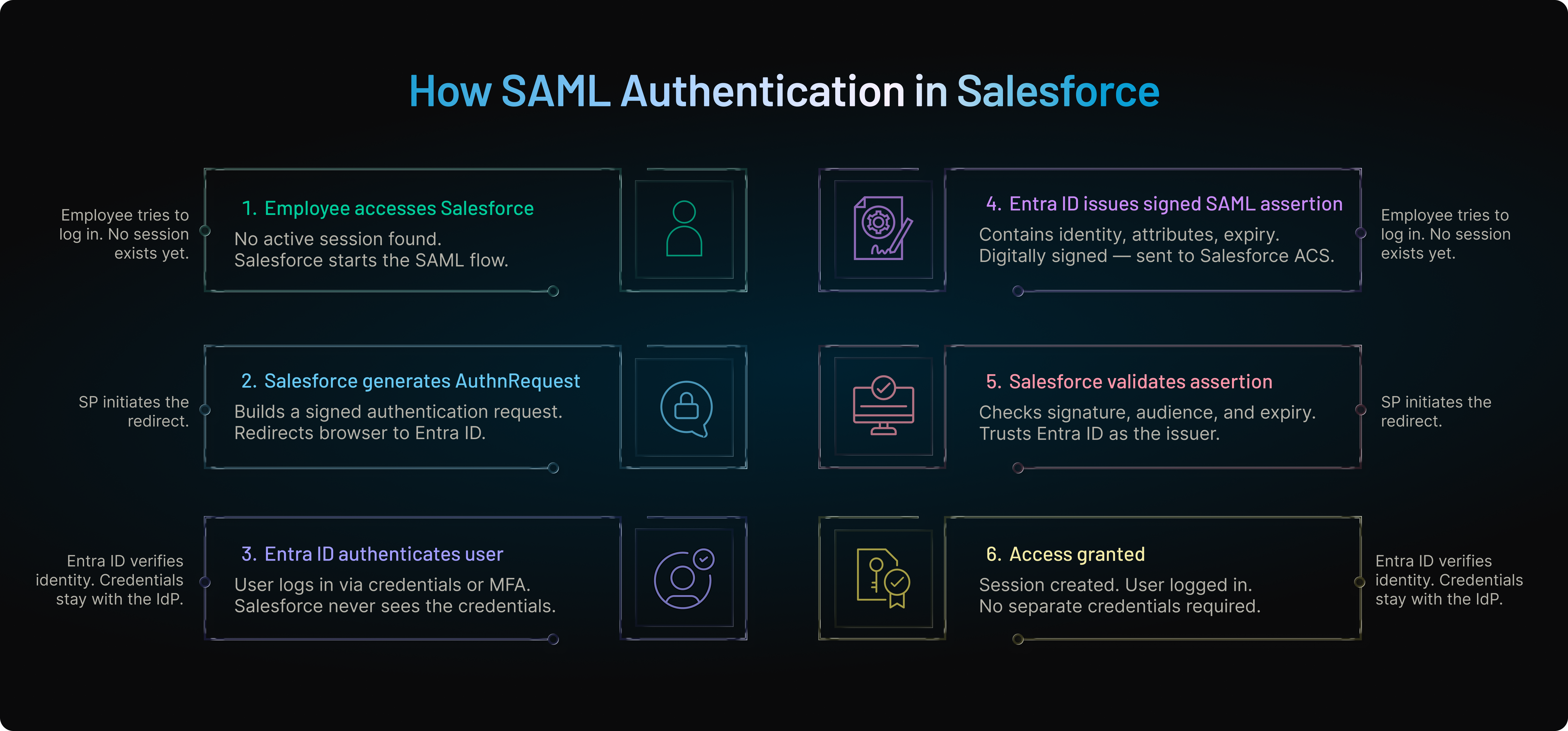
Employee opens the SaaS application. The application redirects the user to LoginRadius. LoginRadius identifies the customer’s configured SAML IdP and sends the AuthnRequest. The enterprise IdP authenticates the employee and returns a signed SAML assertion. LoginRadius validates the assertion, maps attributes into a user profile, and creates a session for the SaaS application.
The employee sees one login experience.
The SaaS company avoids building separate SAML logic for every customer.
The enterprise keeps control over authentication, MFA, offboarding, and access policy.
That is the business value of SAML authentication. Not XML. Control.
What Is Identity Federation in SAML?
While SAML is often associated with single sign-on, one of its most important capabilities is identity federation.
Identity federation allows separate organizations to trust and share authentication information without maintaining duplicate user accounts. Instead of creating new credentials for every business relationship, users authenticate with their own trusted Identity Provider, and external applications accept that authentication through a SAML trust relationship.
A simplified federation model looks like this:
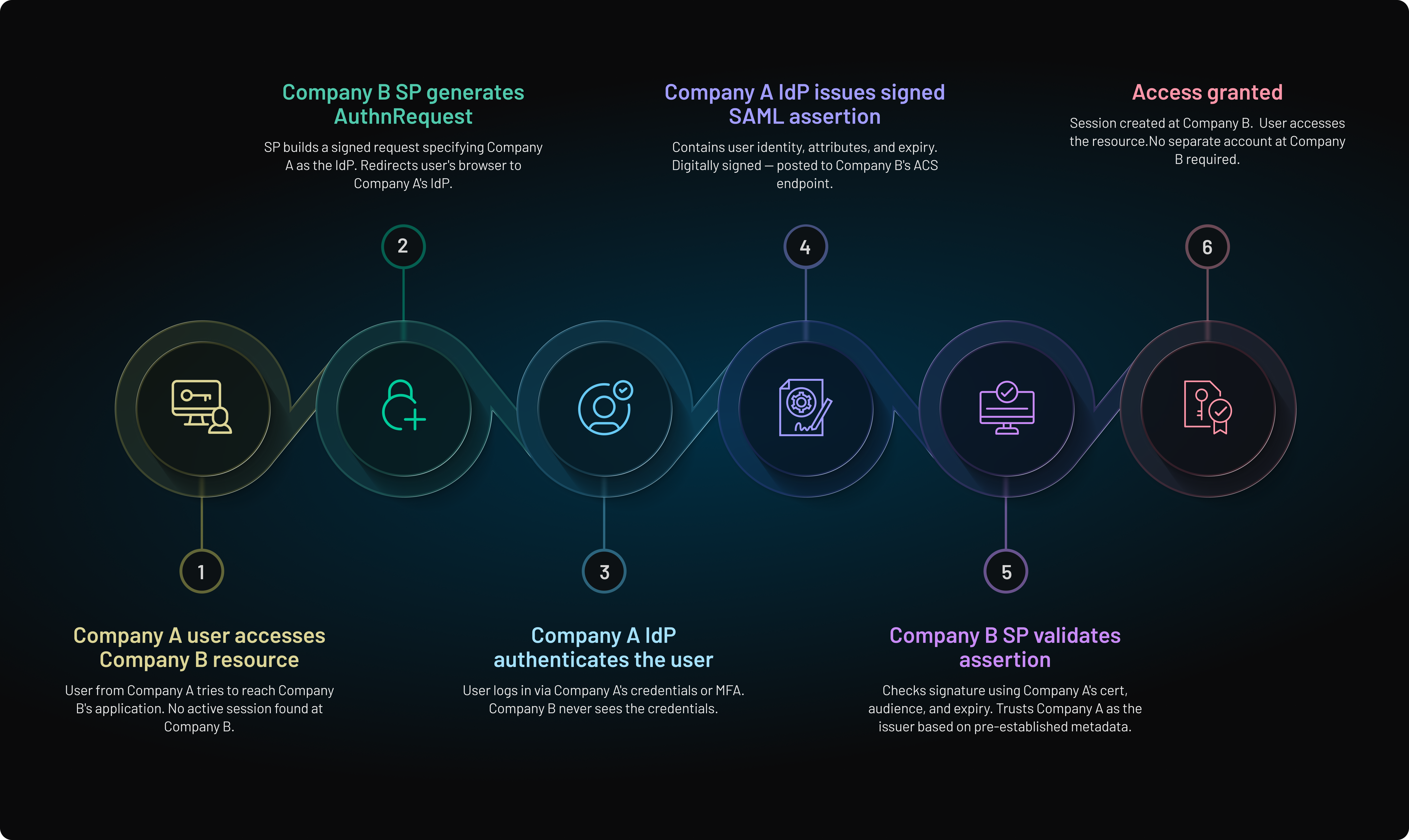
In this model, Company A manages the user’s identity. Company B owns the application. SAML acts as the trust framework between the two organizations.
This is common in B2B SaaS, partner portals, supplier systems, enterprise collaboration tools, and workforce federation. It lets organizations collaborate securely without creating and managing separate accounts for every external user.
Without federation, teams often end up with duplicated accounts, inconsistent offboarding, password reuse, and fragmented security policies. With the SAML federation, authentication remains centralized and access becomes easier to govern.
Why Enterprises Use SAML
Most SAML authentication discussions focus on the protocol itself—requests, assertions, certificates, and redirects. In reality, enterprises care about something much simpler: allowing users to access dozens of business applications without creating and managing separate credentials for each one.
A typical organization may use an Identity Provider such as Microsoft Entra ID, Okta, Ping Identity, or LoginRadius to authenticate employees. Once a user successfully signs in, the Identity Provider issues a trusted SAML assertion that can be used across multiple connected applications.
Instead of maintaining separate authentication systems, applications such as Salesforce, Workday, ServiceNow, Jira, Zoom, SAP, and internal business tools rely on the Identity Provider's authentication decision. The result is a centralized authentication model.
Employees log in once and gain access to the applications they are authorized to use. Security teams manage authentication policies, MFA requirements, conditional access rules, and user lifecycle processes from a single location rather than configuring them separately for every application.
When an employee leaves the organization, access can often be revoked centrally through the Identity Provider. The employee does not need to be manually removed from every connected application. This reduces operational overhead and helps organizations maintain stronger access governance.
For large enterprises managing thousands of employees, contractors, partners, and suppliers, this centralized approach delivers significant security and operational benefits. Authentication becomes easier to manage, onboarding becomes faster, offboarding becomes more reliable, and users spend less time dealing with passwords and login prompts.
This is one of the primary reasons SAML authentication is still widely used across enterprise identity ecosystems today. While users experience a seamless single sign-on journey, organizations gain centralized control over identity, security policies, and access management across their entire application landscape.
| Benefit | Business Impact |
|---|---|
| Centralized Authentication | Consistent security policies |
| Enterprise SSO | Better user experience |
| Federation Support | Easier partner and supplier access |
| MFA Enforcement | Stronger account protection |
| Lifecycle Management | Faster onboarding and offboarding |
| Reduced Password Fatigue | Fewer credentials for users to manage |
For organizations supporting employees, contractors, partners, suppliers, or enterprise customers, these operational advantages are often just as valuable as the security benefits.
Why SAML Still Matters
Many of the world's largest enterprise platforms continue to support SAML-based single sign-on and identity federation. Platforms such as Salesforce, Microsoft 365, Google Workspace, ServiceNow, SAP, and Workday all provide SAML integration capabilities, making SAML one of the most widely adopted standards for workforce identity and enterprise access management.
A Typical Deployment
Most organizations do not use SAML to connect a single application. They use it to centralize authentication across dozens or even hundreds of business systems.
A common enterprise deployment looks like this:
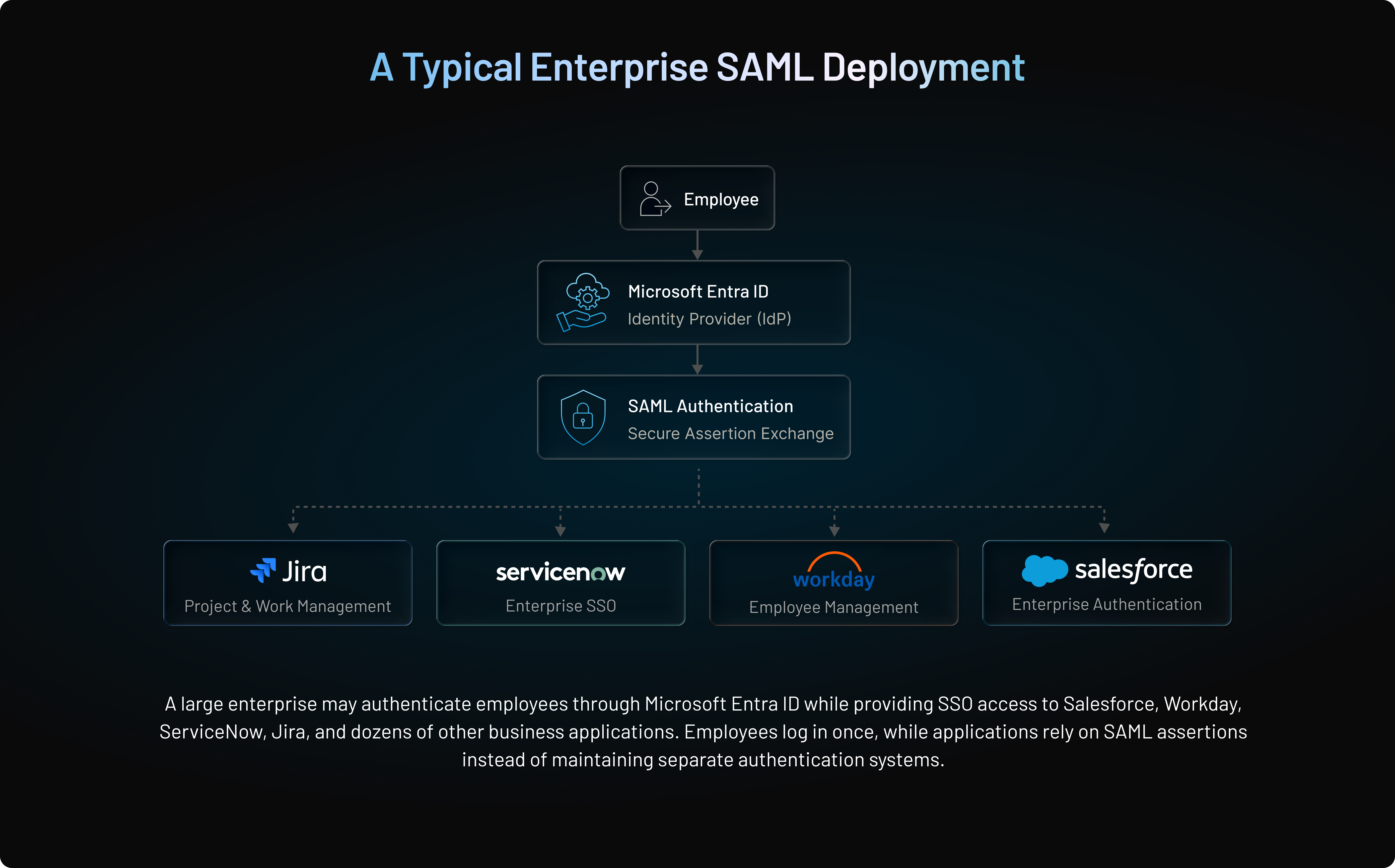
A large enterprise may authenticate employees through Microsoft Entra ID while providing SSO access to Salesforce, Workday, ServiceNow, Jira, and dozens of other business applications. Employees log in once, while applications rely on trusted SAML assertions instead of maintaining separate authentication systems.
This approach gives organizations centralized control over authentication policies, MFA requirements, user lifecycle management, and access governance. At the same time, users benefit from a seamless login experience across all connected applications.
For enterprise IT teams, the value extends beyond convenience. Centralized authentication simplifies onboarding, accelerates offboarding, improves compliance reporting, and reduces the operational overhead of managing credentials across multiple systems.
SAML 2.0 vs Other Similar Technologies
At some point, every developer asks the same question: if SAML exists, why do we also have OAuth, OpenID Connect, and JWT?
The answer is simple. They are related, but they do not all do the same thing.
SAML 2.0 is primarily used for authentication, enterprise SSO, and identity federation. It works well when organizations need centralized authentication across web-based enterprise applications.
OAuth 2.0 is mainly used for authorization. It allows an application to access resources on behalf of a user without exposing the user’s credentials. OAuth answers a different question: can this app access this resource?
OIDC adds an authentication layer on top of OAuth 2.0. It is widely used for modern web apps, mobile apps, single-page applications, APIs, and customer-facing authentication.
JWT is not a protocol. It is a token format. OIDC and OAuth often use JWTs because they are lightweight and easy for modern applications to process.
| Technology | Primary Purpose | Best For |
|---|---|---|
| SAML 2.0 | Authentication and SSO | Enterprise web apps and federation |
| OAuth 2.0 | Authorization | API and delegated access |
| OIDC | Modern authentication | Web, mobile, SPA, and customer apps |
| JWT | Token format | Secure data exchange in modern apps |
Although both SAML and OIDC can be used for authentication, they are usually used in different environments. SAML is common in enterprise SSO. OIDC is common in modern app and customer identity use cases.
SAML vs OIDC: Which Should You Use?
SAML and OIDC are not direct enemies. They often live in the same identity architecture.
SAML was designed for enterprise identity federation and workforce SSO. OIDC was designed for modern application authentication, especially where APIs, mobile apps, and customer identity are involved.
| Scenario | Recommended Protocol |
|---|---|
| Enterprise Workforce SSO | SAML 2.0 |
| B2B SaaS Enterprise Customers | SAML 2.0 |
| Partner and Supplier Portals | SAML 2.0 |
| Legacy Enterprise Applications | SAML 2.0 |
| Consumer Applications | OIDC |
| Mobile Applications | OIDC |
| Single-Page Applications | OIDC |
| APIs and Microservices | OIDC |
| Modern Cloud-Native Applications | OIDC |
Use SAML when you need to support enterprise customers, workforce identity, legacy systems, partner federation, or corporate SSO requirements.
Use OIDC when you are building mobile apps, API-driven products, customer-facing authentication, or cloud-native applications.
Please read this article for a more complete analysis on SAML vs OIDC, to understand which suits your business.
When SAML Is Not the Best Choice
SAML is powerful, but it is not ideal for every use case.
It is not the best fit for mobile-first applications, API authentication, microservices, single-page applications, or consumer-facing authentication experiences. Those environments usually work better with OIDC and OAuth because they use JSON-based tokens and fit modern application patterns more naturally.
SAML still belongs in the enterprise identity space. But forcing it into every modern app architecture usually creates unnecessary complexity.
Common Security Risks in SAML Authentication
SAML is secure when implemented correctly. Problems usually come from weak validation or poor configuration.
If the Service Provider does not validate signatures, an attacker may attempt to tamper with assertions. If AudienceRestriction is not enforced, an assertion meant for one application could be accepted by another. If assertion expiration is ignored, old authentication tokens may remain usable. If assertion IDs are not tracked, replay attacks become possible.
RelayState also needs care. If it is used to redirect users after login, it should not become an open redirect.
Here’s where teams usually go wrong: they focus on getting SSO to work and push security validation to later.
Later rarely comes.
SAML Authentication Security Checklist
A secure SAML implementation should validate every assertion before granting access.
| Security Control | Why It Matters |
|---|---|
| Signature Validation | Confirms the assertion came from the trusted IdP |
| AudienceRestriction Validation | Ensures the assertion was meant for this SP |
| Destination and Recipient Checks | Confirms the response was sent to the correct endpoint |
| Timestamp Validation | Blocks expired or premature assertions |
| Assertion ID Tracking | Helps prevent replay attacks |
| Certificate Monitoring | Prevents outages during certificate rotation |
| RelayState Validation | Reduces redirect abuse |
| Attribute Mapping Review | Prevents incorrect profile or role assignment |
A secure SAML implementation should always ask five questions.
Who issued the assertion? Was it modified? Was it meant for this application? Is it still valid? Should this user receive access?
If any answer is unclear, access should not be granted.
Troubleshooting a Failed SAML Login
When a SAML login fails, start with the basics.
Check whether the user actually authenticated at the IdP. Then confirm the response reached the correct ACS URL. Validate the certificate. Review the assertion timestamps. Confirm the AudienceRestriction matches the Service Provider entity ID. Check required attributes. Look at RelayState if the user lands on the wrong page.
Do not debug SAML only from the application side. The issue may sit inside the IdP configuration, the SP metadata, the certificate, or the attribute mapping.
This is why centralized logs and clear error handling matter. Without them, teams waste hours guessing.
SAML Authentication in CIAM and B2B SaaS
SAML authentication is not only for workforce IAM. It is also important in CIAM and B2B SaaS environments.
Enterprise customers often expect to bring their own IdP. They do not want employees, partners, or contractors to create new credentials in every vendor application. They want users to authenticate through the corporate identity system they already control.
That means a SaaS platform selling to enterprises may need to support many SAML IdPs across many tenants.
This introduces real complexity. Each tenant may have separate metadata, certificates, domains, ACS settings, attribute mappings, and access rules. One customer may require signed AuthnRequests. Another may require a specific identifier format. Another may rotate certificates on a different schedule. For B2B SaaS, SAML support is often not a bonus feature.
It is a sales requirement.
How LoginRadius Simplifies SAML Authentication
SAML becomes difficult when teams need to support many enterprise IdPs, many tenants, many certificates, and many attribute formats.
LoginRadius helps simplify this by centralizing SAML configuration, assertion validation, profile mapping, and session creation.
Instead of every application handling XML parsing, signature validation, certificate management, and profile mapping, LoginRadius can manage the SAML flow and provide applications with a consistent identity layer.
For enterprise and B2B use cases, this reduces integration work and makes SAML onboarding more repeatable. Teams can connect customer IdPs, validate incoming assertions, map attributes into profiles, and combine SAML SSO with MFA, adaptive authentication, and passwordless authentication.
The result is simpler enterprise SSO without forcing every application team to become a SAML expert.
Conclusion
SAML authentication remains one of the most important enterprise login patterns because it solves a practical problem: users need secure access to many applications, and organizations need centralized control over authentication.
The protocol itself is mature. The hard part is implementation.
Teams need to handle metadata correctly, validate assertions strictly, manage certificates carefully, map attributes consistently, and troubleshoot flows across multiple customer IdPs. That is where SAML succeeds or fails.
For enterprises, B2B SaaS platforms, and CIAM teams, SAML is still widely used because it connects existing identity infrastructure with modern applications. It gives organizations a way to support federation, customer-owned IdPs, partner access, and enterprise SSO without spreading passwords across every system.
SAML authentication works best when the architecture is clear, validation is strict, and identity data is normalized before it reaches downstream applications.
Ready to Simplify SAML Authentication?
Implementing SAML does not have to mean manually managing XML, certificates, metadata, ACS URLs, and customer-specific IdP settings across every application.
With LoginRadius, you can simplify SAML-based enterprise SSO, support customer and partner IdPs, validate assertions securely, map attributes into unified profiles, and combine SAML authentication with MFA, adaptive authentication, and passwordless login.
Build secure SAML authentication faster without turning every product team into a federation team.
Explore LoginRadius SSO and Identity Solutions Today.
FAQs
Q: How does SAML authentication work?
A: SAML authentication works by redirecting a user to an Identity Provider, which authenticates the user and returns a signed SAML assertion to the Service Provider.
Q: What is a SAML assertion?
A: A SAML assertion is a signed XML token that contains user identity, authentication context, validity conditions, and attributes used by the Service Provider.
Q: What is the difference between an IdP and SP in SAML?
A: The Identity Provider authenticates the user. The Service Provider is the application that receives and validates the SAML assertion.
Q: What is an ACS URL in SAML?
A: The Assertion Consumer Service URL is the endpoint where the Service Provider receives the SAML response from the Identity Provider.
Q: What is SP-initiated SAML?
A: SP-initiated SAML starts when the user opens the application first. The Service Provider sends an AuthnRequest to the Identity Provider.
Q: What is IdP-initiated SAML?
A: IdP-initiated SAML starts from the Identity Provider, usually through an enterprise app launcher, which sends a SAML response to the application.
Q: Is SAML authentication secure?
A: Yes. SAML is secure when signatures, audience restrictions, timestamps, certificates, destinations, and assertion IDs are validated correctly.
Q: Why does SAML authentication fail?
A: Common causes include expired certificates, incorrect ACS URLs, audience mismatches, clock skew, missing attributes, and profile mapping issues.
Q: Is SAML better than OIDC?
A: SAML is better suited for enterprise SSO and federation. OIDC is usually better for modern apps, APIs, mobile applications, and customer-facing login.
Q: Does SAML share passwords with applications?
A: No. The Service Provider does not receive the user’s password. It receives a signed assertion from the Identity Provider after authentication.
Q: Can SAML be used in B2B SaaS?
A: Yes. SAML is widely used in B2B SaaS when enterprise customers want employees or partners to log in using their corporate Identity Provider.
Q: How does LoginRadius support SAML authentication?
A: LoginRadius can act as the Service Provider, validate SAML assertions, map attributes into profiles, manage SAML integrations, and support secure enterprise SSO flows.
Q: Why do enterprise customers require SAML SSO?
A: Many enterprises require SAML SSO because it allows them to manage authentication, MFA policies, user lifecycle management, and access controls through their existing corporate Identity Provider.
Q: Is SAML 2.0 still relevant in 2026?
A: Yes. SAML 2.0 is still widely used for enterprise SSO, identity federation, workforce authentication, partner access, and B2B SaaS integrations.
Q: Can SAML be used for mobile apps?
A: It can be used, but it is not ideal. Most modern mobile apps use OpenID Connect because it fits mobile and API-based architectures better.