Introduction
Identity language can get confusing, and really fast. One vendor says they support SSO. Another says they support SAML. A security questionnaire asks for SAML metadata. And enterprises ask whether your B2B application supports Single Sign-On. Suddenly, what sounded like one login feature starts looking like a protocol decision.
To simplify: SSO is the login experience and SAML is one of the technologies that can make that experience work.
Single Sign-On, or SSO, lets users sign in once and access multiple applications without entering credentials again and again. SAML, short for Security Assertion Markup Language, is a protocol that allows an Identity Provider and an application to securely exchange authentication information.
So when someone says, “We need SSO,” they are usually talking about the outcome: one login, less friction, easier access. When someone says, “We need SAML,” they are talking about the method: a standards-based way to connect an application with an enterprise Identity Provider.
Teams usually treat SSO as if it automatically means SAML, and it does not. SAML is still widely used for enterprise SSO, especially in SaaS, partner portals, and B2C access. But SSO can also be delivered through other standards, such as OpenID Connect, depending on the application and identity environment.
That distinction matters during sales calls, enterprise onboarding, security reviews, product planning, and access management decisions.
A buyer may ask for SSO. Their IT team may require SAML. A product manager may list SSO as a feature. Engineering still needs to know which protocol to support.
That is why the real question is not “SAML or SSO?” The better question is: What kind of SSO experience do you need, and which identity standard should support it?
This guide will help you understand the difference between SAML and SSO, why the terms are often confused, when SAML actually matters, what enterprise buyers really expect when they ask for SSO, and how to choose the right authentication approach without creating overlap, confusion, or future integration problems.
SAML vs SSO: Core differences
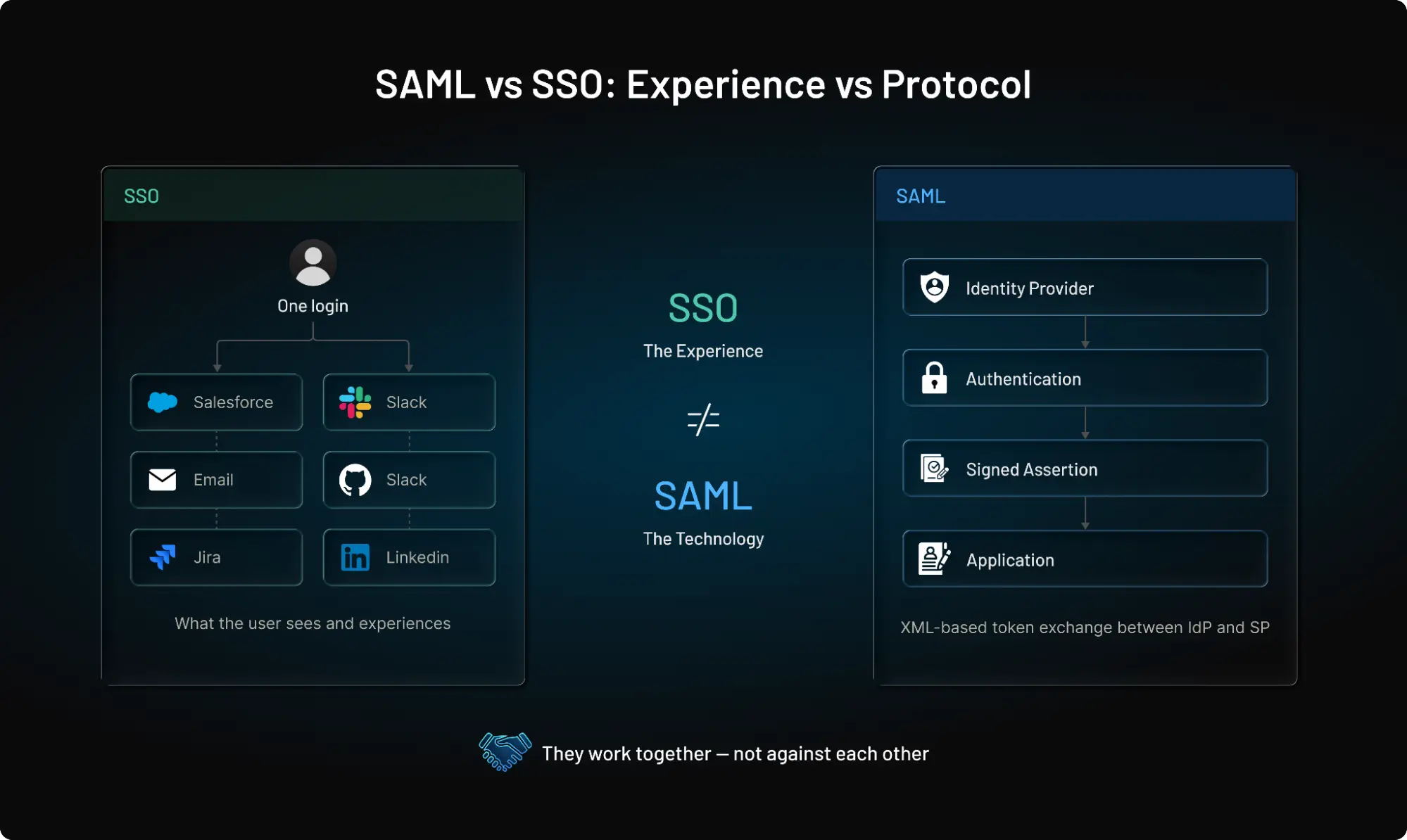
If you only remember one thing from this guide, let it be: SSO is the login experience. SAML is the protocol that makes that experience work. For a detailed understanding on what SAML is and how it works, you can read this article of ours.
They do not compete because they solve entirely different problems. Single Sign-On (SSO) describes the outcome, allowing a user to authenticate once and access multiple applications without re-entering passwords. SAML (Security Assertion Markup Language) describes the method a standardized, secure XML framework used to pass authentication information or identity details between systems so that all of those apps know that the user has already been verified.
The easiest way to separate the two is to compare what each one is responsible for.
| Category | SSO | SAML |
|---|---|---|
| What it is | A login experience | An authentication protocol |
| Primary purpose | Let users sign in once and access multiple applications (frictionless access) | Securely exchange authentication information between systems |
| Primary audience | End users and IT administrators | Developers, security teams, and identity architects |
| User visibility | Highly visible | Mostly invisible |
| Business value | Better user experience and centralized access | Secure enterprise identity federation |
| Depends on | Authentication technologies | Identity Providers and Service Providers |
| Can use | SAML, OpenID Connect (OIDC), Kerberos, and other standards | Primarily enterprise SSO implementations |
So the better question is no longer: "Should we use SAML or SSO?"
Instead, ask: "What type of Single Sign-On experience do we need, and which authentication protocol best supports it?"
That small shift in thinking makes enterprise identity decisions much easier.
How SAML Executes the SSO Outcome: The 3-Step Handshake
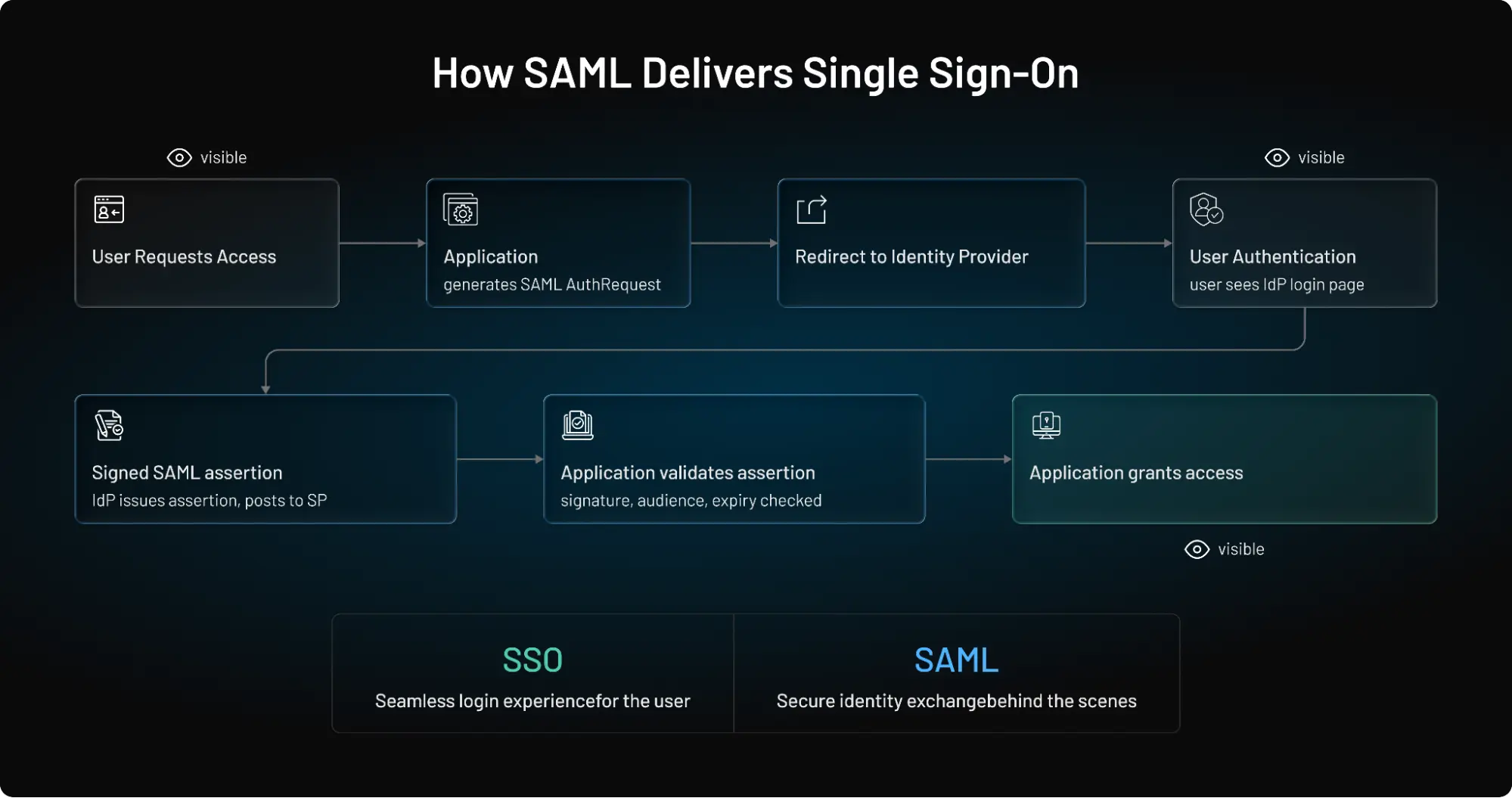
When a user requests access to an application, the security assertion process works via a standardized cryptographic loop:
-
The Challenge (SP-Initiated): The user arrives at your application (the Service Provider). The app detects no active session and generates a secure XML
AuthnRequest, redirecting the user’s browser to their corporate Identity Provider (IdP). -
The Verification: The IdP challenges the user for credentials and validates active Multi-Factor Authentication (MFA) policies.
-
The Assertion Delivery: Upon verification, the IdP packages user claims into a cryptographically signed XML document (the SAML Assertion) and posts it back to the application's Assertion Consumer Service (ACS) URL, completing the login loop.
Why SAML and SSO Are Often Confused
The confusion rarely starts during initial product demos—it surfaces much later during procurement, IT onboarding, or security reviews.
A business buyer asks a simple question: "Do you support SSO?" To them, it's a feature request for simpler logins. However, when that request lands on their internal security team, it instantly transforms into a compliance and integration requirement:
-
Can we hook this into our corporate Identity Provider (IdP) like Okta or Microsoft Entra ID?
-
Can we pass user roles securely without setting up separate passwords?
-
Can we instantly cut off app access from our central dashboard when an employee leaves?
-
Can we enforce Multi-Factor Authentication (MFA) centrally?
-
Can we avoid creating separate passwords inside your application?
-
Will user access be removed automatically when someone leaves the company?
To answer yes to those security questions, your application cannot just support generic "SSO"—it must speak the specific protocol the enterprise environment relies on.
SSO Is More Than Just a Login Button
Implementing SAML helps applications trust the authentication decisions made by an enterprise Identity Provider, but a complete SSO strategy requires more than just processing a token. True enterprise readiness requires planning for what happens after the user clicks log in:
-
Session Management: How long does a user stay authenticated?
-
Identity Federation: Can you cleanly support multi-tenant environments if clients use different IdPs?
-
User Provisioning: Do you support Just-in-Time (JIT) provisioning or automated syncing to create user profiles on the fly?
Ultimately, you can absolutely have SSO without SAML (by using modern cloud alternatives like OpenID Connect), but you cannot integrate into a traditional legacy enterprise identity ecosystem without it. Instead of asking if you need SAML or SSO, the right architecture question is always: "What kind of Single Sign-On experience do our users need, and which protocol matches our target ecosystem?"
When Should You Choose SAML for SSO?
By now, the difference between SAML and SSO is probably much clearer. The next question is the one that actually influences architecture decisions: When should you choose SAML as the protocol behind your Single Sign-On experience?
The answer depends on the identity environment you're integrating with.
SAML is still widely used because many enterprise organizations have already standardized on Identity Providers such as Microsoft Entra ID, Okta, Ping Identity, and similar platforms. Those identity systems are responsible for authenticating employees, enforcing security policies, and managing access across hundreds of applications.
If your application needs to become part of that ecosystem, SAML is often the expected integration standard.
Some common scenarios include:
| Scenario | Is SAML a Good Choice? | Why |
|---|---|---|
| Enterprise workforce applications | ✅ Yes | Integrates with corporate Identity Providers and centralized authentication. |
| B2B SaaS platforms | ✅ Yes | Enterprise customers often expect SAML-based SSO as part of procurement requirements. |
| Partner and supplier portals | ✅ Yes | Simplifies federation between trusted organizations. |
| Internal business applications | ✅ Yes | Supports centralized identity management and access policies. |
| Consumer mobile applications | ❌ Usually No | OpenID Connect (OIDC) generally provides a better fit for modern mobile authentication. |
| Customer-facing web applications | ⚠ Depends | Enterprise editions often support SAML, while consumer experiences frequently rely on OIDC. |
Here's where teams usually go wrong. They treat SAML as a security feature instead of an integration requirement.
Supporting SAML doesn't automatically make an application more secure. Strong security still depends on authentication policies, Multi-Factor Authentication (MFA), session management, access controls, and continuous monitoring.
SAML's primary role is different. It enables trusted identity exchange between an organization's Identity Provider and your application, allowing users to authenticate with credentials their company already manages.
That's exactly why enterprise customers ask about SAML so early in the buying process. They're not evaluating a protocol for its own sake.
They're evaluating how easily your application can fit into their existing identity architecture without introducing another user directory, another password store, or another administrative burden.
For many SaaS vendors, supporting SAML becomes less about adding a new authentication method and more about removing friction from enterprise onboarding.
The easier it is for customers to connect your application to their Identity Provider, the easier it becomes for them to deploy your product securely at scale.
That's the real value SAML brings to enterprise Single Sign-On.
SAML Isn't the Only Way to Deliver SSO
One of the biggest misconceptions about enterprise authentication is that Single Sign-On always requires SAML. It doesn't.
SSO is the outcome. The protocol behind that experience depends on the type of application you're building, the users you're serving, and the identity systems you need to integrate with.
Although SAML is still widely used across enterprise environments, it is no longer the only option.
Modern identity platforms support multiple authentication standards, allowing organizations to choose the one that best fits their architecture instead of forcing every application into the same model. Here’s where it gets interesting.
Two organizations can both offer Single Sign-On while using completely different protocols behind the scenes.
-
An enterprise HR platform may rely on SAML because it integrates with a corporate Identity Provider that manages thousands of employees.
-
A customer-facing SaaS application, in contrast, may use OpenID Connect (OIDC) because it works naturally with modern web applications, mobile apps, APIs, and cloud-native architectures. The login experience feels almost identical to the user. The technology powering it is different.
-
API-first platforms may use OAuth 2.0 as it better supports delegated authorization and user authentication.
The choice usually comes down to the environment you're supporting rather than which protocol is "better."
| Authentication Scenario | Common Choice | Why |
|---|---|---|
| Enterprise workforce applications | SAML | Integrates with existing corporate Identity Providers |
| Internal business systems | SAML | Supports centralized enterprise authentication |
| B2B SaaS serving enterprise customers | SAML | Frequently required during enterprise procurement |
| Modern web applications | OpenID Connect | Designed for browser-based and cloud-native applications |
| Mobile applications | OpenID Connect | Better suited for mobile authentication flows |
| API-first platforms | OAuth 2.0 + OpenID Connect | Supports delegated authorization and user authentication |
Cryptographic Overhead: Heavy XML vs. Lightweight JSON
The primary reason SAML remains the dominant force behind enterprise workforce SSO is its deep maturity in assertion validation. SAML assertions use robust XML digital signatures to cryptographically sign both individual user attributes and the parent data response container.
While this guarantees strict transit security over public browser channels, parsing complex XML structures requires computing overhead. Modern consumer web and mobile applications often prefer OpenID Connect (OIDC) because it relies on lightweight, stateless JSON Web Tokens ($JWT$) that execute much faster on mobile processors.
Common Mistakes Teams Make When Evaluating SSO
Enterprise authentication projects rarely fail because someone chose the wrong protocol. More often than not, they fail because the right questions were never asked.
A team requests SSO. Engineering implements SAML. Procurement approves the purchase. Then onboarding begins, and unexpected requirements start appearing. Multiple Identity Providers. User provisioning. MFA enforcement. Certificate management. Suddenly, what looked like a straightforward integration becomes a much larger identity project.
A surprising pattern we've seen is that organizations often evaluate SSO as a feature instead of an identity capability. That distinction matters.
Single Sign-On is only one part of enterprise identity. The success of an implementation depends just as much on how users are managed, how access is controlled, and how identity integrates across existing systems.
Here are some of the most common mistakes organizations make and how to avoid them.
Mistake 1: Assuming SSO Means SAML
Many buyers use the terms interchangeably. They ask whether an application supports SSO when they actually need SAML, or they ask for SAML without confirming whether it aligns with their authentication architecture.
A better starting point is to identify the Identity Provider your organization already uses and the protocols it supports. That keeps the conversation focused on integration requirements instead of terminology.
Mistake 2: Treating Authentication as the Entire Identity Strategy
Authenticating users is only the beginning.
Enterprise deployments also require user lifecycle management, access governance, provisioning, deprovisioning, audit logging, and policy enforcement. Supporting SSO without considering these capabilities often creates additional operational work rather than reducing it.
Mistake 3: Ignoring Identity Provider Compatibility
Supporting a protocol is not the same as supporting enterprise identity environments.
Organizations should verify that an application integrates with their existing Identity Provider, supports required authentication policies, and can accommodate future organizational growth without extensive customization.
Mistake 4: Focusing Only on Login Experience
A smooth login experience is valuable, but enterprise identity continues long after authentication.
Role assignments, session controls, access reviews, compliance reporting, and account lifecycle management all influence the long-term success of an identity deployment. Evaluating only the login experience provides an incomplete picture.
Mistake 5: Planning for Today's Requirements Instead of Tomorrow's Growth
Identity requirements rarely stay static. A company may begin with a single workforce Identity Provider, then expand to support enterprise customers, partners, contractors, regional business units, or acquisitions. Choosing an authentication approach that scales with those changes helps avoid expensive redesigns later.
The strongest identity decisions usually begin with business requirements, not protocol names.
Once you understand who your users are, how they authenticate, which identity systems they rely on, and how access should be managed over time, selecting the appropriate authentication protocol becomes much more straightforward.
Questions Every Enterprise Buyer Should Ask
"Do you support SSO?" It's a common question. It's also one of the least useful questions you can ask.
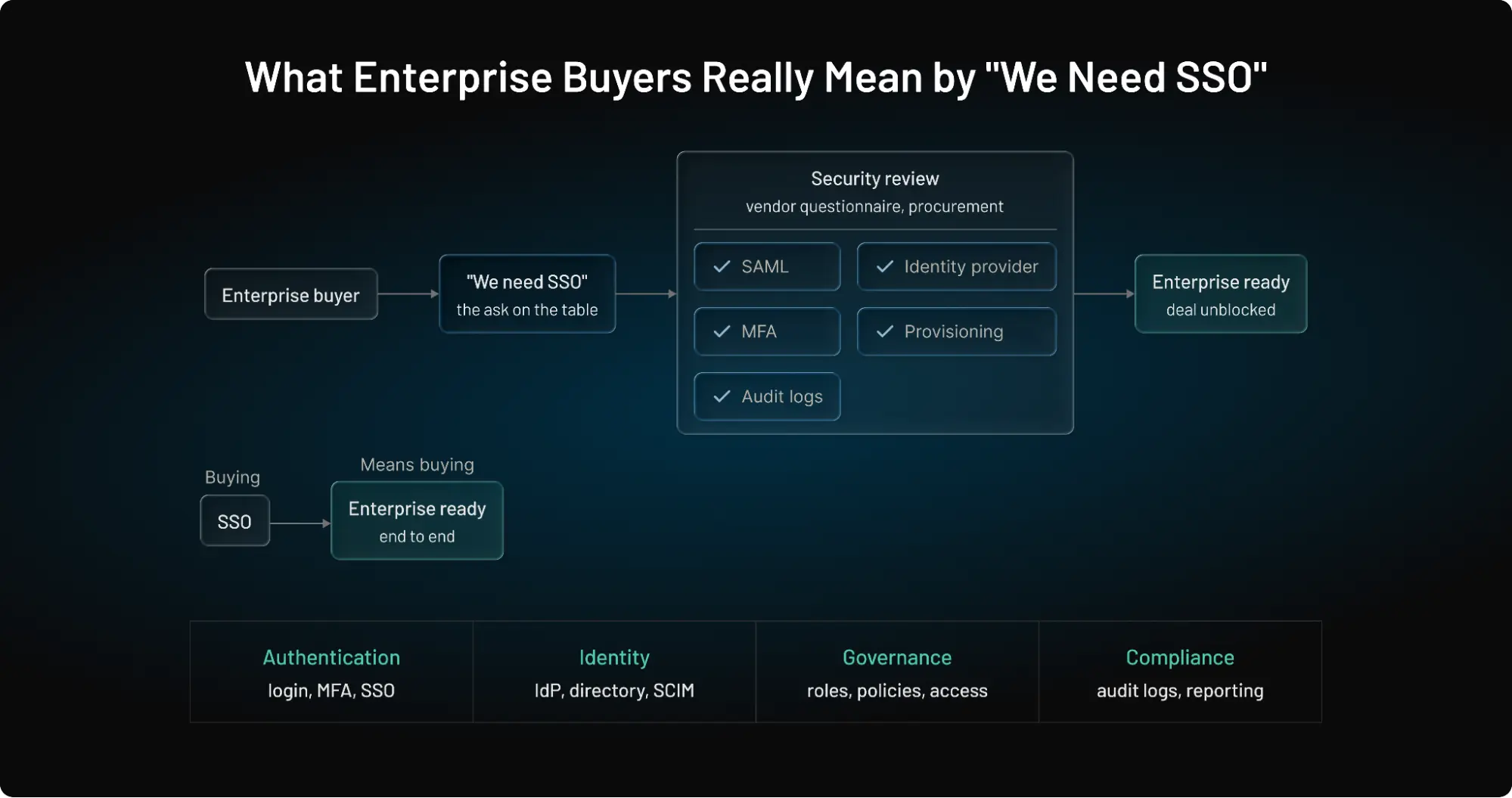
When an enterprise buyer asks, "Do you support SSO?", their security team is secretly screening your app for five specific capabilities:
-
Identity Federation: Can our employees log in via our existing corporate IdP (e.g., Azure AD/Entra ID, Okta)?
-
Centralized Governance: Can we mandate and enforce Multi-Factor Authentication (MFA) from our control panel?
-
Credential Minimization: Can we prevent identity fragmentation and local password stores inside your app?
-
Automated Lifecycle Control: Will a user's access instantly drop when suspended in our central directory?
Most enterprise software vendors will answer "yes." That tells you almost nothing about how well their identity platform integrates with your environment or whether it can support your long-term requirements.
A better conversation starts by understanding how authentication, identity management, and access control work together.
Here are the questions that matter most during an enterprise evaluation.
| Question | Why It Matters |
|---|---|
| Which authentication protocols do you support (SAML, OpenID Connect, or both)? | Confirms compatibility with your existing identity architecture. |
| Which Identity Providers can you integrate with? | Ensures seamless integration with your organization's authentication platform. |
| Can different customers or business units use different Identity Providers? | Important for multi-tenant SaaS platforms and enterprise organizations. |
| How is Multi-Factor Authentication enforced? | Determines whether authentication policies remain centralized. |
| Do you support Just-in-Time (JIT) provisioning or automated user provisioning? | Reduces administrative overhead and speeds up onboarding. |
| How are users deprovisioned when access is removed? | Helps prevent orphaned accounts and strengthens security. |
| Are authentication events logged for auditing and compliance? | Supports security investigations and regulatory requirements. |
| How are certificates, metadata, and trust relationships managed? | Simplifies long-term maintenance of enterprise identity integrations. |
| Can authentication policies adapt as our organization grows? | Ensures the platform can support future business and security requirements. |
Teams usually evaluate identity one integration at a time. Enterprise identity doesn't work that way.
Authentication, user lifecycle management, access governance, compliance, and security policies are all connected. A platform that handles today's SSO requirement but struggles with tomorrow's provisioning, federation, or audit requirements can quickly become an operational bottleneck.
That is why mature organizations evaluate identity platforms as long-term infrastructure rather than individual features. The protocol still matters. So does the login experience.
But what often determines long-term success is whether the platform can evolve alongside your organization without forcing costly migrations or fragmented identity workflows. The strongest enterprise identity solutions don't simply answer "yes" to SSO support.
They demonstrate how authentication, governance, lifecycle management, security, and integration work together as a complete identity strategy.
SAML vs SSO Decision Framework
By now, one thing should be clear. Choosing between SAML and SSO isn't really the decision.
SSO is the experience your users expect. SAML is one of several technologies that can deliver that experience. The real decision is determining when SAML is the right fit for your authentication strategy.
The easiest way to answer that question is to start with your users, your applications, and your existing identity environment not the protocol itself.
The framework below can help.
| If your organization needs to... | SSO Required | SAML Recommended |
|---|---|---|
| Give employees one login across enterprise applications | ✅ | ✅ |
| Integrate with an existing corporate Identity Provider | ✅ | ✅ |
| Support enterprise customer authentication in a B2B SaaS platform | ✅ | ✅ |
| Reduce password fatigue and improve user experience | ✅ | Depends on your identity architecture |
| Authenticate users across modern web and mobile applications | ✅ | Usually No (OIDC is often preferred) |
| Connect with legacy enterprise systems | ✅ | ✅ |
| Build consumer-facing authentication experiences | ✅ | Usually No |
| Meet enterprise procurement requirements for workforce SSO | ✅ | ✅ |
Notice the pattern. The decision isn't driven by whether SAML is "better." It's driven by who is authenticating and which identity ecosystem your application needs to integrate with.
If your customers already manage employee identities through a corporate Identity Provider, supporting SAML is often a business requirement rather than a technical preference. Without it, enterprise onboarding can become slower, procurement becomes more difficult, and IT teams may struggle to integrate your application into their existing authentication workflows.
In contrast, organizations building modern consumer applications frequently prioritize standards that are better suited to browser-based experiences, mobile devices, and API-driven architectures. They still provide Single Sign-On. They simply achieve it using a different protocol.
Another observation we've seen across enterprise SaaS is that successful identity strategies rarely rely on a single authentication standard forever. A workforce application might use SAML to integrate with enterprise Identity Providers. A customer portal might use OpenID Connect.
Partner applications may support both, depending on customer requirements. The goal isn't protocol consistency. It's delivering a consistent, secure authentication experience across every user journey.
That's why mature identity platforms don't force organizations to choose one standard for every scenario. They provide the flexibility to support multiple authentication protocols while maintaining centralized identity management, consistent security policies, and a unified user experience.
When evaluating identity solutions, focus less on which protocol wins and more on whether the platform can support the authentication requirements your business has today and the ones you'll have as it grows. That's usually the decision that matters most.
Conclusion
The question was never whether SAML is better than SSO. They were never competing technologies. Single Sign-On is the experience organizations want to deliver. SAML is one of the standards that helps make that experience possible in enterprise environments.
The real decision is understanding your users, your identity ecosystem, and the systems your applications need to integrate with.
If your organization already relies on an enterprise Identity Provider for workforce authentication, SAML will often be the expected standard. If you're building modern customer-facing applications, other authentication protocols may provide a better fit. Many organizations support multiple standards because different users, applications, and business requirements call for different authentication approaches.
The goal isn't to choose one protocol forever. It's to build an identity strategy that delivers secure authentication today while remaining flexible enough to support tomorrow's applications, customers, and growth.
That's exactly where the right identity platform makes a difference.
Build Enterprise SSO Without the Complexity
Supporting enterprise Single Sign-On shouldn't require months of custom development or maintaining separate authentication systems for every customer.
LoginRadius helps organizations implement enterprise-ready authentication with support for SAML, OpenID Connect (OIDC), OAuth 2.0, adaptive Multi-Factor Authentication (MFA), identity federation, Just-in-Time (JIT) provisioning, and flexible integration with leading enterprise Identity Providers.
Whether you're building a B2B SaaS platform, onboarding enterprise customers, modernizing workforce authentication, or expanding partner access, LoginRadius provides the tools to deliver secure, scalable identity experiences without adding unnecessary operational complexity.
Looking to choose the right approach?
Explore how LoginRadius helps organizations simplify enterprise authentication, accelerate customer onboarding, and deliver secure Single Sign-On experiences that scale with the business.
Frequently Asked Questions
Q: Is SAML the same as SSO?
A: No. SSO is the login experience, while SAML is one of the authentication protocols that enables enterprise Single Sign-On.
Q: What is the difference between SAML and SSO?
A: SSO lets users access multiple applications after one login, while SAML securely exchanges authentication information between an Identity Provider and an application.
Q: Does SSO require SAML?
A: No. SSO can be implemented using SAML, OpenID Connect (OIDC), Kerberos, and other authentication technologies.
Q: Can SSO work without SAML?
A: Yes. Many modern web and mobile applications use OpenID Connect (OIDC) instead of SAML to deliver Single Sign-On.
Q: Why do enterprises use SAML for SSO?
A: Enterprises use SAML because it integrates with corporate Identity Providers, supports identity federation, and centralizes authentication across applications.
Q: Is SAML still used today?
A: Yes. SAML is still widely used for workforce identity, enterprise SaaS, partner portals, and other business applications requiring secure SSO.
Q: What protocols can be used for SSO?
A: Common SSO protocols include SAML and OpenID Connect (OIDC), with the right choice depending on your application and identity environment.
Q: What should I ask a vendor about SSO support?
A: Ask which authentication protocols they support, which Identity Providers they integrate with, and whether they offer MFA, provisioning, and audit logging.
Q: Is SAML more secure than SSO?
A: SAML and SSO aren't direct alternatives. Security depends on how authentication, MFA, session management, and access policies are implemented.
Q: When should a business implement SSO?
A: Organizations should implement SSO when users access multiple applications and centralized authentication can improve security, user experience, and IT efficiency.