Introduction
A customer clicks “Continue with Google” to create an account. An employee clicks “Sign in with SSO” to access a company application. Both avoid creating another password, and both rely on an external identity provider to authenticate the user. So, are social login and Single Sign-On (SSO) essentially the same thing? Not quite.
The confusion is understandable because the technologies overlap. Social login can technically be considered a form of federated sign-on: an application trusts an external provider such as Google, Apple, Microsoft, or GitHub to authenticate the user. But when businesses talk about SSO vs social login, they're usually tackling two different identity problems.
Social login is primarily about making customer registration and sign-in easier. Users bring an identity they already own and choose which provider they want to use. SSO is generally about giving users access to connected applications through a centralized identity, often managed by an employer, enterprise customer, or another organization.
That distinction affects several aspects: who controls the identity, how access is granted and revoked, which authentication policies can be enforced, how users are provisioned and deprovisioned, and whether the experience is better suited to B2C customers, enterprise users, partners, or a mix of them.
And sometimes the right answer isn't choosing one over the other. A SaaS company might offer Google or GitHub social login to self-service customers while providing enterprise SSO to larger organizations.
The useful question, then, isn't simply “Which one is better?” It's “Who owns the identity, who needs to control access, and what kind of user journey are you building?”
Those answers make the difference between SSO and social login much clearer.
SSO vs Social Login: The Difference in 60 Seconds
With social login, the user typically chooses a personal or externally managed identity such as Google, Apple, Facebook, Microsoft, or GitHub to register or sign in to an application. The application trusts that provider to authenticate the user, usually through OAuth 2.0 and OpenID Connect (OIDC).
With Single Sign-On (SSO), authentication is usually tied to a centralized identity system. A company might allow employees or business customers to authenticate through Microsoft Entra ID, Okta, Ping Identity, Google Workspace, or another enterprise identity provider. Once authenticated, the same organizational identity can be used to access multiple connected applications.
Social login is usually optimized for customer choice and lower signup friction, while SSO is usually optimized for centralized access and organizational control.
| Factor | Social Login | Single Sign-On (SSO) |
|---|---|---|
| Primary purpose | Simplify registration and repeat login | Provide access to multiple connected applications |
| Typical identity owner | Individual user | Organization or centralized identity system |
| Typical users | Consumers, developers, self-service users | Employees, partners, enterprise customers |
| Common examples | Google, Apple, Facebook, GitHub | Microsoft Entra ID, Okta, Ping Identity, Google Workspace |
| Main business goal | Reduce signup and login friction | Centralize authentication and access control |
| Common protocols | OAuth 2.0, OpenID Connect | SAML, OpenID Connect |
| Organizational control | Usually limited | Typically much stronger |
| Identity lifecycle | Primarily managed by the external provider and application | Can be centrally managed by the organization |
| Typical fit | B2C, consumer apps, self-service SaaS | Workforce, B2B SaaS, partner and enterprise access |
| Can they coexist? | Yes | Yes |
There are exceptions, which is why treating this as a rigid technology distinction can be misleading. Google, for example, can support a consumer using a personal account for social login and an employee using an organization-managed Google Workspace identity in an enterprise access scenario.
So the better way to distinguish the two is by looking beyond the button. Who manages the identity? Who controls access? Is the goal easier customer onboarding or centralized access across applications?
Those questions usually tell you whether you're dealing with social login, SSO, or an environment that needs both.
For a deeper look at how social login works, its benefits, providers, security considerations, and implementation practices, see What Is Social Login? How It Works, Benefits, Security & Best Practices.
SSO vs Social Login: Key Differences That Actually Matter
The login screen alone doesn't tell you much. A Continue with Google button and a Sign in with SSO button can both send users to an external identity provider and return them to the application authenticated.
The meaningful differences appear behind that experience: who owns the identity, who controls access, what happens when access should end, and what the business is trying to accomplish.
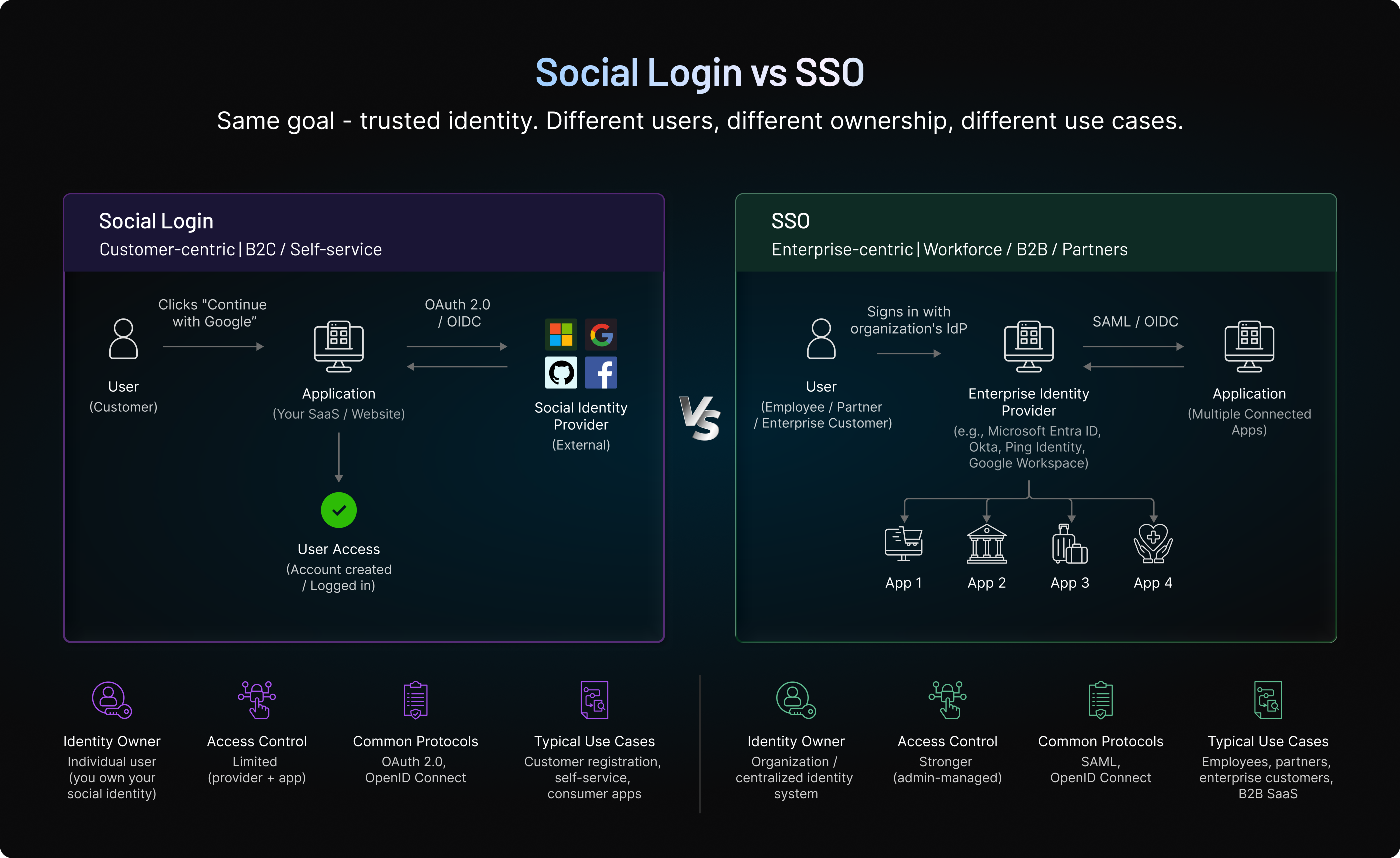
Who Owns and Manages the Identity?
With social login, the identity usually belongs to the individual. The user creates and manages their Google, Apple, Facebook, GitHub, or other provider account independently of the application they're accessing.
The business can decide whether to accept that identity, but it doesn't control the underlying account. If a customer changes their Google password, enables MFA, or closes the account, those actions happen within Google's identity environment.
Enterprise SSO usually works differently. The identity is commonly created or managed by an organization through its identity infrastructure. That gives the organization considerably more influence over authentication requirements and access.
This distinction becomes particularly important in B2B scenarios. A company doesn't just need to know that someone successfully authenticated. It may need to know that the person still belongs to a customer organization and should still have access to its applications.
What Problem Are You Trying to Solve?
Social login is usually chosen to remove friction from customer registration and repeat sign-in.
Someone discovers an application and wants to start using it. Instead of asking them to create another credential, the application lets them authenticate with an identity they already have.
SSO usually starts with another question: How can users access approved applications through one centrally managed identity?
An employee shouldn't need separate credentials for every business application. Likewise, an enterprise customer using a SaaS product may want its employees to authenticate through the company's existing identity provider rather than creating credentials directly with the SaaS vendor.
So while both approaches can reduce password friction, the business objective isn't necessarily the same.
Who Controls Authentication and Access?
Here's where the gap becomes more noticeable.
With social login, the external provider controls how the underlying social account is authenticated. Google, Apple, or another provider may use passwords, passkeys, MFA, device intelligence, or its own risk controls. The application can still apply additional security after authentication, but it doesn't dictate every control protecting the provider account.
Enterprise SSO gives the organization more centralized control. Depending on its identity architecture, it can enforce authentication policies such as MFA and other access requirements before users reach connected applications.
The application still has authorization responsibilities. Successfully authenticating through SSO doesn't automatically mean a user should be allowed to do everything inside the product.
Authentication answers who the user is. Authorization still determines what that user can do.
Registration and Onboarding Work Differently
Social login often participates directly in account creation.
A new customer chooses Google or Apple, authenticates, approves the requested information, and the application uses the verified provider identity to create or connect a customer profile. This makes social login particularly relevant to B2C registration, freemium signup, mobile onboarding, and self-service SaaS.
SSO frequently assumes that an organizational relationship already exists.
A business customer may configure its identity provider with a SaaS platform so employees can authenticate using corporate identities. Depending on the implementation, user accounts may be created when users first authenticate, provisioned in advance, or managed through a broader enterprise identity lifecycle.
That's why social login tends to appear prominently on consumer registration screens, while enterprise SSO is often configured at the organization or tenant level.
Identity Lifecycle and Offboarding
Getting users into an application is only half the identity problem. Eventually, some users need to lose access.
Consider an employee who leaves a company.
With enterprise SSO, disabling or removing the employee's organizational identity can prevent future authentication to connected applications, depending on how the environment is configured. Provisioning and deprovisioning processes can extend that control further.
A personal social identity behaves differently. If someone signs into an application using their personal Google account, leaving an employer doesn't make that Google account disappear. The application therefore needs its own rules for determining whether that person should continue to have access to a particular organization, workspace, subscription, or role. For B2B applications, this difference can be decisive.
The Protocols Aren't Identical Either
Social login commonly uses OAuth 2.0 and OpenID Connect. OAuth provides the authorization framework, while OIDC adds the identity layer commonly used to authenticate users and return standardized identity claims.
SSO can also use OpenID Connect, but SAML 2.0 remains widely used for enterprise federation.
This means the protocol alone doesn't always tell you whether an experience should be classified as SSO or social login. OIDC, for example, can support both.
Context matters more: who is the identity provider, who manages the identity, and what relationship exists between the user, organization, and application?
Privacy and Data Sharing Follow Different Models
Social login frequently involves an individual granting an application permission to receive selected information from an external provider. Depending on the provider and scopes, that might include a stable user identifier, email address, name, or other approved attributes.
That makes consent and data minimization particularly visible parts of the social login experience.
Enterprise SSO generally deals with identity attributes shared as part of a trusted relationship between an organization, its identity provider, and the application. Those attributes might include an employee identifier, email address, group, role, department, or other information needed to establish the user's account and access.
Neither model gives an application permission to collect whatever data it wants. The difference is largely where the identity originates and how the relationship around that identity is governed.
And that leads to a question that causes much of the terminology confusion in the first place: if social login relies on another provider to authenticate the user, isn't social login technically a form of SSO?
Is Social Login a Type of SSO?
Technically, there is some overlap. Social login relies on an external identity provider to authenticate a user for another application, which makes it a form of federated authentication. That's also why you'll sometimes see terms such as social SSO used to describe the experience.
But treating social login and SSO as interchangeable creates more confusion than clarity.
In most customer identity and enterprise discussions, social login refers to an individual using an existing consumer or external identity such as Google, Apple, Facebook, Microsoft, or GitHub to access an application. SSO, meanwhile, usually refers to a centrally managed identity being used across multiple trusted applications.
The distinction is easier to see with Google.
Imagine a shopper uses a personal Gmail account to select Continue with Google on an ecommerce site. The shopper chose the identity, owns the account, and uses it to make registration easier. That's typically described as social login.
Now consider an employee whose company manages identities through Google Workspace. The employee uses that organizational identity to access several business applications approved by their employer. The experience can involve Google as the identity provider, but the identity relationship and access model are different. That's an enterprise SSO scenario.
Same provider. Very different purpose.
This is also why looking only at the protocol doesn't settle the question. OpenID Connect can support both social login and enterprise SSO. What matters is the identity model around it: who manages the user, who controls access, and whether authentication is primarily simplifying entry into one application or providing centrally managed access across connected applications.
So, is social login a form of SSO?
From a broad federation perspective, it can be described that way. From a practical identity-management perspective, however, keeping the terms separate is useful because they solve different business problems.
Social login prioritizes user choice and low-friction customer access. Enterprise SSO prioritizes centralized identity, policy, and access control.
That difference becomes especially important when deciding which approach belongs in a particular customer, workforce, partner, or B2B SaaS journey.
When Should You Use Social Login vs SSO?
Choosing between social login and SSO shouldn't start with the protocol. Start with the user.
Are people signing up as individuals and choosing their own identity provider? Social login will often make more sense. Are they accessing your product as members of a company that needs to control authentication and remove access when they leave? SSO is usually the stronger fit.
For some products, particularly B2B SaaS, the answer is both.
| Scenario | Better Fit | Why |
|---|---|---|
| Consumer ecommerce signup | Social Login | Reduces registration friction and avoids another application-specific password |
| Consumer mobile app | Social Login | Lets users authenticate with familiar identities already connected to their devices |
| SaaS free trial or freemium signup | Social Login | Supports faster self-service onboarding |
| Developer platform | Social Login | Providers such as GitHub or Google align naturally with developer audiences |
| Enterprise SaaS customer | SSO | Lets the customer authenticate users through its organizational identity provider |
| Employee application suite | SSO | Supports centralized authentication and organizational access policies |
| Partner portal | SSO / Federation | Allows partner organizations to authenticate users through trusted identity systems |
| Mixed B2B SaaS audience | Both | Social login can serve self-service users while SSO supports enterprise customers |
| High-risk customer activity | Social Login + Stronger Verification | Initial login can remain convenient while sensitive actions trigger additional authentication |
Choose Social Login When Fast Customer Access Matters
-
Users are consumers
-
Sign-up speed translates into revenue
-
Friction reduction is key.
An ecommerce shopper, streaming subscriber, mobile-app user, or developer trying a new platform probably doesn't want an enterprise identity setup. They want to get in quickly.
Provider choice should follow the audience rather than a generic checklist. GitHub may make perfect sense for a developer tool and very little sense for a fashion retailer. Apple and Google may be more valuable for a consumer mobile application. Regional preferences can change the mix again.
The objective is straightforward: make authentication fit the customer journey instead of making the customer adapt to your authentication system.
Choose SSO When the Organization Needs Control
-
Access is organization-controlled.
-
Compliance matters.
-
Centralized lifecycle management is required.
Consider a company purchasing a SaaS platform for 5,000 employees. It probably doesn't want every employee independently choosing a personal social account to access corporate resources. The company may need authentication to run through its existing identity provider, where security policies, MFA requirements, and organizational access can be managed centrally.
Offboarding makes the difference even clearer. When an employee leaves, the organization needs a reliable way to remove access. Enterprise SSO can make authentication part of that centrally managed identity lifecycle rather than leaving access tied to a personal account the organization doesn't control.
For enterprise customers, that level of control can matter far more than shaving a few seconds off registration.
Use Both When Your Audience Isn't One-Size-Fits-All
This is common in B2B SaaS. A product might start with developers or small teams who sign up themselves. Requiring enterprise SSO configuration before they can try the product would create unnecessary friction, so Continue with Google or Continue with GitHub makes sense. Then the account grows.
The same product lands a large enterprise customer that wants employees to authenticate through its corporate identity provider. Now SSO becomes important.
There is no reason those experiences have to compete.
Social login can support self-service acquisition, while SSO supports enterprise-managed access. A mature identity architecture can accommodate both and apply the appropriate authentication experience based on the user, organization, application, or risk involved.
That's especially useful when a self-service customer later becomes part of an enterprise account. Their authentication method may change, but their product history, profile, preferences, and other customer data shouldn't suddenly become disconnected.
Add Stronger Verification When Login Alone Isn't Enough
There is another scenario where “SSO or social login?” is the wrong question.
A customer may successfully authenticate through Google and still need additional verification before changing a recovery method, accessing sensitive information, or performing a high-risk transaction. An enterprise user authenticated through SSO may face the same requirement.
Authentication assurance should match the action.
MFA, adaptive authentication, passkeys, or other step-up controls can sit alongside social login or SSO when greater confidence is required. That allows routine access to stay convenient without assuming every authenticated session should automatically authorize every action.
The choice, then, isn't always social login versus SSO. For many modern applications, it's about knowing where each belongs and giving different users the authentication experience their relationship with the business actually requires.
Can Social Login and SSO Work Together?
Yes. For many B2B SaaS products, supporting both is more practical than choosing one authentication model for every user.
A developer or small team might initially create an account with Google or GitHub because social login makes self-service signup fast. Later, the same customer's organization may purchase an enterprise plan and require employees to authenticate through its corporate identity provider using SSO.
The authentication requirement has changed. The customer's existing identity and product history shouldn't have to start over.
When a Social Login User Moves to Enterprise SSO
Consider a user who originally signs up with Google. Over time, they create projects, configure preferences, join a workspace, and build activity history inside the application.
Their company later adopts the product at an enterprise level and requires corporate SSO.
Creating an entirely new account at that point can fragment the experience. The application may end up with one profile associated with the original social identity and another associated with the enterprise identity.
Instead, after appropriate verification, the new enterprise authentication method can be associated with the customer's existing application profile. Their authentication method changes, while the account and relevant product history remain consistent.
This distinction matters in B2B SaaS: how someone authenticates can change as their relationship with the business changes.
Don't Treat Matching Email Addresses as Proof of Identity
There is an important security boundary during that transition.
Suppose a customer's Google account and enterprise SSO identity both use name@company.com. A matching email address alone shouldn't automatically prove that the two identities belong to the same person or that the user is authorized to join a particular enterprise account.
The transition should include appropriate verification before the enterprise identity is associated with an existing profile.
The broader account-linking mechanics belong to social login implementation. In the SSO vs social login context, the important point is narrower: moving a customer from self-service authentication to enterprise-managed SSO shouldn't automatically mean creating a second customer identity.
For B2B SaaS businesses, this is one reason social login and SSO can complement each other. Social login can support low-friction acquisition and early product adoption, while SSO can provide the organizational control larger customers need as accounts mature.
For businesses serving both self-service and enterprise audiences, that flexibility is often more useful than trying to declare either social login or SSO the universal winner.
Is SSO More Secure Than Social Login?
Not automatically. Both SSO and social login rely on an external identity provider rather than requiring every application to authenticate users independently. The bigger difference is how much control the organization has over the identity and the policies protecting it.
Enterprise SSO generally provides stronger centralized control over authentication requirements, access policies, and the identity lifecycle. Social login can still provide secure customer authentication, but the application has less control over how the underlying personal identity is managed.
| Security Area | Social Login | Enterprise SSO |
|---|---|---|
| Password managed by application | Usually no | Usually no |
| Central organizational policy | Limited | Strong |
| MFA enforcement | Often depends on provider/user settings unless additional controls are applied | Can typically be enforced by the organization |
| Identity lifecycle control | Limited | Stronger |
| Central access revocation | Application/provider dependent | Typically stronger |
| Upstream IdP dependency | Yes | Yes |
| Authentication response validation | Required | Required |
| Step-up authentication | Can be added by the application | Can be enforced through IdP and/or application policies |
Where Enterprise SSO Has an Advantage
The biggest advantage is organizational control.
With enterprise SSO, businesses can centrally manage authentication requirements for organizational identities. Depending on the identity environment, that can include MFA requirements, contextual access policies, session restrictions, and other controls.
Identity lifecycle management also matters. When an employee leaves or changes roles, the organization can update or disable the centrally managed identity and its access. That level of control is harder to achieve when authentication depends on a personal social account the organization doesn't own.
For workforce and enterprise B2B scenarios, this often makes SSO the stronger choice.
Where Social Login Can Reduce Risk
Social login offers a different security advantage: the application doesn't need the password the customer uses with the social identity provider.
That can reduce dependence on application-specific passwords and the risks associated with customers creating weak or reused credentials for yet another service.
The trade-off is control. The external provider determines how the underlying account is protected, and the application may not know whether every customer has enabled stronger authentication.
So social login can reduce certain password-related risks without providing the same centralized administrative control typically available with enterprise SSO.
Both Depend on the Identity Provider
Both approaches introduce trust in an upstream identity provider.
With social login, compromise of a customer's provider account may affect applications connected to that identity. With enterprise SSO, compromise or misconfiguration of a centralized organizational identity system can potentially affect multiple connected applications.
Neither model therefore becomes secure simply because authentication has been delegated. Applications still need to establish that authentication responses are legitimate and enforce their own authorization and session controls.
The difference is mainly where that trust is placed and who can manage it.
Higher-Risk Actions May Need More Assurance
Neither social login nor SSO should automatically provide the same level of assurance for every action.
Reading a profile, changing account-recovery information, accessing sensitive records, and performing a high-value transaction don't carry the same risk. Applications can require stronger verification when the action or context warrants it.
That may involve MFA, passkeys, adaptive authentication, or another step-up control alongside either social login or enterprise SSO.
So, is SSO more secure than social login? For organizations that need centralized policy enforcement, identity lifecycle management, and access revocation, enterprise SSO generally provides greater administrative control. Social login remains well suited to customer authentication where convenience and user choice matter, provided the surrounding application security is appropriate.
How CIAM Supports Both SSO and Social Login
The SSO vs social login decision becomes less binary once a business serves several types of users.
A consumer may want to sign in with Google. A developer may prefer GitHub. An enterprise customer may require employees to authenticate through its corporate identity provider. Another customer might choose a passkey or passwordless authentication. Then there are sensitive actions that warrant MFA or additional verification.
Building each of those journeys independently can create an identity problem of its own.
Separate integrations often mean separate profile logic, authentication policies, sessions, consent records, and account-recovery processes. Over time, the same person can appear as several identities simply because they used different authentication methods.
A Customer Identity and Access Management (CIAM) platform provides a common identity layer across those experiences.
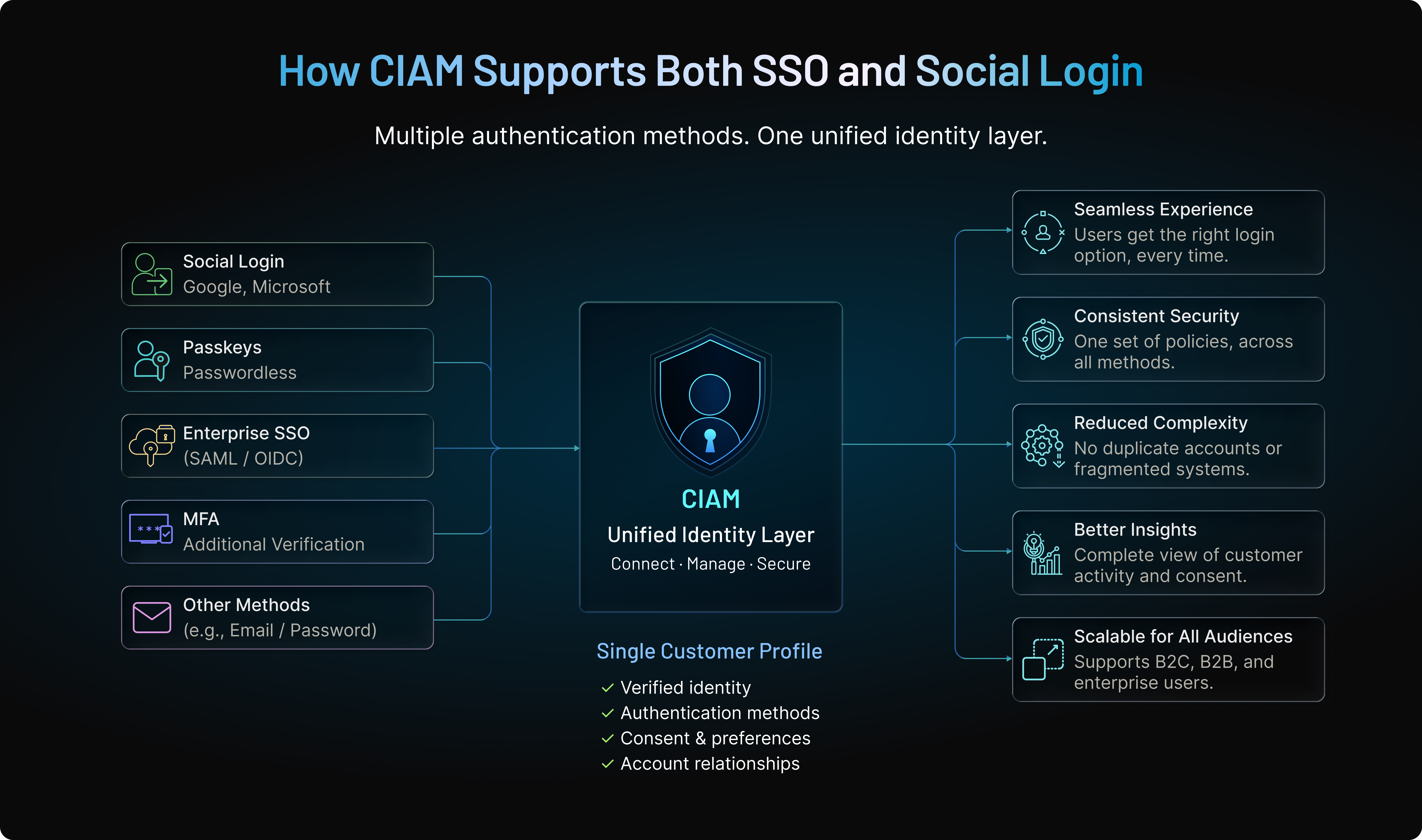
Keep the Customer Profile Separate From the Login Method
This distinction becomes increasingly important as authentication options grow. A customer's identity is not the same thing as the method they use to authenticate.
Someone might initially create an account through Google social login, later add a passkey, and eventually authenticate through enterprise SSO after their company purchases the product. Those authentication methods can change while the underlying customer profile remains consistent.
CIAM can help connect verified identities to that profile so applications don't have to treat every new authentication method as a new person.
For customers, the transition feels more natural. For businesses, it can mean fewer duplicate accounts and a more consistent view of customer activity, preferences, consent, and account relationships.
Support Different Authentication Journeys From One Identity Layer
This is especially useful for businesses serving both B2C and B2B audiences. Instead of forcing one authentication model across every user, organizations can support different paths based on the relationship: Social login can reduce friction for consumers and self-service users.
Enterprise SSO can give business customers centralized authentication through their own identity providers.
Passwordless authentication and passkeys can provide additional options where they fit the experience.
MFA and adaptive authentication can add stronger verification when risk increases.
The important part isn't offering as many methods as possible. It's being able to apply the right method without fragmenting identity management behind the scenes.
Centralize Security and Access Policies
Supporting multiple authentication methods shouldn't mean creating completely separate security models.
A CIAM platform can help applications apply consistent policies after a user authenticates, regardless of whether that authentication began with Google, Apple, an enterprise IdP, or another supported method.
For example, a successful social login may be enough for routine account access but not for changing security settings. An enterprise SSO session may establish the user's organizational identity, while the application still needs to enforce tenant membership, roles, permissions, or step-up verification for privileged actions.
This separation allows businesses to keep authentication flexible while maintaining control over what happens after login.
Where LoginRadius Fits
LoginRadius provides a unified CIAM layer for businesses that need to support different authentication journeys across the same customer base. Self-service users can authenticate through social providers, while enterprise customers can connect their organizational identity providers through SSO using standards such as SAML and OpenID Connect.
Those authentication methods don't have to become separate identity silos. They can connect to a consistent customer identity layer, allowing applications to maintain customer profiles and apply appropriate authentication and access policies as user relationships change.
That becomes particularly useful for B2B SaaS businesses. A user may begin with Google or GitHub during a free trial and later authenticate through enterprise SSO after their organization adopts the product. The authentication method changes, but the customer relationship doesn't need to start again.
The goal isn't to make social login or SSO the universal default. It's to support the right authentication model for each user without fragmenting identity management behind the scenes.
SSO or Social Login? Use the Identity Model That Fits the User
SSO and social login can both make authentication easier, but they aren't competing answers to exactly the same problem.
Social login makes sense when users own and choose the identity they bring to your application. It can reduce friction for consumers, developers, freemium users, and other self-service audiences by letting them authenticate with an account they already use.
SSO becomes more valuable when an organization owns the identity relationship and needs greater control over access. Enterprise customers may need centralized authentication policies, MFA enforcement, user lifecycle management, and a reliable way to remove access when someone leaves the organization. For many businesses, choosing only one would actually create more friction.
A SaaS platform might need Google or GitHub login for someone trying the product today, enterprise SSO when that customer's company adopts the platform six months later, and stronger verification when the same user performs a sensitive action. The authentication method changes. The customer shouldn't have to become a different identity every time it does.
That's where the broader identity architecture matters.
LoginRadius helps businesses support social login, enterprise SSO, federation, passwordless authentication, MFA, and other customer authentication journeys through a unified CIAM platform. Instead of building isolated identity experiences for different customer segments, teams can connect authentication methods to consistent customer profiles while maintaining centralized security and access controls.
The result isn't simply fewer login screens. It's an authentication experience that can adapt as customers, applications, and business requirements change.
Need social login for self-service customers and enterprise SSO for business accounts? Book a LoginRadius demo to see how you can support both without building separate identity systems for each user journey.
FAQs
Q: What is the difference between SSO and social login?
A: Social login lets users access an application with an identity they already own, such as Google or Apple. SSO typically uses a centrally managed identity to provide access across multiple connected applications.
Q: Is social login a form of SSO?
A: Broadly, social login can be considered a form of federated sign-on because an external provider authenticates the user. In practice, however, social login and enterprise SSO serve different identity and access use cases.
Q: Is Sign in with Google SSO or social login?
A: It depends on the context. A personal Google account used to access a consumer application is
typically social login, while an organization-managed Google Workspace identity used across business applications can support an SSO scenario.
Q: Is SSO more secure than social login?
A: Neither is automatically more secure. Enterprise SSO generally provides stronger centralized policy and lifecycle control, while social login can reduce application-managed password risks when implemented securely.
Q: Does social login use SAML?
A: Social login commonly uses OAuth 2.0 and OpenID Connect rather than SAML. SAML is more commonly associated with enterprise SSO and identity federation.
Q: Does SSO use OAuth or OpenID Connect?
A: SSO can use OpenID Connect for authentication, while OAuth 2.0 provides the underlying authorization framework. Enterprise SSO also commonly uses SAML 2.0.
Q: Can an application support both social login and SSO?
A: Yes. An application can offer social login to consumers or self-service users while providing enterprise SSO to organizations that need centrally managed authentication and access.
Q: Which is better for B2B SaaS: SSO or social login?
A: Many B2B SaaS products benefit from both. Social login works well for trials and self-service onboarding, while SSO better supports enterprise customers that need centralized identity and access control.
Q: Which is better for consumer applications?
A: Social login is generally a better fit for consumer applications because users can choose familiar identities such as Google or Apple without creating another password. Higher-risk actions may still require additional verification.
Q: What is the difference between SSO, social login, and federated identity?
A: Social login uses an external consumer identity for convenient access, while SSO provides access across connected applications. Federated identity is the broader trust model that allows separate identity systems and applications to rely on one another.