Cybersecurity can no longer rely on a simple boundary between a trusted internal network and an untrusted internet. Employees work remotely. Customers access applications from personal devices. Businesses rely on SaaS applications and cloud infrastructure. Partners, vendors, and third parties connect to business systems from outside the corporate network.
This makes the traditional security model of “trust what is inside the network” increasingly difficult to defend.
Zero Trust security takes a different approach: never trust, always verify.
Instead of granting trust based on a user's location, network, device, or previous authentication; Zero Trust evaluates every access request using identity, device, context, and policy before granting access to a specific resource.
NIST describes Zero Trust as a shift away from static, network-based perimeters toward protecting users, assets, and resources directly.
In this guide, we'll explain what Zero Trust security is, how it works, how it differs from traditional security, its key components and benefits, and how organizations can begin implementing a Zero Trust architecture.
What Is Zero Trust Security?
Zero Trust security is a cybersecurity model that removes implicit trust from access decisions irrespective of whether they are inside or outside of network connections, and requires users, devices, applications, and other entities to be continuously evaluated before and during access to protected resources.
The fundamental principle is: Don’t trust anyone, always verify.
In a traditional network security model, a user who successfully authenticates or connects through a corporate network may receive broad access to internal resources.
Zero Trust does not assume that being inside the network makes a user or device trustworthy. No access is provided until the system verifies the individual or device demanding access to the IP address, device, or storage.
Instead, every access request is evaluated based on factors such as:
-
Who is requesting access?
-
What device are they using?
-
What application or resource are they trying to access?
-
Where is the request coming from?
-
What permissions does the user have?
-
Is the device compliant?
-
Is the request consistent with normal behavior?
-
What is the current risk level?
Access is then granted according to policy and the principle of least privilege.
This approach is particularly relevant to modern environments where users, applications, workloads, and data are distributed across cloud, on-premises, and hybrid environments.
The traditional perimeter security model used to believe that everything inside is by default secure, and the only thing that requires adequate security is outside network access.
But security experts no longer accept this premise, especially in a world where most data breaches are caused by bypassing the corporate firewalls, and the hackers could move inside a private network without enough resistance.
Hence, enterprises today need a whole new way of thinking regarding access management within the organization, which helps minimize data compromise by a bad external actor.
Why Do Businesses Need Zero Trust Security?
The traditional network perimeter has become increasingly difficult to define.
A business may have employees working from home, customers accessing applications from mobile devices, developers using cloud services, contractors connecting from external networks, and applications communicating across multiple cloud environments.
In this environment, a user being “inside” the corporate network tells you very little about whether a particular access request should be trusted.
A compromised account can also become a starting point for lateral movement if it has more access than the user needs.
Zero Trust addresses this problem by moving security controls closer to the resources they protect.
Instead of asking:
“Is this user inside our trusted network?”
Zero Trust asks:
“Should this user, on this device, in this context, have access to this specific resource right now?”
That shift is at the heart of Zero Trust security.
How Does Zero Trust Security Work?
Zero Trust operates on a simple principle: Don’t trust anyone, always verify.
Every request for access is treated as potentially untrusted, regardless of where the request originates.
A typical Zero Trust access decision looks at several signals before granting access:
User identity → Device → Context → Policy → Resource access → Continuous monitoring
For example, imagine an employee trying to access a sensitive business application.
The Zero Trust system can:
-
Verify the employee's identity.
-
Require MFA if necessary.
-
Check whether the device meets security requirements.
-
Evaluate contextual signals such as location, time, application, and risk.
-
Determine what resources the employee is authorized to access.
-
Grant only the permissions required for the task.
-
Continue monitoring the session and respond if the risk changes.
This is different from authenticating a user once and assuming that the resulting session remains trustworthy.
The 5 Layers of Zero Trust Security
1. Verify Identity
Authenticate the user and establish that they are who they claim to be.
This can include passwords, MFA, passkeys, social login, SSO, adaptive authentication, and other identity signals.
2. Validate Device
Determine whether the device requesting access meets the organization's security requirements.
Device posture, operating-system status, endpoint security, device ownership, and other signals can contribute to the decision.
3. Evaluate Context
Identity alone does not tell the complete story.
Zero Trust can evaluate contextual information such as location, time, application, behavior, device risk, and the sensitivity of the requested resource.
4. Grant Least-Privilege Access
Give the user or service only the permissions required for the specific task.
Least privilege limits the potential impact of a compromised account and reduces opportunities for lateral movement.
5. Continuously Monitor Trust
Trust is not a permanent state.
Organizations should continue monitoring access, sessions, devices, and risk signals and adjust access when circumstances change.
This is what turns Zero Trust from a one-time authentication mechanism into an ongoing security strategy.
Traditional Security vs. Zero Trust
The biggest difference between traditional security and Zero Trust is where trust is established.
| Traditional Security | Zero Trust Security |
|---|---|
| Relies heavily on a network perimeter | Protects individual resources |
| Trust may be associated with network location | Network location does not establish trust |
| Internal users may receive broader access | Access is explicitly authorized using concepts like RBAC |
| Authentication may happen primarily at entry | Access decisions can be continuously evaluated |
| Broad network access can increase lateral movement | Least privilege limits lateral movement |
| Security focuses heavily on the network | Security focuses on identity, devices, applications, data, and resources |
| VPNs and firewalls often provide the primary access boundary | Identity-aware policies can provide application-level access |
The traditional approach is often described as a “castle-and-moat” model: protect the perimeter, then trust entities once they are inside. Zero Trust removes that assumption.
This does not mean that firewalls, VPNs, network segmentation, or other traditional controls become useless.
Zero Trust is a broader security strategy that can incorporate these technologies while making identity, context, authorization, and continuous verification central to access decisions.
Key Components of a Zero Trust Architecture
Zero Trust is not a single product.
A Zero Trust architecture combines multiple security capabilities to make access decisions based on identity, device, context, policy, and resource sensitivity.
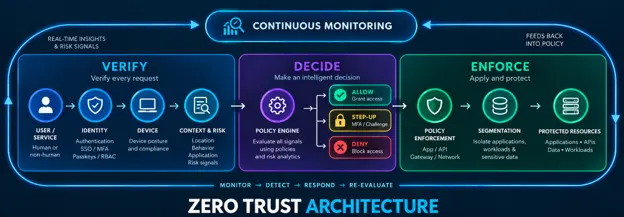
Image alt text: Zero Trust Architecture Diagram
1. Identity and Access Management
Identity is foundational to Zero Trust because organizations need to know who or what is requesting access.
An IAM or CIAM platform can provide capabilities such as:
-
Authentication
-
Single sign-on
-
Multi-factor authentication
-
Passkeys
-
Passwordless authentication
-
User lifecycle management
-
Role-based access control
-
Federation
-
Adaptive authentication
2. Multi-Factor Authentication
Passwords alone provide limited assurance about identity.
MFA adds additional verification factors before access is granted.
For higher-risk requests, organizations can use adaptive or step-up authentication rather than applying the same authentication requirement to every request.
3. Device Security and Posture
Zero Trust considers more than the identity of the person making a request.
Organizations can also evaluate whether the requesting device is known, compliant, managed, or showing signs of compromise.
4. Policy Engine
A Zero Trust architecture needs a mechanism that evaluates available signals and determines whether access should be:
-
Allowed
-
Denied
-
Challenged with additional authentication
-
Restricted to specific resources
The policy decision can incorporate identity, device, context, risk, resource sensitivity, and organizational policy.
5. Policy Enforcement Point
Once a policy decision is made, an enforcement point applies it.
This can occur at the application, API, network, gateway, or resource layer.
NIST's Zero Trust Architecture specifically distinguishes policy decisions from policy enforcement as part of the architecture.
6. Policy Administrator
The Policy Administrator is responsible for carrying out access decisions made by the policy engine. If access is approved, it establishes the user's session and grants the appropriate permissions. If risk conditions change, it can require additional verification, restrict access, or terminate the session. This ensures that Zero Trust policies are enforced consistently across the environment.
7. Network Segmentation and Micro segmentation
Zero Trust can use segmentation to prevent an attacker who compromises one resource from freely reaching others.
Instead of treating the corporate network as one trusted environment, organizations can create smaller security boundaries around applications, workloads, and sensitive resources.
8. Continuous Monitoring and Analytics
Zero Trust requires visibility into access requests and security events.
Organizations can monitor:
-
Authentication activity
-
Access requests
-
Device posture
-
User behavior
-
Application activity
-
Risk signals
-
Policy decisions
-
Security events
This allows security teams to detect suspicious activity and adjust access controls as conditions change.
What Are the Benefits of Zero Trust Security?
1. Reduces the Impact of Compromised Accounts
A compromised credential should not automatically provide broad access to an organization's systems.
Zero Trust limits access according to identity, context, and authorization policies.
Combined with least privilege and segmentation, this can reduce the potential blast radius of a compromised account.
2. Improves Visibility
Zero Trust requires organizations to understand which users, devices, applications, and services are accessing protected resources.
That creates better visibility into access patterns and helps security teams identify unusual activity.
3. Protects Remote and Distributed Workforces
Employees no longer need to be physically located inside a corporate office to work.
Zero Trust allows organizations to evaluate access based on identity, device, context, and policy rather than relying primarily on network location.
This makes the model well suited to remote work, cloud applications, and hybrid environments.
4. Limits Lateral Movement
If an attacker compromises one account or device, excessive permissions can allow the attacker to move through the environment.
Least privilege and segmentation reduce unnecessary access between resources and can limit lateral movement.
5. Strengthens Access Control
Zero Trust replaces broad network-level trust with more granular access decisions.
Instead of asking whether someone can access the network, organizations can determine whether they should access a particular application, API, database, or resource.
6. Supports Modern Cloud Environments
Cloud infrastructure, SaaS applications, remote users, APIs, and distributed workloads make traditional network boundaries less meaningful.
Zero Trust provides a framework for applying security policies across these distributed environments.
Zero Trust vs. SASE vs. ZTNA
These terms are related but they are not interchangeable.
Zero Trust
Zero Trust is the security strategy.
It removes implicit trust and requires access decisions to be based on identity, context, policy, and other relevant signals.
Zero Trust Network Access (ZTNA)
ZTNA is a technology approach for implementing Zero Trust access to applications and resources.
Instead of giving a user broad access to a network, ZTNA can provide access to specific applications based on identity and policy.
Secure Access Service Edge (SASE)
SASE combines networking and security capabilities into a cloud-delivered architecture.
SASE brings together networking capabilities such as SD-WAN with security services and can incorporate Zero Trust principles across distributed environments.
The simplest way to think about the relationship is:
Zero Trust = security strategy
ZTNA = access technology
SASE = broader networking + security architecture
They can work together, but they solve different parts of the problem.
How to Implement Zero Trust Security
Zero Trust is not something an organization implements by purchasing a single product.
A practical implementation can start with the following steps.
Step 0: Prioritizing Employee Education
Educating your employees is perhaps the most crucial aspect of maintaining transparency since it clarifies the zero-trust architecture and how it works.
Organizing training sessions could help them better understand everything related to security-related issues and how zero trust could help overcome the same.
Step 1: Identify Users, Devices, Applications, and Resources
Start by understanding what needs to be protected and who or what needs access to it.
This includes employees, customers, partners, contractors, devices, applications, APIs, workloads, and sensitive data.
Step 2: Establish Strong Identity Verification
Strengthen authentication with capabilities such as MFA, SSO, passkeys, adaptive authentication, and centralized identity management.
Step 3: Define Access Policies
Determine which identities should access which resources and under what conditions.
Use roles, attributes, device state, resource sensitivity, and risk signals where appropriate.
Step 4: Apply Least Privilege
Remove unnecessary permissions.
Users and services should receive only the access required to perform their specific tasks.
Step 5: Evaluate Device and Context Signals
Add device posture and contextual signals to access decisions.
A valid identity does not automatically mean that every access request should be approved.
Step 6: Segment Sensitive Resources
Use application-level controls, network segmentation, or microsegmentation to reduce unnecessary communication between systems.
Step 7: Monitor and Improve
Track access events, authentication activity, policy decisions, and security signals.
Use these insights to identify excessive permissions, suspicious behavior, and gaps in security controls.
Zero Trust should be treated as an ongoing program rather than a one-time deployment. Read this article for a detailed take on how to choose the right zero-trust vendor.
How to Implement Zero Trust Security with LoginRadius
Identity is one of the foundational layers of a Zero Trust strategy.
LoginRadius can help organizations establish this identity layer by providing authentication and access-management capabilities that can be integrated into applications and digital experiences.
For example, organizations can use LoginRadius to implement:
-
Single Sign-On (SSO) to centralize authentication across applications
-
Multi-Factor Authentication (MFA) to strengthen identity verification
-
Adaptive Authentication to apply additional verification based on risk
-
Passkeys and Passwordless Authentication to reduce reliance on passwords
-
Social Login and Federation to support different identity providers
-
Role-Based Access Control (RBAC) to manage permissions
-
Progressive Profiling to collect identity information over time
-
Risk-based access controls to support context-aware security decisions
-
API-first identity infrastructure to integrate authentication and authorization into applications
The role of LoginRadius in a Zero Trust architecture is therefore primarily centered on identity verification and access control.
A complete enterprise Zero Trust strategy can combine this identity layer with device security, network controls, segmentation, security analytics, data protection, and other security technologies.
Zero Trust Security Best Practices
A successful Zero Trust program should follow a few fundamental principles:
Verify explicitly
Do not rely on network location or previous authentication as proof of trust.
Apply least privilege
Give identities only the access they need.
Assume breach
Design security controls with the assumption that an attacker may already have compromised a user, device, application, or credential.
Protect resources, not just the network
Modern security needs to protect applications, APIs, data, workloads, and services in addition to network infrastructure.
Continuously evaluate risk
Access decisions should be able to respond when identity, device, context, or risk signals change.
Make security usable
Security controls that create unnecessary friction can lead users to bypass them.
Zero Trust should strengthen security without making legitimate access unnecessarily difficult.
Conclusion
The modern enterprise no longer has a single network perimeter that can reliably separate trusted users from untrusted ones. Users, devices, applications, APIs, workloads, and data are distributed across cloud and hybrid environments.
Zero Trust addresses this reality by removing implicit trust and making access decisions based on explicit verification, context, authorization, and continuous evaluation.
The goal is to reduce implicit trust, limit unnecessary access, improve visibility, and contain the potential impact of compromised identities and devices.
For organizations beginning their Zero Trust journey, identity is a natural place to start.
Strong authentication, MFA, adaptive access, least privilege, and continuous evaluation provide the foundation for controlling who can access what—and under which conditions.
FAQs
Q. What is the main principle of Zero Trust?
The main principle is “never trust, always verify.” Zero Trust removes implicit trust and requires access to be evaluated based on identity, context, policy, and other relevant signals.
Q. Is Zero Trust a product?
No. Zero Trust is a security strategy and architectural approach, not a single product. Organizations typically combine identity, MFA, device security, network controls, segmentation, monitoring, and other technologies to implement it.
Q. Does Zero Trust mean trusting nobody?
Not exactly.
“Never trust, always verify” means that trust should not be assumed simply because a user, device, or application is inside a corporate network or has previously authenticated.
Access should be based on explicit verification and authorization.
Q. Is Zero Trust the same as Zero Trust Network Access?
No.
Zero Trust is the broader security strategy. ZTNA is one technology approach for implementing Zero Trust access to applications and resources.
Q. What is the difference between Zero Trust and traditional security?
Traditional security often relies heavily on a network perimeter and may implicitly trust entities once they are inside it.
Zero Trust removes that assumption and evaluates access at a more granular level based on identity, device, context, and resource-specific policy.
Q. Does Zero Trust replace firewalls?
Not necessarily.
Zero Trust does not require organizations to eliminate existing security controls. Firewalls, segmentation, endpoint security, and other technologies can continue to play important roles within a broader Zero Trust architecture.
Q. How does MFA support Zero Trust?
MFA provides stronger evidence that a user is who they claim to be.
It is one of the mechanisms organizations can use to implement the identity-verification layer of a Zero Trust strategy.
Q. What are the five layers of Zero Trust security?
A practical framework is:
-
Verify Identity
-
Validate Device
-
Evaluate Context
-
Grant Least-Privilege Access
-
Continuously Monitor Trust
These layers provide a simple way to understand how an access request can move from authentication to authorization and ongoing risk evaluation.