
Social login first started growing popular in 2010s, as it provided a very easy and secure way for users to login, but developers faced difficulty implementing it. LoginRadius started simplifying this since 2012 and 14 years later, we have grown to become the world's leading CIAM provider, and social login is now one of the most popular login methods worldwide. Talking of numbers, social login was being used by 1.17 billion consumers across 500+ brands in 2024.
So, it is important to allow your user to sign in to your website or app with their social network account. It provides a better experience for your user and also lets you obtain more information about your user.
The most popular social logins used in 2026 are Facebook login, Google sign-in, Apple sign-in, and LinkedIn sign-in. In this article, we will cover how to integrate LinkedIn social login authentication into your app and website.
Stage 1 – Enable LinkedIn as Social Login Provider
In the first step, you will first have to enable LinkedIn as your social login provider in your LoginRadius tenant. To do the same, follow the steps given below:
-
Login to your LoginRadius Admin Console. Click here to login.
-
Go to the Authentication > Identity Providers. Then scroll down to find the Social Providers section in the LoginRadius Admin Console.
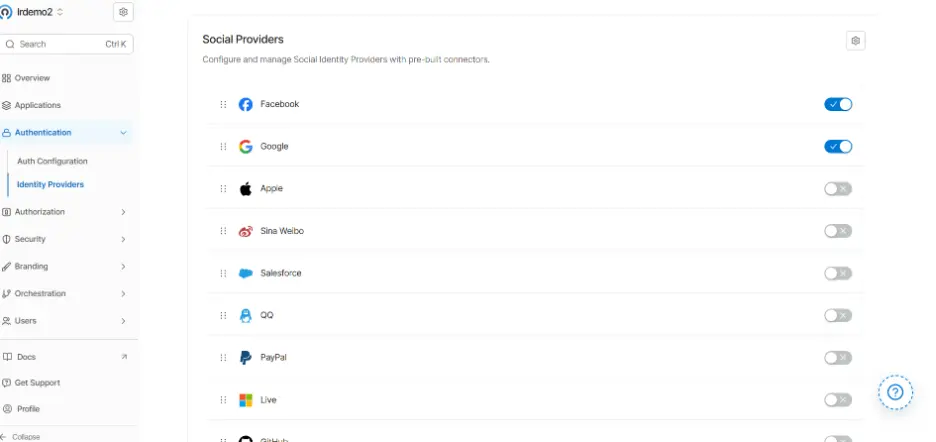
- Scroll down the list of social providers to find LinkedIn. Use the toggle switch to enable it.

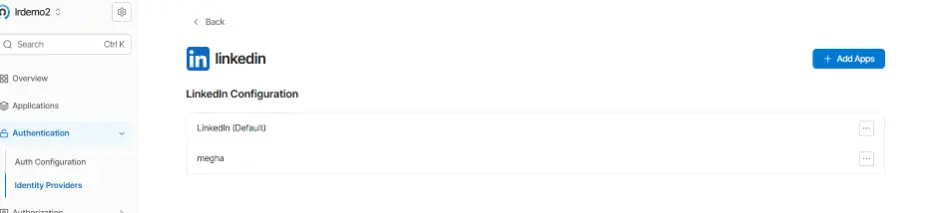
- The configuration tab should open as soon as you toggle it, with further options. In case you do not already have any added apps, click on the Add Apps option.
Stage 2 – Create a LinkedIn App
Now you will have to add your LinkedIn app. But to do so, you need to create a LinkedIn app first. Follow the steps given below to create a LinkedIn app and add it to the console.
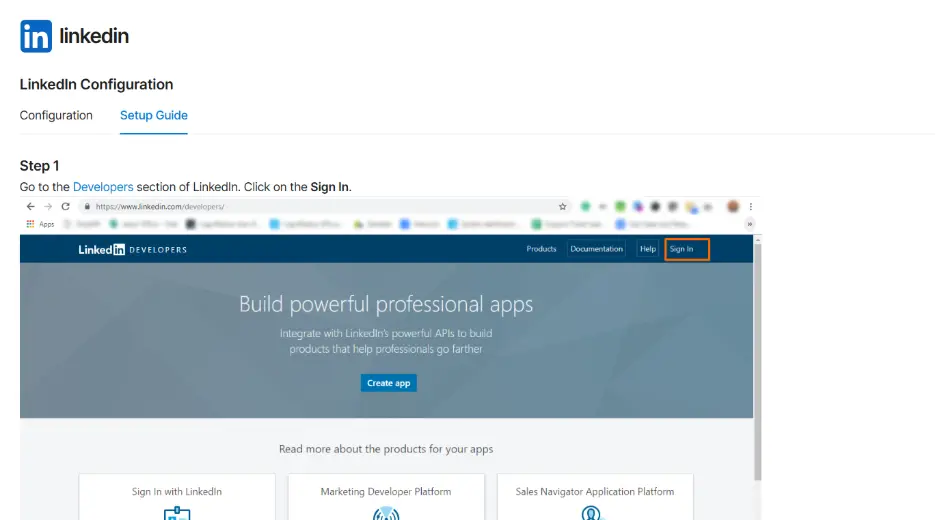
- In your LoginRadius Admin console LinkedIn App Configuration, switch tabs from “Configuration” to go to the “Setup Guide”. You will get detailed step-by-step instructions to create your LinkedIn app here.
-
Start following the steps and start creating your LinkedIn app. First, go to LinkedIn Developer Portal. Complete the Sign In process. You might not have to manually sign in if you are already auto signed in. Also, sometimes the sign in process is prompted after you click on Create App.
-
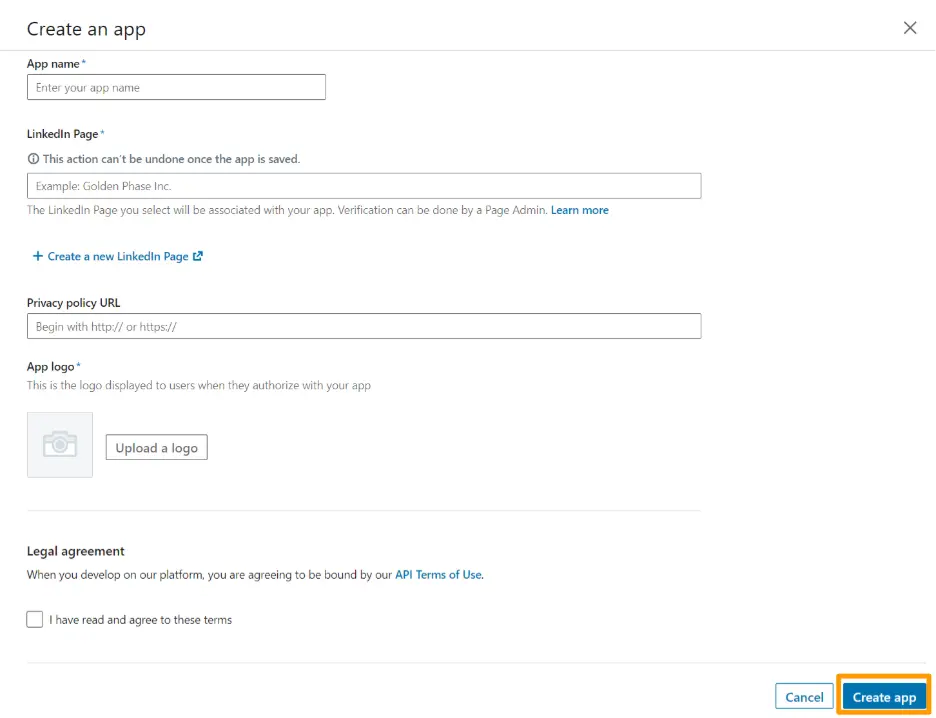
Now from your LinkedIn Developer’s dashboard, click on “Create App” button.
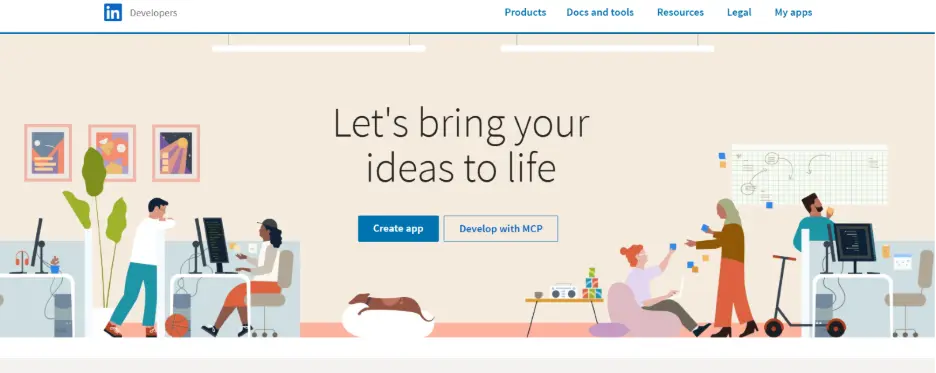
- The “Create App” form will appear in front of you. Fill in all the necessary details like App Name, LinkedIn Page, Privacy Policy, App Logo, and click on the checkbox to agree to the legal terms. Also, note that you will need your official privacy policy URL for this purpose. Just a word document will not be enough.
-
After filling out all the details, click on “Create App” at the bottom of the form. Your LinkedIn App will be created.
-
Now in the settings of your app, go to the “Auth” tab.
-
Here, Auth Keys Client ID and Client Secret will be empty as we have not completed the app settings yet. So, we will get them a couple of steps later. For now, come down to the page and you will see the OAuth 2.0 settings. There, you will get the option to add “Authorized redirect URLs for your app”. This part is critical as correct redirect URLs are necessary for social providers to handle login callbacks securely. There is a standard format for these URLs that needs to be followed.
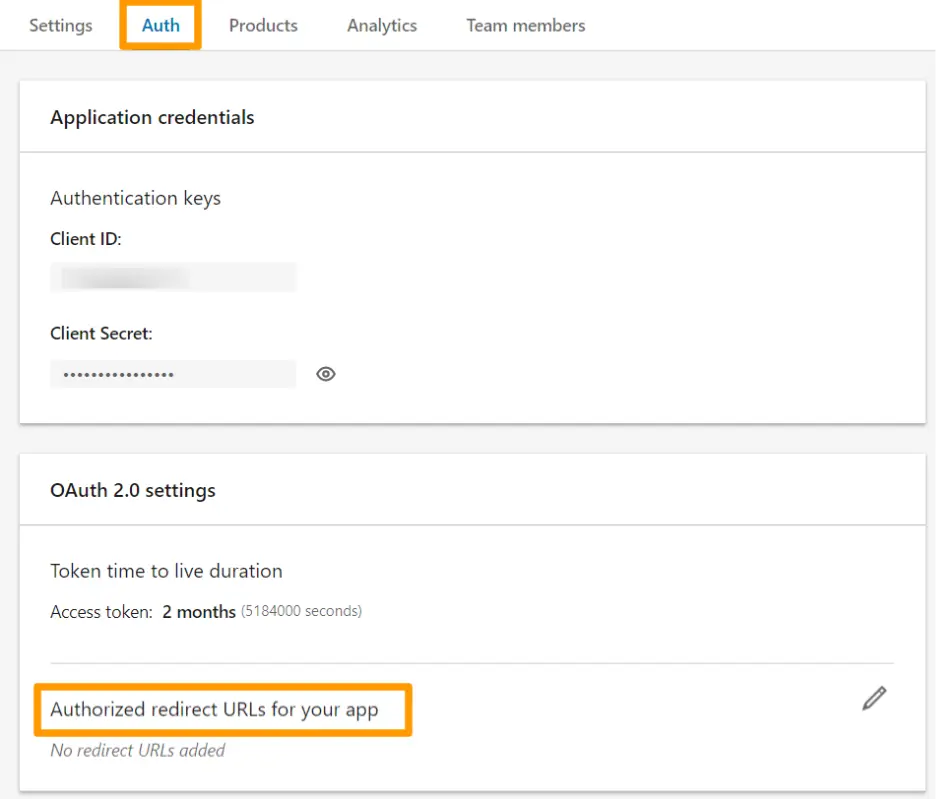
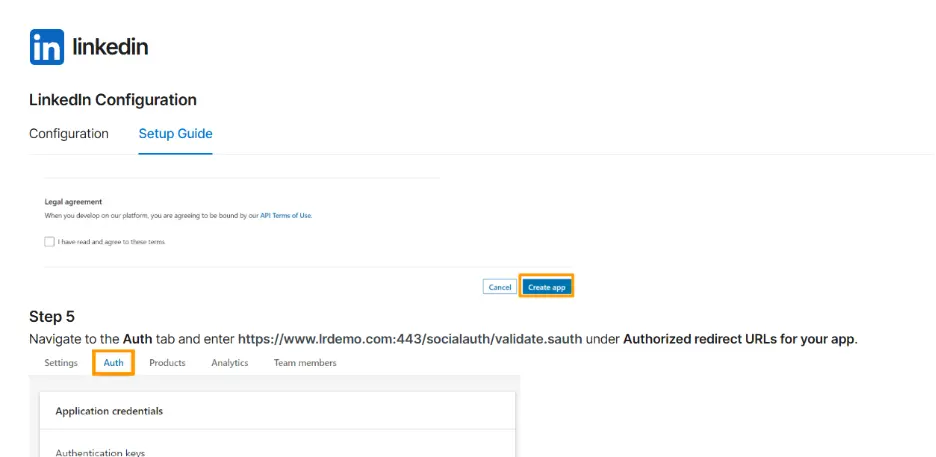
- To find out your correct redirect URL format, go back to the Setup Guide page in your LoginRadius Admin Console. Navigate to Step 5 on that page. You will get your redirect URL mentioned there. Here is an example:
-
Copy the URL and go back to your LinkedIn app OAuth 2.0 settings. Paste the copied URL under “Authorized redirect URLs for your app”.
-
Once done, add the necessary permissions and save the changes.
-
As soon as your app settings get saved, your client ID and client secret will be generated. You can now access them from the Auth tab. It is advised to keep them a secret so that they do not get exposed.
-
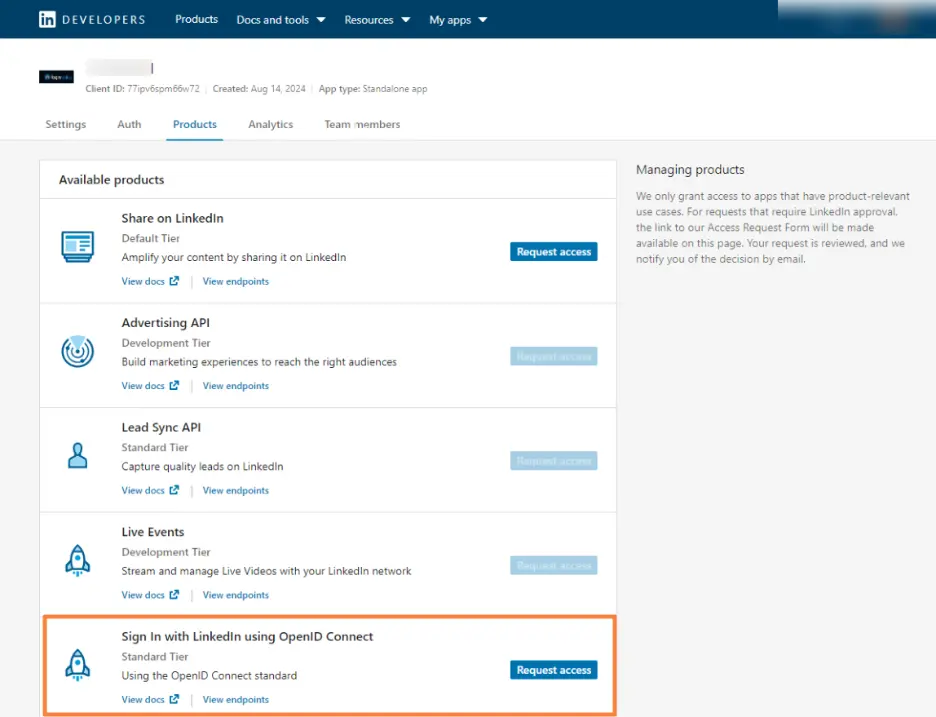
Now go to the “Products” tab. Scroll down and select “Sign in with LinkedIn using OpenID Connect”.
Stage 3 – Add App Details to LR Console to Complete Setup
Copy the client ID and client secret from the “Auth” tab of LinkedIn app settings. Now go back to the LoginRadius Console app configuration tab.
In the configuration tab, you will get the fields to input client ID and client secret. Paste the client ID in the “API Key” field. Paste the client secret in the “API Secret” field, and your app name in the “Social App Name” field.
If all the details match the LinkedIn details, your app will be successfully added, and social login will be enabled.
Now you can create your app within the LoginRadius Admin Console and Sign-in with LinkedIn will work perfectly for your app. Similarly, LinkedIn Sign-In will work for your web apps too!
The process we discussed here was the low-code method. But LoginRadius also offers a built-in JavaScript interface to render a customizable social login experience. For detailed integration guide, read our docs.
Important Consideration – LinkedIn Approval
Unlike Google or Facebook, LinkedIn places stricter controls on the data and permissions available to applications.
For basic authentication, most apps only need the Sign in with LinkedIn using OpenID Connect product enabled. This provides access to standard user identity claims such as email address, profile information, and LinkedIn ID.
However, if your application requires additional LinkedIn data, such as organization information, posting on behalf of users, or marketing integrations, you may need to apply for additional LinkedIn products and undergo LinkedIn's review process.
Before going live, make sure you:
-
Verify that your privacy policy is publicly accessible.
-
Use accurate company and application information.
-
Request only the permissions your application genuinely needs.
-
Test the complete login flow in a staging environment.
Keeping your implementation limited to authentication generally results in a smoother approval experience.
How Will It Work Under the Hood?
Although users only see a "Continue with LinkedIn" button, multiple security checks happen behind the scenes.
The entire process looks like this:
-
User clicks Sign in with LinkedIn.
-
LoginRadius redirects the user to LinkedIn's authorization endpoint.
-
LinkedIn authenticates the user.
-
The user grants permission to share identity information.
-
LinkedIn sends an authorization code to LoginRadius through the configured redirect URL.
-
LoginRadius exchanges the authorization code for tokens.
-
LoginRadius validates the received identity information.
-
A LoginRadius customer profile is created or matched with an existing account.
-
LoginRadius returns authentication tokens to your application.
-
The user is signed in.
This entire process typically takes only a few seconds while ensuring credentials never pass through your application servers directly.
Why OAuth 2.0 and OpenID Connect?
Modern social login systems are built on two widely adopted identity standards: OAuth 2.0 and OpenID Connect (OIDC).
When user clicks Sign in with LinkedIn, your application does not directly authenticate that user or handle their LinkedIn credentials. Instead, LinkedIn performs authentication and securely shares identity information with your application through these standardized protocols.
What is OAuth 2.0?
OAuth 2.0 is an authorization framework that allows an application to obtain limited access to user information without requiring the user's LinkedIn password. Rather than sharing credentials, OAuth relies on tokens that grant controlled access to specific resources.
What is OpenID Connect?
OpenID Connect (OIDC) builds on OAuth 2.0 by adding an identity layer. While OAuth 2.0 answers the question "What can this application access?", OpenID Connect answers "Who is the authenticated user?" through standardized identity tokens. This makes OIDC particularly useful for authentication and social login scenarios.
What are the Benefits of Using OAuth 2.0 and OpenID Connect?
The combination of OAuth 2.0 and OpenID Connect has become the foundation of modern identity systems because it allows organizations to provide secure and seamless authentication experiences across web, mobile, and API-driven applications.
Using OAuth 2.0 and OIDC provides several benefits:
-
No need to store or process LinkedIn passwords.
-
Standardized authentication flows across providers.
-
Improved security through token-based authentication.
-
Reduced attack surface for credential theft.
-
Better interoperability between applications and identity providers.
From a developer's perspective, these standards also simplify implementation. Once your application understands OAuth 2.0 and OpenID Connect, the same core concepts can be applied across multiple identity providers such as LinkedIn, Google, Microsoft, Facebook, and Apple. This reduces development effort while creating a more consistent user experience.
Additionally, OAuth 2.0 and OIDC make it easier to support modern authentication capabilities such as Single Sign-On (SSO), account linking, consent management, API authorization, and passwordless experiences. These capabilities have become increasingly important as organizations move toward centralized identity management.
If you'd like to understand these protocols in more detail, you can explore our guides on OAuth 2.0 Protocol, OAuth 2.0 Authentication, OAuth vs OpenID Connect, and How OAuth 2.0 Works Behind the Scenes, which explain the complete authorization and authentication flow step-by-step.
Which Apps and Websites Must Have LinkedIn Social Login
LinkedIn login is particularly valuable when users already maintain a professional identity on LinkedIn.
Some examples include:
Job Portals and Recruitment Platforms
Applicants can create accounts instantly while allowing employers to access verified professional profile data. This will be extremely time saving for the applicants. At the same time, it will offer a trustworthy source of information to the recruiters as the details are coming directly from the candidate’s LinkedIn profile.
B2B SaaS Applications
Business software products often target professionals who already have LinkedIn accounts. Social login helps reduce onboarding friction, while increasing trust.
Professional Communities
Networking platforms, industry forums, mentorship programs, and membership communities can simplify registration using LinkedIn identity.
Learning and Certification Platforms
Educational providers offering professional certifications can enable faster account creation and profile completion.
Event and Conference Websites
Event organizers often collect professional attendee information. LinkedIn login reduces form abandonment and improves registration quality.
If your audience primarily consists of working professionals, LinkedIn social login can significantly improve signup completion rates.
Benefits of LinkedIn Social Login
LinkedIn social login does much more than simplifying authentication. For both users and businesses, it can improve registration experiences, increase conversion rates, strengthen security, and reduce the friction often associated with account creation.
Let's explore some of the key benefits of implementing LinkedIn login on your website or application.
| Benefit | User Impact | Business Impact |
|---|---|---|
| Faster Signup | Less friction | Higher conversion |
| Password Fatigue Reduction | Better UX | Fewer support tickets |
| Accurate User Information | Less form filling | Cleaner profiles |
| Security | Safer sign-in | Lower risk |
What User Information Does LinkedIn Login Provide?
One of the biggest advantages of LinkedIn social login is that users don't need to manually complete lengthy registration forms. After authentication, LinkedIn securely shares approved profile attributes that can be used to create and enrich customer profiles automatically.
For standard Sign in with LinkedIn using OpenID Connect, the following profile data is typically available:
-
LinkedIn Unique ID
-
First Name
-
Last Name
-
Full Name
-
Primary Email Address
-
Profile Picture
-
Email Verification Status
-
LinkedIn Profile URL (when available)
The exact attributes returned depend on:
-
User consent
-
LinkedIn API permissions
-
Approved products on your LinkedIn application
-
LinkedIn platform policies
How LinkedIn Data Maps to LoginRadius Profiles
After a successful authentication, LoginRadius automatically normalizes LinkedIn profile attributes into a standard customer profile structure.
| LinkedIn Attribute | LoginRadius Profile Field |
|---|---|
| id (LinkedIn Member ID) | Provider UID |
| given_name | FirstName |
| family_name | LastName |
| name | FullName |
| picture | ProfileImageURL |
| email_verified | IsEmailVerified |
| sub (OIDC Subject Identifier) | Social Identity ID |
| provider |
This normalized mapping means that if users later sign in with Google, Apple, or Facebook, LoginRadius can maintain a consistent customer profile structure across all identity providers.
What Additional Data Can Be Retrieved?
If your LinkedIn application receives additional approvals from LinkedIn, you may be able to access richer professional attributes, such as:
-
Job title
-
Professional headline
-
Company information
-
Industry
-
Organization details
-
Career history
-
Public profile URL
Keep in mind that LinkedIn restricts access to many professional profile attributes and requires application review for certain APIs and products.
For most authentication use cases, the standard OpenID Connect profile attributes are sufficient to create a verified user account and streamline onboarding.
Why This Matters
For B2B SaaS platforms, recruitment portals, event registration systems, and professional communities, LinkedIn login can dramatically reduce form completion time.
Instead of asking users to manually enter their name, email, organization, and profile details, much of this information can be populated automatically from their LinkedIn identity, creating a faster signup experience and more accurate user profiles.
Why LoginRadius?
While it is possible to integrate LinkedIn authentication directly, managing social login providers at scale introduces additional complexity.
With LoginRadius, you get:
-
Pre-built LinkedIn social login integration.
-
Centralized identity management.
-
More than 30 social login providers from a single platform.
-
Unified customer profiles across authentication methods.
-
Enterprise-grade security and compliance.
-
User management, MFA, passwordless authentication, and account linking on one platform.
-
Detailed authentication analytics and reporting.
-
SDKs and APIs for web, mobile, and enterprise applications.
Instead of maintaining individual integrations for every identity provider, developers can manage authentication from a single platform.
To Sum Up
LinkedIn social login has evolved from a nice-to-have feature into an important conversion optimization and user experience tool for professional-focused applications.
By integrating LinkedIn authentication through LoginRadius, organizations can quickly provide a secure, standards-based login experience without dealing with the complexities of OAuth implementation, token management, and profile synchronization themselves.
Whether you're building a recruitment platform, B2B SaaS product, professional community, learning platform, or event portal, LinkedIn login can help reduce signup friction while improving user acquisition and onboarding success.
Interested in getting a first-hand demo of how LinkedIn Sign In with LoginRadius works? Click here to book a demo.
FAQs
Q. What is LinkedIn Social Login?
LinkedIn Social Login allows users to authenticate with your application using their LinkedIn account instead of creating a separate username and password.
Q. Does LinkedIn provide the sign-in facility for free?
Yes. LinkedIn provides authentication capabilities through its developer platform. However, some advanced LinkedIn products and APIs may require additional approval.
Q. Which standards and protocols do LinkedIn Social Login use?
LinkedIn authentication is based on OAuth 2.0 and OpenID Connect standards.
Q. What user information can be retrieved from LinkedIn login?
Depending on permissions and LinkedIn policies, applications can typically access user identity information such as name, email address, profile ID, and profile picture.
Q. Can I use LinkedIn login on mobile apps?
Yes. LinkedIn authentication can be integrated into Android, iOS, Flutter, React Native, and other mobile applications.
Q. Can users still sign up without LinkedIn?
Yes. Most applications offer multiple authentication options, including email registration, passwordless login, and other social providers.
Q. Is LinkedIn Login secure?
Yes. LinkedIn authentication uses OAuth 2.0 and OpenID Connect protocols, ensuring credentials remain with LinkedIn and are not exposed to the application.
Q. Can I offer LinkedIn, Google, and Facebook login together?
Absolutely. In fact, providing multiple social login options often maximizes registration completion rates.
Q. What happens if a user changes their LinkedIn email address?
The LinkedIn identity itself remains the same. LoginRadius uses provider-specific unique identifiers to help maintain account consistency.
Q. Can existing users connect LinkedIn login to their accounts?
Yes. LoginRadius supports account linking, allowing users to connect LinkedIn and other social identities to an existing account.
Q. Do I need LinkedIn approval before users can authenticate?
For standard Sign in with LinkedIn functionality, approval requirements are generally minimal. Additional LinkedIn products may require review and approval.
Q. Can LinkedIn login work with WordPress?
Yes. You can enable LinkedIn social login on WordPress using the LoginRadius WordPress plugin without writing custom authentication code.
Q. What is OpenID Connect (OIDC)?
OpenID Connect is an identity layer built on top of OAuth 2.0 that allows applications to verify a user's identity using standardized ID tokens.
Q. What is a LinkedIn Client ID and Client Secret?
These credentials uniquely identify your LinkedIn application and are used during the OAuth authentication process between LinkedIn and LoginRadius.
Q. What is a redirect URI in LinkedIn authentication?
A redirect URI is the callback URL where LinkedIn sends users and authorization codes after successful authentication. It must exactly match the URL configured in your LinkedIn app settings.
Q. What user information can be retrieved from LinkedIn login?
For standard OpenID Connect authentication, LinkedIn typically provides a unique LinkedIn ID, first name, last name, full name, primary email address, profile picture, and email verification status. Additional professional profile attributes may be available if your application receives the necessary LinkedIn approvals and permissions. LoginRadius automatically maps this information into a unified customer profile for easier user management.


