Introduction
In a world where our digital footprints are larger than ever before, your password is often your first line of defense. Passwords were supposed to make digital accounts secure. Instead, they have become one of the biggest sources of password security issues across the internet. Every system asks users to create something “strong,” yet most users either forget it, reuse it, or write it somewhere unsafe just to survive the login process.
For years, organizations believed the solution was simple: add stricter rules. Force users to create longer passwords, add symbols, mix uppercase and lowercase characters, and change them frequently. In theory, these strong password rules were meant to protect accounts from hackers. In reality, they mostly made users frustrated and predictable.
When people face strict password requirements, they rarely create truly secure passwords. Instead, they find shortcuts. A password like Password@123 satisfies traditional complexity requirements, yet it remains dangerously weak and appears in countless breach databases.
Attackers understand this behavior better than most security teams. They know users reuse passwords across multiple platforms, follow common patterns, and often rely on the same predictable combinations of words, numbers, and symbols. This makes large-scale attacks such as credential stuffing and brute-force guessing far more effective than organizations expect.
Even worse, traditional password policy complexity often pushes users toward bad habits. Instead of improving security, it encourages password reuse, incremental changes like Summer2025! becoming Summer2026!, and storing passwords in browsers, spreadsheets, or notes apps.
By 2026, the industry is finally acknowledging something security professionals have quietly known for years: the biggest weakness in password security is not the user. It is the system that forces people to manage dozens of complicated passwords in the first place.
Understanding these password security issues is the first step toward fixing them. And more importantly, it helps explain why the future of authentication is shifting away from rigid password policies toward smarter, user-friendly security models.
In fact, according to a 2025 Cybernews analysis, more than 19 billion passwords have been leaked through breaches, and shockingly, “123456” alone has been used over 338 million times. That’s a whopping number and the equivalent is: two percent of the entire world’s population locked their front door with a sticky note that says “key under mat.”
Here is the reality we face right now: while a passwordless future powered by passkeys is arriving fast, billions of applications still require a traditional login today. Until every app updates its infrastructure, knowing how to create a highly resilient password without falling into the predictable traps that hackers exploit is your most critical line of defense.
In this blog, we’ll dive deep into what passwords are, what makes a password truly strong under modern security standards, and how to choose a strong password that stands up to modern threats. We’ll share examples of strong passwords, relatable scenarios, and technical tips that make this crucial habit not only practical but doable.
Moreover, we’ll also show you how LoginRadius is helping businesses and individuals step up their password game through smarter identity and access management tools. Let’s get started.
Why Passwords Still Matter in 2026
Despite major advances in authentication technology, passwords remain one of the most widely used methods for securing digital accounts.
Most websites, mobile apps, enterprise systems, and customer portals still rely on passwords as a primary login mechanism. Even organizations adopting newer authentication methods often maintain passwords for account recovery, fallback authentication, and compatibility with legacy applications.
Because passwords continue to protect email accounts, banking platforms, healthcare portals, workplace systems, and countless online services, they remain a valuable target for attackers.
This reality makes password security just as important today as it was a decade ago. Weak, reused, or predictable passwords continue to contribute to account compromises, data breaches, and identity theft.
Until modern authentication methods achieve universal adoption, understanding how to create and manage strong passwords remains an essential part of protecting digital identities.
History of Passwords
Passwords might seem like a product of the digital age, but their origins go back much further, long before computers even existed.
The concept of passwords can be traced back to ancient Rome. Roman soldiers would use a “watchword” to authenticate themselves during night watches. This password was shared by the guards on duty and changed regularly to prevent infiltration. It was a simple yet effective method of verifying identity a principle that remains at the core of today’s digital password systems.
Fast-forward to the 1960s, when computer scientist Fernando Corbató implemented the first computer password system at MIT. His goal was to provide different users with separate file access on a shared computer, which was then a revolutionary concept. Little did he know, this idea would evolve into a cornerstone of cybersecurity.
By the 1990s, as personal computers entered homes and businesses, passwords became more commonplace. With the rise of the internet in the early 2000s, users were suddenly juggling dozens of online accounts from email to e-commerce to social media.
And that’s when the problems started. Users began creating weak passwords, reusing passwords, or keeping guessable passwords, which opened the floodgates for cybercriminals.
In response, organizations implemented rules to force users into creating more complex passwords, leading to the infamous mix of capital letters, symbols, and numbers. Ironically, this often made passwords harder to remember, resulting in workarounds like sticky notes on monitors or browser auto-fills neither of which is ideal.
As the complexity of threats increased, so did the evolution of password policies. Today, there’s growing awareness that password strength isn't just about complexity it's about unpredictability, length, and behavior. Experts now recommend combining passwords with Multi-Factor Authentication (MFA), and many organizations are exploring passwordless technologies entirely.
It's a fascinating look at how something as simple as a word or phrase has played a crucial role in securing our digital and physical lives.
From watchwords in ancient Rome to AI-resistant security measures today, the password has had quite a journey. And while it may eventually be replaced by biometrics or cryptographic keys, one thing’s certain its story is far from over.
What is a Strong Password?
A strong password is designed to be difficult for both humans and automated programs to guess. It protects accounts against common attack methods such as brute-force attacks, credential stuffing, and password spraying by increasing the effort required to compromise a login.
The effectiveness of a password depends less on complexity alone and more on a combination of length, uniqueness, and unpredictability. While symbols and numbers can improve security, modern guidance increasingly emphasizes creating passwords that are long, unique for every account, and difficult for attackers to predict.
A strong password is also most effective when combined with additional security measures such as Multi-Factor Authentication (MFA), passkeys, or other forms of strong authentication. These technologies provide extra protection even if a password is exposed through phishing or data breaches.
Key Characteristics of a Strong Password
-
Length: Use at least 12–16 characters whenever possible.
-
Uniqueness: Use a different password for every account.
-
Unpredictability: Avoid common words, keyboard patterns, dates, and predictable substitutions.
-
No Personal Information: Never include names, birthdays, phone numbers, company names, or other publicly available details.
-
Passphrase Friendly: Consider combining unrelated words into a memorable passphrase.
-
MFA Protected: Whenever possible, pair passwords with Multi-Factor Authentication for an additional layer of security.
A password that combines these characteristics is significantly more resistant to modern attack techniques than one that simply satisfies traditional complexity requirements.
How Password Attacks Work
Many people assume attackers manually guess passwords one attempt at a time. In reality, modern password attacks are automated, scalable, and designed to exploit common human behavior.
Attackers use leaked credential databases, password-cracking tools, phishing pages, and bot-driven scripts to test weak or reused passwords across accounts. This is why password length, uniqueness, and unpredictability matter more than simply adding a number or symbol.
Brute-Force Attacks
A brute-force attack systematically tests password combinations until the correct one is found. Short passwords are especially vulnerable because attackers have fewer possible combinations to test.
A password like abc123 can be guessed quickly, while a long and unique passphrase requires far more effort to crack.
Dictionary Attacks
Dictionary attacks use lists of common passwords, words, and predictable variations. Attackers know that many users create passwords based on familiar patterns.
Examples include:
-
Password123 -
Welcome2026! -
Company@123 -
Summer2026!
These passwords may satisfy basic complexity rules, but they are still weak because attackers already expect them.
Credential Stuffing
Credential stuffing happens when attackers use username and password combinations leaked from previous breaches and test them on other websites.
This attack works because many users reuse the same password across multiple accounts. If one platform is breached, attackers may try the same credentials on email, banking, shopping, social media, and workplace applications.
Password Spraying
Password spraying is different from brute force. Instead of trying many passwords against one account, attackers try a small set of common passwords against many accounts.
For example, an attacker may test passwords like:
-
Welcome123 -
Password2026 -
Company@123
across hundreds or thousands of users. This helps attackers avoid account lockouts while still exploiting predictable password habits.
Phishing
Phishing tricks users into entering their password on a fake login page that looks like a real website. Once the user submits the password, attackers can capture it and attempt to access the legitimate account.
Even a strong password can be stolen through phishing if the user enters it on a fraudulent page. This is why passwords should be combined with Multi-Factor Authentication (MFA), passkeys, or phishing-resistant authentication methods wherever possible.
Why This Matters
Most password attacks succeed because of two problems: predictable passwords and password reuse.
A strong password should be:
-
Long enough to resist brute-force attacks
-
Unique for every account
-
Free from common words and patterns
-
Not based on personal or company information
-
Protected with MFA whenever possible
The goal is not just to create a password that looks complex. The goal is to create one that attackers cannot easily guess, reuse, or steal.
Strong Password Examples vs Weak Password Examples
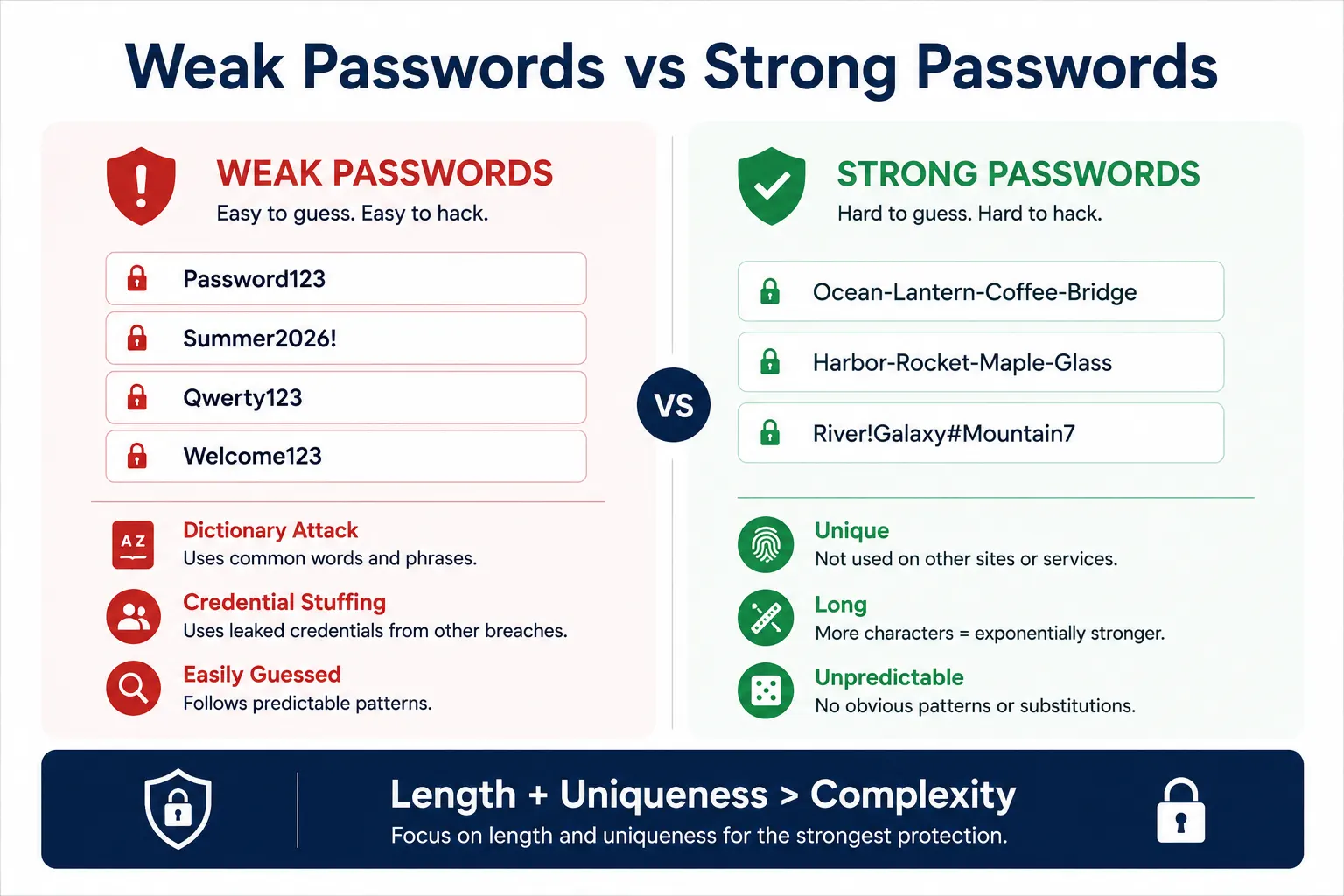
One of the easiest ways to understand password strength is to compare weak passwords with stronger alternatives. Most weak passwords fail because they follow predictable patterns that attackers actively target during brute-force, dictionary, and credential stuffing attacks.
Examples of Weak and Strong Passwords
| Weak Password | Why It Fails | Stronger Alternative |
|---|---|---|
| Password123 | Appears in common password databases and breach lists | Ocean-Lantern-Coffee-Bridge |
| Company2026! | Uses a predictable company name and current year | Harbor-Rocket-Maple-Glass |
| Qwerty123 | Common keyboard sequence | River!Galaxy#Mountain7 |
| Summer2026! | Seasonal pattern commonly targeted by attackers | Ocean-Coffee-Lantern-Bridge |
| JohnSmith@123 | Includes personal information that can often be found online | Lantern-Falcon-Canyon-River |
| Welcome123! | Frequently used and included in dictionary attacks | Forest!Compass#Moonlight8 |
Should You Use a Password Manager?
The strongest password is often one you never have to remember.
One of the biggest causes of password-related security incidents is password reuse. Many people use the same password across multiple websites because remembering dozens of unique credentials is difficult. Unfortunately, this creates a serious security risk. If one account is compromised in a data breach, attackers can use those same credentials to access other services through credential stuffing attacks.
Password managers solve this problem by generating, storing, and automatically filling strong passwords for every account.
Instead of memorizing dozens of credentials, users only need to remember one master password while the password manager securely manages the rest.
Benefits of Using a Password Manager
-
Generate long, random, high-entropy passwords
-
Create a unique password for every account
-
Store credentials in encrypted vaults
-
Reduce password reuse across websites
-
Automatically fill login forms
-
Synchronize passwords across trusted devices
-
Identify weak, reused, or compromised passwords
Are Password Managers Safe?
Modern password managers use strong encryption to protect stored credentials and are generally considered far safer than storing passwords in spreadsheets, notes applications, emails, or browser text files.
Like any security tool, they should be protected with:
-
A strong master password
-
Multi-Factor Authentication (MFA)
-
Secure device access controls
Passwords vs Passkeys: What’s the Difference?
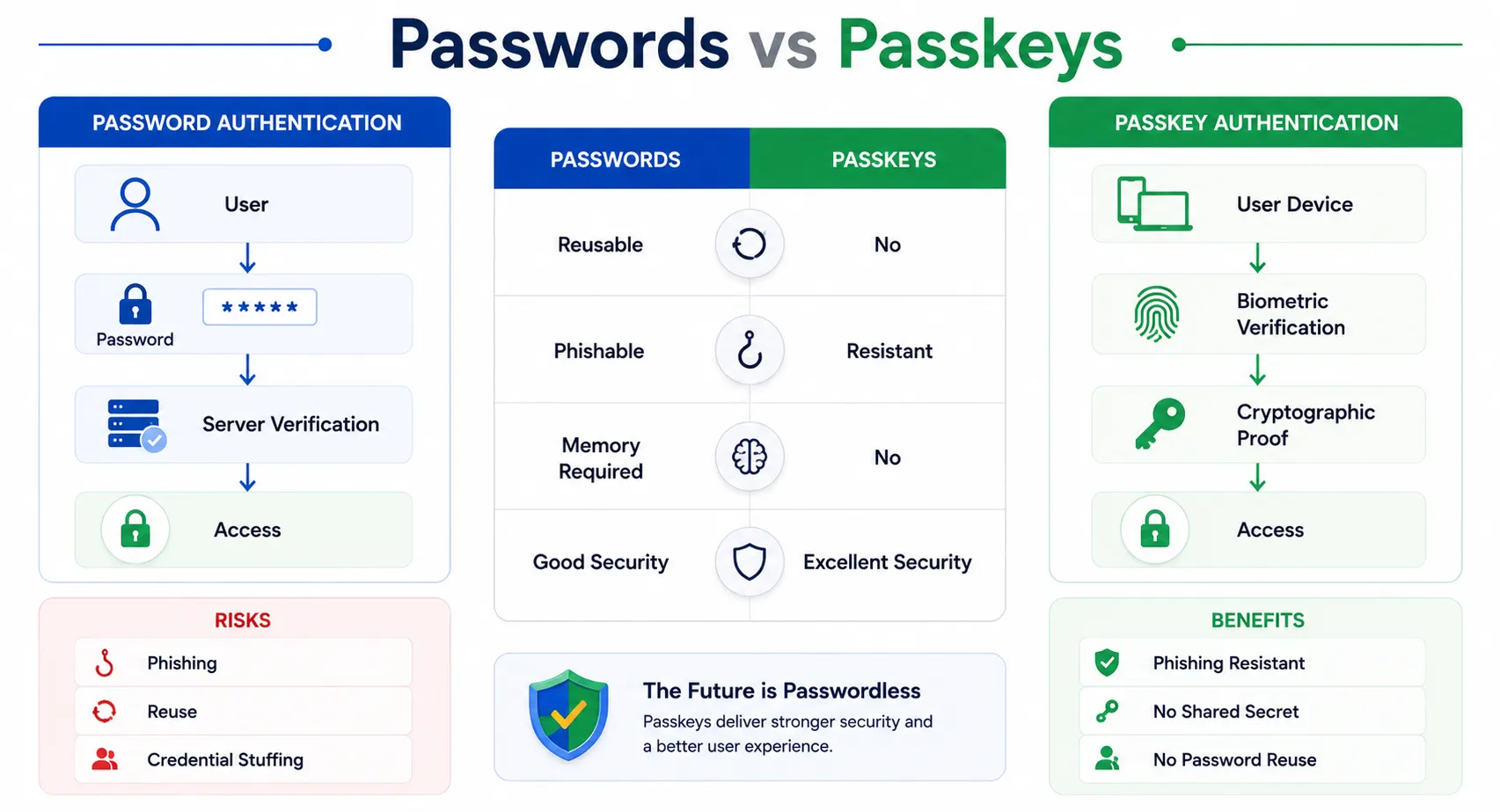
Strong passwords are still important, but they are not the final stage of authentication security. Passkeys are increasingly viewed as the long-term replacement for passwords because they remove many of the weaknesses attackers commonly exploit.
A password is a shared secret that a user creates, remembers, and enters during login. A passkey uses public-key cryptography to verify the user without requiring a reusable password.
Passwords vs Passkeys Comparison
| Feature | Passwords | Passkeys |
|---|---|---|
| Can Be Reused | Yes | No |
| Can Be Phished | Yes | Extremely Difficult |
| User Memory Required | Yes | No |
| Credential Stuffing Risk | High | None |
| Shared Secret Stored on Server | Yes | No |
| Login Experience | Manual entry | Device-based approval |
| Security Level | Good | Excellent |
Why Passkeys Are More Secure
Traditional passwords rely on a shared secret that users must create, remember, and protect. If the password is stolen through phishing, malware, or a data breach, attackers may gain access to the account.
Passkeys work differently. A cryptographic key pair is created during registration:
-
A public key is stored by the application.
-
A private key remains securely on the user's device.
During login, the device proves ownership of the private key without transmitting it. Because there is no reusable secret to steal, passkeys are highly resistant to phishing, credential stuffing, and password reuse attacks.
Will Passkeys Replace Passwords?
Not immediately. Many organizations will continue supporting passwords because of legacy systems, account recovery needs, user familiarity, and application compatibility. However, the long-term direction is clear: authentication is gradually moving away from passwords and toward device-based, phishing-resistant methods.
For now, the best approach is to improve password security while preparing for broader passkey adoption.
That means organizations should:
-
Encourage strong, unique passwords
-
Support password managers
-
Enable Multi-Factor Authentication (MFA)
-
Offer passkeys where possible
-
Use adaptive authentication to detect risky login attempts
Passwords still matter today, but passkeys represent where modern authentication is heading.
Password Strength vs Cracking Time
One of the biggest misconceptions about password security is that complexity alone determines strength. In reality, password length, unpredictability, and uniqueness play a much larger role in resisting modern password-cracking attacks.
Attackers use sophisticated tools capable of testing billions of password combinations per second against stolen password hashes. As computing power increases, short and predictable passwords become vulnerable almost instantly, regardless of whether they contain symbols or numbers.
The table below illustrates how different password choices compare against modern attack techniques.
| Password Example | Estimated Time to Crack |
|---|---|
| 123456 | Seconds |
| Password123 | Minutes |
| Summer2026! | Hours |
| Welcome@Company1 | Days |
| BlueSky!River#Mountain9 | Years |
| Ocean-Coffee-Lantern-Bridge | Decades |
| Manager-Generated 20-Character Password | Practically Impossible |
Actual cracking time depends on password hashing algorithms, attacker resources, and whether credentials have already appeared in breach databases.
The pattern is clear: attackers are highly effective at guessing predictable passwords because they understand how people create them.
Passwords based on seasons, years, company names, keyboard patterns, or common substitutions often appear in password-cracking dictionaries and can be compromised quickly.
Long, unique passphrases perform significantly better because they increase entropy without sacrificing memorability. Better yet, password managers can generate completely random credentials that are extremely difficult for attackers to predict.
Modern security guidance therefore focuses on password length and uniqueness rather than forcing users to memorize increasingly complex strings filled with symbols.
Why Password Length Beats Complexity
For years, password security advice focused on complexity. Users were told to add uppercase letters, numbers, and special symbols to create a "strong" password. While complexity can help, modern security research has shown that password length often provides far greater protection than simply adding more character types.
Consider these two passwords:
| Password | Characteristics |
|---|---|
| P@55! | Complex but very short |
| CorrectHorseBatteryStaple | Long, unique passphrase |
At first glance, P@55! appears more secure because it contains symbols, numbers, and mixed character types. In reality, attackers know these common substitution patterns and include them in modern password-cracking dictionaries. A short password, even with special characters, can often be guessed far faster than users expect.
CorrectHorseBatteryStaple, on the other hand, relies on length and unpredictability. The combination of multiple unrelated words dramatically increases the number of possible combinations an attacker must test, making it significantly harder to crack.
This is why modern security recommendations increasingly favor passphrases over short, complex passwords. A longer password made from unrelated words is often easier to remember, harder to guess, and less likely to be reused across accounts.
Strong Password Creation Methods Compared
| Method | Security | Ease of Use |
|---|---|---|
| Short Complex Password | Moderate | Low |
| Long Passphrase | High | High |
| Password Manager Generated Password | Very High | Medium |
| Passkey | Highest | High |
Length vs Complexity: Which Matters More?
| Factor | Short Complex Password | Long Passphrase |
|---|---|---|
| Easy to Remember | Low | High |
| Resistant to Dictionary Attacks | Moderate | High |
| Resistant to Brute-Force Attacks | Moderate | Very High |
| User Adoption | Low | High |
| Overall Security | Good | Excellent |
The strongest passwords combine both approaches: sufficient length and reasonable complexity. A passphrase such as: BlueSky!River#Mountain9 is significantly stronger than: P@55! because attackers struggle more with length and unpredictability than with common character substitutions.
As a result, many modern password policies now prioritize minimum length requirements and breached-password detection over forcing users to create increasingly complicated strings that are difficult to remember and easy to reuse.
Modern Password Policies: What Works and What Doesn't
For years, organizations relied on strict password policies to improve security. Users were required to create passwords with uppercase letters, lowercase letters, numbers, special characters, and frequent password changes.
The assumption was simple: more complexity equals better security. Unfortunately, real-world behavior proved otherwise.
When users are forced to comply with increasingly complicated password requirements, they often create predictable patterns that satisfy the rules without meaningfully improving security.
Why Traditional Password Policies Often Fail
| Legacy Requirement | Common User Response |
|---|---|
| Add a special character | Password@123 |
| Include the current year | Company2026! |
| Change passwords every 90 days | Small predictable modifications |
| Use uppercase and lowercase letters | Welcome@123 |
These passwords technically satisfy complexity requirements, but attackers understand these patterns and actively include them in modern password-cracking dictionaries.
As a result, many passwords that appear secure on paper remain surprisingly easy to guess.
What Modern Password Policies Focus On
Today's security guidance focuses less on forcing users to memorize increasingly complex strings and more on preventing predictable behavior.
Modern password policy best practices include:
-
Require a minimum length of 12–16 characters
-
Encourage passphrases instead of short complex passwords
-
Block commonly used and breached passwords
-
Prevent password reuse
-
Support password managers
-
Enable Multi-Factor Authentication (MFA)
-
Adopt passkeys where possible
The Modern Approach
The goal is no longer to create the most complicated password possible.
The goal is to create credentials that are difficult for attackers to predict while remaining manageable for legitimate users.
In other words, usability and security should work together—not against each other.
What Actually Works in 2026: Smarter Authentication Beyond Passwords
After years of struggling with password security issues, the security industry has finally started to shift its thinking. Instead of forcing users to create increasingly complex passwords, modern authentication systems focus on reducing password dependency altogether. The goal is not just stronger security, but also a smoother user experience.
One of the most effective approaches is passwordless authentication. Instead of relying on traditional passwords, users authenticate using methods such as email magic links, one-time passcodes (OTP), biometrics, or device-based verification. This removes the burden of remembering complicated passwords and eliminates many risks associated with weak credentials.
Another widely adopted approach is multi-factor authentication (MFA). Rather than relying on a single password, MFA requires users to verify their identity through multiple factors such as a mobile device, biometric scan, or security key. Even if a password is compromised, attackers cannot access the account without the second authentication factor.
In 2026, passkeys are becoming one of the most promising solutions to replace traditional passwords. Passkeys use cryptographic key pairs stored securely on a user’s device and often verified through biometrics like fingerprint or face recognition. Because passkeys are device-bound and phishing-resistant, they significantly reduce the risk of credential theft.
Another important development is risk-based or adaptive authentication. Instead of applying the same login requirements to every user, modern systems analyze contextual signals such as device type, IP address, location, and behavioral patterns. If a login attempt appears normal, access can be granted seamlessly. If something looks suspicious, the system can require additional verification. A typical modern authentication flow often looks like this:
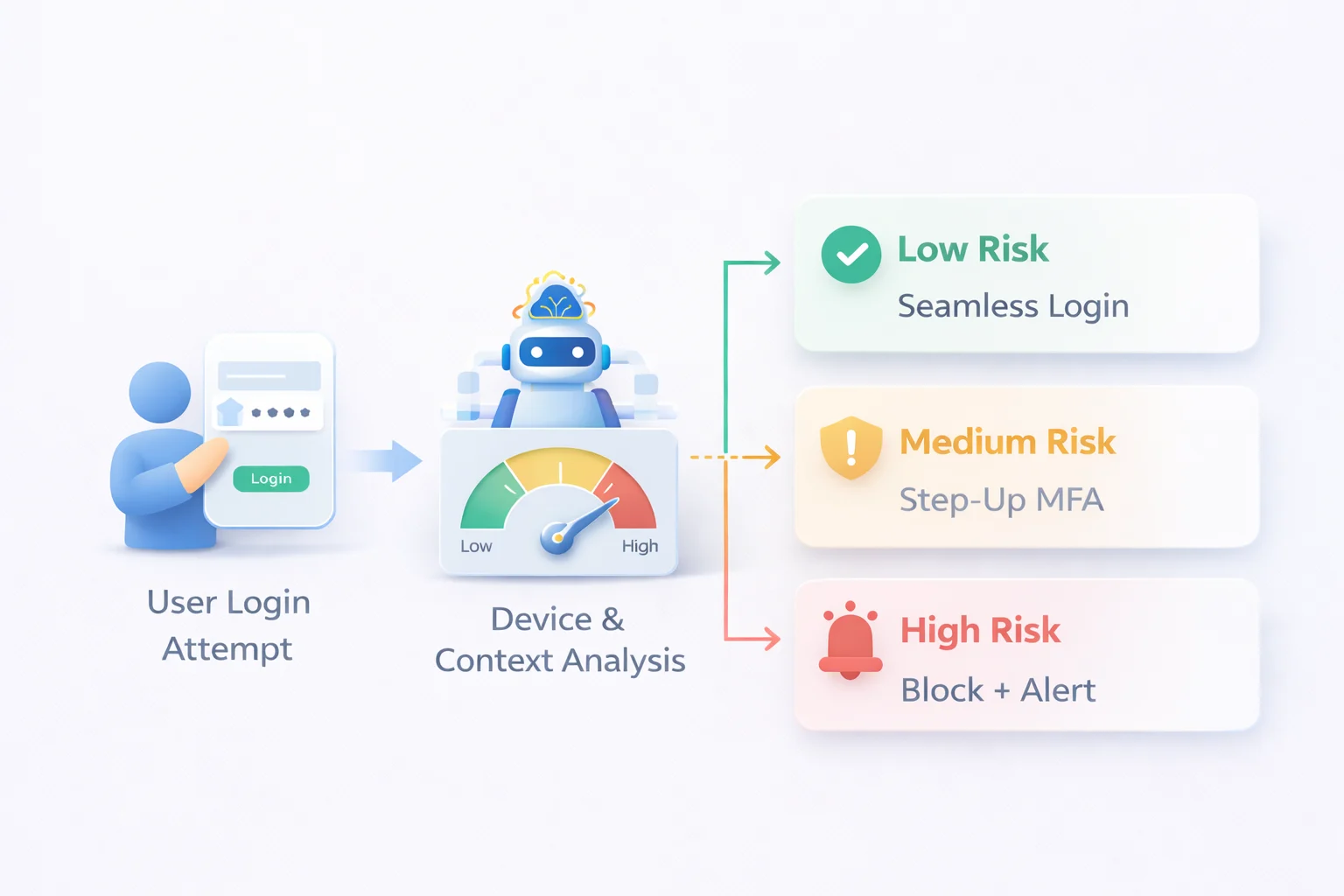
This approach allows security teams to maintain strong protection without frustrating legitimate users with endless password policy complexity. Instead of relying purely on strong password rules, organizations combine multiple authentication signals to verify identity more intelligently.
In short, the most effective security strategies in 2026 are not about making passwords more complicated. They are about reducing reliance on passwords altogether and adopting authentication methods that align with how people actually use technology.
How Modern CIAM Platforms Solve Password Security Issues
As organizations began recognizing the limitations of traditional password policies, many turned to modern identity platforms to solve the problem at its root. This is where Customer Identity and Access Management (CIAM) solutions play a crucial role.
Instead of relying solely on rigid password policy complexity, CIAM platforms provide flexible authentication models designed around both security and usability.
One of the key advantages of modern CIAM platforms is the ability to support multiple authentication methods. Users can sign in using passwords, passkeys, social logins, one-time passcodes, or passwordless authentication flows depending on what works best for the application.
By offering alternatives, organizations reduce their dependence on traditional passwords and minimize common password security issues.
Another major capability is adaptive authentication. Rather than applying the same strong password rules to every login attempt, CIAM platforms analyze contextual signals such as device fingerprint, location, IP reputation, and behavioral patterns.
If a login appears normal, the user can access their account without additional friction. If the system detects unusual activity, it can trigger step-up authentication or block the attempt entirely.
Modern CIAM systems also help eliminate ridiculous password requirements by enabling smarter password management policies. Instead of forcing users to constantly rotate passwords or satisfy overly complicated rules, organizations can adopt more balanced policies such as longer passphrases, breach password detection, and real-time risk analysis.
Another important benefit is identity consolidation. Many users log into applications through multiple methods such as email/password, social login, or passwordless options. Without proper identity management, this can lead to duplicate accounts and fragmented user identities.
CIAM platforms solve this with features like account linking, which ensures that multiple login methods are associated with a single user profile. This provides a consistent user experience while maintaining strong identity security.
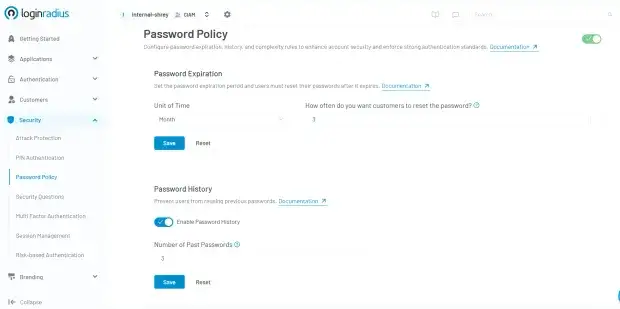
This is where theory meets execution. LoginRadius takes password management to the next level with an intuitive, security-first dashboard. Whether your regulatory framework requires strict compliance rules or you are ready to completely phase out mandatory credential rotations in favor of real-time threat detection, LoginRadius gives you full programmatic control.
You can seamlessly monitor Password History, flag compromised accounts using breach-database tracking, and adapt policies instantly without interrupting the user experience.
Platforms like LoginRadius are designed to support these modern authentication strategies at scale. With features such as passwordless login, adaptive MFA, risk-based authentication, and secure identity management APIs, organizations can significantly reduce the reliance on outdated password policies while improving both security and user experience.
Ultimately, solving password security issues requires more than just stricter password rules. It requires a smarter identity infrastructure that understands user behavior, evaluates risk in real time, and provides secure authentication options that people can actually use.
Will Passwords Disappear?
For decades, passwords have been the foundation of digital authentication. Yet growing concerns around phishing, credential stuffing, password reuse, and account takeover attacks have led many security experts to question whether passwords can remain the primary way users prove their identity online.
The short answer is: passwords are unlikely to disappear anytime soon.
Most organizations have decades of applications, customer accounts, and authentication workflows built around password-based login. Replacing this infrastructure requires time, investment, and widespread industry adoption.
As a result, businesses are expected to operate in a hybrid authentication environment for years to come.
The Hybrid Authentication Future
Most modern identity systems will combine multiple authentication methods, including:
-
Passwords
-
Multi-Factor Authentication (MFA)
-
Passkeys
-
Passwordless Login
This layered approach allows organizations to improve security while maintaining compatibility with existing applications and user expectations.
Why the Industry Is Moving Beyond Passwords
Traditional passwords rely on a shared secret that users must create, remember, and protect. Unfortunately, passwords can be:
-
Reused across multiple accounts
-
Stolen through phishing attacks
-
Exposed in data breaches
-
Guessed through brute-force attacks
-
Exploited through credential stuffing
Passkeys and passwordless authentication address many of these weaknesses by replacing shared secrets with cryptographic verification tied to trusted devices.
Instead of proving identity by typing a password, users authenticate through device-based credentials, biometrics, or secure authentication tokens.
What This Means for Organizations
Organizations should not view passwords and passkeys as competing technologies.
The best strategy is to improve password security today while preparing for a passwordless future.
This includes:
-
Enforcing strong password practices
-
Supporting password managers
-
Enabling Multi-Factor Authentication (MFA)
-
Implementing adaptive authentication
-
Offering passkeys wherever possible
The Long-Term Trend Is Clear
While passwords will remain part of the authentication landscape for years, the industry is steadily moving away from shared secrets and toward device-based cryptographic verification.
The future of authentication is not about creating increasingly complex passwords. It is about reducing reliance on passwords altogether while delivering a more secure, phishing-resistant, and frictionless login experience.
Conclusion
Password policies were created with good intentions. Security teams wanted to protect user accounts from brute-force attacks, credential guessing, and unauthorized access. The logic seemed simple: if passwords are longer and more complex, attackers will have a harder time breaking them.
The reality, however, revealed a different story. Over time, increasingly strict password policy complexity produced frustrated users rather than stronger security. Faced with ridiculous password requirements, people responded with predictable workarounds reusing passwords, making tiny yearly changes, or choosing combinations that technically satisfy the rules but remain easy to guess.
These behaviors are the root of many modern password security issues. The problem is not that users do not care about security. The problem is that traditional password systems ask people to remember dozens of complicated credentials across multiple platforms. Eventually, convenience wins over complexity.
By 2026, organizations are recognizing that authentication must evolve beyond rigid strong password rules. Modern security strategies focus on reducing password dependence through passwordless authentication, adaptive MFA, device intelligence, and risk-based identity verification. These methods protect accounts more effectively while also making the login experience easier for users.
Platforms like LoginRadius enable organizations to adopt these modern authentication approaches without forcing users into complicated password puzzles. By combining passwordless login, adaptive authentication, and identity management capabilities, businesses can significantly reduce common password security issues while delivering a smoother and safer user experience.
In the end, the future of authentication is not about forcing users to create stronger passwords. It is about building smarter identity systems that verify users in ways that are both secure and practical.
FAQs
Q: What is the recommended minimum length for a strong password?
A: Aim for at least 12 characters. Longer passwords are harder to crack and offer better protection against brute-force attacks.
Q: Why do strict password policies create password security issues?
A: Strict password policies often introduce password security issues because they prioritize complexity over usability. When users face ridiculous password requirements, they tend to create predictable patterns or reuse passwords across platforms, which makes accounts easier for attackers to compromise.
Q: What are the best alternatives to traditional password policies?
A: Modern security strategies focus on reducing reliance on passwords. Techniques like multi-factor authentication (MFA), passkeys, passwordless login, and risk-based authentication provide stronger protection while minimizing the problems caused by traditional password policies.
Q: How can organizations reduce password security risks?
A: Organizations can reduce password security issues by adopting modern authentication approaches such as adaptive MFA, passwordless authentication, passphrases instead of complex passwords, and identity platforms that analyze login behavior and risk signals in real time.
Q: What is an example of a strong password?
A: A strong password is long, unique, and difficult to predict. Examples include passphrases such as Ocean-Lantern-Coffee-Bridge or randomly generated passwords created by a password manager. Avoid common patterns like Password123 or Summer2026!.
Q: How long should a password be?
A: Security experts generally recommend using passwords that are at least 12–16 characters long. Longer passwords are significantly more resistant to brute-force attacks than shorter credentials.
Q: Are passphrases safer than passwords?
A: In many cases, yes. Passphrases combine multiple unrelated words into a longer credential that is easier to remember and harder to crack. A passphrase such as Ocean-Coffee-Lantern-Bridge is often stronger than a short complex password like P@55!.
Q: What makes a password weak?
A: Weak passwords are typically short, predictable, reused across multiple accounts, or based on personal information. Common examples include names, birthdays, keyboard patterns, dictionary words, and passwords that have appeared in previous data breaches.
Q: Is changing passwords every 90 days still recommended?
A: Not necessarily. Modern security guidance focuses more on strong, unique passwords, breach monitoring, and MFA than mandatory password rotation. Many organizations now require password changes only when there is evidence of compromise.
Q: Can a password manager generate strong passwords?
A: Yes. Password managers can automatically generate long, random, and unique passwords for every account. This reduces password reuse and significantly improves overall account security.
Q: What's the difference between a password and a passkey?
A: A password is a secret that users create and remember. A passkey uses cryptographic key pairs stored on trusted devices and often verified through biometrics or device unlock methods. Passkeys are more resistant to phishing and credential theft.
Q: Can MFA protect a weak password?
A: MFA provides an additional layer of security, but it should not replace strong passwords. Combining a strong password with MFA offers much better protection than relying on either method alone.
Q: Can hackers crack strong passwords?
A: Given enough time and computing power, any password can theoretically be cracked. However, long, unique passwords and passphrases dramatically increase the effort required, making attacks impractical in most real-world scenarios.
Q: What is a password breach?
A: A password breach occurs when login credentials are exposed through a security incident, database compromise, malware infection, or phishing attack. Exposed credentials are often used in future password attacks.
Q: Are biometric logins safer than passwords?
A: Biometric authentication methods such as fingerprints and facial recognition can improve security and convenience when combined with device-based protections. They are most effective as part of a broader authentication strategy.
Q: Will passwords eventually disappear?
A: Passwords are unlikely to disappear completely in the near future. However, the industry is steadily moving toward passkeys, passwordless authentication, adaptive authentication, and other phishing-resistant technologies that reduce reliance on traditional passwords.