Passwords Are Breaking, And MFA Alone Isn’t Fixing It
Authentication has seen a massive change in the last five years, more than it has seen in the previous twenty. While passwords and SMS OTPs still linger, the industry has reached a tipping point. In 2026, the debate is no longer "Passwordless vs. MFA," it’s about phishing-resistant identity orchestration. For engineering heads and security leads, the challenge is clear: passwords are a liability, and device-bound credentials are a strategic asset.
Passwords were built for simple secrets, not a world of credential stuffing and leaked databases. Attackers no longer "hack" in; they just log in.
While traditional MFA (SMS, OTP) raised the bar, attackers have already adapted through:
-
MFA Fatigue: Bombarding users with push prompts until they cave.
-
Technical Interception: SIM swapping and real-time OTP phishing proxies.
-
Social Engineering: Trickery that exploits human behavior rather than system flaws.
The Friction Trap
When security teams react by adding more legacy steps, the "Friction Trap" triggers:
-
User Drop-off: Conversion rates plummet.
-
Shadow IT: Employees bypass rigid controls to stay productive.
-
Support Burden: Help desks are overwhelmed with reset tickets.
For modern enterprises, passwords are no longer just a nuisance; they are a liability. Device-bound credentials are the new strategic asset. Passwordless authentication sounds like the endgame. No passwords to remember. No reset loops. Fewer chances for stolen credentials to wreck a user account.
For security teams, that sounds like progress. For product teams, it sounds even better. Less friction at login usually means fewer drop-offs, fewer support tickets, and happier users. The move to passwordless has also created a new kind of confusion.
Many teams now assume that if passwords are gone, MFA becomes optional. Or worse, outdated. That assumption looks clean on paper. In practice, it falls apart fast.
The Passwordless Myth: Is MFA Becoming Obsolete?
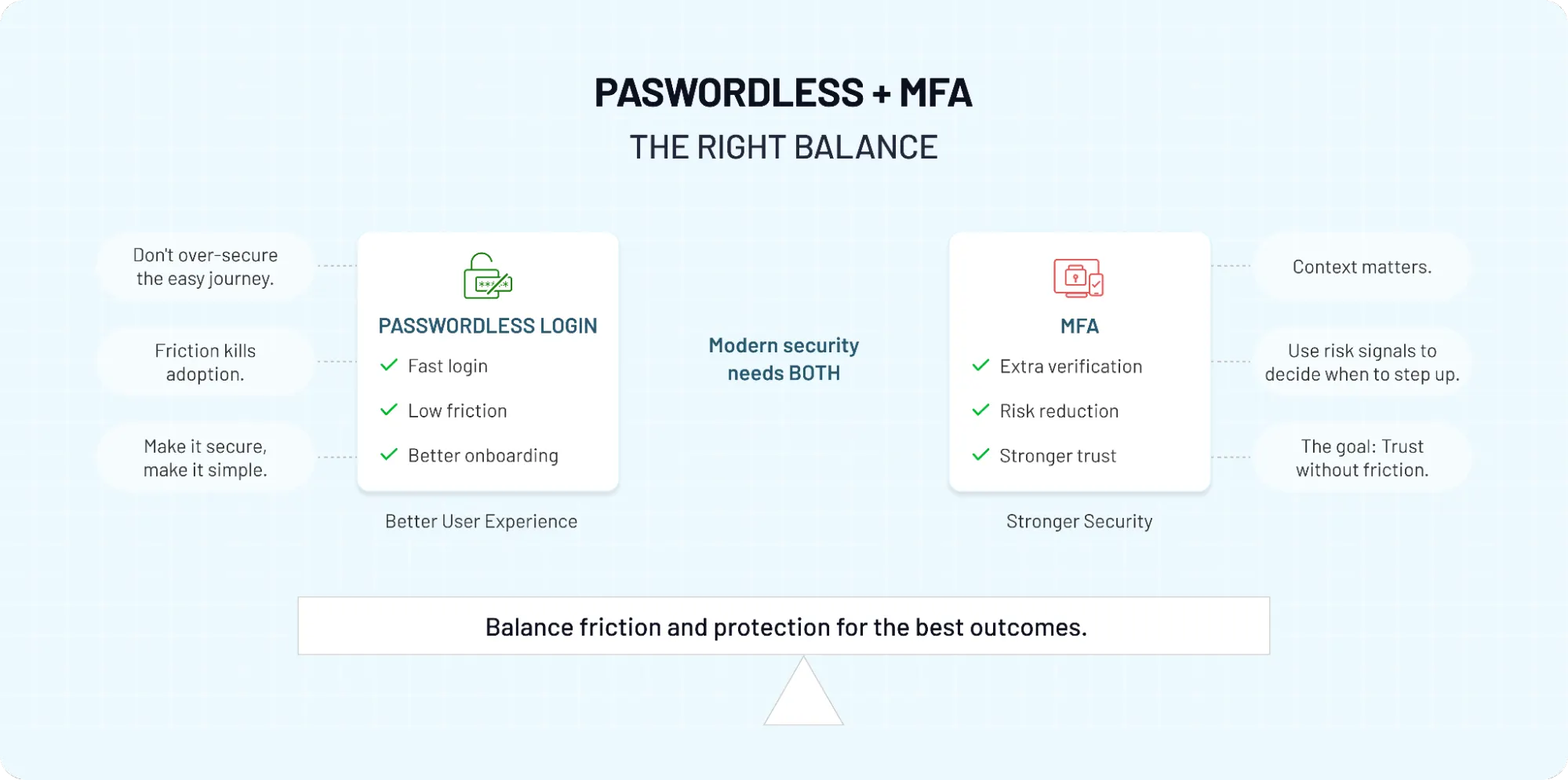
Passwordless and MFA are not competitors.
-
Passwordless removes the weakest link (the shared secret).
-
MFA provides layered assurance when risk variables change.
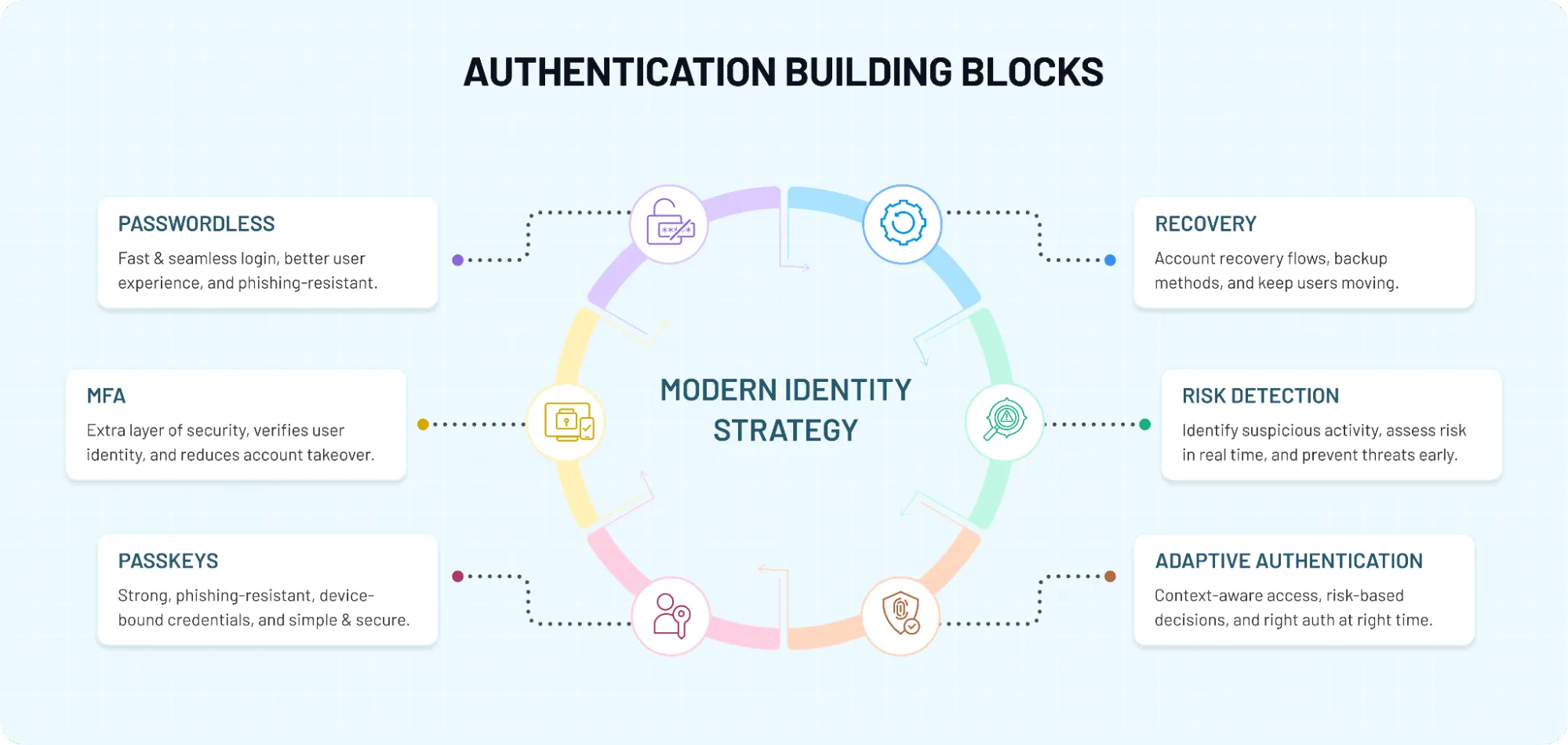
The best login experiences simplify the "front door" without stripping away security. This is why Passkeys and Adaptive authentication are the foundation of modern Zero Trust architectures.
This article will help you understand the differences and similarities between passwordless authentication and MFA, where each one fits, and how modern teams are combining both to build stronger, simpler, and more resilient login flows.
Defining Modern Authentication
What Is MFA (Multi-Factor Authentication)?
MFA, or multi-factor authentication, is exactly what it sounds like: proving identity using more than one kind of signal. Not just a password. Not just a phone OTP. Multiple layers combined to help improve security.
Most authentication factors fall into three buckets:
-
Something you know, like a password or PIN.
-
Something you have, like a phone, hardware key, or authenticator app.
-
Something you are, like a fingerprint or face scan.
When a login flow uses two or more of these, it becomes MFA. A lot of teams hear “MFA” and immediately think of six-digit codes. But that is only one version of it. MFA can take the form of push prompts, one-time passwords, biometrics, security keys, device checks, or adaptive challenges that appear only when risk changes.
Some common use cases include media or ecommerce logins, remote workforce access, financial transactions, healthcare portals, and any system where one weak login can create a much bigger problem.
MFA shows up so often in compliance conversations. Whether a company is thinking about stronger access controls, audit readiness, or baseline account protection, MFA is usually part of the discussion. But MFA was never meant to be a magic shield.
Its effectiveness depends heavily on the factor being used. A hardware security key offers a very different level of protection than an SMS code. A biometric prompt tied to a secure device is not the same as a push notification that a distracted user can approve half-awake. That is the part many blogs skip. They talk about MFA as if every second factor delivers the same security value. It doesn’t.
Teams deploy MFA to satisfy policies and then later realize the user experience and actual resistance to modern attacks vary wildly from one method to another. That is why adaptive MFA is getting more attention now. Instead of forcing every user through the same steps every time, it adjusts based on risk, device trust, location changes, access sensitivity, or unusual behavior.
So yes, MFA still remains one of the most important building blocks in modern authentication. But the real conversation is no longer whether MFA matters. The real question is which kind of MFA actually makes sense in a world that is moving beyond passwords.
What Is Passwordless Authentication?
Passwordless authentication focuses on removing the one thing attackers keep exploiting the most: the password itself. No shared secret. Nothing to reuse. Nothing to phish and replay later. Instead, it relies on proof tied to a device and the user. Most modern implementations use public-key cryptography.
A private key stays locked on the user’s device. A matching public key sits on the server. During login, the server sends a challenge. The device signs it with the private key. The server verifies it with the public key. No secret ever travels over the network.
Here’s how it actually shows up in products. Passkeys backed by standards like WebAuthn and FIDO2. Biometric prompts that unlock a device and confirm presence. Magic links or one-time sign-ins sent to a trusted channel.
Although both aim to reduce friction, not all methods offer the same level of security. Device-bound passkeys with biometrics are in a different league compared to email links that can be forwarded or intercepted.
Teams assume “passwordless” is a single thing. It isn’t. It’s a spectrum.
At one end, you have convenience-first approaches. At the other, you have phishing-resistant authentication designed to stop credential theft entirely. Lumping them together leads to bad decisions. When teams adopt passkeys, login success rates jump and support requests drop because there’s nothing to remember or reset. Users just approve on their device.
Security improves for a different reason. There’s no password database to breach, no credentials to reuse across apps, no code to trick out of a user. The attack surface shrinks.
But removing passwords doesn’t remove risk everywhere. Devices can change. Sessions can escalate. Admin actions can carry higher stakes. That’s where the conversation starts to overlap with MFA, not as a fallback of last resort, but as a smarter, contextual layer.
So the real question isn’t whether passwordless is better than passwords. It is. The question is how it fits with the rest of your security model and where additional assurance still needs to step in.
Passwordless vs MFA: The Real Difference (Not What You Think)
Most comparisons start with a simple split. MFA adds layers. Passwordless removes passwords. Clean distinction. Easy to understand. But this simple definition misses what’s actually happening under the hood. Passwordless doesn’t eliminate factors; it changes how they show up.
When a user logs in with a passkey, they are typically proving two things at once. They have the device. And they are present on it, often verified through a biometric or local PIN. That’s possession plus inherence or knowledge, happening in a single step. So technically, many passwordless flows are already multi-factor.
Here’s where it gets interesting. Traditional MFA stacks factors on top of a password. First, you enter something you know. Then you approve something you have. Sometimes you add a biometric. It works, but it’s layered after the weakest link. If the password is compromised, everything else becomes a race to stop misuse. Passwordless flips that model.
There is no shared secret to steal in the first place. The login starts with a device-bound credential, not a reusable password. The “factors” are baked into the experience instead of being added later as extra steps. Fewer moving parts. Less reliance on user judgment in the middle of an attack. That difference shows up in real scenarios.
A phishing page can capture a password. It can even trick a user into entering an OTP. But it can’t replay a private key locked to a device. It can’t fake a biometric prompt that never leaves the device. That’s why passkey-based authentication is often described as phishing-resistant.
In contrast, traditional MFA still depends on how the second factor is delivered. A hardware security key behaves very differently from an SMS code. A push notification can be ignored or accidentally approved. Not all MFA are equal, even though it’s often treated that way. So framing this as “passwordless vs MFA” creates a false choice.
You’re not choosing between one factor and many. You’re choosing between two models of trust. One builds on top of a weak secret. The other replaces it with something that’s harder to steal and easier to use. And that’s where the conversation starts to shift from comparison to design.
Passkeys vs MFA vs OTP: What Actually Changes?
Let’s start with OTP-based MFA. A one-time password is generated and sent via SMS, email, or an authenticator app. The idea is: only someone with access to that channel can complete the login.
However, in practice, that assumption doesn’t always hold. SIM swap attacks, email compromise, and phishing pages that proxy the login flow can still capture and replay those codes in real time. The protection is better than a password alone, but it still depends on timing and user awareness.
Push-based MFA improves convenience. Instead of typing a code, users approve a notification. Faster, fewer errors. But it introduces a different risk. If a user receives multiple prompts late at night, during a busy day it only takes one accidental approval. That’s how push fatigue attacks work. Not by breaking encryption, but by wearing down attention. Now compare that to passkeys.
A passkey is tied to a device and backed by public-key cryptography. There’s no code to enter, nothing to copy, nothing to forward. The user simply unlocks their device often with a fingerprint or face scan and the authentication happens locally. The server gets a signed response it can verify, but no secret it can store or leak later.
With passkeys, the second factor isn’t something you add after login. It’s already part of the login. The device proves possession. The biometric or local PIN proves presence. Two signals, one step. That changes both security and experience.
Attackers can’t intercept a passkey the way they can intercept an OTP. There’s nothing traveling over the network that can be reused. Phishing attempts lose their usual advantage because there’s no credentials to trick out of the user. On the user side, login becomes almost invisible. You just approve and move on.
In contrast, OTP and push-based MFA still rely on a moment where the user has to make a decision under pressure. Approve this. Enter that. Check your phone. That moment is where mistakes happen.
So when teams compare passkeys with MFA or OTP, the real shift is not just stronger encryption. It’s a change in where trust lives. Less in the user’s hands during the login flow. More in the device and the underlying cryptographic model. And that’s a big shift.
| Method | Phishing Resistant? | User Friction | Security Level |
|---|---|---|---|
| OTP (SMS/Email) | No | High (Manual entry) | Low (Interceptable) |
| MFA | Partial | Low (One tap) | Moderate (Fatigue risk) |
| Passkeys | Yes | Lowest (Biometric) | Highest |
Security Comparison: Is Passwordless More Secure Than MFA?
People compare “passwordless” with “MFA” as if MFA is a single, fixed thing. It isn’t. An SMS code, a push notification, and a hardware security key all fall under MFA but they don’t offer the same level of protection. Not even close. Let me make this simple.
Passwordless methods like passkeys are designed to be phishing-resistant. There’s no password to steal. No OTP to intercept. Authentication happens through a device-bound private key that never leaves the user’s device. Even if someone lands on a fake login page, there’s nothing useful they can capture and replay. Now compare that to traditional MFA setups.
With password + OTP, the password can still be phished. The OTP can be captured in real time using proxy attacks. With push MFA, attackers don’t even need to intercept anything; they just rely on user behavior. Send enough prompts, and eventually, one gets approved. That’s not a theoretical risk. It’s already happening across enterprises.
So from a pure attack-resistance standpoint, passwordless, especially passkey-based authentication comes out ahead. But here’s the part that often gets skipped. Passwordless reduces one class of risk extremely well: credential-based attacks. It doesn’t eliminate all risk everywhere. Sessions can still be hijacked.
Devices can be lost or shared. Privileged actions still need stronger verification. And compliance requirements often demand additional assurance beyond just login. That’s where MFA still remains relevant.
Not as a blanket requirement for every login, but as a targeted layer. High-risk actions. New device access. Admin-level operations. Situations where identity needs to be re-verified, not just assumed.
We’ve seen that the strongest systems don’t rely on one method alone. They combine passwordless login with adaptive, context-aware MFA. Most logins stay fast and invisible. Risky ones trigger additional checks. So asking “which one is more secure” misses the bigger picture.
Passwordless is stronger than traditional MFA in preventing credential theft. MFA is still useful in managing when and how much trust you grant after login. Put them together, and security stops being reactive and starts becoming smarter.
Do You Still Need MFA in a Passwordless World?
This is the question most teams are really trying to answer. Not definitions. Not protocols. Just do we still need it? The honest answer is: it depends on what you’re protecting, how users access it, and how much risk you’re willing to carry at different moments in the journey.
If you’re using passkeys or other device-bound methods with biometrics, you already have multiple signals working together. The device proves possession. The biometric or local PIN proves presence. For many everyday logins, that’s enough. No extra step needed. No second prompt. Just fast, secure access.
That’s why passwordless feels so smooth. It removes the weakest link and avoids adding unnecessary friction back into the flow. But here’s where it changes. Not every login is low risk. Not every action is equal.
Accessing a dashboard is one thing. Changing billing details, exporting sensitive data, or accessing admin controls is another. The moment the impact of an action increases, the need for additional assurance comes back into play. That’s where MFA still remains useful not as a default for every login, but as a targeted control.
Some common situations where MFA still makes sense:
-
First login on a new device
-
Access from an unusual location
-
Privileged or admin-level actions
-
Transactions involving sensitive data
-
Environments with strict compliance requirements
Teams either apply MFA everywhere, creating friction that users try to bypass, or they remove it entirely after adopting passwordless, assuming the problem is solved. Both approaches miss the point. Security isn’t about adding more steps. It’s about adding the right steps at the right time.
Beyond internal security goals, regional regulations are making these layers mandatory. Under the NIS2 Directive, organizations across the EU’s critical sectors must implement 'multi-factor authentication or continuous authentication solutions' as part of their cybersecurity risk-management measures.
Whether you choose a passkey-first approach or adaptive MFA, ensuring your stack aligns with these NIS2 requirements is no longer optional for global enterprises.
That’s why adaptive authentication is becoming the default approach. Instead of forcing every user through the same flow, it evaluates context device trust, behavior, location, risk signals and decides when to step in. Most users never notice it. High-risk scenarios trigger additional checks automatically.
So, do you still need MFA in a passwordless world? Yes but not in the way you used to. It’s no longer a permanent gate at login. It’s a dynamic layer that shows up when trust needs to be re-established.
Passwordless Authentication for Zero Trust Security
Zero Trust changed the way security teams think about access. Or at least it should have. The old assumption log in once, get trusted for the rest of the session doesn’t hold up anymore. Not when users switch devices, work remotely, connect through unmanaged networks, and move between apps carrying different levels of risk.
That’s why passwordless authentication fits so naturally into Zero Trust. It strengthens the first proof of identity without forcing users through the usual password mess. No reused credentials. No reset fatigue. No shared secret sitting around waiting to be phished. But Zero Trust is not just about stronger login. It’s about continuous confidence. Teams adopt passwordless and assume they’ve checked the Zero Trust box. They haven’t.
Passwordless improves the starting point. Zero Trust is about all that is next: device posture, session risk, access sensitivity, behavioral changes, and whether trust should still apply five minutes later. That is where layered security still remains essential.
A passkey can prove that a real user is on a trusted device at the moment of login. Great. But what happens when that same user tries to access a privileged admin panel, download sensitive customer data, or sign in from a new location an hour later? Zero Trust says: verify again if the risk changes. Don’t rely on yesterday’s decision. Or even the one from ten minutes ago.
This is why adaptive authentication matters so much in passwordless environments. Low-risk actions stay smooth. High-risk actions trigger step-up checks. The user experience stays clean for most people, while security gets sharper where it actually counts.
In contrast, password-only systems and basic OTP flows tend to work against Zero Trust goals. They create a one-time checkpoint and then lean too heavily on that initial success.
Passwordless, especially when tied to phishing-resistant methods like passkeys, gives you a stronger foundation to build continuous verification on top of.
So no, passwordless authentication for Zero Trust does not mean “log in without a password and call it done.” It means starting with stronger identity proof, then applying trust carefully, contextually, and only for as long as it makes sense. That’s the bigger shift. Not just removing passwords. Replacing static trust with smarter trust.
Passwordless + MFA in Practice (Real-World Implementation)
On paper, it’s easy to say “go passwordless.” In production, you’re dealing with different users, devices, risk levels, and edge cases that don’t show up in neat diagrams. That’s why most teams don’t go fully passwordless overnight. They evolve into it.
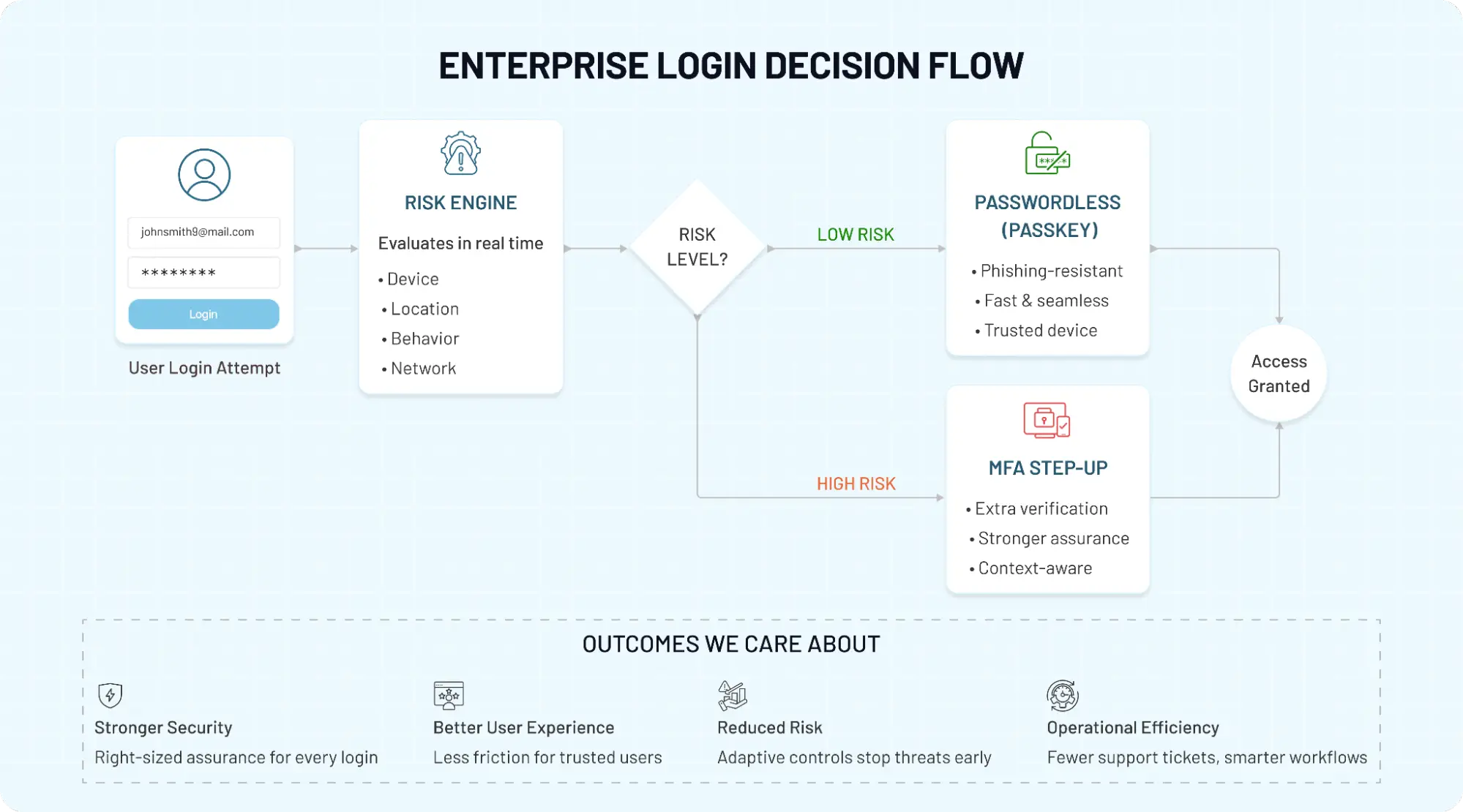
Here’s how it actually works in modern systems. A user lands on the login page. Instead of asking for a password, you prompt for a passkey. If the user has one set up, they authenticate using their device biometric or local PIN and they’re in. No extra steps. No codes. No friction.
But not every user will have a passkey ready. So you need a fallback. That could be a one-time link, an OTP, or a recovery flow tied to a verified channel. This is where MFA quietly steps in not as the default experience, but as a safety net. It ensures access doesn’t break when the ideal path isn’t available.
The best implementations don’t treat fallback as a downgrade. They treat it as a controlled path with the right level of verification. If a user switches devices, logs in from an unusual location, or attempts a sensitive action, the system can trigger step-up authentication automatically. That’s adaptive authentication in action.
Teams introduce passkey-first login with intelligent MFA fallback, two things happen almost immediately:
-
Login success rates improve.
-
Security incidents tied to credential misuse drop.
Not because more steps were added but because the right steps were applied at the right time. There’s also a practical layer most teams underestimate: account recovery.
If a user loses access to their primary device, you need a secure way to restore access without opening the door to attackers. This often involves combining multiple signals: verified email, secondary device, identity checks, or admin approval in enterprise environments. Recovery flows are where many “secure” systems quietly become vulnerable if not designed carefully.
And then there’s compliance. Some industries still require explicit multi-factor verification for certain actions, regardless of how strong your primary login method is. That means even with passwordless in place, MFA may need to be enforced at specific checkpoints, financial approvals, data exports, and admin changes. Not everywhere, but where it matters.
Simple for users. Controlled for security teams. That’s the balance most organizations are aiming for.
Common Misconceptions About Passwordless and MFA
The biggest confusion around passwordless and MFA is not technical. It’s conceptual. Teams hear new terminology, vendors simplify the story too much, and suddenly the market starts treating two connected ideas like they cancel each other out. They don’t.
One of the most common assumptions is that passwordless means MFA is gone. That sounds logical for about five seconds. Then you look at how passkeys actually work. A trusted device is involved. The user often confirms identity through a biometric or local PIN. That is already more than one signal. So in many cases, passwordless is not removing MFA. It is delivering MFA in a cleaner way.
Another misconception is that all passwordless methods offer the same level of protection. They don’t. A passkey tied to a device and protected by local verification is very different from a magic link sent over email. Both remove passwords. Only one gives you strong phishing resistance by design. That distinction matters more than the label.
Then there’s the opposite mistake. Some teams assume MFA automatically means stronger security, no matter how it is implemented. Not quite. An SMS code and a hardware-backed security key do not belong in the same security conversation.
A push notification can be convenient, but convenience is not the same as attack resistance. This is where buyers, security teams, and even content in the market often blur categories that should be kept separate.
Here’s where teams usually go wrong. They try to force a winner between passwordless and MFA when the better question is: what level of assurance does this user, action, or environment actually require? That shift changes everything. It moves the conversation away from buzzwords and toward design choices.
-
Which login method reduces risk without hurting adoption?
-
Which actions need step-up verification?
-
Which users need stronger controls because of privilege, compliance, or exposure?
Once you start asking those questions, the whole “passwordless vs MFA” debate becomes much less dramatic and much more useful. So no, you do not have to choose one and reject the other.
In many modern systems, the strongest approach is not passwordless alone or MFA alone. It is passwordless at the front, adaptive MFA where risk justifies it, and a security model that stops treating every login like the same event.
How to Choose the Right Approach for Your Product
The “right” approach depends on your users, your risk model, and how much friction your product can realistically afford. If you’re building a modern SaaS product, especially one focused on growth and onboarding, passwordless-first is usually the right direction. Faster signups, fewer drop-offs, and no password resets clogging your support queue.
A passkey-based flow or simple passwordless login reduces friction without compromising baseline security. Then you layer in step-up verification only when risk increases with a new device, unusual behavior, or a sensitive action. In contrast, enterprise environments play by slightly different rules.
You’re dealing with multiple user roles, external partners, admin access, compliance checks, and sometimes strict audit requirements. In these cases, a hybrid model makes more sense. Passwordless can still handle the primary login experience, but MFA remains part of the policy layer. Not everywhere, but where it matters privileged access, data-heavy workflows, and regulated operations.
Here’s where it gets practical. Many enterprise teams are not starting from scratch. They’re working with legacy systems, existing identity providers, and users already trained on password + MFA flows. Moving directly to passwordless can feel disruptive.
That’s why phased rollouts tend to work better. Introduce passkeys alongside existing methods. Let users adopt gradually. Monitor behavior. Tighten controls over time.
A surprising pattern we’ve seen is that teams that treat authentication as a product experience not just a security feature tend to get this right faster. They test flows. They measure login success rates. They watch where users struggle. And they adjust. Not everything needs to be enforced on day one. So how do you decide?
Start with your risk tolerance. Map out your high-impact actions. Identify where user friction is hurting adoption. Then design a flow where passwordless handles the majority of logins, and MFA steps in only when additional assurance is justified. Simple in theory. Powerful in practice.
And most importantly, it keeps both security and usability on the same side, instead of forcing a trade-off.
Final Thoughts: Passwordless Is the Evolution of MFA
Passwords are fading out, that much is clear. They’ve become the weakest part of modern authentication, and most teams are actively trying to move away from them. But here’s the part that often gets misunderstood.
Moving to passwordless doesn’t mean stripping away security layers. It means rethinking where those layers belong and how they show up.
Passwordless authentication simplifies the front door. It removes the most fragile element and replaces it with something stronger, faster, and harder to exploit. That alone changes a lot user experience improves, credential-based attacks drop, and login becomes something users don’t have to think about.
MFA, on the other hand, hasn’t lost its place. It has just changed its role. Instead of sitting in every login flow, it now works best as a targeted control. It shows up when risk increases. When access becomes sensitive. When trust needs to be re-verified. Not everywhere just where it actually matters. That combination is where things start to click.
Passwordless handles the majority of logins quietly in the background. MFA steps in when signals indicate something needs a closer look. Security becomes adaptive instead of rigid. Users move faster. Systems stay protected. And that’s the direction modern identity is heading.
So if you’re evaluating your authentication strategy, don’t treat this as a choice between passwordless and MFA. Treat it as an opportunity to simplify what users see while strengthening what happens behind the scenes. Looking to choose the right approach?
Start by moving away from passwords where it makes sense. Introduce passkeys or other passwordless methods for everyday access. Then layer in adaptive MFA where your risk model demands it. Examples include admin actions, sensitive data, and any unusual behavior.
If you’re building or scaling a product and want to get this right without overcomplicating the experience, this is exactly where the right platform makes a difference.
Explore how LoginRadius helps you implement passwordless authentication, adaptive MFA, and secure identity flows without adding friction your users will push back on. Or better yet, book a demo and see how a passkey-first, risk-aware authentication flow works in real environments.
FAQs
Q: What is the difference between passwordless authentication and MFA?
A: Passwordless authentication removes passwords entirely and relies on device-based or biometric verification. MFA adds multiple layers of verification, often on top of a password. In modern systems, passwordless methods like passkeys already combine multiple factors. So instead of replacing MFA, passwordless often simplifies how MFA is delivered.
Q: Is passwordless authentication more secure than MFA?
A: Passwordless authentication, especially passkeys, is generally more secure than traditional MFA using OTPs or SMS. It eliminates shared secrets and reduces phishing risks significantly. However, not all passwordless methods offer the same level of protection. For high-risk scenarios, combining passwordless with adaptive MFA provides the strongest security.
Q: Do you still need MFA with passwordless authentication?
A: Yes, but not for every login. Passwordless handles most low-risk access securely on its own. MFA is still useful for sensitive actions, new devices, or unusual behavior. Modern systems apply MFA selectively based on risk, not by default.
Q: Do passkeys eliminate the need for MFA?
A: Passkeys reduce the need for traditional MFA because they already use multiple factors (device + biometric/PIN). For everyday logins, they are often sufficient. However, MFA may still be required for high-risk or compliance-driven scenarios. So passkeys minimize MFA but don’t eliminate it entirely.
Q: What is passwordless MFA?
A: Passwordless MFA refers to authentication that combines passwordless login with additional verification when needed. For example, a passkey login followed by a step-up check for sensitive actions. It removes passwords while still maintaining layered security. This approach balances strong protection with a smooth user experience.
Q: Is MFA outdated in a passwordless world?
A: No, MFA is evolving, not becoming obsolete. Instead of being used in every login, it’s now applied based on context and risk. Passwordless reduces reliance on weak factors like passwords. MFA still plays a key role in securing high-risk access points.
Q: What is phishing-resistant authentication?
A: Phishing-resistant authentication prevents attackers from stealing or reusing credentials. Methods like passkeys use device-bound cryptographic keys that can’t be intercepted. Unlike OTPs or passwords, there’s nothing to capture or replay. This makes it far more secure against modern phishing attacks.
Q: When should you use MFA with passwordless authentication?
A: Use MFA when risk increases, like new device logins, admin actions, or sensitive data access. It’s also important for compliance-driven environments. Passwordless handles standard access, while MFA adds extra assurance when needed. This keeps security strong without adding unnecessary friction.