Modern organizations operate in increasingly interconnected ecosystems. Partners, suppliers, distributors, resellers, contractors, and enterprise customers all require secure access to business applications, portals, and digital resources. While these relationships drive innovation and growth, they also create identity and access management challenges that traditional IAM solutions were never designed to solve.
Modern B2B IAM platforms address these challenges by providing capabilities such as federated identity, delegated administration, multi-tenant architecture, lifecycle automation, and centralized governance. These capabilities help organizations maintain security and compliance while delivering seamless user experiences across organizational boundaries.
As Gartner and leading identity providers increasingly emphasize identity-first security strategies, businesses are shifting away from perimeter-based security models toward approaches that place identity at the center of access decisions. This shift is particularly important in B2B environments, where external identities often represent one of the largest and most complex attack surfaces.
In this guide, we'll explore the top B2B IAM best practices organizations should follow to strengthen security, streamline partner onboarding, improve operational efficiency, and build scalable identity programs. We'll also examine why delegated administration has become a critical capability for modern Partner IAM architectures and how organizations can implement it effectively.
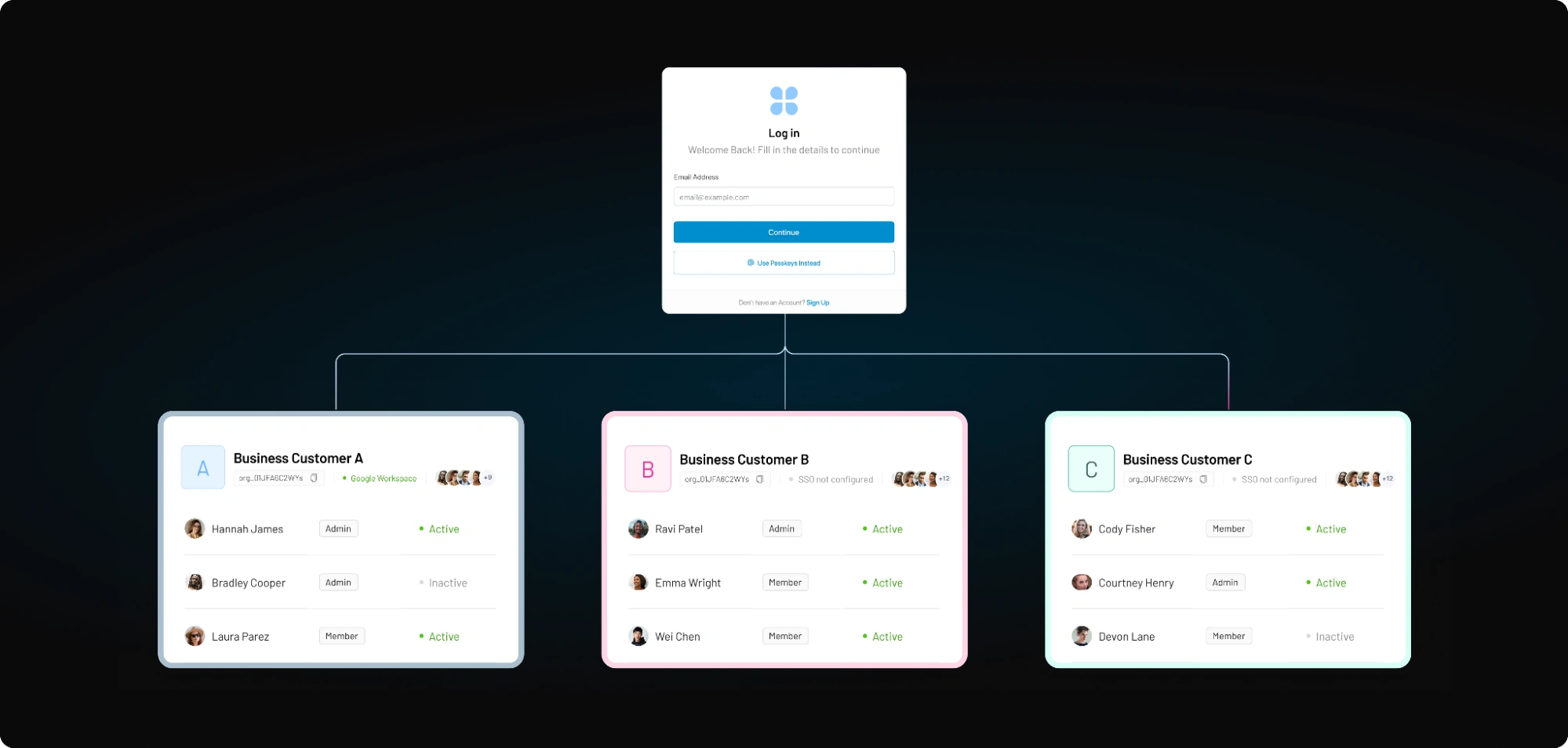
What Makes B2B IAM Different?
B2B IAM extends beyond traditional authentication and authorization. It focuses on enabling secure collaboration between organizations while maintaining visibility, control, and compliance across complex business relationships. Unlike employee-focused IAM systems, B2B IAM must manage identities belonging to external organizations with varying security requirements, governance models, and lifecycle processes.
Several characteristics distinguish B2B IAM from other identity management approaches.
| Capability | Traditional IAM | B2B IAM |
|---|---|---|
| Users | Employees | External Organizations and their users. |
| Infrastructure (Tenancy) | Single | Multi-Tenant with organizational isolation. |
| Trust relationships | Centralized and organization-owned | Federated across multiple organizations. |
| Governance | Centralized | Shared between provider and partner organizations. |
| Administration | IT-managed | Delegated to partner administrators |
As partner ecosystems continue to grow, organizations need B2B IAM solutions that can support federation, lifecycle management, governance, tenant isolation, and delegated administration at enterprise scale.
Read this article, to understand the fundamentals of B2B identity management and to see how Partner IAM differs from Traditional IAM and Customer IAM.
Top 11 B2B IAM Best Practices for Production and Deployment
The following best practices provide a framework for building a secure, scalable, and future-ready B2B IAM strategy.
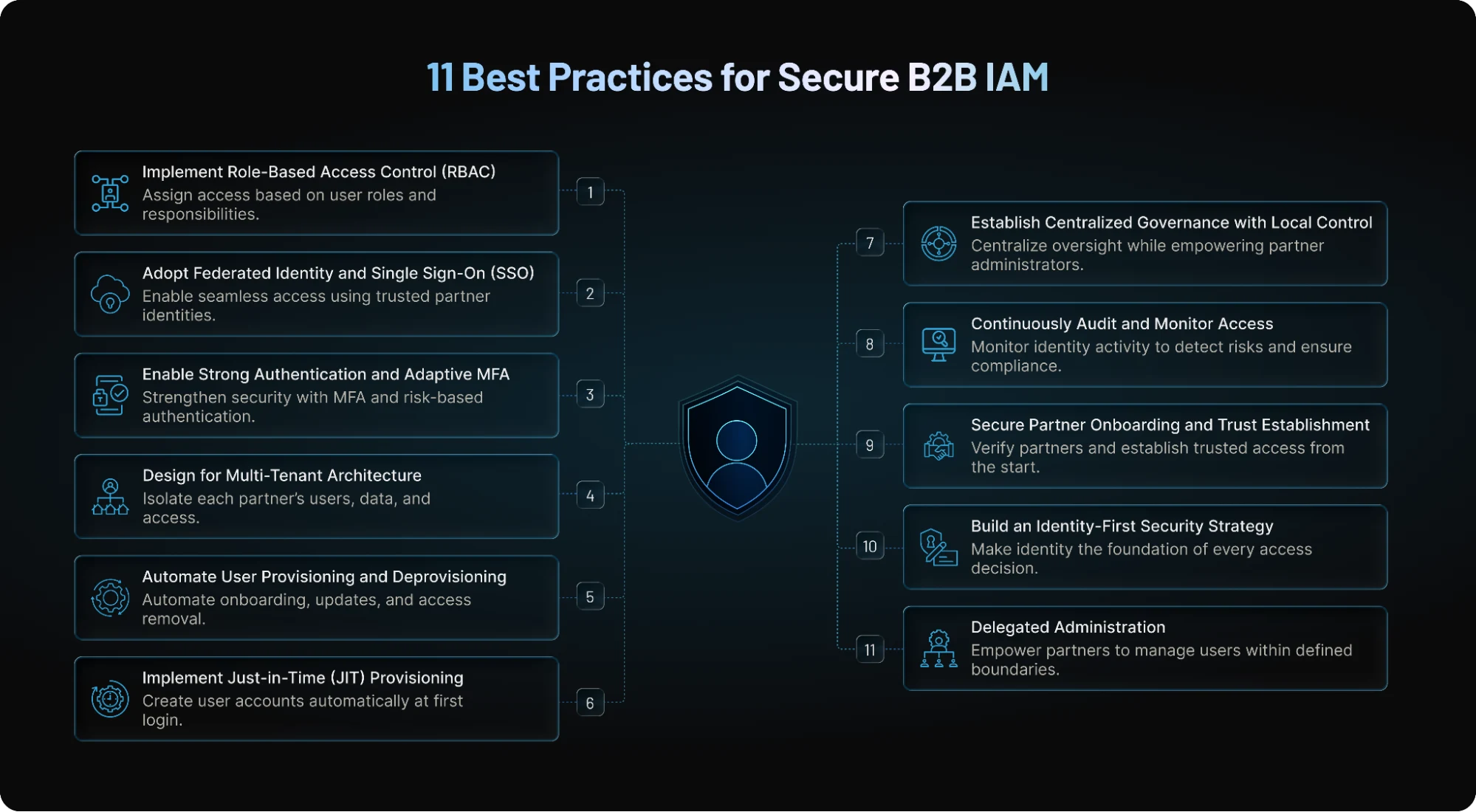
1. Implement Role-Based Access Control (RBAC)
A strong B2B IAM strategy starts with Role-Based Access Control (RBAC). Instead of assigning permissions to individual users, RBAC grants access based on predefined roles aligned with specific responsibilities. This approach simplifies access management, reduces administrative overhead, and helps enforce the principle of least privilege.
In B2B environments, different external users often require varying levels of access. A supplier administrator may need the ability to onboard users and manage accounts, while a supplier employee may only need access to inventory information. RBAC ensures users can perform their tasks without gaining unnecessary access to sensitive resources.
As partner ecosystems grow, role-based models also make permission reviews, compliance audits, and user lifecycle management significantly easier. Organizations should establish clear role definitions, regularly review permissions, and remove redundant privileges to reduce security risks.
2. Adopt Federated Identity and Single Sign-On (SSO)
Managing separate credentials for every partner application quickly becomes unmanageable. Federated identity and Single Sign-On (SSO) solve this challenge by allowing external users to authenticate using identities managed by their own organizations through standards such as SAML, OAuth, and OpenID Connect (OIDC).
Federation reduces password fatigue, minimizes credential-related security risks, and provides a smoother user experience. It also accelerates onboarding because partner organizations can connect their existing identity providers without requiring users to create and maintain additional accounts.
Beyond convenience, federated identity improves security by centralizing authentication policies within the partner organization. As organizations increasingly collaborate across business ecosystems, federated SSO becomes a foundational capability for secure and scalable B2B IAM.
3. Enable Strong Authentication and Adaptive MFA
Passwords alone are no longer sufficient to secure access to business applications. Modern B2B IAM deployments should incorporate Multi-Factor Authentication (MFA) and adaptive authentication mechanisms to protect against account compromise and credential-based attacks.
MFA requires users to present multiple verification factors before gaining access, significantly reducing the likelihood of unauthorized access. Adaptive authentication strengthens security further by evaluating contextual signals such as device posture, geographic location, network risk, and user behavior.
For example, a partner administrator accessing a system from a trusted location may experience a low-friction login, while the same user logging in from an unusual country may be prompted for additional verification.
This risk-based approach balances security with user experience while supporting Zero Trust security principles.
4. Design for Multi-Tenant Architecture
Multi-tenancy is a fundamental requirement for modern B2B applications. A multi-tenant architecture enables multiple partner organizations to operate within a shared platform while maintaining strict separation of users, data, configurations, and policies.
Without proper tenant isolation, organizations risk accidental data exposure, compliance violations, and operational complexity. Each tenant should have clearly defined boundaries that prevent unauthorized access to another organization's information.
A well-designed multi-tenant environment also simplifies scalability. New partners can be onboarded quickly without requiring significant infrastructure changes, while organizations maintain centralized visibility and governance.
As partner ecosystems expand, tenant isolation becomes essential for ensuring both security and business continuity.
5. Automate User Provisioning and Deprovisioning
Manual provisioning processes often introduce delays, errors, and security gaps. Organizations should automate user onboarding, updates, and offboarding whenever possible to improve operational efficiency and reduce risk.
Automated provisioning ensures external users receive appropriate access immediately after approval, while deprovisioning removes access when relationships end, contracts expire, or user statuses change. This helps eliminate orphaned accounts, which remain a common source of security vulnerabilities.
Automation can be achieved through standards such as SCIM and API-driven workflows that synchronize identity information across systems. By reducing reliance on manual processes, organizations improve consistency while maintaining stronger control over identity lifecycles.
6. Implement Just-in-Time (JIT) Provisioning
Just-in-Time (JIT) provisioning streamlines onboarding by automatically creating user accounts when individuals first authenticate through a trusted identity provider. Instead of pre-creating accounts, organizations generate user profiles dynamically during the login process.
JIT provisioning significantly reduces administrative effort, especially when onboarding large partner organizations with frequently changing workforces. Users gain access faster, while IT teams avoid maintaining unused accounts.
The approach also improves identity accuracy because user information is pulled directly from authoritative identity sources during authentication. Combined with federation and lifecycle automation, JIT provisioning creates a highly scalable onboarding process capable of supporting rapidly growing partner ecosystems.
7. Establish Centralized Governance with Local Control
One of the biggest B2B IAM challenges is balancing centralized governance with operational flexibility. Organizations need visibility and control over access decisions while allowing partners to manage day-to-day identity administration within their own environments.
Centralized governance provides policy enforcement, auditability, compliance monitoring, and risk oversight. At the same time, local administrators can handle routine activities such as user onboarding, role assignments, and access updates.
This balance improves efficiency while preventing governance bottlenecks. Instead of routing every request through internal IT teams, organizations maintain strategic oversight while empowering partners to manage their own users responsibly.
Delegated administration, which we'll discuss later, is one of the most effective ways to achieve this balance.
8. Continuously Audit and Monitor Access
Identity governance is not a one-time initiative. Access patterns, partner relationships, and security risks constantly evolve, making continuous monitoring essential for maintaining security and compliance.
Organizations should maintain comprehensive audit trails that capture authentication events, permission changes, administrative actions, and access requests. These logs provide visibility into user behavior and support compliance requirements across regulated industries.
Regular access reviews are equally important. Reviewing roles, permissions, and inactive accounts helps organizations identify excessive privileges and potential security risks before they become incidents.
Continuous monitoring enables security teams to detect anomalies early and respond quickly to suspicious activity.
9. Secure Partner Onboarding and Trust Establishment
The onboarding process represents one of the most critical stages in the B2B identity lifecycle. Poor onboarding practices can introduce unauthorized users, weak trust relationships, and operational inefficiencies.
Organizations should establish standardized onboarding workflows that verify partner identities, validate business relationships, and confirm authorization before granting access. This may include identity proofing, approval processes, contract validation, and federation setup.
Secure onboarding accelerates collaboration while reducing third-party risk. It also establishes a strong foundation for future identity governance activities, ensuring every external user enters the ecosystem through a trusted and auditable process.
10. Build an Identity-First Security Strategy
Traditional security models focused primarily on protecting network perimeters. Today's B2B environments require a different approach, one that treats identity as the primary security control. Gartner and industry leaders increasingly advocate for identity-first security models that continuously verify users, devices, and access requests.
An identity-first strategy combines strong authentication, adaptive access controls, governance policies, lifecycle management, and continuous monitoring to secure interactions across organizational boundaries.
This approach aligns closely with Zero Trust principles, where no user or organization is automatically trusted simply because they are inside a network. By placing identity at the center of security decisions, organizations can reduce third-party risk, improve compliance, and create a more resilient B2B ecosystem.
11. Delegated Administration
As partner ecosystems grow, many organizations encounter a common challenge: how to maintain centralized control without overwhelming internal IT teams with routine access management tasks?
This is where delegated administration becomes a critical component of modern Partner IAM.
Delegated administration shifts routine identity management from central IT teams to trusted partner administrators, without sacrificing security or governance.
It allows partners to independently manage their users, roles, and permissions within defined boundaries, reducing IT workload, speeding up onboarding, and improving the overall partner experience.
A strong delegated administration model combines multi-tenant access, role-based permissions, federation (SAML/OIDC), JIT provisioning, SCIM, MFA, and centralized auditing.
This enables organizations to scale partner ecosystems while maintaining least-privilege access, compliance, and visibility across all identity activities.
Read more on why delegated administration is critical for Partner IAM, how it works, and more.
Key Best Practices for Delegated Access in B2B Identity
As organizations scale their partner ecosystems, maintaining control while empowering third-party users becomes critical. Delegated administration, when left unstructured, can lead to compliance gaps, security vulnerabilities, and operational inefficiencies. That’s why it’s essential to follow a set of proven, practical best practices to govern how access is assigned, monitored, and revoked.
These practices ensure that while partners gain the autonomy they need, your enterprise retains full visibility, security, and compliance. Below are foundational strategies to help you strike this balance effectively:
Use Role-Based Access Control (RBAC)
Implementing Role-Based Access Control (RBAC) is foundational in building a secure and scalable Partner IAM strategy. By assigning specific roles (ex: Admin, Manager, or Viewer) to users based on their responsibilities, you prevent the common pitfall of over-permissioning, where users have more access than necessary, often leading to compliance and security risks.
In the context of Partner IAM, RBAC ensures that external users can perform only those actions relevant to their job function.
For instance, a regional partner’s HR representative might be authorized to add or deactivate users, while their marketing manager may only access campaign analytics. This granular control not only enhances operational clarity but also reinforces the principle of least privilege.
So, whether you're securing a handful of partner logins or managing thousands of external users, RBAC—when implemented via LoginRadius—provides the structure and simplicity needed to stay in control. And it is extremely easy to implement RBAC through the LoginRadius admin console.
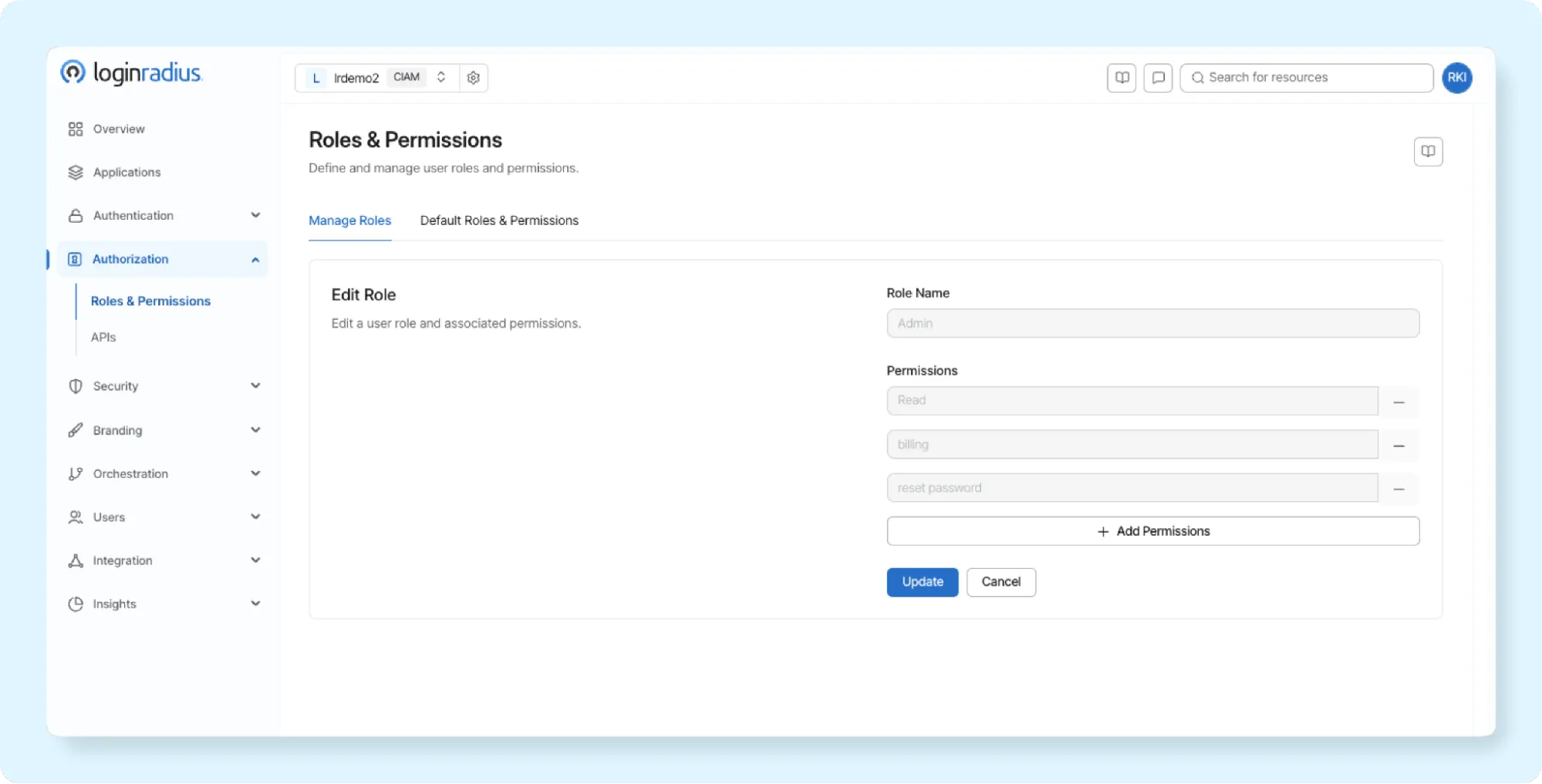
To understand how RBAC fits within a broader identity management strategy and why it's critical for organizations that leverage delegated access, check out our comprehensive guide: What is Role-Based Access Control (RBAC)? The blog explores real-world scenarios and best practices, demonstrating how LoginRadius empowers organizations to implement RBAC with precision and flexibility.
Implement Organizational Units or Tenants
Organizing partner users into logical groups or “tenants” is essential—it ensures both data isolation and clean access boundaries across partner ecosystems.
This practice is particularly valuable in Partner IAM solutions, which often serve hundreds of partner organizations, each needing separate access, user data, and governance.
With multi-tenant architecture, LoginRadius provides a single instance of the Identity Platform that serves multiple clients, each with its own separate database and API routing layer—keeping user data and logs siloed per partner while sharing the underlying infrastructure.
This approach offers an excellent balance between cost-efficiency and secure compartmentalization, ideal for fast-growing enterprises managing diverse partner types.
For higher security demands, private or single-tenant cloud deployments allow complete isolation. Each partner operates in its own dedicated environment, which supports compliance-heavy use cases like healthcare or finance where data sovereignty and customization are critical.
Why this matters:
-
Security : No cross-tenant data leakage risks.
-
Compliance : Easier to enforce jurisdictional policies and audit trails.
-
Scalability : Add new partners without architectural overhauls.
Example: A SaaS provider onboarding ten international distributors can use multi-tenancy to isolate data per distributor. If one tenant experiences an incident, others remain unaffected, ensuring resilience.
This architecture enhances agility and governance, making it a pillar of secure, scalable partner identity and access management (IAM) and B2B identity management. Learn more about tenant management in LoginRadius.
Enable Just-In-Time (JIT) Provisioning
With JIT provisioning, accounts are automatically created upon a partner’s first login using federated single sign-on (SSO). This simplifies onboarding and enhances the user experience. Imagine a new vendor associate accessing a portal for the first time—LoginRadius ensures their account is securely generated on the fly.
Maintain Centralized Governance with Local Autonomy
Balance is key: allow partner admins autonomy within their scope, while maintaining centralized oversight through logs, approvals, and exception handling. LoginRadius supports unified dashboards for governance without micromanaging partner activities.
Ensure Lifecycle Management
Automate user deactivation based on inactivity, contract expiry, or internal triggers. Implement periodic access reviews and re-certification processes to maintain hygiene. Integrating these workflows avoids orphan accounts and ensures timely updates to access rights.
Need help setting this up? Explore LoginRadius’s delegated user management documentation.
SaaS B2B IAM - What Is It and Why Is It Popular?
B2B SaaS Identity and Access Management (IAM) refers to the processes, technologies, and policies used to authenticate, authorize, and manage external users who access SaaS applications across organizational boundaries.
The growing popularity of B2B SaaS IAM is largely driven by the rapid adoption of cloud-based applications and the increasing demand for enterprise-grade security. Business customers expect capabilities such as Single Sign-On (SSO), Multi-Factor Authentication (MFA), role-based access controls, and automated provisioning as standard features rather than premium add-ons.
Additionally, as SaaS vendors expand globally, managing thousands of customer organizations manually becomes unsustainable. B2B SaaS IAM solutions help vendors streamline onboarding, reduce administrative overhead, strengthen security, and improve customer experience while maintaining compliance with evolving regulatory requirements.
Read More About What is B2B SaaS and B2B SSO
How to Choose the Best B2B SaaS Identity and Access Management Platform
Selecting the right B2B SaaS IAM platform requires more than evaluating authentication features. Organizations should assess how well a solution supports customer onboarding, security, scalability, governance, and operational efficiency.
Multi-Tenant Architecture
The platform should provide strong tenant isolation, allowing customer organizations to securely manage users, policies, and data within their own environments while sharing underlying infrastructure. Multi-tenancy is a foundational requirement for modern B2B SaaS applications.
Enterprise Federation and SSO
Look for support for SAML, OAuth, and OpenID Connect (OIDC) to enable seamless federation with customer identity providers. Enterprise customers increasingly expect SSO to be available out of the box.
Delegated Administration
The platform should allow customer administrators to manage their own users, groups, and permissions without relying on vendor support teams. This capability significantly improves scalability and customer satisfaction.
User Lifecycle Automation
Support for JIT provisioning, SCIM, automated onboarding, and deprovisioning workflows can dramatically reduce administrative workload while improving security posture.
Security and Compliance
Evaluate security capabilities such as MFA, adaptive authentication, audit logging, access reviews, and compliance readiness for standards such as GDPR and SOC 2.
Extensibility and APIs
An API-first architecture enables developers to customize authentication experiences, automate workflows, and integrate identity services into existing products and infrastructure.
Best B2B SaaS IAM Platforms: Features and Comparison
| Platform | Multi-Tenancy | Enterprise SSO | Delegated Admin | SCIM | Best For |
|---|---|---|---|---|---|
| LoginRadius | Yes | Yes | Yes | Yes | Partner IAM & B2B SaaS |
| Ping Identity | Yes | Yes | Yes | Yes | Enterprise B2B IAM |
| Okta Customer Identity | Yes | Yes | Yes | Yes | Enterprise SaaS |
| Microsoft Entra External ID | Yes | Yes | Limited | Yes | Microsoft Ecosystems |
| Frontegg | Yes | Yes | Yes | Yes | SaaS Applications |
While feature availability may vary by deployment model and licensing tier, organizations should focus on finding a platform that balances security, scalability, customer experience, and administrative efficiency.
For most SaaS providers, delegated administration, federation, and lifecycle automation remain the most important capabilities for long-term growth.
SaaS B2B IAM Best Practices
Successfully implementing B2B SaaS IAM requires more than selecting the right platform. SaaS providers should follow several best practices to ensure secure and scalable customer identity management.
Design Authentication Around Organizations
B2B SaaS applications should treat organizations as first-class entities rather than simply collections of users. This enables tenant-specific policies, branding, authentication methods, and administrative controls.
Enable Customer-Owned Identity
Allow customers to authenticate using their existing corporate identity providers through SAML and OIDC federation. This simplifies onboarding while reducing password-related security risks.
Implement Fine-Grained Authorization
Move beyond basic roles and build authorization models that support customer-specific permissions, departments, and business hierarchies. Enterprise customers often require more flexibility than standard RBAC alone can provide.
Automate Identity Lifecycle Management
Leverage SCIM provisioning, JIT onboarding, and automated deprovisioning processes to keep user access synchronized with customer systems.
Prioritize Auditability and Compliance
Maintain detailed audit trails for authentication events, administrative actions, and permission changes. This supports governance initiatives and helps organizations demonstrate compliance with regulatory requirements.
Empower Customers Through Delegated Administration
The most successful B2B SaaS platforms minimize reliance on vendor support teams by allowing customer administrators to independently manage users, roles, and access controls within their own organizations. This improves scalability while delivering a superior customer experience.
5 Tips to Enhance Consumer Experience in B2B SaaS
The last five years have witnessed a sudden influx of marketing practices, sales processes, and data teams in enterprise-level B2B SaaS companies. They have been investing in consumer data to enhance purchasers’ journeys or amplify their pre-sales process.
It shouldn't come as a surprise that they are acknowledging the need to provide a full view of their accounts (including branches and divisions), global account addresses, consumer contacts, and sales and marketing performance prospects.
Consumer experience assessment and development is not only acceptable for consumers; it is good for the company. An emphasis on CX produces a competitive advantage that drives consumer retention, sales growth, and company valuation over time.
With the right business growth, technology, and training, you allow your support agents to tackle even the biggest product problems and provide your consumers with excellent and reliable service.
Here are five ways to motivate your B2B SaaS consumer support team to deliver outstanding experiences:
1. Create impactful touchpoints for clients.
Consumers retain a brand based on their experiences through touchpoints, interactions, and engagements. As a business, this allows you to ensure that you have a strategic and satisfying mechanism. You need to use efficient, optimistic brand marketing and a smooth way to connect with the brand.
Therefore, ensure that your communication is valuable, smooth, and promising to your consumers. Enhancing the B2B consumer experience will eventually create faith and trust in them for the brand.
2. Know their market concerns and difficulties.
When you have so much information to pursue your consumers to purchase a product, you may sometimes confuse them with overwhelming information.
So, here's what you need to do. Start by being all ears to your clients, their business issues, and concerns they are trying to eradicate with a solution.
Be a polite listener, ask all the right questions, and explain your concerns about their business issues. Also, take time to learn about their strengths, appreciate their development and growth, and get the hang of their rivals. Assure them that you are here to solve their issues.
3. Concentrate on market values to fulfill their KPIs.
Speak to them about the business principles they would anticipate from using your product/solution at any stage when engaging with your clients. Do less bragging about your product's functionality and strengths and do more talking about what market advantages and values will drive for clients.
In reality, companies should organize their teams to facilitate and carry out substantive consumer discussions about adding value to their businesses. It includes pre-sales, post-sales, marketing, and consumer/technology support.
4. Omnichannel approach for B2B SaaS.
Know that buyers are everywhere, and they expect you to be the same. When they have queries for your support teams, they use all kinds of channels to contact your company.
An omnichannel approach never fails to impress. Get software solutions for business growth designed to manage omnichannel consumer service strategies. They allow your helpdesk to respond decisively and efficiently to consumers, regardless of where they are around the world.
A dedicated omnichannel approach in business enables the consumer support team to move seamlessly between common channels and respond to their consumers regardless of where they are and not miss a beat
5 Make your consumers feel valued.
Delighting and rewarding consumers across all kinds of experiences and engagements at all touchpoints is a must to start building the base of a good CX. Let this be accompanied regularly by a streamlined method of reliable and satisfying contact with your clients by addressing their current requirements.
This also helps them know that you respect their requirements and are there to address their difficulties. Your products should make their lives easier.
Consumer-centricity should be taken as an overarching principle, under which every employee should strive to generate value for the consumers and reciprocate in their communications.
Overall
To bring it all together, the basis of B2B SaaS consumer experience depends on how closely you communicate with your consumers through a smooth, straightforward, and impactful communication approach while facilitating their buying journey.
It is essential to make sure that anything your client comes across from your business should turn out to be an enjoyable experience.
Why LoginRadius Partner IAM?
Managing external identities requires more than authentication alone. Organizations need a purpose-built Partner IAM solution that can support complex organizational hierarchies, delegated administration, federated identity, and scalable governance without introducing operational friction.
LoginRadius Partner IAM is designed specifically for B2B identity use cases, enabling organizations to securely manage partners, suppliers, distributors, franchisees, and enterprise customers from a centralized platform. The solution combines enterprise-grade security with the flexibility required to support diverse partner ecosystems.
Purpose-Built for B2B Identity
Unlike traditional IAM solutions that primarily focus on workforce identities, LoginRadius Partner IAM supports external organizations, business hierarchies, delegated administration, and partner-specific access controls out of the box.
Advanced Delegated Administration
Empower partner administrators to manage users, roles, and permissions within their own organizations while maintaining centralized governance and visibility across your ecosystem.
Enterprise Federation and SSO
Support seamless partner onboarding with SAML, OAuth, and OpenID Connect integrations that allow external organizations to use their existing identity providers while maintaining a consistent access experience.
Automated User Lifecycle Management
Accelerate onboarding and reduce manual overhead through JIT provisioning, SCIM integrations, and automated user lifecycle workflows.
Security and Compliance Readiness
Strengthen security through adaptive MFA, RBAC, tenant isolation, comprehensive audit trails, and policy-driven access controls that support regulatory requirements such as GDPR and SOC 2.
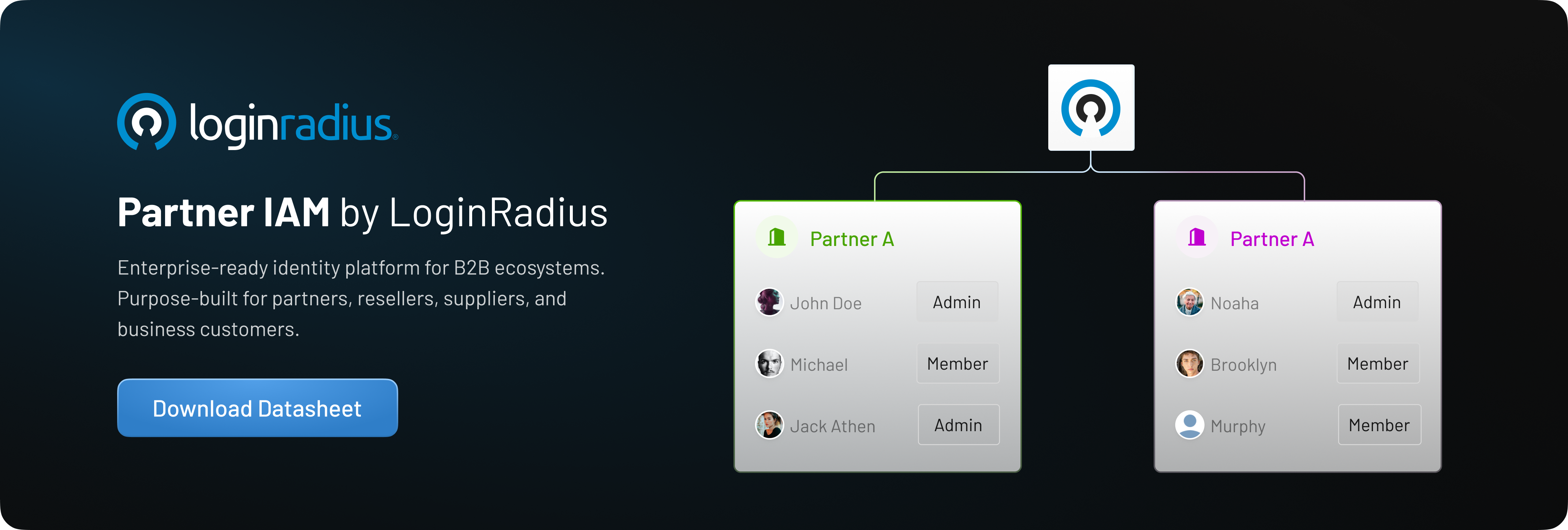
Whether you're building a partner portal, supplier ecosystem, distributor network, or B2B SaaS platform, LoginRadius provides the tools needed to deliver secure, scalable, and frictionless external identity experiences. For more information, please read our product datasheet for LoginRadius Partner IAM.
Conclusion
As digital ecosystems continue to expand, organizations must rethink how they manage external identities. Traditional IAM approaches are often unable to support the scale, complexity, and governance requirements of modern partner networks.
By implementing proven B2B IAM best practices such as RBAC, federation, MFA, multi-tenancy, lifecycle automation, continuous monitoring, and identity-first security, organizations can build a strong foundation for secure collaboration. More importantly, delegated administration enables enterprises to scale partner identity programs efficiently by empowering partners to manage their own users while maintaining centralized control and compliance
The organizations that succeed with B2B IAM are those that strike the right balance between security, governance, and operational agility. With a purpose-built solution like LoginRadius Partner IAM, businesses can reduce administrative burden, accelerate partner onboarding, strengthen compliance, and create seamless identity experiences across their entire partner ecosystem.
Wanna see how LoginRadius Partner IAM actually works? Book a Demo today!