Introduction
A customer reaches your sign-up page ready to create an account. Then comes the form. Email address. Password. Password rules. Confirmation. Maybe a few profile fields on top of that.
Every extra step gives them another chance to leave.
That makes authentication more than a security requirement. It is part of the conversion journey. If registration feels unnecessarily difficult—or returning customers cannot quickly get back into their accounts—even strong purchase intent can disappear before the customer reaches the next step.
Social login can reduce some of that friction by letting customers authenticate with an identity they already use, such as Google, Apple, Microsoft, or another supported provider. Instead of creating another application-specific password, users can move through registration or login with fewer inputs and less credential management. For a deeper look at the technology itself, including how social login works, providers, security, and implementation, see our complete guide to social login.
But adding a Continue with Google button does not automatically improve conversion rates.
Here’s where teams usually go wrong: they measure whether social login is available, not whether it actually makes authentication easier. The providers you offer, the information you request, mobile behavior, account linking, fallback options, and even where authentication appears in the customer journey can influence whether users complete the process or abandon it.
For marketers and growth teams, that changes the question. Instead of asking, “Does social login increase conversions?”, it is more useful to ask: Where is authentication creating friction, does social login remove it, and can we prove the difference with conversion data?
That is where social login becomes a CRO decision rather than simply another authentication feature.
How Does Social Login Affect Conversion Rates?
Social login can influence conversion rates by removing friction at a point where users are already being asked to make a commitment: creating an account or signing back in.
Consider a traditional registration journey. A user may need to enter an email address, create a password that meets specific requirements, confirm it, verify their email, and complete additional profile fields before they can continue. None of those steps necessarily adds value from the user's perspective. They are simply obstacles between intent and action.
Social login can shorten that journey. Instead of creating another set of credentials, users authenticate through an existing provider such as Google, Apple, or Microsoft. Fewer inputs can mean fewer opportunities to hesitate, make an error, forget a credential, or abandon the process.
The impact isn't limited to first-time registration either. Returning users matter just as much.
Someone may come back ready to renew a subscription, check an order, access saved content, or complete a purchase. If they cannot remember the password they created months ago, authentication suddenly becomes a conversion barrier. A familiar social login option can provide a quicker route back into the account, particularly when the user already has an active session with that identity provider.
The relationship looks roughly like this:
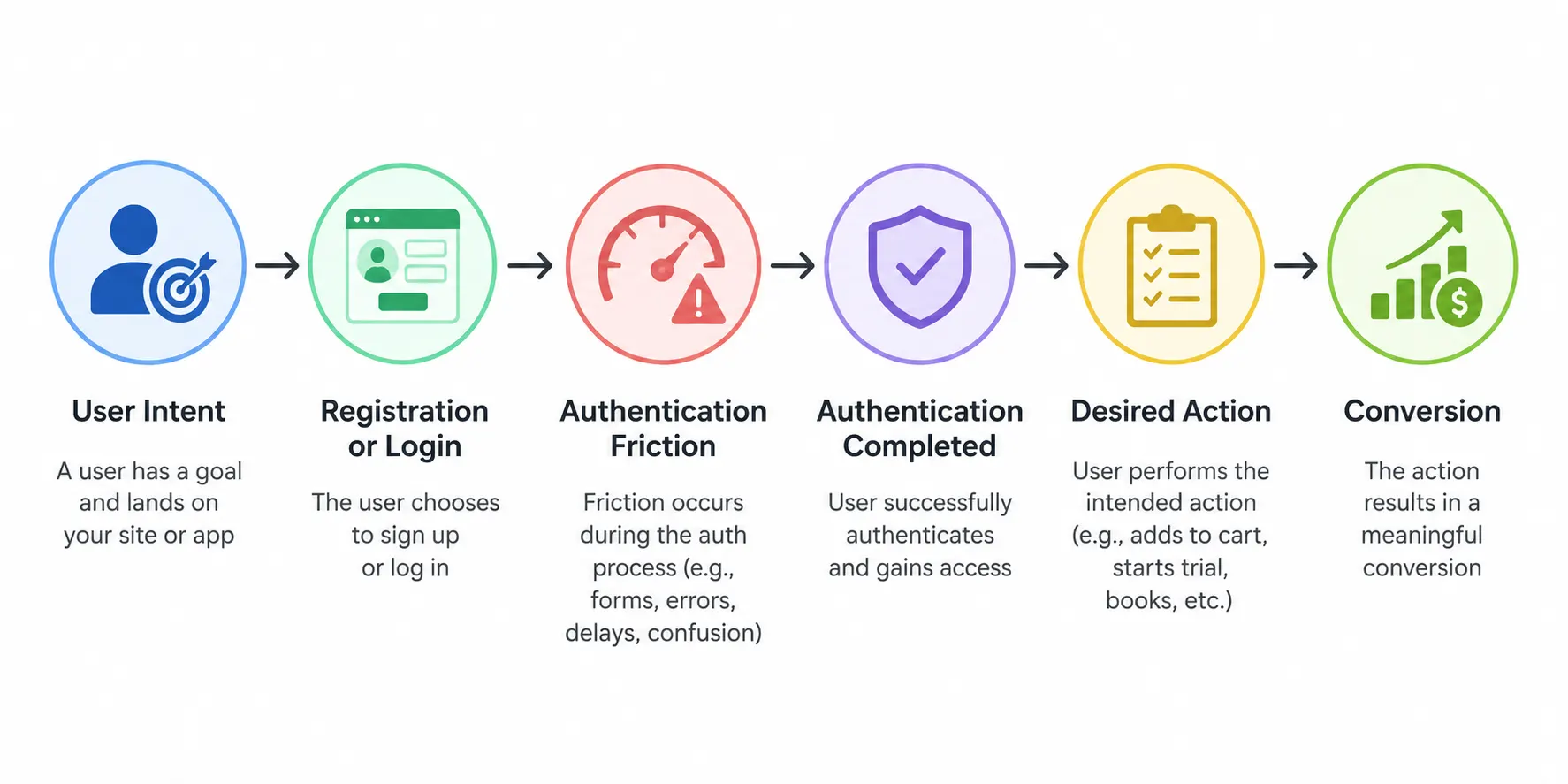
Every unnecessary step between those points creates another opportunity for drop-off.
But there is an important distinction: social login availability is not the same as social login conversion performance.
Adding several provider buttons to a page does not guarantee more completed registrations. The outcome can vary depending on which providers your audience actually uses, whether users are on mobile or desktop, how much information you request, how reliably provider redirects work, and whether returning users can reconnect with the correct existing account.
In some cases, a poorly designed social login experience can introduce new friction. Too many provider choices can create hesitation. Excessive permission requests can make users reconsider. Weak account linking can create duplicate profiles. A customer who cannot remember whether they originally chose Google, Apple, or email may still end up stuck.
That is why marketers should avoid treating “social login increased conversions” as a universal benchmark.
A better measure is the change in completion across the authentication journey: How many users started registration? How many successfully authenticated? Where did the rest leave? And, most importantly, how many completed the action that mattered after authentication?
Social login earns its place in a CRO strategy when it reduces those drop-offs—not simply because the button exists.
Where Authentication Friction Causes Customers to Drop Out
Conversion friction does not always come from the product, pricing, or checkout experience. Sometimes, the problem appears earlier: customers simply cannot get through registration or back into their accounts without doing more work than expected.
A few seconds of extra effort may seem minor. Stack several small obstacles together, though, and the authentication journey starts competing with the action the customer originally came to complete.
| Friction Source | Effect | CRO Impact | CIAM Solution |
|---|---|---|---|
| Long Registration Forms | Increase Sign-Up Effort | Every additional field can reduce the CRO by 3% | Progressive profiling to only collect necessary information at the right juncture. |
| Password Creation | Password Fatigue and Decision Paralysis | Lowers completions, and/or revisit. | Social Login, Passwordless, Passkeys, etc. |
| Forgotten Credentials | Return-login friction | Losing repeat users (who are most valuable) | Social Login, Passkeys. |
| Mobile Login complexity | Hard to use small screens to fill out long forms and long passwords | Mobile user drop-offs are higher than Laptop CROs | Social Login |
How Social Login Can Improve Sign-Up and Login Conversion
Removing friction does not mean removing every step from authentication. Some checks are necessary. The CRO opportunity is to identify the steps that make users work harder without meaningfully improving the experience.
Social login can help by replacing several manual interactions with an identity the customer already uses. The impact can show up during initial registration, repeat visits, and mobile authentication.
Reduce the Number of Registration Steps
Traditional registration often asks users to create an identity from scratch. Even a relatively short form may require an email address, password, confirmation, verification, and profile information before the account is ready. Social login can shorten that path.
When a user chooses an existing identity provider, permitted claims can be used to establish the account without asking the user to manually enter the same information again. That can reduce both the number of fields and the time required to move from registration started to registration completed.
The important word here is can.
If users authenticate socially and are immediately presented with another long registration form, much of the CRO benefit disappears. The better approach is to keep initial requirements focused on what is actually needed and collect additional information later when it becomes relevant.
Remove Another Password From the Journey
Password creation creates friction twice. The first time is during registration, when users need to satisfy password requirements. The second may come weeks or months later, when they need to remember what they created.
Social login changes that part of the journey. For that authentication method, the application does not need the customer to create another application-specific password. Authentication is handled through the selected identity provider.
For customers already comfortable with providers such as Google, Apple, or Microsoft, that familiarity can make the decision to register feel less demanding.
It also removes one common reason for failed logins: incorrectly entered or forgotten application passwords.
That doesn't mean social login eliminates authentication failure. Provider access can fail. Consent can be revoked. Redirects can break. Customers can lose access to their provider accounts.
The friction simply moves, and good CRO means watching where it moves.
Make Returning Login Faster
A successful registration is not the end of the conversion journey.
Many businesses depend on customers returning repeatedly: ecommerce shoppers checking orders, travelers managing bookings, subscribers accessing paid services, or customers coming back to complete another purchase.
Those users have already created an account. Making them prove it through an unnecessarily difficult login experience can interrupt an otherwise high-intent visit.
Social login can simplify repeat access when customers have already connected a provider to their account. If they are authenticated with that provider, the journey may require fewer manual interactions than recalling and entering an application-specific password.
This is why return-login success rate deserves attention alongside registration conversion.
A registration method that performs well on day one but repeatedly creates access problems later isn't delivering a strong customer journey.
Reduce Mobile Authentication Effort
Mobile makes every unnecessary input more noticeable.
Typing an email address is manageable. Typing a complex password with symbols and mixed characters is less pleasant. Doing both while moving between screens or applications adds another layer of effort.
Social login can reduce manual entry by allowing users to select a familiar identity provider instead.
But don't assume that a social button automatically creates a better mobile experience.
Redirect behavior, embedded browsers, provider availability, consent screens, and the order in which authentication options appear can all affect completion. A flow that feels effortless in a desktop browser may perform differently inside a mobile application.
The useful CRO question isn't “Do we support social login on mobile?”
It is “Do mobile users complete authentication more successfully with it?”
Reduce Credential-Related Login Failures
A user who enters the wrong password has not necessarily lost interest in your product. That's an important distinction.
Authentication analytics can sometimes look like customer abandonment when the underlying problem is simply access. Forgotten passwords, mistyped credentials, or an inconvenient recovery journey can stop customers who otherwise intended to continue.
Social login can remove some of these credential-related failures because users are not entering an application-specific password for that authentication method.
Still, login success is only an intermediate metric.
Suppose social login produces more successful authentication sessions but those users abandon checkout at the same rate as everyone else. In that case, authentication improved—but overall conversion may not have.
That is why the strongest CRO analysis connects the entire journey:\
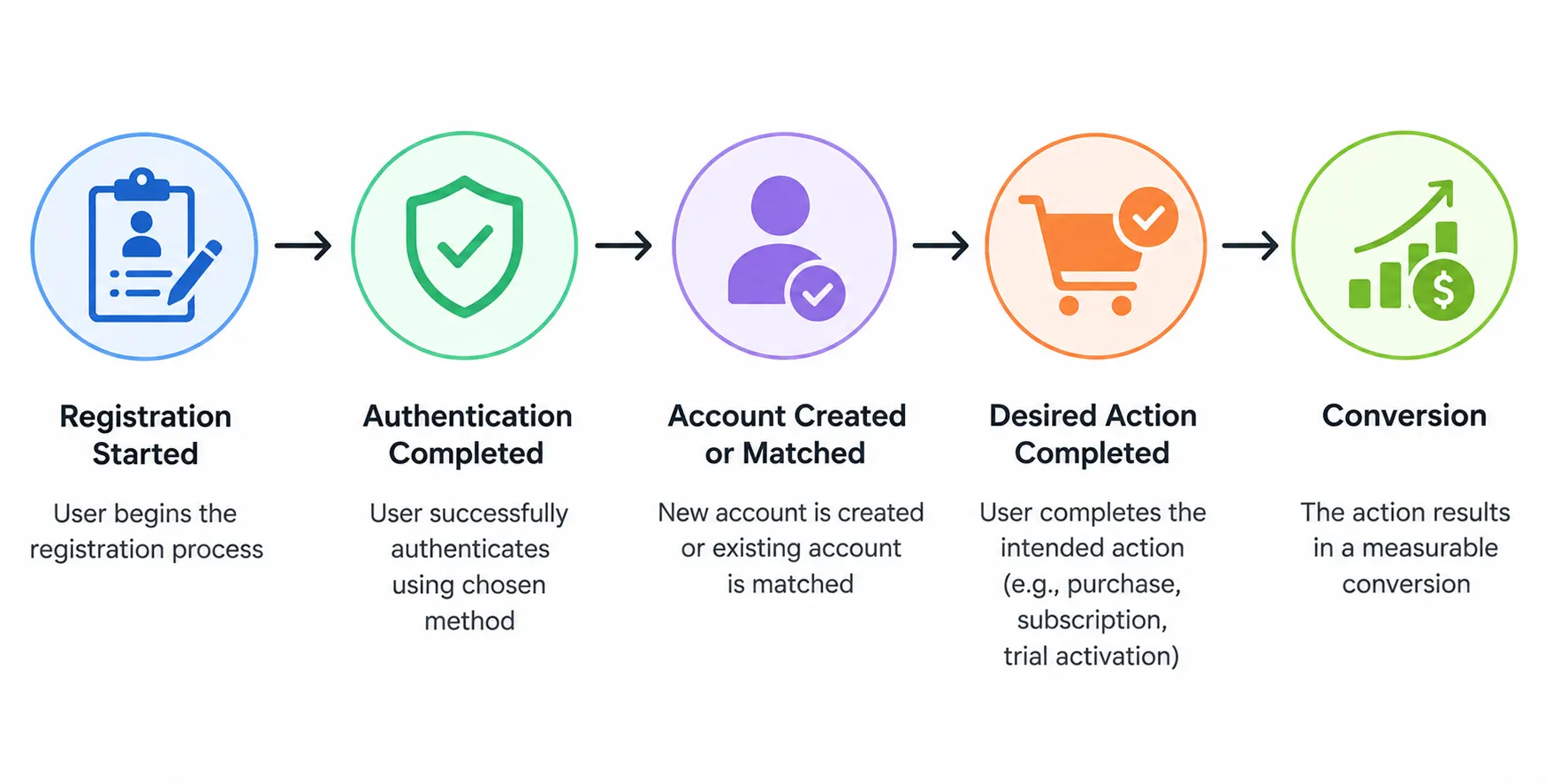
Social login should be judged by how effectively it helps users move through that journey, not by how many people click the provider button.
When Social Login Can Actually Hurt Conversion
Social login is usually introduced to remove friction. Poorly implemented, it can do the opposite.
A crowded provider screen, unnecessary permission requests, duplicate accounts, or a failed redirect can turn what should have been a faster authentication path into another reason to leave. This is why conversion teams should evaluate the entire social login journey, not just whether customers click a provider button.
Too Many Social Login Options Can Create Choice Overload
More providers do not automatically mean more conversions.
A login screen filled with Google, Apple, Microsoft, Facebook, LinkedIn, GitHub, and several other options asks users to make another decision before they can continue. For some audiences, most of those choices may be irrelevant.
The better approach is to prioritize providers customers actually use.
A consumer application may need a different provider mix from a developer platform or B2B service. Geography matters too. Authentication preferences can vary significantly across markets.
Start with customer relevance, then use authentication data to see which providers people select and successfully complete. An unused button is not adding convenience simply because it is available.
The Wrong Provider Mix Adds Friction
Provider selection is not just an implementation decision. It can affect conversion.
Imagine that a significant share of your audience prefers a particular identity provider, but the login page does not support it. Those users are pushed toward another registration method even though social login technically exists.
The reverse is also true. Giving prominent space to providers that very few customers use can clutter the experience without improving completion.
There is no universal highest-converting social login provider. The answer depends on the audience, market, device, and application.
This is where actual usage data matters more than assumptions.
Users May Forget How They Originally Signed In
Social login removes one memory problem but can introduce another.
A returning customer may remember the website but not whether they originally registered with Google, Apple, Microsoft, or an email-based method.
Now the login screen becomes a guessing exercise.
This gets worse when the application treats every authentication method as a completely separate account. A customer might choose Google on one visit and Apple on another, only to discover that their previous orders, preferences, or subscription are missing.
Clear login choices help. So does designing for identity continuity instead of assuming customers will always select the same button forever.
Duplicate Accounts Can Break the Customer Journey
Duplicate accounts are more than a customer-data problem. They can become a conversion problem.
Suppose a customer originally registers with Google. Months later, they return using another provider and the application creates a second profile instead of securely recognizing or linking the identity.
The customer is technically authenticated—but the experience is wrong.
Their purchase history may appear empty. Loyalty points can seem to have disappeared. Saved preferences may be missing. A subscription might appear under another account.
That's not the kind of successful login a CRO dashboard should celebrate.
Secure account linking can help businesses connect appropriate authentication methods to the same customer identity while protecting against unauthorized linking. The detailed security architecture belongs outside a CRO discussion, but the conversion lesson is clear: authentication completion means little if the customer lands in the wrong account.
Excessive Permission Requests Can Trigger Abandonment
Social login should make registration feel easier, not make customers wonder why an application wants access to information it does not appear to need.
Requesting unnecessary permissions can introduce hesitation at exactly the wrong moment.
If someone is creating an account for a straightforward service and suddenly sees requests for unrelated profile information, the natural question is: *Why do they need that? *Sometimes they don't.
Businesses should request only the scopes and identity information necessary for the immediate experience. Additional customer information can be collected later, with an appropriate purpose and consent, rather than front-loading every possible data request into registration.
This also changes how marketers should think about social login. Its CRO value is not unrestricted access to social-profile data. The stronger value is reducing authentication effort while receiving the permitted identity information required to establish and manage the customer account.
Provider and Browser Problems Can Interrupt Authentication
There is another source of friction that is easy to miss because it happens outside the visible registration form.
Social authentication typically moves between your application and an external identity provider. Redirect behavior, browser restrictions, provider configuration, interrupted sessions, or application-specific environments can affect whether that journey completes successfully.
Mobile deserves particular attention. Authentication that works smoothly in a standard browser may behave differently inside an application or embedded browser environment.
Users rarely care where the technical failure occurred.
From their perspective, they clicked Continue, something went wrong, and they still cannot access the account.
That makes authentication failure rates worth monitoring by provider, device, browser, and application environment rather than looking only at an overall success percentage.
Removing the Alternative Login Path Can Create a Dead End
Not every customer wants to use a social identity to access another service.
Others may not have an account with the providers you support. Some may lose access to a provider later. Provider services can also experience availability issues.
If social login is the only route into the account, the convenience you created for one customer segment can become a barrier for another.
An appropriate fallback authentication option gives users another way forward.
The larger CRO lesson is simple: social login should remove a barrier, not replace it with a dependency.
A high-performing authentication experience gives customers a short path to access while still accounting for the moments when their preferred path does not work.
How to Optimize Social Login for Higher Conversion Rates
Once social login is available, the next question is whether it is actually helping users complete authentication.
Small decisions can have an outsized effect here. Which providers appear first? How much information do you request? What happens when social authentication fails? Can an existing customer safely connect another login method without creating a second account?
The best optimization strategy is not to make social login more prominent everywhere. It is to remove the specific friction that prevents customers from completing the journey.
Prioritize the Social Providers Your Customers Actually Use
Start with relevance, not quantity.
A consumer application, B2B platform, developer product, and regional ecommerce business may have very different provider preferences. Google or Apple might dominate one audience, while Microsoft or another provider may matter more elsewhere.
Authentication analytics can tell you far more than assumptions can. Track which providers customers select, how often authentication succeeds, where users abandon the process, and whether those customers ultimately complete registration or another desired action.
If a provider receives very little usage and adds visual clutter, keeping it prominent may not help conversion at all.
Provider order is worth testing too. The authentication option most relevant to your audience should not be buried beneath several rarely used choices.
Make Social Login Easy to Recognize
Users should understand their options almost immediately.
Familiar provider branding, clear labels such as Continue with Google or Continue with Apple, and consistent placement reduce the amount of interpretation required. Ambiguous icons or unfamiliar terminology can make a supposedly convenient authentication method harder to understand.
The surrounding interface matters as well.
If social login buttons compete with multiple calls to action, registration links, promotional messages, password fields, and recovery options all at once, users may struggle to identify the simplest path forward.
Authentication pages have a focused job. Help the customer get access.
Anything that distracts from that deserves scrutiny.
Keep Initial Data Requirements Minimal
A fast social authentication flow can still lead directly into a slow registration experience.
For example, a customer authenticates with Google in a few seconds and is then presented with a form requesting a phone number, address, company, job title, date of birth, communication preferences, and several other fields.
The social login worked. The conversion problem didn't disappear.
Ask for information when it becomes necessary.
If only a few attributes are required to establish the customer account, keep the initial journey focused on those. Additional information can be requested progressively as the relationship develops and there is a clear reason for the customer to provide it.
This is also where teams need to resist an old social-login habit: requesting more provider permissions simply because the data might be useful later.
More data isn't automatically better CRO.
Sometimes the highest-converting permission request is the one you never needed to make.
Provide an Alternative Authentication Option
Social login should be a shortcut, not a gate.
Some users prefer not to connect to an external identity provider. Others may not have an account with the providers you support. A returning customer might also lose access to the social identity originally associated with the account.
Give those users another appropriate route.
Depending on the application and customer requirements, that could include direct registration, passwordless authentication, passkeys, or another supported authentication method.
This does not mean displaying every possible authentication option with equal prominence. Prioritize the methods that work best for your audience while keeping an alternative available when the preferred path is unavailable.
Otherwise, optimizing one conversion path can quietly close another.
Make Account Linking Part of the Experience
Customers do not necessarily think about identity providers the same way an authentication system does.
To them, Google, Apple, email, or another method may simply be different ways of reaching the same account.
Your identity architecture needs to account for that expectation.
When appropriate, secure account linking can allow customers to connect multiple authentication methods to the same underlying profile rather than creating fragmented accounts. This can preserve purchases, subscriptions, preferences, loyalty information, and other customer history across future logins.
But linking should never happen simply because two accounts appear similar. Identity ownership needs to be verified appropriately before accounts or authentication methods are connected.
From a CRO perspective, the goal is continuity: customers should not successfully authenticate only to discover that the system no longer recognizes who they are.
Design Recovery Before Customers Need It
Recovery is often treated as an edge case.
For returning-user conversion, it isn't.
Customers change email addresses. They lose devices. They may lose access to a social provider or decide to stop using one. Authentication methods that work perfectly today may not be available a year from now.
If the recovery experience is unclear or overly difficult, an existing customer can become effectively locked out.
On the other hand, making recovery too easy can weaken account security. The solution is not to remove verification but to design recovery intentionally, with appropriate checks for account ownership.
Growth teams should pay attention to recovery data as well. A sudden increase in recovery attempts may indicate a login UX problem long before it appears in broader conversion metrics.
Optimize Mobile and Desktop Separately
A single overall authentication conversion rate can hide useful information.
Suppose social login completes successfully for 92% of desktop users but only 76% of mobile users. Looking only at the combined number could make the experience appear healthy while a significant mobile problem remains hidden.
The same principle applies across browsers, operating systems, applications, and social providers.
Segment the journey.
Look at where customers start authentication, which provider they select, whether the provider flow completes, whether the correct customer account is found, and whether the user reaches the next intended action.
Here’s where it gets interesting: the provider with the most clicks may not be the provider producing the most completed conversions.
One provider might attract more selections but experience higher authentication abandonment. Another might have fewer users but stronger completion. Mobile and desktop behavior may tell completely different stories.
That is why optimization needs evidence rather than a default provider hierarchy.
Optimize for the Conversion After Login
This is the CRO metric that is easiest to overlook.
A successful login is not usually the final business objective.
The customer came to buy something, activate an account, start a trial, manage a subscription, access content, complete a booking, or perform another meaningful action.
So don't stop measuring at: Social Login Selected → Authentication Successful
Extend the funnel: Social Login Selected → Authentication Successful → Account Created or Matched → Intended Action → Conversion
That distinction can reveal problems that authentication metrics alone miss.
For example, social login may produce excellent completion rates but also create duplicate accounts that prevent returning customers from accessing previous purchases. Technically, authentication is succeeding. Commercially, the journey is failing.
The best social login experience is therefore not necessarily the one with the fewest clicks.
It is the one that helps the right customer reach the right account—and continue toward the action they came to complete.
How to Measure the Conversion Impact of Social Login
If social login is being used to improve conversion, measuring clicks on Continue with Google isn't enough.
A provider button can receive plenty of engagement while users still abandon the authentication flow, land in duplicate accounts, or fail to complete the action that brought them to the site. The measurement needs to extend beyond the login screen.
Start with the authentication funnel itself, then connect it to the business outcome that follows.
| Metric | What It Reveals | Why It Matters |
|---|---|---|
| Registration completion rate | How many users finish sign-up | Shows whether registration friction is decreasing |
| Authentication completion rate | How many started login journeys succeed | Identifies authentication effectiveness |
| Authentication abandonment rate | How many users leave before authentication finishes | Exposes conversion leakage |
| Time to authenticate | How long users need to gain access | Helps compare authentication methods |
| Return-login success rate | How successfully existing customers regain access | Highlights repeat-login friction |
| Account recovery rate | How often users need another route into their account | Can reveal hidden access problems |
| Post-authentication conversion rate | What users do after gaining access | Connects authentication changes to business results |
No single metric tells the whole story. A higher login completion rate looks positive, for example, but means less if those users never reach checkout, activate their accounts, or complete another intended action.
Measure Social Login Registration Completion Rate
Start with a straightforward question: Of the users who begin registration with social login, how many actually finish?
A simple calculation is: Social Login Registration Completion Rate = Completed Social Registrations ÷ Social Registrations Started × 100
Track this separately from traditional registration.
Suppose 10,000 users begin a standard registration journey and 6,500 finish, while 4,000 begin through social login and 3,200 finish. The completion rates are 65% and 80%, respectively.
That does not prove social login caused every point of difference. Users choosing each method may have different levels of intent. But it gives the CRO team something much more useful than assuming a shorter flow must perform better.
Watch the trend over time and test changes under comparable conditions.
Track Authentication Completion, Not Just Provider Clicks
A user clicking a social provider is only the beginning of the authentication journey.
They still need to complete authentication with the provider, return successfully to the application, have the response processed correctly, and reach the appropriate customer account.
Measure: Authentication Completion Rate = Successfully Completed Authentication Sessions ÷ Authentication Sessions Started × 100
Then break the number down by provider.
If Google receives the most clicks but has a lower completion rate than Apple, that is worth investigating. The problem might be provider configuration, UX, device behavior, customer expectations, or something else in the journey.
Raw provider popularity alone would not reveal it.
Find Authentication Abandonment Points
Knowing that users left is useful. Knowing where they left is better.
Break social authentication into meaningful funnel events such as:
Login Page Viewed → Social Provider Selected → Provider Authentication Started → Provider Authentication Completed → Application Authentication Completed → Account Created or Matched
Now abandonment becomes diagnosable.
A high drop-off before provider selection may suggest that users do not recognize or want the available options.
Drop-off after provider selection could point toward provider authentication, permissions, redirects, or other flow problems.
A large gap between successful provider authentication and successful account access deserves a different investigation—possibly account matching, linking, or application-side processing.
CRO gets much more actionable once "login abandonment" stops being treated as one event.
Measure Time to Complete Authentication
Conversion is not only about whether customers eventually finish. Effort matters too.
Measure how long it takes users to move from the start of authentication to successful account access. Then compare social login with the other authentication methods you offer.
Don't chase the lowest possible number in isolation. A slightly longer journey with stronger completion and fewer downstream problems may be better than an extremely fast flow that creates duplicate accounts or recovery issues.
Instead, look for unexpected friction.
If social authentication is supposed to simplify access but consistently takes longer than another method for a particular device or provider, there is probably something worth examining.
Monitor Return-Login Success
First-time registration and returning authentication are different conversion moments.
A customer registering for the first time is deciding whether to establish a relationship with the business. A returning customer may already have purchase history, a subscription, saved preferences, loyalty benefits, or another reason to get back into the account.
Measure how often those returning customers successfully authenticate.
You can also compare return-login success across social login, direct credentials, passwordless methods, or other authentication options where appropriate.
A method that produces strong registration completion but weak repeat access may be creating friction later in the customer lifecycle.
Treat Account Recovery as a CRO Signal
Recovery volume can reveal problems that ordinary login metrics hide.
If customers frequently need to recover access, something in the normal authentication journey may not be working as expected. They might not remember how they originally registered. They may have lost access to an authentication method. Or the available login choices may simply be unclear.
Track both recovery attempts and successful recovery completion. Then look at what happens afterward.
If users recover their accounts successfully but abandon before completing their intended action, recovery solved the access problem without necessarily recovering the conversion.
That distinction matters.
Connect Authentication to Post-Login Conversion
This is where authentication analytics become actual CRO analytics. A completed login is usually an intermediate event. The business outcome happens afterward.
For ecommerce, the journey might be: Authentication → Cart → Checkout → Purchase
For SaaS: Registration → Authentication → Account Setup → Activation → Trial Conversion
For subscription services: Authentication → Subscription Page → Upgrade or Renewal
The relevant conversion event will vary, but the principle remains the same.
Calculate the post-authentication conversion rate for users who choose social login and compare it with other authentication journeys where the comparison is meaningful.
That helps answer a much better question than How many people used social login?
It answers: Did reducing authentication friction help more customers complete the action the business actually cares about?
Here’s where teams usually go wrong. They optimize the login screen, see authentication completion increase, and declare the experiment successful.
Sometimes it is.
But CRO should follow the customer further. Measure successful access, account continuity, and the downstream conversion together. That's how you determine whether social login improved a metric or genuinely improved the journey.
How to Test Whether Social Login Is Improving CRO
Conversion metrics tell you what happened. Testing helps explain why.
If registration completion rises after social login is introduced, it is tempting to attribute the entire improvement to the new authentication option. But other factors may be influencing the result: provider preference, device type, returning-user behavior, changes elsewhere on the registration page, or simply differences in intent between users who choose social login and those who do not.
That is why social login should be treated like any other part of the conversion funnel. Measure it, segment it, test changes, and watch what happens beyond authentication.
Compare Social Login With Other Authentication Methods
Start by comparing how different authentication paths perform.
Depending on what your application offers, that might include:
Social Login vs. Email and Password
Social Login vs. Passwordless Authentication
Social Login vs. Passkeys
Look at registration completion, authentication completion, abandonment, time to authenticate, recovery, and downstream conversion.
Be careful with the interpretation, though.
If users who choose social login convert at a higher rate than users who choose email and password, that does not automatically prove the authentication method caused the difference. The groups may behave differently before they ever reach the login page.
Controlled experiments can provide stronger evidence when practical. Otherwise, use segmented behavioral data and compare trends over time rather than treating simple correlation as proof.
Measure Performance by Social Provider
An overall social login conversion rate can hide large differences between providers.
Suppose Google accounts for most social authentication attempts. Looking only at total social-login completion could make Google appear to be the obvious winner.
Now segment the data.
Perhaps Apple receives fewer selections but has a stronger completion rate among iOS users. Microsoft might perform particularly well for another customer segment. A provider popular in one geographic market may barely be used in another.
The provider with the highest usage is not necessarily the provider with the strongest conversion performance.
Track each provider from selection through authentication and, ideally, through the downstream conversion event.
That gives you a much more useful picture:
Provider Selected → Authentication Completed → Correct Account Reached → Conversion Completed
Segment Mobile and Desktop Results
Device-level segmentation is essential.
A social login experience that performs well on desktop can behave very differently on mobile. Redirects, browser behavior, existing provider sessions, screen size, and the surrounding application experience can all influence completion.
Rather than relying on one blended conversion rate, compare:
Desktop social login completion
Mobile web social login completion
Native application authentication, where relevant
Then go deeper if the data shows a meaningful difference.
Browser, operating system, provider, and application environment can help identify where friction is occurring.
A sudden mobile drop-off, for example, should not automatically lead to the conclusion that mobile users dislike social login. There may be a specific point in the authentication journey that is failing.
Separate New and Returning Customers
New customers and returning customers arrive at authentication with different goals.
A new user may be evaluating whether creating an account is worth the effort. Social login can reduce the initial registration burden.
A returning customer has already crossed that barrier. Their problem is different: Can I get back into my existing account quickly?
Measure the groups separately.
For new customers, focus on metrics such as registration starts, completion, time to register, and activation.
For returning customers, login success, account recovery, duplicate-account incidents, and post-login conversion become more important.
Combining both populations into one authentication metric can hide problems on either side.
Test Provider Placement and Login UX
Provider order can influence which option users notice first.
If Google is placed prominently while Apple sits below several other choices, differences in usage may partly reflect interface placement rather than genuine customer preference.
This is where A/B testing can help.
You might test a smaller set of high-use providers against a larger selection, change provider order based on audience relevance, compare button placement, or evaluate whether explanatory text helps or distracts.
Keep each test focused.
Changing the provider mix, page layout, registration fields, CTA copy, and recovery experience simultaneously may improve conversion, but you will have little idea which change actually mattered.
CRO works better when the hypothesis is clear.
Test How Much Information You Request
Social login can shorten authentication and then immediately lose that advantage through unnecessary profile collection.
That makes registration data requirements another useful testing area.
Compare a journey that requests only essential information upfront with one that asks for additional profile attributes before the account can be created.
Then measure more than initial completion.
Does the shorter registration flow improve sign-up completion? Can additional information be collected successfully later through progressive profiling? Does reducing initial fields affect activation or another downstream metric?
The goal is not to make every registration form as short as technically possible.
It is to ask for information at the point where the value of requesting it outweighs the friction it creates.
Track the Entire Funnel After Authentication
A social login experiment should not end at Authentication Successful.
Imagine two authentication experiences:
Experience A: 90% login completion, 4% purchase conversion.
Experience B: 84% login completion, 7% purchase conversion.
Which is better?
If the business objective is purchase conversion, the answer is not determined by login completion alone.
There may be legitimate reasons for the difference, and the numbers would require investigation. But the example illustrates why authentication optimization cannot be separated from the rest of the funnel.
Track the journey through the event that matters:
Registration Started → Authentication Completed → Account Created or Matched → Account Activated → Purchase
or:
Return Login → Account Access → Checkout → Purchase
or:
Registration → Product Setup → Trial Activation → Paid Conversion
The exact funnel depends on the business.
Watch for Conversion Gains That Create Problems Elsewhere
Here's where it gets interesting.
A change can improve one CRO metric while making the overall identity experience worse.
Reducing account checks might make registration faster but increase duplicate profiles. Aggressively promoting one social provider could increase initial completion while making recovery harder for some customers. Requesting almost no information during registration could increase sign-ups but leave critical profile requirements unresolved later.
That is why experiments should include guardrail metrics alongside the primary conversion metric.
Watch for changes in: duplicate-account creation, account-linking failures, recovery attempts, authentication errors, support requests, and downstream abandonment.
A genuine improvement should reduce friction without quietly creating a larger problem somewhere else in the customer journey.
The objective isn't to prove that social login converts better.
It is to find out where, when, and for which customers it creates a better path to conversion.
Social Login CRO Best Practices at a Glance
Social login works best for CRO when it removes effort without creating new uncertainty elsewhere in the customer journey. That means looking beyond the provider button and paying attention to what happens before authentication, during the provider flow, and after the customer returns to your application.
The table below brings the most important practices together.
| Best Practice | CRO Impact |
|---|---|
| Prioritize relevant social providers | Reduces unnecessary choices and makes familiar authentication methods easier to find |
| Keep registration requirements minimal | Shortens initial sign-up and reduces form-related friction |
| Request only necessary scopes and claims | Avoids unnecessary consent friction and supports data minimization |
| Optimize social login for mobile | Reduces manual input and helps identify device-specific authentication problems |
| Support secure account linking | Helps prevent duplicate profiles and preserves customer continuity across login methods |
| Provide an alternative authentication method | Prevents social-provider preference, access, or availability from becoming a dead end |
| Design account recovery early | Gives returning customers a secure path back when their usual authentication method is unavailable |
| Use progressive profiling where appropriate | Moves nonessential profile questions out of initial registration |
| Measure each provider separately | Reveals which providers actually produce successful authentication and downstream conversion |
| Segment by device and customer type | Prevents blended metrics from hiding mobile, desktop, new-user, or returning-user friction |
| Track post-login conversion | Shows whether easier authentication contributes to the business outcome that actually matters |
| Monitor identity-related guardrails | Helps ensure conversion gains are not accompanied by more duplicate accounts, recovery failures, or authentication errors |
The common thread is simple: optimize for completed customer journeys, not social login usage.
A provider receiving more clicks is useful information, but it does not tell you whether those users successfully authenticated. A higher authentication completion rate is better, but it still does not tell you whether customers reached the correct account or completed the next action.
The strongest signal comes from connecting identity data with the wider conversion funnel.
For example:
Social Login Selected → Authentication Completed → Existing Account Matched or New Account Created → Intended Action Completed
That final action might be a purchase, subscription, trial activation, booking, or another conversion event depending on the business.
There is no single social login configuration that will maximize conversion for every application. Provider preferences change by audience and market. Mobile behavior can differ from desktop. New customers encounter different friction from returning ones.
So use best practices as a starting point—not a substitute for measurement.
The configuration worth keeping is the one your own conversion data shows is making it easier for customers to get through authentication and continue.
How LoginRadius Helps Reduce Authentication Friction
Optimizing social login becomes harder as the identity environment grows.
One application may support Google and Apple. Another may need Microsoft, LinkedIn, or regional providers. Add web and mobile experiences, returning customers, multiple authentication methods, account recovery, and customers who switch login methods over time, and the problem is no longer just adding social buttons to a registration page.
It becomes a customer identity problem.
LoginRadius helps businesses manage social authentication as part of a broader Customer Identity and Access Management (CIAM) strategy. Instead of building and maintaining separate identity flows for every digital property, businesses can provide social login while managing customer profiles and authentication experiences through a centralized identity platform.
Support the Social Providers That Matter to Your Customers
Different audiences prefer different identity providers. LoginRadius supports multiple social and identity providers, allowing businesses to offer authentication choices that align with their customers, markets, and digital experiences.
That flexibility matters for CRO because provider availability should follow customer behavior—not assumptions.
Businesses can monitor which authentication methods customers actually use and adjust the experience accordingly rather than filling the login page with unnecessary choices.
Keep Customer Identities Connected
A customer may register with one authentication method and return later using another.
Without the right identity controls, that can create duplicate profiles and fragmented customer journeys. Purchase history, subscriptions, preferences, consent records, or other account information may end up associated with separate identities.
LoginRadius supports account linking and unified customer profiles, helping businesses manage multiple authentication methods while maintaining customer continuity.
For growth teams, that continuity matters. A successful authentication should take a returning customer back to the account they expect—not make them appear to be a brand-new user.
Collect Customer Information Without Overloading Registration
Reducing registration fields can improve the initial experience, but businesses may still need additional customer information later.
LoginRadius supports progressive profiling, allowing organizations to request relevant information over time rather than forcing every question into the first registration interaction.
This creates a more balanced exchange. Customers can get started with less effort, while businesses can build richer profiles as additional information becomes relevant to the relationship.
Give Customers More Than One Path to Authentication
Social login does not need to operate in isolation.
A CIAM approach can support multiple authentication methods so businesses can design experiences around customer preferences, security requirements, and the context of the interaction.
That becomes particularly useful when a customer's preferred social provider is unavailable or they no longer have access to the identity originally connected to the account.
The objective isn't to push every customer toward the same login method. It is to give them an appropriate, secure route into their account without unnecessary friction.
Turn Authentication Into Part of the Customer Journey
For CRO teams, the biggest shift is treating authentication as something that can be observed and improved rather than a technical checkpoint sitting between two conversion pages.
Registration completion, successful authentication, repeat access, account recovery, and identity continuity can all influence whether customers reach the next stage of the journey.
LoginRadius brings those identity experiences under a unified CIAM layer, helping businesses build authentication journeys that can scale across applications, devices, and customer segments.
Because the best authentication experience is often the one customers barely notice.
Turn Authentication Into a Measurable Part of CRO
A customer who abandons during registration or login never gets the chance to complete the action that brought them there.
That is why authentication deserves a place in the CRO conversation.
Social login can reduce friction by shortening registration, removing the need for another application-specific password, and making repeat access easier. But simply adding Google, Apple, Microsoft, or another provider to a login page does not guarantee better conversion.
The experience around it matters just as much.
Provider relevance, mobile behavior, requested information, account linking, recovery, fallback authentication, and what happens after login can all influence whether a customer continues or leaves.
More importantly, measure the outcome that matters. Track registration completion and authentication success, but don't stop there. Follow customers through account creation or matching and into the purchase, subscription, activation, booking, or other conversion event the authentication journey was supposed to support.
That is where social login proves its CRO value.
For businesses managing authentication across multiple applications, providers, devices, and customer journeys, LoginRadius provides a centralized CIAM foundation for social login, customer identity, account linking, progressive profiling, and flexible authentication experiences.
Conclusion: Make Authentication Work for Conversion, Not Against It
Customers rarely arrive at a website because they are excited to authenticate. They come to buy, subscribe, book, access an account, start a trial, or get something done. Registration and login are simply steps standing between intent and that outcome.
Social login can make those steps easier. It can reduce manual input, remove the need for another application-specific password, and give returning customers a familiar way back into their accounts. But the presence of a social login button alone says very little about conversion performance.
What matters is what happens around it—and after it.
Are customers completing authentication? Are mobile users dropping out more often than desktop users? Are certain providers performing better? Are returning customers reaching the correct account? And after authentication succeeds, are more users actually completing the purchase, activation, subscription, or other action that matters?
Those are the numbers worth optimizing.
With LoginRadius, businesses can bring social login, account linking, progressive profiling, customer identity, and flexible authentication experiences together within a unified CIAM platform. That makes it easier to reduce unnecessary authentication friction while maintaining continuity as customers move across login methods, applications, devices, and stages of the customer journey.
Don't let authentication become the point where customer intent disappears. Book a LoginRadius demo and see how LoginRadius can help turn registration and login into a smoother path toward conversion.
FAQs
Q: Does social login increase conversion rates?
A: Social login can improve conversion rates by reducing registration and authentication friction. The actual impact depends on factors such as provider relevance, device, login UX, requested information, and what users do after authentication.
Q: How does social login reduce sign-up friction?
A: Social login lets users authenticate with an existing identity provider instead of creating another application-specific password and manually entering the same information. This can shorten registration and reduce potential abandonment points.
Q: How do you measure social login conversion rate?
A: Track completed social registrations or authentications against the number started. For a fuller CRO picture, also measure abandonment, authentication time, return-login success, and conversions completed after authentication.
Q: Which social login provider has the highest conversion rate?
A: There is no single provider that converts best for every business. Performance can vary by audience, geography, device, operating system, and application, so businesses should compare conversion data by provider.
Q: Can too many social login options reduce conversions?
A: Yes. Too many provider choices can add decision friction and clutter the login experience. Prioritize the providers your customers actually use and measure their authentication and downstream conversion performance.
Q: Is social login better than traditional registration for CRO?
A: Social login can reduce friction compared with registration that requires users to create and remember another password. However, the better-performing option depends on your audience, application, and authentication journey, so both should be measured.
Q: How does social login affect mobile conversion rates?
A: Social login can reduce mobile friction by limiting manual credential entry and registration fields. Its performance can still vary across providers, browsers, operating systems, and app environments, making mobile-specific measurement important.
Q: Can social login cause duplicate customer accounts?
A: Yes. Customers using different providers or login methods can accidentally create multiple profiles if identity linking is not handled correctly. Secure account linking helps maintain continuity across authentication methods.
Q: What metrics should businesses track for login conversion?
A: Track registration completion, authentication completion and abandonment, time to authenticate, return-login success, account recovery, and post-authentication conversion. Segmenting these metrics by provider and device can reveal where friction occurs.