Introduction
Passwordless authentication sounds like the obvious next move for modern enterprises: no passwords to steal, no reset fatigue and associated tickets, and fewer phishing opportunities. Cleaner login journeys for customers, partners, and admins. However, many teams mistakenly treat passwordless as a switch. Turn it on, remove passwords, reduce attacks. Done. Enterprise reality is messier.
A large organization does not have one login flow. It has legacy apps, cloud platforms, privileged users, remote workers, partner portals, shared devices, compliance rules, recovery scenarios, and security teams that can’t afford blind spots. Remove passwords without planning for those layers, and you may reduce one risk while quietly creating another.
In an enterprise environment, the goal is not just “faster login.” It is threat mitigation, stronger identity proofing, secure recovery, adaptive controls, and most importantly: better alignment with Zero Trust architecture. Passwordless reduces the attack surface by removing reusable credentials, but it does not remove every identity risk. Devices can be lost. Recovery flows can be abused. Weak fallback methods can become the attacker’s favorite door. And if passwordless is not tied to context, policy, and lifecycle controls, it becomes another login feature not a security strategy.
The strongest enterprise passwordless rollouts are not the ones that remove every password overnight. They are the ones that start with high-risk use cases, use passkeys or FIDO2-based authentication where it makes sense, keep adaptive MFA for sensitive actions, and build access decisions around real-time risk signals. That is the shift for 2026.
In 2026, effective passwordless authentication enterprise solutions must prioritize Zero Trust alignment. Before choosing a CIAM vendor, changing your login flow, or replacing your existing MFA setup, the real question is: can your passwordless strategy handle enterprise complexity without weakening security at the edges?
Passwordless Is Growing Fast But Enterprises Are Still Catching Up
Passkeys, biometric authentication, FIDO2 authentication, and device-based login methods are giving organizations a cleaner way to verify identity without depending on shared secrets. Instead of asking users to remember something, passwordless proves access through something they have, something they are, or a secure cryptographic credential tied to their device. While passwordless adoption is surging, enterprises face unique hurdles that startups don't. Enterprise adoption is not as simple as “passwords are bad, passwordless is better.”
An enterprise has years of identity decisions sitting behind every access point. Old applications. Multiple identity providers. SSO dependencies. Admin tools. Compliance audits. Regional data rules. These create a “readiness gap”. Transitioning to phishing-resistant authentication isn't a matter of willingness; it’s a matter of sequencing.
That is why passwordless authentication enterprise solutions need more than a modern login button. They need to fit into an existing identity ecosystem without breaking access, weakening recovery, or creating support chaos. Before deploying, organizations must solve for:
-
Legacy Systems: Handling apps that cannot natively support passkeys.
-
Recovery Flows: Ensuring lost devices don't lead to insecure fallbacks.
-
Hybrid Workforces: Managing shared workstations and rotating contractors.
Why Passwords Still Drive Most Cyberattacks
Ask any security team where security incidents start, and you’ll find a pattern. It is not zero-days, not complex exploits. The common thread is: credentials. Despite decades of password policies, credentials remain the primary entry point for breaches. Attackers no longer "break in"—they log in using leaked, reused, or phished secrets. And they just log in, quietly.
Modern threats like AiTM (Adversary-in-the-Middle) phishing and automated credential stuffing have rendered traditional password-plus-SMS MFA insufficient. Even strong password policies don’t solve this completely. Longer passwords help. Rotation policies help. But they don’t eliminate phishing. They don’t stop reuse across external systems. They don’t prevent users from being tricked. That’s why enterprises started layering controls like MFA. It raised the bar. It made attacks harder. But the root issue stayed the same.
As long as authentication relies on a "shared secret" that can be copied or replayed, the attack surface remains open. Move away from the #1 vector to a passwordless model and close this gap by replacing reusable strings with device-bound cryptographic keys. And that shift changes how attacks work and how defenses need to respond.
What Enterprise Passwordless Authentication Actually Means
Enterprise passwordless authentication is not just “login without a password.” That definition is too small.
In a real enterprise environment, passwordless means
-
Replaces reusable secrets with stronger identity proofing methods that can scale across employees, customers, partners, admins, and applications.
-
Works across devices.
-
Supports recovery.
-
Fits in with existing IAM, SSO, MFA, compliance, and Zero Trust policies.
A consumer app can offer a magic link and call it passwordless. An enterprise cannot stop there. It needs stronger assurance, better auditability, tighter policy control, and secure fallback paths. Otherwise, the weakest recovery or backup method becomes the attacker’s new target. Here’s how it actually works.
Modern passwordless authentication often uses public key cryptography. The user’s device creates a private key that stays protected locally and a public key that is registered with the service. During login, the service sends a challenge. The device signs it. The service verifies it. No password is typed. No shared secret is transmitted. Nothing reusable is exposed. That is why passkeys and FIDO2 authentication are gaining so much attention. They reduce phishing risk because attackers cannot simply copy a password or trick a user into handing over a code. The credential is bound to the legitimate service and the user’s device.
Biometric authentication also plays a role, but it is often misunderstood. The fingerprint or face scan does not get sent to the application. It unlocks the private key locally on the user’s device. That distinction matters for privacy, compliance, and security reviews. These can also help you meet global compliance standards like NIST and GDPR which are requiring MFA and passwordless to different extent.
For enterprises, passwordless only works when it becomes part of the broader identity layer, not a shiny login shortcut sitting on top of old risk.
The Biggest Challenges of Enterprise Passwordless Authentication
This is where most initiatives slow down. Not because passwordless is unclear. Because enterprise reality is.
On paper, removing passwords sounds straightforward. In practice, you’re dealing with systems that were never designed to work without them, users who don’t all behave the same way, and security controls that can’t afford gaps.
-
Legacy systems don’t move easily. Many enterprise apps still depend on username-password flows. Some sit behind older protocols. Some are tightly coupled with internal directories. Replacing those flows isn’t just a UI change; it's an architectural shift. Without careful planning, you end up with parallel systems: passwordless for some apps, passwords for others. That fragmentation creates confusion and weak points.
-
Integration gets complicated faster than expected. Identity in an enterprise is not one system. It’s IAM platforms, SSO layers, directories, APIs, third-party apps, and internal tools stitched together over time. Introducing passwordless authentication enterprise solutions means aligning all of them. One mismatch in how identity is verified or passed between systems, and the experience breaks or worse, security assumptions break.
-
User behavior doesn’t change overnight. Some users adopt passkeys quickly. Others hesitate. Shared devices, contractors, and less tech-savvy users introduce edge cases that don’t fit clean flows. If adoption isn’t managed carefully, users fall back to weaker methods, and the system ends up supporting both old and new paths indefinitely.
-
Multi-device reality adds complexity. Users don’t log in from one device anymore. Laptops, phones, tablets, remote desktops. Sometimes personal, sometimes managed. Syncing credentials securely across devices, or handling cases where sync isn’t available, becomes a real challenge. A strong method on one device means little if access falls back to weaker flows elsewhere.
-
Account recovery becomes the new attack surface. This is one of the most underestimated challenges. Remove passwords, and recovery flows carry more weight. If a user loses a device, forgets access, or changes environments, how do you restore access securely? Weak recovery methods like simple email links or predictable security questions can undo all the benefits of passwordless.
Teams spend most of their effort on the primary login flow and far less on edge cases. But attackers don’t target the main path. They look for the weakest alternative. So the real challenge isn’t enabling passwordless login. It’s making sure every path around it holds up to the same standard: fallbacks, recovery, integrations, and legacy systems. That’s what separates a smooth rollout from a fragile one.
Risks of Passwordless Authentication Most Folks Don’t Talk About
Passwordless reduces major risks. That part is true. It cuts down phishing exposure, removes password reuse, and makes credential theft much harder. But “harder” does not equal “impossible.” Here’s where teams usually get too comfortable. They assume that once passwords are gone, the identity layer is automatically secure. That assumption creates blind spots.
-
Device dependency is the first risk. If access depends on a trusted device, that device becomes extremely important. What happens when it is lost, stolen, replaced, unmanaged, or shared? If the recovery process is weak, attackers may not need the device at all. They will target the reset path instead.
-
Fallback methods can quietly weaken everything. Many passwordless deployments still keep OTPs, email links, or even passwords as backup options. That may help adoption, but it also gives attackers another door to test. If your strongest login method falls back to a weaker one, the overall system is only as strong as that fallback.
-
Account recovery can become the biggest risk. Security questions, email-only recovery, help desk overrides, and rushed admin approvals can undo the value of passkeys or FIDO2 authentication. A secure login flow with a weak recovery process is not secure. It only looks secure until someone tests the side entrance.
-
Endpoint and browser risks still remain. Passwordless can reduce phishing, but it does not magically protect compromised devices. Malware, malicious browser extensions, unsafe endpoints, or session hijacking can still create exposure after authentication succeeds. That is why enterprises need device posture checks and session risk monitoring, not just stronger login.
-
User enrollment can also be abused. If attackers gain temporary access to an account or trick a user during setup, they can attempt to register their own device as the “trusted” passkey. Enrollment is the moment trust is established; if you don't secure that moment with Identity Proofing or Step-up Verification, you are simply handing a "permanent key" to an intruder.
Here’s the uncomfortable part: attackers follow the path of least resistance. If passwords disappear, they do not retire. They move toward recovery, fallback, enrollment, and session abuse.
That is why enterprise passwordless authentication cannot be treated as a single security control. It needs surrounding protections adaptive authentication, device trust, secure identity lifecycle management, admin approval workflows, and continuous monitoring.
Passwordless is powerful. But in enterprise environments, power without guardrails becomes risk in a cleaner-looking package.
Passwordless vs MFA in Enterprise Security
This is where the conversation often gets oversimplified. Teams assume they need to pick one. Either go passwordless or keep MFA. In enterprise environments, that’s the wrong question. Both still remain relevant but they play different roles.
Passwordless authentication enterprise solutions focus on removing the weakest link. No shared secrets. No passwords to reuse or steal. Stronger protection against phishing and credential theft right at the entry point. Passwordless isn't just about security; it’s about reducing "drop-off" at login. By using adaptive signals, you only add friction (MFA) when the risk justifies it, keeping the journey "clean" for 95% of users.
MFA, on the other hand, is about adding assurance when risk changes. It doesn’t replace the login method. It strengthens it when the situation demands more confidence.
With passkeys or FIDO2 authentication, you already have multiple signals involved. The device proves possession. A biometric or local PIN proves presence. In many cases, that is effectively multi-factor authentication built into a single step. No extra prompts. No added friction. But enterprise security does not stop at login.
A user might authenticate from a trusted device in the morning and then attempt a high-risk action later exporting sensitive data, modifying access roles, or accessing privileged systems. That’s where additional verification still makes sense. Not for every action, but for the ones that carry higher impact. Teams either: Apply MFA everywhere, slowing down users and creating fatigue or remove it entirely after adopting passwordless, assuming the job is done. Both approaches miss the balance.
Adaptive authentication bridges this gap. Instead of forcing every user through the same flow, it evaluates context device trust, location, behavior, access sensitivity and decides when to step in. Most interactions stay smooth. High-risk scenarios trigger additional checks automatically.
Enterprises moving to passwordless do not reduce MFA usage, they refine it. Fewer unnecessary prompts. More targeted enforcement. Better alignment with real risk. So this is not a replacement story. Passwordless strengthens authentication at the front door. MFA strengthens decisions after that point. Used together, they create a layered model that fits how enterprise identity actually works dynamic, contextual, and never fully static.
Passwordless Authentication in Zero Trust Architecture
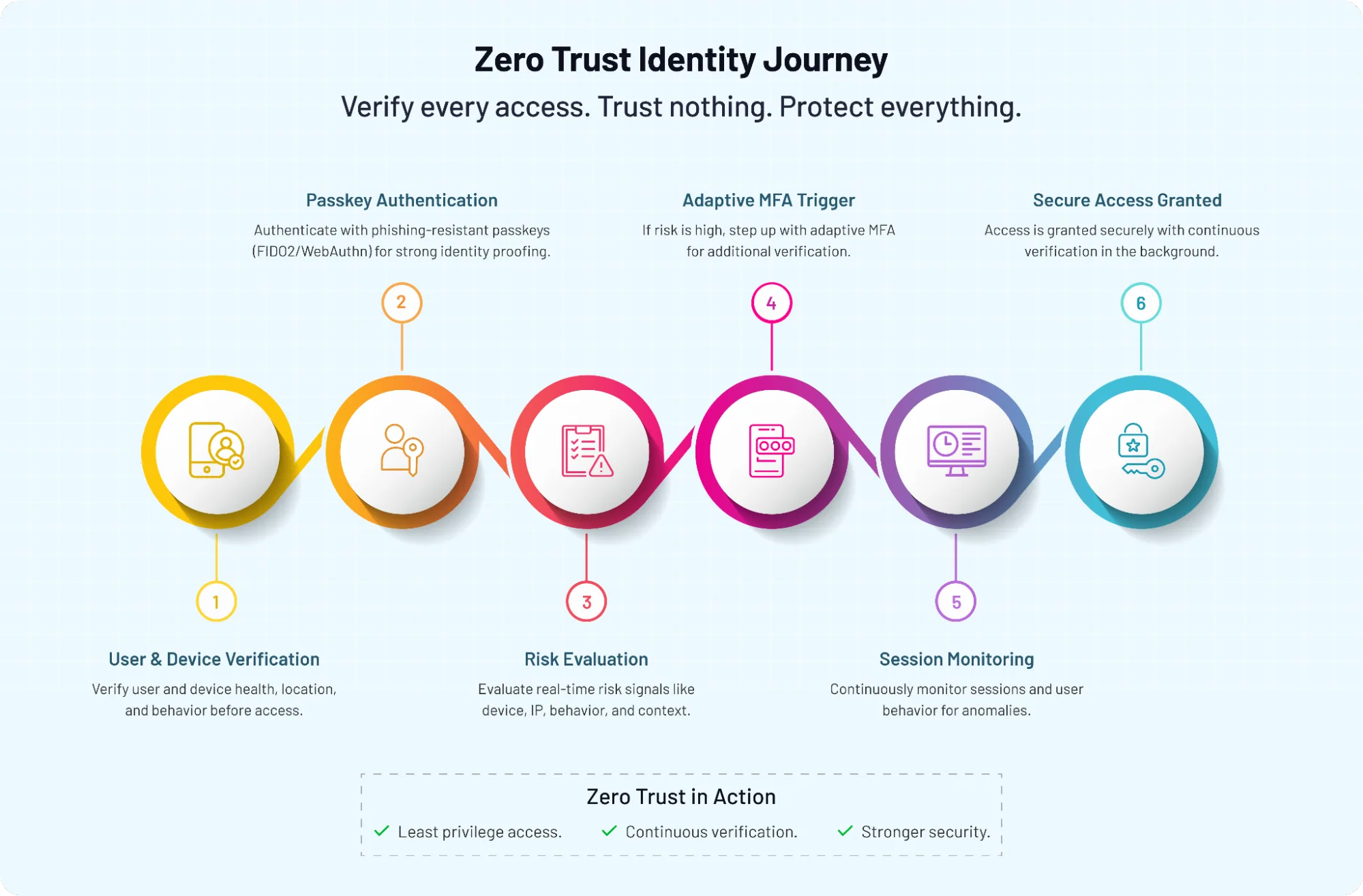
Zero Trust does not care that a user logged in once. It cares whether that user, device, session, and action still deserve access right now. That is why passwordless authentication fits so well into a Zero Trust model but only when it is designed as part of the full identity architecture. Don’t treat passwordless as the finish line. Strong login, fewer passwords, better user experience means good progress. But Zero Trust asks a harder question: what happens after login?
A passkey can prove that the user has access to a trusted device. FIDO2 authentication can reduce phishing risk. Biometric authentication can confirm local user presence. All of that makes the first access decision stronger. But it should not create permanent trust.
In enterprise environments, access needs to stay conditional. A user may start from a managed device and later switch networks. A session may become risky. A privileged action may require stronger proof. A contractor may need temporary access today but not next week. This is where Zero Trust architecture becomes practical not philosophical.
Passwordless gives you a stronger identity signal. Zero Trust decides how long that signal should be trusted, where it applies, and when it needs to be rechecked.
Organizations with the best passwordless outcomes don’t just remove passwords. They use passwordless as a cleaner starting point for continuous verification. That is the real enterprise value.
You reduce credential theft at login. Then you keep watching for risk across the session, device, user behavior, and access request.
Passwordless makes Zero Trust easier to execute. But it does not replace Zero Trust. It gives the architecture a stronger foundation to work from.
Best Practices for Enterprise Passwordless Authentication
This is where strong ideas either hold up or fall apart in production. Most teams don’t struggle with what passwordless is. They struggle with how to roll it out without breaking access, weakening security at the edges, or frustrating users who just want to get their work done. Here’s how teams that get it right approach it.
Start with high-impact, high-risk use cases.
Don’t try to flip everything at once. Begin where passwordless delivers immediate value admin access, workforce login, partner portals, or applications handling sensitive data. These areas benefit most from phishing-resistant authentication and tighter controls. Early wins here build confidence and reduce real risk quickly.
Use passkeys as the primary method not an add-on.
If passwordless sits behind a password, you haven’t removed the problem. Passkeys backed by FIDO2 authentication should lead the flow, not follow it. That’s how you eliminate credential reuse and reduce phishing exposure from the start.
Keep MFA but make it adaptive.
Not every login needs a second step. But some actions do. High-risk events, new devices, unusual behavior, or sensitive operations should trigger additional verification. Adaptive authentication ensures security shows up when it’s needed, not everywhere.
Design recovery as carefully as login.
This is where many deployments quietly weaken. If users lose access to their device, recovery must be secure without becoming a loophole. Avoid relying on simple email links or predictable security questions. Combine multiple signals device verification, secondary channels, admin controls, or identity checks to restore access safely.
Avoid weak fallback mechanisms.
Fallback paths are necessary. Weak ones are dangerous. If your passwordless flow falls back to SMS OTP or passwords without strong controls, attackers will aim for that path first. Treat fallback with the same security standards as your primary method.
Build around identity lifecycle, not just login.
Access doesn’t start and end at authentication. Users join, change roles, switch devices, and eventually leave. Passwordless authentication enterprise solutions should align with provisioning, de-provisioning, access reviews, and audit visibility. Otherwise, you solve login but leave lifecycle risk untouched.
Test across real-world scenarios, not ideal ones.
Shared devices. Remote workers. Contractors. Offline access. Cross-platform usage. These are not edge cases; they're normal in enterprise environments. If your flow only works in perfect conditions, it won’t hold up at scale.
A surprising pattern we’ve seen is that the most successful rollouts are not the most aggressive; they're the most controlled. They simplify login for the majority of users while tightening security where it actually matters. That balance is what turns passwordless from a feature into a reliable enterprise strategy.
How to Implement Passwordless Authentication in Enterprise
Enterprise passwordless implementation should not begin with the login screen. It should begin with an inventory.
Which apps still depend on passwords? Which users carry the highest risk? Which workflows trigger compliance checks? Which recovery paths are currently too weak? These answers decide the rollout plan.
Teams usually start with the easiest app instead of the most meaningful one. That creates activity, but not impact. A better approach is to begin with areas where passwordless implementation can reduce real exposure to privileged access, employee portals, customer-facing apps, partner access, or systems with frequent password reset requests. Once those use cases are clear, move in phases.
Start with a hybrid model. Keep existing authentication available while introducing passkeys or FIDO2 authentication for selected users and applications. This reduces rollout risk and gives IT teams time to monitor adoption, support issues, and security signals.
Next, enroll users carefully. Device registration should not be treated as a casual setup step. Verify the user, validate the device, log the enrollment event, and apply policy controls. If attackers can register their own device during onboarding or recovery, the whole model weakens.
Then comes fallback design. This part deserves more attention than it usually gets. Avoid falling back to the same weak methods passwordless is meant to replace. If fallback is required, pair it with adaptive authentication, device checks, admin approval, or stronger recovery verification.
After that, monitor real behavior. Look at login success rates, failed attempts, recovery requests, device changes, suspicious enrollment attempts, and MFA triggers. These signals show whether the rollout is working or creating new friction.
Finally, phase out passwords where confidence is high. Not everywhere on day one. Start where adoption is stable, fallback is secure, and recovery flows have been tested.
A simple rollout path can look like this:
-
Assess current identity systems and password-dependent apps.
-
Prioritize high-risk or high-friction use cases.
-
Introduce passkeys with controlled user groups.
-
Secure device enrollment and recovery flows.
-
Add adaptive MFA for risky actions.
-
Monitor usage, risk signals, and support impact.
-
Gradually remove passwords from mature flows.
The goal is not to move fast for the sake of it. The goal is to remove passwords without creating weaker doors around them.
Common Misconceptions About Enterprise Passwordless
The biggest mistake with enterprise passwordless authentication is treating it like a silver bullet. It’s not. It is a strong security shift, but only when the surrounding controls are strong too.
One common misconception is that passwordless means “no MFA.” That sounds neat, but enterprise identity rarely works that way. Passkeys may already combine device possession with biometric or local PIN verification, but high-risk actions can still need step-up authentication.
Admin access, financial approvals, data exports, and unusual login behavior deserve more than a smooth front-door experience.
Another misconception is that passwordless is risk-free. It reduces credential theft and phishing risk, yes. But it does not remove device risk, recovery risk, endpoint risk, or session risk. Attackers don’t disappear when passwords disappear. They shift toward weaker fallback paths, enrollment gaps, and compromised devices.
Then there’s the belief that every passwordless method is equally secure. Not true. A magic link is not the same as FIDO2 authentication. An email-based flow is not the same as a device-bound passkey. Both may remove passwords, but only one offers strong phishing resistance by design.
Instead of focusing on the login moment and ignoring the rest of the identity lifecycle, focus on: onboarding, device changes, access reviews, role updates, offboarding, and recovery. All of these stages matter and if any of it is weak, passwordless becomes just a shiny front door attached to a fragile building.
So no, enterprise passwordless is not just about removing passwords. It is about designing a stronger, simpler, and more controlled access model where every path into the account is protected, not just the main one.
Is Your Enterprise Ready for Passwordless?
This is where most discussions get real. Not every organization is ready to move fast on passwordless. And forcing it too early can create more gaps than it closes. The better question isn’t “Should we adopt passwordless?” It’s “Are we ready to support it properly?”
Let’s help you understand what that actually means.
Start with your identity infrastructure. If your environment still depends heavily on legacy systems that require passwords, pushing passwordless across the board will create inconsistencies. Some users will get modern flows. Others will fall back to older methods. That mix becomes hard to manage and even harder to secure.
Next, look at device readiness. Passwordless authentication enterprise solutions rely heavily on trusted devices. Are your users primarily on managed devices? Do you support BYOD? How do you verify device trust? If you cannot answer those clearly, passwordless will feel incomplete.
Then comes user segmentation. Not all users should move at the same pace. Admins, employees, contractors, partners, and customers all have different risk profiles. High-privilege users may need stricter controls from day one. Low-risk users can move faster. Treating everyone the same usually slows adoption or weakens security.
Recovery readiness is another critical checkpoint. If users lose access to their primary device, how do you restore access without introducing risk? If recovery is not well designed, attackers will target it. This is one of the most common gaps in early passwordless deployments.
Compliance also plays a role. Some industries require explicit multi-factor verification for specific actions. Even with strong passwordless authentication, you may still need adaptive MFA for certain workflows. That needs to be planned and not discovered later.
Organizations that assess readiness upfront move faster in the long run. They avoid rework. They avoid emergency fixes. And they build confidence across security, IT, and product teams.
So how do you know you’re ready?
-
Your identity systems can support passwordless methods like passkeys or FIDO2 authentication
-
Device trust and enrollment processes are clearly defined
-
Recovery flows are secure and tested
-
High-risk use cases are identified and prioritized
-
Adaptive authentication policies are in place
-
You can monitor identity events across the full lifecycle
If most of these are in place, you’re not just ready to adopt passwordless. You’re ready to scale it without weakening your security posture. And that’s the difference between experimenting with passwordless and making it work at enterprise level.
The Future of Enterprise Authentication Isn’t Passwordless Alone It’s Smarter
By now, one thing should be clear. Passwordless is not just a better login experience. It’s a shift in how enterprises think about identity, trust, and risk.
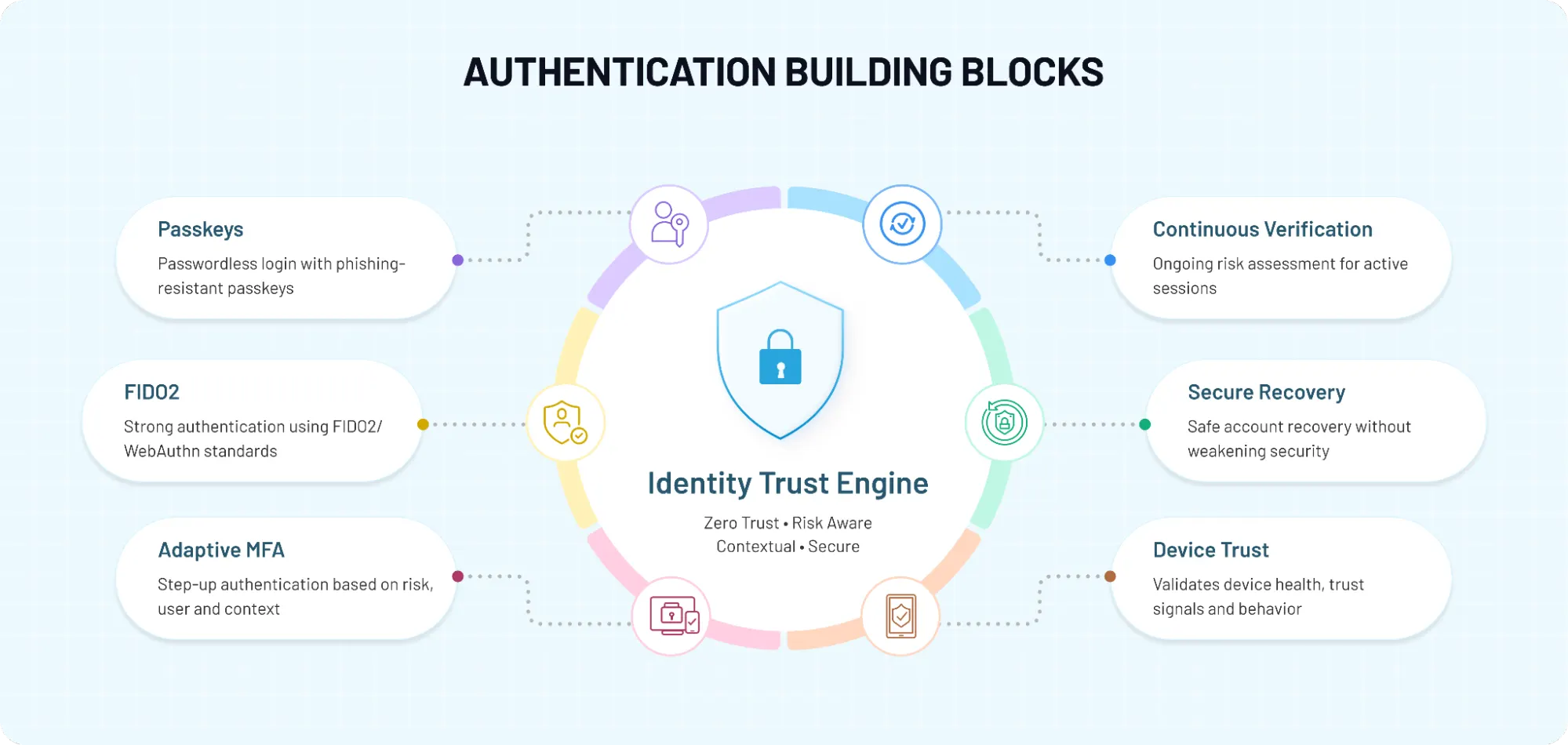
Removing passwords cuts off one of the biggest entry points for attackers. That alone is a meaningful step. But strong enterprise security doesn’t come from removing one problem. It comes from understanding what replaces it. The organizations seeing real impact from passwordless authentication enterprise solutions are not the ones rushing to eliminate passwords everywhere. They’re the ones redesigning authentication as a system one that combines phishing-resistant login, adaptive MFA, secure recovery, device trust, and continuous verification under a Zero Trust model. Less guesswork. More control.
They simplify login for users who should move fast. They add friction only where risk demands it. They treat identity as something that evolves across the session, not something decided once at login. That balance is what makes passwordless work at enterprise scale.
So if you’re evaluating your next move, don’t start with “how do we remove passwords.” Start with: Where are we most exposed today?
-
Which users and actions carry the highest risk?
-
Where does friction hurt adoption the most?
-
And how can passwordless strengthen all of this without creating new weak points?
Because the goal is not to deploy a feature. It’s to build an authentication strategy that actually holds up in the real world. Looking to choose the right approach?
Explore how passwordless authentication enterprise solutions can help you modernize login, reduce credential-based attacks, and align your identity stack with Zero Trust without disrupting existing systems.
Book a demo with LoginRadius and see how you can roll out passwordless authentication the right way securely, gradually, and at enterprise scale.
FAQs
Q: What is enterprise passwordless authentication?
A: Enterprise passwordless authentication replaces traditional passwords with more secure identity verification methods like passkeys, biometrics, or device-based authentication. Instead of relying on shared secrets, it uses cryptographic keys tied to user devices. This reduces phishing and credential theft risks significantly. In enterprise environments, it also integrates with identity lifecycle, compliance policies, and Zero Trust architecture. It’s not just a login method it’s part of a broader security strategy.
Q: Is passwordless authentication more secure than MFA?
A: Passwordless authentication can be more secure than traditional MFA, especially when using phishing-resistant methods like passkeys or FIDO2 authentication. It removes passwords entirely, eliminating common attack vectors like credential reuse and phishing. However, MFA still plays a role in high-risk scenarios such as admin access or sensitive transactions. The strongest approach combines passwordless login with adaptive MFA. Security improves when both are used intelligently together.
Q: What are the biggest challenges of implementing passwordless authentication in enterprises?
A: The biggest challenges include legacy system compatibility, integration complexity, and user adoption. Many enterprise applications still depend on password-based flows, making migration difficult. Multi-device usage, secure enrollment, and recovery processes add further complexity. Weak fallback or recovery mechanisms can introduce new vulnerabilities. Successful implementation requires planning across systems, users, and identity lifecycle not just login.
Q: What are the risks of passwordless authentication?
A: Passwordless reduces credential-based attacks but introduces new risks if not implemented properly. Device dependency becomes critical, especially if devices are lost or compromised. Account recovery and fallback methods can become weak points if not secured well. Endpoint and browser vulnerabilities still remain a concern. Enterprises must combine passwordless with adaptive authentication and continuous monitoring to manage these risks effectively.
Q: How does passwordless authentication support Zero Trust architecture?
A: Passwordless authentication strengthens the initial identity verification, which is essential for Zero Trust. It reduces reliance on passwords and enables phishing-resistant login methods. However, Zero Trust goes beyond login by continuously evaluating user, device, and session risk. Passwordless works best when combined with adaptive authentication, device trust, and real-time policy enforcement. It acts as a strong foundation for continuous verification.
Q: How can enterprises implement passwordless authentication successfully?
A: Enterprises should start with high-risk or high-impact use cases like admin access or workforce login. A phased rollout works best to introduce passwordless alongside existing methods and expand gradually. Secure device enrollment, strong recovery flows, and adaptive MFA are critical. Avoid weak fallback mechanisms that can undermine security. Continuous monitoring and optimization ensure long-term success.
Q: Do enterprises still need MFA with passwordless authentication?
A: Yes, but not in the traditional “every login” sense. Passwordless methods like passkeys already include multiple authentication factors in a single step. However, MFA is still needed for high-risk actions, new devices, or unusual behavior. Adaptive MFA helps apply additional verification only when required. This keeps the user experience smooth while maintaining strong security controls.