Introduction
MFA was originally built for a simpler threat model. Add additional steps and stop stolen passwords to reduce account takeovers. And for a while, that worked well enough. But attackers adapted. They no longer had to guess passwords or brute force their way in, they started to trick users into handing over OTPs, approve push prompts through fatigue, or steal live sessions using adversary-in-the-middle phishing kits.
That is where the need for phishing-resistant MFA arose. According to Microsoft, enabling MFA can block more than 99.9% of automated account compromise attempts. However, attackers increasingly use phishing proxies and session hijacking techniques that can bypass traditional MFA methods, driving adoption of phishing-resistant authentication.
What Is Phishing-Resistant MFA?
Phishing-resistant MFA is a form of multi-factor authentication designed to prevent attackers from stealing, replaying or using authentication credentials obtained through fake landing pages. Unlike traditional MFA methods that rely on shared secrets such as SMS codes, OTPs, or push approvals, phishing-resistant authentication uses cryptographic verification tied to the legitimate application or website.
These methods include passkeys, FIDO2, WebAuthn, and hardware security keys. The private credential stays bound to the user’s device, and authentication only works for the legitimate website or application.
Traditional MFA methods still depend on information users can accidentally reveal:
-
A phishing page can steal an OTP.
-
A push request can be approved by mistake.
-
A session token can be intercepted after login.
Phishing-resistant MFA removes that dependency entirely by replacing reusable credentials with origin-bound cryptographic verification. This is the foundation behind technologies such as:
-
FIDO2 authentication
-
WebAuthn authentication
-
passkeys
-
hardware security keys
-
platform authenticators like Face ID or Windows Hello
Modern adversary-in-the-middle phishing kits can proxy login requests in real time, capture OTPs, and hijack authenticated sessions. But they struggle against authentication methods where the credential never leaves the device and cannot be replayed somewhere else.
For enterprises adopting Zero Trust security models, phishing-resistant MFA is quickly becoming the preferred authentication standard. In many environments, especially those handling sensitive customer or workforce data, it is no longer treated as an advanced option. It is becoming the expectation.
How Adversary-in-the-Middle (AiTM) Attacks Bypass Traditional MFA
For years, organizations assumed multi-factor authentication would stop account takeover attacks. That assumption was largely true until attackers began using adversary-in-the-middle (AiTM) phishing techniques.
Unlike traditional phishing attacks that simply steal passwords, AiTM attacks sit directly between the user and the legitimate application. The attacker acts as a real-time proxy, forwarding information between both parties while secretly capturing credentials and authenticated sessions.
The experience often looks completely legitimate to the user. They visit a phishing page, enter their username and password, complete MFA, and are redirected into the application normally.
The rise of AiTM attacks is not theoretical.
According to the Verizon Data Breach Investigations Report (DBIR), stolen credentials remain one of the most common initial access vectors in breaches. Attackers increasingly target authenticated sessions rather than simply attempting to crack passwords.
This shift explains why organizations are moving beyond basic MFA deployment and evaluating whether their authentication methods are truly phishing-resistant.
Meanwhile, the attacker captures everything needed to access the account.
A Typical AiTM Attack Flow
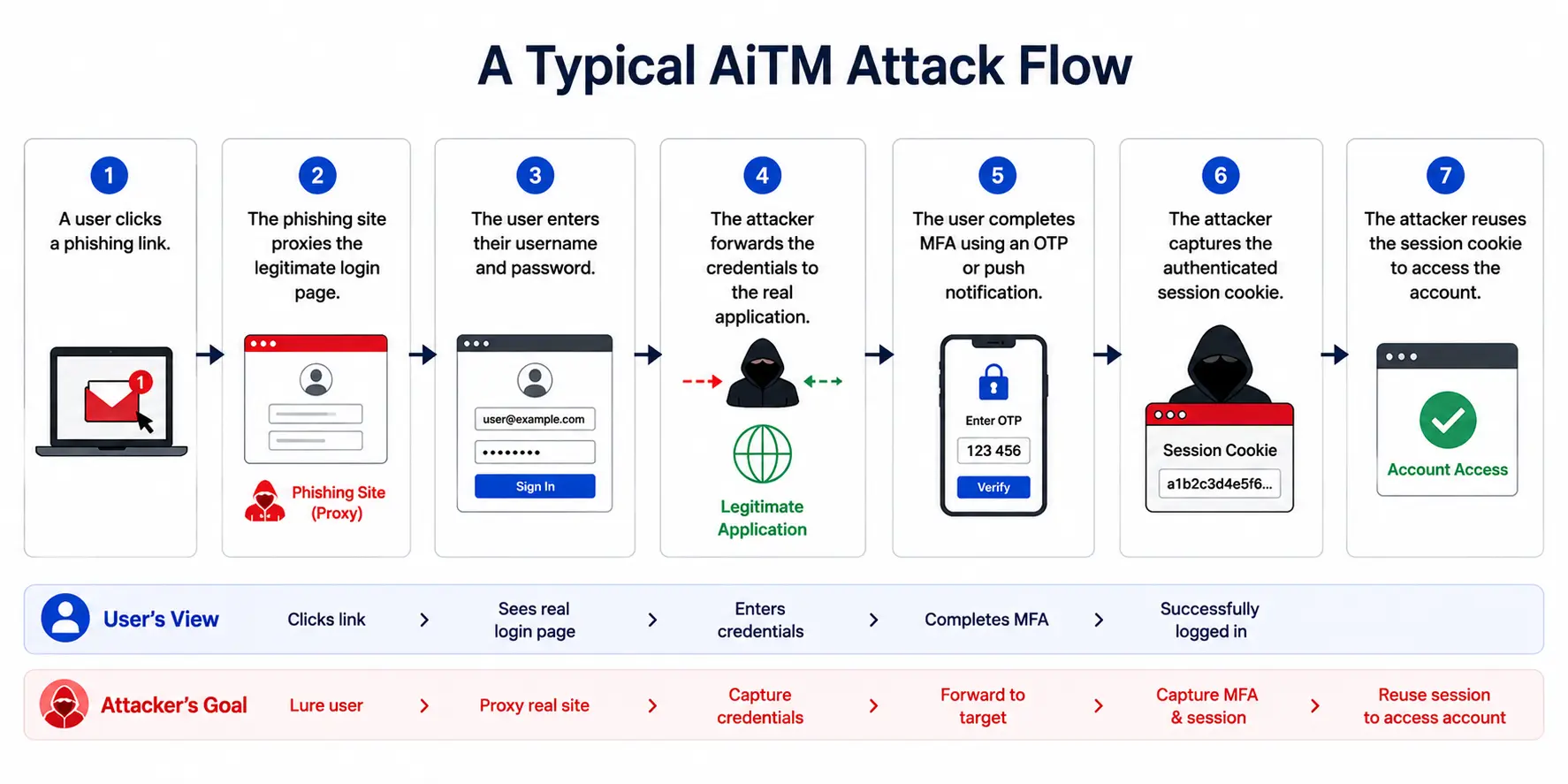
In many cases, the attacker never needs the password again. The stolen session becomes the new credential.
Why Traditional MFA Often Fails
Many MFA methods still depend on secrets users can transfer or approve:
-
SMS OTP codes
-
Authenticator app codes
-
Push approvals
-
Magic links
If the user successfully completes the MFA challenge on a phishing site, the attacker can often reuse the authenticated session immediately. This is why organizations continue experiencing account takeovers despite having MFA enabled.
Phishing-resistant MFA eliminates this dependency. Technologies such as passkeys, WebAuthn, FIDO2 authenticators, and hardware security keys use public-key cryptography and origin-bound authentication, making it significantly harder for attackers to steal, replay, or misuse credentials.
As phishing infrastructure becomes more sophisticated and adversary-in-the-middle (AiTM) attacks continue to grow, organizations are increasingly evaluating not whether MFA is enabled, but whether their MFA method is truly phishing-resistant.
Why Passkeys Stop AiTM Attacks
Passkeys, FIDO2 authentication, and WebAuthn use a fundamentally different model.
Instead of relying on reusable secrets, authentication is tied directly to:
-
The legitimate application origin
-
The user's trusted device
-
Cryptographic key pairs
When a phishing website attempts to proxy the login flow, the passkey checks the website origin before generating any authentication proof.
If the origin does not match the legitimate application, authentication simply fails.
The attacker never receives:
-
Passwords
-
OTPs
-
Reusable credentials
-
Valid authentication signatures
This origin-binding capability is one of the primary reasons passkeys are considered phishing-resistant by design.
Popular adversary-in-the-middle (AiTM) frameworks such as Evilginx, Modlishka, Muraena, and EvilProxy have demonstrated how attackers can intercept authentication sessions in real time. Their growing use has accelerated adoption of phishing-resistant authentication methods that rely on origin-bound cryptographic verification instead of reusable credentials.
Channel Binding
Traditional MFA fails because it verifies identity in a vacuum if you possess the code, you get in.
Phishing-resistant MFA introduces channel binding. During a WebAuthn challenge handshake, the browser injects the exact origin domain
(e.g., https: // login . realbank . com into the signed client data. If an attacker proxies the attack through [https: // login . realbank . security-updates . com], your local device detects the mismatch and refuses to sign the challenge using its private enclave. The attacker receives a null signature, halting the proxy attack dead in its tracks.)
How Phishing-Resistant MFA Actually Works
Most authentication systems still trust something the user knows or types. A password. A six-digit code. A push approval. The issue is simple: if a human can see it, there is always a chance an attacker can steal it too. Phishing-resistant MFA takes a very different route.
Nothing reusable gets shared during login. No OTP travels across the network. No password gets copied into a fake form. Instead, the login process depends on cryptographic proof generated directly on the user’s device.
Here’s how it actually works.
When a user first registers, the device creates two cryptographic keys:
-
a public key that is stored by the application or authentication server
-
a private key that never leaves the user’s device and is protected by biometrics, device PINs, or secure hardware modules like Trusted Platform Modules (TPMs) and Secure Enclaves.
Unlike passwords, OTPs, or other reusable credentials, the private key never leaves the user's device. During authentication, the server sends a cryptographic challenge that can only be signed using the private key. The server then verifies the signed response using the stored public key. Because the private key cannot be copied, intercepted, or replayed, attackers cannot steal it through phishing websites or adversary-in-the-middle attacks.
When the server sends a cryptographic challenge, the user's device instantly processes a 3-step silent validation flow before signing:
-
Domain Origin Match: Compares the active browser domain against the origin locked during registration.
-
Application Legitimacy: Assures the request is originating from the authentic, verified app.
-
Local User Verification: Prompts for an on-device biometric scan (Face ID/Fingerprint) or device PIN to confirm physical presence.
If an attacker creates a fake login page, the authentication attempt fails because the cryptographic proof cannot be generated for the wrong domain. Only after all of these checks pass, does the device sign the challenge using the private key.
The signed response goes back to the server, which validates it using the stored public key. If everything matches, authentication succeeds. Most users never notice the cryptography happening underneath. They just see a faster login prompt and tap their fingerprint sensor. But under the hood, the security model is fundamentally stronger than traditional MFA.
That’s also why phishing-resistant MFA is becoming central to Zero Trust security strategies. Instead of trusting network location, passwords, or temporary codes, systems verify cryptographic proof tied directly to:
-
the user
-
the device
-
the legitimate application origin
How It Works in Mobile Applications
| Mobile Capability | Security Benefit |
|---|---|
| Face ID / Biometrics | Local user verification |
| Passkeys | Passwordless authentication |
| Device-Bound Credentials | Prevent credential theft |
| Secure Hardware | Protect private keys |
Modern mobile authentication combines passkeys, biometrics, and device-bound credentials to deliver phishing-resistant authentication without relying on passwords or OTPs.
As passkey adoption grows across mobile ecosystems, smartphones are increasingly becoming the foundation of passwordless and phishing-resistant authentication strategies.
Why Passkeys, FIDO2, and WebAuthn Are Replacing Traditional MFA
For years, improving MFA meant adding more verification steps. Passwords were followed by OTPs, authenticator apps, and push notifications. Security improved, but so did friction.
Passkeys take a different approach. Instead of adding another factor on top of a password, they remove the password entirely and replace it with cryptographic authentication tied to a trusted device.
Built on standards such as FIDO2 and WebAuthn, passkeys use public-key cryptography to verify identity without transmitting reusable credentials. The private key remains securely stored on the user's device while the public key is stored by the application.
This approach eliminates many common attack paths associated with traditional MFA, including:
-
OTP phishing
-
MFA fatigue attacks
-
Password theft
-
Credential replay attacks
-
Adversary-in-the-middle (AiTM) phishing
Phishing-Resistant MFA Is Not a Complete Substitute for Security Awareness
Phishing-resistant MFA significantly reduces the effectiveness of credential theft, adversary-in-the-middle (AiTM) attacks, OTP phishing, and MFA fatigue campaigns. By eliminating reusable credentials and relying on cryptographic authentication, it closes many of the attack paths that traditional MFA leaves exposed.
However, no authentication technology completely eliminates social engineering risk.
Attackers may still attempt to manipulate users through fraudulent support requests, impersonation scams, account recovery abuse, helpdesk social engineering, or device theft. For this reason, phishing-resistant MFA should be viewed as one layer of a broader identity security strategy rather than a standalone solution.
Organizations achieve the strongest protection when phishing-resistant authentication is combined with:
-
Security awareness training
-
Strong account recovery controls
-
Helpdesk verification procedures
-
Device security policies
-
Continuous risk monitoring and adaptive authentication
Together, these controls help reduce both technical phishing attacks and the human-focused social engineering techniques that increasingly target modern identity systems.
This is one reason organizations increasingly view passkeys as the next evolution of MFA rather than simply another authentication factor.
While passkeys are one of the most widely adopted phishing-resistant authentication methods, they are not the only option. Understanding how different MFA technologies compare helps organizations choose the right approach for their security requirements, user experience goals, and deployment environment.
Which MFA Methods Are Actually Phishing-Resistant?
Not every MFA method offers the same level of protection. That’s where many authentication discussions become misleading. Two systems may both technically qualify as “MFA,” but their resistance to phishing attacks can be completely different.
Some methods slow attackers down. Others remove the attack path almost entirely.
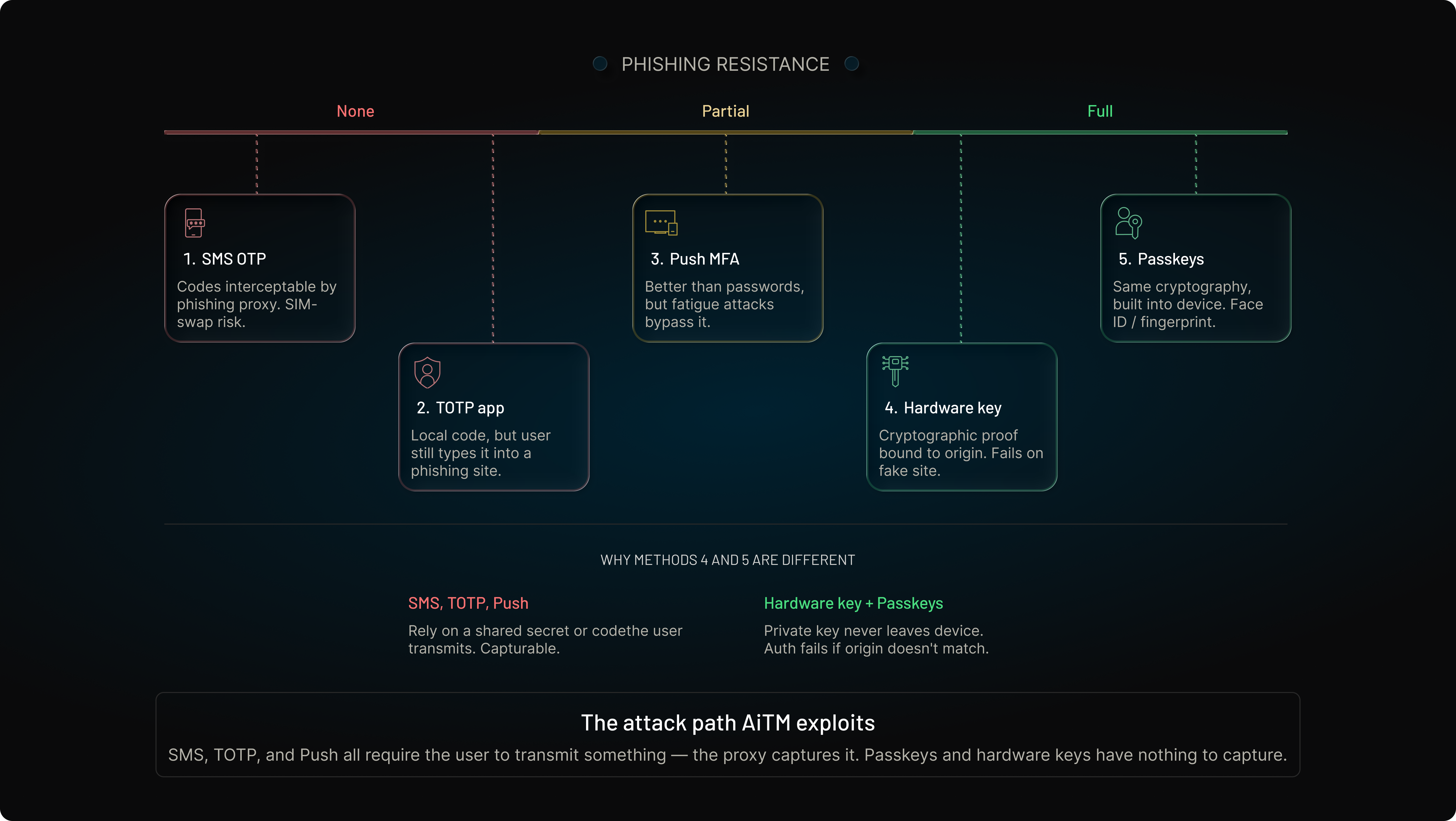
1. SMS OTP Authentication
SMS-based MFA is still widely used because deployment is simple and users already understand text-message verification. But from a security perspective, it has become one of the weakest MFA options available.
Attackers can:
-
intercept OTPs through phishing pages
-
perform SIM-swapping attacks
-
redirect SMS messages using mobile carrier fraud
-
trick users into sharing verification codes in real time
The extra authentication step helps against basic password theft, but it does not reliably stop modern phishing campaigns.
2. TOTP Authenticator Apps
Authenticator apps like Google Authenticator or Microsoft Authenticator improve security compared to SMS because the codes are generated locally on the device instead of being transmitted over telecom networks.
But the weakness still remains: the user can manually enter the code into a phishing site.
That means adversary-in-the-middle attacks can still capture and replay TOTP codes during active login sessions.
3. Push Notification MFA
Push authentication improved convenience significantly. Users simply tap “Approve” instead of typing a code. The friction dropped. Adoption increased. Then attackers adapted again.
MFA fatigue attacks became surprisingly effective because humans respond emotionally under pressure. Repeated push prompts create confusion, especially during busy work hours. One mistaken approval can give attackers immediate access.
Push-based MFA is better than passwords alone, but it is not fully phishing-resistant.
4. Hardware Security Keys
Hardware security keys based on FIDO2 authentication generate cryptographic proof tied directly to the legitimate application origin. The private credential never leaves the security key itself.
Even if a phishing site perfectly imitates the real login page, authentication fails because the cryptographic challenge does not match the registered domain.
That makes hardware security keys one of the strongest phishing-resistant MFA methods currently available.
5. Passkeys
Passkeys bring a similar security model into mainstream devices.
Instead of carrying a separate hardware token, users authenticate using:
-
Face ID
-
fingerprint verification
-
device PIN
-
platform authenticators built into phones and laptops
Underneath the smoother user experience, the same public-key cryptography principles still apply. Authentication remains bound to the legitimate origin, making phishing attacks dramatically harder to execute successfully.
That combination of usability and security is why passkeys are rapidly becoming the preferred authentication direction across modern applications.
MFA Methods Compared
| MFA Method | Phishing Resistant | User Experience | Common Risks |
|---|---|---|---|
| SMS OTP | ❌ No | Familiar | SIM swapping, OTP phishing |
| TOTP Apps | ⚠️ Partial | Moderate | Real-time phishing proxies |
| Push MFA | ⚠️ Partial | High | MFA fatigue attacks |
| Hardware Security Keys | ✅ Yes | Moderate | Device loss management |
| Passkeys | ✅ Yes | High | Ecosystem adoption challenges |
What Makes a MFA Method Truly Phishing-Resistant?
Not all MFA methods provide the same level of protection against phishing attacks. While many authentication systems add additional verification steps, only a subset can prevent attackers from stealing, replaying, or reusing authentication credentials.
For an authentication method to be considered phishing-resistant, it should include several core security characteristics.
| Requirement | Why It Matters |
|---|---|
| Origin Binding | Prevents authentication credentials from being used on phishing domains or fake websites. |
| Public-Key Cryptography | Eliminates reusable secrets such as passwords and OTPs that attackers can steal. |
| Device-Bound Credentials | Keeps authentication credentials tied to a trusted device, preventing export or reuse elsewhere. |
| User Verification | Confirms the legitimate user is present through biometrics, device PINs, or security key interaction. |
| Replay Resistance | Ensures captured authentication responses cannot be reused in future login attempts. |
Together, these capabilities create a fundamentally different security model from traditional MFA methods that rely on passwords, SMS codes, authenticator app codes, or push approvals.
FIDO2
FIDO2 is the open authentication standard that forms the foundation of modern phishing-resistant authentication. It uses public-key cryptography instead of shared secrets and enables passwordless authentication across browsers, applications, and devices.
Because credentials are tied to both the user and the legitimate service, attackers cannot simply steal and replay them through phishing attacks.
WebAuthn
WebAuthn is the web standard that allows applications and browsers to communicate securely with phishing-resistant authenticators.
One of its most important security features is origin binding. Before authentication succeeds, WebAuthn verifies that the request originates from the legitimate website or application where the credential was registered. This prevents credentials from being used on phishing domains designed to imitate trusted services.
Security Keys
Hardware security keys provide one of the strongest forms of phishing-resistant authentication available today.
Devices such as YubiKeys and Titan Security Keys store private cryptographic credentials in secure hardware and perform authentication directly on the device. Since the credential never leaves the security key and authentication is bound to the legitimate origin, attackers cannot intercept or replay authentication data.
For this reason, security keys are commonly deployed for privileged administrator accounts, government systems, and highly regulated environments.
Passkeys
Passkeys extend phishing-resistant authentication to mainstream users by combining public-key cryptography with familiar device experiences such as Face ID, fingerprint verification, Windows Hello, and device PINs.
Built on FIDO2 and WebAuthn standards, passkeys eliminate passwords while maintaining strong phishing resistance. Because authentication is tied to both the user's trusted device and the legitimate application origin, passkeys prevent many of the attacks that successfully bypass traditional MFA.
Device-Bound Credentials
A defining characteristic of phishing-resistant MFA is that credentials remain bound to a trusted device.
Unlike passwords, OTPs, or session tokens that can be copied and reused elsewhere, device-bound credentials remain protected within secure hardware on smartphones, laptops, or security keys. Even if attackers compromise a phishing page or intercept network traffic, they cannot export or reuse the credential.
This combination of origin binding, cryptographic verification, device-bound credentials, user verification, and replay resistance is what separates truly phishing-resistant authentication from traditional MFA methods. As organizations move toward Zero Trust and passwordless authentication strategies, these capabilities are increasingly becoming the baseline for modern identity security.
Where Is Phishing-Resistant MFA Most Valuable?
While phishing-resistant MFA improves security across nearly every authentication workflow, some environments benefit more than others due to elevated risk, regulatory requirements, or the potential impact of account compromise.
| Environment | Benefit |
|---|---|
| Workforce SSO | Protects employee accounts from phishing, credential theft, and session hijacking attacks. |
| Customer Portals | Reduces account takeover risk while maintaining a low-friction login experience. |
| B2B SaaS Platforms | Secures partner, supplier, contractor, and delegated administrator access. |
| Privileged Admin Access | Prevents high-impact compromises involving sensitive systems and administrative accounts. |
| Financial Services | Supports strong authentication requirements for banking, fintech, and payment applications. |
| Healthcare Applications | Helps protect regulated patient data and sensitive healthcare records. |
Why These Environments Prioritize Phishing-Resistant Authentication
The consequences of credential theft vary significantly across industries and user populations. A compromised customer account may result in fraud or account takeover, while a compromised administrator account can expose entire systems, sensitive data, or critical infrastructure.
For this reason, many organizations begin phishing-resistant MFA adoption with high-risk user groups such as administrators, IT teams, privileged users, and external partners before expanding deployment across broader user populations.
As Zero Trust initiatives mature and passwordless authentication adoption increases, phishing-resistant MFA is becoming a foundational security control across workforce identity, customer identity, and B2B access management environments.
Why Organizations Are Adopting Phishing-Resistant MFA
For many organizations, the shift toward phishing-resistant MFA is no longer driven by innovation goals. It is being driven by failure patterns.
Security teams watched attackers bypass passwords. Then they watched attackers bypass traditional MFA too. Stolen session cookies, AiTM phishing kits, MFA fatigue attacks, and social engineering campaigns exposed a hard reality: adding more login steps does not automatically eliminate account takeover risks. That pressure changed enterprise priorities quickly.
Large organizations now care less about simply “having MFA enabled” and more about whether the authentication method can survive modern phishing attacks in real-world conditions. Compliance checkboxes alone are not enough anymore.
This is one reason Zero Trust security models accelerated phishing-resistant authentication adoption. Instead of assuming trust after login, Zero Trust frameworks continuously verify:
-
user identity
-
device integrity
-
application legitimacy
-
authentication strength
At the center of this model is cryptographic verification tied to trusted origins and devices.
Governments and major technology vendors are moving in the same direction. Agencies like CISA increasingly recommend phishing-resistant MFA for high-risk environments because older authentication methods remain vulnerable to credential interception and session hijacking attacks.
Industry adoption is accelerating as major platform providers continue expanding support for phishing-resistant authentication. Apple, Google, and Microsoft have integrated passkeys and passwordless authentication directly into their operating systems, browsers, and identity ecosystems.
At the same time, organizations are seeing increased guidance from industry groups such as the FIDO Alliance, which continues to promote phishing-resistant authentication standards across consumer and enterprise environments. As users encounter passkey experiences across more applications and devices, adoption barriers continue to decline.
The Regulatory Push: NIST, CISA, and Executive Mandates
Sometimes the transition isn't strictly driven by internal risk management; it's a compliance directive. Regulatory frameworks are actively deprecating legacy MFA:
-
NIST SP 800-63B recognizes FIDO2 and WebAuthn-based authenticators as phishing-resistant authentication methods that can support higher authentication assurance requirements when deployed appropriately.
-
CISA Directives: Formally advises critical infrastructure against relying on voice or SMS text verification due to aggressive routing and intercept vulnerabilities.
Meanwhile, enterprise platforms are pushing passwordless and passkey adoption aggressively:
-
Microsoft expanding passwordless sign-in
-
Google enabling passkeys across consumer and enterprise ecosystems
-
Apple integrating passkeys deeply into device authentication
That ecosystem support matters because authentication habits change faster when users encounter the same login experience everywhere.
Several industry trends are accelerating phishing-resistant MFA adoption:
-
Microsoft reports that MFA can prevent more than 99.9% of automated account compromise attempts.
-
The Verizon DBIR consistently identifies credential abuse as one of the leading breach patterns.
-
Security researchers continue to observe growth in phishing kits capable of bypassing SMS OTP and push-based MFA.
-
Major platform providers including Apple, Google, and Microsoft have expanded support for passkeys and passwordless authentication across consumer and enterprise ecosystems.
Together, these trends are pushing organizations toward authentication methods that eliminate reusable credentials altogether.
Here’s where many companies hesitate though. Migration feels complicated. Legacy applications, workforce training, device compatibility, recovery workflows, and onboarding concerns often slow adoption. But delaying the transition creates its own risk.
Attackers are evolving faster than traditional MFA methods were designed to handle. And as phishing infrastructure becomes easier to buy, automate, and scale, the gap between “MFA-enabled” and “phishing-resistant” security keeps getting more visible.
How to Implement Phishing-Resistant MFA Without Breaking User Experience
One reason some authentication rollouts fail has nothing to do with security. The login flow becomes frustrating, confusing, or disruptive, and users immediately look for workarounds.
That risk becomes even bigger in customer-facing applications where every extra step affects onboarding, retention, and conversion.
Teams end up treating phishing-resistant MFA like a security feature added at the end of development. In reality, authentication is part of the product experience itself. The strongest implementations reduce friction while increasing security. Passkeys are a good example of this shift.
Many organizations also combine passkeys with adaptive MFA to apply additional verification only when risk signals such as unfamiliar devices, unusual locations, suspicious behavior, or anomalous login patterns are detected. By evaluating authentication risk before generating a challenge, adaptive MFA helps reduce unnecessary friction while strengthening protection against account takeover attempts.
Users authenticate with a fingerprint, Face ID, or device PIN they already use daily. There is no OTP to type, no password reset flow, and no separate authenticator app required in many cases. The experience feels faster because the cryptographic complexity stays invisible underneath.
For enterprises and SaaS platforms, rollout strategy matters just as much as the technology stack.
| Deployment Phase | Core Technical Milestone | UX Friction Mitigation Strategy |
|---|---|---|
| 1. Privileged Isolation | Mandate hardware security keys (FIDO2) for all root admins and infrastructure engineers. | Issue corporate physical keys; provide white-glove setup. |
| 2. Hybrid Cohabitation | Register WebAuthn/Passkeys for end-users while keeping TOTP as a parallel option. | Use subtle in-app prompts to nudge users to "Enable Face ID/Touch ID Login" during active sessions. |
| 3. Contextual Enforcement | Demote password fields entirely for returning users with active device-bound keys. | Passkey autofill UI handles login seamlessly in a single click. |
Alternatively, here are some common implementation steps:
-
Introducing passkeys alongside existing MFA methods first
-
Prioritizing high-risk admin accounts initially
-
Enabling device-bound authentication for returning users
-
Keeping fallback recovery flows carefully restricted
-
Reducing password dependency gradually over time
Forcing abrupt authentication changes across every user segment often creates support issues and adoption resistance. Recovery design is another area many teams underestimate. The goal is not simply to add another authentication factor. The goal is to create a login system attackers struggle to exploit while users barely notice the added protection.
The Account Recovery Paradox: Closing the Backdoor
A common architectural failure is protecting the front door with a pristine cryptographic passkey, while leaving a phishable SMS or email link open as the "Forgot Device" fallback path. To avoid this:
-
Enforce Multi-Passkey Enrollment: Require or encourage workers to register both a platform authenticator (e.g., Mac Touch ID) and a physical backup roaming hardware key (e.g., YubiKey).
-
Cryptographic Break-Glass Accounts: Utilize pre-generated, single-use hardware-bound recovery seeds kept in secure offline custody rather than dynamic cloud-mediated resets.
-
Managed Helpdesk Out-of-Band Verification: Train support desks to verify identities via pre-established video validation or physical cryptographic smart cards before registering a replacement passkey.
Architectural Blueprints for Secure Fallbacks
To prevent your helpdesk or recovery flow from becoming the weakest link, implement an asymmetric recovery flow:
-
Identity Proofing Integration: Tie cloud recovery to cryptographic government ID verification or out-of-band video verification.
-
Escrowed Recovery Keys: Generate an encrypted recovery payload during initial registration that can only be unlocked by a secondary trusted device or a designated corporate admin key.
The Future of MFA Is Moving Beyond Passwords
Authentication is gradually moving away from shared secrets and toward cryptographic verification.
Instead of relying solely on passwords, OTPs, and static login checks, modern identity systems increasingly verify: trusted devices, application origins, biometric verification and behavioral and risk signals.
Passkeys are accelerating this transition by making passwordless authentication practical for both consumers and enterprises. At the same time, Zero Trust architectures and adaptive authentication systems are extending verification beyond the initial login event, continuously evaluating risk throughout the session.
| Legacy Verification Paradigm (Static) | Modern Identity Verification Paradigm (Dynamic) |
|---|---|
| Question: "Did the user enter the correct credentials?" | Context Check: Is this the expected device and registered posture? |
| Trust Model: Static knowledge checkpoint at the login gate. | Origin Check: Does the requesting application domain match the bound origin? |
| Risk Handling: Blindly accepts valid credentials even if intercepted. | Risk Check: Are there session behavior anomalies or geo-velocity risks? |
This evolution reflects a broader industry shift. Organizations are no longer asking whether MFA is enabled. They are asking whether the authentication method can withstand modern phishing attacks, session hijacking attempts, and credential theft.
The future of authentication is not simply more MFA prompts. It is stronger identity verification with less user friction.
Conclusion
Traditional MFA still blocks many low-effort attacks. But modern phishing campaigns are no longer low effort. Attackers now intercept sessions in real time, proxy authentication flows, trigger MFA fatigue, and exploit human behavior faster than older verification models were designed to handle.
That is why phishing-resistant MFA is becoming the next major shift in authentication security.
Instead of trusting passwords, OTPs, or approvals that users can accidentally reveal, phishing-resistant authentication relies on cryptographic proof tied directly to trusted devices and legitimate application origins. The result is a login flow that becomes dramatically harder to phish, replay, or bypass.
And the timing matters.
Passkeys, WebAuthn, FIDO2 authentication, and passwordless login experiences are rapidly moving into mainstream adoption. Enterprises are redesigning authentication strategies around Zero Trust principles. Users are becoming less tolerant of clunky login flows. Meanwhile, phishing infrastructure keeps evolving at scale.
Those trends are colliding fast.
Organizations that continue relying heavily on traditional MFA alone may eventually face the same problem many companies faced with passwords years ago: security controls that technically exist, but no longer match the threat landscape around them.
Looking to modernize authentication before traditional MFA becomes the next weak link?
Book a Demo with LoginRadius to explore how phishing-resistant MFA, passkeys, adaptive authentication, and passwordless security can help protect customer identities without creating login friction. Connect with our identity experts to see how modern authentication can fit into your existing applications, customer journeys, and security architecture.
FAQs
Q: Why is traditional MFA vulnerable to phishing attacks?
A: Many traditional MFA methods still rely on information users can accidentally share, such as OTPs or push approvals. Modern phishing kits can intercept these credentials in real time and hijack authenticated sessions.
Q: What is the difference between phishing-resistant MFA and regular MFA?
A: Regular MFA adds additional verification steps like OTPs or push notifications, but those can still be intercepted or approved accidentally. Phishing-resistant MFA removes reusable secrets from the login flow and uses cryptographic proof instead.
Q: How does WebAuthn help prevent phishing?
A: WebAuthn verifies authentication requests against the legitimate website origin before allowing login. If a user lands on a fake phishing page, the authentication process fails because the origin does not match.
Q: Why are enterprises moving toward phishing-resistant authentication?
A: Organizations are facing more sophisticated phishing attacks that bypass traditional MFA methods. Phishing-resistant authentication helps reduce account takeover risks while supporting Zero Trust security strategies and passwordless login experiences.
Q: Is phishing-resistant MFA the same as passwordless authentication?
A: Not always, but they are closely connected. Many passwordless authentication methods like passkeys use phishing-resistant technologies such as FIDO2 and WebAuthn to secure login flows.
Q: What is the most secure authentication method for mobile applications?
A: Passkeys and FIDO2-based authentication are currently among the most secure mobile authentication methods because they are resistant to phishing, credential theft, and replay attacks.
Q: Can phishing-resistant MFA stop AiTM attacks?
A: Yes, in most cases. Passkeys, FIDO2 security keys, and WebAuthn use origin-bound cryptographic authentication that prevents attackers from reusing credentials through adversary-in-the-middle (AiTM) phishing attacks.
Q: Is phishing-resistant MFA required for Zero Trust?
A: Not always, but it is increasingly considered a core component of Zero Trust security. It helps verify user identity and device legitimacy while reducing the risk of account takeover attacks.
Q: What does NIST recommend for phishing-resistant authentication?
A: NIST recommends phishing-resistant authentication methods such as FIDO2 and WebAuthn for higher assurance levels because they resist phishing, credential theft, and replay attacks.
Q: What is the difference between passkeys and phishing-resistant MFA?
A: Phishing-resistant MFA is a category of authentication methods that prevent phishing attacks. Passkeys are one example of phishing-resistant authentication that uses public-key cryptography and trusted devices for passwordless login.
Q: Are hardware security keys better than passkeys?
A: Both provide strong phishing resistance. Hardware security keys are often preferred for high-security environments, while passkeys offer a more convenient user experience for most users.
Q: Which MFA methods are considered phishing-resistant?
A: Passkeys, FIDO2 security keys, WebAuthn authenticators, Windows Hello, Face ID, Touch ID, and other device-bound authenticators are commonly considered phishing-resistant authentication methods.