Introduction
Imagine this: a new visitor lands on your eCommerce site, intrigued by a product you’ve spent months perfecting. They click “Buy Now” only to be met with a wall of form fields: name, email, phone number, password, confirm password… You’ve lost them.
We’ve all been that user, abandoning the process mid-way because it’s just too much friction. In today’s hyper-competitive market, an ecommerce login can no longer be an afterthought. It needs to be seamless, fast, and built around the habits users already have, like using their existing Google or Facebook accounts to sign in.
That’s exactly where social login steps in.
Often called “login using social media,” social login gives users the option to authenticate using their existing social identities like Google, Facebook, LinkedIn, Apple, and more. It cuts down registration time to seconds, improves the user experience dramatically, and helps businesses collect rich, permission-based profile data right from the start.
But why is social login really beyond the shiny buttons? And more importantly, is it right for your eCommerce strategy?
In this blog, we’ll unpack everything from the fundamentals of social login in e-commerce to how it boosts checkout rates, trust, and long-term retention. Whether you run a D2C storefront or a B2B eCommerce platform with custom pricing and partner access, this feature might just be your most underrated growth driver.
Let’s explore how social loginfor e-commerce can not only meet modern expectations but unlock real, measurable value.
What is Social Login?
Social login is exactly what it sounds like: an authentication method that allows users to log in using social media accounts like Google, Facebook, Apple, LinkedIn, or Twitter. Instead of creating a new username and password for your eCommerce site, users can sign in with just one click using an account they already trust and use daily.

But let’s go beyond the obvious.
Social login isn’t just about convenience. It’s about removing barriers that slow down conversions. It simplifies the entire ecommerce login process, especially on mobile, where typing lengthy forms is frustrating. It also helps businesses verify users instantly, retrieve permission-based data (like name, email, or profile picture), and tailor the shopping experience from the very first visit.
Behind the scenes, it uses modern authentication protocols like OAuth 2.0 and OpenID Connect (OIDC) to securely request user information from third-party platforms. That means the user's credentials are never stored or processed by your site—making it not only fast, but also more secure.
For B2B eCommerce platforms, social login adds another layer of benefit: it simplifies repeat logins for partner accounts, helps build a consistent user identity across sessions, and supports role-based access when paired with CIAM (Customer Identity and Access Management) solutions.
So next time a visitor clicks “Log In with Google,” remember it’s not just a shortcut. It’s a smart, strategic gateway to engagement, trust, and conversion.
Is Social Login Right for E-Commerce?
If you’re wondering whether social login is just a nice-to-have or a real game-changer for your business, you’re not alone. Many eCommerce brands hesitate to implement it, thinking it’s only for tech giants or B2C retail behemoths. But the reality? Social login can transform outcomes across the board from boutique storefronts to sprawling B2B eCommerce platforms.
Let’s break it down.
If your site struggles with any of the following, social login is likely a smart move:
-
Customers are abandoning sign-up midway through your registration form
-
High cart abandonment at the checkout page
-
Low mobile conversion rates
-
A growing list of guest checkouts you can’t personalize for
-
Duplicate or fake accounts (like testuser123@xyz.com) are clogging your system
-
A support team drowning in password reset requests
-
Partners or resellers emailing your IT team every time they forget their credentials
The truth is, your ecommerce login flow is often the silent deal-breaker. It’s easy to overlook, but it sits right at the point where a visitor turns into a buyer—or bounces. That’s why reducing friction here can have an outsized impact on your ecommerce strategy.
And this isn’t just true for D2C. For B2B ecommerce login experiences, where returning users expect ease and account-level access, social login paired with delegated admin rights or role-based permissions can dramatically streamline user onboarding.
In short, if your business thrives on user experience, speed, and trust, social login e-commerce isn’t just right for you. It’s overdue. Take the next step and download this insightful datasheet see how LoginRadius can simplify identity management for your B2B ecosystem:
Benefits of Social Logins for E-Commerce Sites
In an era where digital attention spans are measured in seconds and customer loyalty is earned (not given), the smallest point of friction, like a slow or clunky ecommerce login, can cost you sales.
That’s why social login has evolved from a “nice-to-have” into a “must-have” for brands that want to streamline the path from discovery to conversion. Whether you’re running a trendy D2C storefront or managing a large-scale B2B eCommerce platform, the benefits of social login are wide-ranging, practical, and proven.
Let’s unpack what makes social login e-commerce such a powerful tool beyond just those familiar login buttons.
1. Faster Checkouts - Higher Conversions
Every extra second in your checkout flow adds risk. Social login offers numerous benefits as it trims the fat by allowing customers to authenticate with a single tap. No typing, no account creation hurdles, no waiting for email verification. For customers, it’s fast. For your business, it’s a direct boost to conversion rates—especially when users are on mobile or just browsing casually.
2. Improved Mobile Experience (Where Most Customers Are)
Mobile shopping now dominates online commerce, yet traditional registration forms are rarely optimized for small screens. Social login eliminates the need to tap out long passwords on tiny keyboards, allowing for a smoother, app-like experience. For mobile-first businesses, this isn’t just convenient—it’s critical to success.
3. Reduced Cart Abandonment
We’ve all done it, loaded up a cart only to abandon it when the registration process felt too long, slow, or intrusive. That’s where social login can quietly rescue your checkout funnel. By offering a fast-track option to sign in, customers stay focused on buying, not filling out yet another form. Fewer distractions mean more completed purchases.
4. Say Goodbye to Forgotten Passwords
Let’s be honest—nobody enjoys creating another username-password combo. Worse, password reset requests clog up support channels and delay purchases. With social login, your customers use credentials they already know and trust—like Google, Apple, or Facebook. This not only simplifies access but reduces your customer service load, too.
5. Higher Sign-Up Completion Rates
Think about your own behavior. Would you rather fill out 8–10 fields manually or click “Continue with Google” and be done? Social login drastically shortens onboarding, which means more visitors convert into actual customers. For many businesses, this single change can lift sign-up rates by 30–50%.
6. More Accurate and Verified User Data
When users create accounts manually, you often get fake emails, misspelled names, or empty fields. With social login, the data comes pre-verified—straight from a user’s trusted identity provider. This means higher data accuracy, cleaner CRM records, and better insights for personalization and segmentation.
7. Personalized Shopping from the First Visit
The beauty of social login is that it allows you to welcome users by name, show location-specific offers, and even pre-fill checkout details—on the very first visit. For returning users, this familiarity builds loyalty. For new users, it feels like your store already knows them. That’s a win in any ecommerce strategy.
8. Builds Trust Through Recognized Platforms
Not every visitor has heard of your brand, but they know Google, Apple, and LinkedIn. By using social login options from familiar platforms, you tap into their brand trust and elevate your own. This sense of security often encourages new users to register who might have otherwise bounced.
9. Seamless Cross-Device Access
Your customers aren’t shopping from just one device. With social login, a user who signs in on their laptop can easily continue the journey on mobile or tablet—without resetting a password or re-entering data. This continuity is essential for omnichannel and B2B ecommerce login experiences where sessions span devices and time zones.
Social Login for E-Commerce: Extension to Skyrocket Your Sales
By now, it’s clear that social login does more than simplify sign-ins it transforms how users experience your brand. But to unlock its full potential, it has to be implemented correctly. That means it must work with your current platform, respect your brand’s design language, and scale with your growth without sacrificing performance or compliance.
That’s where a specialized social login extension can make all the difference.
Let’s face it, while there are plenty of plugins and open-source options out there, most fall short when it comes to enterprise-grade needs. They’re often inflexible, poorly documented, and difficult to scale beyond the basics. But modern eCommerce, especially for businesses juggling D2C, partner ecosystems, and B2B ecommerce login scenarios, demands more.
Here’s how using a robust identity platform like LoginRadius elevates social login from a simple feature to a full-blown sales driver:
1. Built for the Platforms You Already Use
Whether you're using Shopify, Magento, BigCommerce, WooCommerce, or a custom-built frontend with a headless CMS, LoginRadius offers out-of-the-box SDKs, APIs, and prebuilt UI components that make integration fast and developer-friendly.
You won’t need to write custom logic for each social provider or manage dozens of redirect URLs. Everything is standardized, tested, and continuously supported, saving your dev team hours (or days) of effort.
2. Fully Customizable Login Experiences
Your login page is one of the most visited pages on your site—and first impressions matter. Unlike rigid third-party tools, LoginRadius gives you the freedom to fully customize the social login interface: placement, button style, animation, post-login redirects, error messaging, and more.
Want to match your brand’s typography and tone? Use localized language? Optimize for mobile-first shoppers? Done.
For a high-converting ecommerce strategy, brand consistency is non-negotiable—and your login flow should feel like a seamless part of your digital storefront, not an awkward bolt-on.
3. Designed for B2B, Not Just B2C
While most social login tools cater only to consumer workflows, LoginRadius also supports B2B ecommerce platform use cases. This includes:
-
Multi-tenant support for managing partners or distributors
-
Delegated admin access so your partners can manage their own users
-
Granular access controls based on roles or regions
-
SSO across portals to unify different tools under one login
Whether you’re selling to retailers, resellers, or international vendors, social login can simplify onboarding and reduce IT dependency, while still enforcing security at scale.
Did you know social login can make or break retail conversions? Download our Retail CIAM Checklist to uncover the stats and fix gaps before they cost you revenue:
4. Enterprise-Grade Security and Compliance
LoginRadius doesn’t just focus on UX—it takes care of the heavy lifting behind the scenes, too. From OAuth 2.0 and OIDC-based authentication to GDPR, CCPA, and data residency compliance, the platform ensures every social login interaction is secure, privacy-respecting, and legally sound.
Consent screens, audit logs, and PII encryption are built-in—so you never have to worry about falling behind on compliance updates.
5. Real-Time Analytics for Smarter Decisions
LoginRadius gives you powerful login-level analytics, helping you understand which providers are most popular (Google, Facebook, LinkedIn, Apple), where users are dropping off, and how social login compares to other authentication methods.
These insights can be looped back into your ecommerce strategy to improve funnel performance, UX decisions, and even inform your marketing campaigns.
Why It All Adds Up
With the right extension in place, social login e-commerce becomes a growth lever—not just a feature. It accelerates customer acquisition, reduces operational burden, and aligns with the expectations of modern users—whether they’re casual shoppers or enterprise buyers logging in to view contract pricing and custom catalogs.
So if you’re serious about offering a frictionless, secure, and brand-aligned ecommerce login experience, LoginRadius isn’t just a plugin. It’s a platform built to scale with your business.
How to Implement Social Login in eCommerce
Implementing social login in eCommerce isn’t just about dropping a few login buttons onto your sign-in page and calling it a day. To truly benefit from it, boost conversions, improve UX, maintain security, and respect user privacy, you need a thoughtful, structured approach.
Whether you're running a fast-moving D2C brand or a complex B2B ecommerce platform, here’s a detailed, step-by-step guide to help you do it right. This section is equally helpful for developers, product managers, and growth teams aiming to align user experience with business outcomes.
Step 1: Choose a Reliable CIAM Platform with Social Login Support
The first decision is foundational to how you’ll implement social login. While there are free plugins out there, most fall short on scalability, branding, and compliance.
Instead, choose LoginRadius CIAM that:
-
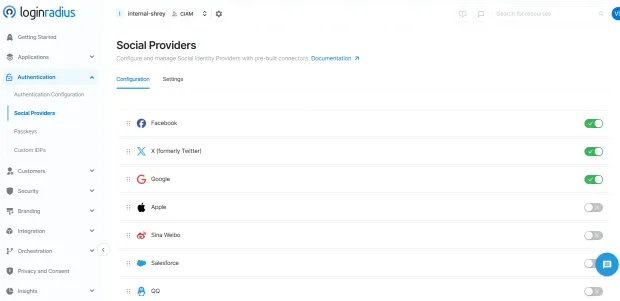
Supports multiple social providers (Google, Facebook, LinkedIn, Apple, GitHub, etc.)
-
Offers easy SDKs and hosted login pages
-
Allows branding customization
-
Ensures security protocols like OAuth 2.0 and OpenID Connect
-
Offers role-based controls (essential for B2B ecommerce login)
Look how quickly you can setup social login through LoginRadius admin console:
Step 2: Select the Right Social Identity Providers
You don’t need to offer every social platform, just the ones that match your audience.
-
Google: Must-have. Broad adoption across personal and business users.
-
Facebook: Strong for D2C lifestyle, fashion, and global markets.
-
Apple: Required for apps on iOS, great for privacy-conscious users.
-
LinkedIn: Best for B2B ecommerce platforms or SaaS solutions.
-
GitHub: Useful for developer-focused tools and marketplaces.
Tip: Keep it simple. More than 3 options can overwhelm users. Test combinations to see which providers convert best.
Step 3: Customize the Login Experience to Match Your Brand
Your ecommerce login is part of your product. Treat it like a core touchpoint not an afterthought.
A good social login implementation should:
-
Match your site’s colors, fonts, and button styles
-
Support localization (for international users)
-
Work flawlessly across mobile and desktop
-
Include branded error messages and fallback flows
-
Offer a “continue as guest” fallback when needed
Platforms like LoginRadius offer both hosted login pages (fast to launch) and SDK-based integration (for full customization control).
Step 4: Ensure Privacy, Compliance, and Consent Handling
Just because you’re collecting data via a social provider doesn’t mean you can skip privacy requirements.
Make sure to:
-
Request only the data you need (e.g., name, email)
-
Display a clear consent screen before data is fetched
-
Link to your privacy policy and terms of service
-
Handle user data securely and only for permitted use
-
Comply with GDPR, CCPA, and other regional laws
LoginRadius automatically manages consent logs, access revocation, and regional data residency for enterprise-grade compliance.
Step 5: Test Across Devices, Browsers, and Edge Cases
Before you go live, test the experience across:
-
Major browsers (Chrome, Firefox, Safari, Edge)
-
Android and iOS mobile devices
-
Logged-in and logged-out states
-
Different identity providers
-
Common failure scenarios (cancel login, invalid tokens)
A smooth login journey, especially for first-time visitors, is essential to making a strong first impression and converting.
Step 6: Monitor and Optimize Login Performance
Once live, don’t stop there. Use analytics to track:
-
Which providers are most popular
-
Social login vs traditional login conversion rates
-
Drop-off rates during sign-in
-
Errors or bottlenecks in the flow
-
Returning vs first-time user trends
LoginRadius offers real-time login analytics that give you visibility into each step of the authentication funnel, helping you optimize performance and user engagement.
If you want to personalize experiences post-login (like saved items, loyalty rewards, or B2B pricing access), make sure your backend or CRM is ready to ingest the data social login provides. This could include:
- User name
- Verified email
- Location
- Profile image
- Social ID tokens
Connect this with your marketing tools, product catalog, or support CRM to build a 360° view of your users without asking them to fill endless forms.
By following these steps, you not only implement social login e-commerce properly, but you turn it into a strategic asset. Whether you’re simplifying access for consumers or unlocking portal-level control for partners on a B2B ecommerce platform, this login layer becomes a silent workhorse that boosts retention, satisfaction, and sales.
Conclusion
In the world of eCommerce, every click matters—and the login experience is one of the most critical yet overlooked touchpoints. Whether it’s a casual shopper browsing on their phone or a business partner logging into a B2B eCommerce platform, users expect one thing: simplicity.
Social login delivers exactly that.
It transforms your ecommerce login from a source of friction into a moment of ease. With just one tap, users can bypass lengthy forms, avoid forgotten passwords, and instantly access their personalized journey. Behind the scenes, you gain verified data, better security, and the ability to craft tailored experiences from the very first visit.
But here’s the truth: it’s not just about convenience. The benefits of social login stretch across your entire ecommerce strategy from boosting conversions and retention, to improving your backend data, to building trust through familiar platforms like Google, Apple, or LinkedIn.
And when powered by a scalable CIAM platform like LoginRadius, social login becomes more than just a feature. It becomes a strategic asset designed to meet the expectations of today’s users, while setting your brand apart in a crowded digital marketplace.
So whether you’re running a D2C storefront, a global brand, or a growing B2B eCommerce login portal, the time to act is now.
Explore LoginRadius Social Login and see how easy it is to offer fast, secure, and branded authentication built for eCommerce at every scale. Request a Demo
FAQs
1. Why is social login beneficial for eCommerce businesses?
A: Social login simplifies the registration process, reduces cart abandonment, and increases conversion rates by allowing users to log in with their existing social media accounts. It also provides verified customer data for better personalization and marketing.
2. Can social login help with customer retention?
A: Yes, social login makes it easier for users to return without needing to remember passwords. This frictionless experience encourages repeat visits and boosts retention by keeping the login journey seamless across sessions and devices.
3. How does social login enhance the mobile shopping experience?
A: On mobile, users often abandon sign-up due to tedious form filling. Social login streamlines this by enabling one-tap access, improving user experience, and increasing conversions on smartphones and tablets.