Introduction
A recent data breach report released by Verizon suggests that over 80% of hacking-related breaches involve stolen or compromised credentials. As attacks evolve, organizations are turning to two-factor authentication (2FA) to reduce account takeover risks.
But 2FA is not a perfect solution.
While it significantly improves security, it also introduces tradeoffs in user experience, cost, and implementation complexity. Not all 2FA methods offer the same level of protection, and some can even create new vulnerabilities if implemented incorrectly.
In this guide, we break down the real benefits, risks, and cost tradeoffs of 2FA—so you can decide whether it’s the right authentication strategy for your organization.
2FA by the Numbers: Why It Matters
-
Over 80% of breaches involve stolen credentials (Verizon DBIR)
-
MFA can block 99.9% of automated account attacks (Microsoft)
-
Phishing-resistant methods like security keys prevent nearly 100% of automated phishing attempts (Google Security)
-
The average cost of a data breach reached $4.45 million globally (IBM)
These statistics show why organizations are rapidly adopting 2FA while also pushing toward stronger, phishing-resistant alternatives like passkeys.
This guide dives straight into the strategic tradeoffs of 2FA. If you want a detailed refresher on what is 2FA and how it works, please read our other blog first.
Types of 2FA Methods: Benefits, Risks & Tradeoffs
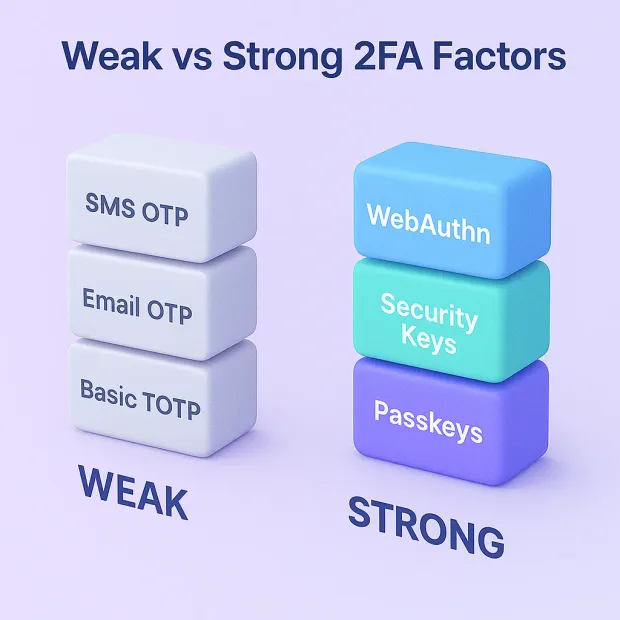
Choosing the right 2FA method isn’t just about adding a second step; it’s about understanding how each factor works, how secure it really is, and how it impacts the user experience.
If you need quick two factor authentication examples to clarify the options, here are the most common patterns teams implement:
-
SMS OTP (text message code)
-
TOTP app (Google Authenticator, Authy)
-
Push approvals (“Approve/Deny” prompts in an app)
-
Hardware security keys (FIDO2/WebAuthn devices like YubiKey)
-
Biometrics (Face ID, fingerprint)
Below are the most common types of 2FA, explained in a way that helps both beginners and experts understand their strengths, weaknesses, and suitability for modern authentication and CIAM platforms.
1. SMS-Based One-Time Passwords (OTP via Text Message)
SMS 2FA is the most familiar and widely adopted form of two-factor authentication. When a user logs in, they receive a numeric code via text message, which they must enter to complete the login. Because SMS is already integrated into every mobile device, it’s incredibly easy for users to understand and adopt.
However, this convenience comes with significant security risks. SMS messages travel through mobile carrier networks, which are susceptible to SIM-swap attacks, SS7 vulnerabilities, and OTP interception. This makes SMS 2FA one of the weakest forms of second-factor security, despite being the most common.
Benefits:
-
Simple and familiar for non-technical users
-
Very low onboarding friction
-
Works on almost every device
-
Useful when prioritizing ease of adoption
Risks & Disadvantages:
-
Vulnerable to SIM-swap attacks
-
Susceptible to SS7 and network-level exploits
-
OTP interception and AitM attacks
-
Lower 2FA security improvement compared to other methods
Cost Tradeoffs:
-
High cost of global SMS delivery
-
OTP delivery failures impact conversion
2. TOTP App-Based 2FA (e.g., Google Authenticator, Authy)
Time-based One-Time Passwords (TOTPs) are generated in authenticator apps installed on a user’s device. These apps generate rotating codes every 30 seconds, making them far more secure than SMS because the codes never travel through a carrier network.
TOTP balances good security with fairly easy implementation, but users who aren’t tech-savvy may struggle with setup. It also presents recovery challenges if users lose their phone, delete the app, or fail to save backup codes.
Benefits:
-
More secure than SMS 2FA
-
No SIM-swap or phone-number hijacking risk
-
Lower operational cost than OTP SMS
-
Widely supported across apps and platforms
Risks & Challenges:
-
Vulnerable to man-in-the-middle attacks
-
TOTP usability issues for non-technical users
-
Device-loss recovery and backup code dependency
-
It can still be bypassed in sophisticated phishing attacks
Cost Tradeoffs:
-
Near-zero operating cost
-
Higher support costs if users frequently lose devices
3. Push Notification 2FA (Approve / Deny Prompts)
Push-based 2FA sends a notification to a user’s mobile app asking them to approve or deny a login attempt. Instead of entering a code, the user simply taps “Approve,” offering a frictionless experience.
This method boosts login completion rates and reduces onboarding drop-offs. However, it introduces a rising threat known as MFA push fatigue, where attackers flood users with repeated approval requests until one is mistakenly approved.
Benefits:
-
Fastest and most user-friendly 2FA
-
Excellent for reducing login friction
-
No OTP entry or code copying required
-
Higher conversion and fewer onboarding drop-offs
Risks & Challenges:
-
Push fatigue attacks (MFA fatigue)
-
Requires reliable mobile notifications
-
Users may accidentally approve malicious requests
-
App dependency and device compatibility matters
Cost Tradeoffs:
-
Requires app infrastructure
-
Lower cost than SMS OTPs
-
Potential push delivery delays impact UX
4. Hardware Security Keys (WebAuthn, FIDO2, YubiKey)
Hardware keys are physical devices that users plug in or tap to verify their identity. They are considered the strongest form of 2FA because they are phishing-resistant, meaning attackers cannot intercept or trick users into approving fake login attempts.
Security keys rely on public-key cryptography and enforce zero-trust authentication by ensuring the user interacts with the legitimate website. This prevents real-time phishing (AitM), session hijacking, and OTP theft.
Benefits:
-
Highest level of 2FA security
-
Strong resistance to phishing and token theft
-
No OTPs, no SMS, no passwords transmitted
-
Ideal for admins and high-risk accounts
Risks & Challenges:
-
Higher upfront hardware cost
-
Users may lose the physical key
-
Requires modern browser/device compatibility
-
Higher learning curve
Cost Tradeoffs:
-
Higher initial investment
-
Reduced long-term breach risk saves cost
5. Biometric 2FA (Fingerprint, Face ID, Iris, Voice)
Biometrics authenticate users based on unique physical characteristics stored securely on their device (e.g., Face ID on iOS). They offer usability and speed unmatched by other 2FA methods and are increasingly common in mobile-first apps.
However, biometrics cannot be changed if compromised, raising privacy concerns. They are best used as a second factor rather than a standalone method.
Benefits:
-
Extremely fast and frictionless
-
Greatly improves the authentication user experience
-
Device-bound and secure
-
Convenient for mobile-first experiences
Risks & Challenges:
-
Cannot be replaced if compromised
-
Device dependency
-
Privacy and biometric data handling concerns
-
Not suitable for every industry or region
Cost Tradeoffs:
-
No direct cost to organizations
-
Higher support cost if devices fail
Also read: What is Biometric Authentication and How It's Changing Login
6. Passkeys (Passwordless, Phishing-Resistant Authentication)
Passkeys replace passwords and 2FA altogether by using public-key cryptography to authenticate users instantly and securely. They eliminate OTPs, SMS, TOTP, and push notifications, improving both security and usability.
Passkeys are not technically 2FA, but organizations often evaluate passkeys vs 2FA because passkeys provide stronger security with far less friction.
Benefits:
-
Phishing-resistant authentication
-
No codes, no passwords, no OTP fatigue
-
Dramatically improves login success rates
-
Excellent for consumer-scale CIAM experiences
Risks & Challenges:
-
Requires modern device + browser ecosystem
-
User education and migration still evolving
-
Cross-device synchronization issues in some regions
Cost Tradeoffs:
-
Lower operational cost than OTP-based 2FA
-
Ideal for reducing long-term authentication support cost
The real challenge isn’t adding 2FA, it's balancing security with user experience.
2FA Method Comparison: Security vs Usability vs Cost
| Method | Security Level | Phishing Resistance | User Friction | Cost | Best Use Case |
|---|---|---|---|---|---|
| SMS OTP | Medium | Low | Low | Medium | Consumer apps, low-risk use |
| TOTP Apps | High | Medium | Medium | Low | SaaS, developer platforms |
| Push Notifications | High | Medium | Low | Medium | Mobile-first apps |
| Hardware Keys | Very High | High | Medium | High | Enterprises, high-security |
| Biometric Authentication | Very High | High | Low | Medium | Consumer + enterprise apps |
| Passkeys | Very High | Very High | Very Low | Medium | Passwordless future systems |
Passkeys vs 2FA: When Should You Make the Switch?
| Feature | 2FA | Passkeys |
|---|---|---|
| Authentication Type | Password + second factor | Passwordless |
| Phishing Resistance | Medium (varies by method) | Strong (phishing-resistant) |
| User Experience | Moderate friction | Seamless |
| Security Model | Shared secrets (OTP) | Public-key cryptography |
| Adoption | Widely used | Rapidly growing |
2FA improves security over passwords, but passkeys eliminate passwords entirely making them the long-term direction for secure authentication.
Benefits of 2FA: Why Organizations Still Rely on It
Despite the rise of passwordless and phishing-resistant authentication, Two-Factor Authentication (2FA) remains one of the most effective ways to strengthen login security and reduce account takeovers.
It delivers clear benefits of two factor authentication, improves trust, and aligns with modern CIAM security best practices, which is why it continues to be widely used across customer platforms, enterprise SaaS, eCommerce, finance, and high-risk digital services.
Below is a well-rounded overview of the major advantages of two factor authentication (also commonly framed as 2fa benefits) clearly explained for both beginners and experts.
1. Stronger Security Than Passwords Alone
Passwords are weak, reused, and frequently compromised in breaches. Adding a second factor creates an additional layer that blocks attackers even if they’ve already stolen a password.
Why it matters:
-
Reduces account takeover (ATO) risk
-
Prevents basic credential-stuffing attacks
-
Enhances overall 2FA security improvement
-
Provides foundational strong authentication for customer identity systems
Organizations see immediate value because the second factor forces attackers to clear an additional hurdle one they rarely have access to.
2. Resistance Against Common Phishing Attacks
Certain 2FA methods, especially WebAuthn, security keys, and some TOTP flows, offer strong resistance to 2FA phishing. They make it significantly harder for attackers to steal login codes, trick users, or intercept sessions.
Why it matters:
-
Blocks OTP stealing and real-time phishing (AiTM)
-
Prevents session hijacking and token theft
-
Stops attackers from misusing stolen passwords
While SMS and TOTP remain vulnerable, phishing-resistant MFA dramatically reduces the success rate of phishing attacks.
Also read: Phishing-Resistant MFA Login for Mobile Applications: Strategies and Challenges
3. Increased User Trust and Platform Credibility
Users feel more confident when a service offers secure login options. Even basic 2FA creates a perception of safety, which helps platforms earn long-term loyalty.
Why it matters:
-
Strengthens customer trust in digital experiences
-
Helps retain users by improving 2FA user experience
-
Shows commitment to protecting personal and financial data
A trusted authentication process often leads to higher engagement and more conversions.
4. Compliance With Industry Standards and Regulations
Many regulations now require 2FA or MFA as a minimum control for securing customer data. Implementing 2FA helps organizations meet these requirements without major architectural changes.
Why it matters:
-
Required by GDPR, HIPAA, PCI-DSS, PSD2, and financial regulators
-
Avoids legal penalties and compliance gaps
-
Aligns with industry-wide modern authentication best practices
For many organizations, 2FA is not optional, it’s a compliance necessity.
5. Reduces Fraud and Account Takeovers
2FA lowers the probability of successful ATO attempts by adding friction where it matters most at login.
Why it matters:
-
Strong protection for customer apps and enterprise SaaS
-
Helps reduce fraudulent transactions and identity misuse
-
Slows down attackers even when other layers fail
This directly leads to lower operational costs related to fraud recovery and customer support.
6. Works Across a Range of Devices and Environments
From SMS and TOTP to hardware keys and biometrics, 2FA offers flexible implementation options for different customer segments.
Why it matters:
-
Let's organizations align methods with user behavior
-
Supports low-tech and high-tech users
-
Integrates into various CIAM systems, login flows, and onboarding journeys
This flexibility is one of the key reasons 2FA is still widely adopted worldwide.
7. Smooth Transition Path Toward MFA & Passwordless
2FA acts as the stepping stone between outdated password-only security and future-ready authentication (adaptive MFA, passkeys, phishing-resistant MFA).
Why it matters:
-
Eases migration away from passwords
-
Helps prepare users for stronger authentication journeys
-
Bridges the gap between convenience and robust security
Enterprises often start with 2FA and later introduce adaptive MFA or passkeys for frictionless authentication.
Risks & Challenges of 2FA: What Organizations Must Consider
While 2FA significantly strengthens security, it isn’t flawless. Every authentication method introduces tradeoffs, and for 2FA, those tradeoffs often appear in usability, reliability, and vulnerability to modern attacks. Understanding these two factor authentication pros and cons is crucial before rolling it out to millions of users.
Below are the major challenges organizations should be aware of.
1. Usability and Friction
The most common challenge with 2FA is the additional friction it creates. Even one extra step—switching apps, waiting for a code, or approving a prompt can slow users down. For fast-moving consumer applications or eCommerce journeys, this friction directly impacts conversion rates, onboarding completion, and user satisfaction.
While security improves, a poorly designed 2FA flow can feel inconvenient, leading to frustration and higher abandonment.
2. Recovery and Device Loss
When users change devices, delete their authenticator apps, or lose their phones, 2FA quickly becomes a barrier instead of a safeguard. Recovery flows are often confusing, and many users skip backing up codes or alternative verification methods.
This turns a protective layer into a support burden, resulting in lockouts, ticket spikes, and negative user sentiment if recovery isn’t handled gracefully.
3. Weaknesses in Specific 2FA Methods
Not all 2FA methods offer the same level of protection. SMS-based OTPs remain popular but are also the most vulnerable due to SIM-swap attacks, SS7 exploitation, and OTP interception. Even TOTP apps and push notifications can fall victim to real-time phishing, malware, or approval fatigue.
These weaknesses don’t make 2FA ineffective—but they do highlight the importance of choosing methods that align with your risk profile.
4. Cost and Operational Overhead
2FA introduces visible and hidden costs. SMS OTP delivery can become expensive at scale, while authenticator apps and push flows demand engineering effort and mobile infrastructure. On top of that, recovery support is often underestimated, and it becomes one of the largest overheads when 2FA is deployed to millions of users.
Organizations need to evaluate both the security value and long-term operational impact before choosing a method.
5. Compatibility Across Users and Devices
Device diversity plays a major role in how successful 2FA adoption becomes. Older devices, limited connectivity, regional SMS issues, or lack of app support can prevent users from accessing certain 2FA methods. If alternatives aren’t provided, these compatibility gaps can turn a secure login process into an exclusion problem, especially for global audiences.
Balancing Usability and Security: How to Reduce 2FA Friction Without Weakening Protection
Every organization eventually faces the same challenge: how to strengthen authentication without frustrating users.
This is the classic security vs usability tradeoff at the heart of 2FA. Stronger security adds protection, but too much friction leads to drop-offs, abandoned signups, and frustrated customers. On the other hand, making login too convenient leaves accounts exposed to attacks.
The goal isn’t to choose between security and usability; it’s to design an authentication experience that delivers both. Below are practical, modern strategies organizations use to balance convenience, trust, and strong authentication.
1. Use Adaptive MFA Instead of Forcing 2FA Every Time
Static 2FA challenges users constantly, even when the login is routine and low-risk. Adaptive MFA evaluates user behavior, location, device, and real-time context to decide whether a step-up is necessary.
This approach keeps high-risk actions secure while letting familiar, low-risk sessions flow smoothly. It reduces fatigue, minimizes unnecessary prompts, and still strengthens overall protection.
Also read: Adaptive Authentication- Is it the Next Breakthrough in Customer Authentication?
2. Educate Users About Why 2FA Matters
Users are more willing to complete a second authentication step when they understand what it protects them from. Transparent communication during onboarding and login without technical jargon helps users see 2FA as a safeguard, not an inconvenience.
This directly supports adoption by reinforcing why is two factor authentication important in the first place.
When users understand the “why,” they’re far less resistant to adopting stronger authentication.
3. Offer Flexible 2FA Options
No single method works for everyone. Giving users choices—such as SMS, TOTP apps, push authentication, or biometrics—improves adoption and reduces frustration. With flexibility, users can select methods that match their device capabilities, comfort level, and accessibility needs, creating a more user-friendly authentication experience.
4. Keep the Enrollment Flow Simple
A confusing setup flow is one of the biggest reasons users abandon 2FA entirely. Clear instructions, a short setup sequence, and well-placed guidance make the process smooth and approachable. When onboarding is simple, adoption increases and support tickets decrease.
5. Provide Clear and Safe Recovery Paths
A secure recovery process prevents 2FA from becoming a lockout risk. Backup codes, secondary verification options, or guided recovery processes ensure users can regain account access without compromising security. When users know they won’t get stuck, they’re more confident enabling 2FA in the first place.
6. Recognize When to Move Beyond Traditional 2FA
For high-risk industries or large-scale customer applications, basic 2FA may not be enough. At some point, organizations benefit from transitioning to passwordless, phishing-resistant MFA, passkeys, or hardware-backed authentication.
These methods offer stronger protection with even less friction, making them ideal for modern CIAM strategies.
Cost Considerations of 2FA: The True Investment Behind Secure Authentication
Implementing 2FA is not just a security decision, it’s also a financial one. Each two-factor authentication method carries visible and hidden costs that organizations must understand before rolling it out at scale.
From SMS delivery fees to recovery support overhead, 2FA introduces expenses that can directly affect operational budgets, conversion rates, and long-term ROI.
Below are the core cost considerations explained clearly.
1. Implementation and Setup Costs
Different 2FA methods require different levels of infrastructure. SMS OTPs demand telecom integrations, push notifications require mobile app support, and hardware keys need device compatibility. Even TOTP-based 2FA involves engineering work, UI design, user training, and testing.
These initial costs vary depending on your authentication strategy, but they are essential to building a secure CIAM experience and reducing account takeovers in the long run.
2. Ongoing Support and Maintenance
Once 2FA is live, users will inevitably need help. Lost devices, deleted authenticator apps, expired codes, and lockouts significantly increase support workloads. This is one of the most underestimated expenses in authentication.
Support teams must be trained to handle 2FA-related requests safely without creating new vulnerabilities, a requirement that adds both time and cost.
3. Cost of OTP Delivery (Especially SMS)
SMS OTP remains the most expensive 2FA option, especially for global platforms. Telecom rates vary by region, delivery can be inconsistent, and failed SMS messages negatively affect login completion rates.
App-based TOTP and push notifications reduce ongoing costs, but may require more development upfront. Hardware keys require one-time purchases, but are costly for large user bases. Understanding these tradeoffs helps determine the best long-term investment.
4. Impact on Conversion Rates and User Behavior
Every extra step in the login process directly impacts conversions. If users find 2FA annoying or slow, they drop off, especially during sign-ups. This is why companies must evaluate the balance between 2FA security improvements and the potential loss in conversions due to friction.
Even a small increase in drop-offs can significantly affect revenue for high-traffic consumer apps.
5. Evaluating Long-Term ROI
The true value of 2FA becomes clear when compared to the cost of account takeovers, fraud, data breaches, and customer churn. For most organizations, preventing even a handful of high-impact incidents justifies the investment.
A well-implemented 2FA system reduces fraud losses, lowers chargebacks, and increases user trust, positively influencing long-term retention and revenue.
Security Risks and Modern Attack Vectors That Can Break 2FA
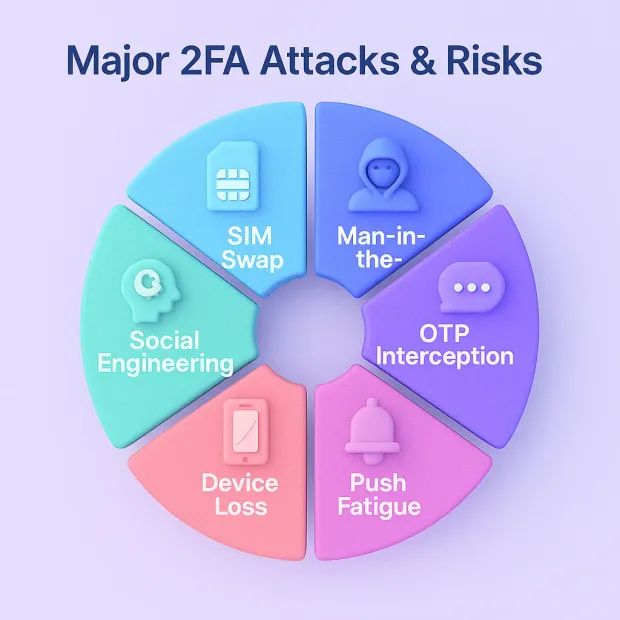
Two-factor authentication dramatically improves security, but it is not invincible. As attackers evolve, many traditional 2FA methods, especially SMS and OTP-based systems face new threats that can bypass or weaken them.
Understanding these risks helps organizations choose the safest authentication method and decide when they should upgrade to phishing-resistant MFA or passkeys.
Below are the most common attack vectors that affect 2FA today.
1. SIM-Swap Attacks
In a SIM-swap attack, an attacker convinces a mobile carrier to transfer a victim’s phone number to a new SIM card. Once successful, the attacker receives all SMS OTPs, completely bypassing.
2. SMS-based 2FA
This is one of the biggest reasons why SMS 2FA is considered risky, especially for high-value accounts such as banking, crypto, or enterprise admin portals.
3. Man-in-the-Middle (MITM) and Real-Time Phishing (AitM)
Modern phishing kits can intercept login credentials and the second factor in real time. Attackers set up fake login pages, wait for the user to enter their password and OTP, then pass those details to the real site.
This makes SMS OTPs, TOTP apps, and even push notifications vulnerable to AitM attacks unless combined with phishing-resistant MFA such as WebAuthn or security keys.
4. OTP Interception and Malware-Based Attacks
Attackers increasingly deploy malware on mobile devices that can read incoming one-time passwords or push notifications.
Examples include:
-
mobile trojans that intercept SMS OTPs
-
malware that steals TOTP codes from authenticator apps
-
bots that auto-forward verification messages
These threats target OTP delivery channels, not users directly.
5. Push Notification Fatigue Attacks
Push-based authentication improves usability, but it introduces a human weakness: people get tired of notifications. Attackers exploit this by sending repeated pushes until the user accidentally approves one.
This attack, known as push fatigue or “MFA bombing,” has been used in major breaches across tech and enterprise environments.
6. Session Hijacking and Token Theft
Even with 2FA, attackers may bypass security by stealing session cookies or tokens after login. Once they have these tokens, they can act as the user without needing the password or second factor again.
This highlights the need for layered protections, not just 2FA alone.
7. Social Engineering and User Manipulation
Attackers often trick users into sharing OTPs or clicking “approve” on push prompts. Even strong 2FA systems fail if the user can be manipulated, a reminder that secure authentication also depends on user awareness.
This is where user education and clear UX design play a major role. In other words, 2FA is a solid baseline, but not the finish line for modern identity security.
Real-World 2FA Bypass Incidents
-
Uber MFA Fatigue Attack (2022): Attackers bombarded a contractor with push notifications until one was approved, granting internal access.
-
Twitter SIM-Swap Attack (2020): Hackers exploited telecom vulnerabilities to intercept SMS OTPs and take over high-profile accounts.
-
MGM Resorts Breach (2023): Attackers used social engineering and MFA fatigue tactics to gain system access.
-
AiTM Phishing Campaigns (Microsoft 365): Attackers used reverse proxy phishing kits to capture both credentials and OTPs in real time.
These examples highlight that not all 2FA methods provide equal protection—especially against modern phishing attacks.
Is 2FA Worth It? Evaluating Whether It’s the Right Choice for Your Organization
Deciding whether to implement 2FA isn’t just a technical decision; it’s a balance of security needs, user expectations, and cost. While two-factor authentication strengthens protection against account takeovers, it also brings usability challenges, operational costs, and varying levels of effectiveness depending on the method you choose.
Here’s a clear breakdown to help you evaluate whether 2FA is “worth it” for your business or if you should adopt stronger alternatives like adaptive MFA, phishing-resistant MFA, or passkeys.
1. Security Value vs. Potential Breach Impact
The primary question is simple: What happens if an account gets compromised? If you handle sensitive data, financial information, healthcare records, or high-value customer accounts, 2FA delivers enormous value by reducing the likelihood of account takeovers.
For lower-risk platforms, the added security may still be beneficial, but not always mandatory.
2. User Experience and Conversion Impact
2FA adds a step in the login process, and that friction affects user behavior. If your audience is highly sensitive to convenience, such as eCommerce shoppers, B2C apps, or guest checkouts you must weigh the security benefits against potential drop-offs.
In platform-heavy SaaS products or industries where security is expected, users are generally more accepting of 2FA.
3. Industry Expectations and Compliance Requirements
Many industries require 2FA or MFA by regulation. If you operate in finance, healthcare, retail, or payments, 2FA is often non-negotiable. Compliance frameworks such as GDPR, HIPAA, PCI-DSS, and PSD2 require stronger authentication to protect customer data.
If compliance is part of your world, the value of implementing 2FA is immediately clear.
4. Long-Term Strategic Benefits
Beyond immediate security gains, 2FA helps build a culture of secure user behavior. More importantly, it paves the way for future authentication models such as adaptive MFA, passkeys, and phishing-resistant methods.
Ultimately, 2FA acts as a stepping stone in a broader identity-first security strategy.
Should You Implement 2FA? Decision Matrix
| Business Scenario | Recommended Approach | Rationale |
|---|---|---|
| Low-risk consumer apps | SMS or Push 2FA | Balances UX and basic security |
| SaaS platforms | TOTP or Push MFA | Stronger protection with moderate friction |
| Enterprise systems | Hardware keys or Passkeys | High security, phishing resistance |
| Regulated industries | Adaptive MFA + Passkeys | Compliance + risk-based authentication |
| eCommerce platforms | Optional 2FA + Adaptive MFA | Avoids conversion drop-offs |
The right approach depends on your risk profile, user base, and compliance requirements.
What Happens If Users Lose Access to 2FA?
One of the biggest challenges with 2FA is account recovery.
Common Recovery Options
-
Backup codes provided during setup
-
Secondary authentication methods (email, biometrics)
-
Trusted device recognition
-
Identity verification via support workflows
Best Practices
-
Always provide backup recovery options
-
Allow multiple enrolled devices
-
Use step-up authentication for recovery
-
Avoid overly complex recovery flows that lock users out
A poorly designed recovery flow can create more risk than it solves making it a critical part of 2FA implementation.
Conclusion
Two-factor authentication remains one of the most effective ways to strengthen customer login security, reduce account takeovers, and build user trust. It provides strong protection against password-based attacks, phishing, and unauthorized access, making it a foundational layer of modern authentication.
But like any security measure, 2FA comes with tradeoffs. Usability friction, recovery challenges, SMS vulnerabilities, evolving attack vectors, and ongoing costs all play a role in determining whether a specific method is right for your platform.
The key is not just enabling 2FA, but choosing the right type, supporting your users through it, and balancing security with a smooth authentication experience.
For many organizations, 2FA becomes the first big step toward more advanced approaches such as adaptive MFA, phishing-resistant authentication, and passwordless login. When implemented thoughtfully, 2FA doesn’t just protect accounts it elevates the entire digital experience.
If you want to implement 2FA that’s secure, scalable, and user-friendly without compromising on performance or conversion, LoginRadius can help. Book a quick demo with LoginRadius and see how modern authentication can transform your customer experience.
FAQs
Q: What is the difference between Adaptive MFA and Traditional MFA?
A: Traditional MFA enforces the same verification steps for every login, while Adaptive MFA analyzes risk signals like device, IP reputation, location, and behavior to decide when to require step-up authentication. It provides stronger security with less friction.
Q: Is Adaptive MFA more secure than regular MFA?
A: Yes. Adaptive MFA uses contextual and behavioral analysis to detect anomalies and stop modern attacks such as AITM, SIM-swap, and credential stuffing. It only challenges high-risk events, making it both secure and user-friendly.
Q: When should a business choose Adaptive MFA over Traditional MFA?
A: Choose Adaptive MFA when you need high security without hurting UX, especially for customer-facing apps, high-traffic platforms, and global user bases. It reduces friction, increases conversions, and aligns with zero-trust authentication.
Q: Does Adaptive MFA reduce user friction?
A: Yes. Adaptive MFA allows low-risk users to log in without extra verification while stepping up only when suspicious activity is detected. This reduces MFA fatigue and boosts user satisfaction.
Q: Is 2FA enough to stop hackers?
A: 2FA significantly reduces risk but can still be bypassed through phishing or social engineering if weaker methods are used.
Q: What is the safest 2FA method?
A: Hardware keys and passkeys provide the highest level of phishing-resistant security.
Q: Does 2FA affect user experience?
A: Yes, it can introduce friction, but adaptive MFA and passkeys help reduce this impact.
Q: Should small businesses use 2FA?
A: Yes, even small businesses benefit from 2FA as credential-based attacks target organizations of all sizes.