Push notification authentication is a modern authentication method that verifies user identity through a real-time approval request sent to a trusted mobile device. Instead of entering passwords or one-time codes, users simply approve or deny login attempts with a single, real-time tap making authentication both secure and frictionless. This method combines device possession (something the user has) with user interaction (something the user does) to significantly enhance security.
As cyber threats increasingly target user identities, traditional methods like passwords and OTPs are no longer sufficient. Stolen credentials, phishing attacks, and SIM-swapping have exposed the limitations of these approaches. Push authentication addresses these challenges by eliminating manual code entry and introducing device-based, context-aware verification.
In a typical flow, when a user attempts to log in, a push notification is sent to their registered device with details such as location, device type, and time of access. The user can then approve or deny the request instantly. This not only improves security but also enhances user experience by reducing login friction.
Why push authentication is gaining adoption:
-
Eliminates password and OTP entry, reducing user friction
-
Reduces risk of phishing and credential-based attacks
-
Enables real-time, device-based identity verification
-
Improves login success rates and user experience
-
Supports modern MFA and passwordless authentication strategies
Modern implementations also include advanced security controls such as number-matching authentication, contextual prompts, and adaptive risk-based checks. These enhancements help prevent attacks like MFA fatigue and unauthorized approvals.
In this guide, we’ll explain what push notification authentication is, how it works step by step, its advantages and limitations, real-world use cases, and best practices for secure implementation.
Push authentication is widely used in multi-factor authentication (MFA) solutions, adding an extra layer of protection against unauthorized access. It is commonly implemented by banking services, corporate security systems, and cloud-based applications to prevent fraudulent logins. It is also implemented by other industries as part of their adaptive MFA strategy.
This is a specialized guide on Push notification authentication methods. For a look at the human login journey, see our User Authentication Guide. For backend protocols and machine-level security, see our Comprehensive Guide to Authentication.
What is Push Notification MFA?
Push Notification MFA is a secure and user-friendly multi factor authentication method where users verify their identity by approving a login request directly on their registered mobile device.
The user receives a real-time push notification through an authenticator app or mobile device. They simply tap “Approve” or “Deny”, making the login process faster and more seamless.
But this is the most basic type of it, and can sometimes give rise to issues - like a user accidentally tapping on approval without understanding the details. This can again give rise to cyber threats.
That is why, modern Push Notification MFA can go beyond simple Approve/Deny and include interactive challenges like Number or Alphabet Matching.
Instead of blindly approving a request:
-
The login screen shows a random number or alphabet (e.g., 27)
-
The push notification sent to your trusted device displays multiple options
-
The user must select the correct matching number or alphabet
This ensures the user is actively involved and prevents accidental or fraudulent approvals.
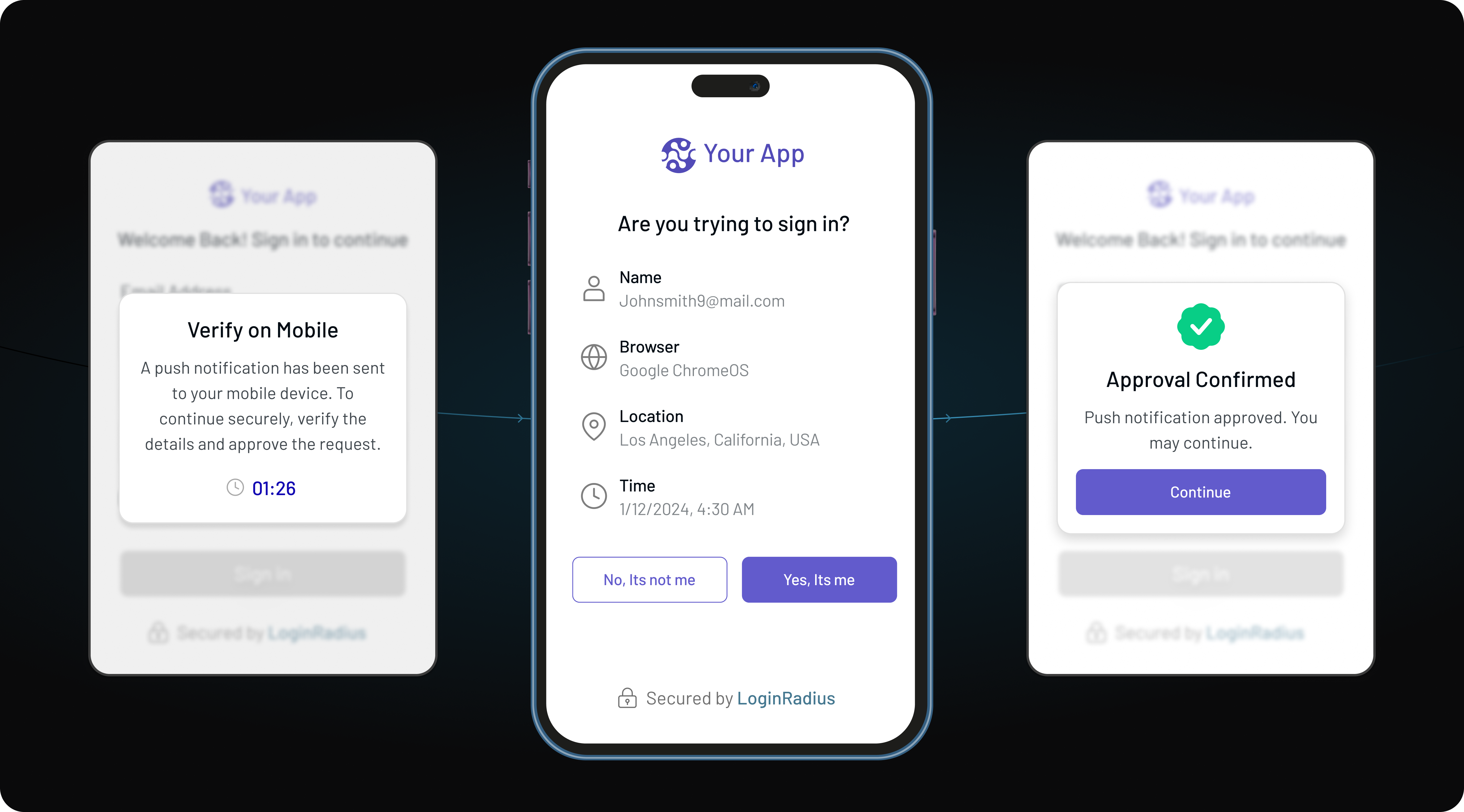
How Push Authentication Works?
Push authentication follows a straightforward and user-friendly process:
User Initiates Login
Step 1
The user attempts to log into an application / access a protected resource using primary credentials (username/password).
Server Triggers Push Request
Step 2
The authentication server generates a unique transaction challenge as a push request and sends the notification to the user’s registered trusted device.
Contextual Review
Step 3
The trusted device receives an encrypted payload displaying critical context: real-time login location data, device information, IP address, time and an authorization prompt.
User Verification & Signing
Step 4
The user signs the transaction with a tap (or number-matching challenge). The device sends a cryptographically signed approval back to the auth server to grant or deny access.
💡 Under the Hood: The Asymmetric Key Handshake
When a user registers a trusted device during onboarding, the application generates a unique cryptographic key pair. The private key remains safe inside the mobile device's Hardware Security Module (Secure Enclave), while the public key is saved on the LoginRadius server. When a push prompt occurs, the server sends a challenge string. Tapping "Approve" unlocks the private key to sign that specific challenge, meaning a cloned device cannot mimic the signature.
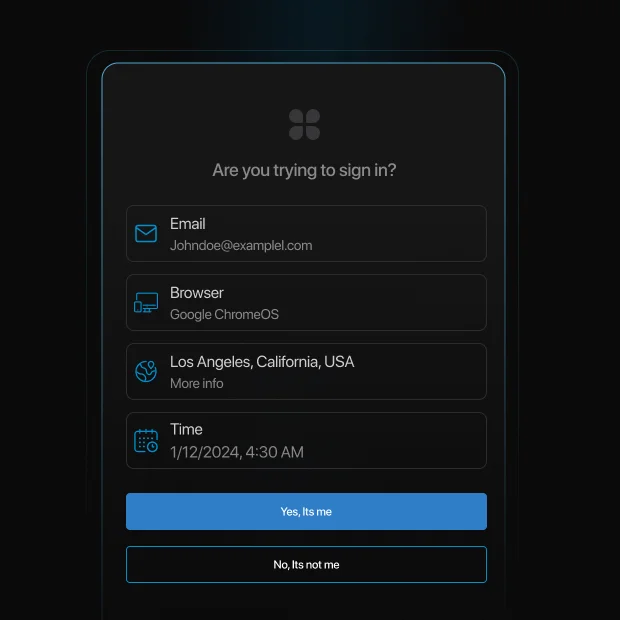
What Are the Advantages and Challenges of Push Authentication?
Advantages of Push Notification Authentication
-
Enhanced Security: Since push authentication requires both device possession and user approval, it is more secure than passwords or OTPs.
-
Seamless User Experience: Users do not need to memorize passwords or enter codes manually, reducing friction during authentication.
-
Real-Time Alerts: Users receive immediate notifications of any login attempts, enabling them to take quick action against unauthorized access.
-
Phishing Resistance: Unlike traditional authentication methods, push authentication minimizes the risk of phishing attacks by eliminating the need to enter credentials.
-
Cost-Effective: Reduces reliance on SMS-based OTPs, lowering operational costs and improving authentication efficiency.
Why Push Authentication Is Growing
-
MFA blocks 99.9% of automated attacks (Microsoft)
-
Over 80% of breaches involve stolen credentials (Verizon DBIR)
-
Push-based MFA adoption is rapidly increasing across enterprises (Gartner)
These trends show why organizations are moving beyond passwords and OTP-based authentication.
Challenges of Push Notification Authentication
Device Dependency
Push authentication requires users to have access to a registered device. If a device is lost or changed, users may face login disruptions unless backup authentication methods are configured.
Internet Connectivity
Push notifications rely on internet connectivity. In offline scenarios, users may not receive authentication requests, making fallback methods like TOTP essential.
Device Compatibility
Not all devices or operating systems support push notifications equally. Older devices or restricted environments may limit functionality.
MFA Push Fatigue
Repeated authentication requests can lead to accidental approvals, especially if users are not trained to recognize suspicious activity.
Approval Phishing (AiTM Attacks)
Attackers can intercept authentication flows and trick users into approving malicious requests in real time.
User Adoption Challenges
Some users may not understand push-based authentication flows, requiring onboarding and education for smooth adoption.
MFA Push Fatigue: The Biggest Risk of Push Authentication
MFA push fatigue (also known as MFA bombing) is one of the most common attacks against push notification authentication.
In this attack, an attacker repeatedly sends login approval requests to a user’s device until the user accidentally or unknowingly approves one. This tactic relies on human behavior rather than technical vulnerabilities.
A well-known example is the 2022 Uber breach, where an attacker sent repeated push notifications until a contractor approved one, granting access to internal systems.
How to prevent push fatigue attacks
-
Use number-matching authentication instead of simple approve/deny
-
Limit the number of push requests within a time window
-
Show contextual details (location, device, time) in the notification
-
Enable risk-based authentication to detect suspicious patterns
Modern push authentication systems combine these controls to significantly reduce attack success rates.
Number Matching Authentication
This is a modern technique that requires the user to type a 2-digit number or select the right one from a few options, from the login screen.
⚠️ The Phishing Catch: Is Push Truly Phishing-Resistant?
Standard "Approve/Deny" push notifications are not completely phishing-resistant. Attackers using Adversary-in-the-Middle (AiTM) proxy kits can trigger a legitimate push, and if the user is caught off-guard, they approve it. To turn push authentication into a completely phishing-resistant factor, you must use number-matching combined with adaptive location verification.
Where Is Push Authentication Used?
Push authentication is widely used across various industries, including:
| Industry | Primary Push Trigger | Critical Contextual Components Protected |
|---|---|---|
| Financial Services | Transactions and logins | Transaction amount, recipient verification, account detail changes |
| B2B Partners and Vendors | VPN access, privileged admin logins | Device compliance state, location anomalies |
| E-Commerce | Modification of billing information, bulk orders | Cart details matching, behavioral risk score |
| Healthcare | Accessing sensitive patient EMR systems | Session expiration limits, strict HIPAA audit trails |
| Government & Public Sector | Accessing tax portals, citizen benefit claims | National identity cross-reference and IP risk checks |
| Education Platforms | Accessing academic records, launching online exams | Student ID verification and device lock-down states |
How Does LoginRadius Push Notification MFA Work?
Instead of making users wait for an SMS or open a separate email, the LoginRadius server sends an instantaneous, encrypted message directly to the user's registered mobile device via an authenticator app.
The onboarding process for your end users is remarkably simple.
-
During registration or their first security setup, the user is presented with a secure QR code on their login screen.
-
By scanning this QR code with their mobile authentication app, a cryptographic bond is established between the user's account and their physical device.
-
From that point forward, the device acts as a trusted hardware token.
Now, we mentioned before that this process happens though an authenticator app. You must be worried at first, thinking you might have to either build it from scratch, or be satisfied with whatever we provide - right?
Well, when we were building the solution, we also thought about it the same way. That is why,
to give businesses maximum flexibility, LoginRadius offers multiple implementation pathways, depending on your engineering setup. Let’s go through them one by one.
The Turnkey Solution (LoginRadius Authenticator App)
For organizations looking to deploy MFA instantly without building custom software, LoginRadius provides its own dedicated, ready-to-use authenticator app for both iOS and Android platforms.
Your end users can simply download it from playstore or app store and get started with the auth process.
Custom App Integration (Via LoginRadius SDKs & APIs)
If you want a completely white-labeled experience built right into your own native mobile apps, LoginRadius allows rapid deployment through its official SDKs and MFA APIs.
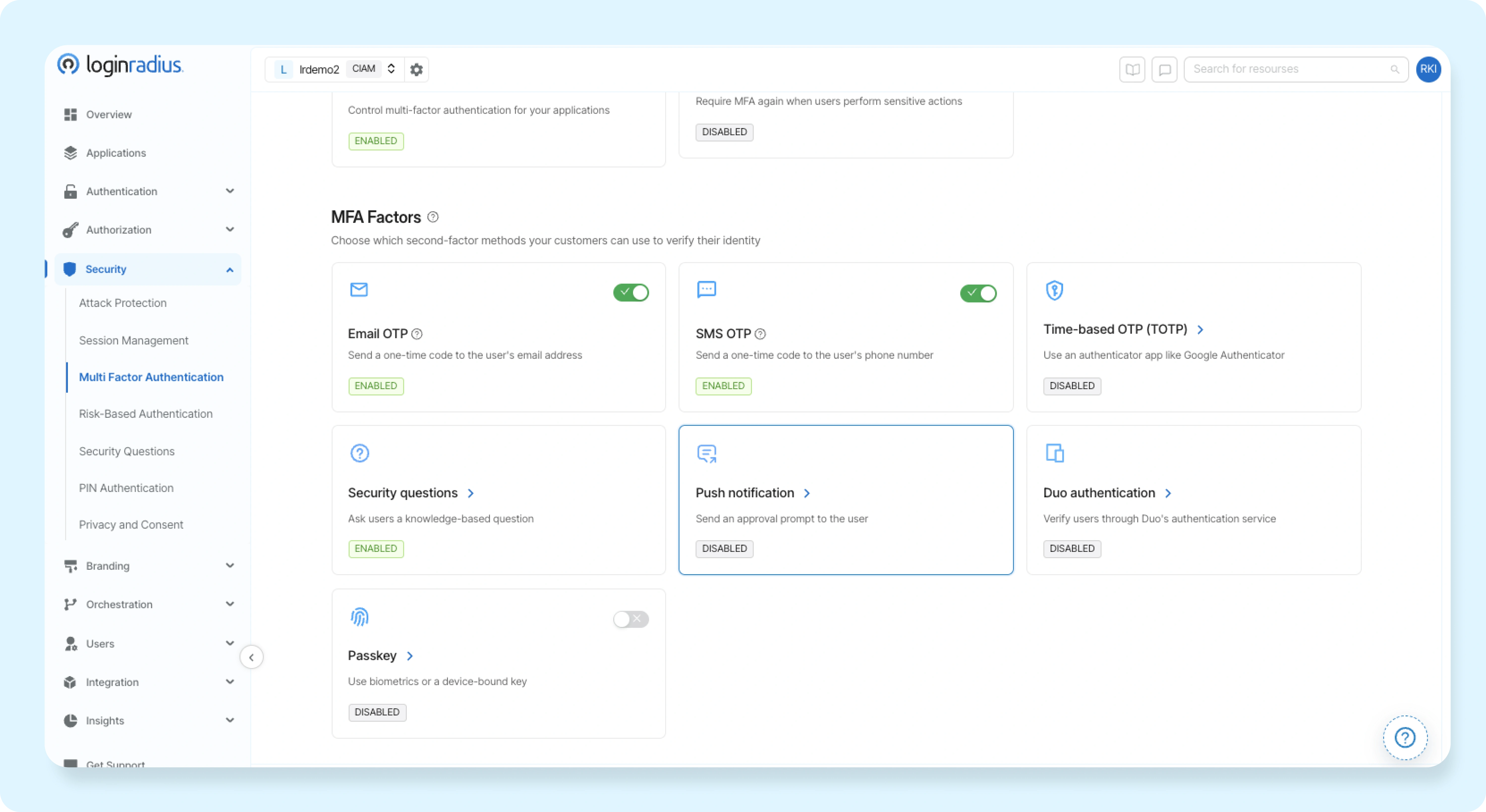
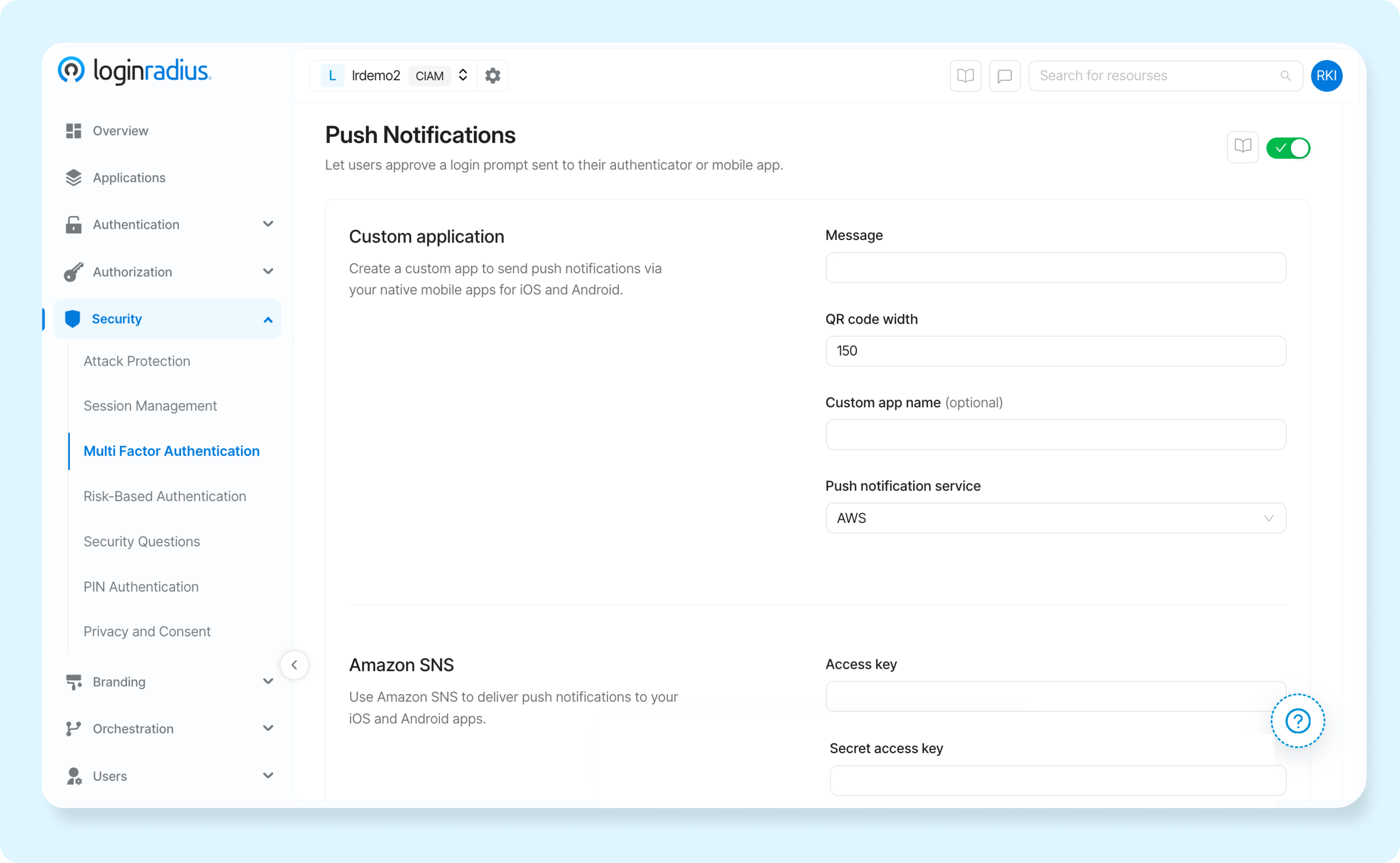
For configuring a custom app workflow, you need to go to the LoginRadius Admin Console under Security → MFA → Push Notification. You can then select your preferred backend delivery service:
1. AWS SNS (Amazon Simple Notification Service)
If you leverage enterprise cloud infrastructure, LoginRadius can route your authentication prompts using Amazon SNS.
Because Android and iOS handle push notifications through entirely different cloud architectures, the dashboard separates the configuration for each platform:
-
Android App Configuration: Requires your Play Store URL (so users can easily download the app) and the Platform ARN generated in your AWS console for Google Firebase Cloud Messaging (FCM).
-
iOS App Configuration: Requires your App Store URL and the unique AWS Platform ARN assigned to your Apple Push Notification service (APNs) platform application.
2. Native Messaging Service
If you prefer not to route through AWS SNS, LoginRadius also provides a "Native" configuration option in the dashboard.
This allows you to integrate your own proprietary or preferred messaging service directly with the LoginRadius identity APIs to trigger the authentication events.
The End-to-End Developer Blueprint: Implementing Push MFA Using LoginRadius
If you are building using LoginRadius APIs, enabling custom Push MFA requires coordinating three distinct environments: your Mobile Push Infrastructure (AWS), your Application Codebase (APIs), and the LoginRadius Identity Layer.
Here is the exact step-by-step lifecycle a development team follows to take this architecture live, strictly aligned with the LoginRadius developer specifications.
1+------------------+     (1) Route Push Notification     +-------------------+
2|   LoginRadius    | ----------------------------------> |     AWS SNS       |
3|  Admin Console   | <---------------------------------- | (FCM/APNs Hub)    |
4+------------------+       AWS Access/Secret Keys        +-------------------+
5         ^                                                         |
6         | (4) Ping Auth Status                                    | (2) Deliver Alert
7         v                                                         v
8+------------------+     (3) User Taps "Approve"         +-------------------+
9|   Your Backend   | <---------------------------------- | Your Mobile App   |
10|   (API Client)   |                                     | (iOS / Android)   |
11+------------------+                                     +-------------------+
Phase 1: Establish Your Cloud Architecture (AWS & Mobile Network Setup)
Before configuring anything in your identity layer, you must build the transit network that pushes payloads directly to your users' hardware devices.
Step 1: Obtain Mobile Push Credentials
-
For Android: Go to your Firebase Developer Console, generate a private key file for your service account, and retrieve your Firebase Cloud Messaging (FCM) credentials.
-
For iOS: Go to your Apple Developer Portal, navigate to Certificates, Identifiers & Profiles, and generate an Apple Push Notification service (APNs) .p8 signing key. Note your Team ID and Key ID.
Step 2: Generate Platform ARNs in AWS SNS
-
Log into your AWS Management Console and navigate to Amazon Simple Notification Service (SNS).
-
Under Push Notifications, click Create Platform Application.
-
Create one endpoint for Android. Select Google Firebase Cloud Messaging, upload your FCM JSON credentials, and copy the generated Platform ARN.
-
Create a second endpoint for iOS. Select Apple Push Notification service, upload your .p8 key, insert your Team/Key IDs, and copy the generated Platform ARN.
Step 3: Create an IAM Access Key
-
Go to AWS IAM.
-
Create a dedicated programmatic system user with a policy that grants sns:CreatePlatformEndpoint and sns:Publish permissions.
-
Securely download the AWS Access Key ID and AWS Secret Access Key.
Phase 2: Wire the Logic (Backend and API Implementation)
With your infrastructure ready, you must implement the programmatic two-step authentication handshake inside your application logic using the precise endpoints listed in the LoginRadius API documentation.
Step 4: Execute First-Factor Authentication
When a user submits their credentials on your login screen, send them to the primary login endpoint, using LoginRadius First-Factor API (e.g., via the Email Login API).
1curl -X POST 'https://api.loginradius.com/identity/v2/auth/login'
2-H 'Content-Type: application/json'
3-d '{ "email": "user@example.com", "password": "SecurePassword123" }'
If MFA is configured, the LoginRadius engine drops a critical parameter in the response: a unique SecondFactorAuthenticationToken.
Step 5: Trigger the Out-of-Band Push Prompt
Take the SecondFactorAuthenticationToken received from Step 1 and immediately pass it to the 2FA endpoint. This tells LoginRadius to generate the push challenge and send it through AWS SNS to the user's registered phone.
1curl -X POST 'https://api.loginradius.com/identity/v2/auth/login/2FA?apikey={{YOUR_API_KEY}}'
2-H 'Content-Type: application/json'
3-d '{ "secondfactorauthenticationtoken": "{{TOKEN_FROM_STEP_4}}" }'
At this moment, the user’s mobile device awakens, prompting them with the interactive approval layout.
Step 6: Handle the Ping Loop (Status Check)
Because push verification happens "out-of-band" (on a mobile device, away from the web browser), your front-end application must poll the verification status endpoint every few seconds to check if the user has responded.
1curl -X GET 'https://api.loginradius.com/identity/v2/auth/login/2fa/push/ping?apikey={{YOUR_API_KEY}}&secondfactorauthenticationtoken={{TOKEN}}'If the user hasn't interacted yet, the API returns a processing status.
Once the user completes the matching challenge or clicks approve, this endpoint immediately returns the authenticated session data and the active user access_token.
Phase 3: Connect Everything inside the LoginRadius Dashboard
The final step brings everything together inside the LoginRadius Admin Console, mapping your AWS keys and app store endpoints to your live login flows.
Step 7: Map the Multi-Factor Policy
-
Log into the LoginRadius Admin Console.
-
Navigate to Security ➔ Multi-Factor Authentication.
-
Set the root MFA setting to Required if compliance dictates that every profile must use two-factor layers, or Optional if it is a user-managed opt-in feature.
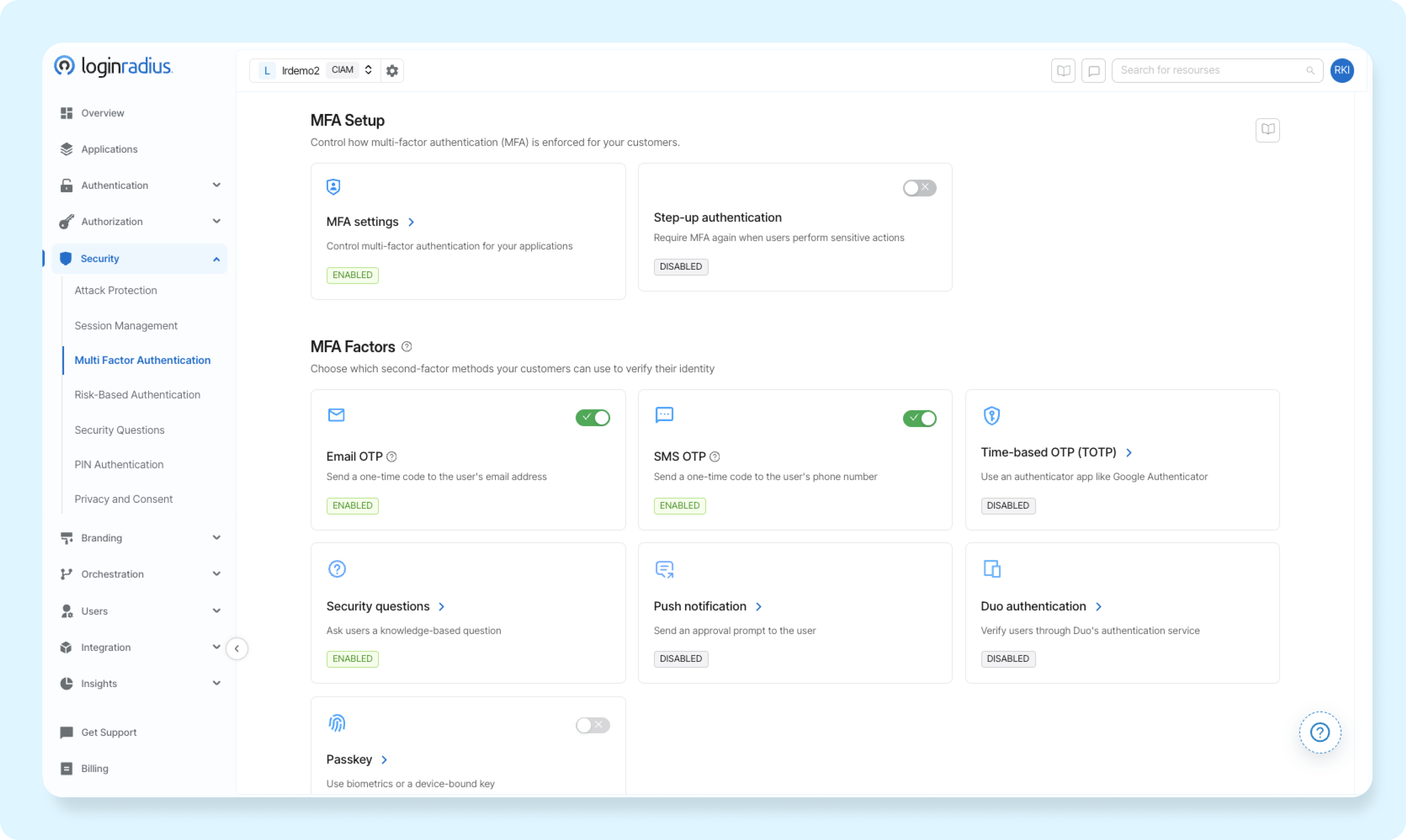
Step 8: Provision the Push Infrastructure Keys
-
Locate the Push Notification subsection and toggle it to enabled.
-
Under the service provider options, select AWS SNS.
-
Paste your AWS Access Key, AWS Secret Access Key, and select the target deployment Region.
Step 9: Align App Store URLs and Component ARNs
-
Turn on the Android App Configuration switch: Paste your live Play Store URL and inject the specific FCM Platform ARN built in Step 2.
-
Turn on the iOS App Configuration switch: Paste your live App Store URL and input your APNs Platform ARN.
-
Click Save Settings. The configuration goes live immediately across your production environments.
Plug-and-Play Option: Using the LoginRadius Authenticator App
While custom API integrations give you total UI freedom, you don't actually need to write custom mobile code or manage AWS SNS endpoints to get Push MFA up and running.
If your team wants an instant, zero-maintenance rollout, LoginRadius provides a turnkey LoginRadius Authenticator App ready to use right out of the box for both iOS and Android.
Here is how simple it is to deploy using the pre-built ecosystem:
1. Enable the Ready-Made Service
In your LoginRadius Admin Console:
-
Go to Security ➔ Multi-Factor Authentication ➔ Push Notification.
-
Select LoginRadius Authenticator App as your default push provider instead of AWS SNS.
-
Save your settings. No API keys or mobile credentials required.
2. The User Onboarding Experience
Once enabled, the enrollment flow for your end users is completely automated:
-
First-Time Setup: When users log into your platform, they are prompted to register their mobile device. The screen displays a secure QR code.
-
App Pairing: The user downloads the LoginRadius Authenticator app from the Apple App Store or Google Play Store and scans the QR code.
-
Instant Handshake: A secure cryptographic token pair is stored on the phone, turning the device into an authenticated hardware factor in seconds.
3. Verification in Action
Every time a user logs in from that point forward:
-
They enter their regular username and password on your website.
-
An instant push notification automatically pops up on their phone via the LoginRadius Authenticator.
-
The user taps Approve (or completes the matching number challenge), and your web app logs them in immediately—with zero custom code on your end!
For a detailed implementation guide, refer to our developer documentation.
Push Notifications vs. Other MFA Factors
| Method | Security Level | Phishing Resistance | User Friction | Best Use Case | Limitation |
|---|---|---|---|---|---|
| Push Notifications | High | Medium–High | Low | Mobile apps, SaaS, enterprises | Requires device and internet |
| SMS / Email OTP | Medium | Low | Medium | Consumer apps | Vulnerable to SIM swap |
| TOTP Apps | High | Medium | Medium | Developer platforms, SaaS | Manual entry required |
| Biometric Authentication | Very High | High | Low | Mobile-first authentication | Device dependency |
| Hardware Security Keys | Very High | Very High | Medium | Enterprises, high-security use | Cost and hardware required |
| Passkeys (FIDO2) | Very High | Very High | Very Low | Passwordless systems | Adoption still growing |
For most applications, push authentication offers the best balance between security and user experience, while passkeys and hardware keys provide the highest phishing resistance.
Key Functions of LoginRadius Push Notification MFA
-
Enrollment Flexibility: Customers can easily enroll in Push Notification MFA through your native mobile apps or the LoginRadius Authenticator. This process is straightforward and user-friendly, encouraging widespread adoption.
-
**Automated Triggers: **Once customers authenticate with their credentials, a push notification is automatically triggered for additional verification. This ensures an added layer of security without requiring extra steps from the user.
-
Timeout Management: If a customer does not respond within a defined timeframe, the push notification will time out, ensuring a secure authentication process. This helps protect accounts from unauthorized access attempts.
-
**Customizable Notifications: **Tailor your push notifications' branding and challenge message content as well as language to align with your brand identity. This customization ensures that notifications are consistent with your company's look and feel.
-
Detailed Activity Logs: Gain insights into customer activity and authentication attempts with comprehensive logging capabilities. This feature allows for better monitoring and analysis of security events.
-
Seamless Integration and Deployment: Push Notification MFA is designed to introduce minimal friction in the customer experience while significantly enhancing security. By integrating this feature through LoginRadius CIAM's SDKs and APIs into your native mobile apps or directly with the LoginRadius Authenticator, you can ensure a robust and user-friendly customer authentication process.
The Growing Need For Push Authentication in Cybersecurity
With the rise in credential-based attacks and data breaches, organizations are increasingly adopting push authentication as a key security measure. Since push notifications require an active user response, they offer a higher level of assurance compared to traditional authentication methods.
Additionally, organizations can integrate adaptive authentication mechanisms, such as analyzing device fingerprinting and login patterns, to further enhance security while keeping the user experience seamless.
Future Trends in Push Notification Authentication
As technology evolves, push notification authentication is expected to become even more sophisticated. Artificial Intelligence (AI) and machine learning (ML) will play a crucial role in detecting anomalies and preventing fraud.
Future advancements may also integrate biometrics with push authentication, creating a multi-layered security approach that is nearly impossible to bypass. Furthermore, enterprises are looking to implement decentralized identity solutions, ensuring greater user privacy and security across digital ecosystems.
Push Authentication and Compliance Requirements
Push notification authentication helps organizations meet modern security and compliance standards.
• PCI DSS 4.0 requires MFA for accessing cardholder data
• NIST 800-63B defines authentication assurance levels (AAL2)
• CISA recommends number-matching push authentication to prevent fatigue attacks
• HIPAA requires secure access controls and audit logging for healthcare systems
Implementing push authentication ensures both security and regulatory compliance.
Conclusion
Push notification authentication has emerged as one of the most effective ways to balance security and user experience in modern authentication systems. Replacing manual code entry with real-time, device-based approvals reduces friction while strengthening identity verification.
As identity-based attacks continue to rise, relying solely on passwords or OTPs is no longer enough. Push authentication adds a critical layer of protection by leveraging trusted devices, contextual signals, and real-time user interaction. When combined with advanced controls like number-matching and adaptive authentication, it significantly reduces the risk of phishing, credential theft, and unauthorized access.
Key takeaways:
-
Push authentication enables fast, secure, and user-friendly login experiences
-
It reduces dependency on passwords and OTP-based methods
-
Advanced implementations help prevent MFA fatigue and approval-based attacks
-
It supports compliance with modern security standards and frameworks
-
It is a key component of MFA and passwordless authentication strategies
For most organizations, push authentication offers the optimal balance between strong security and seamless usability making it a preferred choice for mobile-first, SaaS, and enterprise applications.
Implement Push Authentication with LoginRadius
If you're looking to implement secure and scalable push notification authentication, LoginRadius provides a developer-friendly identity platform with built-in support for modern authentication methods:
-
Push-based MFA with contextual verification and secure approvals
-
Support for passwordless authentication, biometrics, and passkeys
-
Adaptive authentication with real-time risk analysis
-
Easy integration with APIs, SDKs, and pre-built workflows
Book a demo today and start building secure, seamless authentication experiences and stay ahead of evolving identity threats.
FAQs
Q: What is an example of push notification authentication?
A: A push notification authentication example includes receiving a login request on your mobile device with details like location, device, and time. You can approve or deny access directly from the notification.
Q: Are push notifications secure?
A: Yes, push notifications are secure when implemented correctly. They use encrypted communication, signed requests, and contextual verification to ensure safe authentication.
Q: Is push authentication better than OTP?
A: Push authentication is generally more secure and user-friendly than OTP, as it reduces phishing risks and eliminates manual code entry. However, TOTP may be preferred in offline scenarios.
Q: How do I enable push authentication?
A: Push authentication can be enabled through platforms like LoginRadius by configuring MFA settings, selecting push notifications, and testing the setup in minutes.
Q: What is MFA push fatigue?
A: MFA push fatigue is an attack where repeated login requests are sent to trick users into approving one. It can be prevented using number matching and rate limiting.
Q: Can push authentication work offline?
A: No, push authentication requires internet connectivity. Backup methods like TOTP should be configured for offline access.
Q: Is push authentication the same as 2FA?
A: Push authentication is a type of multi-factor authentication (MFA) that verifies identity using a device-based approval mechanism.
Q: What happens if a user loses their phone or doesn't have internet access?
LoginRadius provides built-in fallback options to ensure users are never locked out of their accounts. You can configure backup factors such as Time-based One-Time Passwords (TOTP) via standard authenticator apps, SMS/Email OTPs, or single-use Backup Recovery Codes that users can download during initial onboarding.
Q: How does Push Notification MFA defend against "MFA Fatigue" or "Prompt Bombing" attacks?
MFA Fatigue occurs when an attacker repeatedly triggers push notifications until a user accidentally taps "Approve". LoginRadius mitigates this risk through Interactive Challenge Matching (Number or Alphabet Matching). The user must match the specific value displayed on their login screen with options in their app, making accidental approvals impossible.
Q: Can we customize the branding and message content inside the push notifications?
Yes. Through the LoginRadius Admin Console, you can fully white-label the notification experience. You can customize the application name, logo, language, and contextual details (such as login location, IP address, and time) so users know exactly what request they are verifying.
Q: Do we need an AWS account if we want to use our own custom mobile app instead of AWS SNS?
No. AWS SNS is the primary option for cross-platform message routing, but LoginRadius also supports a Native Messaging Service option inside the Admin Console. This allows your team to use your own custom push notification pipeline or third-party infrastructure directly via the LoginRadius APIs.