Introduction
MFA has been the default answer to password risks for years. Add additional factors, reduce account takeover by making stolen passwords less useful. It worked well enough when attackers were mostly trying to guess, reuse, or brute-force credentials. But the login battlefield has changed. Today, attackers don’t need to break MFA.
Instead, they can trick users into completing it. A fake login page can capture your OTP. A push fatigue attack can wear someone down until they tap approve. An adversary-in-the-middle phishing kit can proxy the login flow and steal the session after authentication succeeds. That is why the conversation around passkeys vs MFA is becoming so important.
Passkeys remove the weakest parts of traditional login: passwords, reusable codes, and manually approved prompts that attackers can phish or manipulate. Instead, they use cryptographic authentication tied to the real application and the user’s trusted device. The result is a login method that feels simpler for users and is much harder for attackers to replay on fake websites.
So, does this mean MFA is becoming obsolete?
Not exactly. Traditional MFA is losing ground, especially SMS OTPs and push approvals that can be phished or abused. But MFA itself is not disappearing. It is evolving into something stronger: phishing-resistant, passwordless, device-bound authentication.
Teams often treat passkeys as just another login option or treat MFA as one fixed category. In reality, passkeys are changing what “strong authentication” means. For developers and security teams, the real question is no longer “Should we use MFA?” It is “Which authentication factors can actually survive modern phishing attacks without creating more friction for users?”
Why MFA Became the Standard for Modern Authentication
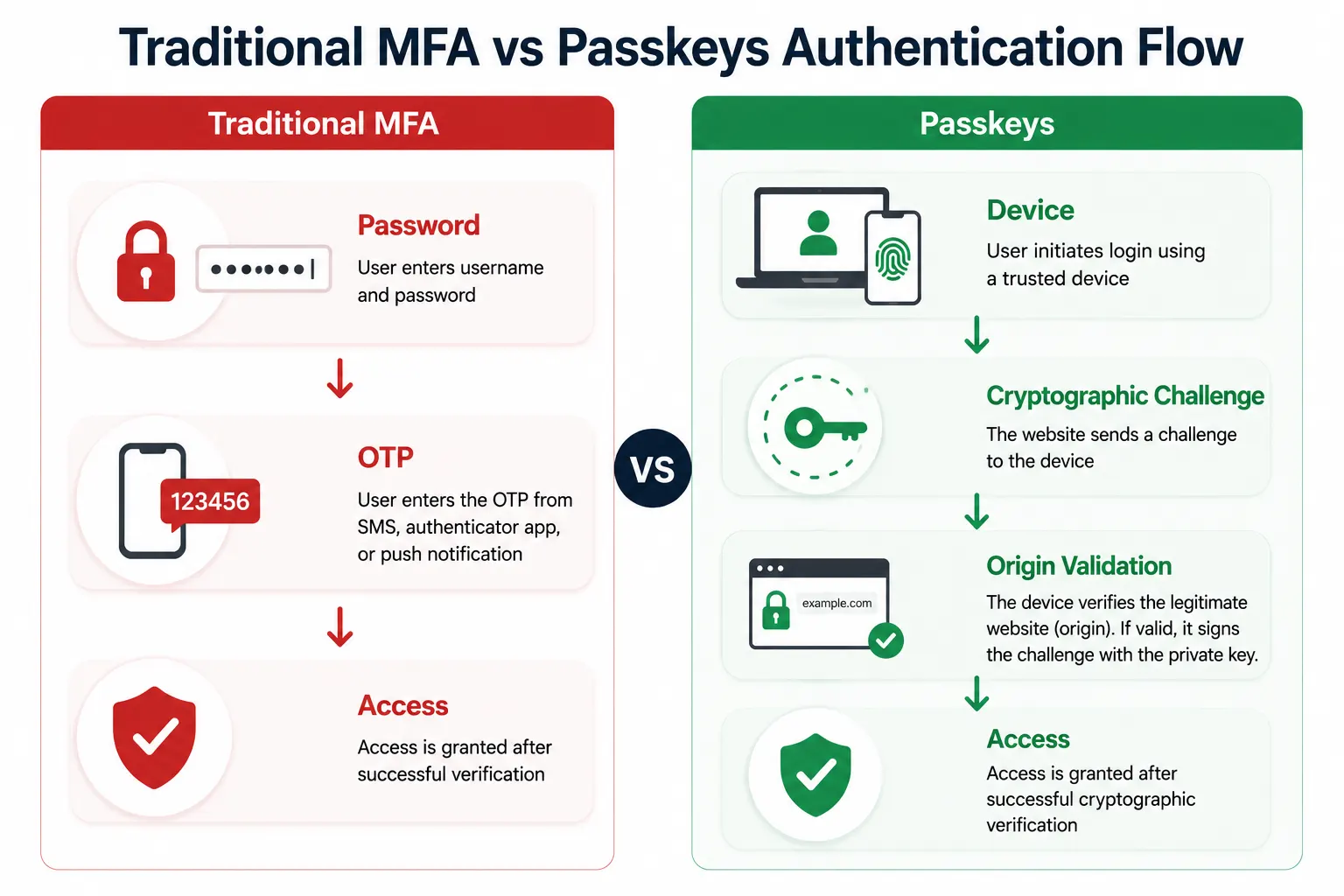
Passwords were never designed to withstand modern attack methods. Users reused them across applications, created weak variations, and often relied on the same credentials for both personal and business accounts. As credential breaches became more common, attackers began using credential stuffing attacks to test stolen usernames and passwords across multiple services.
Multi-factor authentication (MFA) emerged as the industry's solution. By requiring a second verification factor in addition to a password, MFA significantly reduced the success rate of password-based account takeover attempts. Organizations adopted MFA widely because it strengthened security without requiring a complete redesign of existing authentication systems.
For years, this approach worked well. Even if a password was compromised, attackers still needed to bypass an additional authentication factor.
However, attackers adapted. Rather than focusing solely on stealing passwords, they began targeting the authentication process itself. Phishing kits evolved to capture OTPs, adversary-in-the-middle attacks started proxying login sessions, and MFA fatigue attacks exploited repeated push notifications to trick users into approving fraudulent requests.
MFA remains far more secure than passwords alone, but these newer attack techniques exposed the limitations of authentication methods that still depend on reusable secrets and user actions. That shift accelerated interest in passkeys, phishing-resistant authentication, and passwordless identity systems designed to remove many of those weaknesses altogether.
What Are Passkeys?
Passkeys are a passwordless authentication method designed to replace passwords with cryptographic credentials stored securely on trusted devices.
Instead of asking users to remember and enter passwords, passkeys authenticate users through device-based verification such as Face ID, fingerprint authentication, or a device PIN.
Behind the scenes, passkeys work differently from traditional authentication methods. When a user creates a passkey, the device generates a cryptographic key pair:
-
A public key that is shared with the application
-
A private key that remains securely stored on the user's device
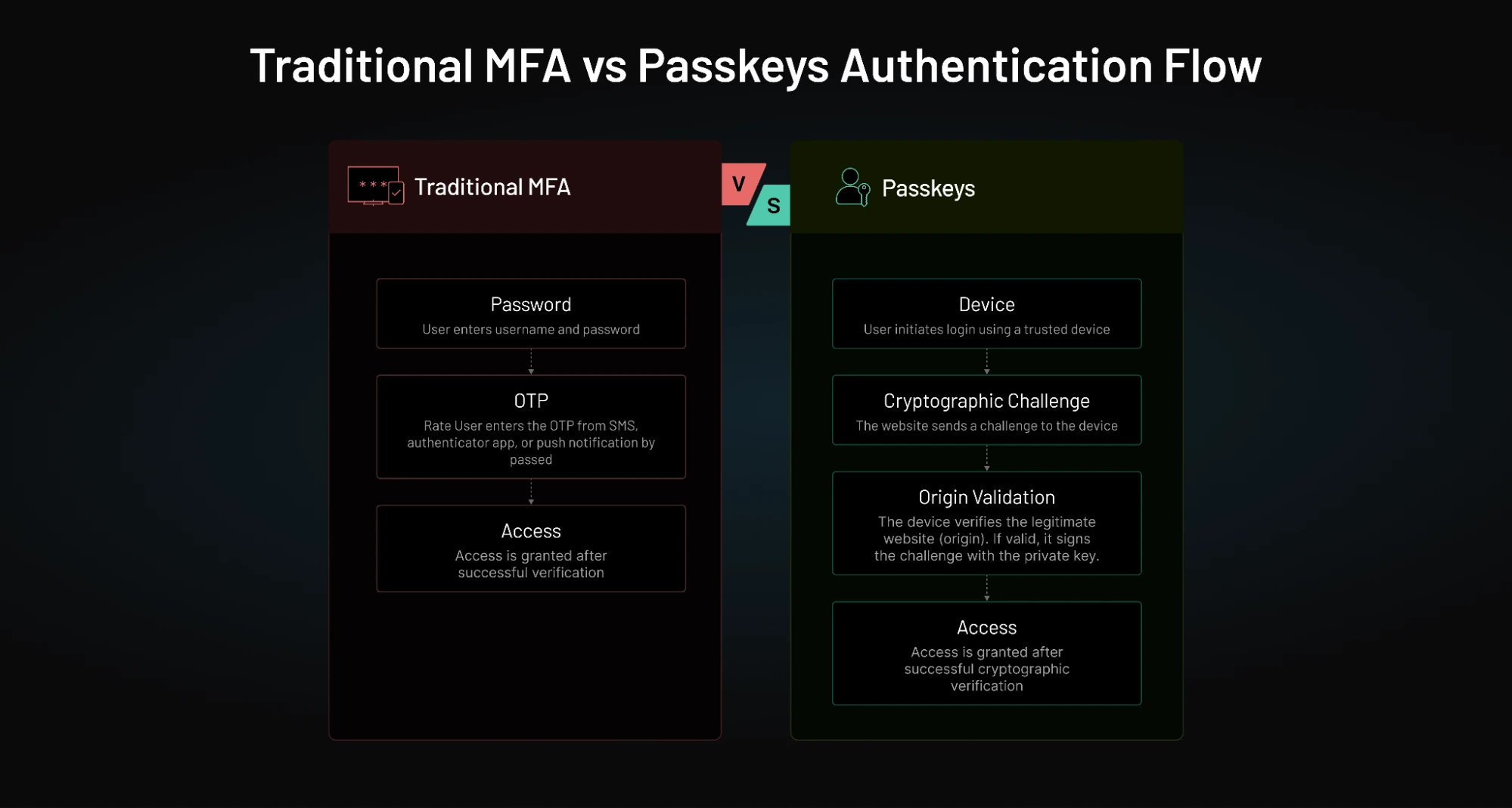
The private key never leaves the device. During authentication, the application sends a cryptographic challenge that can only be answered using the corresponding private key. Because the private key is never transmitted, attackers cannot steal and reuse it through phishing pages, database breaches, or intercepted login requests.
Passkeys are built on the WebAuthn and FIDO2 standards, which introduce an important security feature called origin binding. Authentication only works for the legitimate website or application associated with the passkey. If a user visits a phishing site that imitates the real login page, the browser refuses to authenticate because the domain does not match the registered origin.
This is one of the primary reasons passkeys are considered phishing-resistant.
For organizations, passkeys represent a shift away from authentication models built around shared secrets and reusable credentials. Instead, trust is established through cryptographic verification tied to a user's device and the legitimate application.
While passkeys still require planning around recovery, device migration, and enterprise deployment, they are increasingly becoming the foundation of modern passwordless authentication strategies.
Passkeys vs MFA: What’s the Real Difference?
At first glance, passkeys and MFA can look like competing ideas. One removes passwords. The other adds more verification layers. That is why many teams ask whether passkeys are replacing MFA entirely. The reality is more nuanced.
| Feature | Traditional MFA (SMS, TOTP, Push) | Passkeys |
|---|---|---|
| Password Required | Yes | No |
| Authentication Method | Password + Second Factor | Cryptographic Key Pair |
| Phishing Resistance | Partial | Yes |
| OTP Required | Often | No |
| Shared Secrets | Yes | No |
| Susceptible to AiTM Attacks | Yes | No |
| Vulnerable to MFA Fatigue | Yes | No |
| Credential Stuffing Risk | Possible | Eliminated |
| Password Reset Dependency | Yes | No |
| Device Bound Authentication | No | Yes |
| Biometric Support | Optional | Native |
| User Experience | Multi-Step | Single Gesture |
| Login Speed | Moderate | Fast |
| Cross-Platform Support | Broad | Growing Rapidly |
| Operational Overhead | High | Low |
| SMS Delivery Costs | Possible | None |
| Support Ticket Volume | Higher | Lower |
| Recovery Complexity | Lower | Higher |
| WebAuthn Support | Optional | Native |
| FIDO2 Compliance | Optional | Native |
| Regulatory Alignment | Good | Excellent |
| Enterprise Readiness | Mature | Emerging but Strong |
| Future Readiness | Medium | High |
Key Takeaways
-
Traditional MFA remains significantly stronger than passwords alone and continues to play an important role in enterprise security.
-
Passkeys provide stronger phishing resistance because authentication is tied to the legitimate application and cryptographic keys never leave the user's device.
-
Passkeys reduce operational burden by eliminating password resets, OTP delivery issues, and MFA fatigue attacks.
-
Many modern identity architectures use both, with passkeys serving as the primary authentication method and adaptive MFA applied only when risk increases.
Bottom Line: Passkeys are not replacing authentication security they are redefining it. While traditional MFA adds layers on top of passwords, passkeys remove passwords entirely and replace them with phishing-resistant cryptographic authentication. For most modern applications, the long-term direction is passkeys by default and adaptive MFA when additional assurance is required.
Not All MFA Methods Provide the Same Security
One common misconception is that all multi-factor authentication methods provide the same level of protection. In reality, MFA technologies vary significantly in their resistance to phishing attacks, usability, operational complexity, and overall security strength.
For example, SMS OTPs and email-based verification codes still rely on transferable secrets that attackers can intercept or trick users into sharing. Security keys and passkeys, on the other hand, use cryptographic verification that is far more resistant to phishing and credential theft.
The table below highlights how common authentication methods compare.
| Authentication Method | Phishing Resistance | User Experience | Security Strength |
|---|---|---|---|
| SMS OTP | Low | Medium | Medium |
| Email OTP | Low | Medium | Medium |
| TOTP Authenticator App | Medium | Medium | High |
| Push Notification MFA | Medium | High | High |
| Hardware Security Keys | High | Medium | Very High |
| Passkeys | High | High | Very High |
SMS and Email OTPs
SMS and email-based verification codes helped popularize MFA adoption because they were easy to deploy and familiar to users.
However, these methods remain vulnerable to:
-
Phishing attacks
-
Adversary-in-the-middle attacks
-
SIM-swapping attacks
-
OTP interception
They are generally considered stronger than passwords alone but weaker than modern phishing-resistant authentication methods.
TOTP Authenticator Apps
Applications such as Google Authenticator and Microsoft Authenticator generate one-time codes locally on the user's device.
TOTP significantly improves security compared to SMS OTPs because codes are not transmitted over telecommunications networks. However, users can still be tricked into entering valid codes on phishing websites.
Push Notification MFA
Push-based authentication improves convenience by allowing users to approve login requests with a single tap.
While easier to use than manually entering OTPs, push authentication introduced new attack techniques such as MFA fatigue attacks, where attackers repeatedly send authentication requests until users accidentally approve one.
Hardware Security Keys
Hardware security keys use phishing-resistant cryptographic authentication and are widely considered one of the strongest authentication methods available.
Because authentication is bound to the legitimate application origin, attackers cannot easily replay credentials through phishing proxies or fake login pages.
Many organizations require security keys for:
-
System administrators
-
Security teams
-
Privileged workforce accounts
-
High-risk environments
Passkeys
Passkeys build on the same phishing-resistant foundations as security keys while offering a significantly smoother user experience.
Users authenticate through:
-
Face ID
-
Fingerprint authentication
-
Device PIN
-
Platform-native authenticators
Passkeys combine:
-
Device possession
-
Local user verification
-
Cryptographic authentication
into a seamless login experience that removes passwords and OTPs entirely.
The Industry Is Moving Toward Phishing-Resistant MFA
The most important takeaway is that MFA is no longer simply about adding more authentication factors.
The industry is increasingly moving toward phishing-resistant authentication, where credentials cannot be intercepted, replayed, or shared with fake websites.
That is why security keys and passkeys are increasingly replacing SMS OTPs, email verification codes, and other legacy MFA methods in modern authentication architectures.
Bottom Line: Not all MFA methods provide equal protection. While SMS OTPs, email OTPs, and push notifications improve security compared to passwords alone, passkeys and hardware security keys offer substantially stronger protection against modern phishing attacks while reducing user friction.
Why Passkeys Are More Resistant to Phishing Attacks
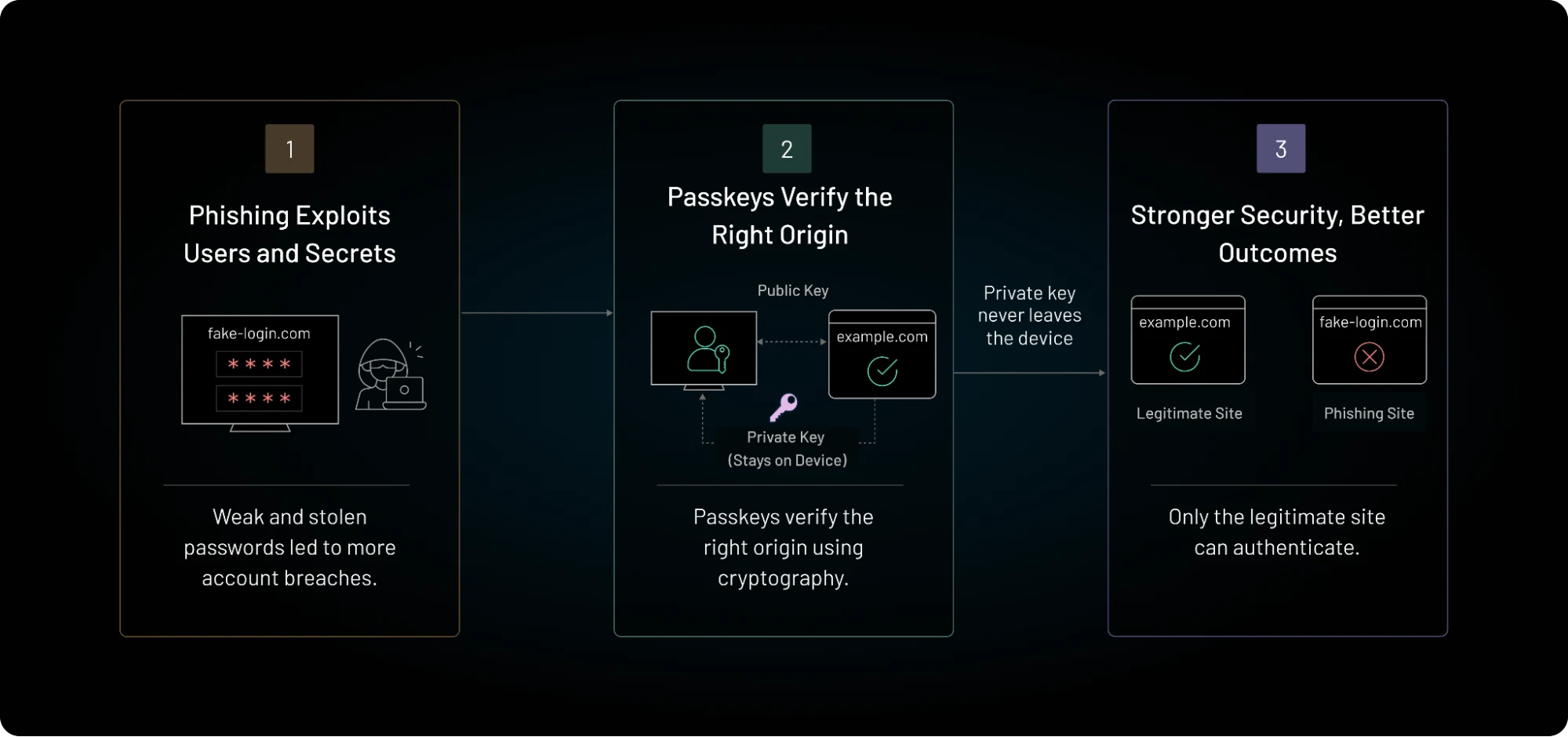
Traditional authentication systems often depend on users recognizing suspicious behavior manually. Spot the fake domain. Ignore the fraudulent OTP request. Reject the unexpected push notification. That approach becomes risky once phishing pages start looking nearly identical to legitimate applications. Passkeys change that responsibility.
Instead of relying heavily on human judgment during login, passkeys use cryptographic verification tied directly to the legitimate application origin. If the domain does not match the registered website or application, authentication simply does not complete.
That difference matters a lot against modern phishing attacks.
With passwords and OTP-based MFA, attackers can still steal reusable information through phishing proxies or adversary-in-the-middle attacks. Once the credentials or session tokens are captured, they can often be replayed elsewhere.
Passkeys remove much of that attack surface because:
-
there is no reusable password
-
there is no OTP to intercept
-
the private key never leaves the device
-
authentication only works for the correct origin
Even if attackers perfectly clone the login page, the browser or authenticator refuses to generate a valid authentication response for the fake domain.
This is why large technology companies are pushing passkeys aggressively now. Phishing attacks became too effective against systems built around transferable credentials and user-dependent verification.
For developers, phishing resistance also improves operational security in quieter ways. Fewer compromised accounts mean:
-
fewer recovery escalations
-
lower fraud exposure
-
reduced credential stuffing risk
-
fewer MFA fatigue incidents
-
stronger session trust overall
The important shift here is that passkeys are not simply “harder passwords.” They fundamentally reduce how much authentication depends on secrets users can accidentally expose during login.
Passkeys and MFA Adoption Statistics
Authentication is evolving rapidly as organizations balance security, usability, and compliance requirements. Several industry reports highlight why both MFA and passkeys have become central to modern identity strategies.
MFA Remains One of the Most Effective Security Controls
According to Microsoft, enabling multi-factor authentication can block more than 99% of automated account compromise attempts. MFA remains one of the most effective defenses against password reuse, credential stuffing, and brute-force attacks.
However, attackers have increasingly shifted their focus away from passwords and toward phishing authentication flows, session hijacking, and MFA fatigue techniques.
Credential Abuse Continues to Drive Breaches
The annual Verizon report consistently identifies stolen credentials and credential abuse among the most common paths to account compromise and data breaches.
This trend has accelerated interest in authentication methods that eliminate reusable credentials altogether rather than simply adding more verification layers.
Passkey Adoption Is Accelerating
The FIDO Alliance reports growing adoption of passkeys across consumer and enterprise applications as organizations seek phishing-resistant authentication methods that improve both security and user experience.
Passkeys are now supported by major browsers, operating systems, and identity providers, making large-scale deployment increasingly practical.
Major Technology Platforms Have Standardized on Passkeys
Leading technology companies, including Google, Apple, and Microsoft, have integrated passkey support directly into their operating systems, browsers, and authentication ecosystems.
This industry-wide support has helped move passkeys from an emerging security concept to a mainstream authentication option.
The Industry Direction Is Clear
The trend is not simply toward more authentication factors. It is toward phishing-resistant authentication that minimizes user friction while reducing reliance on passwords, OTPs, and other reusable secrets.
For many organizations, that future combines:
-
Passkeys for primary authentication
-
Adaptive MFA for higher-risk scenarios
-
Continuous risk evaluation throughout the session lifecycle
Where MFA Still Matters Alongside Passkeys
Passkeys solve many weaknesses tied to passwords and phishing-prone MFA flows, but they do not remove every authentication challenge modern applications face.
There are still situations where additional verification makes sense.
Enterprise environments are one example. A trusted device may be enough for everyday access, yet higher-risk actions often require stronger assurance. Admin privilege changes, financial approvals, sensitive customer-data access, and infrastructure management workflows usually carry different risk levels than standard login sessions.
That is where adaptive MFA and step-up authentication still matter.
Instead of interrupting every user constantly, modern systems can apply stronger verification dynamically when something changes:
-
unusual device behavior
-
suspicious session activity
-
unexpected geographic access
-
privilege escalation attempts
-
sensitive transactions
This creates a more balanced authentication experience. Low-risk actions stay friction-light, while higher-risk events trigger additional trust checks only when necessary. Recovery flows are another important reason MFA still exists alongside passkeys.
If users lose access to trusted devices, applications still need secure ways to restore account access safely. Some organizations rely on secondary authenticators, backup verification methods, or hardware security keys during those scenarios. Enterprise environments may also require layered authentication policies for compliance or workforce identity governance.
Many companies will transition gradually rather than replacing every authentication flow immediately. Legacy systems, older browsers, cross-platform compatibility, and enterprise integrations still influence adoption speed.
For developers, this means the future is probably not “passkeys only” or “traditional MFA everywhere.” The stronger model is becoming:
-
phishing-resistant authentication by default
-
adaptive MFA when risk increases
-
continuous trust evaluation throughout the session lifecycle
That approach reduces unnecessary friction while still allowing applications to respond intelligently when trust signals change.
When Should You Choose Passkeys vs MFA?
The answer is not always passkeys or always MFA. The right choice depends on your users, application architecture, security requirements, and adoption timeline.
For many organizations, the best approach is not choosing one over the other. It is understanding where each authentication model delivers the most value.
Use Passkeys When
Passkeys are often the strongest option when building modern authentication experiences from the ground up.
They are particularly well-suited for:
-
New SaaS applications
-
Consumer-facing products
-
Mobile-first experiences
-
High phishing-risk environments
-
Passwordless authentication initiatives
-
Applications seeking lower login friction
-
Organizations looking to reduce password reset costs
Because passkeys eliminate passwords and OTPs entirely, they provide a simpler user experience while significantly reducing phishing exposure.
Use Traditional MFA When
Traditional MFA still makes sense in many environments, particularly where modern authentication standards cannot be adopted immediately.
MFA remains valuable for:
-
Legacy applications
-
Systems that depend on passwords
-
Regulatory or contractual compliance requirements
-
Workforce migration projects
-
Enterprise environments with mixed device support
-
Account recovery workflows
-
Transitional authentication architectures
In these scenarios, MFA can provide an effective security layer while organizations gradually modernize authentication systems.
The Best Practice: Passkeys Plus Adaptive MFA
Increasingly, security teams are discovering that the question is not "Passkeys or MFA?"
The stronger model is:
Passkeys for primary authentication. Adaptive MFA for elevated risk.
Under this approach:
-
Users authenticate with passkeys by default.
-
Low-risk sessions remain frictionless.
-
Risk engines continuously evaluate context.
-
Additional verification is triggered only when trust changes.
Examples include:
-
Suspicious login behavior
-
New devices
-
Impossible travel scenarios
-
Privileged administrative actions
-
Sensitive financial transactions
-
Account recovery requests
This model delivers the security benefits of phishing-resistant authentication while preserving the flexibility organizations need for higher-risk scenarios.
| Scenario | Recommended Approach |
|---|---|
| New SaaS Product | Passkeys |
| Consumer Application | Passkeys |
| Mobile-First Platform | Passkeys |
| High Phishing Risk Environment | Passkeys |
| Legacy Enterprise Application | MFA |
| Compliance-Driven Deployment | MFA + Passkeys |
| Workforce Modernization Program | MFA → Passkeys Migration |
| Privileged Admin Access | Passkeys + Adaptive MFA |
| Financial Transactions | Passkeys + Step-Up MFA |
| Account Recovery | Passkeys + Recovery Verification |
Bottom Line: If you are building a modern authentication architecture today, passkeys should be the primary authentication method whenever possible. Traditional MFA remains valuable for legacy systems, recovery workflows, and risk-based step-up verification, but the long-term direction of identity security is increasingly centered on phishing-resistant passkey authentication.
Passkeys vs MFA for B2B SaaS Platforms
B2B SaaS authentication is fundamentally different from consumer authentication. Instead of managing individual users, platforms often need to support customer organizations, delegated administrators, partners, vendors, contractors, and privileged users across multiple tenants.
Because these identities frequently have elevated access and administrative permissions, they are attractive targets for phishing, credential theft, and account takeover attacks.
For most modern B2B SaaS environments, passkeys provide the strongest primary authentication method, while adaptive MFA remains valuable for higher-risk actions and privileged workflows.
| Identity Type | Recommended Authentication |
|---|---|
| Tenant Administrators | Passkeys |
| Delegated Administrators | Passkeys |
| Partner Access | Passkeys |
| Vendor & Contractor Access | Passkeys |
| Standard User Access | Passkeys |
| Privileged Actions | Passkeys + Adaptive MFA |
| Account Recovery | Recovery Verification + Step-Up Authentication |
| High-Risk Sessions | Adaptive MFA |
The emerging B2B authentication model is straightforward: use passkeys as the primary authentication mechanism, apply adaptive MFA when risk increases, and reserve additional verification for sensitive administrative or business-critical actions.
This approach reduces phishing exposure while maintaining the flexibility and security controls that enterprise SaaS platforms require.
Why Developers Are Moving Toward Passwordless Authentication
For many development teams, the shift toward passwordless authentication is about more than improving security. It is also about reducing the operational complexity that password-based systems create over time.
Traditional authentication introduces ongoing challenges such as password resets, OTP delivery failures, MFA fatigue, and credential stuffing defenses. As applications scale across devices, browsers, and enterprise environments, maintaining these workflows becomes increasingly difficult.
Passkeys simplify many of these challenges by replacing passwords and OTPs with device-based cryptographic authentication. Users authenticate through trusted devices, biometrics, or local PINs, creating a smoother login experience while reducing reliance on reusable credentials.
For developers, the benefits often extend beyond security. Organizations frequently see fewer password reset requests, reduced authentication support overhead, and a more consistent login experience across platforms.
Passwordless authentication is not without challenges. Recovery workflows, device migration, and enterprise deployment still require careful planning. However, many teams view passkeys as a cleaner long-term approach than continuing to maintain increasingly complex password-centric authentication systems.
As phishing attacks continue to target traditional login flows, passwordless authentication is becoming a strategic modernization initiative rather than simply another authentication feature.
Challenges Developers Face With Passkey Adoption
Passkeys solve several long-standing authentication problems, but adoption is not always as effortless as marketing demos make it appear.
The login experience may feel simple for users. The implementation side is where complexity starts showing up.
-
The Account Recovery Paradox: Password-based systems always had a fallback path: reset the credential and move on. Because cryptographic keys never leave the device, losing a device can mean permanent lockout. If developers make it easy, attackers can target it. Developers often spend more time designing safe recovery architecture than implementing the actual passkey login.
-
Ecosystem & Browser Fragmentation: Users expect authentication to work seamlessly across phones, laptops, browsers, and operating systems. In reality, passkey synchronization still depends heavily on platform ecosystems and browser support. Syncing behavior varies heavily between Apple iCloud Keychain, Google Password Manager, and Microsoft Passkey provider, presenting hurdles in enterprise or cross-OS setups.
-
User Mental Model Shift: Passkeys change familiar login behavior as users are accustomed to passwords. Some users understand biometric-driven authentication immediately. Others hesitate when device-level prompts appear during onboarding because they are unsure what is happening behind the scenes. Transitioning them to device-native biometric prompts without confusion requires careful UX onboarding.
For developers, the challenge is rarely deciding whether passkeys are stronger. The challenge is implementing them in a way that improves security without creating new friction across recovery, onboarding, and multi-device usage at scale.
Passkey Compatibility Across Modern Platforms
Before deploying WebAuthn, verify your target user base environment matches current platform native synchronization features:
-
Apple Ecosystem: Full cross-device sync via iCloud Keychain (iOS 16+, macOS Ventura+).
-
Google/Android: Native generation and sync via Google Password Manager (Android 9+).
-
Windows/Microsoft: Windows Hello acts as a local authenticator; cloud sync is dependent on third-party managers (1Password, Bitwarden).
How Account Recovery Works with Passkeys
One of the most common concerns about passkey adoption is account recovery.
Unlike passwords, passkeys rely on cryptographic credentials stored on trusted devices. If users lose access to those devices, organizations need secure recovery mechanisms that prevent lockouts without creating new attack paths.
Common Passkey Recovery Methods
Device Recovery
Users may lose access because:
-
A smartphone is lost or stolen
-
A laptop is replaced
-
A device is factory reset
-
A hardware authenticator becomes unavailable
Without a recovery strategy, users can lose access to their accounts.
Synced Passkeys
Many passkey ecosystems support secure synchronization across trusted devices through:
-
Apple iCloud Keychain
-
Google Password Manager
-
Supported password managers
This allows users to continue authenticating even if one device becomes unavailable.
Hardware Security Keys
Organizations often register backup hardware security keys for:
-
Administrators
-
Privileged users
-
High-security environments
These keys provide a phishing-resistant recovery option when primary devices are unavailable.
Recovery Codes
Some applications issue one-time recovery codes during enrollment.
These codes provide emergency access if all registered authenticators are lost and should be stored securely.
Enterprise Recovery Best Practice
| Recovery Layer | Purpose |
|---|---|
| Synced Passkeys | Primary recovery path |
| Secondary Device | Backup authentication |
| Hardware Security Key | Emergency access |
| Recovery Codes | Last-resort recovery |
| Identity Verification | High-assurance recovery |
The key principle is simple: passkeys eliminate password recovery but not identity recovery. Organizations should design recovery workflows before deploying passkeys at scale to ensure users can regain access securely when devices are lost, replaced, or unavailable.
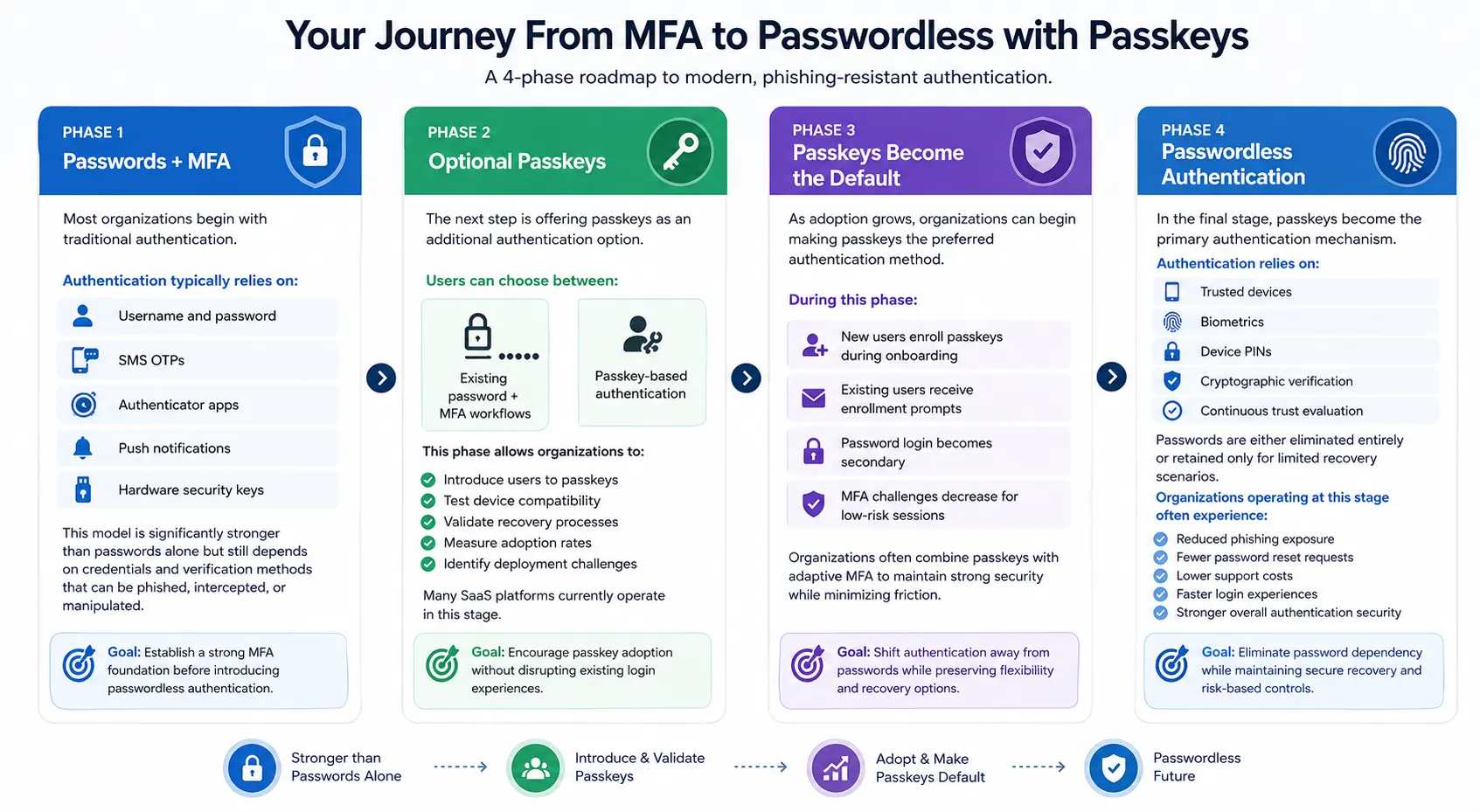
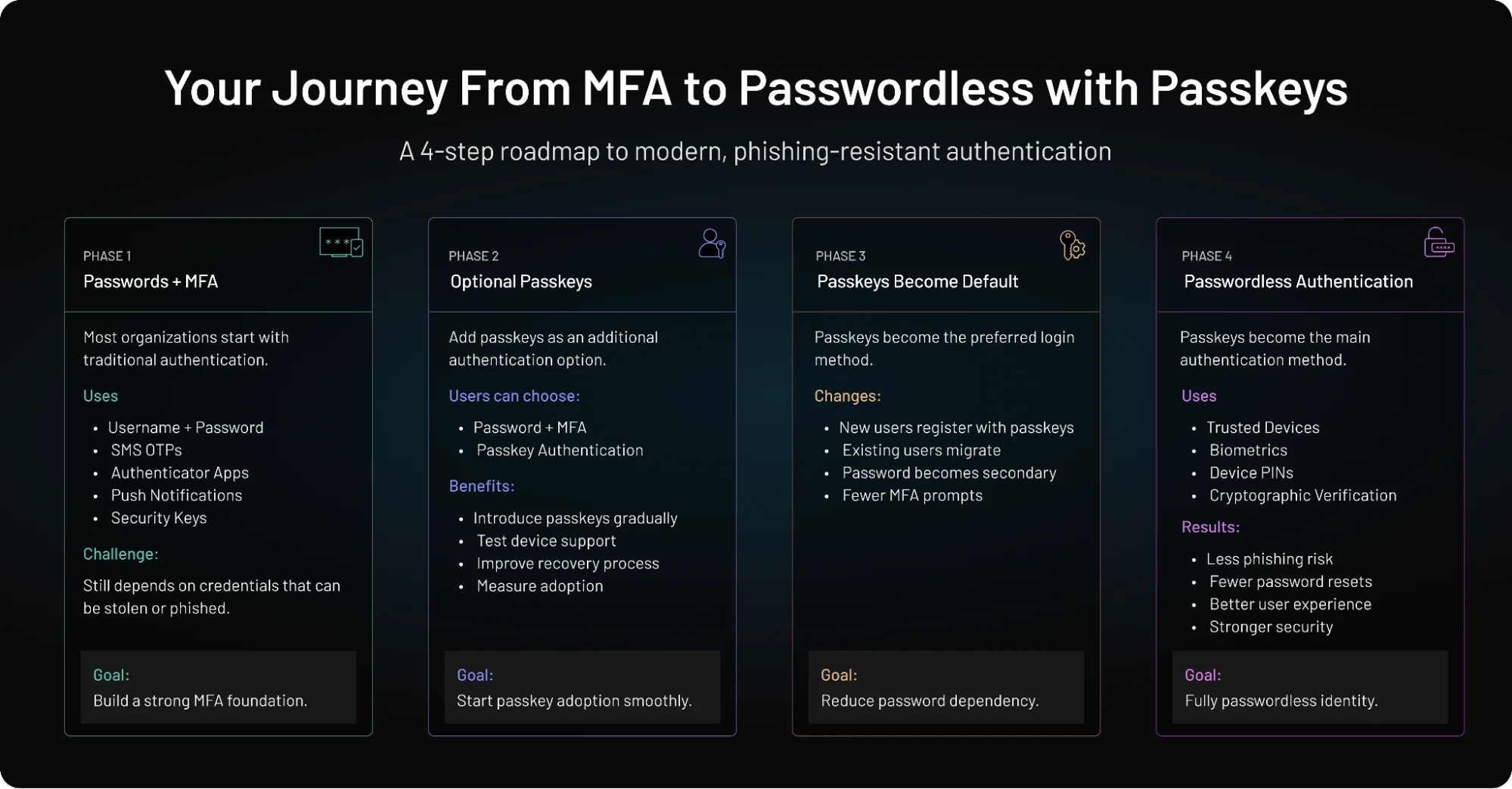
How to Migrate From MFA to Passkeys
For most organizations, the transition from passwords and MFA to passkeys is not a single project. It is a gradual modernization journey.
Legacy applications, user adoption concerns, compliance requirements, and account recovery processes all influence how quickly an organization can move toward passwordless authentication.
Rather than replacing passwords overnight, most successful deployments follow a phased approach that reduces risk while improving security over time.
The Future of Authentication: Passkeys, MFA, and Continuous Trust
Authentication is evolving beyond static login checkpoints toward systems that evaluate trust continuously.
Traditional security models focused on verifying users at login and then assuming trust for the rest of the session. Modern threats such as phishing proxies, session hijacking, token theft, and account takeover attacks have exposed the limitations of that approach.
As a result, authentication is becoming more dynamic. Instead of relying solely on passwords, OTPs, or repeated login challenges, modern identity systems increasingly evaluate:
-
Trusted devices
-
User behavior
-
Session activity
-
Location anomalies
-
Risk signals
Passkeys are an important part of this shift because they provide phishing-resistant, device-bound authentication without relying on reusable credentials. At the same time, adaptive MFA continues to provide additional assurance when risk increases.
The long-term direction is not passkeys versus MFA. It is passkeys, adaptive MFA, and continuous trust working together to create stronger security with less friction.
In this model, authentication becomes less about repeatedly challenging users and more about continuously validating trust throughout the user journey.
Compliance Frameworks: Passkeys vs. NIST, PCI-DSS, SOC 2, HIPAA, and PSD2
For organizations operating in regulated industries, passkeys offer security benefits that align well with modern compliance requirements. Because passkeys rely on cryptographic authentication and eliminate many phishing-prone workflows, they can help organizations strengthen both security posture and regulatory readiness.
NIST SP 800-63B
The National Institute of Standards and Technology Digital Identity Guidelines increasingly favor phishing-resistant authentication methods.
-
Synced passkeys can support strong authenticator assurance requirements.
-
Hardware-backed passkeys and security keys can help satisfy higher assurance levels.
-
Passkeys reduce dependence on passwords and shared secrets that NIST discourages.
PCI-DSS v4.0
Organizations handling payment card data must implement strong authentication controls.
Passkeys can help satisfy PCI-DSS multi-factor authentication requirements by combining:
-
Device possession
-
Local user verification
-
Cryptographic authentication
without relying on SMS OTPs or other easily phished verification methods.
SOC 2
Many SaaS providers pursue SOC 2 compliance to demonstrate strong security controls.
Passkeys support several SOC 2 security objectives by helping organizations:
-
Reduce account takeover risk
-
Strengthen access controls
-
Minimize credential theft exposure
-
Improve authentication assurance
For SaaS platforms, phishing-resistant authentication can strengthen overall security governance and risk management programs.
HIPAA
Healthcare organizations must protect access to electronic protected health information (ePHI).
Passkeys can help support HIPAA security requirements by:
-
Reducing password-related compromise risks
-
Strengthening identity verification
-
Limiting exposure to phishing attacks
-
Improving protection for privileged healthcare users
While HIPAA does not mandate passkeys specifically, phishing-resistant authentication aligns well with HIPAA's broader security objectives.
PSD2 and Strong Customer Authentication (SCA)
The Payment Services Directive 2 requires Strong Customer Authentication for many financial transactions.
Passkeys naturally align with SCA principles because they combine:
-
Possession (trusted device)
-
Inherence or knowledge (biometric verification or device PIN)
This makes passkeys particularly attractive for fintech applications, digital banking platforms, and payment providers seeking stronger customer authentication with less friction.
Compliance Is Moving Toward Phishing Resistance
Across industries, the trend is increasingly clear: regulators and security frameworks are placing greater emphasis on phishing-resistant authentication rather than simply requiring additional authentication factors.
Passkeys help organizations move toward that future by combining stronger security, improved user experience, and alignment with modern compliance expectations.
Conclusion
The debate around MFA vs passkeys is not really about choosing one winner and abandoning the other. The larger shift happening across modern authentication is about reducing dependence on passwords, reusable secrets, and phishing-prone verification methods that attackers have learned to exploit repeatedly.
Traditional MFA helped solve the password problem for years. But phishing kits, session hijacking attacks, OTP interception, and MFA fatigue exposed how fragile some authentication flows still are under modern threat conditions. Passkeys changed the direction of that conversation.
By combining trusted devices, local biometric verification, and cryptographic authentication tied to legitimate application origins, passkeys make phishing attacks significantly harder while also reducing login friction for users. That balance is why passwordless authentication adoption is accelerating across SaaS platforms, enterprise identity systems, fintech applications, and consumer products.
For developers, the challenge now is not simply adding another authentication factor. It is designing authentication systems that can:
-
resist phishing attacks
-
handle recovery safely
-
support multiple devices
-
reduce operational complexity
-
maintain trust continuously without exhausting users
That is where authentication architecture is heading overall, stronger verification with less visible friction.
MFA is not disappearing. Weak MFA methods are. The future is moving toward phishing-resistant, device-aware, adaptive authentication models built around continuous trust rather than static passwords and repeated OTP prompts.
Ready to Move Beyond Passwords and Fragile MFA?
Traditional MFA helped reduce password risk, but modern phishing attacks evolved faster than most authentication systems did. Passkeys, WebAuthn, and phishing-resistant authentication are changing how modern applications build trust with stronger security, fewer interruptions, and far less reliance on reusable credentials attackers can steal.
Whether you are modernizing workforce identity, securing customer logins, or building passwordless authentication into your SaaS platform, the shift toward phishing-resistant authentication is already happening.
Because the future of authentication is not more passwords and OTPs. It is stronger trust with less friction.
FAQs
Q: Are passkeys more secure than traditional MFA?
A: Yes, passkeys are generally more resistant to phishing attacks because they rely on cryptographic authentication tied to trusted devices and legitimate application origins. Unlike OTPs or push approvals, attackers cannot easily intercept or replay passkey-based authentication.
Q: Do passkeys completely replace MFA?
A: Not entirely. In many systems, passkeys already function as phishing-resistant MFA, but organizations may still use adaptive MFA or step-up authentication for high-risk actions, sensitive transactions, or recovery scenarios.
Q: Why are passkeys considered phishing-resistant?
A: Passkeys use WebAuthn and FIDO2 authentication standards that bind authentication requests to the legitimate website or application. Even if users land on a fake phishing page, the authentication request fails automatically because the domain does not match.
Q: What is the difference between passkeys and OTP authentication?
A: OTP authentication relies on temporary codes users manually enter during login, which attackers can sometimes intercept or phish. Passkeys remove reusable codes entirely and authenticate users through cryptographic verification stored securely on trusted devices.
Q: Can passkeys stop MFA fatigue attacks?
A: Yes, passkeys significantly reduce MFA fatigue attacks because they do not depend on repeated push approval prompts. Authentication happens locally on the trusted device through biometrics or PIN verification instead.
Q: Are passkeys difficult to implement for developers?
A: Adding passkey support has become easier with WebAuthn and FIDO2 standards, but developers still need to plan carefully around recovery flows, cross-device behavior, onboarding, and enterprise compatibility.
Q: Why are companies moving toward passwordless authentication?
A: Passwordless authentication reduces phishing risk, password reset overhead, OTP delivery issues, and login friction. It also improves user experience by allowing faster authentication through biometrics and trusted-device verification.
Q: Does MFA still matter in a passkey-based system?
A: Yes. MFA still matters for adaptive security scenarios such as unusual login behavior, privileged actions, account recovery, or compliance-driven workflows where additional trust verification may still be required.
Q: What are the biggest challenges with passkey adoption?
A: The most common challenges include secure account recovery, device migration, browser compatibility, enterprise rollout complexity, and helping users understand unfamiliar authentication flows during onboarding.
Q: How do passkeys work with WebAuthn and FIDO2?
A: WebAuthn and FIDO2 provide the standards behind passkeys. They allow devices to generate cryptographic key pairs where the private key stays securely on the device while authentication requests are verified using the public key stored by the application.
Q: Can passkeys prevent credential stuffing?
A: Yes. Credential stuffing attacks rely on attackers reusing stolen usernames and passwords from previous breaches. Because passkeys eliminate passwords entirely and use device-bound cryptographic credentials, there are no reusable credentials for attackers to test across multiple applications.
Q: Are passkeys compliant with PCI-DSS?
A: Passkeys can help organizations meet PCI-DSS authentication requirements by providing strong, phishing-resistant authentication. In many environments, passkeys satisfy multi-factor authentication requirements while reducing the risks associated with SMS OTPs and password-based authentication.
Q: Do passkeys work across devices?
A: Yes. Modern passkey ecosystems support secure synchronization across trusted devices through platforms such as iCloud Keychain, Google Password Manager, and supported password managers. The exact experience depends on the operating system, browser, and passkey provider being used.
Q: Can passkeys be used with SSO?
A: Yes. Passkeys and Single Sign-On (SSO) complement each other. Organizations can use passkeys as the primary authentication method at the identity provider, while SSO enables users to access multiple applications after successful authentication.
Q: Are passkeys better than security keys?
A: Neither is universally better. Passkeys provide a simpler user experience and broad platform support, while hardware security keys offer extremely strong phishing resistance and are often preferred for highly privileged accounts. Many organizations use both as part of a layered authentication strategy.