Introduction
Authentication has become one of the most important security decisions that organizations make. For years, passwords served as the primary way to authenticate someone. But as phishing attacks, credential theft, account takeover, and session hijacking have become more sophisticated, passwords alone stopped being enough. Today, attackers rarely break into systems through complex technical exploits. Instead, they target identities by stealing credentials, exploiting weak authentication flows, and manipulating users through social engineering.
Microsoft reports that Multi-Factor Authentication (MFA) can block more than 99% of automated account compromise attempts, and Verizon's Data Breach Investigations Report (DBIR) identifies stolen credentials as one of the leading causes of security breaches.
Traditional authentication methods, such as relying solely on passwords, have significant drawbacks:
-
Vulnerability to Attacks: Easily compromised through phishing, brute force, or credential stuffing.
-
User Frustration: Managing multiple complex passwords can lead to poor practices like reuse or weak passwords.
-
Maintenance Overhead: Frequent password resets and account recoveries burden IT support.
As a result, organizations are moving beyond passwords toward stronger authentication methods such as passkeys, adaptive authentication, biometrics, phishing-resistant MFA, and passwordless login. The key tradeoff is: they must balance stronger security with seamless user experiences across web, mobile, SaaS, and enterprise applications.
Choosing the right authentication method is no longer just a security decision. It affects user adoption, compliance, operational complexity, and long-term scalability.
In this guide, we'll compare today's most widely used authentication methods, explain how they work, evaluate their strengths and limitations, and help you choose the right approach for your applications, workforce, or customer identity platform.
Key Insight: Modern attackers increasingly target identities rather than infrastructure, making authentication one of the most important security controls in modern applications.
Authentication vs Authorization: What’s the Difference?
Authentication and authorization solve two different security problems.
-
Authentication verifies identity: “Who are you?”
-
Authorization determines permissions: “What are you allowed to access?”
Authentication and authorization are often used together but serve different purposes.
| Feature | Authentication | Authorization |
|---|---|---|
| Purpose | Verifies user identity | Determines user permissions |
| Example | Log in with a password or biometrics | Access to files or resources |
| When it happens | First step | After authentication |
If you are interested in learning more about the differences or in detail, you can read this authentication vs authorization blog of ours.
Quick Note: Authentication verifies identity, verification confirms ownership of a factor (such as an email address or phone number), and identity proofing validates a person's real-world identity through processes such as KYC or document verification.
Authentication vs Login
People often use authentication and login interchangeably, but they are not the same.
-
Authentication is the security process that verifies a user's identity using credentials such as passwords, passkeys, biometrics, or MFA.
-
Login is the action a user takes to start a session after successful authentication.
Every login requires authentication, but authentication can also occur throughout an active session. For example, a banking app may ask for biometric verification before approving a payment, even though the user is already logged in. Modern identity systems increasingly perform continuous authentication by evaluating device trust, user behavior, and contextual risk throughout the session.
| Authentication | Login |
|---|---|
| Verifies user identity | Starts a user session |
| Security process | User action |
| Can occur multiple times during a session | Usually occurs once per session |
| May use passwords, passkeys, biometrics, or MFA | Depends on successful authentication |
The Four Authentication Factors
Every authentication method ultimately relies on one or more authentication factors. These factors represent different ways a system can verify a user's identity.
Something You Know
Knowledge-based authentication relies on information only the user should know. Passwords and PINs remain the most common examples of this factor. While easy to deploy, knowledge factors are vulnerable to phishing, credential stuffing, password reuse, and social engineering attacks.
Something You Have
Possession-based authentication verifies that the user owns a trusted device or credential. Examples include smartphones, hardware security keys, authenticator apps, and one-time passcode generators. Because attackers must obtain the physical device, possession factors provide stronger protection than passwords alone.
Something You Are
Biometric authentication uses unique physical characteristics to verify identity. Fingerprints, facial recognition, voice recognition, and iris scans are common examples. Biometrics improve convenience while reducing dependence on memorized credentials.
Something You Do
Behavioral authentication evaluates how users interact with systems. Typing speed, mouse movements, touchscreen gestures, and other behavioral patterns can help identify legitimate users and detect suspicious activity. This factor is increasingly used in adaptive and risk-based authentication systems.
How Modern Authentication Uses These Factors
Most modern authentication methods combine multiple factors rather than relying on a single one.
For example:
-
MFA combines two or more independent factors, such as a password and a smartphone approval.
-
Passkeys often combine device possession with biometric verification.
-
Adaptive Authentication dynamically evaluates authentication factors, device trust, and contextual risk signals to determine whether additional verification is required.
As identity threats continue to evolve, combining multiple authentication factors remains one of the most effective ways to improve security while maintaining a seamless user experience.
Why is User Authentication Important?
User authentication is a foundational element of digital security. As digital services become deeply integrated into daily life, ensuring that only verified users can access systems, applications, and data is crucial.
Authentication serves not just as a protective barrier but also as a key component of trust, compliance, and operational stability. Let’s understand its importance in today’s modern digital landscape:
Security: Protecting Access to Sensitive Systems
The primary role of authentication mechanisms is to prevent unauthorized access. Inadequate authentication exposes systems to credential stuffing, phishing, and brute-force attacks. Organizations using only basic authentication types, such as passwords, are particularly vulnerable.
If an attacker manages to obtain login credentials to a banking application through a phishing scam and no additional verification is in place, unauthorized access and transactions could occur. However, if the application uses biometric login or multi-factor authentication, the chances of a breach are significantly reduced.
Compliance: Aligning with Regulatory Requirements
Regulatory frameworks such as GDPR, HIPAA, and PCI-DSS mandate the protection of user data, and secure user authentication methods are a critical part of that requirement. Failure to comply with these standards can result in fines, reputational damage, and legal complications.
For instance, a healthcare provider must ensure that only authorized personnel access patient records. Implementing biometric or passkey-based access control helps meet HIPAA’s strict data protection guidelines while also streamlining user login. Incorporating the right types of authentication methods is therefore not only a best practice but often a legal necessity.
User Trust: Strengthening Brand Confidence
Trust is difficult to earn and easy to lose. With growing awareness of data breaches, users are more concerned than ever about how their data is handled. Authentication methods that prioritize both security and ease of use help build long-term trust.
For example, when a user logs in to an app using a face scan or a synced passkey stored on their device, the experience feels secure and modern. There is no need to remember complex passwords or wait for one-time passcodes. This convenience, backed by robust authentication mechanisms, enhances user satisfaction and confidence.
Operational Integrity: Preventing System Disruption
Beyond user experience, authentication plays a major role in safeguarding an organization's internal operations. Breaches resulting from weak or outdated authentication types can cripple business continuity. Whether it’s internal tools, partner portals, or customer-facing systems, weak access controls can lead to serious disruptions.
Consider a scenario where an employee's account is compromised due to a reused password. Without secondary authentication checks, an attacker could gain access to sensitive documents or systems, halting workflows and triggering crisis response procedures.
By implementing various authentication methods such as adaptive MFA or device-based verification, organizations ensure that their systems remain resilient and secure—even if one layer is breached.
Top User Authentication Methods Explained for Modern Apps
Here are top proven user authentication methods that every business should consider today:
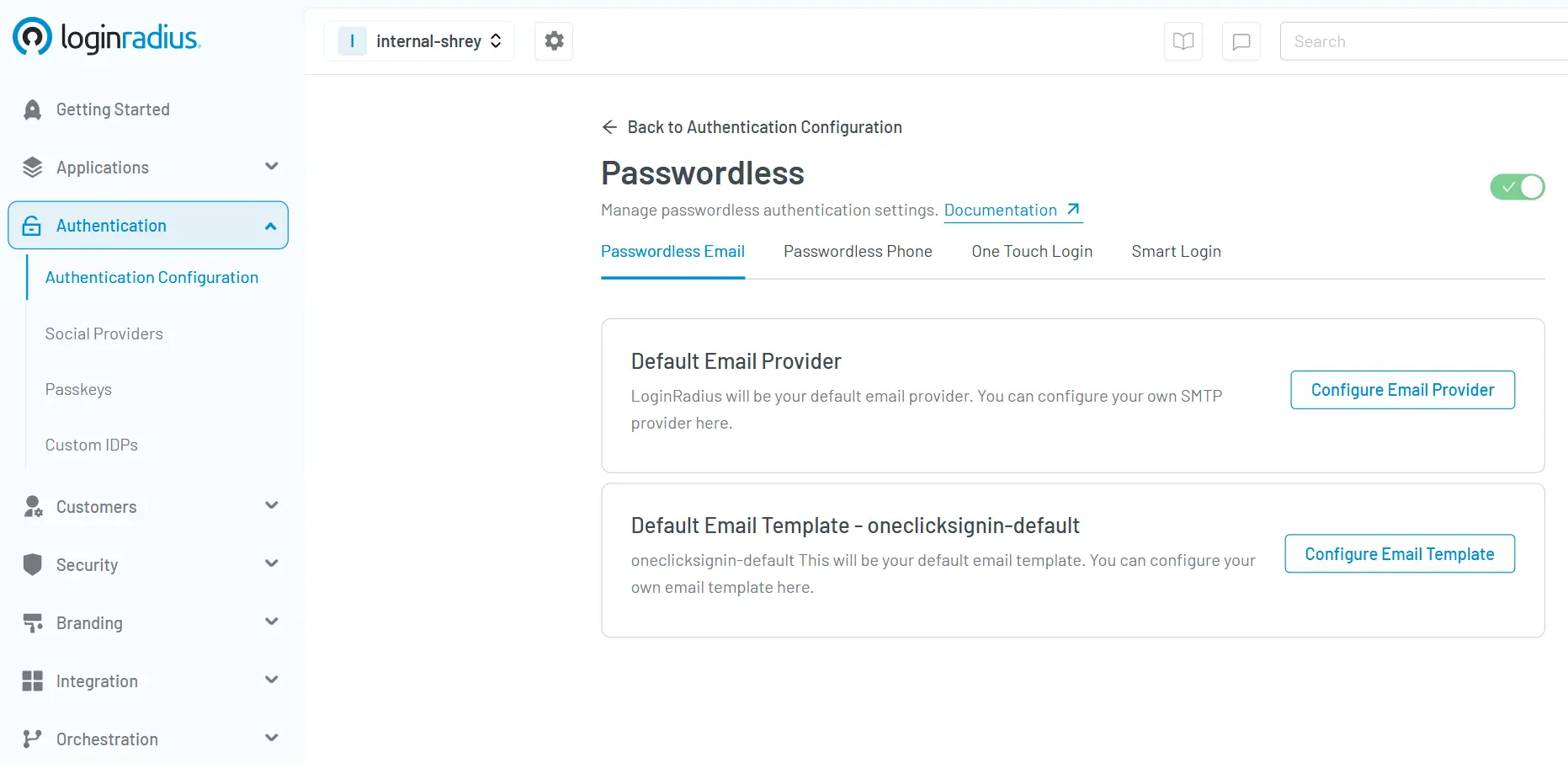
1. Passwordless Authentication
This method eliminates the need for traditional passwords by using other identifiers such as biometrics, one-touch login, or one-time passcodes (phone/email) sent to trusted devices.
Passwordless logins are a part of advanced authentication methods, improving security while reducing friction for users.
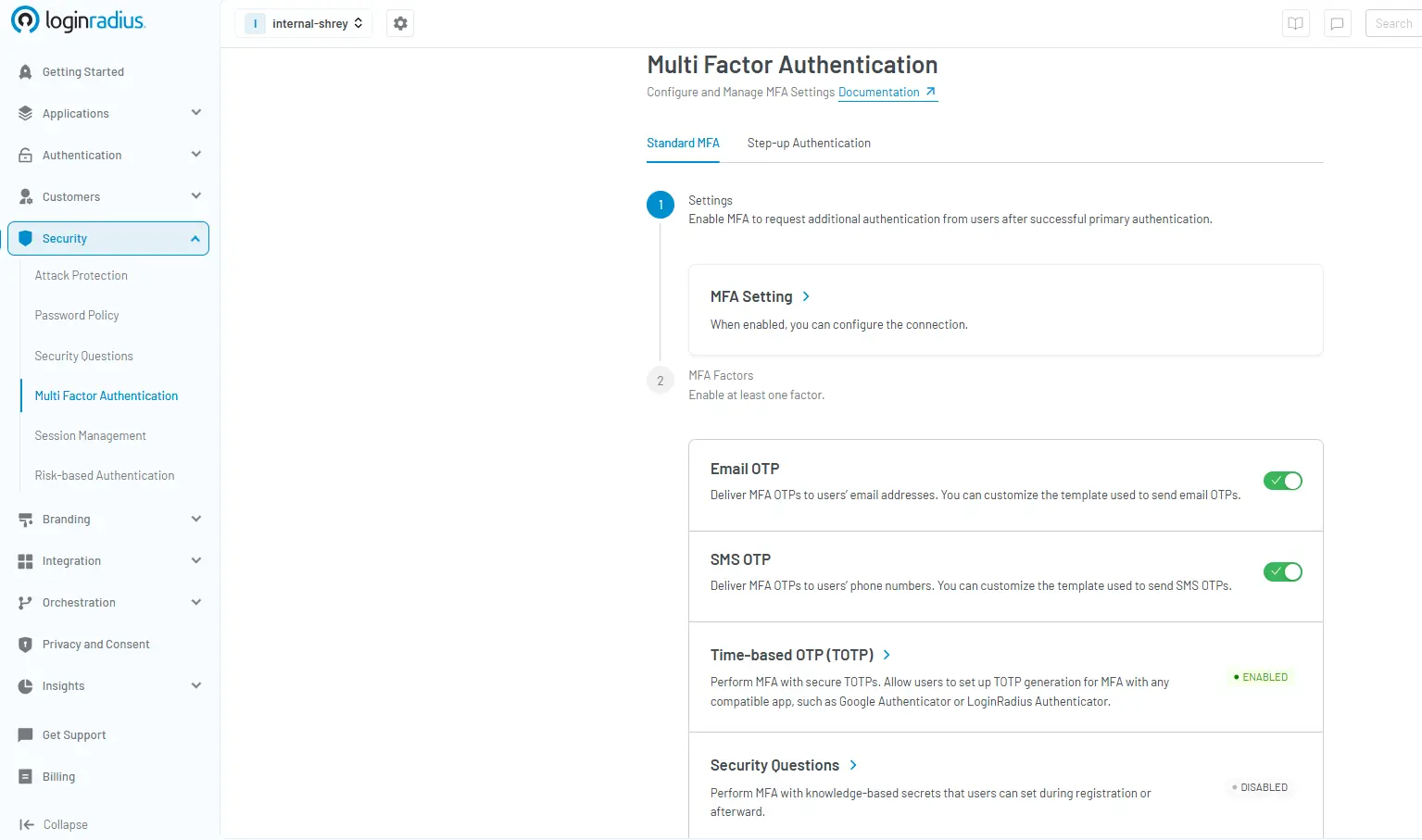
2. Multi-Factor Authentication (MFA)
Multi-Factor Authentication (MFA) strengthens security by requiring users to verify their identity using two or more independent authentication factors.
These factors typically include:
-
Something you know (password or PIN)
-
Something you have (smartphone, security key, or authenticator app)
-
Something you are (fingerprint, face recognition, or other biometric)
By combining multiple factors, MFA significantly reduces the risk of unauthorized access, even if a password is compromised.
Common MFA methods include:
-
Authenticator Apps (TOTP)
-
Push Notifications
-
Hardware Security Keys
-
Biometric Verification
MFA remains one of the most effective defenses against credential theft, phishing, password reuse, and account takeover attacks. For this reason, it has become a standard security requirement across consumer applications, enterprise platforms, financial services, healthcare systems, and SaaS environments.
Many organizations are now extending traditional MFA with adaptive authentication and phishing-resistant technologies such as passkeys and FIDO2 security keys to improve both security and user experience.
Choosing MFA Methods Beyond SMS
Not every multi-factor authentication method depends on a mobile network. While SMS one-time passwords remain widely used, organizations increasingly deploy authentication methods that continue working even when users have limited or no cellular connectivity.
For example:
-
Authenticator apps (TOTP) generate time-based one-time passcodes directly on the device after initial setup, allowing users to authenticate without receiving SMS messages.
-
Hardware security keys such as FIDO2 security keys verify identity through cryptographic authentication and do not rely on phones or cellular service.
-
Passkeys stored on trusted devices enable users to authenticate with biometrics or device verification instead of passwords or SMS codes.
-
Backup authentication methods, including recovery codes and secondary authenticators, help users regain access if their primary device is unavailable.
For organizations, relying exclusively on SMS-based MFA can create unnecessary friction for employees, travelers, and users with limited mobile connectivity. Supporting multiple authentication methods improves both account recovery and user experience while reducing dependence on a single verification channel.
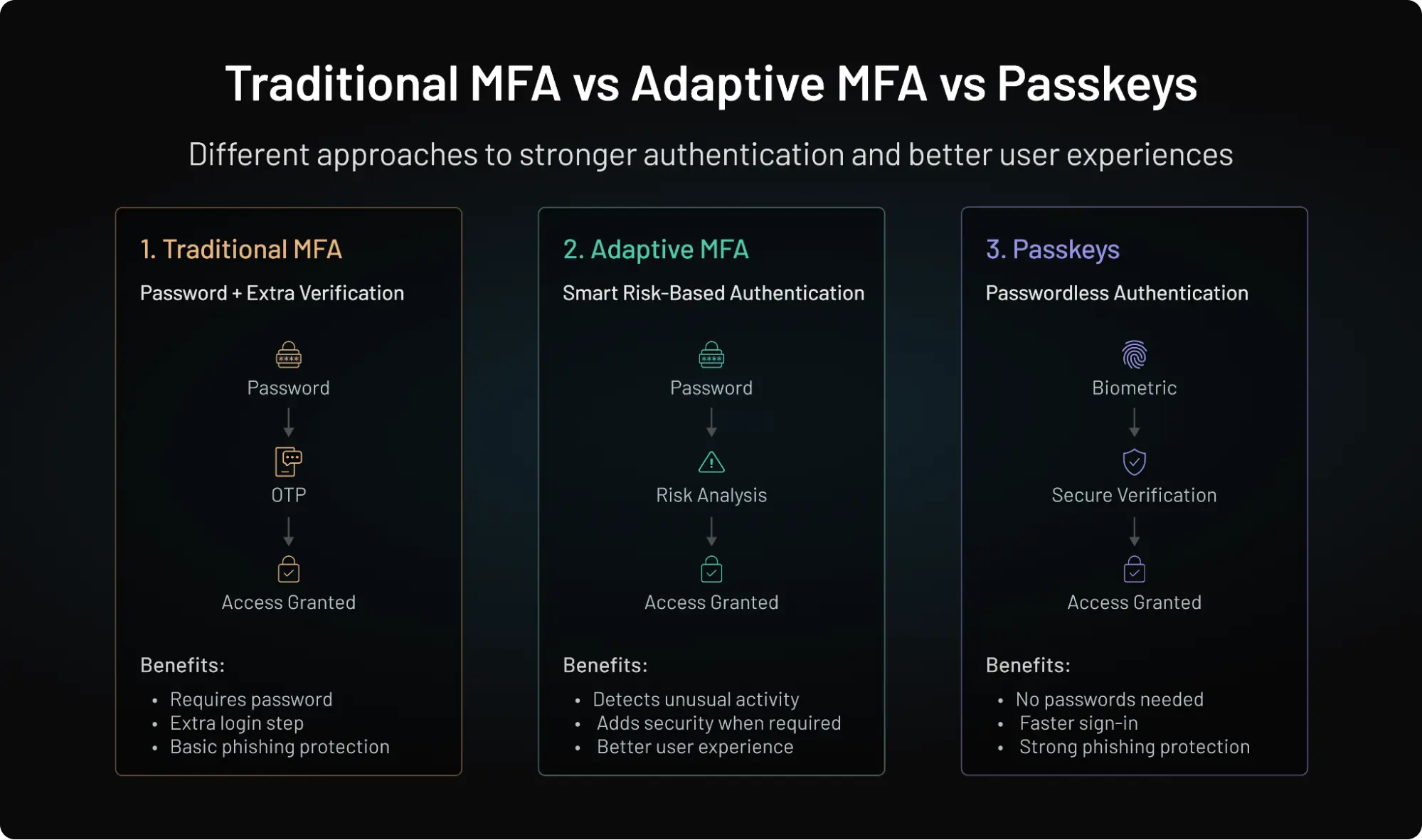
MFA vs Adaptive MFA vs Passkeys
As authentication technologies evolve, organizations increasingly compare traditional MFA, adaptive MFA, and passkeys when designing secure login experiences. While all three approaches improve account security, they solve different problems and offer varying levels of user convenience.
As authentication threats evolve, organizations are moving beyond traditional MFA toward more intelligent and phishing-resistant authentication models. Understanding how these approaches differ can help teams choose the right balance of security and user experience.
| Feature | Traditional MFA | Adaptive MFA | Passkeys |
|---|---|---|---|
| Password Required | Yes | Usually | No |
| User Friction | Medium | Low | Very Low |
| Phishing Resistance | Partial | Partial | Very High |
| Risk-Aware Decisions | No | Yes | No |
| Device Trust Evaluation | Limited | Yes | Built-In |
| Credential Stuffing Protection | Medium | Medium | Very High |
| User Experience | Good | Better | Excellent |
| Security Level | High | Very High | Very High |
Please read this LoginRadius article to learn more about how these specific MFA technologies differ.
The Industry Direction
Most organizations are no longer choosing a single authentication method. Instead, modern authentication architectures increasingly combine:
-
Passkeys for passwordless login
-
Adaptive MFA for risk-based protection
-
Traditional MFA for fallback and account recovery
Modern authentication architectures increasingly combine passkeys for passwordless login, adaptive MFA for risk-based protection, and traditional MFA for fallback and recovery. This layered approach delivers stronger security while minimizing friction for legitimate users.
3. Biometric Authentication
Biometric-based authentication mechanisms are harder to replicate and ideal for mobile apps and enterprise environments alike.
Biometric authentication verifies identity using unique physical characteristics such as fingerprints, facial recognition, voice patterns, or iris scans. Because these traits are difficult to replicate, biometrics provide a convenient and secure alternative to traditional passwords.
Common biometric authentication methods include:
-
Fingerprint authentication
-
Facial recognition
-
Voice recognition
-
Iris and retina scanning
Advantages
-
Fast and convenient user experience
-
No passwords to remember
-
Difficult to share or reuse
-
Strong support for mobile authentication
Limitations
-
Biometric data cannot be changed if compromised
-
Some systems remain vulnerable to spoofing attempts
-
Privacy concerns may arise in regulated environments
Common Use Cases
-
Mobile banking applications
-
Workforce authentication
-
Consumer mobile apps
-
Passkey authentication flows
Biometrics are increasingly used alongside passkeys and device-based authentication to deliver both strong security and low-friction user experiences. To quickly configure biometric authentication, you can visit our developer docs.
4. Token-Based Authentication
Token-based authentication verifies identity using digitally signed tokens rather than repeatedly transmitting user credentials. After successful authentication, an Identity Provider issues a signed token that applications validate before granting access.
Common token-based authentication approaches include:
-
JSON Web Tokens (JWTs)
-
OAuth 2.0 access tokens
-
OpenID Connect (OIDC) ID tokens
-
Session tokens
Advantages
-
Reduces credential exposure by avoiding repeated transmission of usernames and passwords.
-
Scales well across distributed systems, making it ideal for APIs, microservices, and cloud-native applications.
-
Supports modern identity standards such as OAuth 2.0 and OpenID Connect for secure delegated access and Single Sign-On (SSO).
Limitations
-
Tokens must be securely stored because stolen access tokens can sometimes be reused until they expire.
-
Requires proper lifecycle management, including expiration, rotation, and revocation policies.
-
Authentication tokens establish identity, but applications still require authorization models such as RBAC or ABAC to determine what authenticated users can access.
Common Use Cases
Token-based authentication is widely used for:
-
API authentication
-
Single Sign-On (SSO)
-
Cloud applications
-
Mobile applications
-
Microservices architectures
Because applications validate signed tokens instead of handling passwords directly, token-based authentication reduces credential exposure while improving scalability across distributed systems. Here’s how to configure token-based authentication for your applications.
Modern identity platforms commonly combine OAuth 2.0 and OpenID Connect to deliver secure authentication and authorization across applications, APIs, and enterprise ecosystems.
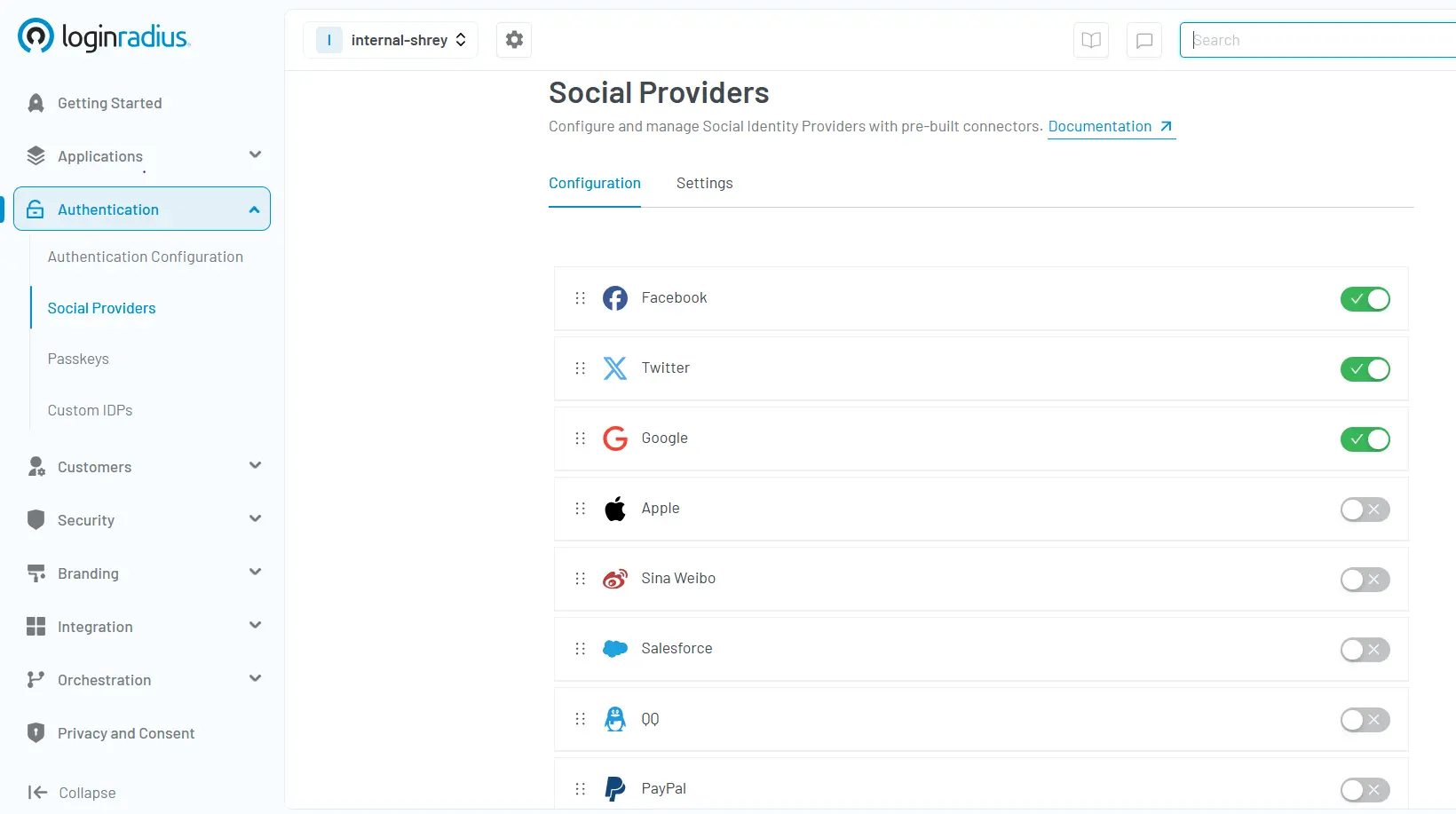
5. Social Login
Social login allows users to authenticate using existing accounts from identity providers such as Google, Apple, Facebook, LinkedIn, or GitHub. Instead of creating a new username and password, users can sign in with credentials they already trust and use regularly.
This approach reduces registration friction, simplifies onboarding, and improves the overall user experience while relying on established authentication systems operated by trusted providers.
Advantages
-
Faster registration and onboarding
-
Reduced password fatigue
-
Higher sign-up and login completion rates
-
Fewer password reset requests
-
Consistent cross-device user experience
Limitations
-
Dependency on third-party identity providers
-
Limited control over external authentication policies
-
Potential account recovery challenges if a linked social account is lost
-
Profile data availability varies across providers
Common Use Cases
-
Consumer applications
-
eCommerce platforms
-
Community and membership sites
-
Media and content platforms
-
SaaS free trials and self-service onboarding
For many customer-facing applications, social login is often combined with passkeys, adaptive authentication, or MFA to balance convenience with stronger security controls.
6. Risk-Based / Adaptive Authentication
Adaptive authentication evaluates contextual and behavioral signals in real time to determine the appropriate level of verification required for each login attempt. Instead of applying the same authentication requirements to every user, the system dynamically adjusts security controls based on risk.
Common signals evaluated include:
-
Device Fingerprint – Determines whether the login originates from a trusted or previously recognized device.
-
IP Reputation – Evaluates whether the source IP address has been associated with suspicious or malicious activity.
-
Geolocation – Detects logins from unusual countries, regions, or locations.
-
Behavioral Analytics – Analyzes typing patterns, navigation behavior, and user interactions to identify anomalies.
-
Impossible Travel Detection – Identifies situations where a user appears to log in from geographically impossible locations within a short timeframe.
By continuously evaluating these signals, adaptive authentication can allow low-risk users to authenticate seamlessly while triggering MFA, step-up authentication, or access restrictions when risk levels increase. This approach helps organizations improve security without introducing unnecessary friction for legitimate users.
7. Certificate-Based Authentication
Certificate-based authentication uses digital certificates to verify the identity of users, devices, or systems. Instead of relying on passwords, trusted certificates establish cryptographic proof of identity.
This method is commonly used for:
-
Device authentication
-
Enterprise VPN access
-
Corporate networks
-
Machine-to-machine authentication
-
Zero Trust environments
Because certificates rely on public-key cryptography, they provide strong protection against credential theft and phishing attacks.
Certificate-based authentication is especially valuable in enterprise environments where organizations must secure large fleets of managed devices and automated systems while maintaining centralized identity controls.
Advantages
-
Strong cryptographic identity verification
-
Ideal for managed devices
-
Resistant to credential theft
Limitations
-
PKI infrastructure required
-
More complex deployment
-
Less suitable for consumer applications
Common Use Cases
Certificate-based authentication is commonly used in environments where organizations need strong cryptographic identity verification for users, devices, and systems. Typical use cases include:
-
Managed enterprise devices to verify corporate laptops, desktops, and mobile devices.
-
Corporate VPN access to authenticate employees before granting access to internal networks.
-
Mutual TLS (mTLS) to establish trusted, encrypted communication between applications and APIs.
-
Zero Trust device authentication to continuously verify trusted devices before allowing access to sensitive resources.
-
Machine-to-machine (M2M) communication for securely authenticating services, containers, and IoT devices without relying on passwords.
Here’s a quick guide for implementing certificate-based authentication for your applications.
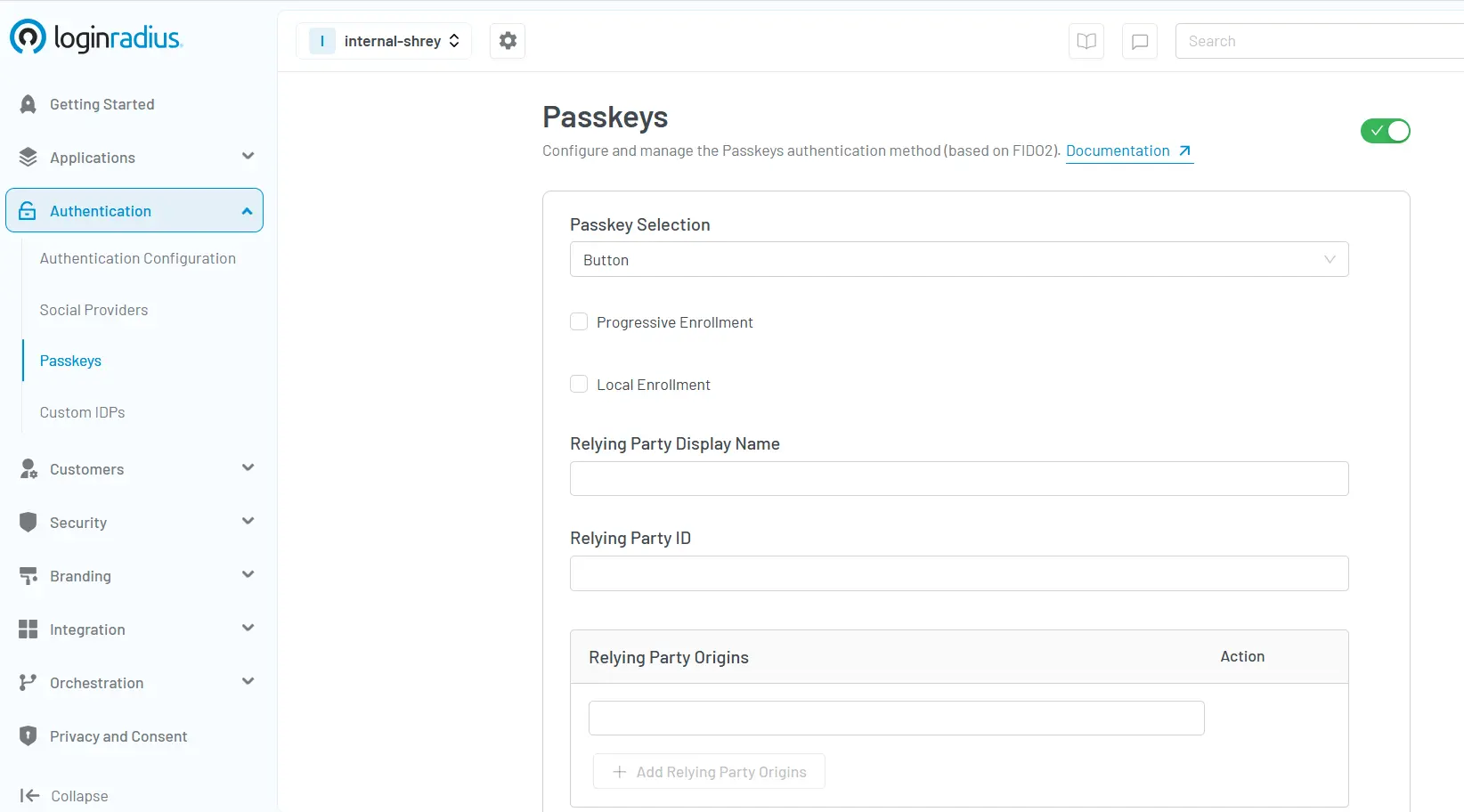
8. Passkeys and the Future of Authentication
Passkeys use public-key cryptography to replace traditional passwords. Stored securely on a trusted device, they enable users to authenticate through biometrics or device verification without relying on reusable credentials.
Passkeys are built on the FIDO2 and WebAuthn standards, enabling origin-bound cryptographic authentication that resists phishing and credential replay attacks.
| Passkey Type | Implementation Variant | Core Security/UX Benefit |
|---|---|---|
| Device-Bound | Hardware security keys (FIDO2) | Highest phishing resistance; completely non-exportable. |
| Syncable | Cloud-escrowed (Apple/Google) | Cross-device roaming; seamless consumer UX recovery. |
Passkeys are now supported by major platforms and are becoming the default authentication method.
As an advanced authentication method, passkeys eliminate phishing risks and simplify login experiences, making them a future-proof option for modern applications.
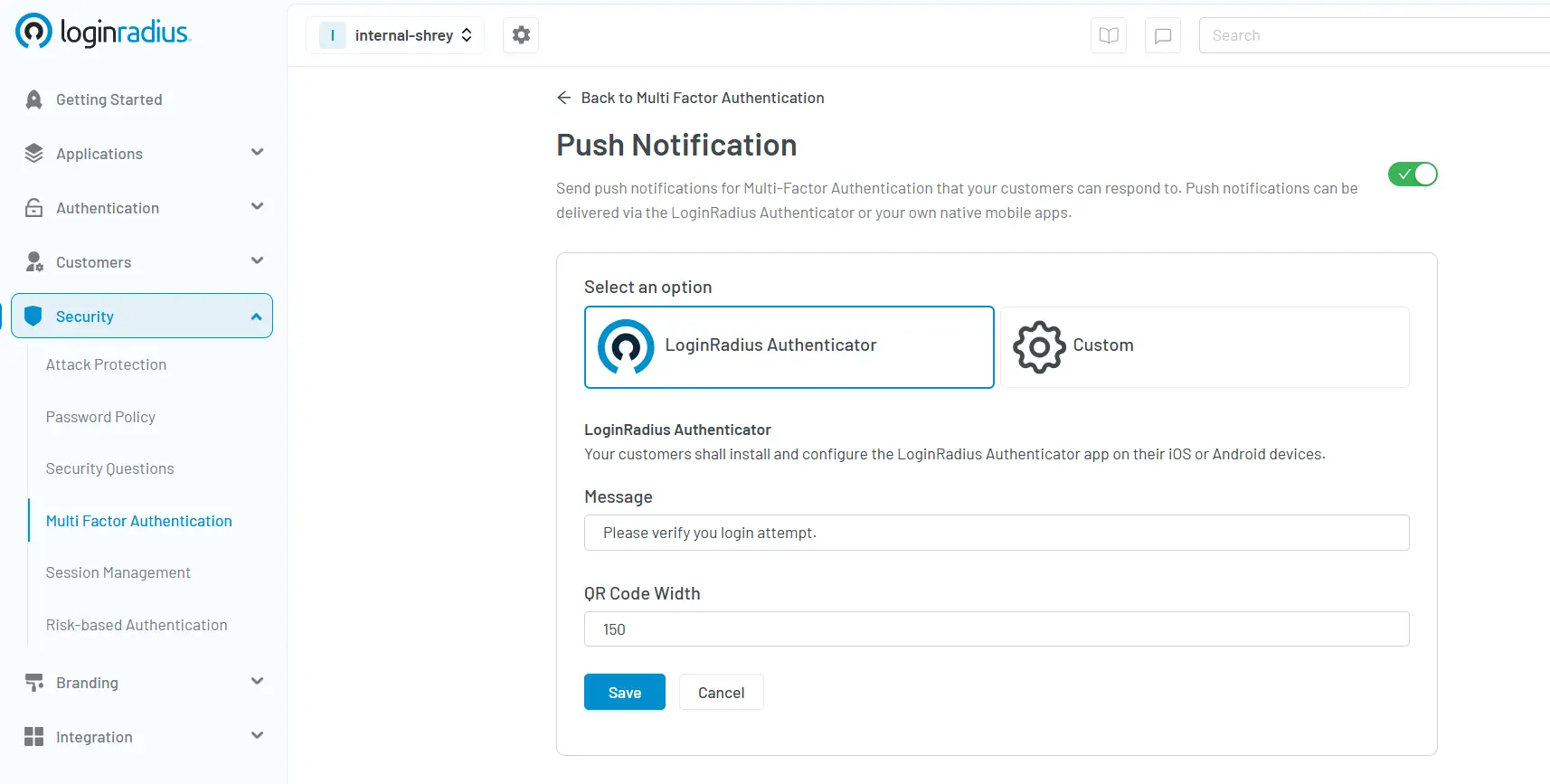
9. Push-Notification MFA
Push-notification MFA sends a prompt to a registered device asking the user to approve or deny the login attempt. It provides a quicker and more secure alternative to SMS-based one-time passcodes.
This method strengthens secure authentication methods by reducing the reliance on manually entered codes and enhancing protection against phishing and social engineering attacks.
How Modern Authentication Works Behind the Scenes
Most users only see the login screen. Behind the scenes, modern identity platforms perform multiple verification steps before granting access. Instead of simply checking a username and password against a database, today's authentication systems evaluate device trust, contextual risk, session state, and identity claims before establishing an authenticated session.
A modern authentication flow typically follows these steps:
Step 1: Authentication Request
The process begins when a user attempts to sign in using a supported authentication method, such as a password, passkey, social login, or Single Sign-On (SSO). The application forwards the request to an Identity Provider (IdP), which is responsible for verifying the user's identity.
Step 2: Risk Evaluation
Before completing authentication, the identity platform evaluates contextual signals such as:
-
Device reputation
-
IP address
-
Geolocation
-
Login history
-
User behavior
-
Threat intelligence
These signals help determine whether the login appears legitimate or requires additional verification.
Step 3: Authentication Policy
Based on the calculated risk, the authentication service applies security policies. Low-risk logins may proceed immediately, while higher-risk attempts can trigger step-up authentication using MFA or other verification methods.
Step 4: Token Issuance and Session Establishment
Once authentication succeeds, the Identity Provider establishes an authenticated session. Depending on the application's architecture, it may issue secure session cookies, access tokens, refresh tokens, or identity tokens that allow users to access protected applications and APIs.
Step 5: Authorization
Authentication confirms who the user is. Authorization determines what the user is allowed to access. Applications validate the issued credentials and evaluate identity claims, roles, or permissions before granting access to protected resources.
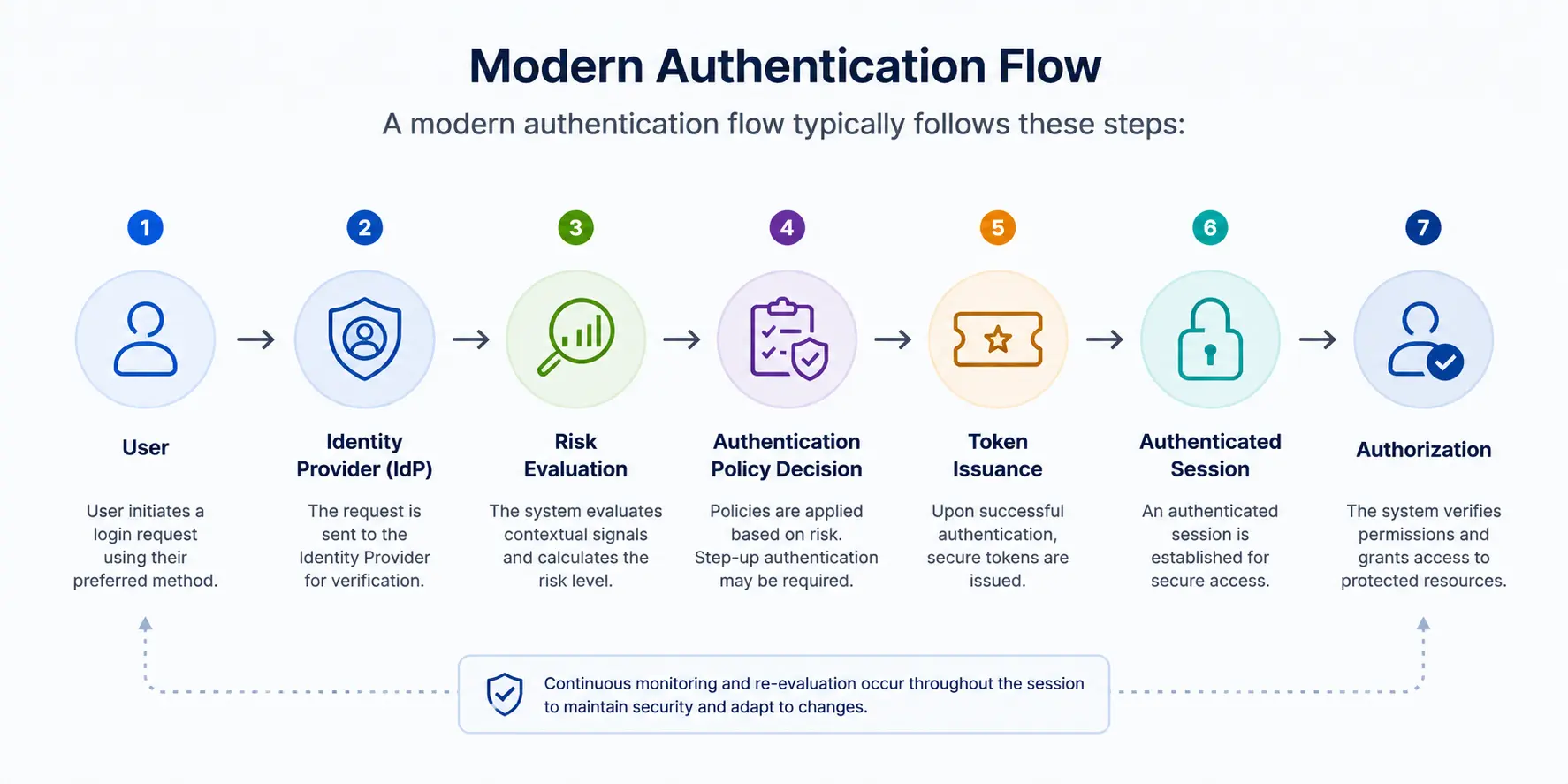
Modern identity platforms combine authentication, risk analysis, session management, and authorization to deliver secure, low-friction access across applications and APIs.
Protocols Behind Modern Authentication
Modern authentication systems rely on standardized protocols to securely exchange identity and access information across applications, APIs, and enterprise environments.
| Protocol | Primary Purpose |
|---|---|
| OAuth 2.0 | Delegated authorization and API access |
| OpenID Connect (OIDC) | User authentication and identity verification |
| SAML | Enterprise Single Sign-On (SSO) |
| FIDO2 / WebAuthn | Passkeys and phishing-resistant authentication |
These standards help organizations deliver secure authentication across web applications, mobile apps, APIs, SaaS platforms, and enterprise ecosystems without requiring every system to manage identities independently.
Comparing Authentication Methods in 2026
For years, many organizations viewed authentication primarily as passwords combined with traditional MFA. That approach no longer holds up. Modern identity threats have evolved beyond simple credential theft, and authentication strategies must evolve with them.
Attackers now use phishing kits, adversary-in-the-middle (AiTM) attacks, credential stuffing, and MFA fatigue campaigns to target user identities. Even traditional MFA can be bypassed when it relies on reusable secrets such as passwords or one-time passcodes.
As a result, organizations are increasingly adopting phishing-resistant authentication methods like passkeys, adaptive MFA, and hardware security keys to improve security while maintaining a seamless user experience.
| Authentication Method | Passwordless | Best For | Primary Limitation |
|---|---|---|---|
| Passkeys | ✅ Yes | Consumer apps, modern SaaS | Ecosystem adoption still growing |
| Adaptive MFA | ❌ No | Enterprise workforce, regulated industries | Requires risk engine and policy tuning |
| Hardware Security Keys | ✅ Yes | Privileged administrators | Additional hardware deployment |
| Authenticator Apps (TOTP) | ❌ No | Workforce and customer MFA | Manual code entry |
| Push MFA | ❌ No | Enterprise login flows | Vulnerable to MFA fatigue if poorly configured |
| Biometrics | ✅ Yes | Mobile applications | Device availability and privacy considerations |
| Social Login | ✅ Yes | Consumer onboarding | Dependency on third-party identity providers |
| SMS OTP | ❌ No | Legacy systems and fallback authentication | SIM-swapping and interception risks |
| Passwords Only | ❌ No | Legacy applications only | High risk of phishing and credential theft |
Biometrics are typically passwordless when implemented with trusted devices or passkeys. No authentication method solves every security and usability challenge equally well.
Some approaches maximize phishing resistance but increase deployment complexity. Others improve onboarding and conversion rates but provide weaker protection against modern identity attacks. The right authentication strategy depends on factors like threat exposure, compliance requirements, customer experience expectations, and operational scalability.
That is why modern identity systems increasingly combine multiple authentication approaches instead of relying on a single method alone.
Which Authentication Method Should You Choose?
There is no single authentication method that works best for every application. The right choice depends on your security requirements, user experience goals, compliance obligations, and deployment constraints.
The following framework can help identify which authentication approach is most appropriate for different scenarios.
| If You Need | Recommended Method |
|---|---|
| Best User Experience | Passkeys |
| Highest Security | Hardware Security Keys |
| Enterprise Workforce Authentication | Adaptive MFA |
| Consumer Applications | Social Login + Passkeys |
| Legacy Application Support | MFA + Passwords |
| Mobile Applications | Biometrics + Passkeys |
| Privileged Admin Access | Hardware Security Keys + Adaptive MFA |
| B2B SaaS Platforms | SSO + Passkeys + Risk-Based Authentication |
| Financial Services | Hardware-Backed MFA + Identity Proofing |
| Healthcare Platforms | Adaptive MFA + Continuous Session Validation |
Choose passkeys when reducing login friction and phishing risk are top priorities. They provide a strong balance of security and usability for most modern applications.
Choose adaptive MFA when user risk varies significantly. It allows organizations to increase security without forcing every user through the same authentication flow.
Choose hardware security keys for privileged accounts, administrators, and high-assurance environments where phishing resistance is critical.
Choose social login when onboarding speed and conversion rates are important, especially for consumer-facing applications.
Choose password-based MFA when supporting legacy systems that cannot yet adopt passwordless authentication methods.
The Reality: Most Organizations Use Multiple Methods
Modern identity architectures rarely depend on a single authentication mechanism.
A typical deployment may combine:
-
Passkeys for primary login
-
Adaptive MFA for suspicious activity
-
Hardware security keys for administrators
-
Social login for onboarding
-
Password-based recovery for legacy compatibility
The goal is not to find one perfect authentication method. The goal is to combine the right methods to balance security, usability, compliance, and operational efficiency.
NIST Authentication Guidelines (SP 800-63-4)
Modern authentication systems in 2026, should align with the National Institute of Standards and Technology (NIST) SP 800-63-4 guidelines and the three Authentication Assurance Levels (AAL) as defined:
-
AAL1: Basic authentication (passwords)
-
AAL2: MFA required
-
AAL3: Phishing-resistant authentication
The latest guidelines emphasize:
-
passwordless authentication
-
phishing-resistant MFA
-
strong device-based authentication
Organizations in regulated industries must align with these standards to ensure compliance.
Common Authentication Security Risks
Even advanced authentication methods can fail if not implemented correctly.
-
SMS OTP Attacks: SIM swapping can allow attackers to intercept one-time passwords.
-
MFA Fatigue Attacks: Attackers repeatedly send push notifications until users approve access.
-
Biometric Spoofing: Deepfake and facial spoofing techniques can bypass weak biometric systems.
-
Token Theft:Session tokens can be stolen and reused for unauthorized access.
To mitigate these risks:
-
Use phishing-resistant MFA
-
Monitor login behavior
-
Implement adaptive authentication
| Authentication Method | Common Security Risk | Recommended Mitigation |
|---|---|---|
| Passwords | Credential stuffing and password reuse | Passkeys or Multi-Factor Authentication |
| SMS OTP | SIM swapping and message interception | Authenticator apps or FIDO2 security keys |
| Push MFA | MFA fatigue (push bombing) | Number matching and adaptive MFA |
| Social Login | Third-party account compromise or dependency | MFA and secure account recovery policies |
| Token-Based Authentication | Token theft and session hijacking | Short-lived tokens, secure storage, and token rotation |
| Biometrics | Presentation and spoofing attacks | Device-bound biometrics with liveness detection |
Every authentication method has potential failure points if implemented incorrectly. Rather than relying on a single control, organizations should combine strong authentication with secure session management, continuous monitoring, and risk-based verification to reduce identity-related threats.
AI-Driven Authentication Threats
Modern cyberattacks are increasingly powered by artificial intelligence.
-
AI-Powered Phishing: Attackers generate realistic phishing messages at scale.
-
Credential Stuffing Bots: Automated bots test stolen credentials across multiple platforms.
-
Deepfake Attacks : AI-generated voices and faces can bypass weak biometric systems.
These threats require stronger authentication systems such as adaptive MFA and passwordless authentication.
Authentication for B2B SaaS Platforms
Authentication becomes significantly more complex in B2B SaaS environments.
Unlike consumer applications, B2B platforms must manage authentication across multiple organizations, departments, partners, vendors, contractors, and external collaborators. Security requirements are often higher, user hierarchies are more complex, and enterprise customers frequently expect federation with their existing identity providers.
As a result, B2B SaaS authentication typically extends beyond simple username-and-password login.
Enterprise Single Sign-On (SSO)
Most enterprise customers expect Single Sign-On (SSO) to integrate their workforce identities with SaaS applications.
SSO allows users to authenticate through a trusted Identity Provider (IdP) and access applications without maintaining separate credentials for every service.
Common enterprise SSO implementations rely on:
-
SAML
-
OpenID Connect (OIDC)
These protocols enable secure identity federation between organizations and SaaS providers.
Delegated Administration
B2B SaaS platforms often need delegated administration capabilities.
Instead of a single global administrator managing every account, organizations can assign administrators to manage users, groups, permissions, and authentication policies within their own tenant.
This approach improves scalability while maintaining security boundaries between organizations.
Partner and Vendor Access
Many organizations extend application access to:
-
Business partners
-
Suppliers
-
Vendors
-
Contractors
-
External consultants
These users typically require different authentication policies than internal employees.
Adaptive authentication can apply additional verification requirements when higher-risk access attempts occur, helping organizations secure external identities without creating unnecessary friction.
Conclusion
Authentication is no longer just a login feature sitting at the edge of an application. It has become the foundation of modern digital trust.
As identity attacks continue evolving from phishing kits and credential stuffing to session hijacking and MFA fatigue, organizations can no longer rely on passwords alone to protect users, applications, and business systems. Modern authentication strategies increasingly combine phishing-resistant authentication, adaptive policies, passkeys, device trust, and continuous risk evaluation to reduce identity-based risk while maintaining a seamless user experience.
At the same time, security cannot come at the cost of usability. Users expect fast onboarding, seamless authentication across devices, and low-friction login experiences. The strongest authentication architectures are the ones that balance both security and user experience without compromising either.
Whether you're building a consumer application, enterprise SaaS platform, workforce identity system, or API ecosystem, choosing the right authentication methods can significantly reduce attack surface while improving trust, compliance, and scalability.
Ready to modernize your authentication strategy?
Explore how LoginRadius helps organizations implement passwordless authentication, adaptive MFA, passkeys, social login, and enterprise-grade identity security designed for today’s evolving threat landscape.
FAQs
Q: What is the most secure authentication method?
A: Phishing-resistant MFA and passkeys are considered the most secure.
Q: Is passwordless authentication secure?
A: Yes, it reduces risks associated with passwords.
Q: Why is MFA important?
A: MFA adds an extra layer of security beyond passwords.
Q: What is the most commonly used form of authentication?
A: Password-based login remains the most widely used form, although it is being rapidly replaced by advanced authentication methods like MFA and biometrics for improved security.
Q: What is the difference between authentication and authorization?
A: Authentication verifies identity, while authorization determines access. In short: authentication asks "Who are you?", authorization asks "What can you access?"
Q: Passkeys vs MFA: Which is better?
A: Passkeys and MFA solve different security challenges. Passkeys replace passwords entirely using cryptographic authentication, while MFA adds additional verification factors. Many modern identity systems use passkeys as the primary authentication method and MFA as a fallback or recovery mechanism.
Q: Can passkeys replace passwords?
A: Yes. Passkeys are designed to replace traditional passwords by allowing users to authenticate using trusted devices and cryptographic key pairs. While adoption is growing rapidly, many organizations still support passwords for compatibility and account recovery purposes.
Q: What is phishing-resistant authentication?
A: Phishing-resistant authentication uses cryptographic verification methods that cannot be easily intercepted or replayed by attackers. Examples include passkeys, FIDO2 authentication, and hardware security keys.
Q: Is biometric authentication secure?
A: Biometric authentication is generally secure when combined with trusted devices and modern authentication frameworks. Fingerprints, facial recognition, and other biometric factors improve convenience while reducing dependence on passwords.
Q: What is adaptive authentication?
A: Adaptive authentication evaluates contextual signals such as location, device reputation, IP address, and user behavior to determine the appropriate level of verification required. Low-risk logins may proceed seamlessly, while higher-risk activity can trigger additional authentication challenges.
Q: What is token-based authentication?
A: Token-based authentication uses digitally signed tokens to verify user identity after successful login. Standards such as OAuth 2.0 and OpenID Connect (OIDC) allow applications to validate identity without repeatedly exposing credentials.
Q: Which authentication method is best for SaaS applications?
A: Most modern SaaS platforms combine multiple authentication methods, including Single Sign-On (SSO), adaptive MFA, passkeys, and social login. The best approach depends on security requirements, user experience goals, and compliance obligations.
Q: What authentication methods support Zero Trust security?
A: Zero Trust architectures commonly use passkeys, adaptive MFA, device trust validation, certificate-based authentication, hardware security keys, and continuous session monitoring to verify users throughout the access lifecycle.
Q: What is the difference between MFA and adaptive MFA?
A: Traditional MFA applies the same authentication requirements to every login. Adaptive MFA evaluates risk signals in real time and only requests additional verification when suspicious activity is detected.
Q: Which authentication method is the most phishing-resistant?
A: Passkeys and FIDO2/WebAuthn security keys provide the strongest protection against phishing because they use cryptographic, origin-bound authentication rather than reusable credentials or one-time codes.
Q: What are authentication assurance levels?
A: They are NIST-defined levels indicating authentication strength. AAL1: Basic authentication (passwords), AAL2: MFA required, AAL3: Phishing-resistant authentication.