Introduction
Passwordless authentication looks like an obvious upgrade. No passwords to remember. Fewer resets. Faster login. Stronger security. On paper, most passwordless authentication solutions seem like an easy win. Then the evaluation begins and things get complicated.
The one common mistake teams do? Fall into a feature comparison mode.
Passkeys? Available. FIDO2 authentication? Supported. Magic links, OTP, adaptive authentication? All there. The shortlist of your CIAM vendor starts to look identical.
But the real decision is not about feature availability. In 2026, these are table stakes. The real question is whether a solution can handle how your identity system actually works across onboarding, login, recovery, integration, and scale without introducing new friction. Here’s where it usually breaks.
Passwordless is treated like a login upgrade when it is really an identity decision. A passkey flow that looks seamless in a demo can create friction when users switch devices. A magic link can simplify onboarding, but fall short in phishing-resistant authentication. Everything works until it doesn’t, and that moment rarely shows up in evaluation.
That gap matters more than most buyer guides admit. You’re not just choosing between passwords and passwordless login anymore. You’re choosing between different levels of identity assurance, different recovery strategies, and very different approaches to platform integration and scalability.
Some passwordless authentication platforms are built for simple consumer use cases. Others are designed for CIAM authentication, B2B SaaS authentication, and large-scale environments where orchestration, performance, and control matter. These differences don’t stand out in feature lists but they define how the system performs after rollout.
In short, if your evaluation starts and ends with features, you will likely make the wrong call.
The better approach is to ask harder questions. How is identity verified at signup? What happens when a user loses access to their device? How strong is the platform’s FIDO2 authentication implementation in real scenarios? Can it integrate cleanly into your existing architecture? Will adaptive authentication improve security without disrupting the user journey? And at scale, does performance stay consistent?
These are the questions this guide focuses on. Not just how passwordless authentication works, but how to evaluate passwordless authentication solutions when the stakes are real users, revenue, and security included. Because the best solution is not the one with the most features. It’s the one that fits your identity architecture and holds up in real-world conditions.
From “No Passwords” to Identity-Bound Authentication
The conversation has moved on from simply removing passwords. Modern passwordless authentication is about tying access to something stronger than shared secrets. That usually means device-bound credentials, cryptographic keys, or biometrics working through standards like FIDO2 authentication.
Passkey authentication is a good example. Instead of asking users to remember something, it relies on something they already have and controls their device. The private key never leaves that device. That changes the threat model entirely. Phishing-resistant authentication becomes the baseline, not an add-on.
Although both OTP-based flows and passkeys fall under the passwordless umbrella, they operate very differently. One still depends on a code that can be intercepted or misused. The other relies on cryptographic proof that is far harder to replicate. Treating them as equivalent is where evaluation starts to slip.
Passwordless Is Not One Method (And That’s the Catch)
Some common use cases include:
-
Passkeys for returning users who need fast, secure login
-
Magic links for quick onboarding or low-friction signup
-
OTP as a fallback when stronger methods are unavailable
-
Biometrics layered on top of device-based authentication
Each of these solves a different problem. None of them solves everything.
Most passwordless authentication platforms support multiple methods. But support alone does not guarantee the right orchestration. The real value shows up in how these methods are combined across journeys, when to prompt, when to step up authentication, when to fall back, and when to stay invisible.
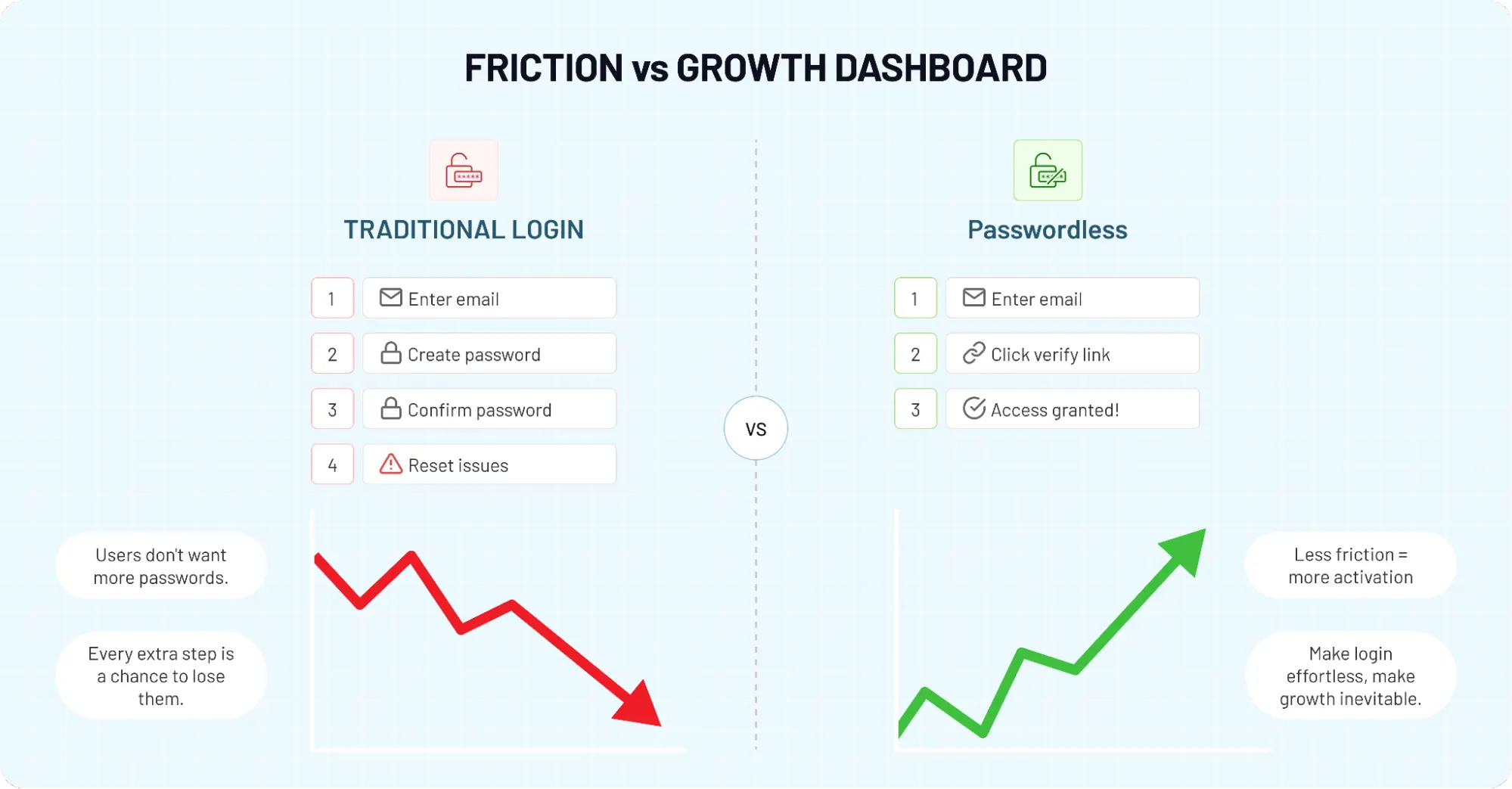
CIAM Changes the Game
In contrast to simple authentication systems, CIAM authentication has to balance scale, user experience, and security at the same time. You’re not dealing with a fixed set of users. You’re dealing with unpredictable behavior, multiple devices, different geographies, and varying levels of trust. That introduces complexity quickly.
A passkey flow that works well for a single-device user may struggle when users switch devices frequently. A magic link that feels effortless for B2C onboarding may not hold up in B2B SaaS authentication where org invites, roles, and admin controls come into play.
And adaptive authentication, while powerful, can either strengthen security or create friction depending on how it is implemented.
What This Means for Buyers
Looking to choose the right approach? Passwordless authentication is no longer about just eliminating passwords. It’s about designing an authentication system that can:
-
Prove identity reliably
-
Adapt to different user journeys
-
Integrate with your existing CIAM platform
-
Scale without breaking performance
-
Maintain security without adding friction
That’s a much higher bar than most feature comparisons suggest. And it’s exactly why understanding what passwordless authentication really means in a CIAM context is the first step before evaluating any vendor.
Why Passwordless in CIAM Is Not Just About UX Anymore
For a long time, passwordless login was framed as a convenience story. Faster sign-in. Fewer password resets. Less friction for users. That part is still true. But it is no longer enough.
In 2026, teams are not evaluating passwordless authentication just to make login feel smoother. They are looking at it because traditional credentials keep creating the same problems: phishing exposure, credential stuffing risk, reset fatigue, weak password habits, and support costs that never seem to disappear.
So yes, user experience still matters. A lot. But the conversation has moved well beyond convenience. In a CIAM environment, user experience and security are no longer separate decisions. They affect each other directly. A weak login experience can hurt conversions.
A weak security model can hurt trust. And a passwordless flow that looks elegant on the surface can still fall apart if it cannot verify the right user with the right level of confidence.
Security Is Now the Bigger Buying Trigger
A surprising pattern we’ve seen is that many teams still talk about passwordless as if it were mainly a conversion play. In practice, security teams are often driving the evaluation just as strongly as product teams.
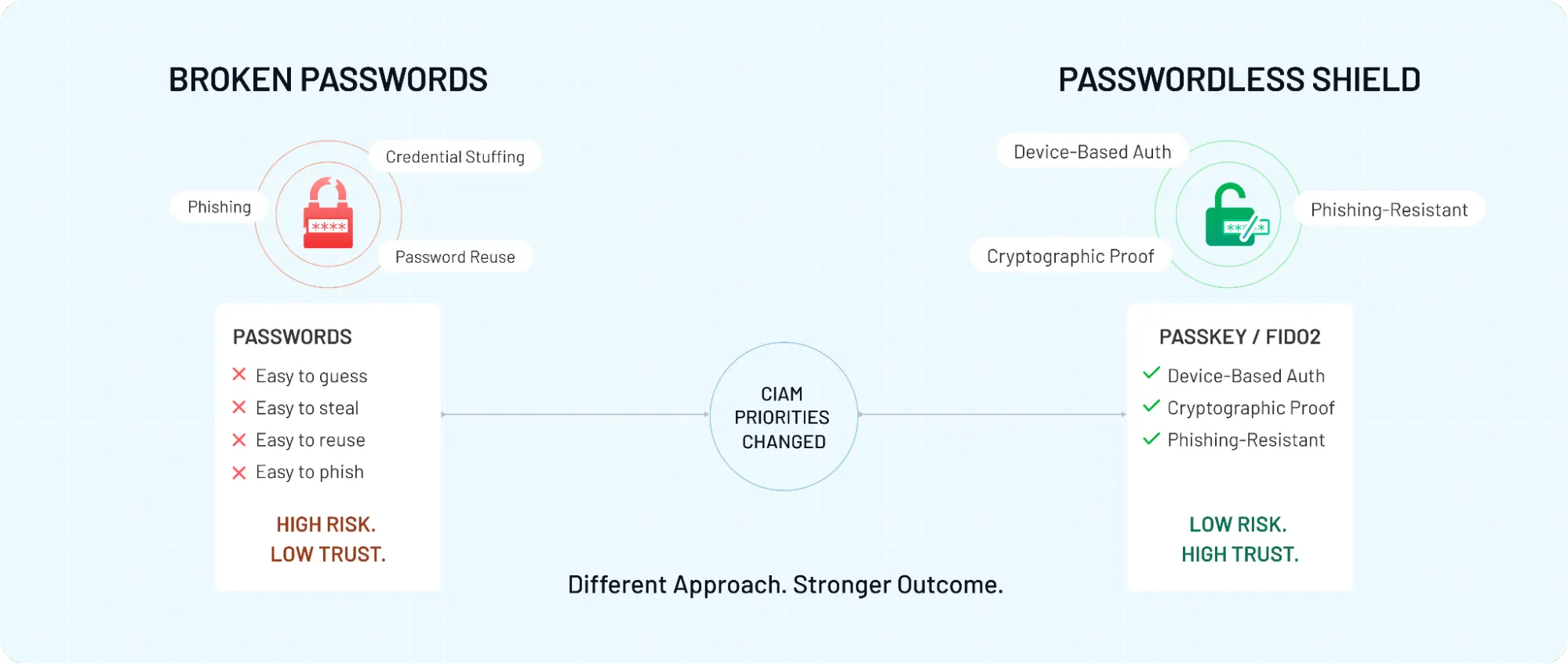
That makes sense. Passwords remain one of the easiest entry points for attackers because they can be guessed, stolen, reused, or phished. Passwordless authentication changes that equation, especially when it is built on FIDO2 authentication and phishing-resistant authentication models.
Instead of relying on knowledge-based secrets, it uses possession, local device verification, or cryptographic proof. That is a major shift.
Passkeys are a strong example of this change. They are not simply a nicer replacement for passwords. They reduce exposure to phishing and make replay-style attacks far harder. That difference matters more in modern CIAM than many buyer guides acknowledge.
Where Passwordless CIAM Implementations Break in Real Products
Passwordless authentication implementation looks clean in the architecture diagrams. But not so much when real systems are involved. Most issues don’t show up during login; they show up around it. Signup, device changes, recovery, org invites. The parts that sit just outside the “happy path.” That’s where otherwise solid passwordless authentication solutions start to leak friction or risk.
Onboarding Friction Shows Up First
Teams often pick the fastest-looking flow for signup, usually magic links or OTP. It works… until it doesn’t. Delayed emails, expired links, users switching apps mid-flow, corporate spam filters, small things, but they add up.
Passkey authentication can solve some of this, but it introduces its own timing problem. Prompting users to create a passkey too early can feel like a commitment they don’t understand yet. Too late, and you miss the moment when intent is high. Getting that sequence right is harder than it sounds.
Cross-Device Reality Breaks “Seamless” Flows
A user signs up on mobile, tries to log in on desktop, or vice versa. If your passwordless login depends heavily on device-bound credentials (FIDO2 authentication), you need a clear path for cross-device access. Without it, users hit a wall with no passkey on this device, no easy fallback, no obvious next step.
Magic links can bridge this gap, but they come with trade-offs in phishing resistance. This is where orchestration matters more than the method itself.
Account Recovery Is the Silent Failure Point
Users lose devices. They upgrade phones. They switch browsers. If your passwordless authentication platform does not handle recovery cleanly, support tickets rise and trust drops. Recovery flows that rely on weak signals can also open security gaps. Overly strict recovery, on the other hand, locks legitimate users out.
There’s no single perfect answer. But there has to be a deliberate one multi-step recovery, risk-based checks, and clear user guidance. Most implementations treat recovery as an afterthought. It rarely behaves like one.
B2B SaaS and CIAM Complexity Adds Another Layer
In B2B SaaS authentication, you’re not just authenticating a user, you're placing them into the right organization, with the right role, under the right policies.
Org invites, admin approvals, domain routing, SSO fallbacks these flows interact with passwordless in ways that basic guides don’t cover. A magic link might log a user in but not place them correctly. A passkey might authenticate the device but not resolve tenant context. Small mismatches like these create confusing first experiences.
CIAM authentication has to orchestrate identity and context together. Passwordless methods are only one part of that system.
Adaptive Authentication Can Either Help or Complicate Things
Adaptive authentication is often added to strengthen security. But it can also introduce inconsistency if not tuned well.
Users may see different prompts across sessions without understanding why. Step-up authentication might trigger too often, breaking flow, or not often enough, weakening protection. The logic behind it needs to be predictable, even if it is dynamic.
Passwordless authentication doesn’t fail because the methods are weak. It fails when the surrounding system isn’t designed to support real user behavior. That’s the gap most evaluations miss and the one that shows up fastest after rollout.
The Biggest Mistake Buyers Make When Evaluating Passwordless Solutions
Most shortlists look impressive on paper. Passkeys? Yes. FIDO2 authentication? Yes. Magic links, OTP, adaptive authentication, integrations, everything seems covered. And yet, teams still end up reworking flows a few months after rollout. The mistake is not in choosing passwordless. It’s in how the evaluation is done.
Feature Parity Hides Real Differences
On the surface, many passwordless authentication vendors offer similar capabilities. The checkboxes line up. But those checkboxes don’t tell you how each method behaves under pressure.
Two platforms may both support passkey authentication. One may handle cross-device login smoothly with proper fallbacks. The other may leave users stuck when they switch browsers. Both technically support the same feature. Only one actually works in real conditions.
The same pattern shows up with OTP and magic links. They look simple and interchangeable, but their impact on phishing-resistant authentication and recovery flows can be very different. Treating them as equal options leads to shallow comparisons.
Ignoring Identity Assurance Levels
Not all passwordless authentication is equally secure.
Some methods verify possession. Others rely on weaker signals. A platform that leans heavily on OTP may still expose users to interception risks. A platform built around FIDO2 authentication offers stronger, cryptographic proof. That difference affects how resistant your system is to phishing and account takeover.
Buyers often ask, “Does it support passwordless login?” The better question is, “What level of identity assurance does each method provide, and where is it applied?”
Overlooking the Full User Journey
Evaluation tends to focus on login screens. Real systems don’t operate there alone.
What happens during onboarding? How does the platform behave during step-up authentication? What does account recovery look like? Can users move between devices without friction? These moments define the experience more than the initial login itself.
A passwordless authentication platform that performs well across these journeys is far more valuable than one that excels in a single entry point.
Underestimating Integration Depth
Passwordless does not exist in isolation. It has to fit into your existing CIAM authentication setup, your identity providers, your APIs, and your application logic.
Some platforms integrate cleanly into modern stacks with API-first models. Others require workarounds that slow down implementation or limit flexibility later. Integration is rarely visible in feature comparisons, but it directly affects how quickly and reliably you can deploy at scale.
Confusing “Support” With “Execution”
Many vendors support multiple authentication methods. Fewer orchestrate them well.
The difference shows up in how flows are combined. When to trigger passkeys. When to fall back to OTP. How adaptive authentication decisions are made. Poor orchestration creates inconsistent experiences. Strong orchestration keeps the journey predictable without exposing unnecessary risk.
What Buyers Should Do Instead
Looking to choose the right approach? Shift the evaluation lens. Instead of asking: “Does this platform support passwordless authentication?”
Start asking: “How does it handle identity assurance across different methods?”, “How does it behave across onboarding, login, and recovery?”,“Can it adapt without breaking the user experience?” “Will it integrate cleanly into our CIAM platform and scale with us?” “Are there pricing traps or features trapped in higher plans only?”
The answers to these questions reveal far more than a feature grid ever will. Because the best passwordless authentication solutions are not defined by what they list but by how they perform when real users interact with them.
The Real Evaluation Framework: What Actually Matters
Once the feature checklist is out of the way, see how they behave across identity, security, and scale. Looking to choose the right approach? Focus on how the system performs across these layers, not just whether it supports them.
Identity Assurance & User Verification
Everything starts here. If the system cannot reliably establish that the user is who they claim to be, the rest doesn’t matter.
Some platforms rely on lightweight signals during signup, email access, OTP, and basic verification. Others allow stronger identity proofing or step-up checks when needed. The difference shows up later, especially in fraud prevention and account recovery.
In CIAM authentication, this becomes critical. You’re not just authenticating a returning user, you're onboarding new identities at scale. Weak verification at the start often leads to stronger friction later.
Phishing Resistance & Cryptographic Security
This is where modern passwordless authentication earns its value.
Methods built on FIDO2 authentication and passkey authentication provide cryptographic proof tied to a device. That makes phishing-resistant authentication far more achievable compared to OTP-based flows. It’s not just about removing passwords, it’s about removing entire attack vectors.
Although both approaches fall under passwordless, their security posture is very different. Buyers should evaluate which methods are primary and which are fallback, not treat them equally.
User Experience Across Journeys
A smooth login is easy to demo. A smooth system is harder to build.
Think beyond the first interaction. Onboarding, repeat login, step-up authentication, and edge cases all shape user perception. A platform that minimizes friction across these journeys without sacrificing security creates real value.
Here’s where orchestration matters. When to prompt for a passkey, when to fall back to OTP, when to stay invisible. These decisions affect both adoption and trust.
Account Recovery & Device Lifecycle
Users will lose devices. They will upgrade phones. They will forget how they signed up.
Recovery flows need to handle this without opening security gaps or frustrating legitimate users. Some passwordless authentication platforms offer multi-step recovery with adaptive authentication. Others rely on weaker fallback methods that can be exploited.
This is not a corner case. It is a core part of the system.
Platform Integration & CIAM Compatibility
Passwordless authentication has to fit into your existing ecosystem.
That includes CIAM platforms, identity providers, APIs, and application logic. Integration depth determines how quickly you can deploy and how flexible the system remains over time. API-first authentication models often provide better control, especially for teams building custom flows.
In B2B SaaS authentication, this becomes even more important. Org-level routing, SSO fallback, tenant context these require tight coordination between authentication and platform logic.
Compliance & Security Standards
Security is not just technical it is also regulatory.
Depending on your market, you may need to align with standards like NIST guidelines or regional data protection requirements. Passwordless authentication solutions that support strong authentication levels and auditability make this easier to manage.
Ignoring this early can slow down expansion later.
Scale & Performance
Here’s where many evaluations fall short.
A system that works well for thousands of users may behave very differently at millions. Authentication performance, latency, and reliability directly affect user experience. Even small delays at login can impact conversion and retention.
Scalable authentication solutions need to maintain consistency under load while still enforcing security policies. That balance is not easy to achieve and not always visible during evaluation.
What This Framework Changes
Let me make this simple. You are not choosing between features. You are choosing between systems that handle identity, security, and scale differently.
The best passwordless authentication platforms are not defined by how many methods they support. They are defined by how well they combine identity assurance, phishing resistance, user experience, integration, and performance into a system that holds up under real-world conditions.
That is the standard worth evaluating against.
Migration Strategy: Moving to Passwordless Without Breaking UX
Switching to passwordless sounds straightforward until you try to replace something that’s been baked into your system for years. Passwords are everywhere: login flows, recovery logic, integrations, support processes. Removing them all at once is rarely practical.
A surprising pattern we’ve seen is teams attempting a full switch too early. It looks bold on paper. In production, it often leads to confusion, failed logins, and rising support tickets. The smarter approach is gradual, controlled, and measurable.
Start With a Hybrid Authentication Model
Most successful rollouts don’t eliminate passwords on day one. They introduce passwordless alongside existing methods.
This hybrid authentication approach allows you to:
-
Test passkey authentication and other methods without disrupting current users
-
Provide fallback options like OTP when needed
-
Observe how different user segments respond
Over time, as confidence builds, you can shift primary authentication toward stronger, phishing-resistant methods like FIDO2 authentication.
Introduce Passwordless at the Right Moments
Timing matters more than most teams expect. Onboarding is a natural entry point. Users are already engaged and open to new flows. But even here, pushing passkeys too aggressively can create hesitation. Starting with familiar methods like magic links, then gradually introducing stronger options works better in many cases.
For returning users, the transition can be smoother. Once trust is established, prompting for passkey authentication feels less intrusive and more like an upgrade.
Plan for Device Transitions Early
Users don’t stay on one device. They switch constantly.
If your rollout assumes a single-device journey, friction will appear quickly. Cross-device authentication needs clear pathways:
-
Syncing passkeys across ecosystems where possible
-
Providing fallback methods when credentials are unavailable
-
Avoiding dead ends where users cannot proceed
This is not an edge case. It is the default behavior.
Treat Account Recovery as a Core Flow
Recovery is often treated as a backup plan. In passwordless systems, it becomes a primary experience.
Users will lose access to their devices. When that happens, recovery flows must:
-
Verify identity without relying on weak signals
-
Avoid creating easy attack vectors
-
Guide users clearly through the process
Strong passwordless authentication platforms support layered recovery combining adaptive authentication, multiple factors, and contextual checks. Weak recovery design can undo the benefits of strong primary authentication.
Monitor, Measure, and Adjust
Passwordless authentication rollout is not a one-time deployment. It is an ongoing optimization process.
Track:
-
Login success rates
-
Drop-offs during onboarding
-
Recovery requests
-
Performance under load
These signals reveal where friction exists. Small adjustments, changing when prompts appear, refining fallback logic, tuning adaptive authentication can have a large impact on both security and user experience.
What This Means for Buyers
Looking to choose the right approach? Evaluate not just how a platform supports passwordless authentication, but how it supports migration to it.
Ask:
-
Does it enable hybrid authentication strategies?
-
Can it introduce passkeys and other methods progressively?
-
How does it handle cross-device scenarios during transition?
-
Are recovery flows strong enough to support real-world behavior?
The goal is not to remove passwords overnight. It is to move toward a stronger, more reliable authentication system without disrupting the experience users already rely on.
Progressive Enrollment: The B2C Secret to Passkey Adoption
One of the biggest mistakes in B2C passwordless rollouts is forcing high-assurance methods like Passkeys during the initial signup. In a world of 3-second attention spans, asking a new user to "Register a Passkey" before they’ve seen your product's value is a recipe for abandonment.
Progressive Profiling (or Progressive Enrollment) solves this by matching the authentication strength to the user’s relationship stage:
-
The First Visit: Use a "frictionless" entry point like a Magic Link or Social Login to get the user inside and active.
-
The Second or Third Session: Once the user is "active," use a non-intrusive prompt or "nudge" to suggest enabling a Passkey for "faster, biometric-access next time."
-
High-Value Actions: Only enforce the strongest phishing-resistant authentication when the user performs a sensitive action, like updating payment details or transferring funds.
By treating enrollment as a journey rather than a one-time gate, you maximize conversion early on while systematically hardening your security posture as the user’s account value grows.
Vendor Evaluation Checklist: What to Verify Before You Commit
By the time you reach vendor comparisons, most platforms will look similar. Clean dashboards, modern flows, support for passkeys, OTP, integrations it all checks out.
Identity Assurance: What Is Actually Being Verified?
Start with the foundation. How does the platform verify identity during signup? Does it rely only on email or phone access, or can it support stronger identity verification when needed? Can it step up assurance dynamically based on risk?
Weak verification at the beginning often leads to stronger friction later. Strong identity assurance reduces that need.
Authentication Methods: Depth Over Breadth
Most vendors will list multiple passwordless authentication methods. That’s expected.
What matters is how those methods are implemented:
-
Is passkey authentication built on solid FIDO2 authentication standards?
-
Are OTP and magic links treated as primary methods or fallbacks?
-
Does the system support phishing-resistant authentication in practice?
Support alone is not enough. Execution matters.
Orchestration Across Journeys
Authentication does not happen in isolation.
Ask how the platform manages:
-
Onboarding vs returning login
-
Step-up authentication triggers
-
Method switching across devices
-
Consistent user experience across flows
Poor orchestration creates confusion. Strong orchestration keeps the system predictable without exposing unnecessary risk.
Account Recovery & Device Lifecycle
This is where many evaluations fall short.
What happens when users lose access to their device? How does recovery work without weakening security? Can users easily add new devices without starting from scratch?
A reliable passwordless authentication platform treats recovery as a core capability, not a fallback.
Platform Integration & CIAM Compatibility
Integration determines how fast you can move.
Check:
-
API-first capabilities for custom flows
-
Compatibility with your CIAM authentication setup
-
SSO and identity provider integration
-
Support for B2B SaaS authentication scenarios like org routing and tenant mapping
If integration is rigid, everything downstream becomes harder.
Scale, Performance, and Reliability
Demos don’t show scale.
Ask how the platform performs under load:
-
Can it handle millions of users without increasing latency?
-
How does it maintain authentication performance during peak traffic?
-
Are there safeguards for failure scenarios?
Even small delays in authentication can impact conversion at scale.
Compliance & Security Standards
Security requirements don’t stop at implementation.
Does the platform align with standards like NIST? Does it support auditability and reporting? Can it adapt to regional compliance requirements as you expand?
These questions matter more as your product grows.
What Buyers Should Take Away
Looking to choose the right approach? Use the checklist to test assumptions, not just confirm them.
Instead of asking: “Does this vendor support passwordless authentication?”
Ask: “How well does it handle identity, recovery, orchestration, and scale in real conditions?”
Because the best passwordless authentication vendors are not defined by what they promise. They are defined by how reliably they deliver when real users, real devices, and real edge cases come into play.
How to Choose the Right Passwordless Solution for Your Needs
By this point, most platforms on your shortlist will look capable. They support passkeys, offer FIDO2 authentication, handle OTP, and integrate with your stack. Nothing looks obviously wrong.
And that’s exactly why the final decision gets tricky.
Here’s where it gets interesting. The right passwordless authentication solution is not the one with the most features or the strongest individual method. It’s the one that fits your identity model, risk profile, and user behavior all at the same time.
Use this matrix to categorize your primary requirements and narrow your shortlist:
| Your Business Model | Primary Challenge | Focus your Evaluation on | Recommended Primary Method |
|---|---|---|---|
| High-Growth B2C | Signup Drop-off & Conversion | Progressive Enrollment and social integration. | Magic Links (Onboarding) → Passkeys (Returning) |
| B2B SaaS / Multi-tenant | Organization Routing & Team Invites | Tenant-aware orchestration and deep platform integration. | Magic Links & Passkeys |
| Regulated / High-Security | Phishing & Credential Theft | FIDO2 Attestation and phishing-resistant hardware-bound keys. | Hardware Keys & Device-Bound Passkeys |
| Large-Scale Enterprise | Operational Costs & Support Tickets | Automated Recovery Workflows and legacy system compatibility. | Passkeys with OTP Fallback |
Before you commit to a 2026 contract, put your top two vendors through this "Real-World" stress test. If they can't answer these, they are selling you a feature, not a system:
-
Recovery Paradox: "How does a user regain access if they lose their device without our helpdesk performing a manual reset?"
-
The Sync Gap: "How do you handle a user who registers a passkey on an iPhone but later attempts to log in on a Windows PC?"
-
Orchestration Agility: "Can we change the fallback method from SMS to Email in 5 minutes without a code deployment?"
-
Identity Sovereignty: "Are the passkeys portable, or are our users' identities locked into your platform?"
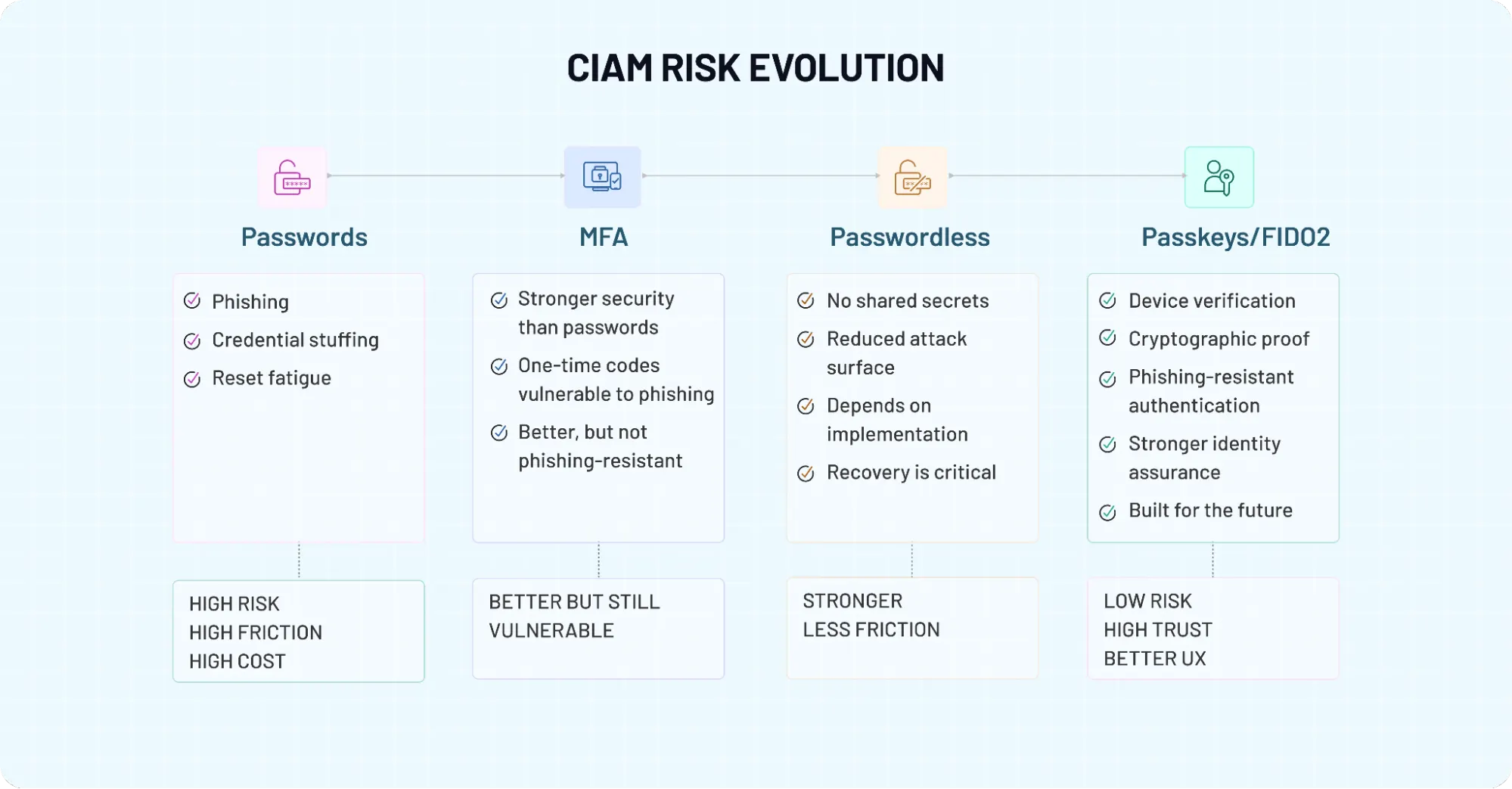
Business Impact: Conversion, Experience, and ROI
Passwordless Authentication earns executive attention because it produces measurable outcomes.
Conversion: Removing the First Drop-Off Point
Every additional field in a registration flow introduces friction. Password creation is one of the most common abandonment triggers. By reducing registration and login to a single email input and a verification click, Passwordless Login removes that barrier entirely. This aligns with how users behave. When access feels immediate, hesitation disappears.
Experience: Eliminating a Known Pain Point
Passwords frustrate users long before they fail. Remembering them, resetting them, and managing them across devices creates unnecessary friction. Passwordless Login replaces that with a seamless experience built around actions users already perform daily, checking email and clicking links. That improvement compounds over time, especially for repeat users and mobile-first audiences.
ROI: Cutting Operational Waste
Password resets are expensive. They generate support tickets, slow down users, and distract teams from higher-value work. This is where ROI becomes tangible. Reduced support load translates into lower operational cost.
Fewer authentication failures translate into higher engagement and retention. When security incidents tied to credential reuse decrease, risk exposure shrinks as well. Passwordless Login doesn’t just improve the top of the funnel it cleans up the cost structure behind it.
Final Thoughts: Passwordless Is an Identity Decision That Matters
Passwordless authentication is easy to approve and surprisingly hard to get right.
On paper, most passwordless authentication solutions look similar. In production, they behave very differently. The difference shows up in places that don’t make it into demo recovery flows, cross-device access, onboarding friction, integration depth, and how well the system holds up at scale.
Here’s where it gets real. You’re not just replacing passwords. You’re deciding how identity is verified, how trust is maintained, and how users move through your product without friction or risk. That’s not a feature decision. That’s architecture.
The teams that get this right don’t chase the longest feature list. They focus on fit. Fit with their CIAM authentication model. Fit with their user journeys. Fit with their security posture. And just as importantly, fit with how their system will evolve over time.
Looking to choose the right approach? Take a step back from the checklist.
Ask the harder questions:
-
Can this platform deliver phishing-resistant authentication where it actually matters?
-
Will it support passkey authentication without breaking cross-device flows?
-
Does it handle recovery without opening security gaps?
-
Can it integrate cleanly into your existing stack and scale with your growth?
If those answers are unclear, the risk doesn’t disappear after purchase. It shows up later in support tickets, in drop-offs, in security incidents, and in the effort required to fix what should have worked from the start.
If you’re evaluating passwordless authentication vendors or planning a rollout, don’t rely on assumptions. Run a real evaluation. Test real journeys. Pressure-test recovery and edge cases.
Or, if you want to move faster: Book a demo with LoginRadius and see how a modern passwordless authentication platform handles real-world CIAM scenarios across onboarding, login, recovery, and scale.
Request a tailored evaluation for your use case and identify gaps in your current authentication stack before they impact users. Because the right passwordless authentication solution doesn’t just remove passwords. It builds a system your users can trust and your team can rely on.
FAQs
Q: What is passwordless authentication?
A: Passwordless authentication is a login method that allows users to access applications without using a traditional password. Instead, it relies on alternatives like passkeys, biometrics, OTPs, or magic links to verify identity. The goal is to reduce friction while improving security. By removing passwords, it eliminates risks like phishing and credential theft.
Q: How does passwordless authentication work?
A: Passwordless authentication works by verifying a user through something they have (device), something they are (biometrics), or a secure link/code. For example, passkey authentication uses cryptographic keys stored on a device, while OTPs send a temporary code. The system checks these signals instead of a password. This approach improves both security and user experience.
Q: Is passwordless authentication more secure than passwords?
A: Yes, in most cases, passwordless authentication is more secure than traditional passwords. Methods like FIDO2 authentication and passkeys are phishing-resistant and cannot be easily stolen or reused. Unlike passwords, they don’t rely on user memory or weak habits. However, security depends on how well the system handles recovery and fallback flows.
Q: What are the main types of passwordless authentication?
A: The main types include passkeys, magic links, one-time passwords (OTP), biometrics, and hardware security keys. Each method serves a different purpose depending on the use case. Passkeys offer strong security for repeat logins, while magic links are often used for onboarding. OTPs usually act as fallback options rather than primary authentication methods.
Q: What should businesses look for in passwordless authentication solutions?
A: Businesses should evaluate beyond features and focus on identity assurance, phishing resistance, and user journey support. Integration with existing CIAM platforms, scalability, and recovery mechanisms are equally important. The solution should handle cross-device access and real-world edge cases smoothly. Choosing the right platform is more about fit than feature count.