
Introduction
Let’s say you open a .txt file created on Windows, but you’re working on a Mac. Suddenly, your perfectly structured data has strange extra spacing, broken formatting, or worse, lines that don’t even register. What just happened?
Chances are, you’ve run into the mysterious but mighty EOL character, short for End of Line character. It is the unsung hero (or villain) of text formatting, and while it’s invisible on your screen, it makes or breaks how your program processes data.
Whether you’re writing logs, sending API responses, or formatting output in a terminal, these tiny line characters dictate how your text behaves. And yet, they’re often misunderstood.
This blog breaks down everything you need to know from the ASCII new line character to how Python handles EOL characters. We’ll explore the difference between \n, \r\n, and \r, why platforms treat them differently, and how to stop these invisible glitches from sneaking into your code.
You’ll learn: What is the end-of-line character really?, Why do newline characters vary between operating systems?, How does the EOL character in Python behave and finally, what is the ASCII command for a line break, anyway?
So if you've ever wondered about E.O.L. meaning or spent hours debugging line breaks that "shouldn't be there," this blog is for you.

What Is an End of Line (EOL) Character?
Let’s start simple. The EOL character, also known as the newline character, line break character, or end line character, tells your machine: “Hey, we’re done with this line start a new one.”
It’s not something you see. You don’t type it directly (unless you’re working in a hex editor). But the moment you hit the Enter key, your operating system inserts one or more control characters to mark the end of line.
Now, here's where it gets interesting (and slightly messy):
Different systems interpret the "Enter" key differently.
-
Linux/macOS → Inserts \n → That’s ASCII code 10, also called Line Feed (LF).
-
Windows → Inserts \r\n → A combination of ASCII code 13 (Carriage Return - CR) and 10 (Line Feed - LF).
-
Classic Mac OS (pre-OS X) → Used \r alone (CR, ASCII 13), which is almost obsolete now but still shows up in old files.
This difference is why a file created on one machine may look misaligned or unreadable on another. The newline in ASCII \n, but its meaning and interpretation vary across environments.
Some developers even refer to these as ASCII newline symbols, and if you’re working in Python, Node.js, or Bash, you’ll see these characters rear their head more often than you'd expect. For instance:
echo "Hello\r\nWorld" > file.txt
The above will behave differently depending on whether you open it in Notepad, VS Code, or a Linux terminal.
So, in short, what is a line break? It’s a silent instruction that splits text into chunks your computer (and your eyes) can understand. Mastering it means fewer bugs, smoother collaboration, and a deeper understanding of how computers truly communicate with each other.
How Developers Interpret Line Breaks (And Why That’s Not Always Right)
Which character do you consider as the end of line or newline?
Most developers will answer \n (except for front-end developers, who might say: </br> 😄). But that’s not entirely true let’s dig deeper.
An end-of-line character is any character in a string that represents a line break. In other words, the next content appears on a new line. There are two basic newline characters:
-
LF
-
Character: \n
-
Unicode: U+000A
-
ASCII: 10
-
Hex: 0x0A
-
Known as: Line Feed Character
-
-
CR
-
Character: \r
-
Unicode: U+000D
-
ASCII: 13
-
Hex: 0x0D
-
Known as: Carriage Return character
-
Did you know? In older printers, \r moved the print head to the start of the same line, while \n advanced the paper to the next line. That’s why early systems had to use both.
These characters—known as line feed characters (\n) and carriage return characters (\r)—form the foundation of how systems break lines. In ASCII terms, \n corresponds to ASCII code 10 and \r to ASCII code 13.
This is why developers often refer to them as the ASCII newline character, ascii code for new line, or even ascii line break characters when debugging cross-platform file issues.
OS Behavior and Compatibility
Different operating systems interpret EOL characters differently, and this has major implications in how files are parsed and displayed:
| OS | EOL Interpretation |
|---|---|
| Unix/Linux | Uses \n as the line terminator |
| macOS (modern) | Uses \n (compliant with Unix) |
| Mac OS ≤9 | Used \r for line breaks |
| Windows | Uses both: \r\n (CRLF) as the newline |
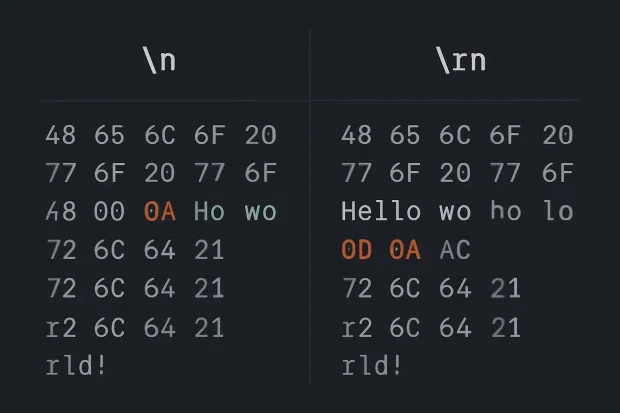
This explains why newline handling across systems is sometimes called newline encoding, and why some developers may refer to Windows newline characters as \r\n or CRLF (Carriage Return + Line Feed)—hex-coded as 0x0D 0x0A in ASCII.
This is why when you move files between systems, you may run into unexpected formatting, bugs, or data misalignment, because the newline in ASCII isn’t universal.
How to Check Line Endings in a File (Practical Tip!)
There are many ways to check which newline characters a file is using. One of the easiest tools? Notepad++.
View EOLs in Notepad++
-
Open the file
-
Click the pilcrow symbol (¶) on the toolbar
-
You'll now see the newline characters at the end of each line:
- CR LF = Windows-style (\r\n)
- LF = Unix or modern macOS (\n)
Search for Line Breaks
-
Press Ctrl + Shift + F
-
Choose Search Mode → Extended
-
Search for:
- \r\n → if found, it’s a Windows file
- \n → if found alone, it’s likely Unix/macOS
For example, searching for \r\n helps detect Windows newline characters, while \n identifies Unix-style line breaks. If you inspect in hex mode, you’ll see:
- \n → 0x0A ASCII
- \r → 0x0D ASCII
These values are part of the hex code for new line or newline ascii value you might see in tools like hex editors or log viewers.
Convert Between EOL Formats
Still in Notepad++:
-
Go to the Edit menu
-
Navigate to EOL Conversion
-
Choose between Windows (CRLF), Unix (LF), or Old Mac (CR)
This is especially useful when working on files shared between identity systems, APIs, or imported/exported user data, like CSVs containing CIAM profile records.
References:
ASCII and EOL: The Invisible Symbols That Control Code
Before GUIs, emojis, and Markdown, there was ASCII, the foundational language for text in computing.
The ASCII (American Standard Code for Information Interchange) standard represents characters as numbers. Most of us know A is 65, a is 97, and so on. But the real magic lies in the control characters, invisible instructions that tell machines how to handle text, not just what text to display.
Among these, two characters are critical for EOL (end of line) operations:
| Symbol | ASCII Code | Name | Purpose |
|---|---|---|---|
| \r | 13 | Carriage Return (CR) | Moves the cursor to the beginning of the line |
| \n | 10 | Line Feed (LF) | Moves the cursor down to the next line |
So when you ask, “What is the ASCII command for a line break?”—the answer is context-dependent:
-
Unix/macOS use \n (LF, ASCII 10, Unicode U+000A)
-
Windows uses \r\n (CRLF, ASCII 13 + 10, Unicode U+000D + U+000A)
-
Old Mac OS used \r (CR, ASCII 13, Unicode U+000D)
These control characters are also known as:
-
ASCII newline characters
-
ASCII line feed character (\n)
-
ASCII return character (\r)
-
ASCII EOL
-
ASCII for new line
In fact, the newline (\n) is often called ASCII code 10, newline ascii code, or simply \n in ASCII.
Pro tip: These Unicode values—U+000A for \n and U+000D for \r—can help you identify line breaks in more advanced tools, text encodings, or data validation scenarios.
You can find these values in the ASCII table under the line feed (LF) and carriage return (CR) entries. Unicode equivalents are U+000A (\n) and U+000D (\r), also referred to as newline unicode and unicode carriage return.
Want to see them in action? Scroll down to the Notepad++ section, where we show how to reveal and interpret these ascii line break characters visually.
Originally, typewriters and early terminals required both. CR brought the cursor back to the start of the line, and LF advanced it downward—think of it like pressing “return” and then pulling the paper up by one notch.
So when you ask, “What is the ASCII command for a line break?” the answer is context-dependent:
-
Unix/macOS use \n (LF, ASCII 10)
-
Windows uses \r\n (CRLF, ASCII 13 + 10)
-
Old Mac OS used \r (CR, ASCII 13)
This is why you'll often encounter terms like:
-
new line character ASCII
-
ASCII for newline character
-
line characters
-
char new line
-
ASCII line symbols
You might not see these symbols in your editor, but version control tools (like Git) or debugging hex dumps will often expose them. They can also cause serious issues in parsing when your code expects one style, and the file delivers another.
Why EOL Is Different on Windows, Mac, and Linux
So why did different operating systems decide to do line breaks... differently?
The answer, like most things in tech, lies in legacy systems.
Windows (\r\n – CRLF)
Microsoft DOS inherited its text file conventions from CP/M, which treated carriage return and line feed as separate commands. This was crucial in physical printing hardware, which needed two instructions to properly end a line: one to return the carriage and one to feed the paper.
This tradition carried into Windows and persists to this day. So, Windows text files contain \r\n to indicate a line break—two characters instead of one.
Linux/Unix/macOS (\n – LF)
Unix chose to simplify things and used just \n (LF) to represent the end of line. It worked, it was efficient, and other Unix-like systems (including modern macOS) adopted it.
Classic Mac OS (\r – CR)
Before macOS switched to Unix underpinnings (Darwin), old versions of Mac OS used \r (CR) for line breaks. This method is almost extinct, but you might still see it in legacy or obscure files.
This variety leads to bugs you might not expect:
-
Text files with Windows-style EOL (\r\n) opened in a Unix-only environment may show extra ^M characters.
-
Scripts fail when executed in the wrong shell because of unseen \r.
-
APIs that consume JSON, CSV, or XML may fail to parse due to mismatched newline characters.
So yes, the humble end-of-line character has the power to completely break your application, especially when you're transferring files across environments.
EOL Character in Python: A Developer's Mini-Guide
Python, like most modern languages, plays nicely with newline characters—but only if you know how to control them.
Python Default: \n
By default, Python uses \n (LF) as the newline character, regardless of your OS. This means when you use:
print("Hello\nWorld")
You’ll get:
Hello
World
This works cross-platform in the console or terminal. But things change when working with files.
Reading and Writing Files with Different Line Breaks
Writing Files with Custom Line Endings:
with open("windows_style.txt", "w", newline="\r\n") as f:
1f.write("Line 1\r\nLine 2")Here, you're explicitly telling Python to use the Windows-style line break.
Reading Files with Mixed EOLs:
with open("mixed_file.txt", "r") as f:
1for line in f:
2print(line.strip())
Always account for differences like \n vs \r\n and how they're interpreted as newline unicode, newline in hex, or even ASCII break line characters. Using .splitlines() helps Python auto-detect these newline characters, whether they're encoded in ASCII or Unicode.
Detecting Line Breaks in a File
You can peek under the hood to see what line endings a file uses:
with open("example.txt", "rb") as f:
1content = f.read()
2print(repr(content))
This raw mode will show you whether the file uses \n, \r\n, or \r.
So, if you’re working across environments or parsing external input, the EOL character in Python becomes a big deal. Inconsistent line endings can break parsers, introduce bugs in string manipulation, or mess up CLI output.
Pro Tips:
-
Use newline="" (empty string) when writing CSVs in Python to prevent extra blank lines on Windows.
-
Always strip or sanitize input lines when reading external files.
-
Use os.linesep to write system-native EOLs:
import os
print(repr(os.linesep)) ## '\r\n' on Windows, '\n' on Unix
Understanding the Python newline character, line break character, and how Python interfaces with end-of-line nuances is critical for robust, bug-free applications.
Real-World Use Cases (and Bugs!) Caused by EOL Differences
You’d think a line break is harmless, right? But mismatched end-of-line characters are notorious for creating subtle and frustrating bugs, especially in collaborative and cross-platform environments. Here's how they sneak in:
1. Git Diffs and the ^M Monster
If you’ve worked on a codebase shared across macOS/Linux and Windows, you’ve probably seen the infamous ^M symbol in your diffs.
That’s your text editor or terminal telling you: "Hey, this file has a Carriage Return (CR) character I wasn’t expecting."
What’s really happening? You saved a file with Windows-style EOL (\r\n), but your teammate's Git repo expects Unix-style (\n). Suddenly, Git thinks every line has changed—even if you’ve only added a comment. The result: messy diffs, merge conflicts, and annoyed developers.
2. Broken CSV Imports and Line-Based Parsers
Ever had a CSV file import break in your data pipeline with no clear error? It might be because a file exported from Excel (on Windows) used \r\n, but your Linux-based ETL process expected only \n.
These mismatches confuse line-based parsers, making them read the file incorrectly. You get:
-
Merged lines that shouldn’t merge
-
Empty records
-
Unexpected behavior during validation
It’s especially dangerous when handling authentication logs or session files that rely on precise line characters and ascii code for newline parsing.
3. API Payloads and Webhooks Gone Rogue
In API responses, especially those using raw text or file attachments, the use of platform-dependent newline characters can lead to inconsistencies. For example:
-
A webhook handler on Linux might expect line breaks as \n, but your client running on Windows sends \r\n.
-
JavaScript clients parsing split("\n") miss half the data because the actual break is \r\n.
This is more common than you think in log shipping, error reporting, and event-driven microservices.
Best Practices to Handle End-of-Line Characters
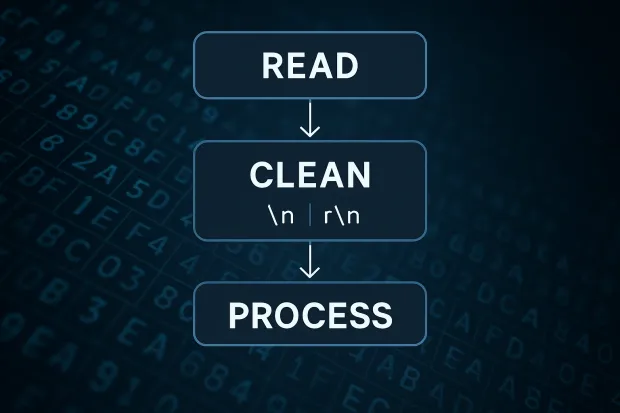
Now that we know how disruptive inconsistent EOL characters can be, let’s explore some developer-approved strategies to prevent issues across your stack:
1. Normalize Line Endings in Version Control
Set up .gitattributes to enforce consistent line endings:
-
text=auto
-
.sh text eol=lf
-
.bat text eol=crlf
This ensures that even if contributors are on different systems, Git will store and checkout files with the correct newline characters.
2. Use EditorConfig to Set File Behavior
Add an .editorconfig file to your project root:
[*]
end_of_line = lf
charset = utf-8
Tools like VS Code, Atom, Sublime, and IntelliJ respect this config, ensuring developers on any OS follow the same end-of-line standards.
3. Handle EOL in Python the Right Way
-
Open files with the correct newline argument
-
Normalize all incoming lines using .strip() or .replace() methods
-
Use splitlines() to safely handle different newline characters
lines = file.read().splitlines()
4. Convert Files Before Processing
For data pipelines or file uploads:
-
Use tools like dos2unix, unix2dos, or Notepad++ to clean up EOL formats
-
Notepad++ is especially useful for visual inspection and conversion of EOL styles—just open the file, view hidden characters, and convert using the Edit > EOL Conversion menu
-
Always sanitize uploaded content before parsing or importing it into your CIAM platform
This step is essential when working with identity data imports, whether you're processing user profiles, logs, or session exports. Ensuring the right newline character can prevent silent parsing failures and inconsistent user records.
5. Test With Mixed Inputs
Make it part of your testing to validate inputs with various end-of-line character combinations. Especially when:
-
Reading emails
-
Consuming logs
-
Handling user-submitted text
This practice helps catch bugs where platforms mix newline in ASCII styles, especially if users switch devices or browsers.
Conclusion
Let’s be honest, when people talk about code quality, nobody gets excited about line breaks. But once you’ve been burned by a parsing error, broken import, or impossible-to-resolve Git conflict, you’ll never ignore the end-of-line character again.
EOLs may be small, but they’re foundational. They keep your logs readable, your APIs clean, and your files interoperable across systems. From ASCII for newline to the EOL character in Python, understanding them helps you write cleaner, more portable, and more resilient code.
So the next time you’re debugging something that “looks fine,” consider looking at what you can’t see:
The newline characters hiding between the lines.
In a CIAM system, where data integrity, audit trails, and user lifecycle logs are critical, mastering end-of-line characters isn't optional; it’s a best practice. Whether you're exporting identities to third-party systems, parsing access logs, or syncing profiles across apps, EOL consistency ensures your identity data stays clean, secure, and compliant.
More Technical EOL Terms You Might Encounter
-
ASCII newline character : Typically refers to
\n, ASCII 10 -
Carriage return character :
\r, ASCII 13 -
Unicode newline : U+000A, used across systems
-
ASCII code for \n : Decimal 10, Hex 0x0A
-
ASCII EOL : General term for any end-of-line ASCII character
-
Newline ascii code : Often used interchangeably with ASCII 10
-
Line break unicode : Platform-agnostic representation of newlines
-
ASCII value of \n : 10 in decimal, 0x0A in hex
FAQs
What is the ASCII command for a line break?
ASCII code 10 (\n) is the most common newline character used to break lines in text.
What is a line break?
It's the invisible character (like \n or \r\n) that signals the end of one line and the start of another.
What is the newline ASCII code?
The newline character is ASCII 10, or \n.
How does Python handle EOL characters?
Python uses \n by default, but you can control line endings explicitly when reading or writing files.
What is ASCII end of line?
ASCII end of line(EOL) refers to the control characters in the ASCII (American Standard Code for Information Interchange) set that represent a line break or the end of a line of text.
What's the difference between newline and carriage return?
\n (LF) moves the cursor to the next line; \r (CR) returns the cursor to the beginning of the line.


