Introduction
Customers usually notice identity systems only when something goes wrong. A forgotten password blocks a login. An account recovery attempt fails. MFA becomes unavailable after a device change. Or a customer signs in with a different method and suddenly cannot find the account information they expected.
These problems often end up with customer support. At scale, even routine identity issues can create unnecessary tickets and manual work—especially when support teams have limited account context or customers are not able to resolve basic identity tasks themselves. Customer Identity and Access Management (CIAM) can change that.
Secure self-service account recovery, flexible authentication, profile management, unified customer identities, and controlled administrative access can help customers complete more identity tasks without support intervention. When assistance is necessary, authorized teams can work with clearer identity context instead of piecing together account information across disconnected systems.
The goal is not simply to reduce support tickets. A strong CIAM approach should make account access easier for legitimate customers while keeping recovery and sensitive account changes appropriately protected. Done well, that can reduce repetitive identity-related support work and create a more consistent customer experience at the same time.
How CIAM Improves Customer Support Across the Identity Lifecycle
Customer support issues can appear at almost any point in the identity lifecycle. A customer may struggle to complete registration, verify an account, sign in, recover access, update profile information, or manage an authentication method. Treating each problem as an isolated support case creates unnecessary manual work.
CIAM brings these identity processes into a more consistent framework. It can enable customers to complete appropriate account tasks through secure self-service while giving authorized teams the identity information and administrative controls needed when human assistance is needed.
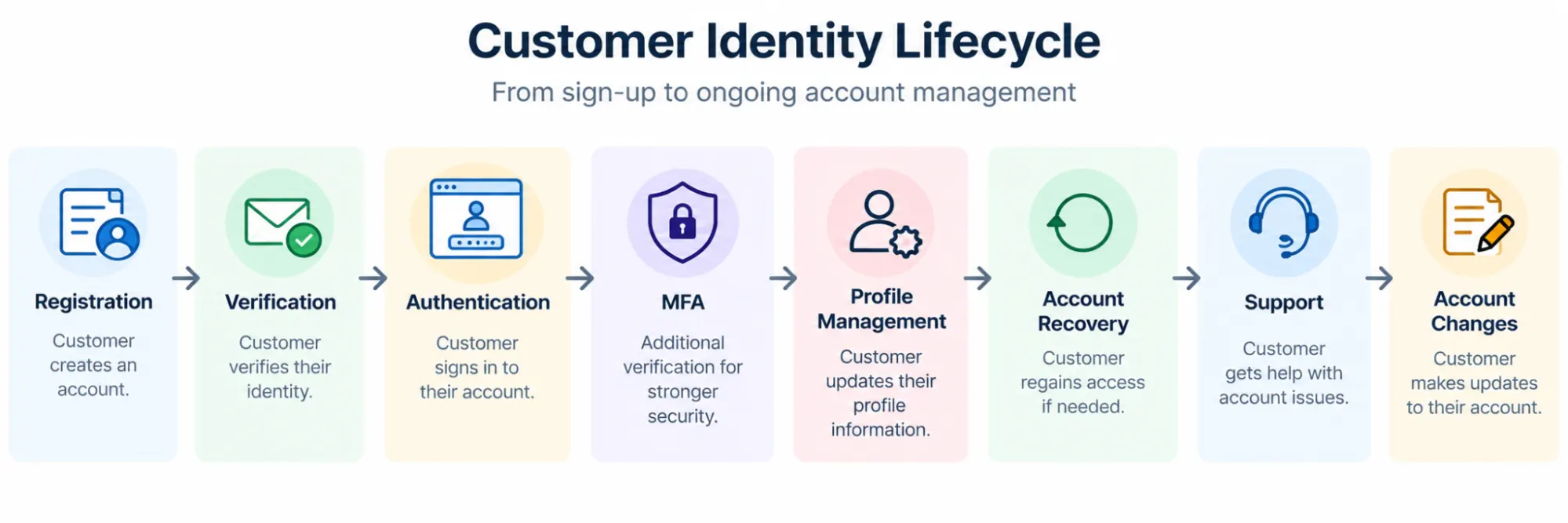
Support can touch several points in that journey. The difference with CIAM is that it does not need to be the first destination every time something changes.
For example, a customer who forgets a password may be able to recover access through a verified self-service process rather than opening a ticket. Someone who needs to update permitted profile information can make the change directly. If a problem requires escalation, the support team can work from a consistent customer identity rather than trying to reconstruct the account relationship manually.
CIAM can improve customer support in two practical ways: preventing routine identity tasks from becoming support requests and making genuine identity-related support cases easier to investigate and resolve.
There is an important boundary, though. CIAM is not a replacement for a CRM, help desk, or customer service platform. Its role is to manage customer identity, authentication, account access, and related identity data. When integrated with the broader customer technology stack, that identity layer can provide useful context to the systems and teams responsible for customer service.
Reduce Password Reset and Account Recovery Support Requests With Secure Self-Service
Password resets and account recovery are routine identity events, but they can become expensive support problems when every failure requires manual intervention. Customers may forget a password, lose access to an authentication method, change a phone number, or encounter a locked account. If the only path forward is contacting support, both the customer and the support team spend time on a problem that may be suitable for secure self-service.
CIAM can provide recovery journeys that allow customers to regain access after appropriate verification. The objective is simple: let legitimate customers resolve common identity problems themselves while keeping recovery difficult for someone attempting to take over the account.
A typical journey might look like: Access Problem → Recovery Requested → Identity Verified → Credential or Authentication Method Recovered → Access Restored
Let Customers Reset Forgotten Passwords Securely
Self-service password reset allows customers to initiate a recovery process without waiting for a support agent. Depending on the implementation, the customer may verify control of an approved email address, phone number, or another configured recovery mechanism before setting a new password.
That removes a routine administrative task from the support queue. It also gives customers a direct recovery path when they need access outside normal support hours.
Security still matters. Password reset is an account-recovery operation, and a weak recovery process can undermine stronger authentication controls elsewhere in the application.
Support Recovery When an Authentication Method Is Unavailable
Passwords are not the only reason customers lose access.
A customer using MFA may replace a phone, lose access to an authenticator, or otherwise become unable to use an enrolled factor. Passwordless users can also need recovery when a device or authentication method is no longer available.
Here’s where teams usually go wrong: they build strong authentication and then make the fallback recovery process much easier to bypass.
Recovery should provide an alternative path for legitimate customers without becoming a shortcut around the authentication controls protecting the account. Sensitive recovery scenarios may require stronger verification or controlled escalation rather than an automatic reset.
Keep Routine Profile Verification Out of the Support Queue
Some account problems involve verification rather than credential recovery. A customer may need to verify an email address or phone number before completing registration or accessing particular account functionality.
CIAM can automate appropriate verification journeys instead of requiring support teams to manually confirm every routine request. If verification fails repeatedly or the customer no longer controls the registered channel, the case can then move to an escalation process.
The distinction is useful: Routine Identity Task → Secure Self-Service
Unresolved or Higher-Risk Identity Problem → Controlled Support Escalation
Design Escalation for Cases Self-Service Cannot Safely Resolve
Self-service should not mean every account problem can be resolved automatically.
Customers may lose access to all registered recovery methods, dispute an account change, or encounter circumstances where the available information is not sufficient to establish legitimate ownership. Those cases need a controlled support path.
Support teams should have defined procedures for verifying the customer and performing permitted recovery actions rather than relying on ad hoc decisions. Sensitive changes may also require additional controls and appropriate auditability.
Done well, self-service does not remove customer support from identity recovery. It changes where support is needed. Routine, verifiable requests can be handled automatically, while agents spend their time on exceptions that genuinely require human assistance.
And recovery is only one side of the equation. A better authentication experience can prevent some access problems from becoming recovery requests in the first place.
| Customer Issue | Traditional Support | CIAM Self-Service |
|---|---|---|
| Forgotten password | Open ticket | Self-service reset |
| Lost MFA device | Agent recovery | Verified recovery flow |
| Email verification | Manual review | Automated verification |
| Profile updates | Admin action | Customer self-service |
Reduce Login Friction Before It Turns Into a Customer Support Problem
Account recovery deals with customers after they lose access. Good CIAM design can also reduce some of the friction that causes those problems in the first place.
Customers may forget passwords, struggle with repeated authentication requirements, choose the wrong login method, or abandon a journey when authentication becomes unnecessarily difficult. Not every failed login becomes a support ticket, but repeated access problems can push customers toward support or prevent them from completing the journey altogether.
CIAM gives businesses more flexibility in how customers authenticate. The right approach depends on the application, customer population, risk level, and available authentication methods.
| Authentication Method | Primary Customer Benefit | Customer Support Impact |
|---|---|---|
| Passkeys | Passwordless, phishing-resistant authentication | Reduced password reset tickets and credential management overhead |
| Passwordless Authentication | Simplified login experience | Fewer forgotten-password requests, but recovery planning remains important |
| Social Login | Faster registration and sign-in | Fewer credential-related issues, but potential account-linking support cases |
| Multi-Factor Authentication (MFA) | Stronger account protection | Can create recovery requests if enrolled factors are lost or changed |
| Adaptive Authentication | Applies verification based on risk | Reduces unnecessary authentication friction while maintaining security |
| Single Sign-On (SSO) | Consistent access across connected applications | Fewer login issues caused by multiple credentials and disconnected sign-in experiences |
Give Support Teams a Unified Customer Identity View for Faster Issue Resolution
Self-service can keep routine identity tasks out of the support queue. But when a customer does need help, the support team needs enough reliable context to understand the account before making changes.
That can be difficult when customer identities are fragmented across applications or authentication methods. An agent may need to determine which account the customer is using, whether the account has been verified, how the customer normally authenticates, or whether multiple identities belong to the same person.
CIAM can provide a centralized identity layer that brings relevant customer profile and account information into a more consistent view.
Centralize Customer Identity and Profile Information
A CIAM system can maintain customer identity records that include appropriate profile attributes and information related to authentication and account access.
Instead of each application maintaining a disconnected version of the customer identity, applications can rely on a common identity layer. This helps reduce inconsistencies that make account-related support cases harder to investigate.
For example, an authorized support workflow may need to establish: Customer Identity → Account → Verification Status → Authentication Context → Relevant Profile Information
The exact information available depends on the implementation and the support user's permissions. The important part is having a reliable identity record rather than forcing teams to reconstruct it from disconnected account data.
Make Customer Identities Easier to Find and Understand
A support agent cannot resolve an identity problem efficiently if they cannot identify the correct account.
Searchable user management can help authorized teams locate customer profiles using appropriate identifiers and review the information needed for the support task. This is particularly useful when a customer cannot remember exactly how the account was created or which identifier is associated with it.
Access should still follow appropriate administrative controls. Support teams do not need unrestricted access to every profile attribute simply because centralized identity information exists.
Keep Identity Consistent Across Applications and Channels
Customers rarely think about identity architecture. They expect their account to remain recognizable as they move between a website, mobile application, or other connected digital experiences.
When those applications rely on disconnected identity stores, profile information and authentication state can become inconsistent. That inconsistency can eventually surface as a support issue.
A centralized CIAM layer can help applications work from a consistent customer identity while allowing each application to use the information it legitimately requires.
Connect CIAM With the Broader Customer Technology Stack
CIAM provides identity context, but it should not be confused with a CRM or customer service platform.
A CRM may contain sales and relationship information. A help desk may contain tickets and previous support conversations. Other systems may hold subscriptions, orders, or product activity. CIAM focuses on the customer's identity, authentication, account access, and related profile data.
When these systems are appropriately integrated, identity can become the connection point that helps applications associate the correct customer with relevant business information.
That distinction keeps the architecture clean:
CIAM → Who the Customer Is and How They Access the Account
CRM / Support Platform → Customer Relationship and Service Context
Business Systems → Orders, Subscriptions, Products, or Other Domain Data
The result is not that CIAM suddenly becomes the source of every customer record. Instead, it provides a consistent identity foundation that other systems can reference.
Better identity context helps when support is required. But many everyday profile changes still should not require an agent at all. Giving customers controlled self-service over appropriate account information can remove another category of repetitive support work.
Let Customers Manage Their Own Profiles, Preferences, and Account Information
Not every customer support request starts with a failed login. Customers also contact support to change account information, update contact details, manage preferences, or correct profile data they cannot edit themselves.
When appropriate account changes require an agent every time, simple maintenance becomes repetitive support work. CIAM can give customers controlled self-service access to profile information they are permitted to manage.
Allow Customers to Keep Profile Information Up to Date
Customer profiles change over time. People change phone numbers, email addresses, names, preferences, and other account information.
Self-service profile management allows customers to update appropriate attributes directly rather than submitting a request and waiting for an administrator to make the change.
That can reduce manual work for support teams while giving customers more direct control over their accounts.
But not every field should be equally editable. Changing a display name is different from changing an email address that is used as a login identifier or recovery channel. Sensitive changes may require reauthentication, verification of the new value, or another security control before they take effect.
Give Customers Control Over Relevant Preferences and Consent
Depending on the application and how the CIAM implementation is configured, customers may also need a way to review or update preferences and consent-related choices associated with their profile.
Providing an appropriate self-service interface can make those choices easier to manage without turning every change into a customer service request.
The underlying principle is straightforward: customers should be able to manage information that is legitimately theirs to control, while the business maintains appropriate safeguards around protected attributes and security-sensitive settings.
Make Account Management Consistent Across Digital Experiences
Account maintenance becomes confusing when a customer updates information in one application but another continues to show an older profile.
A centralized customer identity can help connected applications work with consistent identity information rather than maintaining unrelated copies of the same profile attributes.
This does not mean every application needs access to every customer attribute. Applications should receive only the identity information appropriate to their purpose and authorization context.
From the customer's perspective, though, the experience should feel coherent. Updating permitted account information should not require figuring out which backend system owns a particular version of their profile.
Protect Sensitive Account Changes With Additional Verification
Self-service should reduce unnecessary support dependency, not weaken account security.
Changes to authentication methods, recovery information, verified contact points, or other sensitive attributes can affect who controls the account. Those operations may justify reauthentication, step-up authentication, verification, or other safeguards before the change is accepted.
A useful separation is:
Routine Profile Change → Customer Self-Service
Security-Sensitive Account Change → Additional Verification → Change Applied
Unresolvable or Higher-Risk Request → Controlled Support Escalation
This keeps self-service useful without treating every profile field as equally sensitive.
Customers can handle more routine account maintenance themselves. Support teams then spend less time acting as manual profile administrators and more time on cases that actually require intervention.
When intervention is necessary, however, speed cannot be the only goal. Support workflows themselves need appropriate identity verification, administrative permissions, and auditability so that helping a customer does not create a new security gap.
Help Support Teams Resolve Identity Issues Without Creating Security Gaps
Some identity problems cannot be resolved through self-service. A customer may lose access to every registered recovery method, dispute an account change, or need help with an issue that requires administrative intervention.
Support teams need enough access to resolve those cases. Giving them broad, permanent control over customer identities, however, creates a different problem.
The support workflow itself needs to be treated as part of the identity security model.
Verify the Customer Before Sensitive Recovery Actions
A customer knowing basic profile information does not necessarily prove that they control the account. Much of that information may be discoverable elsewhere.
Higher-risk actions—such as changing recovery information, resetting authentication methods, or modifying security-sensitive account attributes—should follow an appropriate identity verification process.
The level of verification should reflect the sensitivity of the action. A routine profile question and an account-recovery request do not necessarily need the same controls.
This becomes especially important when a customer has lost access to the authentication methods normally used to establish account ownership. The fallback process should not be significantly easier for an attacker to exploit than the authentication process it is bypassing.
Limit Support Access With Role-Based Permissions
Support agents rarely need unrestricted administrative control over customer identities.
Role-based access can separate common support responsibilities from more privileged identity administration. One support role might be allowed to view limited account information, while a more restricted administrative role handles sensitive recovery operations.
The same principle applies inside support teams: Support Agent → Required Support Permissions → Appropriate Customer Scope → Permitted Action
This supports the Principle of Least Privilege. Give support personnel enough authority to perform their responsibilities without automatically granting access to unrelated identity data or administrative capabilities.
Require Stronger Controls for High-Impact Administrative Actions
Some support operations carry greater risk than others.
Resetting an authentication factor, changing a recovery channel, modifying a verified identifier, or performing another privileged account action may justify additional controls. Depending on the implementation, that could include stronger authentication for the administrator, additional authorization checks, or an approval requirement.
The objective is not to make every support interaction cumbersome. Apply stronger controls where the action could materially affect account ownership or access.
Keep Administrative Actions Auditable
When a support agent changes customer identity information, teams should be able to understand what happened.
Appropriate audit records can capture relevant events such as administrative profile changes, role changes, recovery actions, or security-related account updates. This helps with troubleshooting and investigation when a customer later questions an account change.
Auditability also discourages informal workarounds. Sensitive identity operations should happen through controlled workflows rather than undocumented manual processes.
Treat Impersonation and Delegated Support Access Carefully
Some applications provide controlled ways for authorized personnel to view or troubleshoot a customer's experience. If support impersonation or delegated access is available, it should not be treated as unrestricted access to the customer's account.
The workflow should have a defined purpose, appropriate authorization boundaries, auditability, and a clear way to end the delegated access. Particularly sensitive actions may need to remain unavailable even during a support session.
Here’s where teams usually go wrong: they secure the customer's normal authentication journey carefully, then create a powerful support shortcut around those controls.
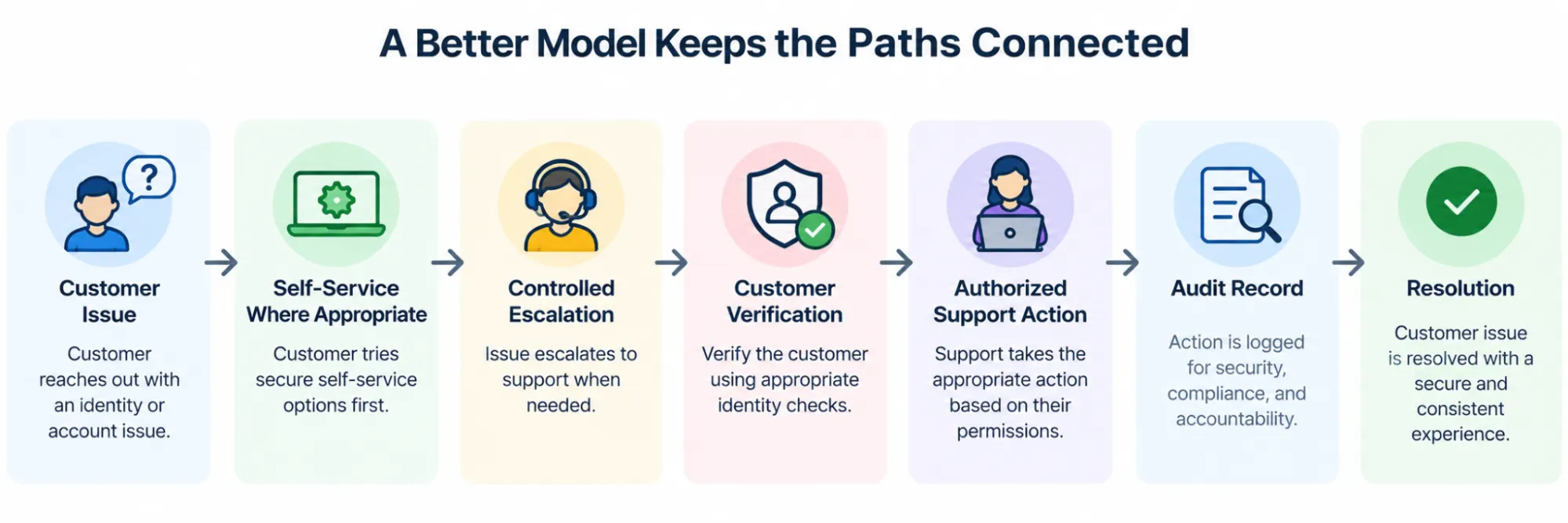
CIAM can help make support more efficient, but efficiency should come from better identity context, automation, and controlled administration—not weaker verification.
There is another source of support friction that can be harder to spot. Sometimes the customer can authenticate successfully but ends up in what appears to be the wrong account. Duplicate and fragmented identities are often behind that experience.
Prevent Duplicate and Fragmented Identities From Becoming Customer Support Problems
A customer can authenticate successfully and still end up contacting support because the application does not recognize them as the same person they were before.
This can happen when customers use different authentication methods over time. Someone may create an account with email and password, then later return using Google, Apple, or another identity provider. If the application treats that provider identity as an entirely new customer, the result can be duplicate or fragmented profiles.
From the customer's perspective, the problem is confusing: “I logged in successfully. Why is my account information missing?”
Maintain Identity Continuity Across Login Methods
Account linking can associate multiple authentication methods with the appropriate customer account rather than requiring a separate profile for each method.
A simplified relationship looks like: Existing Customer Account → Password Login + Google Login + Other Approved Authentication Methods
This can help preserve a consistent customer identity when users legitimately authenticate in different ways.
The linking process needs strong security controls, though. Applications should not automatically assume that two accounts belong to the same person simply because they appear to share an email address. Provider-specific identifiers, verified account information, existing authentication, and appropriate confirmation flows all matter when establishing the relationship.
Reduce the Support Impact of Duplicate Profiles
Duplicate identities can create problems beyond login. A customer may appear to have lost profile information, preferences, subscriptions, or access because those records are associated with another identity.
Support teams then have to determine whether they are looking at two legitimate accounts, a linking problem, or an attempted account takeover before deciding what action is safe.
Preventing unnecessary fragmentation gives both customers and authorized support teams a more consistent identity to work with.
Keep Account Linking and Account Merging Distinct
Linking authentication methods is not necessarily the same as merging all data from two customer accounts.
Account linking establishes an association between identities or authentication methods. Account merging may involve combining profile or business data and can have different security and data-integrity consequences.
That distinction matters when support teams troubleshoot duplicate accounts. A convenient “merge everything” action should not replace a properly designed identity-linking process.
For deeper implementation guidance, the dedicated LoginRadius account-linking resource can cover provider identifiers, secure linking flows, email matching, and account-linking security in more detail.
The support benefit here is simple: a customer who maintains a consistent identity across legitimate login methods is less likely to need help figuring out where their account went.
Self-service, easier authentication, unified profiles, secure support workflows, and identity continuity all affect individual support interactions. Together, they also affect a larger business question: how much manual support effort is required as the customer base grows?
How CIAM Can Reduce Customer Support Costs as the Customer Base Grows
The support value of CIAM becomes clearer when individual identity improvements are viewed together. A self-service password reset may save one manual interaction. A customer updating their own profile removes another. Preventing a duplicate identity can avoid an investigation later. Across a large customer base, those routine identity tasks can add up.
CIAM can help reduce support costs by changing which identity problems require human intervention and how much effort is needed when support does become involved. The exact impact will depend on the application, customer population, authentication design, support processes, and how effectively the CIAM implementation is configured.
Reduce Routine Identity-Related Support Requests
Many identity tasks are predictable: password recovery, profile updates, verification, authentication-method management, and other account maintenance.
When appropriate tasks are available through secure self-service, customers do not need an agent for every routine change. Support teams can focus more of their time on exceptions that genuinely require investigation or administrative action.
That does not mean every identity issue should be automated. The cost benefit comes from separating repeatable, safely automated tasks from cases where human judgment or stronger verification is necessary.
Shorten the Path to Resolving Account Problems
Support effort is not only about ticket volume. The time required to understand and resolve each issue matters too.
When authorized teams can work from consistent customer identity information, they may spend less time determining which account is involved or reconciling fragmented identity records.
A clearer support path might look like: Customer Contacts Support → Identity Located → Appropriate Verification → Issue Identified → Authorized Action → Resolution
Compare that with a fragmented environment where the agent first needs to search across disconnected account stores and determine which identity record is current.
Reduce Manual Identity Administration
Support teams should not have to function as manual identity administrators for every customer.
Self-service profile management, automated verification, recovery journeys, and controlled delegated administration can move appropriate identity tasks closer to the person or administrator responsible for them.
This becomes increasingly useful as the customer base grows. Adding more identities does not have to mean adding the same proportion of manual work for routine account maintenance.
Prevent Avoidable Authentication Problems
Authentication design also influences support demand. Passwordless options can reduce dependence on remembered passwords. Social login can simplify authentication for appropriate customer journeys. SSO can provide a more consistent experience across connected applications. Well-designed MFA and recovery can protect accounts without leaving customers stranded when circumstances change.
None of these methods guarantees fewer support requests on its own. Poorly implemented authentication can create new problems just as easily.
The support benefit comes from designing authentication and recovery as one coherent customer journey.
Improve Support Scalability Without Weakening Security
The objective is not simply to minimize the number of tickets. Driving ticket volume down by weakening verification or giving support teams unrestricted administrative access would be the wrong trade-off.
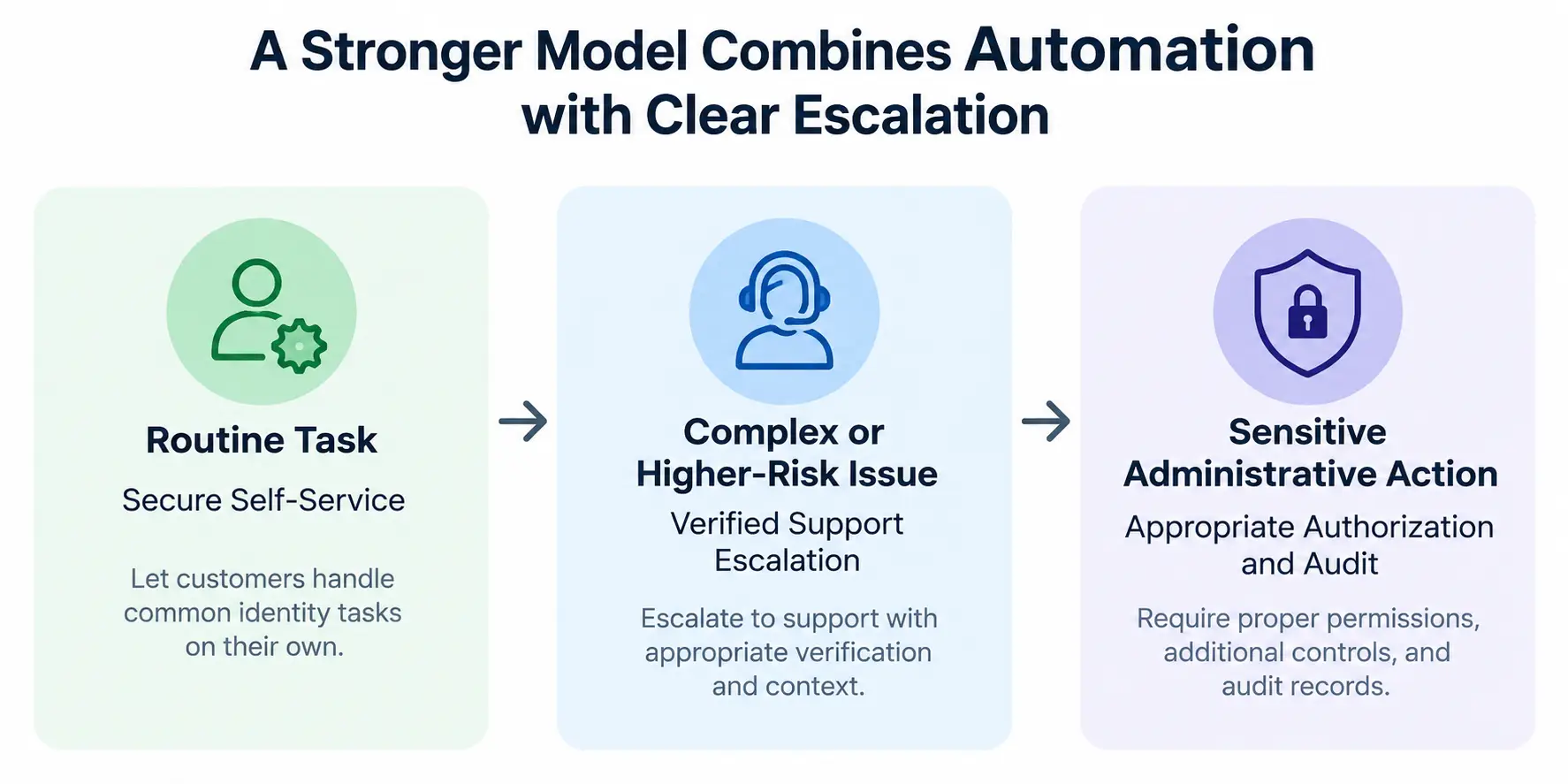
That can make identity support more scalable while preserving controls around account access.
| Identity Problem | Manual-Heavy Approach | CIAM Approach | Potential Support Impact |
|---|---|---|---|
| Forgotten password | Agent-assisted reset | Secure self-service recovery | Fewer routine requests |
| Profile update | Support changes information | Customer self-service | Less manual administration |
| Login friction | Repeated troubleshooting | Appropriate authentication options | Fewer avoidable access issues |
| Duplicate identity | Manual account investigation | Secure account linking | Better identity continuity |
| Account investigation | Fragmented identity records | Centralized identity context | Shorter resolution path |
| Sensitive recovery | Ad hoc intervention | Controlled verification and escalation | More consistent support security |
The important word is potential. CIAM creates the capabilities and architecture that can reduce repetitive support work; the actual outcome depends on how those capabilities are implemented and how customers use them.
CIAM KPIs That Measure Customer Support Success
Measuring the support impact of CIAM requires more than tracking ticket volumes alone.
Organizations should evaluate how effectively customers can complete identity-related tasks without assistance and how efficiently support teams can resolve issues when intervention is necessary. Useful metrics may include password reset request volume, self-service recovery completion rate, account recovery success rate, identity-related support tickets per active user, and average resolution time for account access issues.
Teams can also monitor first-contact resolution rates, duplicate account investigations, and the percentage of customers who successfully update profile information without opening a support case. Together, these KPIs help organizations understand whether their CIAM implementation is reducing identity friction, improving customer experience, and allowing support teams to spend more time on complex issues rather than repetitive account administration.
A strong CIAM program should not only strengthen security, but also increase self-service adoption, shorten resolution paths, and improve operational efficiency as the customer base grows.
| KPI | What It Measures | Desired Outcome |
|---|---|---|
| Password Reset Requests | Volume of password-related support needs | Decrease |
| Self-Service Recovery Rate | Customers who recover access without support | Increase |
| Identity-Related Ticket Volume | Authentication and account-access cases | Decrease |
| First-Contact Resolution (FCR) | Issues resolved in a single interaction | Increase |
| Average Resolution Time | Time required to solve identity issues | Decrease |
| Duplicate Account Cases | Identity fragmentation incidents | Decrease |
| Self-Service Profile Updates | Profile changes completed without agents | Increase |
| Escalated Recovery Requests | Recovery cases requiring manual review | Stable or decrease |
For businesses evaluating that architecture, the next question is practical: which CIAM capabilities can LoginRadius provide to support these customer identity and support journeys?
How LoginRadius Supports Better Customer Service Through CIAM
Reducing identity-related support effort requires more than one feature. Authentication, recovery, profile management, security, and user administration need to work as connected parts of the customer identity journey.
LoginRadius provides CIAM capabilities that businesses can use to build these experiences while keeping customer identity and access centrally managed.
Offer Flexible Authentication Experiences
LoginRadius supports authentication options including traditional credentials, social login, passwordless authentication, passkeys, and multi-factor authentication. Businesses can use the methods appropriate to their customer journeys rather than relying on a single authentication experience for every user.
This flexibility can help address different sources of login friction. Passwordless methods can reduce password dependency, while social login can give customers an alternative way to authenticate using supported identity providers.
The right combination still depends on the application's security requirements and customer population. More authentication options are useful only when the overall login and recovery experience remains clear.
Support Customer Profile and User Management
Centralized customer identity management gives businesses a consistent place to manage customer profiles and identity-related account information.
Authorized administrators can work with customer identities without every application maintaining a completely separate user-management model. Customers can also be given appropriate self-service capabilities for managing permitted profile information.
For support workflows, this creates a clearer identity foundation when teams need to investigate account-related issues.
Build Self-Service Identity Journeys
Routine identity tasks should not automatically require administrator involvement.
LoginRadius can support customer journeys around registration, authentication, verification, profile management, password reset, and account recovery. Giving customers appropriate self-service options can reduce the number of routine identity operations that reach support teams.
Sensitive changes should still use suitable verification and security controls. Self-service is most effective when convenience and account protection are designed together.
Maintain Identity Continuity With Account Linking
Customers may authenticate using different methods over the lifetime of an account. LoginRadius supports account-linking scenarios that can help businesses associate appropriate identities rather than treating every authentication method as an unrelated customer.
A consistent identity can reduce confusion when customers switch between supported login methods and help applications work with a more coherent customer profile.
Account linking should still follow secure matching and verification practices. Convenience should not come from automatically trusting identifiers that are insufficient to establish account ownership.
Add MFA and Adaptive Security Where More Assurance Is Needed
Not every authentication event or account action carries the same level of risk.
LoginRadius supports MFA and security controls that businesses can use to add stronger authentication where appropriate. This can help protect higher-risk customer journeys without designing every interaction around the maximum possible level of friction.
For support-related scenarios, additional verification can also be relevant before sensitive account or recovery actions are completed.
Control Administrative Access to Customer Identities
Support and administrative teams should have access appropriate to their responsibilities rather than unrestricted control over customer accounts.
LoginRadius provides identity and access management capabilities that can support controlled administration of customer identities. Businesses can design roles and permissions around who should be able to view or change identity information and protect more sensitive administrative operations accordingly.
This helps keep customer support workflows aligned with least-privilege access rather than creating broad administrative shortcuts.
Connect Customer Identity With the Existing Technology Stack
CIAM rarely operates alone. Customer-facing applications may also rely on CRM, support, commerce, analytics, and other business systems.
LoginRadius provides APIs, SDKs, webhooks, and integration capabilities that businesses can use to connect customer identity with the broader application ecosystem. CIAM remains the identity layer while other systems continue to own their respective customer, support, or business data.
That separation matters. Better customer support does not require forcing every customer interaction into the identity platform. It requires a reliable identity foundation that the right systems and authorized teams can use when identity context is needed.
The result is a more connected approach to customer support: give customers secure ways to handle routine identity tasks themselves, provide controlled assistance when they cannot, and keep identity consistent throughout the journey.
Conclusion: Reduce Identity-Related Support Friction Without Compromising Customer Experience
Customers should not need to contact support every time they forget a password, update profile information, verify an account, or manage a routine identity task. And when an issue genuinely requires human assistance, support teams need the right identity context and controlled administrative access to resolve it securely.
That is where CIAM can make a measurable operational difference. Self-service, flexible authentication, centralized customer identities, secure recovery, account linking, and appropriate administrative controls can reduce repetitive identity work while creating a more consistent experience for customers. The goal is not to eliminate human support. It is to use it where human intervention actually adds value.
LoginRadius provides a developer-centric CIAM platform for managing customer and partner identity and access across authentication, user management, security, and the broader identity lifecycle.
Looking to reduce password resets, account recovery tickets, and identity-related support workload while giving customers simpler, more secure account experiences? Book a Demo to see how LoginRadius can support your customer identity strategy.
FAQs
Q: How does CIAM improve customer support?
A: CIAM can improve customer support through secure self-service, easier authentication, centralized customer identities, and controlled account administration. This can reduce routine identity requests while helping support teams resolve genuine account issues more efficiently.
Q: How can CIAM reduce customer support costs?
A: CIAM can reduce manual support effort by enabling customers to handle routine tasks such as password recovery, profile updates, and verification themselves. Centralized identity context can also help authorized teams investigate account issues more efficiently.
Q: Can CIAM reduce password reset support tickets?
A: Yes. CIAM can provide secure self-service password reset and account recovery journeys so customers do not always need an agent to restore access. Higher-risk recovery cases can still be escalated for additional verification.
Q: How does self-service identity management improve customer experience?
A: Self-service identity management lets customers complete permitted tasks such as updating profile information, managing authentication methods, or recovering access without waiting for support. Sensitive changes can require additional verification.
Q: How does CIAM help support teams resolve account issues?
A: CIAM can give authorized support teams access to consistent customer identity and account context while controlling what actions they can perform. This can reduce time spent locating accounts or reconciling fragmented identity records.
Q: How does passwordless authentication reduce customer support friction?
A: Passwordless authentication can reduce dependence on passwords and the problems associated with forgetting, resetting, or managing them. Passkeys, magic links, and OTP-based experiences are examples, depending on the implementation.
Q: How does CIAM provide a unified view of the customer?
A: CIAM centralizes customer identity and profile information so applications and authorized teams can work with a consistent identity. CRM, support, commerce, and other systems can remain responsible for their respective business data.
Q: What is the difference between CIAM and CRM for customer support?
A: CIAM manages customer identity, authentication, access, profiles, and related identity journeys. CRM systems primarily manage customer relationships and business interactions; integrating the two can provide support teams with complementary context.