Ever had your phone ask, “Is this really you?” That’s not just user authentication—it’s device authentication at work.
In today’s hyper-connected world, devices aren’t just accessories—they’re central to how we access data, services, and systems. From a customer unlocking their banking app with a fingerprint to an employee accessing a corporate VPN from their work laptop, verifying not just who is logging in, but what device they’re using, has become a cornerstone of modern digital security.
Whether you're managing millions of mobile users, protecting remote teams, or operating in regulated industries like healthcare or finance, device authentication ensures that only recognized and approved devices can interact with your applications, APIs, and networks. This prevents attackers from gaining access, even if they’ve stolen the right credentials.
So, how does device authentication work? What methods are available? And how can you use them effectively across your organization? Let’s break it down.
What is Device Authentication?
Device authentication is the process of verifying that a specific device, such as a smartphone, tablet, desktop, or IoT sensor, is authorized to access a digital resource, network, or service.
Unlike traditional authentication, which focuses solely on verifying the user’s identity, device authentication adds another layer: it confirms that the hardware being used is trusted, secure, and recognized. This two-pronged approach significantly strengthens access control and helps prevent breaches from compromised or unauthorized devices.
Device authentication extends the foundation of authentication—the process of verifying a user’s identity - by also ensuring that the device being used meets defined trust criteria.
This is especially crucial in environments where credentials alone aren’t enough—such as in finance, healthcare, or distributed remote teams. Let’s understand this in detail.
Why is Device Authentication Important—Beyond Device-to-Device?
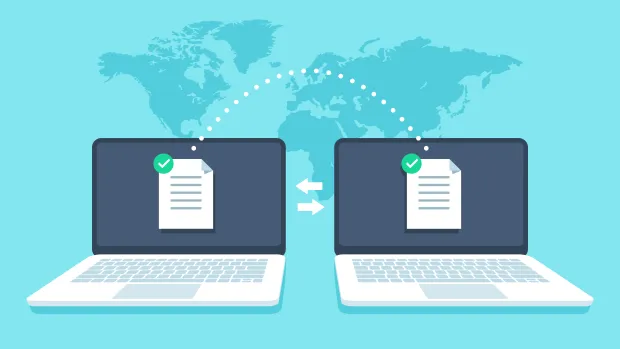
Device-to-device authentication, often referred to as machine-to-machine (M2M) communication, enables systems, applications, and connected devices to securely identify and interact with each other—without human involvement. It’s essential for IoT ecosystems, backend microservices, and automated workflows where secure, autonomous communication is required.
However, device authentication goes far beyond M2M scenarios.
In most real-world applications, devices are used by people—employees, customers, partners—who access apps, networks, and APIs from various endpoints. Here, device authentication plays an even more critical role: it ensures that access is granted not only to the right user but also from a recognized, trusted device.
This dual-layer validation strengthens security, reduces fraud risk, and helps maintain compliance across regulated industries.
Here are a few key examples that will help you better understand:
B2C Use cases:
-
Mobile Banking and Financial Apps : Even if an attacker knows a user’s login credentials, they can’t initiate a transaction without using the verified mobile device. This prevents fraud at the device level.
-
Healthcare Portals : Sensitive patient records can only be accessed from registered devices used by authorized practitioners, reducing the chance of HIPAA violations or data leaks.
-
E-commerce and Retail : Device fingerprinting and trust scoring prevent account takeovers by identifying suspicious devices attempting to log in, even if the username and password are correct.
B2B Use cases:
-
Remote Work Security : When employees work from personal or unmanaged devices, the risk of unauthorized access increases. Device authentication ensures only compliant, trusted laptops can connect to corporate systems.
-
API Access Management : Ensures only backend services or apps running on validated infrastructure can interact with your APIs, reducing the risk of exploitation from compromised clients.
These use cases highlight that device authentication is essential not just for device-to-device communication, but also for human-to-system interactions, which are far more common in everyday digital experiences.
How is Device Authentication Done?
Let’s walk through the different types of authentication that can be used to verify devices, and explore how you can integrate each into your applications.
1. Password-Based Authentication
This is the most familiar and widely used method: a user logs into a system from a device by entering a username and password. While it's simple to implement and user-friendly, it’s also inherently vulnerable—passwords can be guessed, phished, or leaked.
Despite its limitations, password-based authentication still plays a vital role, especially in systems where backward compatibility or user familiarity is important. When combined with multi-factor authentication (MFA) and device-based verification, it contributes to a layered, more secure access strategy.
To implement password-based login while aligning with modern security standards, explore LoginRadius’s password authenticationfeatures, which include advanced policy controls, encryption, and breach detection.
2. Certificate-Based Authentication
Here, the device presents a digital certificate usually X.509 , signed by a trusted Certificate Authority. This certificate proves the device's identity and is validated by the server.
This method is ideal for machine-to-machine authentication, such as in IoT ecosystems or automated service connections. It's highly secure and used widely in corporate VPNs and secure enterprise environments.
To implement certificate-based authentication, explore LoginRadius’ certificate and token authentication support for high-trust environments.
3. Token-Based Authentication
Devices first authenticate themselves using credentials or a certificate, and then receive a token (like a JWT). That token is then used for future requests, keeping the process lightweight and secure.
This method is excellent for device-based verification solutions, especially when scalability and speed are important—like in APIs and mobile apps.
To secure your APIs and sessions with token-based authentication, get started with LoginRadius’s secure access token capabilities.
4. Biometric Authentication for Mobile Devices
This involves authenticating a user to a device using physical characteristics, like fingerprints or facial recognition. Once verified, the trusted device can access protected systems or perform actions on the user’s behalf.
Biometric authentication for mobile devices is fast, intuitive, and difficult to spoof—making it ideal for financial apps, healthcare platforms, and mobile-first businesses.
To integrate biometric login into your mobile apps, try LoginRadius’s SDKs that support fingerprint and facial biometrics.
5. Multi Factor Authentication (MFA) Device Integration
MFA uses two or more verification factors—something you know (password), something you have (multi factor authentication device like a security token), or something you are (biometric).
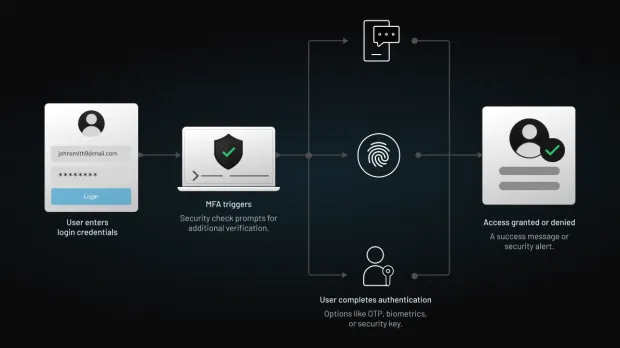
Combining these adds layers of protection, ensuring that even if one factor is compromised, the others hold firm. It’s essential in highly regulated industries like finance or healthcare.
Here’s how to implement LoginRadius MFA.
6. Device Fingerprinting
This technique creates a unique ID for each device based on characteristics like browser type, operating system, screen resolution, and installed fonts. It's a form of passive device-based verification often used in fraud prevention and e-commerce platforms.
Fingerprinting can flag unusual or suspicious device behavior even if credentials are correct.
To enhance your fraud detection strategies, integrate device fingerprinting through LoginRadius’s adaptive risk-based authentication tools.
How Does Device Fraud Happen?
Cybercriminals are clever—and they’re getting better at making fake devices look real.
Here’s how device authentication can be compromised:
-
Spoofing Device IDs: Attackers fake or clone device identifiers like MAC addresses.
-
Man-in-the-Middle (MitM) Attacks: Hackers intercept communication between devices to eavesdrop or manipulate data.
-
Credential Theft: Phishing attacks or malware capture passwords stored on devices.
-
Token reuse or theft: If authentication tokens aren’t properly secured or invalidated, attackers can hijack sessions using stolen tokens.
-
Exploiting poorly implemented fingerprinting: Weak or inconsistent device fingerprinting methods can be bypassed or manipulated to spoof legitimate devices.
These are exactly the kinds of threats device-based verification solutions are designed to defend against. With proper encryption, secure APIs, and adaptive verification through device-based verification solutions, you can stay ahead of spoofing attempts.
What Are the Benefits of Device Authentication?
Implementing strong device authentication provides a range of benefits:
-
Improved Security: Only trusted devices can access your network, apps, or APIs.
-
Regulatory Compliance: Helps meet industry standards like GDPR, CCPA ,etc.
-
Streamlined Access: Trusted devices don’t need to authenticate from scratch every time—enhancing the user experience.
-
Risk Reduction: Stops unauthorized or unknown devices at the door.
-
Enhanced Trust: Customers and users feel more secure knowing their access is protected.
When combined with user-based device access management strategies like adaptive MFA, it becomes a powerful access control technique.
What is Device Authorization?
Authentication and Authorization might sound similar but they are NOT the same. Authentication verifies the device—whereas authorization controls what that device is allowed to do once it's in.
Even if a device is trusted, it shouldn't have unrestricted access. That's where device authorization comes in—allowing granular control over permissions based on the device, user, role, or context.
How is Device Authorization Done?
Authorization determines what you can access once verified. Device authorization works in the same way for devices and typically involves:
-
Access Control Lists (ACLs): Assigning permissions to specific devices.
-
Role-Based Access Control (RBAC): Granting access based on device roles.
-
Conditional Access Policies: Applying rules like geolocation, time of day, or behavioral analysis.
This layered approach supports flexible, real-time user based device access management that adapts to evolving threats.
What is LoginRadius Machine-to-Machine Authorization (M2M)?
Imagine your applications, services, and smart devices working together—without any human involvement—securely and seamlessly. That’s the power of LoginRadius Machine-to-Machine (M2M) Authorization.
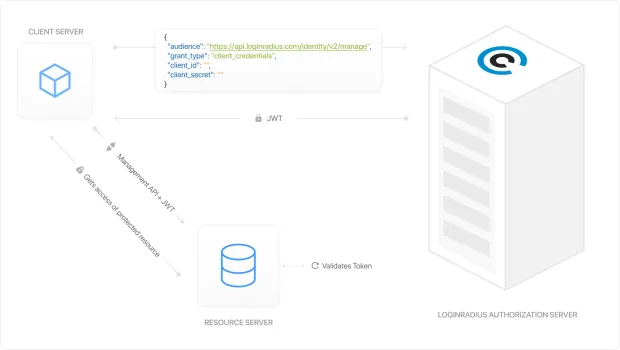
M2M authorization is essential when two or more systems need to communicate autonomously. Whether it's an IoT device pushing data to your cloud platform, a backend service calling an API, or a third-party integration syncing user information—these systems must verify each other’s identity without manual intervention.
Learn more- LoginRadius M2M Authorization Docs →
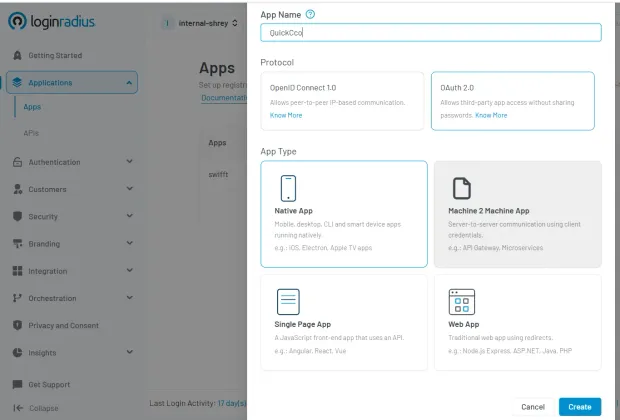
This is how LoginRadius M2M setup looks like in the admin console :
Why M2M Matters More Than Ever
In today’s architecture, where microservices, APIs, and distributed cloud apps dominate, device-to-device authentication isn’t optional—it’s fundamental.
Without proper authorization protocols in place, machines and applications can become weak points in your security posture. LoginRadius eliminates that risk with a powerful, flexible M2M framework.
Key Benefits of LoginRadius M2M:
-
Secure Token Exchange : Applications and services authenticate using client credentials to receive encrypted access tokens that define scope, expiration, and access levels.
-
Automated Trust Management : No need to manually assign or rotate credentials—LoginRadius handles key provisioning, expiration, and renewal with enterprise-grade encryption.
-
Granular Permissions : Define exactly which machines or APIs can access which resources—and when. You’re always in control.
-
Highly Scalable : Whether you’re handling 100 or 100 million requests a day, our infrastructure grows with you. Our M2M authentication platform scales without compromising security.
-
Audit and Monitoring Built-In : Gain full visibility into every device or service that connects to your ecosystem. Track usage, revoke tokens, and stay compliant with ease.
Who Should Be Using LoginRadius M2M?
-
SaaS businesses integrating third-party tools
-
IoT platforms managing thousands of connected devices
-
Enterprises running microservices and APIs
-
Developers needing secure automation between services
If you’re building a platform where systems need to talk to each other silently and securely, LoginRadius M2M gives you the tools to do it right—without friction, without gaps, and without compromise.
Ready to see how M2M can unlock smarter, faster, and safer communication between your applications?
Download this insightful datasheet and discover how LoginRadius M2M fits into your architecture:
What’s the Most Secure Method of Device Authentication?
While there’s no universal “best,” combining methods is the most secure strategy.
-
Certificate-based authentication offers strong identity verification.
-
Biometric authentication for mobile devices prevents impersonation.
-
Multi factor authentication devices create layered protection.
-
Fingerprint authentication devices are fast, reliable, and hard to fake.
Using a combination of these—alongside behavioral analytics and device fingerprinting—offers the strongest defense.
Final Thoughts
As more systems go digital and devices multiply, verifying not just users—but their authentication devices—becomes critical. Whether you’re integrating fingerprint authentication devices, securing device to device authentication, or streamlining logins with device-based verification, a smart authentication strategy keeps your systems safe and users happy.
Ready to take the next step? Contact us to build secure, seamless authentication across devices.
FAQs
What is a security device used in two-factor authentication?
A multi factor authentication device like a YubiKey or authenticator app is used to confirm identity after the password stage. It adds a strong second layer of protection.
What is network device authentication?
Network device authentication validates a device before it joins a secure network—using certificates, credentials, or MAC filtering.
What is device-based verification?
It’s a method of checking if a device is recognized, safe, and matches expected usage patterns. It’s a key layer of fraud detection and secure login.
What is API verification?
API verification confirms that API calls are from authenticated, authorized sources—usually through tokens or digital signatures.