Consumers are getting increasingly frustrated with traditional authentication experiences. Each website comes up with their own unique requirement that forces users to remember passwords that are unique for each website. It is not just creating accounts and remembering passwords, but resetting credentials every time they forget their password, and completing lengthy registration forms introduce friction that impacts both user experience and conversion rates.
Phone Login offers a simpler alternative that also verifies their identity. Instead of relying on usernames and passwords, users authenticate with their phone number and immediately verify their identity using a One-Time Password (OTP) delivered via SMS or other supported channels. This creates a faster onboarding experience while maintaining strong identity verification.
For businesses, phone login can reduce password-related friction, simplify onboarding, and provide a convenient authentication option for mobile-first customers. It is particularly useful when a phone number is a more natural customer identifier than an email address.
But phone login is not simply an SMS form. A production-ready implementation needs to handle phone-number validation, OTP generation and expiration, SMS delivery, rate limiting, bot protection, fraud detection, account recovery, consent, and session management. Phone Login has become a core capability of modern Customer Identity and Access Management (CIAM) platforms because it balances security, accessibility, and convenience for mobile-first users. Phone login can also be particularly useful in markets where mobile phone adoption is high, but email is not always the preferred customer identifier. Ex: India, Middle Eastern countries and some South American countries.
This guide explains what phone login is, how it works, its benefits and limitations, phone login security, implementation architecture, and when businesses should use it.
What Is Phone Login?
Phone Login is an authentication method that allows users to register and sign in using their mobile phone number instead of relying solely on an email address or username and password. Identity verification is typically performed through a one-time password (OTP) delivered by SMS. LoginRadius requires phone number verification through OTP before access is granted, ensuring the phone number belongs to the user attempting authentication.
In a typical flow:
-
User enters phone number
-
The authentication service generates and sends OTP
-
User enters the OTP
-
OTP is validated
-
Session or token is created
-
User gains access
If the phone number is not associated with an existing account, the application can create a new account after successful verification. If the number already belongs to an account, the user can be authenticated into that account.
Why Phone Login Has Become So Popular
The rise of smartphones has fundamentally changed user expectations. Users expect authentication to be:
-
Fast
-
Mobile-friendly
-
Passwordless
-
Secure
-
Available anywhere
Modern mobile authentication strategies now rely on phones as primary identity devices rather than secondary factors. Mobile devices increasingly store secure credentials, support biometrics, and act as always-available authentication channels. This shift has made Phone Login an attractive choice for:
-
E-commerce platforms
-
Food delivery providers
-
Ride-sharing services
-
Mobile wallets
-
Banking applications
-
Healthcare apps
-
Consumer marketplaces
Phone login can also be implemented with a password. In that model, the phone number is the username or identifier, and the user authenticates with a password rather than an OTP on every login.
Phone Login vs. Passwordless Phone Login
These terms are sometimes used interchangeably, but they are not identical.
| Authentication method | Identifier | Authentication factor |
|---|---|---|
| Phone + password | Phone number | Password |
| Phone + OTP | Phone number | One-time code |
| Phone + MFA | Phone number | OTP plus another factor |
| Phone + passkey | Phone number | Passkey/device credential |
For consumer applications, phone number + OTP is the implementation most commonly associated with passwordless phone login.
How Phone Login Works
The phone authentication workflow consists of several coordinated systems.
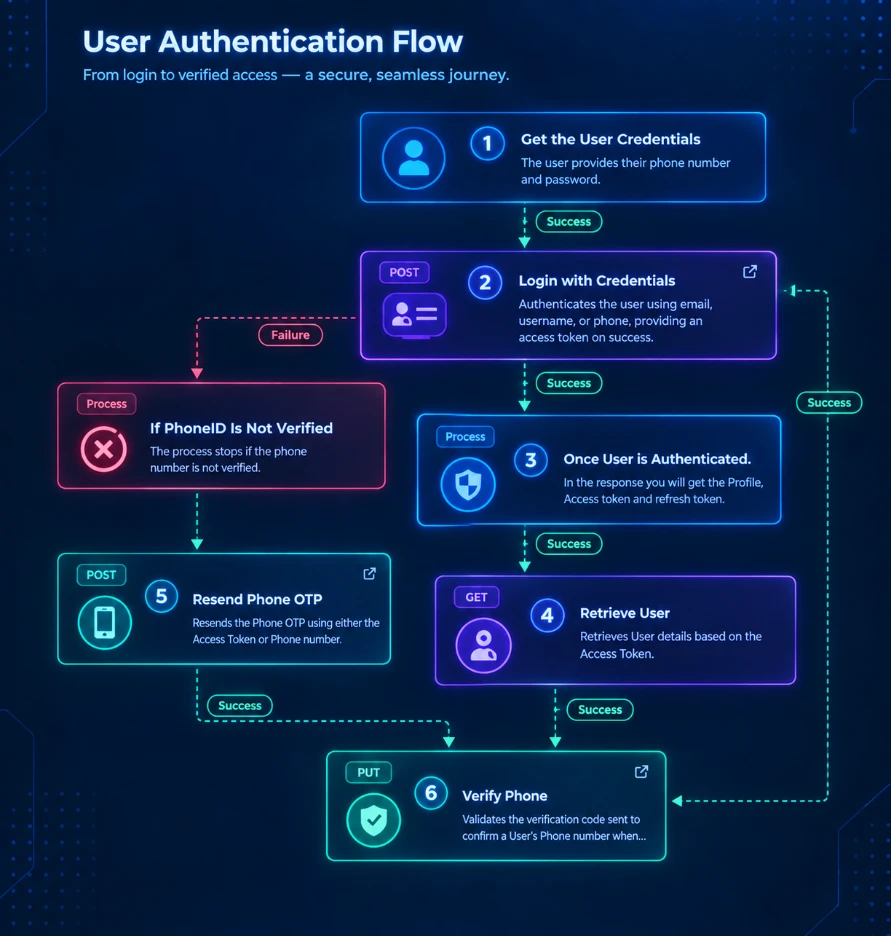
Image alt text: Diagram titled “How Phone Login Works” showing a five-step phone authentication flow
Step 1: User Enters a Phone Number
The user enters their phone number into the application's login or registration form. The application should validate the number before requesting an OTP.
Validation can include:
-
Country code
-
Number format
-
Supported country
-
Number length
-
Allow or deny lists
-
Rate limits
-
Risk signals
-
Device and session context
International phone numbers should generally be normalized into a consistent format before they are stored or processed.
Step 2: Authentication Service Generates an OTP
The authentication service generates a short-lived, one-time verification code.
The OTP should be associated with the authentication request and protected against:
-
Brute-force attempts
-
Replay
-
Excessive resend requests
-
Enumeration
-
Automated abuse
The exact OTP lifetime and retry policy should be determined by the application's security requirements.
Step 3: OTP Is Delivered
The authentication service sends the OTP through a messaging provider. Depending on the implementation and region, this may include:
-
SMS
-
WhatsApp
-
Other messaging channels
The authentication platform typically integrates with an external messaging provider rather than directly operating the mobile network.
Step 4: User Enters the OTP
The user receives the code on their phone and enters it into the application.
The authentication service validates:
-
Is the OTP correct?
-
Has it expired?
-
Does it belong to the current authentication request?
-
Have the maximum number of attempts by the user exceeded?
-
Did the request trigger any fraud or risk controls?
Step 5: Authentication Is Completed
After successful verification, the identity platform establishes an authenticated session.
Depending on the architecture, the application may receive:
-
An access token
-
A refresh token
-
A session cookie
-
User identity claims
-
Authentication metadata
Step 6: User Gets Access
The application uses the resulting session or token to authorize access to protected resources.
At this point, phone verification has established that the authentication flow successfully verified control of the phone number. Authorization remains a separate responsibility.
Phone Login Architecture
A production phone-login system usually consists of more than a login screen and an SMS provider.
Alt text: Phone login architecture diagram showing the OTP authentication flow
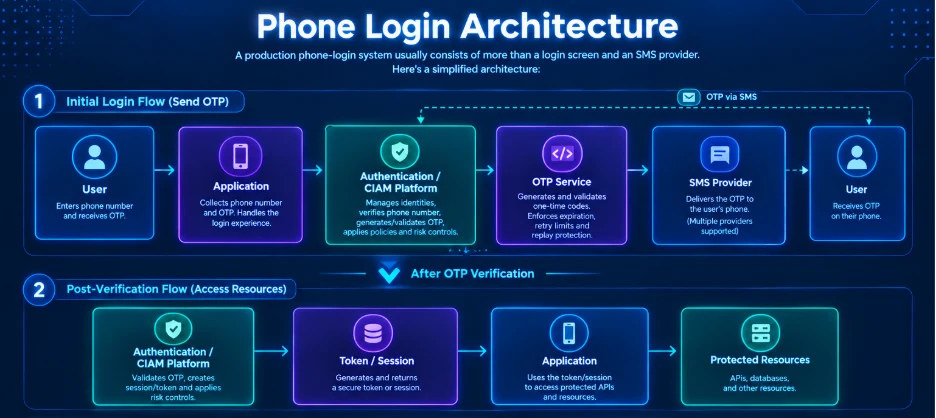
A simplified architecture looks like this:
User → Application → Authentication/CIAM Platform → OTP Service → SMS Provider → User
After OTP verification:
Authentication Platform → Token/Session → Application → Protected Resources
The major components are:
1. Client Application
The web or mobile application collects the phone number and OTP.
It is responsible for presenting the authentication experience and securely handling the resulting session.
2. Authentication or CIAM Platform
The identity platform manages:
-
User identities
-
Phone-number verification
-
OTP generation and validation
-
Authentication policies
-
Sessions
-
Tokens
-
Account recovery
-
Risk controls
-
Identity data
3. OTP Service
The OTP service generates and validates one-time codes. It should enforce expiration, retry limits, and replay protection.
4. SMS or Messaging Provider
The messaging provider delivers the OTP to the user's phone.
The identity platform may support multiple providers, so businesses can select providers based on geography, delivery requirements, cost, or availability.
5. Risk and Abuse Controls
A production implementation should evaluate signals such as:
-
Request frequency
-
Device information
-
IP reputation
-
Geographic anomalies
-
Repeated failed attempts
-
Unusual OTP behavior
-
Known abuse patterns
These controls help prevent attackers from turning the OTP endpoint into a mechanism for account abuse or SMS spam.
6. Application and API Layer
After successful authentication, the application uses the authenticated session or token to access protected APIs and resources.
This separation is important: authentication establishes who the user is; authorization determines what that user can access.
Benefits of Phone Login
Faster Registration
Users only need to provide a phone number and verify it. This can reduce the number of fields required during registration and shorten the onboarding journey. For businesses, this translates to a higher conversion rates during onboarding.
No Password to Remember
With passwordless OTP authentication, users do not need to create or remember a password. This can also reduce password-reset requests and associated support work for your business.
Verified Phone Number
Successful OTP verification provides evidence that the user controls the phone number used during registration or authentication. This can be useful for applications where the phone number is also required for communication, delivery, transactions, or account recovery. Communicating with your users on their verified mobile devices is a great asset to businesses and improves their reach.
Better Mobile Experience
Phone numbers are already available on mobile devices, making them a natural authentication identifier for mobile applications.
This is especially relevant for services such as:
-
Food delivery
-
Ride sharing
-
Digital wallets
-
E-commerce
-
Consumer marketplaces
-
Loyalty applications
-
Mobile banking
-
Healthcare applications
Flexible and Secure Authentication
Phone login does not have to replace every other authentication method. It can coexist with:
-
Email login
-
Social login
-
Passwords
-
Passkeys
-
MFA
-
Enterprise SSO
The OTP verification aspect helps eliminate fake account creation and abuse, thereby making the process secure.
Is Phone Login Secure?
Phone login can be secure, but SMS OTP should not be treated as a phishing-resistant authentication method.
This distinction matters.
Phone-number verification establishes control of a phone number, but the security of the authentication flow depends on the delivery channel and the controls around it. Read this other article of ours, for details on phishing-resistant MFA methods.
SMS-based authentication has known risks, including:
-
SIM swapping
-
SMS interception
-
Number recycling
-
Social engineering
-
OTP phishing
-
Automated OTP abuse
Therefore, businesses should evaluate phone login according to the sensitivity of the application and the actions being protected.
For a low-risk consumer application, SMS OTP may provide an appropriate balance between convenience and security.
For high-value transactions or highly sensitive accounts, phone login can be combined with stronger authentication methods such as passkeys, biometrics, or step-up MFA.
Common Phone Login Security Risks
OTP Brute-Force Attacks
An attacker may repeatedly guess OTPs.
Mitigations:
-
Limit verification attempts
-
Expire OTPs quickly
-
Introduce progressive delays
-
Lock or challenge suspicious requests
-
Monitor failed attempts
OTP Request Abuse
Attackers can repeatedly request OTPs to generate unwanted SMS traffic or increase messaging costs.
Mitigations:
-
Rate limiting
-
CAPTCHA or bot detection
-
Per-number limits
-
Per-IP limits
-
Device-based controls
-
Abuse monitoring
SIM Swapping
An attacker may convince a carrier to transfer a victim's phone number to a SIM controlled by the attacker. If authentication relies exclusively on SMS, the attacker may then receive OTPs intended for the legitimate user.
Mitigations:
-
Risk-based authentication
-
Device intelligence
-
Step-up authentication
-
Passkeys
-
Additional verification for sensitive actions
OTP Phishing
Attackers can trick users into providing legitimate OTPs to a fraudulent website or person.
For sensitive applications, organizations should consider phishing-resistant authentication such as passkeys.
Account Enumeration
Poorly designed authentication APIs can reveal whether a phone number already has an account.
For example, different responses for "number exists" and "number does not exist" can allow attackers to build lists of registered users.
Applications should design responses carefully to minimize unnecessary account enumeration.
Phone Login Best Practices
A reliable implementation should address security, usability, compliance, and operational considerations.
Authentication
Validate Before Sending OTPs
Check:
-
Country
-
Format
-
Supported number types
-
Application policies
-
Abuse signals
before initiating an OTP request.
Use Short-Lived OTPs
OTP validity should be limited to an appropriate period for the application's risk level.
Protect Account Recovery
Account recovery can become the weakest point in an otherwise secure phone-login implementation.
Changing a phone number or recovering an account should require appropriate verification.
For example, Step-up authentication and a separate verification flow can be triggered when users update their phone number.
Use Stronger Authentication for Sensitive Actions
Phone login does not have to be the only authentication factor.
For high-risk operations, use:
-
MFA
-
Passkeys
-
Biometrics
-
Risk-based authentication
-
Step-up authentication
Security
Rate Limit OTP Requests
Do not allow unlimited OTP requests.
Apply limits across multiple dimensions, such as:
-
Phone number
-
IP address
-
Device
-
Account
-
Session
Limit OTP Verification Attempts
An attacker should not be able to make unlimited guesses against the same OTP.
Add Bot Protection
CAPTCHA or other bot-detection mechanisms can help prevent automated OTP abuse.
User Experience
Normalize Phone Numbers
Store phone numbers consistently, including country codes. Do not rely on users entering numbers in one specific local format.
Compliance
Avoid Revealing Whether an Account Exists
Design registration and login responses so attackers cannot easily enumerate customer accounts.
Consider Regional Messaging Regulations
SMS authentication can be subject to country-specific regulations.
For example, India's TRAI DLT regulations as a consideration for services sending SMS messages to users.
Businesses operating internationally should evaluate messaging regulations, sender requirements, consent requirements, and local delivery constraints for each market.
Phone Login vs. Email Login
Phone login and email login solve similar authentication problems but fit different customer experiences.
| Factor | Phone Login | Email Login |
|---|---|---|
| Primary identifier | Phone number | Email address |
| Typical passwordless method | SMS OTP | Email OTP or magic link |
| Mobile experience | Strong | Medium |
| Password required | No, with OTP | Often required,But can be skipped with OTP or magic link |
| Verified contact | Phone | |
| Messaging dependency | SMS or messaging provider | Email provider |
| Regional considerations | Carrier and SMS regulations | Email deliverability and regulations |
| Best fit | Mobile-first audiences | Email-centric audiences |
| Registration speed | Faster | Slower |
The choice does not have to be either/or.
Many CIAM platforms support multiple authentication methods and allow businesses to offer users a choice.
Phone Login vs. Social Login
Phone login and social login have different identity models.
| Customer identity relationship | Business-managed | Federated through provider |
|---|---|---|
| User experience | Fast | Fast |
| Additional provider dependency | Messaging provider | Social identity provider |
| Data sharing concerns | Minimal | Higher |
| Best fit | Mobile-first customer journeys | Users who prefer existing social identities |
| Factor | Phone Login | Social Login |
| Primary identifier | Phone number | Social identity |
| Third-party identity provider | Usually no | Yes |
| OTP commonly used | Yes | No |
Social login can reduce registration friction by allowing users to authenticate through an existing identity provider.
Phone login gives businesses another direct customer authentication path without requiring the customer to maintain a social-provider identity.
Phone Login vs. Passkeys
Phone login is also worth comparing with passkeys.
Passkeys use public-key cryptography and are designed to resist phishing. OLOID's mobile-authentication guidance identifies passkeys as a stronger passwordless method than SMS OTP for high-security scenarios.
| Factor | Phone + SMS OTP | Passkeys |
|---|---|---|
| Passwordless | Yes | Yes |
| Phishing resistance | Limited | Strong |
| SMS dependency | Usually | No |
| User identifier | Phone number | Account identity |
| Device dependency | Phone/SIM | Device/passkey ecosystem |
| Setup friction | Low | Low once established |
| Best use | Fast mobile onboarding | Strong passwordless authentication |
This does not mean businesses must choose one.
A modern CIAM strategy can use phone OTP for registration or initial authentication and passkeys for returning users or higher-risk authentication.
Phone Login for Mobile-First Businesses
Phone login is particularly relevant when the phone number is already part of the customer journey.
For example, consider a food delivery application.
The business already needs the customer's phone number for:
-
Delivery communication
-
Order updates
-
Driver coordination
-
Customer support
Using that same phone number as the authentication identifier can reduce the amount of information customers need to provide during registration.
Similar patterns apply to:
-
Ride-sharing applications
-
Digital wallets
-
Marketplaces
-
Retail applications
-
Loyalty programs
-
Consumer fintech
-
Healthcare applications
The strongest use case is therefore not simply "mobile users."
It is when the phone number is already a meaningful part of the customer relationship.
How to Implement Phone Login
A production implementation generally follows this sequence.
Step 1: Collect the Phone Number
Present a simple phone-number field with:
-
Country selector
-
Country code
-
Number field
-
Clear validation
-
Consent information where required
Avoid unnecessary fields at the authentication stage.
Step 2: Request an OTP
The client sends the phone number to the authentication backend.
The backend validates the request and generates an OTP if the request passes its security controls.
Step 3: Send the OTP
The authentication service passes the OTP to the configured SMS or messaging provider.
The provider delivers the message to the user's phone.
Step 4: Verify the OTP
The user enters the received code.
The authentication service validates the code, expiration, request context, and attempt limits.
Step 5: Create or Retrieve the Identity
If the phone number belongs to an existing account, authenticate that account.
If it is a new number and registration is enabled, create the customer identity after successful verification.
Step 6: Issue a Session
The identity platform creates the authenticated session and returns the appropriate token or session information to the application.
Step 7: Apply Authorization
The application uses the authenticated identity to determine which resources and actions the customer can access.
Implementing Phone Login with LoginRadius
LoginRadius supports phone authentication for both registration and login.
The platform supports two primary phone authentication approaches:
Phone Login With Password
Users register using their phone number and a password.
The phone number acts as the customer's login identifier.
Passwordless Phone Login With OTP
Users authenticate using their phone number and a one-time password.
This removes the need to create and remember a password.
The LoginRadius phone authentication APIs support registration, phone verification, login, and password recovery through phone-based authentication.
A typical implementation includes:
-
Phone number registration
-
Phone number verification
-
Phone login
-
OTP resend
-
Password recovery
-
Session management
LoginRadius also provides phone authentication configuration through its Admin Console, where organizations can enable phone authentication and add the phone identifier to their registration form.
When Should You Use Phone Login?
Phone login is a strong option when several of the following are true:
-
Your product is mobile-first.
-
Customers already provide their phone number.
-
Password creation creates onboarding friction.
-
Email is not the preferred identifier for your audience.
-
You need to verify control of a phone number.
-
Fast registration is important.
-
Your customers frequently return through mobile devices.
-
You need phone-based communication after registration.
Phone login may be less suitable as the sole authentication method when:
-
Your customers primarily identify with email.
-
Your application handles highly sensitive information.
-
SMS reliability is poor in your target markets.
-
Your security requirements demand phishing-resistant authentication.
In those cases, phone login can still be offered alongside stronger authentication methods.
Is Phone Login the Same as Two-Factor Authentication?
No.
This distinction is important.
If a user enters a phone number and receives an OTP, the OTP may be the only authentication factor in the login process.
That is passwordless authentication, but it is not automatically two-factor authentication.
For example:
Phone number + SMS OTP
is generally a single authentication flow based on possession/control of the phone number.
By contrast:
Password + OTP
uses two different factors: something the user knows and something they possess.
Businesses should therefore avoid describing every phone OTP login flow as "2FA."
Phone Login Security Checklist
Before launching phone login, verify that the implementation has:
-
International phone-number validation
-
Country-code handling
-
OTP expiration
-
OTP retry limits
-
OTP resend limits
-
Rate limiting
-
Bot protection
-
Account-enumeration protection
-
Fraud monitoring
-
Secure session management
-
Secure account recovery
-
Phone-number change verification
-
Consent and privacy controls
-
Regional SMS compliance
-
Monitoring for delivery failures
-
Cost controls for SMS abuse
-
Step-up authentication for sensitive actions
-
A stronger authentication option where required
The Future of Phone Login
Phone login is likely to remain an important part of customer authentication, particularly for mobile-first applications and markets where phone numbers are central to customer interactions.
But phone login should not be treated as the final destination for passwordless authentication.
Modern CIAM platforms increasingly combine multiple authentication methods, including:
-
Phone OTP
-
Email OTP
-
Social login
-
Passkeys
-
Biometrics
-
MFA
-
Risk-based authentication
-
Adaptive authentication
The right approach is to match the authentication method to the customer's context and the sensitivity of the action being performed.
Phone OTP can provide a fast path into an application. Passkeys and stronger authentication methods can provide additional protection when the risk is higher.
Conclusion
Phone login gives businesses a simple way to authenticate customers using a phone number instead of relying entirely on passwords and email addresses.
The basic experience is straightforward:
Enter phone number → Receive OTP → Verify OTP → Create session → Access application
But a secure production implementation requires more than sending a six-digit code. Businesses need to account for OTP abuse, rate limiting, SIM swapping, phishing, account enumeration, account recovery, messaging regulations, and secure session management.
For mobile-first applications where the phone number is already an important part of the customer relationship, phone login can reduce authentication friction while providing verified customer identity.
The strongest implementations treat phone login as one component of a broader CIAM strategy—combining convenient authentication methods with risk-based security and stronger options such as passkeys when the application or transaction requires them.
If you are looking to implement phone authentication, LoginRadius provides APIs and CIAM capabilities for phone registration, verification, login, password recovery, and session management.
FAQs
Q. What is phone login?
Phone login is an authentication method that allows users to register and sign in using a phone number instead of an email address and password. Passwordless implementations typically verify the number using a one-time password sent through SMS or another supported messaging channel.
Q. How does phone login work?
The user enters a phone number, receives an OTP, enters the OTP, and the authentication service verifies it. After successful verification, the service creates or retrieves the user's identity and establishes an authenticated session.
Q. Is phone login passwordless?
It can be. Phone login can use either a password or a one-time password. Phone number + OTP is a common passwordless implementation.
Q. Is phone login secure?
Phone login can provide a secure and convenient authentication experience when implemented with rate limiting, OTP expiration, bot protection, fraud detection, secure session management, and appropriate account recovery controls. SMS itself has known weaknesses, including SIM swapping and interception, so stronger authentication methods should be considered for high-risk applications.
Q. Is SMS OTP secure enough for banking?
The answer depends on the bank's threat model and regulatory requirements. SMS OTP has known weaknesses and should not automatically be treated as phishing-resistant authentication. For sensitive transactions, organizations may use stronger methods such as passkeys, biometrics, device-bound credentials, or step-up authentication.
Q. Can phone login work without SMS?
Yes. Phone-based authentication can use other channels or authentication mechanisms depending on the platform, including WhatsApp OTP, push authentication, passkeys, or other device-based methods. Supabase, for example, documents both SMS and WhatsApp as phone OTP channels for supported providers.
Q. Can users register with phone login?
Yes. A phone login flow can support both registration and authentication. After successful verification, a new phone number can be associated with a new customer identity.
Q. Can phone login and email login be used together?
Yes. Many applications support both methods. This allows customers to choose the authentication method that works best for them and gives businesses greater flexibility in their customer identity strategy.