Introduction
A customer signs in to your main website, moves to the loyalty portal, and gets another login screen. They authenticate again, and open the support portal at a later time and face the same request. The applications may belong to one digital ecosystem, but to the customer, the experience feels disconnected.
Web Single Sign-On (Web SSO) addresses that problem by allowing an authenticated customer to move between connected web applications without repeatedly entering credentials. Instead of every application handling authentication as an isolated event, they rely on a shared authentication authority and recognize an existing authenticated session when appropriate.
A simplified Web SSO journey looks like this:
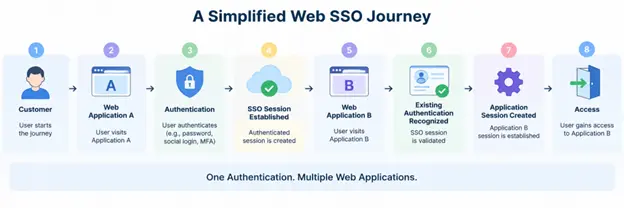
There is an important distinction here. Web SSO is not a protocol by itself. Depending on the architecture, browser-based SSO can use centralized session management and standards such as SAML 2.0 or OpenID Connect (OIDC). OAuth 2.0 may also be part of the authorization flow, but OAuth itself is an authorization framework rather than an authentication protocol.
For businesses operating multiple customer-facing websites, portals, stores, communities, or other web applications, Web SSO can create a more consistent authentication experience while keeping identity controls centralized. But the implementation needs more than a shared login page. Session handling, token or assertion validation, browser privacy restrictions, logout behavior, and security controls all matter.
This guide explains how Web SSO works across web applications, the technologies behind it, where it differs from other forms of SSO, the security considerations teams need to address, and how LoginRadius supports Web SSO for connected customer experiences.
What Is Web SSO (Web Single Sign-On), and How Does It Keep Customers Signed In Across Web Applications?
Web SSO (Web Single Sign-On) is a browser-based authentication approach that allows a customer who has authenticated once to access multiple connected web applications without repeatedly entering credentials. The applications rely on a common authentication authority or trusted identity provider (IdP) to recognize the customer's authenticated state.
Consider a business that operates an online store, account dashboard, support portal, and community. Without SSO, each application may require a separate authentication event. With Web SSO, the customer can authenticate through the central identity layer and then move to another participating application. If the SSO session is still valid and the customer is authorized to use that application, another credential prompt may not be necessary.
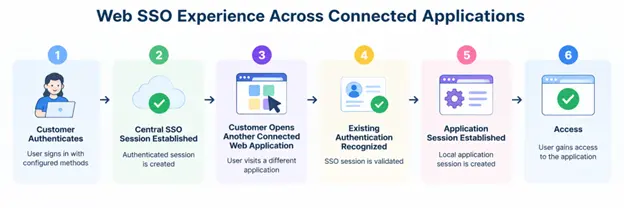
That last part matters. Web SSO does not necessarily mean every application shares one identical session. A central SSO session can represent the customer's authenticated state, while each participating application maintains its own local application session after the authentication result has been accepted.
Web SSO Is an Authentication Experience, Not a Protocol
Web SSO describes the experience and architecture of reusing authentication across connected browser-based applications. It is not another authentication protocol alongside SAML or OpenID Connect.
Depending on the implementation, Web SSO may use SAML 2.0, OpenID Connect (OIDC), centralized browser session mechanisms, or a combination of technologies. Cookies and browser storage may also participate in session management, but they are not authentication protocols themselves.
This distinction prevents a common misunderstanding: SSO describes the outcome—one authentication experience across participating applications—while protocols and session technologies determine how that experience is implemented.
Web SSO vs SSO: What Is the Difference?
Single Sign-On (SSO) is the broader concept of authenticating once and gaining access to multiple authorized applications without repeatedly providing credentials. Web SSO applies that concept specifically to applications accessed through a web browser.
So, Web SSO is a type of SSO rather than a separate alternative to it.
For customer-facing environments, that might mean allowing someone to move from an ecommerce site to their account portal and then to a support application without encountering an unnecessary login screen at every transition. The applications remain distinct, but authentication feels connected.
And that raises the next question: what actually happens behind the browser when a customer moves from the first application to the second? That requires looking more closely at the Web SSO authentication and session flow.
How Does Web SSO Work Across Multiple Web Applications and Browser Sessions?
Web SSO works by separating the customer's central authenticated state from the local session maintained by each participating web application. When the customer moves to another connected application, that application can rely on the same trusted authentication authority to determine whether the customer has already authenticated.
Here’s how it actually works.
1. The Customer Opens the First Web Application
The customer visits Web Application A. If the application does not already have a valid local session, it determines that authentication is required and initiates the configured authentication flow.
2. The Browser Is Directed to the Central Authentication Service
The browser interacts with the trusted identity provider (IdP) or central authentication service. Depending on the implementation, this may involve redirects and standards such as SAML or OpenID Connect.
The application itself does not need to collect credentials when authentication is centralized at the identity layer.
3. The Customer Authenticates
If there is no valid SSO session, the customer completes the required authentication. That could involve a password, passkey, passwordless method, MFA, or another authentication method supported by the identity system and configured policy.
Once authentication succeeds, the central identity layer can establish an SSO session representing the customer's authenticated state.
4. Web Application A Establishes Its Local Session
The browser returns to Application A with the appropriate authentication result. The application validates that result according to the protocol being used and establishes its own authenticated application session.
At this point, two concepts should not be confused: Central SSO Session → Represents authentication at the shared identity layer
Application Session → Represents the customer's authenticated state inside a specific application
They work together, but they are not necessarily the same session.
5. The Customer Opens Another Connected Application
Now the customer moves to Web Application B. Application B does not have a local session for that customer yet, so it initiates its own authentication process with the same trusted authentication authority.
Here’s where Web SSO changes the experience.
6. The Existing SSO Session Is Recognized
The central authentication service determines that the customer already has a valid authenticated session. If that session remains valid and applicable policies permit the authentication to be reused, the customer may not need to enter credentials again.
The identity layer can return the appropriate authentication result to Application B.
This does not mean Application B should simply trust a session or token created for Application A. Each application still needs to process and validate the authentication information intended for it.
7. Web Application B Creates Its Own Session
After validating the authentication result, Application B establishes its local application session. The customer can now use the second application without another unnecessary credential prompt.
The complete journey can be represented as: Application A → Authentication Required → Central SSO/IdP → Customer Authenticated → SSO Session Established → Application A Session
Then, when the customer moves elsewhere: Application B → Central SSO/IdP → Existing Authentication Recognized → Authentication Result Validated → Application B Session → Access
Here’s where teams usually go wrong: they treat Web SSO as if one browser cookie or application token is simply copied between every connected website. A well-designed SSO architecture instead establishes a trusted authentication relationship, while each participating application handles its own session and validates the authentication information it receives.
Understanding that separation makes the rest of Web SSO much easier to reason about. Next come the components responsible for making that exchange work: the browser, identity provider, participating applications, central SSO session, and local application sessions.
Core Components of a Web SSO Architecture and their Role
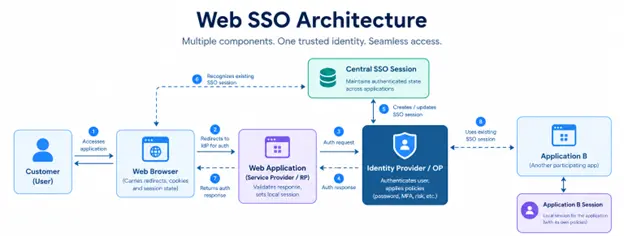
Web SSO depends on several components working together. The exact architecture changes depending on whether the implementation uses SAML, OpenID Connect, or another centralized session model, but the underlying roles remain fairly consistent.
Understanding those roles also clears up a common source of confusion: the identity provider, browser, application, and SSO session are related, but they are not interchangeable parts of the authentication flow.
Identity Provider or Central Authentication Service
The Identity Provider (IdP) or central authentication service is responsible for authenticating the customer and providing the authentication information participating applications need to establish their own sessions.
This is where authentication policies may be applied. Depending on the implementation, that can include passwords, passwordless authentication, passkeys, MFA, risk-based authentication, or other supported methods.
Service Provider or Web Application
The web application is the resource the customer wants to access. The application relies on authentication information from the trusted identity system, validates the response appropriate to the protocol, applies its own access requirements, and creates a local session for the customer.
This is also why authentication and authorization should not be treated as the same decision. SSO can establish who the customer is, but the application still needs to determine what that authenticated customer is allowed to access.
The Customer's Web Browser
The browser connects the customer, web application, and authentication service during a Web SSO flow. Depending on the architecture, it can carry redirects, authentication responses, cookies, and other browser-managed state between the relevant endpoints.
The browser does not make the trust decision itself. The identity provider and participating application remain responsible for authentication, validation, and session handling.
Central SSO Session
After successful authentication, the central identity system can maintain an SSO session. This allows it to recognize the customer's authenticated state when another participating application initiates an authentication request. That is what can remove the second credential prompt.
The SSO session should still have defined expiration and security policies. SSO does not mean the customer remains authenticated indefinitely.
Local Application Session
Each participating application may establish its own local session after successfully processing the authentication result.
For example:
Central SSO Session→ Customer has authenticated with the trusted identity system.
Application A Session→ Customer has an active session in Application A.
Application B Session→ Customer has an active session in Application B.
Keeping these sessions separate gives individual applications control over their own session lifetime, authorization requirements, logout behavior, and other application-specific policies.
Web SSO Protocols and Session Technologies: SAML, OIDC, OAuth 2.0, Cookies, and Browser Storage
Web SSO is not tied to one protocol. The right mechanism depends on the applications involved, how authentication is centralized, whether identity needs to cross organizational or domain boundaries, and how browser sessions are managed.
This is also where terminology gets messy. SAML and OpenID Connect can support authentication and SSO. OAuth 2.0 primarily handles authorization. Cookies and browser storage help maintain state or sessions. They should not be treated as five competing SSO protocols.
SAML 2.0 for Browser-Based Federated SSO
SAML 2.0 (Security Assertion Markup Language) is widely used for federated browser-based SSO. It allows an Identity Provider (IdP) to send a signed SAML assertion to a Service Provider (SP) containing authentication information and, where configured, relevant attributes about the user.
A simplified flow looks like this: Customer → Service Provider → Identity Provider → Authentication → Signed SAML Response → Service Provider Validates Response → Application Session
SAML is common in enterprise and federation scenarios, particularly when an application needs to trust authentication performed by a separate identity provider.
The receiving application still needs to validate the SAML response correctly, including relevant signature, issuer, audience, and timing conditions.
OpenID Connect for Modern Web Authentication
OpenID Connect (OIDC) is an identity layer built on OAuth 2.0. It allows an application to authenticate a customer and receive identity information through standardized claims.
In an OIDC flow, the OpenID Provider authenticates the customer and can issue an ID token for the client application. The application validates the ID token and other relevant parts of the authorization response before establishing its local session.
Conceptually: Customer → Web Application → OpenID Provider → Authentication → OIDC Response → ID Token Validated → Application Session
OIDC is particularly common in modern web, mobile, API-connected, and cloud application architectures.
OAuth 2.0 Handles Authorization, Not Authentication by Itself
OAuth 2.0 is often grouped under “SSO protocols,” but that description can be misleading.
OAuth 2.0 is an authorization framework. It enables a client to obtain delegated access to protected resources without requiring the resource owner's credentials to be shared with that client.
OIDC adds the standardized identity layer used for authentication.
So an OAuth access token should not automatically be treated as proof of a user's identity simply because an application received one. Authentication decisions should use the mechanisms defined for that purpose, such as OIDC when applicable.
Cookies Help Maintain Browser Session State
Cookies frequently play a role in Web SSO because browsers need a way to maintain session state with the relevant domain.
For example, after authentication, a central identity service may establish a secure session cookie. When the browser later returns to that service as part of an SSO flow, the existing session can help the service determine whether another credential prompt is necessary.
Cookies are therefore part of session management, not an authentication protocol.
Their configuration matters. Attributes such as Secure, HttpOnly, SameSite, domain scope, and expiration can affect both security and how browser-based authentication behaves.
Browser Storage Can Support SSO State in Some Architectures
sessionStorage and localStorage can also be used for browser-side state in certain Web SSO implementations. Their behavior differs from cookies: browsers do not automatically send values stored there with every HTTP request, and their persistence and scope are different.
That means the choice between cookies and browser storage should follow the requirements and security model of the SSO implementation rather than treating them as interchangeable storage locations.
The roles can be summarized more clearly:
| Technology | Primary Role in a Web SSO Architecture |
|---|---|
| SAML 2.0 | Federated authentication and SSO using assertions |
| OpenID Connect | Authentication and standardized identity claims |
| OAuth 2.0 | Delegated authorization |
| Cookies | Browser session and state management |
| sessionStorage / localStorage | Browser-side state or storage where appropriate |
Here’s where teams usually go wrong: seeing OAuth, OIDC, SAML, and cookies mentioned in the same architecture and assuming they solve the same problem. They don't. Separating authentication, authorization, federation, and session management makes it much easier to choose the right Web SSO design.
It also helps explain why Web SSO, federated SSO, and mobile SSO can look similar from the customer's perspective while relying on different mechanisms underneath.
Web SSO vs Federated SSO vs Mobile SSO: How the Authentication Models Differ
Web SSO, federated SSO, and mobile SSO can all reduce repeated authentication, but they describe different environments or trust models. The boundaries are not always rigid. A web application, for example, can use SAML or OpenID Connect federation and still deliver a Web SSO experience.
The useful distinction is not simply whether customers sign in once. It is where authentication is being reused and how the participating applications establish trust.
| Web SSO | Federated SSO | Mobile SSO | |
|---|---|---|---|
| Primary environment | Browser-based web applications | Applications or organizations connected through identity federation | Native mobile applications |
| Main purpose | Reuse authentication across connected web properties | Allow one identity system to authenticate users for another trusted system | Reduce repeated authentication across participating mobile apps |
| Typical mechanisms | Central browser sessions, SAML or OIDC depending on architecture | SAML, OIDC, and other federation mechanisms | Platform-specific mechanisms, browser-based authorization flows, and supported identity protocols |
| Example | Store → Account Portal → Support Portal | Partner IdP → External SaaS Application | Mobile App A → Mobile App B |
Web SSO Connects Browser-Based Customer Experiences
Web SSO focuses on applications accessed through a browser. A customer might authenticate on a company's main site and then move to its billing, support, or account portal without another unnecessary credential prompt.
For example: Customer → Ecommerce Site → Authentication → Account Portal → Support Portal
The applications can remain separate. What connects the experience is their relationship with the trusted authentication layer and the customer's valid SSO state.
Federated SSO Extends Authentication Across Trust Boundaries
Federated SSO allows separate systems to establish trust so that one system can rely on authentication performed by another identity provider.
A common pattern is: Customer or Partner → External Identity Provider → SAML/OIDC Federation → Service Provider → Access
This can be useful when customers, business partners, or other external users need to access an application using an identity managed elsewhere.
Federated SSO and Web SSO are not mutually exclusive. A browser-based application can participate in federation and, from the customer's perspective, still provide an SSO experience.
Mobile SSO Addresses Authentication Across Native Applications
Mobile SSO applies the same broad goal—reducing repeated authentication—to native mobile environments. But native applications do not behave exactly like browser tabs or web applications.
The implementation may depend on the mobile operating system, supported identity protocols, secure browser or app-to-app flows, and how authentication state is transferred or recognized without exposing sensitive credentials or tokens.
So copying a browser-based Web SSO design directly into native applications is not necessarily appropriate.
Choose the SSO Model Based on the Application Environment
A business may use more than one SSO model at the same time.
A customer could access several browser-based properties through Web SSO, authenticate to a partner application through federated SSO, and use connected native applications supported by mobile SSO.
The architecture might look like this: Customer Identity → Web SSO for Browser Applications → Federated SSO for Trusted External Applications → Mobile SSO for Native Apps
What matters is maintaining a consistent identity relationship while using authentication mechanisms appropriate to each environment. Once that foundation is in place, the practical benefits of Web SSO become easier to see—especially across customer-facing websites, portals, stores, and other connected digital properties.
Why Businesses Use Web SSO to Reduce Login Friction Across Customer-Facing Applications
The practical value of Web SSO becomes clearer when a business operates more than one customer-facing web property. A customer may start on the main website, move to an account dashboard, check a subscription, open a support portal, and visit a community—all during the same journey.
Requiring a fresh authentication at every transition adds friction without necessarily adding meaningful security. Web SSO allows participating applications to recognize an existing authenticated state when the session remains valid and policy permits it.
Reduce Repeated Authentication Across Connected Applications
The most immediate benefit is fewer unnecessary login prompts.
Without Web SSO: Website → Login → Account Portal → Login → Support Portal → Login
With Web SSO: Website → Authentication → Account Portal → Existing Authentication Recognized → Support Portal → Existing Authentication Recognized
This does not mean authentication disappears. It means connected applications can rely on a trusted authentication relationship rather than asking the customer to prove the same identity repeatedly.
Reduce Dependence on Separate Passwords for Every Web Property
When connected applications maintain entirely separate accounts, customers may end up creating and managing multiple credentials for the same organization.
Web SSO can centralize authentication so participating applications do not each need a separate customer password. This can reduce password-management friction and give the business a more consistent way to apply authentication requirements.
It can also simplify recovery. Instead of every application independently implementing password reset and account recovery, those processes can be handled through the central identity layer where the architecture supports it.
Create a More Consistent Cross-Property Customer Experience
Customers generally care less about which internal application owns a particular page than whether the overall journey feels connected.
Consider an ecommerce business with: Main Website → Store → Customer Account → Loyalty Portal → Support
If those properties belong to the same customer experience but repeatedly interrupt the journey with authentication prompts, the technical boundaries become visible to the customer.
Web SSO can make those transitions smoother while allowing each application to remain operationally distinct.
Centralize Authentication Policies and Controls
A shared identity layer gives businesses a central place to manage authentication requirements across participating applications.
Instead of implementing authentication logic independently in every web property, teams can establish common requirements for supported authentication methods, session policies, MFA, account recovery, and other identity controls.
Individual applications can still apply their own authorization rules. Centralized authentication should not be confused with giving every authenticated customer the same access everywhere.
Apply Stronger Authentication Without Repeating It Unnecessarily
Reducing login prompts does not require weakening authentication.
Web SSO can work with MFA, passkeys, passwordless authentication, adaptive or risk-based authentication, and step-up authentication depending on the identity platform and implementation.
For example, a customer may already have a valid SSO session when moving from a shopping site to an account portal. That session may be sufficient for ordinary account access, while a sensitive action could require additional verification.
Existing SSO Session → Standard Activity → Continue
Existing SSO Session → Higher-Risk Action → Step-Up Authentication → Continue
That is a more useful security model than forcing the same login screen before every application regardless of context.
Maintain a More Consistent Customer Identity Across Web Properties
Repeated authentication is only part of the problem. Separate applications can also create fragmented identity experiences when they maintain disconnected customer accounts.
With a centralized customer identity layer, participating applications can work from a consistent identity relationship while still controlling the data and permissions appropriate to each application.
Here’s where the benefit goes beyond convenience. Web SSO can connect authentication across a digital ecosystem without requiring every application to become the same application.
For organizations with several customer or partner-facing properties, that makes Web SSO useful in a range of practical scenarios from ecommerce and subscription services to support portals and multi-brand experiences.
Common Web SSO Use Cases Across Customer and Partner-Facing Digital Experiences
Web SSO becomes especially useful when customers or partners regularly move between separate web applications that belong to the same broader digital experience. The applications do not need identical functionality, but they do need a trusted way to recognize an existing authenticated customer.
Some common use cases include ecommerce ecosystems, subscription platforms, customer portals, support communities, and B2B partner experiences.
Ecommerce and Customer Account Portals
An ecommerce journey rarely ends on the storefront. Customers may move between order history, loyalty programs, subscription management, returns, support, and account settings.
Without Web SSO, those transitions can expose the boundaries between separate applications: Store → Login → Loyalty Portal → Login → Support → Login
With Web SSO, an authenticated customer can move between participating properties while the identity layer recognizes the existing authentication session where appropriate.
Store → Authentication → Account Portal → Loyalty Portal → Support
Sensitive actions can still require step-up authentication. SSO should reduce unnecessary authentication, not remove security checks that are appropriate to the action.
Subscription and Media Platforms
Subscription businesses may operate separate properties for content, billing, profile management, preferences, and customer support.
A subscriber who has already authenticated to access content should not necessarily need to enter credentials again simply because billing or account management is hosted in another participating web application.
Web SSO helps connect those properties through a common authentication experience while allowing each application to maintain its own authorization rules and local session.
Customer Support and Community Portals
Support portals and communities often sit alongside the primary product or customer account experience.
Consider this journey: Customer Account → Knowledge Base → Support Portal → Community
If authentication is connected appropriately, customers can move from their account to protected support or community experiences without repeatedly proving their identity.
The support application still decides what the customer can access. Web SSO establishes authentication; it does not replace application-level authorization.
Multi-Brand and Multi-Property Customer Experiences
Organizations sometimes operate several brands, regional sites, or digital properties under a broader customer identity strategy.
Web SSO can support a connected authentication experience across participating properties where sharing authentication is appropriate and intentionally configured.
That last condition matters. Businesses should not automatically establish SSO across every brand or domain simply because they share an owner. Privacy expectations, consent, account structures, regional requirements, and customer expectations may differ.
B2B Customer and Partner Portals
External business users may need access to several applications, such as an account portal, ordering system, partner dashboard, support application, or documentation environment.
A connected SSO experience can reduce repeated authentication as those users move between authorized applications.
In some B2B scenarios, federation may also be involved. For example: Partner User → Partner Identity Provider → Federated Authentication → Business Portal → Connected Web Applications
Here, federation establishes trust with the external identity provider, while Web SSO can contribute to the browser experience across participating applications.
Connected SaaS Customer Experiences
SaaS products often grow beyond a single application. Billing, administration, analytics, support, developer portals, and other services may exist as separate web properties.
Web SSO can help keep authentication consistent as customers move between them: Main SaaS Application → Admin Console → Billing → Developer Portal → Support
The applications can maintain separate sessions and permissions while relying on the same trusted identity relationship.
Across all these scenarios, the pattern is similar: authenticate the customer appropriately, recognize that authenticated state across participating web applications, and let each application make its own access decisions.
That broader reach also makes security more important. If several applications depend on the same authentication layer, session protection, token or assertion validation, logout behavior, and step-up authentication need deliberate attention.
Web SSO Security Risks and Best Practices for Protecting Customer Sessions
Web SSO reduces repeated authentication, but it also makes the central authentication layer more important. If several applications rely on the same authenticated state, weak session handling or incorrect token validation can affect more than one part of the customer journey.
The goal is not simply to make SSO convenient. The authentication relationship between the identity provider, browser, and participating applications needs to remain trustworthy throughout the session.
Protect the Central SSO Session
An active SSO session can allow a customer to authenticate to multiple participating applications without entering credentials again. If an attacker obtains or takes over that session, the impact may extend beyond a single application.
Use secure session identifiers, appropriate expiration policies, HTTPS, and platform-supported cookie protections. Sessions should also be invalidated when security-sensitive events require reauthentication.
Validate SAML Assertions and OIDC Tokens Correctly
Applications should never accept an authentication response simply because it appears to come from an expected SSO flow.
For SAML, validation can include the signature, issuer, audience, destination, and time-related conditions. For OIDC, applications need to validate the ID token according to the protocol, including its signature and relevant claims such as issuer, audience, and expiration.
The exact checks depend on the protocol and flow being used. Skipping them can undermine the trust Web SSO is supposed to establish.
Use HTTPS Throughout the Authentication Journey
Authentication requests, responses, tokens, session identifiers, and other sensitive information should be protected while moving between the browser, identity provider, and web applications.
HTTPS should be used across production authentication endpoints and participating applications. Redirecting customers through an insecure endpoint can expose information that should remain protected.
Set Session Lifetimes Based on Risk
A long-lived SSO session may improve convenience, but keeping authentication valid indefinitely increases exposure if the session is compromised.
Session duration should reflect the application, customer journey, and risk level. Idle timeouts, absolute session lifetimes, reauthentication requirements, and session revocation can all be part of that design.
There is no universal session duration that works for every Web SSO implementation.
Use MFA and Step-Up Authentication Where Risk Requires It
An existing SSO session should not automatically provide sufficient assurance for every action.
A customer browsing account information may continue with the existing session, while changing sensitive profile information, accessing higher-risk resources, or performing another protected action may justify additional verification.
Valid SSO Session → Normal Activity → Continue
Valid SSO Session → Sensitive or Higher-Risk Action → Step-Up Authentication → Continue or Deny
This allows businesses to preserve the convenience of SSO without treating authentication as a one-time decision that never needs to be revisited.
Protect Against Session Hijacking, Fixation, and CSRF
Web SSO inherits many of the security concerns found in browser-based authentication generally.
Session identifiers should be difficult to obtain or reuse, session state should be refreshed when appropriate, and authentication flows should include the protections required by the protocol against request forgery and related attacks.
Cookie attributes such as Secure, HttpOnly, and an appropriate SameSite policy can also help protect browser sessions, although their exact configuration depends on the architecture.
Design Logout and Single Logout Deliberately
Logout becomes more complicated when several sessions exist.
A customer may have: Central SSO Session + Application A Session + Application B Session
Logging out of Application A does not automatically mean every other application session or the central SSO session has ended. Conversely, terminating the central session does not necessarily remove every local application session unless the architecture explicitly coordinates that behavior.
Single Logout (SLO) can coordinate logout across participating systems in architectures that support it, but it should not be treated as a universal requirement or assumed to behave identically across protocols.
Define what “Log out” is expected to mean for the customer, then implement the session termination behavior accordingly.
Monitor Authentication and Session Activity
Authentication logs can help teams identify unusual patterns such as repeated failures, unexpected session creation, suspicious geographic or device changes, or other signals relevant to the identity system.
Where supported, risk signals can also contribute to adaptive authentication decisions rather than relying only on whether an SSO session exists.
Here’s where teams usually go wrong: SSO is treated as a usability feature first and a security architecture second. In practice, the two are inseparable. The smoother the authentication experience becomes across applications, the more carefully session scope, validation, expiration, reauthentication, and logout need to be designed.
Browser behavior adds another constraint. Modern privacy controls can affect cross-domain cookies and storage, which means a Web SSO architecture that worked under older browser assumptions may need a different approach today.
How Browser Privacy Controls and Cross-Domain Restrictions Affect Web SSO
Web SSO often needs to maintain authentication across applications hosted on different domains or subdomains. That sounds straightforward until the browser becomes part of the security boundary.
Modern browsers restrict how cookies and other storage mechanisms behave in cross-site contexts. As a result, an SSO design that assumes every application can freely read or set authentication state across unrelated domains can become unreliable—or insecure.
Cross-Domain SSO Cannot Rely on Shared Cookies Everywhere
Cookies are scoped to domains. An application on app.example.com cannot simply read a cookie belonging to an unrelated domain such as identity.example-id.com.
Historically, some SSO architectures also relied heavily on third-party cookie behavior to determine whether a user already had a session with an identity provider. Browser privacy protections have made that assumption increasingly fragile.
This does not mean Web SSO stops working across domains. It means the architecture needs a supported way to re-establish or confirm authentication without exposing session credentials between applications.
SameSite Cookie Rules Influence Authentication Flows
The SameSite cookie attribute controls when browsers send cookies in cross-site requests. Depending on whether it is configured as Strict, Lax, or None, the browser may handle the cookie differently when navigation crosses site boundaries.
Cookies intended for appropriate cross-site contexts require careful configuration, and cookies using SameSite=None are expected to use the Secure attribute in modern browsers.
Choosing the most permissive setting simply to make an SSO flow work is not a good fix. Cookie policy should match the authentication architecture and security requirements.
Safari and Other Browser Privacy Features Need to Be Tested
Safari's privacy protections are particularly relevant to cross-domain authentication architectures because they can restrict cross-site tracking and storage behavior. Other browsers also continue to evolve their privacy and cookie policies.
For LoginRadius Web SSO, the current implementation guidance specifically calls out Safari restrictions around cross-domain API calls used for cookie management and recommends using a LoginRadius Custom Domain where applicable so authentication calls can operate within the appropriate domain context.
That is a useful reminder for any Web SSO project: browser compatibility is not something to check after the authentication architecture has already been finalized.
Custom Domains Can Reduce Cross-Domain Friction in Some Architectures
A custom authentication domain can keep the identity experience under a business-controlled domain structure.
For example, instead of sending authentication traffic to an unrelated-looking identity hostname, an organization may use an authentication domain associated with its own digital property where the identity platform supports it.
A simplified pattern is: Customer → app.example.com → login.example.com → Authentication → app.example.com
A custom domain does not remove every browser privacy consideration, nor does it automatically make separate origins equivalent. Cookie scope, redirect handling, storage behavior, protocol requirements, and browser policies still need to be configured correctly.
Test Web SSO Under Real Browser Conditions
Testing only one browser in a development environment can hide problems that appear after deployment.
A Web SSO test plan should include the browsers and devices customers actually use, along with scenarios such as: Application A → Authentication → Application B → SSO Recognition → Logout → Reauthentication
Also test expired sessions, blocked or restricted storage, private browsing where relevant, cross-domain navigation, and direct entry into a secondary application.
Here’s where it gets interesting: a Web SSO architecture can be technically correct at the identity layer and still deliver a broken customer experience because its browser assumptions are wrong.
Browser behavior therefore belongs in the architecture discussion from the beginning. Once those constraints are understood, teams can move to the practical implementation decisions—participating applications, authorized domains, session creation, SSO checks, and logout handling.
How to Implement Web SSO With LoginRadius Across Multiple Web Applications
Implementing Web SSO with LoginRadius starts with deciding which customer-facing applications should participate in the shared authentication experience. From there, each application needs to be configured to work with the same LoginRadius identity environment and handle its own local session correctly.
The exact integration depends on your application architecture, so current LoginRadius documentation should remain the source of truth for SDK methods and configuration details. The implementation pattern, however, follows a clear sequence.
Step 1: Identify the Web Applications That Should Participate in SSO
Start by defining the applications that genuinely need a shared authentication experience.
For example: Main Website → Customer Portal → Subscription Management → Support Portal
Don't automatically add every domain owned by the organization. Participating applications should have a legitimate reason to rely on the same customer authentication context, with privacy, account structure, and access requirements considered beforehand.
Step 2: Configure the Required Domains in LoginRadius
The participating web properties need to be configured appropriately in the LoginRadius Admin Console. This establishes which application domains are expected to interact with the LoginRadius authentication environment.
Domain configuration should match the actual production and testing environments. Avoid overly broad domain allowances simply to make development easier.
Where cross-domain browser restrictions affect the intended architecture, evaluate whether a LoginRadius Custom Domain is appropriate for the deployment.
Step 3: Integrate LoginRadius With Each Participating Application
Each application participating in Web SSO needs the appropriate LoginRadius integration so it can interact with the centralized authentication and SSO functionality.
The application should be able to determine whether a valid SSO state exists, process the authentication result, retrieve the appropriate customer identity information, and establish its own local application session.
Avoid copying authentication state directly from one application to another.
Step 4: Authenticate the Customer and Establish the SSO Session
When a customer reaches the first application without an existing valid authentication state, they complete authentication through the configured LoginRadius experience.
Depending on your implementation, that experience may use passwords, passwordless authentication, passkeys, social login, MFA, or other configured authentication methods.
After successful authentication, the SSO state can be established so other participating web applications can recognize that the customer has already authenticated.
Conceptually: Application A → LoginRadius Authentication → Customer Authenticated → SSO Session Established → Application A Session
Step 5: Check the Existing SSO State From Another Application
When the customer later opens Application B, the second application should determine whether an appropriate LoginRadius SSO session already exists.
If the authentication state is valid, the customer can continue without unnecessarily entering credentials again. Application B still needs to process the authentication result correctly before establishing its own session.
Application B → LoginRadius SSO Check → Existing Authentication Recognized → Application B Session → Access
If the central session has expired or additional authentication is required, the customer should be sent through the appropriate authentication process instead.
Step 6: Retrieve the Customer Profile and Establish Application Context
Once authentication has been validated, the application can retrieve the customer information it is authorized to use and establish the appropriate local context.
Authentication alone should not determine everything the customer can do. Application-specific authorization still decides which resources, features, or actions are permitted.
In practice: Authenticated Customer → Valid Identity Context → Application Authorization → Appropriate Access
This separation keeps SSO focused on authentication rather than turning it into a substitute for authorization.
Step 7: Define Session Expiration and Logout Behavior
Before deployment, decide what happens when the customer logs out, closes a session, becomes inactive, or reaches the configured session lifetime.
If the customer logs out of Application A, should only that local session end? Should the central SSO session also terminate? What should happen to Application B?
There is no single correct answer for every architecture. The expected behavior needs to be defined and implemented deliberately.
Step 8: Test the Complete Multi-Application Journey
Don't stop testing once the first application successfully authenticates.
Run the full customer journey:
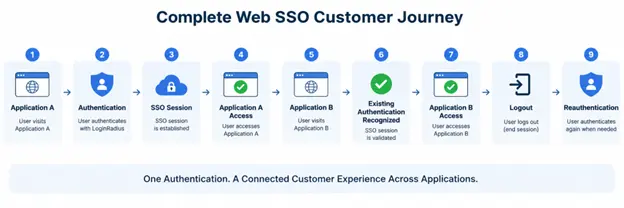
Also test expired sessions, direct entry into Application B, authentication failures, multiple browsers, mobile browsers, logout behavior, and any step-up authentication requirements.
A successful Web SSO implementation should not merely remove login screens. It should maintain a secure and predictable authentication state as the customer moves between participating applications.
For current configuration options and implementation methods, teams should use the LoginRadius Web SSO documentation alongside their integration. This keeps SDK-specific code and configuration aligned with the latest supported implementation rather than relying on code copied from an older article.
Conclusion: Build a Secure Web SSO Experience That Keeps Customer Authentication Connected Across Applications
Web SSO should make moving between connected applications feel simpler without making authentication less secure. A customer authenticates once, participating applications recognize that authenticated state when appropriate, and each application maintains the session and access controls it needs.
Getting there requires more than adding a shared login page. Central SSO sessions, application sessions, protocol validation, session expiration, logout behavior, browser privacy controls, MFA, and cross-domain requirements all need to work together. The architecture matters.
For businesses managing multiple customer-facing websites, portals, stores, or other web applications, LoginRadius provides a centralized CIAM foundation for authentication and Web SSO. Teams can connect customer identity across participating applications while supporting authentication methods and security controls appropriate to the customer journey.
Ready to reduce repeated authentication across your connected web experiences? Book a LoginRadius demo to explore how Web SSO can fit your application architecture and help you build a more consistent, secure authentication experience across customer-facing properties.
FAQs
Q: What Is Web SSO?
A: Web SSO (Web Single Sign-On) is a browser-based authentication approach that lets users access multiple connected web applications without repeatedly entering their credentials after authentication.
Q: How Does Web SSO Work?
A: Web SSO establishes a centralized authenticated state after the user signs in. When the user visits another participating web application, it can recognize and validate that authentication before creating its own application session.
Q: What Is the Difference Between SSO and Web SSO?
A: SSO is the broader concept of using one authentication experience across multiple applications. Web SSO specifically applies that experience to browser-based web applications and sessions.
Q: What Is the Difference Between Web SSO and Federated SSO?
A: Web SSO focuses on maintaining authentication across connected web applications. Federated SSO establishes identity trust between separate systems or security domains, often using SAML or OIDC; the two models can overlap.
Q: Which Protocols Are Used for Web SSO?
A: Web SSO commonly uses SAML 2.0 or OpenID Connect (OIDC) for authentication and identity federation. OAuth 2.0 handles authorization and is often used with OIDC, but OAuth alone is not an authentication protocol.
Q: Does Web SSO Use Cookies?
A: Web SSO can use cookies to maintain browser session state, depending on the architecture. Cookie scope, SameSite settings, browser privacy controls, and cross-domain restrictions must be considered during implementation.
Q: Is Web SSO Secure?
A: Web SSO can be implemented securely when sessions, tokens or assertions, HTTPS, MFA, expiration, logout, and application-specific authorization are handled correctly. Security ultimately depends on the architecture and configuration.
Q: How Does Web SSO Work Across Different Domains?
A: Cross-domain Web SSO typically relies on a trusted central authentication service rather than directly sharing a session cookie between unrelated domains. Each application validates the authentication result and establishes its own local session.